Kling O1 adds Element Library with 10‑image memory – studios lock continuity

Stay in the loop
Free daily newsletter & Telegram daily report
Executive Summary
After last week’s focus on Kling 2.6’s one‑pass audio, today is about keeping your worlds coherent. Kling O1 now ships Element and Subject Libraries, where you can feed up to 10 multi‑angle references for a character, prop, or set and have the model remember them across shots, relights, and camera moves instead of mutating every scene. A new Before & After Template auto‑frames input vs output plus prompts into polished side‑by‑sides, so portfolio reels and client breakdowns stop living in hacked screen recordings.
The ecosystem snapped into place fast. ImagineArt’s browser‑based Kling Studio lets you restyle footage into wildly different looks without breaking physics or timing, while OpenArt leans on O1 for character swaps, FX passes, and environment changes from a single interface. Creator tests show O1 holding identity through global relights, background swaps, and multi‑cut “first roll” cinematics, and there’s even a neat 9:16 hack that turns old horizontal clips into AI‑filled vertical shorts without crop‑zooming. The pattern: O1 is shifting from “cool demo” to something closer to a lightweight continuity department.
On the stills side, BytePlus is pitching Seedream 4.5 as a production model that can run roughly 70% cheaper and 50% faster than Nano Banana Pro in some pipelines, which is the kind of math budget owners actually read.
While you're reading this, something just shipped.
New models, tools, and workflows drop daily. The creators who win are the ones who know first.
Last week: 47 releases tracked · 12 breaking changes flagged · 3 pricing drops caught
Top links today
- Runway Gen-4.5 model overview
- HunyuanVideo 1.5 GitHub repo
- Tencent HY 2.0 documentation
- FLUX.2 dev weights on Hugging Face
- LongCat-Image model on Hugging Face
- LongCat-Image and Edit on fal platform
- SAM 3D image-to-3D on fal
- Picsart Image Vectorizer API on Runware
- Kling O1 Image API on Runware
- Seedream 4.5 image model overview
- Fish Audio voice generation on Glif
- Pictory guide to creating videos from text
- Webinar on turning slides into videos with Pictory
Feature Spotlight
Kling O1 locks continuity with Element Library + Studio
Kling O1’s Element Library and studio tie‑ins let creators anchor characters, props, and sets across shots—solving video consistency while the Before & After Template speeds shareable, edit‑free breakdowns.
Today’s big creative story: Kling O1’s Element/Subject Library and new Before & After Template focus on character/prop/set consistency and sharable workflows. Multiple creators show stable relights, swaps, and layout tricks.
Jump to Kling O1 locks continuity with Element Library + Studio topicsTable of Contents
🎬 Kling O1 locks continuity with Element Library + Studio
Today’s big creative story: Kling O1’s Element/Subject Library and new Before & After Template focus on character/prop/set consistency and sharable workflows. Multiple creators show stable relights, swaps, and layout tricks.
Kling O1’s new Element Library gives video characters and sets true memory
Kling officially unveiled Element Library, a system where you upload multi‑angle images of characters, props, and backgrounds so O1 can keep them consistent across shots, camera moves, and scene changes. Element Library launch

For filmmakers and designers this means you can build a reusable cast and asset kit—think: a hero, a car, a logo, a living room—and have O1 recall and re‑pose them instead of fighting model drift on every new prompt. The companion "Subject Library" concept, highlighted in a separate explainer, shows how Kling auto‑generates variations under different lighting and viewpoints once you seed it with a few references. Subject Library explainer Creatively, it moves O1 from "one‑off clip generator" toward something closer to a mini asset pipeline, where continuity and brand consistency are finally first‑class.
ImagineArt’s Kling Studio turns O1 into a motion‑safe browser production suite
ImagineArt launched an exclusive Kling Studio, baking Kling O1 into a browser workflow that can restyle footage without breaking physics or camera motion. Kling Studio partnership

In creator tests, the same shot is pushed through totally different looks—gritty live‑action, stylized, commercial polish—while movement, timing, and blocking stay intact, which is exactly what production teams need for versioning and brand exploration. Stable restyle example Combined with ImagineArt’s broader suite, this makes O1 feel less like a raw model and more like a directed "studio layer" you can sit on top of your existing edit to explore looks safely.
Kling O1 adds Before & After Template for portfolio‑ready comparisons
Kling closed its Omni Launch Week with a Before & After Template that auto‑builds side‑by‑side panels of your input and O1’s output, including prompts and references, with no manual editing. Before and after feature

Creators can now show text→video, image→video, or restyle workflows in a format that already matches how work is shared on social feeds and in case studies, instead of screen‑recording timelines or hand‑compositing split screens. A separate breakdown frames this as a polished, reusable format for portfolios, tutorials, and client breakdowns, and directly contrasts Kling’s creator‑first tooling with Sora’s fading social app push. Creator analysis
Kling O1 hack turns old horizontal clips into AI‑filled vertical shorts
ProperPrompter shared a practical hack: drop your horizontal footage into a 9:16 canvas with black bars, feed that into Kling O1, and prompt it to "infer what should be in the black area and fill it"—O1 expands the scene to a full vertical short. Vertical hack guide
This gives editors a way to recycle landscape shots for Reels, Shorts, and TikTok without crop‑zooming or manual matte painting, while preserving original action in the center. The fill O1 generates is context‑aware (UI, cityscapes, code editors, etc.), so you can turn one archive clip into multiple platform‑native layouts with a single prompt instead of rebuilding motion graphics from scratch. Hack repost
OpenArt leans on Kling O1 for character swaps, style passes, and FX in one model
OpenArt is pushing Kling O1 as an all‑purpose video workhorse, calling it "GOATED" after using it for character replacement, style changes, FX passes, and environment swaps from within one interface. OpenArt feature rundown

For AI filmmakers this matters because you no longer have to bounce between separate tools for roto, restyling, and compositing: a single reference image can swap in a new character, a reference clip can dictate style, and prompts handle environment changes while O1 tries to keep overall coherence. OpenArt is positioning this as a link‑in‑bio production tool—grab an existing clip, feed O1 a few images and a prompt, and you’ve got a social‑ready, on‑brand variation in minutes. OpenArt O1 link
Relighting tests show Kling O1 preserving character–environment coherence
A quick test from Ozan Sihay shows Kling O1 dramatically changing a room’s lighting—from bright white to deep blue—while keeping the character, clothing, and environment geometry locked in. Relight test

Kling amplified the clip, framing it as proof that O1 can now handle one of the classic hard problems in AI video: global relights without melting faces or backgrounds. Kling retweet For directors and colorists, this hints at a workflow where you block and shoot a scene once, then explore alternative moods and times of day as a post step rather than regenerating entirely new takes that risk continuity drift.
Single‑ref subject and environment in Kling O1 nail cinematic shots on first roll
Creator tests show Kling O1 handling a reference subject + reference environment + simple prompt combo well enough to land a cinematic shot on the first generation. First roll success

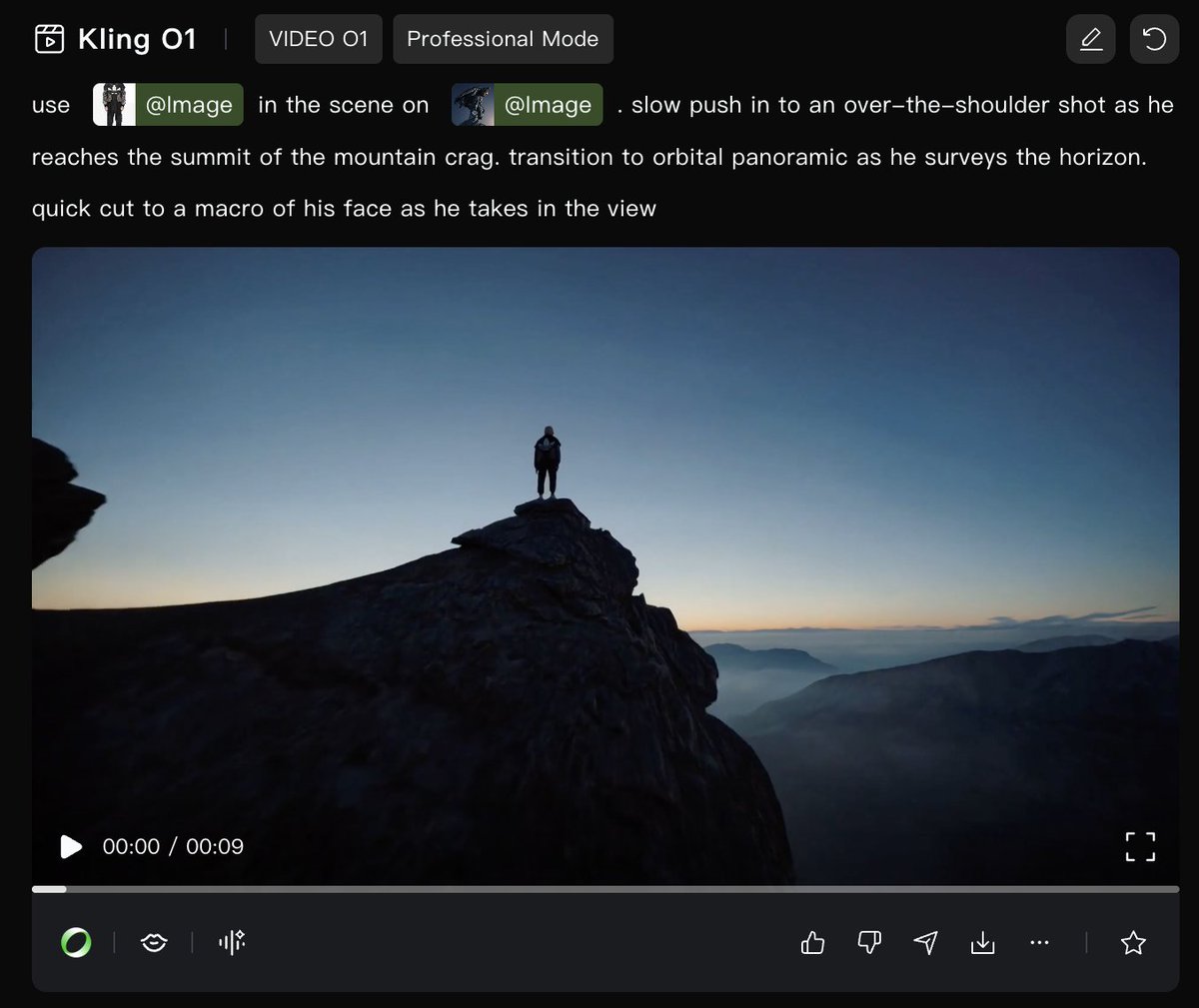
In the shared example, an over‑the‑shoulder summit reveal smoothly pushes into an orbital panoramic and then into a tight macro close‑up, with the character and futuristic city staying visually consistent across cuts. The same workflow also powers the "Digital Deity" stills series, where O1 repeatedly reimagines a deity figure within one hyper‑futuristic city world, suggesting O1’s element memory is usable not just for motion but also for cohesive campaign‑style image sets. Digital Deity still
WaveSpeed shows Kling O1 doing clean, consistent video background swaps
WaveSpeed users highlighted how Kling O1 can swap video backgrounds while keeping the foreground subject stable, calling out how "easy and consistent" it feels for creators. Background swap demo

In the shared clip, the same presenter is composited into different environments without obvious haloing or jitter, which is exactly what short‑form creators and educators need for quick scene variety. Tying this into WaveSpeed’s broader media stack means you can script, generate, and then restage the same performance across multiple virtual locations, all in the browser, without touching traditional keying tools. WaveSpeed platform link
🔊 One‑pass video+audio: creators put Kling 2.6 to work
Distribution and early use of native audio video (excludes O1 Element Library feature). Hedra, Leonardo, and Lovart ship 2.6; creators report synced dialog, ambience, and SFX in 1080p shorts and cinematic tests.
Higgsfield leans on unlimited Kling 2.6 for ambitious audio‑driven reels
Higgsfield is treating Kling 2.6 like an in‑house engine, using its unlimited, uncensored 1080p access to pump out dense demo reels: a first‑person dragon ride torching Miami, a 1900s London street brought to life, miniature diorama cities, race cars on soaked tracks, warehouse‑to‑bedroom timelapses, and more—each with native audio baked into generation.

Creators testing on the platform report that the emotional tone and vocal delivery now feel "more real than ever" when 2.6 handles both visuals and voice, and that they can drive precise ambience (fire, crowds, rain, room tone) from text alone. (dragon prompt example, emotional audio comment) For filmmakers and VFX folks, the takeaway is that Higgsfield’s unlimited deal isn’t just a discount; it’s an invitation to treat Kling 2.6 as a sandbox where you can iterate on complex, audio‑sensitive sequences—chase scenes, historical reconstructions, moody interiors—without rationing generations, which is crucial if you’re trying to find a repeatable look and sound for a whole series rather than a single short.
Leonardo AI showcases 10 cinematic Kling 2.6 audio scenes
Leonardo’s Kling 2.6 integration leveled up from "it’s live" to a full prompt cookbook, with azed_ai sharing 10 highly specific scenes—dragons over lava valleys, cyberpunk rooftop chases, neon F1‑style races, submarine war rooms—each generated with baked‑in voices, SFX, and ambience in one render. creator-stack-integrations initially covered the rollout; now you get concrete camera directions, dialogue lines, and sound design notes you can adapt directly into your own prompts.
The race clip, for example, uses a helmet‑mounted shot plus a side‑mounted ground rig, with turbine whine, tire screech, crowd roar, and a race engineer shouting "Push! Push!" all coming straight from Kling, not a DAW timeline. (prompt walkthrough, race scene script) For filmmakers and editors, this thread is less about hype and more a living spec of how far you can push blocking, sound cues, and motion language before the model breaks, which is exactly the kind of reference you want when planning real projects instead of one‑off tests.
Hedra adds Kling 2.6 native‑audio video with 1080p control
Hedra quietly became a one‑stop AI video shop by plugging in Kling 2.6 with native audio, so every generated clip now ships with synced dialogue, music, and ambience at 1080p in a single pass. Their launch offer gives the first 500 followers 1,000 credits to try the model, which sits alongside new tools like Prompt Builder, He‑Draw doodle‑to‑video, and 5‑minute Kling Avatars in a dense weekly release recap.

For creators this means you can storyboard cinematic scenes in Hedra, sketch or upload a frame, and get a finished shot with camera moves and soundtrack without bouncing between separate audio tools, which is a big deal if you’re cranking out shorts and social content on a tight schedule. (hedra launch clip, weekly feature recap)
Horror short “The Tenant” stress‑tests Kling 2.6’s atmosphere and dialogue
Creator Diesol released “THE TENANT”, a compact horror short that leans heavily on Kling 2.6’s native audio to carry dread—using it to generate base ambience, room tone, background sounds, and guided dialogue inflections, then layering extra effects from ElevenLabs and Envato in Premiere.

He notes this is one of the first times a single model could stay locked into a specific emotional tone across multiple scenes rather than drifting into generic delivery, even if there are still rough edges that needed patching in edit. (tenant process notes, kling 2-6 clip note) For storytellers, it’s a proof‑of‑concept that you can get 70–80% of a horror soundscape—footsteps, creaks, distant voices, unsettling drones—out of the same system that’s drawing your frame, which massively lowers the barrier to doing test screenings and mood drafts before committing to a full sound‑design pass.
Kling 2.6 bakes audio into generation, fixing 2.5’s two‑step pipeline
A concise breakdown from ai_for_success spells out the key architectural shift in Kling 2.6: instead of rendering video first and slapping audio on as a separate stage like 2.5 Turbo, 2.6 generates visuals and sound together, which tightens lip‑sync, especially in multi‑character dialogue scenes, and improves overall image cleanliness.
Following the original native-audio-launch which introduced one‑pass voiced clips, this explainer clarifies why it feels different in practice—better timing between mouth shapes and words, more coherent ambient beds, and less need for post‑sync—making it easier for indie teams to treat Kling as a full pre‑viz and animatic tool. upgrade summary If you’re deciding whether to move projects off 2.5, this is the practical line: 2.6 reduces the amount of manual ADR and audio patching you’ll have to do after generation, especially for scenes where multiple characters talk over environmental noise.
Kling 2.6’s native audio shows nuanced emotional performances in one pass
Kling’s own showcase clip has a single actress delivering one line across five distinct emotions, with both facial performance and vocal tone generated by the 2.6 model, underscoring how far one‑pass video+audio has come for character‑driven work.

Elsewhere, creators testing 2.6 via partners like Higgsfield report that vocal tone now carries more believable urgency, fear, or calm without having to swap in external TTS for every line, especially when you write clear emotional directions into the prompt. (kling actress demo, emotional audio comment) For character animators, VTubers, and social storytellers, this matters because you can now prototype nuanced performances—reaction shots, monologues, pet “voiceovers”—directly in the model, then decide later whether it’s worth re‑recording with a human actor instead of starting from scratch in audio land.
Lovart turns Kling 2.6 native audio into an unlimited creative staple
Lovart flipped Kling 2.6 with native audio from “nice feature” into a staple by bundling it with Nano Banana Pro and Kling O1 as 0‑credit, effectively unlimited models on its subscription plans, with up to 50% off during a launch promo.

Their "Lovart Wrapped" teaser shows Kling ranked among users’ top five models and highlights that one heavy user burned ~191k credits on Nano Banana that would have cost money, but didn’t under Lovart’s unlimited setup, hinting at similar long‑tail usage for 2.6 once people start relying on one‑pass video+audio more.
For designers and social teams, the appeal is straightforward: you can iterate on promos, reels, or explainers with fully voiced 2.6 clips without worrying about per‑render costs, then layer Lovart’s own upcoming features like text editing on top of the visuals when you need polish.
🖼️ Sharper stills: Seedream 4.5, FLUX.2, LongCat edits
Production‑oriented image updates dominate: Seedream 4.5 gets multi‑partner rollouts, FLUX.2 climbs leaderboards, and LongCat‑Image/Edit brings precise global/local/text edits. Plus a structured NB Pro JSON prompt demo.
FLUX.2 [dev/pro/flex] climbs text‑to‑image leaderboards and passes 1M downloads
Black Forest Labs reports that FLUX.2 [dev] has cleared 1M downloads across its BFL and ComfyUI variants on Hugging Face, while the hosted [pro] and [flex] tiers are now near the very top of major text‑to‑image leaderboards. flux leaderboard thread On Artificial Analysis, FLUX.2 [pro] and [flex] sit at #2 and #4 overall by ELO, while on LMArena’s open‑weights board, FLUX.2 [dev] ranks #1 among current models. flux leaderboard thread
Nano Banana Pro still edges out FLUX.2 on some cross‑provider boards, but the gap is small, and the key differentiator is that FLUX.2 [dev] ships as open weights with a reference implementation for local and on‑prem use. flux dev repo BFL also highlights a lighter FP8‑quantized build co‑developed with Nvidia plus a forthcoming FLUX.2 [klein] variant aimed at consumer GPUs, which would bring frontier‑level style and coherence into more home and indie workflows. playground and repo For image‑heavy storytellers, this is one of the first times an open model is credibly competing with the top closed systems on both aesthetics and control.
BytePlus claims Seedream 4.5 is cheaper and faster than Nano Banana Pro
BytePlus gives Seedream 4.5 its own deep‑dive, claiming it can run 70% cheaper and 50% faster than Nano Banana Pro in some workflows, while matching or beating it on clarity and subject consistency. byteplus overview This builds on the original Seedream 4.5 launch via ModelArk initial launch and shifts the story from “new model” to concrete economics for production teams.
Their breakdown emphasizes five things: stronger detail fidelity and aesthetic cohesion, better spatial reasoning and layout, more reliable complex prompt execution, multi‑image fusion with up to 10 reference images, and noticeably cleaner text/faces for UI, packaging, and portraits. byteplus overview Open beta access through ModelArk targets studios that care about predictable costs and throughput, not just pretty demos, and positions Seedream as a credible alternative to Google’s Nano Banana stack in enterprise pipelines. modelark overview
Freepik shows what Seedream 4.5 can really do for production stills
Freepik follows up on its Seedream 4.5 rollout freepik rollout with detailed carousels showing why this model matters for photographers, brand designers, and art directors. initial freepik post Premium+ and Pro users now get unlimited 4.5 usage, with Freepik warning it will run slightly slower during the preview phase. unlimited notice
The new examples highlight several production-grade upgrades: crisp, readable small text on product shots and posters, sharper and more natural skin with believable micro‑detail, and characters that stay consistent across angles, outfits, and environments. subject consistency demo Additional sets focus on spatial logic—coherent layouts, correct proportions, and 3D depth in fashion/editorial scenes—as well as promptable charts, diagrams, and structured visuals for design workflows. diagram examples Freepik positions 4.5 as suitable for e‑commerce, advertising, film concept frames, game art, education, and general design, all at the same credit cost as older Seedream versions. workflow overview Creatives who already tested Seedream via other hosts now have a more visual, hand‑holding entry point on Freepik’s own platform. seedream product page
LongCat-Image and Edit go live on fal with strong text and precise edits
fal has onboarded Meituan’s LongCat-Image and LongCat-Image-Edit, giving creators an API and UI for bilingual (Chinese/English) image generation plus very precise global, local, and text‑only edits. fal launch LongCat’s calling cards are accurate text rendering (posters, UI, book covers), high photorealism, and the ability to change parts of an image while leaving layout, lighting, and identity intact. model gallery
Under the hood, the Edit model is designed to preserve non‑edited regions—texture, color, subject traits—while following detailed instructions about what to swap or remove, which makes it attractive for multi‑round refinements instead of one‑shot generations. longcat edit model fal exposes both generation and editing as separate endpoints, and there’s a simple web app for testing LongCat-Image and LongCat-Image-Edit side by side before wiring them into production pipelines. longcat app link For designers and art leads, this looks more like a controllable Photoshop layer tool than a “roll the dice” prompt engine.
ElevenLabs adds Seedream 4.5 stills with 412 images for $11
ElevenLabs Image & Video has integrated Seedream 4.5, pitching it as a way to get cinematic color, consistent subjects, and 4K‑style clarity inside the same environment where people already generate music and voices. elevenlabs announcement On the Creator Plan they advertise 412 images for $11, which is a clear, concrete price point for solo creators and small teams.
The promo focuses on sharp detail, readable text, and stable characters that can carry over shot to shot—exactly what you need when you’re building a storyboard, album cover series, or social campaign and then pairing it with ElevenLabs audio. elevenlabs announcement For AI filmmakers and musicians, this means one fewer context switch: you can rough out keyframes and visuals right next to your narration or score and keep everything in one account. elevenlabs image page
Ultra-structured Nano Banana Pro prompt shows spec-style control and QA
ProperPrompter posted a tongue‑in‑cheek but very real production spec for Nano Banana Pro: a massive JSON prompt that describes one boring gray rock down to glossiness, micro‑scratches, background delta, and even acceptance tests. rock prompt The brief includes constraints like interestingness_0_to_1: 0.01, forbidden effects (no godrays, no lens flares), and QA checks such as count_distinct_rocks_equals_1 before accepting the output.
For creatives who work with engineers, this is a useful pattern: it shows how you can encode not just a prompt, but cameras, lighting, style targets, negative prompts, sampler settings, and fallback logic in a single structured object that a tool or agent can reuse. followup reply It’s overkill for day‑to‑day art, but a good blueprint if you’re building pipelines where the “art director” is a config file that needs to generate thousands of perfectly boring, perfectly on‑spec assets.
🎥 Beyond Kling: Runway worlds + HunyuanVideo speedups
Non‑Kling video models in focus (excludes O1 feature): Runway Gen‑4.5 reels for aesthetic worldcraft, Tencent’s step‑distilled I2V speeds, Luma’s Ray3 showcase, and Sora 2 access via Hailuo.
Tencent’s HunyuanVideo 1.5 step‑distilled I2V cuts render time by ~75%
Tencent released a 480p image‑to‑video step‑distilled version of HunyuanVideo 1.5 that runs in 8 or 12 steps by default, slashing end‑to‑end generation time by about 75% while keeping quality close to the original model. HunyuanVideo update On a single RTX 4090, full clips now arrive in roughly 75 seconds at 8–12 steps, with an even faster 4‑step mode available if you can trade a bit of fidelity for speed. HunyuanVideo update

For creatives working in iterative workflows—storyboarding, previz, animatics—this kind of turnaround makes it realistic to try many more camera moves and beats per session without needing a small render farm, especially when you just need 480p references before committing to higher‑res passes from other tools.GitHub repo
Runway Gen‑4.5 reel spotlights precise control over a world’s look and atmosphere
Runway is leaning into Gen‑4.5 as a "world builder" rather than just a clip generator, showing how the model can lock in specific points of view, aesthetics, and atmosphere across shots. Gen 4.5 reel For filmmakers and designers, the short reel highlights how you can dial in neon cityscapes or quiet, moody landscapes and keep that visual language coherent as you move the camera and change scenes.

For AI storytellers this means less fighting the model on style drift: once you find a look that fits your story, Gen‑4.5 appears capable of sustaining it over multiple beats in a sequence instead of each shot feeling like a separate experiment.
Sora 2 gains traction on Hailuo as giveaways end and creators start testing
Hailuo confirmed that Sora 2 is live on its platform and has wrapped a Sora 2 Ultra membership giveaway, with winners notified via DM, marking the end of the promo phase and the start of regular use. (Sora 2 on Hailuo, Ultra winners note) Around that, creators are beginning to treat Hailuo as a serious animation tool—one clip shows a manga‑inspired action test built in Sora 2, Anime practice clip while another leans into a surreal "dream recorder" concept piece. Dream recorder demo

There’s also early integration into other tools, with Vidnoz offering to animate user images via Hailuo’s models, Vidnoz Hailuo note which matters if you’re a motion designer: Sora’s realistic physics and motion are getting wrapped in friendlier front‑ends rather than living only in OpenAI’s own app, opening up more ways to slot it into existing video workflows.
Luma’s Ray3 "Silent Colossus" clip shows slow, cinematic world traversal
Luma Labs shared "Silent Colossus", an image‑to‑video piece created with its Ray3 system inside Dream Machine, where the camera drifts alongside a towering metal giant crossing a desolate landscape. Ray3 colossus clip The shot is all about patient movement: consistent lighting, grounded scale, and a camera path that feels like a dolly move rather than the jittery swings older video models tended to produce.

For directors and concept artists, this is a good reference for how far slow, atmospheric world traversal has come—Ray3 isn’t doing flashy cuts or violence here, it’s showing that you can take a single still and turn it into a contemplative, cinematic moment that holds together over time instead of collapsing into texture soup.
🧩 Production agents for decks, ads, and brands
Workflow builders that ship content fast: Gamma’s slide agent with NB Pro + Kling transitions, Apob’s one‑photo multiverse looks, Runware’s vectorizer for clean SVG, Vidu’s template→fine‑tune flow, and Pictory’s PPT→video path.
Gamma + Nano Banana Pro turn prompts into full decks, sites, and feeds
Gamma is leaning hard on Nano Banana Pro to become an all-in-one production surface for decks, landing pages, and social feeds, driven by a single prompt. nano banana overview

In examples, Gamma generates a full social media grid for a small-batch olive oil brand, with hyper-real product shots and perfect on-bottle typography in under a minute, replacing what would normally be a full shoot plus Photoshop pass. social feed example It can also recreate complex events like Apple’s 2007 iPhone keynote as a complete presentation, including a Jobs-style presenter and slide-by-slide historical context, and spin up a ready-to-publish realtor website—with hero imagery, sections, and CTAs—directly inside Gamma. (iphone launch deck, realtor site demo) Nano Banana Pro now runs across all tiers, with an Ultra plan offering NB Pro HD for near‑4K decks and sites, and the creator behind the thread is giving away 500+ tested prompt formulas for pitch decks, ads, and content calendars to help teams get high-quality outputs faster. (prompt pack offer, free tier note)
Apob’s ReEverything turns one influencer shot into a month of looks
Apob AI launched ReEverything, a workflow that keeps an influencer’s face locked while completely changing outfit, background, and style from a single reference photo. feature description

The demo shows one portrait cycling through clubwear, street style, different locations, and aesthetic treatments while preserving identity, offering a way to turn one photoshoot into a full month of content without reshoots. This is aimed squarely at creator and brand teams who need high-volume, on-brand visuals but want to avoid the usual time and cost of repeated shooting and retouching. tool landing page
Glif’s Seedream 4.5 Studio agent automates ad-grade image edits
Glif introduced a Seedream 4.5 Studio agent that strings together complex image tasks—like deconstructing a scene, changing on-image text only, compositing heavy effects, and tweaking skin micro‑details—into one orchestrated workflow, building on its earlier 4K Seedream integration. (4k-support, deep dive thread)

In the deep dive, the agent handles stepwise tests such as isolating and editing only billboard text, applying localized texture changes to faces, preserving identity across camera angle shifts, and running Midjourney-style narrative prompts through Seedream 4.5 for sharper, more coherent outputs. For ad and campaign teams, the takeaway is that you can now brief a single agent to perform multiple precise edits on product shots or key art—rather than manually bouncing between tools—and iterate inside Glif while still leveraging Seedream’s cheaper, often faster performance compared with Nano Banana Pro in certain scenarios. seedream studio agent
Glif’s Slide Guru agent builds full AI slides with Nano Banana Pro
Glif introduced a Slide Guru agent that takes a topic, slide count, and a reference image, then uses Nano Banana Pro plus Kling-powered transitions to assemble complete pitch decks automatically. slide agent overview

Instead of hand-building slides, you feed Slide Guru a concept (like "evolution of gaming"), a visual style, and let the agent draft slide-ready copy, images, and animations end-to-end, with a one-click flow for reviewing and refining sections. workflow example You can try the agent directly inside Glif’s interface, where it’s exposed as a reusable workflow for creative teams building decks, content series, or ad storyboards. agent page
Vidu API offers 300+ AI video templates with pro editing controls
Vidu promoted its API as a way to start from 300+ optimized AI video templates and then fine-tune rhythm, music, and style for brand-specific edits. template announcement

The platform claims these templates are tuned for interactive effects and e‑commerce scenes, with generation times down to ~10 seconds and over 50% higher success rates versus generic models, before users dive into granular controls. vidu api For ad and social teams, the pitch is clear: launch with a high-performing base template, then dial in on‑brand pacing, audio, and visual identity instead of storyboarding from scratch.
Invideo’s Money Shot builds spec-driven product ads and launches $25K prize
Invideo rolled out a "Money Shot" feature that generates pixel-perfect product-spec ads from structured descriptions, claiming to avoid the usual geometric distortions or brand mismatch that plague some AI renders. money shot description The tool is pitched as a one-click way for marketers to feed in product attributes and get ready-to-run hero visuals for campaigns, and Invideo is tying it to a $25,000 challenge for the best product-spec ad created with the system. For designers and performance marketers, this is a signal that spec‑driven creative generation is maturing into something that can be judged, rewarded, and potentially shipped directly into live campaigns without heavy post work.
Pictory pushes PPT-to-video training workflow with Dec 9 webinar
Following its move into fast AI voiceovers for creators voiceovers, Pictory is now zeroing in on training teams with a December 9 webinar about turning static PowerPoints into short, engaging videos. webinar invite
The company’s new text→video guide shows how you can drop in scripts, slide decks, or even URLs and have Pictory auto-cut scenes, add narration, music, and captions, then tweak visuals before export. blog guide In the webinar with AppDirect, they plan to walk through how this workflow can boost learner engagement and cut video creation time by up to 80% for internal enablement and customer education content. registration reminder Teams can register via the Zoom link and start experimenting today using the detailed how‑to guide. (text to video guide, webinar registration)
Runware hosts Picsart Image Vectorizer API for clean SVG brand assets
Runware added the Picsart Image Vectorizer to its API lineup, converting raster graphics into structured SVGs for about $0.04 per image. api overview
The vectorizer outputs clean, layered vectors with precise edge tracing and separated color regions, so logos, UI icons, and other brand assets drop straight into design tools without manual cleanup or re‑tracing. This makes it useful for teams who need to bulk-convert legacy PNG/JPG assets into resolution-independent SVG pipelines or generate on-the-fly vectors from AI image models in production. pricing page
🛠️ APIs & nodes for video pipelines
Builder‑facing drops (excludes O1 Element Library/Before‑After which is featured): Runware exposes Kling O1 Image/Video via API, and ComfyUI streams “Kling Omni One” nodes for text/image/video editing flows.
Runware adds Kling O1 Image API for multi‑ref scene restaging
Runware is now hosting Kling O1 Image as a first‑class API, letting you create and edit visuals from text plus up to 10 reference images, with no masking or manual compositing. Kling image api
For creatives, this means you can lock in a character, product, or brand and generate consistent sets of shots—Kling O1 Image can produce many variations of the same subject while keeping identity stable. multiple image sets You can also mix and match styles, swap scenes, and restage backgrounds in one prompt, which is ideal for running A/B tests on look and feel or building campaign variations from a single seed. style mixing example Runware calls out that camera angle and lighting are promptable too, so you can iterate on coverage (wider, closer, higher, moodier) without rebuilding your base design each time. camera and lighting tweak For anyone wiring up a custom image‑to‑video pipeline, this slots in cleanly as the "consistent key art" or storyboard frame generator before you hand things off to your video model.
ComfyUI showcases Kling Omni One nodes for full video pipelines
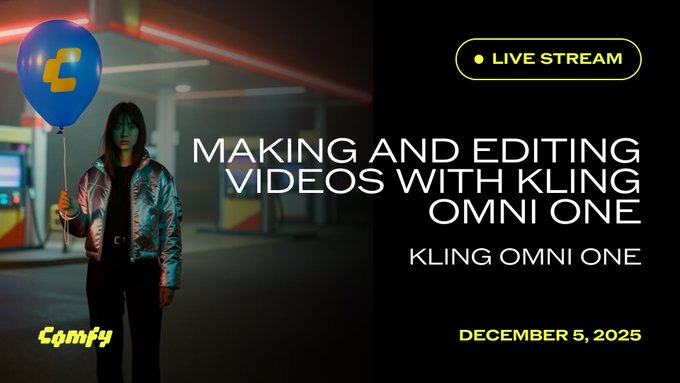
ComfyUI is leaning into Kling Omni One by running a live session on how to build text‑to‑video, image‑to‑video, video‑to‑video, and editing flows entirely in node graphs. comfyui kling stream The stream, hosted by Purz, Fill, and Julien, walks through using Kling Omni One as a flexible node in ComfyUI so you can wire it into existing image models, control inputs, and post‑processing instead of treating it as a black‑box web app. kling omni overview One example already shared uses Z‑Image to generate start and end keyframes, then feeds those into Kling Omni for motion in between—showing how you can keep full control over style and layout while offloading the in‑betweening to AI. Z-Image start end to kling For filmmakers and motion designers who live in ComfyUI, this turns Kling Omni One into another building block you can script, batch, and remix alongside your usual denoisers, upscalers, and color passes, instead of having to juggle separate web tools.
Mesh2Motion lands in ComfyUI for mesh‑driven motion experiments
ComfyUI quietly announced "Mesh2Motion in ComfyUI!", hinting that a new node or workflow now lets you drive motion from 3D mesh data directly inside graph‑based pipelines. mesh2motion note For 3D artists and technical directors, this matters because it suggests a path to physics‑aware or layout‑aware motion where you can rough in a scene with meshes, then let AI handle the in‑between frames or stylistic rendering. It also pairs well with emerging image‑to‑3D tools (like SAM 3D in the broader ecosystem) as a way to go from a single still → mesh → animated shot without ever leaving node‑based control. If you’re already using ComfyUI as glue between your image models and video tools, Mesh2Motion looks like the next piece in getting more predictable, reusable camera and character movement rather than hoping a pure T2V model guesses your blocking correctly.
🎨 Reusable looks: new MJ srefs + retro anime vibes
Style kits for quick visual identity: new Midjourney style references and creator reels for neo‑retro anime aesthetics. Practical for treatments, boards, and episodic brand looks.
MJ sref 6935383951 delivers neon outline action poster aesthetics
Azed_ai published a fresh Midjourney style ref, --sref 6935383951, that locks in a cohesive neon outline look: split‑tone profiles, light‑painted fighters, Spartan warriors and long‑exposure silhouettes in blue–orange/pink palettes. neon style thread The pack’s examples show strong edge lighting, clean silhouettes and reflective floors, making it ideal for esports branding, action covers, sports posters or title cards where you want all assets to feel like one campaign.
For teams storyboarding series intros or social sets, this sref can standardize an entire “electric night” identity—drop it into your MJ prompts and you get consistent framing, glow behavior and color story without re‑discovering the recipe every time.
New MJ sref 2524895222 nails dark 90s–00s gothic OVA look
Artedeingenio dropped a new Midjourney style reference, --sref 2524895222, tuned for dark late‑90s/2000s OVA vibes with gothic fantasy, heavy jewelry and dramatic lighting, very much in the spirit of Vampire Hunter D: Bloodlust. style ref post Following dark OVA style, which introduced an earlier OVA preset, this one pushes more realistic faces, ornate armor and layered gold accessories, giving creatives a second, richer dial for pitch frames, character sheets, and key art comps in this niche.
For storytellers and designers, this is a ready-made kit when you need mature, gothic anime moods without hand‑tuning prompts—swap this sref into existing MJ workflows to keep anatomy, shading and atmosphere consistent across shots and episodes.
Neo‑retro anime clip offers quick reference for dramatic TV‑style shots
Artedeingenio also shared a short neo‑retro anime clip whose look mixes 90s TV framing with modern compositing: punchy close‑ups, bold typography, and saturated color blocks built around a single character moment. neo retro clip

Even without an explicit sref, this serves as a handy tone card for editors and directors—use it as a visual reference when you’re briefing animatic boards, AI video prompts, or motion designers on how “neo‑retro anime drama” should feel in motion rather than as a still.
🗣️ Talk to books, clone voices, sing along
Interactive voice tools for storytellers (separate from native audio video). ElevenLabs’ ElevenReader adds voice chat with books; Glif supports Fish Audio voice cloning; Producer pushes a karaoke‑like full‑screen player.
ElevenLabs’ ElevenReader lets you have voice chats with your books
ElevenLabs has launched ElevenReader’s new Voice Chat mode so you can literally talk to a book: ask questions aloud about characters, themes, or plot and a narrator answers using the actual text, with long‑range context memory for deeper discussion book chat teaser app download info.

For storytellers, editors, and teachers this turns any novel or script into an always‑on discussion partner: you can probe motivations, verify continuity, or explore alternate readings without building a custom chatbot, all powered by the ElevenLabs Agents Platform behind the scenes app website.
Glif adds Fish Audio for multilingual voice cloning in agents
Glif now integrates Fish Audio, letting you generate or clone natural‑sounding voices in any language directly inside your agents and automations, instead of wiring up a separate TTS stack integration demo.

For podcasters, explainer channels, and interactive fiction builders, this means a single Glif workflow can both reason and perform—swapping narrator personas, languages, or character voices on demand while keeping everything in one place glif fish link glif fish page.
Producer AI ships Full Screen Player for karaoke-style visuals
Music tool Producer AI introduced a Full Screen Player that blows a track up into lyrics‑forward, animated visuals, effectively turning any song you make on the platform into a karaoke‑style experience for live sessions or writing camps full screen feature.

For musicians and storytellers, this is a quick way to test hooks with friends, host listen‑along streams, or pitch sync ideas: your AI‑generated tracks now come with an instant performance surface, not just an audio file.
🧱 From image to 3D (and motion) in a click
3D tools for asset pipelines: fal’s SAM 3D converts one image into full geometry/texture/pose; links to body/objects endpoints. Plus ComfyUI teases Mesh2Motion support.
fal ships SAM 3D to turn a single image into full 3D assets
fal has launched SAM 3D, a pair of endpoints that reconstruct full 3D geometry, texture, and layout from a single image, handling both human bodies and arbitrary objects for asset pipelines. SAM 3D launch
SAM 3D exposes "Image to 3D Body" and "Image to 3D Objects" APIs that output GLB models for $0.02 per request, making one‑click kitbashing of posed characters or props from reference photos realistic for small teams. Sam 3D endpoints Creatives can feed messy, real‑world shots with occlusion or clutter and still get usable meshes, which slots neatly into game, AR, and previz workflows where traditional photogrammetry is too slow or fragile. (objects endpoint docs, body endpoint docs)
ComfyUI hints at Mesh2Motion support for mesh‑driven animation graphs
ComfyUI briefly teased "Mesh2Motion in ComfyUI!", signalling that mesh‑driven motion tools are starting to land inside its node graph system. Mesh2Motion mention For 3D artists using AI video, that points to a near‑future where you can feed a static mesh into ComfyUI, then drive physically plausible or stylized motion from within the same workflow that already handles image and video diffusion, rather than bouncing between separate DCC and AI apps.
📊 Model watch: evals & sentiment that affect creatives
Benchmarks and vibes that inform tool choices: Tencent HY 2.0 claims big gains, Grok 4.1 tops a reasoning benchmark, GPT‑5.2 timing chatter, and early Gemini 3 Deep Think feels more human to some users.
GPT‑5.2 reportedly pulled forward as OpenAI’s “code red” vs Gemini 3
According to a Verge report screenshot shared today, OpenAI is planning to ship GPT‑5.2 on December 9 as a “code red” response to Google’s Gemini 3 launch, after originally targeting later in the month, with the emphasis on backend improvements to ChatGPT rather than shiny new features. Launch report
Commentary threads note how unusual this cadence is—GPT‑5 launched in August, 5.1 in mid‑November, and now 5.2 is expected roughly a month later—prompting remarks that “they have never released models this fast” and that “fear is real” about competition. (Release cadence comment, Timing speculation) For creatives and tool builders, the takeaway is less about a brand-new API and more about planning to re-benchmark your existing ChatGPT-based workflows next week: if OpenAI pushes better reasoning, latency, or safety tuning under the hood, you may see subtle but material changes in how story structure, prompts for image/video tools, or code snippets behave—even if the surface UI looks the same.
Gemini 3 Deep Think earns strong reviews but strains Google’s capacity
Following up on Deep Think launch, early hands-on reports are saying Gemini 3 Deep Think feels at least as capable as GPT‑5.1 Pro on hard problems while sounding more human and less overwhelming in its answers. One power user writes that “it feels as smart as (maybe smarter) than GPT‑5.1 Pro, but the answers feel more human and less overwhelming,” signaling a good fit for long-form planning, coding, and narrative work where tone matters. Usage impression

A detailed explainer thread reiterates that Deep Think runs multiple rounds of reasoning, explores parallel hypotheses, and is pitched for code, prototyping, and complex idea exploration, but is currently limited to Google AI Ultra subscribers who select the Thinking → Deep Think mode in the app. Feature explainer At the same time, another user reports that a Googler has privately acknowledged servers are “being hit hard” and that Deep Think outputs have been timing out for days or weeks while capacity is scaled up. Capacity note For creatives, this combo—high praise on quality plus spotty reliability—means it’s worth testing Gemini 3 Deep Think for serious writing, outlining, and multi-step coding tasks, but you probably shouldn’t move client-critical workflows over until Google stabilizes throughput and error rates.
Tencent HY 2.0 posts strong math, coding, and long-context benchmarks
Tencent unveiled HY 2.0, a 406B-parameter MoE LLM with 32B active weights and a 256K context window, and backed it with big benchmark jumps in math, coding, and agent-style tasks. The Think variant hits 73.4 on IMO-AnswerBench (nearly a 20-point gain), 53.0 on SWE-bench Verified (up from 6.0), and 72.4 on Tau2‑Bench (from 17.1), positioning it between current leaders and laggards across a comparison chart that includes GPT‑5‑think, DeepSeek, Qwen3, and Kimi models. Model overview
For creatives and technical directors, this reads as a general-purpose “brains plus keyboard” model: HY 2.0 Think is aimed at deep reasoning, structured code generation, and complex instruction-following, while HY 2.0 Instruct targets more free-form chat, long-form writing, and multi-turn story development. Tencent is already offering the model through its cloud API with separate endpoints for Think and Instruct, plus public docs, so teams in Tencent’s ecosystem can start A/B-testing it against GPT‑5.x and Gemini for script ideation, tool-using agents, and code-heavy pipelines right now. Product page API docs
Grok 4.1 Fast Reasoning edges out Claude, GPT‑5.1 on T²‑Bench
A new T²‑Bench‑Verified leaderboard has xAI’s Grok 4.1 Fast Reasoning in the top spot with an 82.71% average across airline, retail, and telecom tasks, slightly ahead of Claude Opus 4.5 at 81.99%, GPT‑5 (reasoning: med) at 79.92%, Gemini Pro 3 at 79.39%, and GPT‑5.1 (reasoning: high) at 76.82. Leaderboard summary
T²‑Bench is targeted at multi-step, customer-support-like scenarios rather than pure math Olympiad questions, so for people building conversational agents, scripted support flows, or interactive story helpers, this is a signal that Grok’s Fast Reasoning tier is competitive with the biggest frontier models on structured, tool-flavored reasoning. It doesn’t automatically mean better prose style or visual creativity, but if your workflow leans on “explain, decide, then act” patterns (branching narratives, dialogue agents, or routing logic around creative tools), it’s now a serious candidate to benchmark alongside GPT‑5.x, Claude, and Gemini in those stacks.
🗞️ Industry pulse: platform fatigue and AI film economics
Discourse itself is news: Sora’s social app engagement dips, an agency owner shares hard AI‑film math, and debates over “AI art theft” plus mid‑market adoption headwinds trend in replies and charts.
Sora’s social video app is already losing engagement steam
OpenAI’s Sora app, which briefly hit #1 on the App Store, now shows “most popular” videos with only a few thousand likes and a feed many early adopters describe as repetitive and boring, with creators posting less over time Sora engagement analysis. The main culprits called out are the short‑lived novelty of seeing your face in AI clips, weak social loops compared to TikTok/Instagram, and the high compute cost that forced OpenAI to cap free users at 6 videos per day while Sam Altman reportedly shifted “code red” focus back to ChatGPT Sora engagement analysis.
For filmmakers and storytellers this signals Sora is more likely to survive as a powerful behind‑the‑scenes generator (as in third‑party integrations like Hailuo’s Sora 2) than as a destination social network, so audience building still needs to happen on existing platforms even if production moves into AI.
Creators split over whether AI art is “stolen” or fair learning
Koltregaskes synthesizes a large reply thread on whether AI‑generated art is “stolen,” estimating that roughly 60–70% of respondents see training as pattern‑learning similar to how human artists study predecessors, while about 20–30% argue that scraping copyrighted work without consent is theft that undercuts real livelihoods AI art theft summary. A smaller but vocal group says “it depends”: licensed or clearly transformative use is acceptable, but monetizing near‑copies of a living artist’s style from unlicensed data crosses a line and should trigger lawsuits or new opt‑out rules AI art theft summary. Policy pressure is rising alongside this discourse, with UK technology secretary Liz Kendall reportedly sympathetic to artists who don’t want their work in training sets without permission policy comment. For designers and illustrators, this split will shape which models feel reputationally safe to use on client projects versus those that may invite backlash or legal risk.
Producer says 30‑minute AI episode took 4+ months and $300k+
AI studio owner PJ Accetturo breaks down why there are still no fully AI‑generated TV shows: his team spent 4+ months and over $300k to make a single 30‑minute AI episode, only to have it look dated by launch because the tools kept changing and shots needed constant reshooting AI film economics. He argues the smart near‑term play is to build a very profitable AI‑powered commercial agency—starting with $5k+ brand spots, then moving to short branded series, and only later to long‑form episodic work once the tech and economics stabilize AI film economics. For creatives, the takeaway is to treat narrative AI film as R&D unless a marketing budget is footing the bill, and to focus revenue on shorter, repeatable client work where rapid tool churn hurts less.
AI adoption lags in mid‑size firms amid Copilot costs and accuracy fears
An AI adoption chart by company size shows the strongest uptake among the tiniest (1–4 employees) and largest (250+ employees) organizations, while 20–249 employee firms trail noticeably behind AI adoption chart. Commenting from a mid‑market perspective, Koltregaskes says subscribing 200–400 staff to tools like Microsoft Copilot is “incredibly expensive” for their margins and that internal gen‑AI projects have stalled because models “are just not accurate or reliable enough yet” on their data AI adoption chart.
For agencies, studios, and mid‑sized creative shops, this means management may hesitate to fund org‑wide AI rollouts, so the most realistic path is still bottom‑up experimentation by small teams that can prove concrete savings or new revenue before seats scale.
Gemini 3 Deep Think and Nano Banana Pro hit capacity walls
As Google’s newest models spike in popularity, users are starting to feel backend strain: a Googler told Koltregaskes that Gemini 3 Deep Think servers are “being hit hard right now” and that the team is working to improve capacity after days of flaky outputs Gemini capacity comment. On the image side, CF Bryant shares a Nano Banana Pro warning that the provider is under high demand and that generations may take around 2 minutes 35 seconds, joking that it’s running “Nano Banana Slow” today Nano Banana slow warning.
For working artists, editors, and founders, this is a reminder to design pipelines with fallbacks—alternate models, local tools, or looser deadlines—because when a hot model launches, production‑critical latency and reliability can wobble for days.
🎁 Promos, credits, and creator programs to grab
Time‑sensitive offers (non‑feature): Higgsfield’s 70% OFF unlimited 2026, Freepik Day 4 SF trip giveaway, Lovart discounts, Krea’s Creator Partner Program, and Hailuo’s Sora 2 Ultra winners.
Higgsfield’s Cyber WEEKEND gives 70% off a full year of unlimited Kling
Higgsfield is running a Cyber WEEKEND sale that cuts 70% off a full year of unlimited access to its top image and video models, including Nano Banana Pro, Kling O1, and Kling 2.6, for all of 2026. Higgsfield Cyber ad Creators get uncapped generations for 365 days, with some promos also dangling bonus credits if you follow, retweet, and reply during the campaign.

For AI filmmakers and designers, the key thing is this isn’t a small credit top‑up: it’s effectively an all‑you‑can‑eat plan across multiple high‑end models (Kling 2.6 is uncensored on Higgsfield, which some people call out directly). Higgsfield Cyber ad Threads from creators show Kling 2.6 handling room makeover timelapses and cinematic dragon POV shots, all pushed through Higgsfield while plugging the same 70% discount and unlimited tier. (room timelapse demo, dragon POV promo) Details, including tiers and duration, live on Higgsfield’s pricing page. pricing page
Freepik AI Advent Day 4 adds SF trip giveaway for one creator
Freepik’s #Freepik24AIDays has moved from credits to travel: Day 4 is giving one AI creator a package with flight, hotel, and a full‑access ticket to Upscale Conf San Francisco. Day 3 credits (Day 3 gave 800k credits to 100 creators.) Freepik SF challenge To enter, you need to post your best Freepik AI creation, tag @Freepik, use the hashtag, and submit all weekly entries via the linked form before the cutoff. entry reminder

The offer is explicitly framed as the biggest reward of week one, and it’s meant for people already using Seedream 4.5 and other Freepik tools in their workflows. Freepik SF challenge If you’re a designer or filmmaker building AI‑heavy visuals, this is one of the few promos that can convert your experiments directly into a conference trip and networking time with other production teams. Full rules and the submission form are in Freepik’s post. entry form
Lovart’s December promo ties 50% off to unlimited Nano Banana, Kling O1, and 2.6
Lovart is still running its Dec 1–7 promo with up to 50% off subscriptions, but now it’s bundling that with 0‑credit unlimited access to Nano Banana Pro, Kling O1, and the new Kling 2.6 for the length of your plan. Lovart Seedream deal (Earlier we saw the same discount tied mainly to Seedream 4.5 Unlimited.) Lovart Kling promo
For creatives, that means one discounted subscription can cover photoreal stills (Nano Banana Pro), Seedream‑style image work, and fully voiced Kling 2.6 video without worrying about per‑clip credit burn. Lovart Kling promo The team is also running a tongue‑in‑cheek Lovart Wrapped recap, showing people having spent 190,990 “credits” on Nano Banana but actually paying zero because of the unlimited tier, and listing their top five models (Nano Banana, Sora, Veo, Kling, Seedream). Lovart Wrapped stats
If you’ve been testing multiple video and image stacks separately, this is one of the cleaner ways to consolidate them under a single discounted subscription while the offer is live.
Krea reopens its Creator Partner Program for new AI artists
Krea has officially reopened applications for its Creator Partner Program (CPP), inviting a new wave of AI artists and builders who want perks like credits, early access to tools, and social boosts from the main account. CPP announcement
The pitch is straightforward: if you’re already making strong work with Krea’s tools, CPP can turn that into extra generation capacity, early feature access, and reposts that help grow your audience. CPP announcement There’s a short application form linked in the announcement, and they emphasize wanting people who’ll be part of the “Krea family”, not a one‑off promo crowd. application form For designers and storytellers building a consistent visual practice, this is worth a quick application pass while slots are open.
Hailuo closes Sora 2 Ultra giveaway and names five winners
Hailuo has closed its Sora 2 Ultra giveaway, thanking everyone who joined and announcing five specific winners who’ll get free Ultra memberships; all are being contacted via DM from the official account. Sora Ultra winners This wraps up the earlier promo that asked people to follow and retweet for a chance at free access to Hailuo’s Sora 2 video model. Sora 2 availability
If you’re a filmmaker or animator who entered, this is your cue to check DMs and confirm your account details. For everyone else, the message is that Sora 2 on Hailuo is now in steady use, with users already posting stylized action tests and anime‑inspired clips built on the platform. Hailuo practice reel Expect future promos or creator calls as Hailuo leans on community work to showcase what's possible with its Sora integration.
While you're reading this, something just shipped.
New models, tools, and workflows drop daily. The creators who win are the ones who know first.
Last week: 47 releases tracked · 12 breaking changes flagged · 3 pricing drops caught