Claude Opus 4.6 migrates UploadThing to R2 in 40 minutes – refactor logged

Stay in the loop
Free daily newsletter & Telegram daily report
Executive Summary
Anthropic’s Claude Opus 4.6 is getting showcased as a “walk away and come back” coding agent: one builder claims a ~40‑minute autonomous run migrated an UploadThing setup to Cloudflare R2, touching env vars, component wiring, and TypeScript cleanup; the shared terminal-style recap lists broad edits (Prisma model rename, package removals, consumer-file updates) and ends with “zero TypeScript errors,” but there’s no independent repo diff or reproducible harness attached.
• Opus 4.6 + Codex 5.3: creators describe running both in parallel as a new default; sentiment is strong, evidence is mostly anecdotal clips and screenshots.
• Claude Code pricing: a public request proposes $400–$1000 max tiers to avoid cap resets and account/tool switching.
• Qoder: ships a Qwen‑Coder‑Qoder custom model tuned for an autonomous in‑IDE agent; pitched as the “model→agent→product” loop.
Net signal: agent workflows are being validated via end-to-end migrations and UI feature diffs; the bottleneck discourse is shifting from model IQ to usage caps, packaging, and auditability.
While you're reading this, something just shipped.
New models, tools, and workflows drop daily. The creators who win are the ones who know first.
Last week: 47 releases tracked · 12 breaking changes flagged · 3 pricing drops caught
Top links today
- xAI API credits promo details
- X API pay-per-use documentation
- Remotion community prompt library
- BLERBZ ad-free AI reading news app
- Nume AI CFO product page
- Qoder agentic IDE download page
- Topaz Astra Starlight Fast 2 upscaling
- Claude Code data pipelines live session
- invideo AI Film Festival submissions
- Vermillio AI licensing and IP protection
- Freepik AI tools access and models
- OpenArt Kling 3.0 Omni launch page
Feature Spotlight
Kling 3.0 builders move from “cool clips” to repeatable scene coverage (multi-shot, timing prompts, ad tests)
Kling 3.0 is becoming a production workflow (not a toy): multi-shot coverage, start/end frames, and timing-based prompting are giving creators reusable ways to generate ads and cinematic sequences with less manual editing.
Kling 3.0 dominates the day with creators stress-testing multi-shot stitching, start/end frames, and ad-style sequences—plus lots of talk about how much editing it can replace. This category is the headline because it’s referenced across many accounts with concrete workflow experiments and prompts.
Jump to Kling 3.0 builders move from “cool clips” to repeatable scene coverage (multi-shot, timing prompts, ad tests) topicsTable of Contents
🎬 Kling 3.0 builders move from “cool clips” to repeatable scene coverage (multi-shot, timing prompts, ad tests)
Kling 3.0 dominates the day with creators stress-testing multi-shot stitching, start/end frames, and ad-style sequences—plus lots of talk about how much editing it can replace. This category is the headline because it’s referenced across many accounts with concrete workflow experiments and prompts.
Kling 3.0 timed shotlists: 0:00–0:02 prompts for rapid cut pacing
Kling 3.0 (prompt format): A creator reports that “Sora-style” timed shotlist prompts—explicitly writing actions as time ranges like “0:00–0:02 …, 0:02–0:04 …”—can outperform Multi Shot for rapid-cut sequences, as noted in Timed prompt experiment with an example storyboard-like script shown in Prompt timecode screenshot.

This is a concrete prompt-writing trick: you’re encoding edit rhythm directly into the text, which can be easier to iterate than per-shot UI controls when you want tight pacing.
Freepik Lists + Kling 3.0: batching characters/scenes before multishot video
Freepik Lists + Kling 3.0 (workflow): A creator walkthrough shows a repeatable pattern: use Freepik Lists inside Spaces to batch-generate multiple consistent protagonists and scene variants, then feed those into Kling 3.0 multishot to assemble a short sequence; the claim is minutes-level iteration because the “list node” acts like a prompt batcher before animation, as described in Lists plus Kling walkthrough.

This is less about a new Kling feature and more about pre-production hygiene—locking multiple “options” (characters, styles, scenes) upstream so your 15s Kling runs aren’t wasted on exploring basics.
Kling 3.0 can invent dialogue if you leave it unspecified
Kling 3.0 (failure mode): A Codeywood test suggests Kling 3.0 may “fill silence” by inventing nonsense dialogue when you don’t supply any lines; the creator recommends explicitly writing dialogue for scenes where you want speech control, as described in Dialogue gotcha test.

This is a practical prompt hygiene note: if the scene implies conversation (actors facing each other, mouth movement), leaving dialogue blank may not yield a quiet take.
Kling 3.0 character blocking: explicit multi-subject actions in one take
Kling 3.0 (directional prompting): A control-test prompt pushes Kling on multi-subject staging—foreground wounded man, an officer’s bayonet lunge, a parry spark, and a separate sharpshooter muzzle flash—inside a single “camera anchor” long-take instruction (low-angle tracking dolly through smoke), as shown in Blocking prompt test.

The usable takeaway is how literal the prompt gets: enumerate subjects, give them spatial anchors (“far left,” “center-right”), and specify simultaneous background rhythm (reload/fire flashes) to see whether the model preserves intent across the frame.
Kling 3.0 Multi Shot: one run, five scene prompts, stitched into an ad cut
Kling 3.0 (Multi Shot): An ad-style test shows Multi Shot taking multiple “scene-style” prompts and stitching them into a single short, multi-cut video output; the creator frames it as a first step toward prompting longer (e.g., 60s+) sequences without manual clip assembly, as described in Multishot ad generation test.

The tweet doesn’t publish the full prompt (it’s offered via DM), but the key workflow detail is that the shot planning happens inside Kling rather than in an editor—useful when you want fast variations on the same ad structure.
Kling 3.0 start→end frames: 15s single-take attempts with prompt blocks
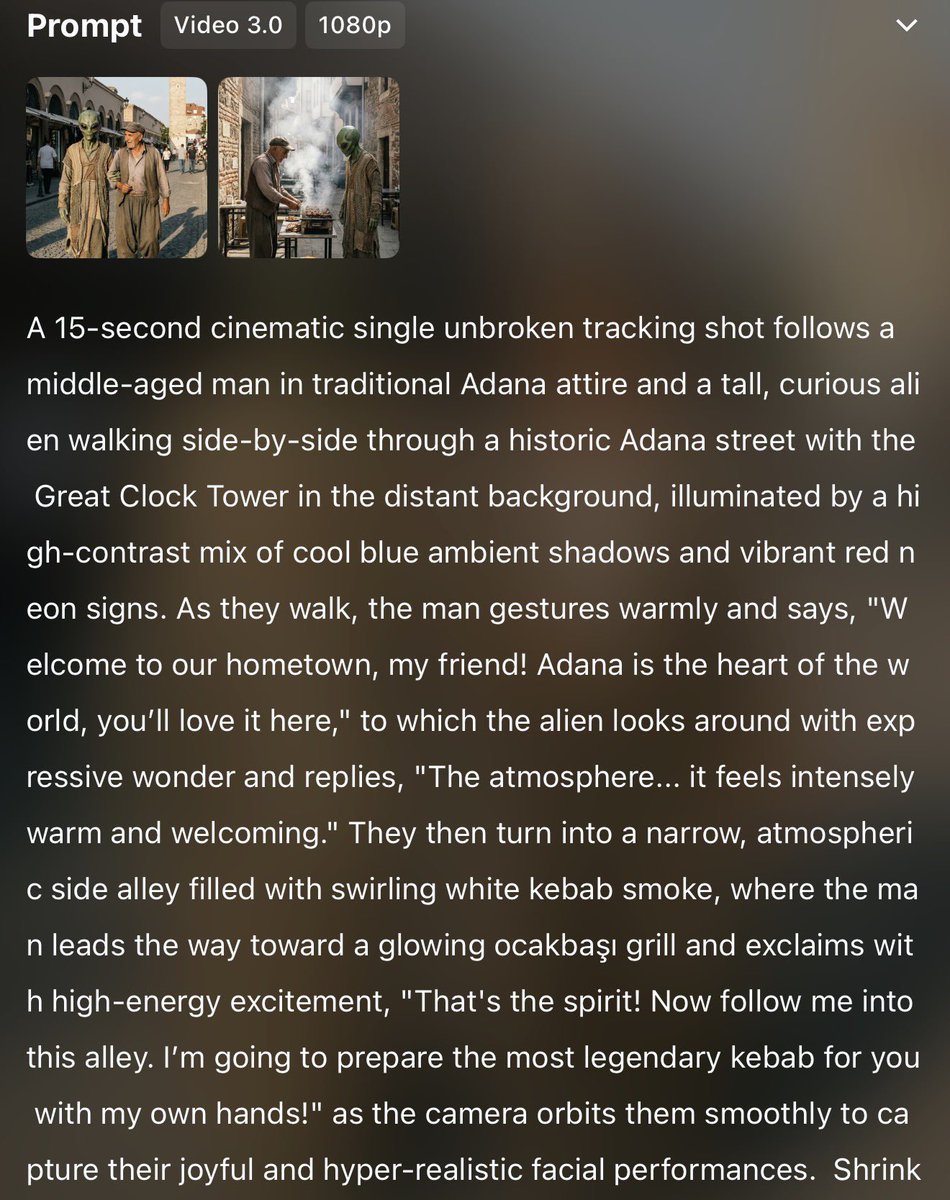
Kling 3.0 (Start/End frames): Creators are still stress-testing “start→end frame” control as a way to force continuity through a single 15-second shot; one post shares a full, long prompt block (non-English) describing a cinematic scene, alongside start/end thumbnails, in Single-plan start/end attempt, while another shows a separate start/end test run in Start/end frames demo.

Compared to multi-shot, this technique is about holding one coherent beat—useful when you want the feel of a continuous take rather than an edited montage.
Kling 3.0 Multi Shot used for a three-cut car chase sequence
Kling 3.0 (Multi Shot action test): A short chase sequence demonstrates Multi Shot handling action continuity across multiple cuts—tunnel shot to street turn to industrial drift—shared as a first “getting feet wet” experiment in Chase sequence test.

This is a concrete coverage case for Multi Shot beyond ads: fast motion, vehicle identity, and camera direction changes across cuts are the core stressors.
Kling 3.0 suspense micro-beat: closet door opens to fog
Kling 3.0 (atmosphere test): A short horror micro-scene—opening a closet to reveal dense fog—gets used as a pacing/atmosphere benchmark, explicitly compared to The Mist in Closet fog clip.

This kind of “single scare beat” is a handy way to evaluate whether the model can sell mood (dark interiors, particulate/fog behavior, and tension timing) in a tight 10-second window.
OpenArt says Kling 3.0 Omni is available, pitching text-prompt video edits
Kling 3.0 Omni (OpenArt): OpenArt is being cited as a new surface for Kling 3.0 Omni, with the feature framing focused on “edit videos with text prompts” and improved element consistency, per the announcement RT in Omni availability note.
The tweet doesn’t include a public demo clip or settings, so what’s concretely new here is distribution (another place to run Omni) rather than verified quality deltas.
A creator shares a “Kling 3.0 GPT” to iterate prompt variants faster
Kling 3.0 (prompting aid): One creator packaged their Kling prompt learnings into a shareable “Kling 3.0 GPT,” positioned as a way to test many prompt ideas and refinements faster, as stated in Kling GPT share.

What’s actionable is the pattern: externalize your house style (prompt structure, camera language, shot templates) into a reusable assistant so you aren’t rewriting the same prompt scaffolding every time.
🎥 Beyond Kling: Sora 2 feel, Seedance coloring, Grok Imagine ads, and browser-based editing agents
Non-Kling video chatter centers on short-form realism (Sora 2 comparisons), reference-first animation experiments (Seedance), and prompt-to-motion editing tools that aim to replace traditional timelines. Excludes Kling 3.0, which is covered in the feature category.
Sora 2 is being praised for short-form realism and automatic cut choices
Sora 2 (OpenAI): A creator who’s tested Kling / Sora 2 / Veo says Sora 2 currently feels best for short-form because motion reads more natural and the model’s camera cuts “are often just… right,” with one example unexpectedly cutting mid-clip to focus on the clothes without being asked, as described in the Sora 2 comparison post.

• First-frame workflow surface: The same thread points to a site flow that supports “generate video from the first frame of Sora 2,” linking to a First-frame generator as the access path.
• Noted artifact: The only specific flaw called out was that a clothes rack near the end “looks a bit unnatural,” per the Sora 2 comparison writeup.
A 100% Grok Imagine commercial gets a script-first making-of thread
Grok Imagine (xAI): A creator says they made a full commercial “100% with Grok Imagine,” then shared a 7-step making-of that starts with writing the script and reusing an older VO script as input, as stated in the 7-step workflow thread.

• Reference-driven tone matching: The workflow notes feeding an old VO script into Grok and using “Elon’s Cheeky Pint interview” as data for updated vision, according to the 7-step workflow context.
• Speed as the headline: The point being emphasized is iteration speed (“barely slept”), per the 7-step workflow framing.
Seedance 2.0 shown auto-coloring a manga frame into a short animation
Seedance 2.0: A creator reports uploading a screenshot from the One Piece manga and getting back an animated clip that includes automatic coloring, using the prompt “Video generated from reference text, with automatic coloring,” as shown in the Manga-to-video demo.

• Prompt shape: The claim is specifically that the model followed a reference-text instruction rather than a long shotlist, per the Manga-to-video demo caption.
• Second-order signal: The same creator later frames this as a “worked” reference-driven test, reinforced by the Remotion-like promo discussion that cites the Seedance clip as the trigger in Pipeline reaction.
Grok Imagine commercials are emerging as a repeatable meme format
Grok Imagine (xAI): Multiple posts show “prompt-as-commercial” shorts—taglines, a product card, then a reveal that it was made with Grok Imagine—suggesting a growing template for creators shipping spec ads on X.

• Tagline + reveal structure: The “UNDERSTAND THE UNIVERSE. FASTER.” spot uses a clean title-card rhythm and an explicit “MADE WITH GROK IMAGINE” punchline, as shown in Spec ad example.
• Character-led pitch parody: Another example has “JD” delivering a speech for “Grok Imagine 1.0,” with “Available Now” overlays visible in the Podium ad demo.
• Misinformation positioning: A separate spot leans into “Facts can get fishy. Use Grok,” as framed in Grok anti-fake-news ad.
Topview Vibe Editing pitches browser prompt-to-motion video generation
Topview Vibe Editing (TopviewAIhq): A creator describes a browser-based tool that generates motion-rich videos from prompts, optionally using your own images/clips, and highlights making a full piece from a single product image with slow, calm camera motion and deliberate timing, per the Vibe Editing beta demo.

• URL-to-promo promise: The same account claims a Remotion-style site promo flow where you enter a website link (or short prompt) and the system orchestrates multiple skills/agents to output a promo video, as stated in Website promo claim.

A viral “blatant AI filmmaking” clip sparks a realism-vs-camp argument
AI-in-film perception: A short clip framed as “blatant use of AI in filmmaking” is criticized for flamboyant, unnatural dialogue/acting, as stated in the AI filmmaking critique post.

• Counterpoint framed as a joke: The same poster later argues the complaint mirrors how humans celebrate awkwardness in cult cinema—explicitly citing The Room—and says the post was meant humorously, per the The Room reference follow-up.
The throughline is less about a specific tool and more about whether “unreal” performances are automatically a failure or can be an intentional aesthetic.
LTX Studio’s Retake is being pitched as in-video rewriting via prompts
Retake (LTX Studio): A widely shared note claims Retake lets you change what happens inside an existing video by rewriting the content via prompts, according to the Retake capability RT.
The tweets here don’t include interface details (controls, constraints, or supported formats), so it’s a capability tease rather than a documented workflow.
🧑🎤 Consistency stack: lip-sync with your own audio, identity-safe prompting, and “no drift” setups
Today’s consistency conversation is mostly about lip-sync driven by user-provided audio and structured constraints for keeping identity stable across generations. Excludes Kling-specific continuity tricks (in the feature).
Hedra Omnia makes user-audio lip-sync the consistency anchor
Hedra Omnia (Hedra): Omnia is being pitched as an audio-first consistency lever—upload your own audio, then use it to drive lip-sync and performance while still prompting for camera angles, motion, and character movement, as described in Omnia lip-sync claim.

• Voice continuity: The key promise is that using your own audio keeps the character’s voice consistent across multiple generations, per the sponsored breakdown in Voice stays consistent.
• Use-case fit: The same post frames it as particularly suited for podcasts, UGC-style clips, and cinematic dialogue where repeated takes usually drift, as stated in Omnia lip-sync claim.
Hedra Elements to Omnia: lock character look, then animate the performance
Hedra Elements → Omnia (Hedra): A creator workflow is emerging where Elements is used to generate a consistent character and vary environments, then Omnia uses the (same) user-provided audio plus prompt to drive the performance—camera angle changes included, as shown in Elements to Omnia workflow.

The pitch is that you separate “lookdev consistency” (Elements) from “acting consistency” (Omnia), instead of trying to solve both in one generation, per Elements to Omnia workflow and the Omnia feature framing in Camera and motion controls.
Long prompt schemas are turning into anti-drift contracts for photoreal shots
Photoreal constraint prompting: Underwoodxie96 is sharing ultra-structured “prompt schemas” that behave like an anti-drift contract—explicit identity preservation flags, composition constraints, and long must_keep / avoid / negative_prompt blocks—illustrated by a 9:16 alpine-chalet lifestyle setup in Alpine chalet schema example.
• Identity and artifact guardrails: Another schema example bakes in anti-mirror and anti-reversed-text rules ("not a mirror selfie", "no reversed text effects") alongside framing/lighting constraints for a boutique scene, as written in Boutique schema block.
Across both, the shared move is pushing “what cannot change” into explicit lists rather than hoping the model infers it.
The “stylized_3d_avatar_portrait” spec is being reused as a likeness dial
Stylized 3D avatar portrait specs: Creators are treating the structured stylized_3d_avatar_portrait JSON-like template as a repeatable way to control “how much identity to keep,” mainly via style_match_strength and the preserve_identity toggle—compare the preserve-identity-false avatar examples in Template and examples with a preserve-identity-true character translation in Night King spec.
The practical effect is a clearer separation between “brand avatar” rendering (toy/Pixar-lite) and “recognizable character” rendering, without rewriting an entire prompt each time, as implied by the field-by-field constraints in Night King spec.
🧑💻 Frontier coding agents in production: Opus/Codex parallelism, autonomous IDEs, and the ‘model→agent→product’ loop
Dev-focused posts are intense: people are running Opus 4.6 and Codex 5.3 in parallel, pushing autonomous agents to spec/build/repair, and asking vendors for higher max-usage tiers. This stays distinct from creative video tools.
Opus 4.6 + Codex 5.3 parallel usage becomes a new “default” for some builders
Opus 4.6 + Codex 5.3 (Workflow): Multiple posts describe running the two models in parallel as a day-to-day baseline, with creators calling it an “intelligence boost” and comparing Codex 5.3 to Opus 4.6 in programming terms, following up on Mixed feelings (model-switching talk). Quotes are unusually emphatic—“using both… in parallel… limitless pill” in the parallel workflow post and “codex 5.3 is the opus 4.6 of programming” in the comparison line.

Another post frames it as the extra headroom needed “for the stove to catch on fire,” per the intelligence boost comment.
Opus 4.6 reportedly auto-migrates UploadThing to Cloudflare R2 in ~40 minutes
Claude Opus 4.6 (Autonomous refactor): A creator reports Opus 4.6 ran for ~40 minutes and migrated an entire UploadThing setup to Cloudflare R2, including code cleanup and a TypeScript pass, with the full step breakdown shown in the migration terminal summary. This is a concrete “walk away and come back” example, not a snippet-level copilot win.
The log claims broad surface-area work (env var cleanup, Prisma model rename, new upload components, ~25 consumer files updated, package removals) and ends with “Zero TypeScript errors confirmed,” per the migration terminal summary.
Figma → Cursor with Opus 4.6 recreates ~80% of a game UI from a mockup
Cursor + Opus 4.6 (Design-to-code loop): A builder says they can design a game UI in Figma, drop the mockup into Cursor with Opus 4.6, and get ~80% of the UI recreated “in one prompt,” shifting effort from pixel-pushing to higher-level UI design, as described in the design-to-code workflow.
The attached images show multiple UI states (title screen, hub/menu screen, combat UI, victory screen), serving as a practical example of what “80% recreation” means in surface area and style fidelity, per the design-to-code workflow.
Qoder ships a Qwen-Coder-Qoder custom model tuned for its autonomous agent
Qwen-Coder-Qoder (Qoder): Qoder launched a custom model fine-tuned for its in-IDE agent, framed as the “model→agent→product loop” in action—targeting autonomous spec generation, execution, and error recovery rather than chat-style copiloting, as shown in the launch claim and demo and reinforced by the loop explanation.

• What creators are reporting: the demo task was “build a task-tracker component with calendar feature in React,” with the claim that the agent can run without “constant babysitting,” per the launch claim and demo.
• Model provenance hints: the thread later says Qoder is backed by Alibaba and built on Qwen-Coder, with other tiers possibly including Opus/Gemini, per the model and tiers note.
Creators ask Anthropic for $400–$1000 Claude Code max tiers to avoid token juggling
Claude Code pricing (Anthropic): A public request argues Anthropic is “leaving money on the table” by not offering higher “max” plans—explicitly suggesting $400/$600/$800/$1000 tiers—because creators dislike paying per-token, making new accounts, or switching tools when caps hit, following up on Usage caps (reset-timer friction). The proposed tiers and rationale are laid out in the max plan request.

The post frames this as a retention problem: when a cap expires, the creator considers moving to “codex/gemini something else,” per the max plan request.
Opus 4.6 one-shots an “agent chat” UI feature inside KomposoAI
KomposoAI + Opus 4.6 (Feature build): A KomposoAI user claims Opus 4.6 “one-shotted” a new agent chat feature, showing applied diffs (“52 lines added… then 10 lines added”) in the UI, continuing KomposoAI Opus (one-shot edits). The before/after evidence is in the agent chat diff screenshot.
The screenshot pairs a marketing-style landing page preview with an “Agent” pane titled “Claude Opus 4.6,” suggesting the product pattern: make a UI change request → accept patch → iterate, per the agent chat diff screenshot.
“Browser for lobsters” pitches local, parallel agent browsing with prompt-injection defenses
Browser for lobsters (OpenClaw ecosystem): A new “browser for lobsters” pitch claims advantages over cloud browsers/Playwright: zero costs, local execution “where your lobster is,” parallel actions, and some prompt-injection prevention, as stated in the browser announcement.
The attached screenshot shows a desktop UI running a Hacker News view alongside an “Agent Test” task tree, implying a product direction where browsing is a first-class agent surface rather than a headless automation script, per the browser announcement.
CleanShot capture settings tuned for agent workflows: clipboard + always-save
CleanShot actions (Workflow): A tip for creators using coding agents recommends setting screenshot actions to auto-copy files to clipboard (for instant pasting into Claude/Codex) and always save to disk (so agents can reliably access/OCR screenshots), as described in the CleanShot settings tip.
The screenshot shows both “Copy file to clipboard” and “Save” enabled for screenshots and recordings, matching the stated goal of reducing friction between capture → agent prompt → tool action, per the CleanShot settings tip.
Claude “agent teams” keeps showing up as a shorthand for scaling coding work
Claude agent teams (Anthropic): “Agent teams” continues to circulate as a mental model for getting more work done per task—showing up as a terse callout in the agent teams mention and echoed via a retweet that frames Opus 4.6 as having “multiple Claude… agent teams,” per the agent teams claim.
There aren’t concrete implementation details in these posts (no configs, limits, or failure modes), but the repetition signals that creators are starting to describe their workflows in terms of delegating across multiple sub-agents rather than prompting a single assistant, per the agent teams mention.
🧩 Full pipelines creators can copy: storyboarding loops, prompt-to-promo, and autonomous animation stacks
The strongest value here is multi-step, multi-tool pipelines: storyboard → selection → vertical outpaint → animate → music → upscale. Excludes Kling-centric pipelines so the feature section stays clean.
Infinite storyboard workflow: lock a character, then build 30s shorts from panels
Infinite storyboard workflow (Midjourney → Nano Banana Pro → Wan 2.2 → Suno → Topaz): A creator shares a copyable pipeline for consistent 30-second shorts—start with a full-body Midjourney concept on white background, convert it into a 3D “anchor” in Nano Banana Pro, then generate 4 storyboard sheets (36 frames) and animate selected panels in Wan 2.2 with Suno music and Topaz finishing, as outlined in the step-by-step thread Workflow breakdown and recap Pipeline recap.

• Anchor prompt (3D bridge): The conversion step uses a reusable prompt—“Create a high-fidelity 3D CGI render… neutral white studio… cinematic lighting… realistic shadows”—as written in the 3D bridge step.
• Storyboard sheet prompt (9 panels): The storyboard generator prompt specifies a “3x3 grid” with wide/mid/close-up rows, strict character consistency, “35mm film, anamorphic lens… film grain,” and “no visible grid lines,” per the Storyboard engine step.
• Finishing notes: The workflow calls out vertical outpainting for 9:16 and suggests Topaz interpolation for slowing overly-fast motion, as described in the Vertical outpaint step and Animation and sound step.
LLM-as-director prompt: turn 36 storyboard panels into an 8-shot arc
LLM-as-director step: One concrete sub-technique inside the “Infinite Storyboard” pipeline is handing 4 storyboard sheets (each a 3×3 grid) to an LLM and asking it to choose 8 panels that form a coherent emotional arc, then return a table with ordering, source sheet + panel position, description, and purpose—spelled out in the Director selection prompt and referenced in the Pipeline recap.
The prompt wording shown in the thread is specific enough to copy-paste: it constrains tone (“Melancholic”), asks for an 8-shot “Instagram reel sequence,” and forces a structured output schema (order, file, panel position, purpose), which reduces “random good shots” selection drift across multiple storyboard pages.
AniStudio.ai pitches prompt-driven, autonomous animation pipelines with invites
AniStudio.ai (agentic animation): A new tool pitch claims “animation pipelines are becoming autonomous,” positioning AniStudio.ai—described as founded by two ex-Adobe researchers—as a workflow that shifts more of the animation assembly process onto an agent, with invites distributed via reposts in the Invite post.

The public details in the tweet are limited (no specs, pricing, or supported DCCs mentioned). The concrete signal today is distribution: invite-code gating plus founder provenance (ex-Adobe) as the credibility hook.
As gen video quality rises, creators shift the bottleneck back to writing and taste
Idea-first production framing: A small cluster of posts argues that with generative quality now high enough to produce “very high quality content,” the competitive edge shifts to script/idea/feeling rather than tool novelty—captured directly in the “IDEA” framing and anti-“slop” sentiment in the Idea stage post.

A related follow-up frames the same point via “use cases” and iteration potential, using a sketch-driven visual as the hook in the Future sketch post. The throughline is a values statement (“slop should die”) paired with a practical production claim: tools are no longer the constraint; direction is.
🧠 Copy/paste prompts & aesthetics: SREF codes, Nano Banana templates, and structured ‘spec prompts’
The feed includes several paste-ready prompt blocks (including SREF styles and JSON-like specifications) aimed at repeatable looks: editorial campaigns, prismatic product renders, plushies, and gritty scribble aesthetics.
A structured JSON spec for consistent toy-figure 3D avatars
Structured “spec prompts” (avatar lookdev): A long JSON-like schema for stylized_3d_avatar_portrait lays out repeatable controls—material choices (semi-gloss plastic), simplified facial features, studio softbox lighting, and solid-color backgrounds—shown in the Avatar spec prompt alongside multiple resulting avatars.
The same pattern also appears in a preserve-identity variant (e.g., “Night King” reference + frosted ice-plastic skin and cold lighting) as written in the Preserve identity variant. The key creative lever is the explicit preserve_identity toggle plus tight constraints on camera/lighting/materials, per the Avatar spec prompt.
Nano Banana Pro JSON prompt for prismatic glass-and-chrome product renders
Nano Banana Pro (prompt spec): A copy/paste JSON-style prompt block targets a very specific finish—“Y2K Frutiger Aero meets modern hyper-realism,” with glass refraction, prismatic chromatic aberration, and lens flares—spelled out directly in the JSON prompt.
• Look ingredients: Dual-tone gradient background (#111B24→#CAEFFF), high-contrast rim lighting, chrome/acrylic/high-gloss plastic textures, and “Octane Render style” framing are all explicitly called out in the JSON prompt.
• Visual target: The “glassy figurine” vibe it’s aiming at is illustrated by the character-style renders shared in the Glassy examples.
This is one of the more structured “spec prompts” today—meant to be parameterized by swapping only the subject field.
Copy/paste plushie prompt for people and pets
Image model prompting (style transfer): A weekend-ready prompt describes a consistent “plush doll” transformation—velvet/microfiber texture, rounded fabric-like surfaces, studio lighting, and explicit “preserve identity cues”—shared as a copy/paste block in the Plushie prompt.
The examples show it working for both a person portrait and a pet, as demonstrated in the Plushie prompt. The negative space is mostly about texture and lighting constraints (soft highlights, diffused shadows) rather than heavy subject re-description.
Nano Banana editorial fashion campaign prompt for brand-style ad frames
Nano Banana (prompt template): A shareable “editorial fashion campaign” prompt is being passed around as a reusable pattern for generating premium-looking brand ads (Perrier/Maserati/Kenzo/Cartier-style comps), with the core deliverable shown in the Prompt image.
The distinguishing trait is consistency across a 2×2 set: same composition logic (suited model, checkerboard floor, oversized logotype) while swapping the brand treatment. It’s less about one perfect frame and more about getting a repeatable campaign system that can be re-skinned quickly—see the reference grid in Prompt image.
Midjourney SREF 3037302753 for cozy anime-watercolor illustration sets
Midjourney (SREF style code): SREF 3037302753 is being pitched as a “healing” look that sits between minimalist anime linework and watercolor warmth, positioned for sticker/packaging/children’s illustration use cases in the SREF pitch. The longer-form breakdown and example positioning is linked via the Style details page.
The practical claim is that this SREF does most of the style work with relatively light prompting—so the remaining prompt can focus on subject + composition, as described in the SREF pitch.
Midjourney SREF 3505439658 for geometric, brand-friendly illustration systems
Midjourney (SREF style code): SREF 3505439658 is framed as a clean “modern geometric illustration” style—bold color blocks + hand-drawn texture meant to read like agency-grade brand visuals—per the SREF pitch. A fuller writeup (use cases + prompting notes) is collected in the Style guide page.
Compared to more painterly SREF trends, this one is explicitly positioned for UI/UX illustration libraries and poster graphics, as described in the SREF pitch.
Midjourney desert poster prompt using a dual SREF blend
Midjourney (prompt + SREF blend): A paste-ready illustration prompt pairs “desert landscape with saguaro cacti and a massive setting sun” with flat color fields, then blends two SREFs (883649402 + 3818487457) alongside high chaos/exp settings, all shared verbatim in the Paste-ready prompt.
This is presented as an illustration-forward recipe (poster-like color blocking) rather than a photoreal landscape; the only concrete parameters shown are the exact SREF pair and the full prompt line in the Paste-ready prompt.
Midjourney SREF 525536268 for raw scribble-punk visuals
Midjourney (SREF style code): SREF 525536268 is being circulated as an “anti-polish” aesthetic—neo-expressionist scribble energy with high-contrast reds and chaotic ink linework—based on the positioning in the SREF description. A more detailed explainer and prompt guidance sits behind the Detailed prompt guide.
The emphasis is emotional texture over render realism; the SREF description explicitly frames it as closer to punk zines/Basquiat-like mark-making than cinematic lighting.
🖼️ Image-making formats that perform: puzzles, creatures, glossy renders, and avatar lookdev
Image posts skew toward repeatable content formats (hidden-object puzzles), stylized character lookdev, and product/brand render aesthetics. This is quieter on new model capability claims and heavier on output formats and style exploration.
A structured “stylized_3d_avatar_portrait” spec spreads as avatar lookdev
Avatar lookdev spec: A constraint-heavy, structured prompt for stylized_3d_avatar_portrait is being shared as a reusable template—minimal toy/Pixar-lite geometry, glossy-plastic materials, studio-softbox lighting, and a bold solid background—spelled out in the JSON-like block in Avatar prompt spec.
A second post shows the same schema adapted to a known character (“Night King”) with preserve_identity: true, plus tuned materials like “frosted ice plastic,” as demonstrated in Night King variant. Net effect: it’s less “one-off image” and more “brand avatar system,” because the structure forces consistent proportions, camera framing, and surface treatment across variants.
Adobe Firefly puzzle posts iterate: AI‑SPY .012 and a new Hidden Objects format
Adobe Firefly (Adobe): Glenn’s hidden-object engagement format continues following up on AI‑SPY format (earlier level iterations); today’s drop adds AI‑SPY | Level .012 with a clearer “find these items” row (pink flamingo, red dice, rubber duck, goldfish bowls, pocket watch), as shown in AI‑SPY level .012.
The same thread also tees up a second, more “progression-friendly” template—Hidden Objects | Level .001—where the creator explicitly frames it as a separate puzzle series they’re testing, per New puzzle series test.
• Why it matters: This is a repeatable image format that bakes comments into the post itself (“can you find X?”), which is the whole point of the template described in AI‑SPY level .012.
Chrome-and-glass figurine renders show up as a reusable character style
Glassy figurine lookdev: A tight, repeatable aesthetic—translucent glass bodies, chrome accents, prismatic refraction—shows up as a character-collectible set (Pikachu, Popeye, Sonic, Smurf) in Glassy renders.
Across the examples in Glassy renders, the consistency comes from the same cues: gradient studio backdrops, hard rim highlights, and “product shot” framing that reads like merch or premium key art. The images also mix in internal-mechanism details (notably the gear-filled transparent bodies) that help the set feel cohesive without needing a long narrative.
Creature-making posts keep using “drop your dragons” as a weekly loop
Creature prompts as a social format: The “make creatures/worlds that don’t exist” prompt culture keeps getting packaged as participation posts—first as a general invite to create and connect in Create creatures and worlds, then as a weekly prompt thread with “Drop your Friday dragons” in Friday dragons prompt.
The same pattern extends to quick-scrolling “creature sheet” videos that function as replies-bait/reference fuel, like the montage in AI creatures montage. The content itself is the mechanism: post a theme, get a gallery back in the replies.
2D vs 3D side-by-sides are being used as quick direction checks
2D vs 3D direction check: Following up on 2D vs 3D test (side-by-side readability), a new “2D or 3D?” post in 2D or 3D comparison puts an illustrated character next to a 3D-rendered version with the same halo/spear concept.
The value here is speed: one post gives immediate signal on whether the character reads better as stylized art or as a more realistic 3D asset, as framed by the prompt-like caption in 2D or 3D comparison.
🧷 Likeness, consent, and platform guardrails: the ethics layer creators can’t ignore
Trust/safety discourse is driven by ongoing Higgsfield allegations (consent, naming, PR tactics) and evidence of platforms tightening ‘prominent person’ upload rules. This is about governance and creator norms, not aesthetics.
Creator alleges Higgsfield DM outreach to counter consent backlash
Higgsfield (ethics dispute): Following up on Backlash escalates (consent and legitimacy claims), BLVCKLIGHTai says Higgsfield shifted to DM’ing creators for supportive quotes—and allegedly offering payment to some—rather than addressing non-consensual likeness issues, as described in Critique of DM campaign.

• Concrete asks from creators: The post calls for consent verification, removal of non-consensual content, renaming the "Steal" feature, and a public acknowledgment/apology to affected people, with examples cited in Critique of DM campaign.
The thread frames this as a trust problem (process and policy), not a PR one.
Creator reports a declined $150 Higgsfield charge despite prepaid yearly sub
Higgsfield (billing trust signal): A creator claims Higgsfield attempted to charge $150 despite having paid upfront for a yearly subscription and having canceled earlier, and says the transaction was only blocked because the card was locked, per Billing warning.
This is a single-user report, but it’s being circulated as another trust-and-safety adjacent red flag (billing integrity) rather than a product issue.
AI-film taste debate leans on “humans don’t talk like this” vs camp cinema
AI-in-film perception gap: A viral clip is criticized as "blatant" AI filmmaking because characters "don't talk or act like this," as stated in AI filmmaking critique; the creator later says the post was a joke and points to The Room as proof humans ship awkward dialogue too, per Joke explanation.
The through-line is less about detection and more about taste: when “off” acting reads as slop versus a deliberate, campy aesthetic.
Prominent-person upload restrictions surface as a blocking policy modal
Platform guardrails (prominent people): A UI error message—"Our policies prohibit uploading of prominent people at this time"—shows a hard block on using certain real-person images as inputs, as captured in Policy modal screenshot.
• Practical impact: This constraint directly affects parody, biopics, and celebrity look-alike workflows where creators commonly start from a reference image, as implied by the upload attempt shown in Policy modal screenshot.
Grok gets positioned as an antidote to fake news
Grok (positioning): A short skit explicitly frames misinformation as the problem and "Use Grok" as the response, per the callout in Use Grok message.

This is marketing rather than an evidence-backed verification workflow, but it shows how “truth tooling” is becoming a front-of-house creative narrative for AI products.
🛠️ Finishing matters: 4K/60fps upscaling, enhancement models, and what ‘native’ really means
The practical debate today is about whether upscales behave like native footage and which tools are worth using for AI-generated material polish. This is mostly about upscaling/enhancement, not generation.
Topaz Starlight Fast 2 pushes 2× faster upscaling in Astra during “unlimited” window
Starlight Fast 2 (Topaz Labs): Following up on unlimited window (time-boxed unlimited access), Topaz is now emphasizing that Starlight Fast 2 delivers “more realistic, sharper details” at 2× the speed while remaining “unlimited to use right now in Astra,” per the product pitch.
The Astra product page also frames finishing as a mode choice—Precise (stay close to source) vs Creative (add/alter details)—as described in the Astra modes explainer.
4K upscaled vs native 4K: creators compare sharpness, cadence, and delivery needs
4K/60fps finishing: Creators are pressure-testing whether an upscale is meaningfully equivalent to “native” 4K/60fps by doing side-by-side comparisons and tying it to real delivery constraints, starting with a visual A/B clip in the native vs upscaled question.

• Delivery reality: One creator notes they had to deliver 4K and 60fps for a TV commercial, which changes what “good enough” means compared with social-only output, as stated in the TV commercial spec.
• When 60fps matters: A reply argues you mainly notice 60fps on fast-paced motion, with a separate claim that many viewers tolerate much lower resolutions on desktop/mobile, per the FPS and resolution take.
• Local vs cloud constraints: Another thread pins quality gaps on hardware—local upscales vs cloud runs on much larger GPUs—according to the hardware speculation.
Creators signal renewed interest in non-Topaz upscaling and enhancement options
Upscaler landscape: A creator flags that there are “more viable upscalers than just Topaz,” teasing a deep dive with examples across both image and video enhancement in the upscaler deep dive tease.
The post doesn’t name specific alternatives in the excerpted tweet, but it reflects a broader shift from “pick one tool” to comparing multiple finishing stacks for AI-generated material.
🗣️ Voice stack pulse: ElevenLabs as the default VO layer for creator pipelines
Voice discussion is less about new features and more about why ElevenLabs is becoming the go-to layer in multi-tool creative stacks (music videos, shorts, ads).
a16z explains why ElevenLabs stands out as a voice-first company
ElevenLabs (a16z/venturetwins): a16z published a behind-the-scenes look at why they think ElevenLabs is special—starting with the founders and what internal operating choices (hiring, titles, research vs product balance) look like in practice, as described in a16z behind-the-scenes clip and expanded in follow-up notes. This matters to creative teams because it frames ElevenLabs less as a single “voice feature” vendor and more as a long-term layer you can expect to keep investing in creator-grade quality and product surfaces.

• Operating model signals: the thread calls out focus areas like hiring structure and the research/product split, as recapped in follow-up notes.
No new product specs or pricing were shared in these tweets; the update is organizational context and positioning.
ElevenLabs is increasingly credited as the default VO layer in multi-tool pipelines
ElevenLabs (Workflow crediting pattern): multiple creators are now listing ElevenLabs alongside their visual models as the “audio/voice” layer they expect to swap in and out across projects—less a special effect, more a standard dependency in the stack, as shown by the explicit toolchain credits in storybook tool list and the multi-tool build notes in multi-shot pipeline credits.

• Full-stack disclosure is becoming normal: one children’s story episode lists Firefly + Nano Banana + Veo 3.1 + Kling + ElevenLabs + Suno, per storybook tool list, which makes ElevenLabs feel like “table stakes” in narrative formats.
• Short-form video stacks: a Kling multi-shot montage credits ElevenLabs in the same line-item list as Midjourney/Nano Banana and editing apps, per multi-shot pipeline credits.
This is usage signal, not a feature launch—there aren’t new ElevenLabs controls described here, just repeated inclusion in real production recipes.
🎵 Soundtrack glue: Suno-backed reels and music-first micro-cinema packaging
Audio is mostly used as the finishing layer inside larger workflows (reels, micro-shorts), rather than standalone music model news. Still useful because it shows repeatable ‘visuals + Suno track’ packaging patterns.
Infinite Storyboard workflow ends with a mood-matched Suno backing track
Infinite Storyboard workflow: A detailed short-form packaging recipe ends by using Suno to generate a custom backing track matched to a defined mood (“Melancholic/Horror”), then editing the selected animated panels to that audio bed; the step-by-step is spelled out in Workflow overview and the recap in Pipeline recap, with the explicit “Suno backing track” instruction captured in Sound step.
• Pipeline shape: Midjourney concept art on white → Nano Banana Pro 3D “anchor” → 4 storyboard sheets (36 frames) → LLM selects 8 panels for an arc → vertical outpaint → animate in Wan 2.2 → Suno for soundtrack → Topaz for polish, as laid out in Pipeline recap.
• Where Suno fits: Audio comes after the visual sequence is chosen, acting as the cohesion layer for pacing and mood rather than a starting constraint, per the “Animation & Sound” note in Sound step.
Stor‑AI Time’s storybook episode pipeline uses Suno as the soundtrack layer
Stor‑AI Time (GlennHasABeard): Following up on Scheduled drop (Feb 6 release timing), a ~4‑minute “Mighty Monster Afang” storybook-style episode is now out, with the creator explicitly listing Suno as the music layer inside a multi-tool pipeline that also includes Adobe Firefly, Nano Banana, Veo 3.1, Kling, and ElevenLabs for voice/audio parts, as shown in Episode announcement and the stack callout in Tools used list.
• Why this matters for shorts: It’s a concrete “soundtrack as final glue” pattern—generate visuals first (Firefly/Nano Banana/Veo/Kling), then lock vibe and pacing by dropping in a Suno bed at the end, per the explicit toolchain in Tools used list.
• Format signal: The episode is framed as a repeatable kids-channel package (“paper-storybook style” plus a folktale narrative), with distribution pointers inside the post thread context in Episode announcement.
🧱 Where builders plug in: APIs, prompt libraries, and ‘apps on top of models’ surfaces
Today’s platform layer is about distribution surfaces—APIs/credits, model access wrappers, and prompt libraries that make creation faster. Excludes Kling-specific distribution since that’s in the feature.
Remotion opens a public gallery of prompt-to-video recipes
Remotion prompts (Remotion): Remotion is collecting and publishing “great Remotion prompts” in a browse/copy/submit gallery, as announced in the Prompt gallery call, with the actual prompt library hosted on their site via the Prompt gallery. The page frames prompts as inputs to Remotion Skills, which can use AI coding agents (Claude Code, Codex, OpenCode) to translate a prompt into a working video project, per the Prompt gallery.

• What’s new here: A shared, community-maintained set of “known-good” recipes that can be reused across explainers, social promos, and motion-graphics templates, as described in the Prompt gallery call.
• Why creatives care: It turns “prompting” into something closer to a repeatable motion design workflow—copy a prompt, tweak the variables, and regenerate—matching the “prompt → video” loop shown in the
.
X launches pay-per-use pricing for the X API
X API (X Developers): X is officially launching X API Pay-Per-Use, framed around indie builders, early-stage products, and startups in the Pay-per-use launch. This is a distribution shift: instead of committing to fixed tiers, builders can align social-data spend with real usage, which matters for creative tooling that spikes around launches, drops, or campaigns.
The tweet doesn’t include a pricing table or quota math, so the operational details still need confirmation from first-party docs beyond what’s stated in the Pay-per-use launch.
xAI ties Grok credits to X API spend with up to 20% back
Grok API credits (xAI): xAI is offering a rebate-style program where spending on X API credits earns up to 20% back in xAI (Grok) API credits, with the rate based on cumulative spend as described in the Cashback offer. For creative app builders, this effectively discounts pipelines that combine X ingestion (trends, posts, replies) with Grok generation (scripts, captions, storyboard beats, prompt variants).
No minimums, caps, or tier thresholds are specified in the tweet, beyond “up to 20%,” per the Cashback offer.
Wabi’s sketch-to-wallpaper mini-app goes public with remixable prompts
Sketch to Wallpaper (Wabi): A Wabi mini-app turns rough sketches into phone wallpapers by letting you draw on a canvas and choose a transformation style, as demonstrated in the App demo; it’s now publicly usable and supports prompt remixing, with distribution boosted by an “access code” rollout (100k codes mentioned) in the Access code note and the Public mini-app page.

• Workflow surface: “Draw → pick a style → generate,” with the interaction shown in the App demo.
• Why it matters: It’s an example of model capability being packaged into a lightweight consumer creation surface (a mini-app) rather than a full creative suite, which lowers friction for quick concept iteration—see the Public mini-app page.
🌍 World models & 3D generation: driving sims, interactive worlds, and asset creation
Biggest signal is world simulation for autonomy and interactive world generation—plus continued creator interest in turning images into usable 3D assets. This is more ‘worlds’ than ‘characters’ today.
Waymo World Model brings Genie 3-style world generation to AV simulation
Waymo World Model (Waymo × Google DeepMind): Waymo and DeepMind say they’ve built a photorealistic, interactive simulation model on top of Genie 3 to train autonomous vehicles on rare edge cases before they happen on-road, as shown in the Partnership demo clip and detailed in the Blog post.

• Multi-sensor outputs: The model is described as transferring “world knowledge” into outputs aligned to Waymo hardware—specifically camera plus 3D lidar data—per the Partnership demo clip.
• Promptable “what if” stress tests: Engineers can prompt scenarios like extreme weather or reckless drivers to probe safety-critical behavior, according to the Partnership demo clip.
The creative-adjacent signal is that “world model” products are converging on controllable, interactive scene generation rather than one-off video clips—especially when they can emit structured sensor/3D representations, not just pixels.
Meshy spotlights one-click vehicle assets with rugged/vintage/cyberpunk looks
Meshy (MeshyAI): Meshy is marketing a one-click workflow for generating “stylish vehicles” across preset aesthetics (rugged, vintage, cyberpunk) as shown in the Vehicle style demo, alongside positioning about rapid world-building and Blender integration in the same post.

For 3D creatives, the notable part is the packaging: style presets + fast asset generation are being presented as a way to stop hand-modeling large volumes of environment props and instead iterate at the “set dressing” level quickly.
Genie 3 creators report “auto-run” behavior that breaks interactive staging
Genie 3 (Google DeepMind): A creator exploring a generated “Elvish City” world says Genie 3 keeps making the player character start running immediately, and asks for a “spawn in place” state so movement can be user-driven, per the World exploration clip and the Spawn-control request.

This is a practical control issue for interactive storytelling and previs: without an explicit idle/spawn state, it’s harder to block a scene, establish an opening composition, or treat movement as an intentional choice rather than a default animation.
Autonomous motion won’t necessarily feel “human-timed,” even in creative rigs
Autonomous motion perception: In a discussion attached to an auto-rigging model thread, a creator notes humans are bad at intuiting what autonomous motion will look like—and there’s no requirement that robotic/procedural systems match human timescales or perception—per the Motion timescale comment.
For animation and simulated-world tooling, this frames a recurring gap: even when geometry/rigging is “good enough,” motion can still read wrong because timing and acceleration profiles default to non-human priors.
📅 Deadlines & stages: AI film festival submissions, creator contests, and live sessions
Events today are concrete: an AI Film Festival with a near-term submission deadline and a few creator/engineering sessions to learn pipelines. Excludes Kling-only contests to avoid duplicating the feature section.
Invideo’s India AI Film Festival sets a Feb 15 submission deadline and $12K prize
IAFF (invideo + Govt of India): Invideo’s “AI Film Festival 2026” is being promoted as part of an India-hosted AI Impact Summit in New Delhi, with a film submission deadline of Feb 15 and a $12K winner prize plus mentorship, per the festival rundown in festival announcement and the submission instructions in submission post.

• Submission mechanics: The submission form in submission form specifies delivery requirements (MP4/H.264, minimum 1080p) and positions the screening as happening Feb 17–20 in New Delhi.
Details like runtime and eligibility are mostly in the form; the tweets emphasize prize + deadline and the “AI-assisted filmmaking” positioning.
Oxylabs schedules a Claude Code live session on single-prompt data pipelines (Mar 4)
Oxylabs (webinar): Oxylabs is advertising a live coding session on turning “a single prompt” into a production data pipeline using Claude Code, scheduled for March 4 at 3 PM CET, with a free recording option, according to the event post in webinar announcement.
The registration page is linked directly as the event registration page, and the tweet frames it as “no manual scraping” and “no LLM iterations,” but doesn’t include a repo or post-session materials yet.
🏁 What shipped: folktales, micro-shorts, mood pieces, and playable-TV teasers
This bucket is for named/packaged outputs (episodes, shorts, finished scenes) rather than tool capability demos. Several creators dropped complete pieces and series updates today.
BLVCKLIGHTai drops “ROUTE 47 MALL – EXIT AT YOUR OWN RISK” as a liminal horror short
ROUTE 47 MALL (BLVCKLIGHTai): A packaged micro-short lands as a self-contained horror “worldbuilding drop,” combining a written mythos (47 exits; shifting realities) with a finished video sequence previewed in Route 47 Mall drop.

The piece reads like a format template for episodic liminal spaces: a title + rules + a short visual pass that sets tone and continuity (signage, corridors, exits) in one deliverable.
Showrunner pushes “TV is playable” framing with an Ikiru Shinu remix teaser
Showrunner / Ikiru Shinu (fablesimulation): The project continues the “playable TV” pitch—following up on Teaser (Netflix-of-AI positioning)—by reframing the show as “a world you remix” and “an infinite creative sandbox,” as stated in remix framing.

The new drop is less about tool mechanics and more about distribution posture: episodes as editable artifacts, with “zero gatekeepers” positioned as the product claim in remix framing.
Stor‑AI Time releases “The Mighty Monster Afang” as a paper‑storybook AI folktale
Stor‑AI Time (GlennHasABeard): The “Mighty Monster Afang” episode is now live as a paper‑storybook style Welsh folktale, following up on Scheduled drop (it was queued for Feb 6) with the finished ~4‑minute cut shown in episode release.
• Full-stack credits disclosed: The creator lists a multi-model pipeline—Adobe Firefly plus Nano Banana, with Veo 3.1 and Kling in the video layer, and ElevenLabs + Suno for voice/music—spelled out in tools used list.
• Workflow follow-through: A behind-the-scenes breakdown is teased as available in BTS breakdown note, framing this as a repeatable “kids channel episode” format rather than a one-off.
“Where Stone Learned to Burn” posts as an atmospheric image set with a full version link
Where Stone Learned to Burn (awesome_visuals): A released image sequence leans into mythic scale—stone steps, hooded figure, and a vertical “rift” of fire—presented as a coherent set in image set post, with the creator pointing to a longer cut via the full version note.
The output functions like a finished mood-piece pack (multiple frames, consistent palette, readable “world rules”) suitable for story pitches, album-art sequences, or opening-title concepts.
Bennash releases “The Monsters of Man,” a Grok-made silhouette musical collage
The Monsters of Man (bennash): A finished longform piece lands as a “musical collage” explicitly nodding to The Adventures of Prince Achmed, with the release and provenance (“created with Grok”) stated in release note.

It’s a notable format choice for AI shorts: leaning into silhouette/texture stylization to make motion and composition do the storytelling work, rather than chasing photoreal performance.
📣 Creator distribution signals: impression drops, engagement asks, and community support norms
A small but clear thread of meta-creator talk: algorithm shifts hurting reach, calls to repost/comment, and prompts to share work for visibility. This is about platform conditions, not tool features.
Creators flag X impression drops and ask for community reposts to retain AI talent
Creator distribution on X: A visible meta-thread today is creators saying an algorithm shift has cut impressions, and framing “a simple comment or repost” as the social norm to keep smaller AI accounts from churning, as stated in Impressions drop note. It’s platform-conditions talk, not tool talk. That matters because it changes how fast new AI film/music/art accounts can compound.
• What’s being asked: The post explicitly asks for lightweight engagement (comments/reposts) as the workaround for the reach drop, per Impressions drop note.
• Why it’s framed as urgent: The claim is that reduced impressions could push “talented creators” to leave, again per Impressions drop note.
“Drop your Friday dragons” threads act as a repeatable engagement hook
Participation prompt: Another distribution scaffold today is a themed art call—“Drop your Friday dragons”—inviting creators to reply with their latest dragon images, as shown in Friday dragons prompt. It’s a format built for fast replies and easy browsing.
A separate repost of the same prompt reinforces it as a repeatable ritual for the network effect, per Reposted dragons prompt.
Weekly “drop your best gen” threads keep AI video discovery alive on X
Community discovery format: A recurring lightweight distribution mechanic shows up as a weekly prompt—“Show favorite AI video you generated in the past week”—meant to pull creations into one reply chain for browsing and mutual discovery, as posted in Weekly AI video prompt. It’s an engagement scaffold that doubles as a portfolio feed.
The thread is explicitly framed around contests and ongoing creator activity, with the call for replies acting as the collection mechanism in Weekly AI video prompt.
Creature/world prompts get used as community glue and reply bait
Creator community prompts: Alongside dragons, a broader “creatures and worlds that don’t exist” invitation shows up as an explicit community-building post—“connect with other creators”—anchored by a single compelling image in Creatures and worlds invite. It’s framed as weekend participation and mutual discovery.

The same account follows with a creature montage post that functions like a reply-starter and inspiration pool, as seen in Creature montage clip.
📈 Marketing with generative media: UGC cloning, content voice prompts, and scalable formats
Marketing posts focus on scaling proven formats (UGC cloning) and improving writing voice with prompt packs. This is tactic-forward rather than tool-release-forward.
Brazil TikTok Shop UGC cloning: one creator format scaled across products ($120k/mo claim)
UGC format multiplication: A creator claims $120k/month from a single TikTok Shop account in Brazil by keeping one consistent UGC “face + pacing + framing” format and using AI to swap the product daily, as described in the Brazil TikTok shop claim.
• What stays constant: The pitch is that the same on-camera delivery (same casual cadence, same camera distance, same structure) becomes the reusable asset, according to the Brazil TikTok shop claim.
• What changes: The “product in hand” and SKU-specific visuals rotate while the creator style remains intact, echoing the “brands don’t reshoot, they clone” framing in the UGC cloning thread context.
The revenue number is presented as a claim with no receipts in-thread; the operational takeaway is the repeatability of a single UGC template when AI can preserve performance cues.
Claude-for-content prompt pack: 10 prompts to sound less corporate (340% engagement claim)
Claude writing workflow: A thread argues Claude outperforms ChatGPT for social writing and attributes a claimed 340% engagement jump to a reusable set of prompts meant to force conversational tone and stronger rhythm, per the 10 prompts thread and the prompt pack recap.
• Tone constraint: “Coffee Shop Test” asks for friend-over-coffee phrasing and bans marketing voice, as written in the 10 prompts thread.
• Anti-tells cleanup: One prompt explicitly bans stereotypical AI words (“delve”, “leverage”, “robust”), as shown in the prompt pack recap.
• Cadence control: “Rhythm Master” sets a max sentence length and forces short/medium sentence variation, as listed in the prompt pack recap.
The post is promotional in tone and the engagement delta is self-reported, but the prompts are copy-pasteable and specific enough to test as-is.
XPatla: analyze an X account’s writing style and generate tweets in that voice
XPatla: A new-ish growth tool claims it can analyze anyone’s writing style on X and generate tweets/threads/replies that match that voice, as described in the style cloning pitch and on the product page.
• Positioning: The site frames virality as a system—learn the account’s vocabulary/humor, then generate content and optimize posting timing, according to the product page.
It’s effectively “brand voice cloning” for social posting; the tweets don’t include third-party quality evals or before/after examples beyond the product claims.
While you're reading this, something just shipped.
New models, tools, and workflows drop daily. The creators who win are the ones who know first.
Last week: 47 releases tracked · 12 breaking changes flagged · 3 pricing drops caught