VideoCoF and Kling 2.6 add director control – 4× longer shots, in‑clip cuts

Stay in the loop
Free daily newsletter & Telegram daily report
Executive Summary
AI video took a very director-brained turn today. VideoCoF shipped an Apache‑2.0 “Chain‑of‑Frames” model that does mask‑free object edits across sequences: trained on only 50k video pairs, it can remove or swap props and even extrapolate shots to 4× their original length while staying temporally clean. On the pacing side, fresh Kling 2.6 tests show in‑clip cuts from a single prompt, hinting at sequences that feel properly edited instead of one endless camera glide.
Around that, the tools are snapping into a recognisable production workflow. FLORA’s Qwen Edit Angles adds slider‑based push‑ins, pull‑outs, and tilts so you can lock a take, then re‑frame it like a DP instead of re‑prompting. LTX Studio’s Retake lets you regenerate only a bad 2–3 second span inside a 20s shot, keeping the rest of the scene intact. Glif’s Contact Sheet agent turns Nano Banana Pro stills into planned beats, SyncLabs’ upcoming React‑1 re‑acts a rendered performance without touching the shot, and Kling’s earlier native audio now meets these visual controls head‑on.
After last week’s “money shot” spec ads and ninja shorts, this is the next chapter: AI video is starting to behave less like a slot machine and more like an editable timeline.
While you're reading this, something just shipped.
New models, tools, and workflows drop daily. The creators who win are the ones who know first.
Last week: 47 releases tracked · 12 breaking changes flagged · 3 pricing drops caught
Feature Spotlight
Director controls come to AI video
Filmmakers get real control: fix-only retakes, slider-based camera moves, performance edits, and contact-sheet prompting make AI video far more directable and production-friendly.
Big day for precise video direction: multiple tools focused on in‑scene fixes, camera moves, and predictable shot planning—high signal for filmmakers. Excludes post‑production upscalers/retouchers (covered elsewhere).
Jump to Director controls come to AI video topicsTable of Contents
🎬 Director controls come to AI video
Big day for precise video direction: multiple tools focused on in‑scene fixes, camera moves, and predictable shot planning—high signal for filmmakers. Excludes post‑production upscalers/retouchers (covered elsewhere).
FLORA’s Qwen Edit Angles adds slider‑based camera moves to AI video
FLORA unveiled Qwen Edit Angles, a control panel that lets you push in, pull out, tilt, and adjust camera angles over an AI video using sliders instead of re-prompting. You tweak shot distance and perspective interactively and the system re-renders from the new virtual camera, turning what used to be prompt guesswork into a familiar directing task Edit Angles overview.

For filmmakers, this matters because it separates "what happens" from "how we see it"—you can lock performance and environment, then iterate on framing like a DP. It also lowers the prompt engineering tax; once you have a good take, you can fine-tune composition for platform crops, alt versions, or continuity, all from a UI that behaves more like a real camera rig than a chatbot.
LTX Retake lets filmmakers fix only bad moments in AI shots
LTX Studio rolled out Retake, a feature that lets you regenerate only the exact section of an AI-generated clip that went wrong, instead of paying to rerun the full 10–20 second shot. You scrub to the problem moment, mark the span, describe the fix, and the rest of the scene stays locked for continuity and cost control Retake feature thread.

Creators are showing it fixing facial glitches, odd hand poses and single bad beats in otherwise strong takes, and LTX explicitly pitches it as ideal for longer 20s shots where full-regens are painful Long shot example. For directors and editors, this moves AI video a step closer to traditional workflows, where you patch the take instead of starting over, and it makes iterative polish on hero shots much less risky than before LTX Studio site.
VideoCoF brings mask‑free object‑level video edits via reasoning
The VideoCoF project introduces a "Chain‑of‑Frames" model that thinks about an edit before it makes it, enabling mask‑free object removal, addition, and swapping in video. Instead of painting mattes, you describe the change in text and VideoCoF infers where and how to apply it across the sequence, with support for up to 4× length extrapolation, all released free under Apache 2.0 VideoCoF feature rundown.

Trained on only 50k video pairs, it still delivers precise edits that stay temporally consistent, which is the pain point for most current tools that either jitter or smear VideoCoF blog. For directors and compositors comfortable running open-source models, this is a new VFX-style lever: you can surgically adjust props, backgrounds, or characters in an AI shot with natural language, instead of hoping for a lucky re-generation.
Glif’s Contact Sheet agent makes NB Pro video beats predictable
Glif is pushing a new Contact Sheet Prompting agent that uses Nano Banana Pro to turn a sequence of planned beats into controlled, predictable video, instead of a single opaque prompt blob. You sketch or describe key frames on a contact sheet, and the agent treats them as a shot plan, preserving character, framing, and motion logic across the whole clip Contact sheet announcement.

The result is closer to storyboarding plus directing: you get repeatable cuts and actions that line up with the plan, rather than one-off lucky generations that are hard to redo. Glif is positioning this as the baseline for how powerful an AI video agent should feel, and they’ve opened it up for people to test in-browser today Agent invite link Contact sheet agent.
SyncLabs’ React‑1 edits acting performance on already rendered video
SyncLabs is previewing React‑1, an upcoming model that lets you change an actor’s performance on a video you’ve already generated, instead of rerendering the whole thing from scratch. In the demo, a Flamethrower Girl avatar delivers the same lines with different timing and emotion, showing that React‑1 can re-interpret acting choices while reusing the underlying shot React 1 teaser.

For AI filmmakers this is a big deal: it turns performances into something you can direct in post, like asking for a more sarcastic read or calmer demeanor, without touching the camera move, lighting, or edit. It also suggests a future where expensive hero shots are generated once, then iterated endlessly on delivery for trailers, regional cuts, and A/B tests using a single base render.
Kling 2.6 now supports in‑clip cuts for more cinematic pacing
A new test clip shows Kling 2.6 generating what looks like multiple internal cuts inside a single prompt run, rather than one continuous camera move. The short “Chase” experiment jumps between angles and framings while still feeling like one coherent sequence, prompting the creator to note how Kling can now "incorporate 'cuts' into a sequence" Chase cuts demo.

If this behavior becomes controllable, it gives directors a way to suggest coverage and pacing—wide to close, back to wide—without stitching separate generations in an editor. Even at this early stage, it hints at a future where a text brief can yield not just a shot, but a cut-together mini-scene with intentional edits built in.
🖼️ Precision image models for campaigns
Image tools skewed toward control and realism today—sequence‑safe edits, brand fidelity, and text handling. This section excludes NB Pro platform quotas/agents (covered elsewhere).
Lovart Edit Text promises layout‑safe copy rewrites in images
Lovart introduced “Edit Text,” a feature that lets you click on any text inside an image—posters, mockups, weird fonts, even half‑hidden labels—and rewrite, delete or replace it while keeping the original style and background intact. Edit text announcement For people fixing last‑minute copy on key art or localizing campaign assets, this is exactly the kind of control that used to need a Photoshop pro.

The demo shows headline text being edited as if it were live type in a design file: same font, same spacing, same background textures, with no obvious cloning seams or smudged edges. They also claim it works on “wild fonts” and complex layouts, which matters because many AI models still mangle typography or require you to regenerate the entire image for a tiny copy change.
For creatives, the workflow shift is big: you can treat AI‑generated posters and social graphics like editable documents—tweak one word for a regional variant, fix a typo, or test new CTAs—without throwing away the composition or re‑rolling hundreds of times to get legible text again.
Seedream 4.5 leans into brand‑safe, sequence‑accurate campaign imagery
BytePlus is showing Seedream 4.5 as a precision tool for campaign visuals, demoing a burger that gets built bun→lettuce→tomato→cheese→patty→bacon with each layer locked to the right order, position and size. Burger stacking tweet

In a separate breakdown, they pitch 4.5 as an upgrade for teams juggling 50+ assets per launch: sharper, cinematic renders, stronger spatial understanding for layouts, better instruction following, and cleaner brand text and logos for things like OOH, key art and product shots. Marketing feature thread An official visual calls out aesthetics, typography handling, video hooks and brand controls as core pillars, making 4.5 feel less like a generic model and more like a “brand consistency engine” for marketers.
They’re also stress‑testing style range: one example recreates an HD‑2D‑style fantasy warrior reminiscent of Octopath Traveler, which is the sort of polished key art RPG studios commission for launch beats. HD2D warrior example Another has a Kim‑Kardashian‑adjacent lawyer striding down a runway, aimed squarely at pop‑culture‑driven social campaigns. Kim K runway visual For creatives, the point is simple: Seedream 4.5 wants to be the model you reach for when both realism and layout discipline matter.
15 Seedream prompts turn Leonardo into a near‑real campaign workhorse
Creator Azed dropped a 15‑prompt pack for Seedream 4.x inside Leonardo, covering everything from grim medieval war posters to chrome fashion, sci‑fi macros and breakfast food photography. Seedream prompt thread The prompts are written like shot lists—lens, lighting, color palette, motion cues—so they behave more like brief templates than one‑off “cool prompts.”

On the practical side, a lot of the set is campaign‑ready: there’s a “freshly baked bread on rustic table” brief for cozy food brands, Bread prompt example automotive angles on matte black sports cars for product spec ads, Car detail prompt and ultra‑close cybernetic eye macros that could slot straight into tech or cyber‑security key art. Cybernetic eye prompt Other prompts map to travel, outdoor wear, homeware and sci‑fi IP concepts.
The value for designers is that these aren’t vague vibes. Each line bakes in camera choice, depth‑of‑field, lighting mood and texture detail, so a brand team can grab a prompt, swap in their product, and get something that already feels like a finished campaign frame rather than a random AI sketch.
Vidu Q2’s reference portraits target realistic, on‑brand faces from a single photo
Vidu is pushing Q2’s reference‑to‑image mode as a way to turn a single raw selfie into multiple on‑brand portraits, all while preserving identity and expression. Vidu reference thread You feed it a source photo plus a structured prompt, and it outputs things like winter fashion editorials, soft window‑light portraits or neon‑lit night shots featuring the same person.
Their examples are very campaign‑adjacent: a basic hoodie selfie becomes a high‑end snow editorial with falling flakes and neutral wardrobe, a cinematic night‑city portrait, and a moody black‑and‑white headshot—all with consistent facial structure and emotion. Vidu reference thread They also share prompt templates that separate style, atmosphere, lighting and expression, which helps art directors steer the look without losing likeness.
For brands and storytellers who need consistent “hero” faces across many executions—a spokesperson, a fictional character, an influencer‑style avatar—this kind of one‑click variation is far more controllable than regenerating full characters every time.
Leonardo tennis shootout exposes model personalities for lifestyle campaigns
A Leonardo test compares six models on the same brief—a blue‑eyed woman on a tennis court pulling her hair into a ponytail—and the differences are exactly what campaign teams care about. Tennis comparison intro Lucid Origin pushes polished athleisure with auto‑added Nike‑style branding, Lucid Realism leans softer and editorial, and GPT‑Image‑1 comes out looking like vintage film photography. (Lucid origin sample, Gpt image sample)
Seedream 4 goes full bright commercial: dynamic angle, electric blue eyes, punchy contrast, very much suited to billboard or homepage hero use. Seedream 4 sample Nano Banana Pro defaults to full tennis gear, visor and wristbands included, which can be a plus for concepting but a constraint if you need tight wardrobe control. Nano banana sample Seedream also seems less prone to weird anatomy or logo glitches in this mini‑shootout.
If you’re picking a house model for lifestyle work, this comparison is a useful sanity check: Lucid feels brand‑friendly but stylized, GPT‑Image‑1 sells nostalgia, while Seedream 4 is the straight‑up “campaign hero” look.
Z-Image Turbo starts showing up in fast real‑estate visual workflows
Tongyi‑MAI’s Z‑Image Turbo text‑to‑image model is popping up in production workflows, with PropertyDescriptionAI adding it via Replicate to auto‑generate listing visuals and calling the speed “insane.”Propertydescription integration For agents and copywriters, that means going from description to hero image inside the same tool instead of bouncing between stock sites and design apps.
At the infra level, Z‑Image Turbo also appears on Hugging Face’s trending models list under the “Inference available” filter, alongside heavy hitters like DeepSeek V3.2 and GLM‑4.6, Inference providers screenshot which suggests it’s becoming a common choice for API‑driven creative tools. The combo of fast inference and campaign‑style output is attractive for any vertical that needs lots of decent‑looking images rather than a handful of perfect hero shots.
If you’re building or running high‑volume visuals—real‑estate portals, catalogues, long‑tail ad variants—Z‑Image Turbo is worth a test as a pragmatic workhorse model, especially when latency and cost matter as much as pure aesthetic nuance.
New Midjourney sref 3020990757 nails warm mid‑century children’s book style
Artedeingenio shared a Midjourney style reference code, --sref 3020990757, that reliably produces digital ink‑and‑watercolor illustrations reminiscent of classic mid‑20th‑century children’s books. Children style thread The look is loose, tender and slightly quirky, with simple line work and textured color fills that feel print‑ready.
Across examples—kids in raincoats with odd monsters, small animals stacked together, diverse groups of children and friendly creatures—the style stays consistent while still allowing different characters and compositions. Children style thread It lands in a sweet spot between handmade charm and clean digital output, ideal for picture books, gentle animated series, postcards or narrative decks where you want a unified illustrated world.
For storytellers, this sref acts like a “house style” shortcut: plug it into your prompts and you can explore new scenes or characters while keeping the same visual language throughout a project.
🧩 Agentic canvases and template killers
Design/Doc agents that understand full context and produce finished artifacts (cards, thumbnails, press releases with images). Excludes NB Pro quota/integrations (covered under NB Pro platform).
Felo LiveDoc turns documents into an agentic canvas for press, decks, and visuals
Felo LiveDoc is pitching itself as an “intelligent canvas” where an AI agent understands your whole project—research, drafts, data, slides—and turns raw inputs into finished artifacts like illustrated press releases and updated slide decks. Agent canvas intro Instead of “ChatGPT + file upload”, you work on one canvas, tag agents, and let them write, lay out, translate, and visually decorate content.
For creatives and marketers, key tricks include: type “Write a press release and add images” and it both drafts the copy and places relevant cover/product/context visuals into the layout; upload last year’s deck and have AI rewrite the narrative with new data in about an hour instead of several days; and convert an English slide deck into another language while preserving layout, images, and design. Slides and translation demo The pitch is that you stop bouncing between docs, PowerPoint, a stock site, and an AI chat—LiveDoc becomes a single project surface where agents handle most of the tedious formatting and illustration work.
Glif Nano Pro Thumbnail Designer turns rough sketches into polished YouTube thumbnails
Glif’s Nano Pro Thumbnail Designer agent is built around a simple idea: draw a rough thumbnail layout, and let the agent turn it into a polished, click‑ready design while respecting your composition. You sketch boxes for faces, text, and background, then the agent keeps that structure and fills it with on‑model imagery and typography. Thumbnail workflow

Because it’s layout‑aware, you can iterate on framing and hierarchy first, instead of praying a pure prompt nails the arrangement. The hosted agent page exposes this as a repeatable tool for YouTube creators and social teams, powered by Nano Banana Pro for image generation and Glif’s own layout logic. Thumbnail agent page It’s especially useful if you need a whole series of thumbnails with consistent structure but different content.
Pictory pushes 5‑minute workflow to turn slides and URLs into video lessons
Pictory is leaning hard into the “slides to video” automation pitch, running webinars on a 5‑minute workflow that turns existing decks into full narrated lessons. Slides to video webinar For law firms and educators, the angle is clear: most training and explainer content already exists in PPT or on a website, and Pictory’s agent‑style pipeline converts that into branded video with text animation, stock or AI visuals, and voiceover.
Alongside the live sessions, Pictory Academy now bundles short how‑tos on things like animated text, subtitle styling, silence and filler‑word removal, and generating AI images for scenes, so non‑editors can still ship decent content. Pictory academy page For solo creators and small training teams, this effectively replaces a traditional motion designer + editor stack with a guided template‑like agent that ingests URLs, scripts, or slide decks and outputs ready‑to‑publish video.
Glif Holiday Card Creator agent writes, designs, and styles cards from a single upload
Glif’s new Holiday Card Creator agent aims to kill templates: you upload a style reference and a photo, and the agent writes the holiday copy, applies the visual style, and even pitches idea variants if you’re stuck. Holiday card flow The whole flow runs as a single agent instead of bouncing between Canva, stock sites, and a writing model.

The public agent page lets you try it directly without setup, powered under the hood by Nano Banana Pro visuals and Kling for some layouts. Agent landing page For designers and teams doing seasonal campaigns, this is a quick way to get on‑brand, personalized cards or social posts from minimal input, while still giving you a file you can tweak afterward if needed.
🍌 NB Pro everywhere: quotas and integrations
Platform momentum for Nano Banana Pro—more capacity and integrations aimed at creatives’ daily flow. Excludes contact‑sheet video agent (covered in the feature).
Google Stitch nearly quadruples Nano Banana Pro quota
Google’s Stitch app quietly boosted its Nano Banana Pro quota by almost 4×, giving creatives far more headroom to run the Redesign Agent on chaotic holiday cards, sites, and multi-image remixes without hitting limits mid‑project Stitch quota boost.

For designers and illustrators, this turns Stitch into a more viable daily lab for iterative NB Pro explorations, especially when experimenting with multiple variants of the same layout or family card before client approval.
Mixboard adds Nano Banana Pro image generation on boards
Google Labs’ Mixboard now lets you spin up full presentations and visual assets directly from your boards using Nano Banana Pro, while also adding PDF/HEIC/TIFF support and multi‑board projects for more complex jobs Mixboard update.

For art directors and content teams, that means reference dumps, scribbled notes, and layout sketches can live on one canvas and be turned into on‑brand NB Pro imagery and slide decks without hopping between separate tools.
AiPPT dynamic slides now use Nano Banana Pro for imagery
AiPPT’s dynamic slide feature now calls Nano Banana Pro to auto‑generate tailored images for each slide based on the content, instead of leaving you with blank placeholders or generic stock art AiPPT feature.
If the result feels off, you can upload your own reference image or tweak the prompt and regenerate, which gives marketers and educators a fast loop from rough outline to visually coherent deck while staying inside one workflow.
Hailuo unlocks unlimited 4K Nano Banana Pro renders to year‑end
Hailuo users can now run Nano Banana Pro at 4K resolution "生成し放題" (effectively unlimited) through at least December 31, with reports that the Pro plan shows no practical resolution cap in real use Hailuo NB Pro promo.
For illustrators and concept artists, this makes Hailuo a cost‑effective front end for gallery‑scale stills and print‑ready NB Pro work, instead of having to upscale lower‑res exports in a separate tool.
Freepik Spaces showcases Nano Banana Pro image edits
Creators are leaning on Nano Banana Pro inside Freepik Spaces to remix and enhance their own photos, with Freepik amplifying standout composites like diamond‑chain portraits wrapped in surreal 3D tubing Spaces composite example.
The combination of NB Pro rendering and Spaces’ layout tools gives illustrators and brand designers a low‑friction way to layer AI detail onto existing campaigns while keeping everything in a shareable, multi‑asset workspace Freepik response.
🎙️ Directable voices and synced emotion
Audio tools focused on emotional control and tight lip‑sync for avatars/cartoons—useful for narration and character work. Excludes discount offers (in Deals).
Hedra Audio Tags bring scriptable emotions and tighter avatar lip‑sync
Hedra launched Audio Tags, a system where you can wrap dialogue in tags like [angry], [whisper], [laughing], [crying], and [pause] to drive precise emotional delivery and timing in AI voices.

Creators can pair these tagged voices with systems like Kling Avatars or Character‑3 to get lip‑sync that feels expressive instead of robotic, and the team is offering a free month to the first 500 people who reply for a code, which is already driving early trials among video and avatar users Hedra launch Audio tags recap.
Kling 2.6 native audio powers cinematic dialogue and talking characters
Kling 2.6’s native audio is now being pushed hard for fully in‑sync dialogue, with one creator showing a grizzled detective confronting a corrupt politician entirely generated by the model, including timing and delivery that feels close to live‑action script reads Dialogue example.

Following up on earlier work on prompt recipes for stable Kling voices Kling voices, Omni Launch clips now showcase everything from a baby answering “most unforgettable moment” in a surprisingly poetic tone, to pets and household appliances speaking with distinct emotions, all lip‑synced to the visuals Baby monologue

. Creators like Diesol are also folding Kling 2.6 Native Audio into full shorts alongside traditional tools (Envato, Eleven Labs), using it for dialogue, ambient sound, and ADR‑style tweaks inside larger cinematic workflows Live by sword tools.
Grok Imagine auto‑writes playful dialogue for cartoon animations
Grok Imagine is quietly becoming a dialogue sidekick for animators by auto‑generating back‑and‑forth lines for simple cartoon clips, then syncing them to character performance so the conversation feels improvised.

In one shared test, two static cartoon characters are brought to life as Grok supplies a spontaneous, funny exchange in speech bubbles, giving storytellers a fast way to prototype character chemistry or add light narrative on top of existing loops without hand‑writing every line Creator reaction.
✨ Realistic finishing: faces, detail, and 4K
Post tools that clean AI artifacts without plastic sheen—useful in photo and video finishing. Excludes in‑scene retakes (feature).
Topaz launches Starlight Precise 2 for natural 4K video enhancement
Topaz Labs released Starlight Precise 2, a new Astra model tuned to fix plastic-looking AI footage by reconstructing realistic skin texture, facial detail, and preserving the original look while outputting pristine 4K. Starlight overview

For filmmakers and editors finishing AI‑generated clips, this is positioned as a last-mile enhancer: it sharpens detail, removes artifacts, and keeps faces human rather than waxy, directly inside the Astra pipeline where many already upscale projects. Creators already lean on Topaz in high-profile AI shorts (for example, a ninja action film finished in HDR 4K) 4k ninja workflow, so a realism-focused model gives them a more trustworthy default for cleaning Kling, Veo, Sora, or NB Pro footage without reintroducing the uncanny sheen they were trying to escape.
Higgsfield adds one-click Skin Enhancer alongside holiday sale
Higgsfield highlighted a new Skin Enhancer that performs one‑click, realistic portrait retouching—rebuilding skin detail, clearing compression noise, and balancing tone while preserving the subject’s identity—bundled into a three‑day holiday sale with up to 67% off and a year of unlimited generations. (Skin Enhancer details, Holiday sale)

The demo shows side‑by‑side faces with noise and artifacting cleaned up into natural‑looking skin rather than over‑smoothed beauty-filter results, which matters for AI artists trying to move away from “AI plastic” but still ship polished client work. Because the enhancer lives inside the same image stack as Higgsfield’s generative models, photo editors, portrait retouchers, and social creatives can keep their finishing pass in one place instead of bouncing out to a separate app or plug‑in.
Magnific Skin Enhancer earns creator praise for subtle face cleanup
Magnific’s Skin Enhancer is getting strong word‑of‑mouth from AI artists, with before/after comparisons showing Midjourney portraits transformed into more photographic, detailed faces without the usual blur or plastic airbrushing. One creator calls it “LEGIT” and “pure MAGIC” while sharing side‑by‑side results that keep pores, hair, and expression intact. Magnific praise For illustrators and concept artists, this kind of finishing model slots in as the last stage of an image pipeline: you can push stylization or aggressive upscaling early on, then hand the result to Magnific to repair skin, remove weird artifacts around eyes and lips, and nudge the piece toward print‑ready realism. It won’t matter much to non‑visual users, but for people delivering posters, key art, or close‑up character shots, this kind of subtle, identity‑preserving cleanup is exactly the gap generic face-smoothing filters fail to fill.
⚖️ Antitrust and open agent standards
Policy and governance items that directly affect creative distribution and tooling. Mostly EU antitrust and open‑standard moves today.
EU opens antitrust case into Google’s AI Overviews and YouTube training
The European Commission has launched a formal antitrust investigation into how Google uses publisher content to power AI Overviews/AI Mode in Search and trains models on YouTube videos, without what regulators see as fair compensation or a real opt‑out for publishers. EU Google probe The case argues that publishers were effectively forced to accept AI reuse of their work or lose visibility in Search, with some reporting 50–65% drops in organic traffic since generative summaries rolled out, while Google could face fines up to 10% of global annual revenue if abuse is proven. EU Google probe For creatives who rely on search distribution—indie media, educators, niche bloggers, even portfolio sites—the stakes are direct: less click‑through means fewer subscribers and buyers, while their work still fuels the models that answer user questions in the SERP. The YouTube angle matters for filmmakers and musicians too; the Commission is probing whether Google is training models on user‑uploaded video while blocking rival AI players from similar access, which could entrench its position in AI video tools and summarizers. EU Google probe If Brussels forces licensing, compensation, or stricter consent rules around AI Overviews and model training, it could set the first big template for how creative work must be treated when it’s repackaged by AI assistants rather than traditional search results.
Anthropic hands Model Context Protocol to new Linux Foundation fund
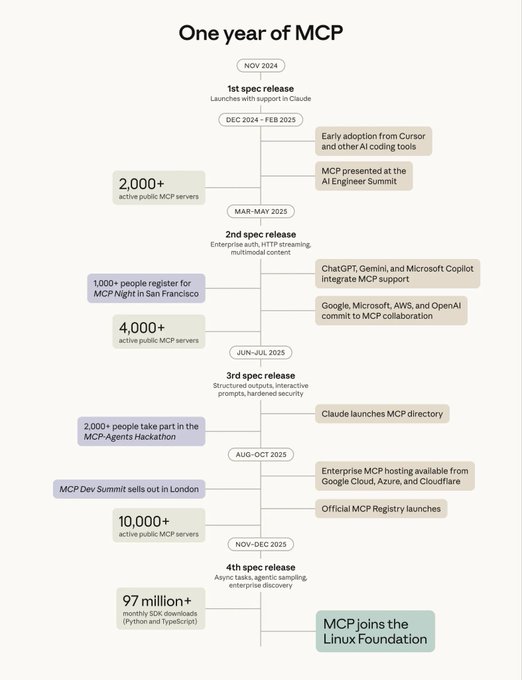
Anthropic has donated the Model Context Protocol (MCP)—its open spec for connecting AI agents to tools and data sources—to the new Agentic AI Foundation, a directed fund under the Linux Foundation co‑founded by Anthropic, Block, and OpenAI, with backing from Google, Microsoft, AWS, Cloudflare, and Bloomberg. MCP donation thread The one‑year timeline graphic shows MCP growing from its first spec release in late 2024 to over 10,000 active public MCP servers and 97M+ monthly SDK downloads by late 2025 before joining the Linux Foundation as its fourth spec release shipped.
For people building creative tooling—editors, DAMs, asset libraries, production trackers—this is a big nudge toward a common way to let any model talk to your app without bespoke plugins for each vendor. MCP is already supported in Claude, ChatGPT, Gemini, and Microsoft Copilot, and cloud providers are rolling out managed MCP hosting, so an open multi‑stakeholder foundation makes it more likely that a single connector you build for, say, your storyboard database or sound‑effects library will work across the assistants your clients use. The Linux Foundation home also matters politically: it lowers the risk that MCP drifts into a single company’s control, which is exactly what creatives and studios worry about when they tie their workflows to agent ecosystems that might later close or change terms.
🧱 3D materials and relighting for pipelines
Production‑grade asset tools for games/VFX: material estimation and relighting nodes that slot into ComfyUI workflows.
Ubisoft La Forge open-sources CHORD PBR material model with ComfyUI nodes
Ubisoft La Forge has released its CHORD PBR material model as open source, plus custom ComfyUI nodes that turn a single tileable texture into full Base Color, Normal, Height, Roughness and Metalness maps, directly inside artists’ node graphs. announcement thread This targets one of the slowest parts of AAA pipelines—expert-built materials for every asset—by making end‑to‑end AI material generation available in a production‑style toolchain.
The provided ComfyUI workflows cover three stages: tileable texture synthesis, conversion into full PBR maps, and upscaling of all channels to 2K/4K, so teams can experiment without building graphs from scratch. workflow overview Ubisoft’s own blog calls out why they chose ComfyUI—ControlNets, image guidance and inpainting give artists granular control instead of black‑box one‑clicks.ubisoft blog post A published example slate material shows CHORD generating coherent color, height and roughness maps that render cleanly on a sphere, hinting this is ready for real look‑dev tests rather than just moodboards.
For game and VFX shops already dabbling in ComfyUI, CHORD effectively drops a production‑grade material lab into their existing node graphs.
Light Migration LoRA brings controllable relighting to ComfyUI image pipelines
ComfyUI highlighted the Light Migration LoRA by dx8152, which focuses on re‑lighting existing images rather than generating them from scratch. relighting mention Dropped into a ComfyUI workflow, it lets artists push a scene toward new light directions and moods while preserving composition and detail, making it useful for shot matching, key art variants, and quick lighting explorations when a full 3D rebuild would be overkill.
For AI‑first pipelines, this slots alongside texture tools like CHORD: one graph can now handle both physically‑based materials and late‑stage lighting tweaks on concept frames, box‑art, or marketing renders, all while staying inside the same node‑based environment rather than bouncing through external photo editors.
🧰 Coder LLMs powering creative stacks
Open coding models and IDE hooks that help teams glue creative pipelines together. Mostly SWE‑Bench updates and app integrations.
Mistral’s Devstral 2 and Small open-source coder models hit SOTA on SWE‑Bench
Mistral released two open-weight coding models, Devstral 2 (123B, modified MIT) and Devstral Small 2 (24B, Apache‑2.0), both free for commercial use and reaching 72.2% and 68.0% respectively on SWE‑Bench Verified, competitive with many proprietary code assistants. Devstral benchmark tweet The larger model also exposes a 256k context window and is tuned for agentic coding workflows like exploring large repos and editing multiple files, with full details in the model card and CLI tooling via Mistral Vibe. Devstral model card
For creative dev teams building custom pipelines around image, video, or audio tools, this means you can now self‑host a genuinely top‑tier coder under permissive licenses, wire it into your own tool-calling stacks, and avoid per‑token costs or vendor lock‑in for the “glue” logic that keeps your art and film workflows running.
Hugging Face now exposes 50k+ models via unified inference providers API
Hugging Face highlighted that 50,773 models are now available with hosted inference across a growing list of providers (Groq, Together, Replicate, fal, Cerebras, etc.), filterable via the “Inference Available” toggle. HF provider stats The updated Inference Providers docs show how to call all of these through one API from the HF JS/Python clients, covering tasks from chat and code to text‑to‑image/video and speech. HF providers docs
If you write the code behind creative pipelines, this lets you swap or mix specialist models—DevLLMs for code, NB‑style image gens, video models—without rewriting your client stack, and treat “which model” as a config decision instead of an architectural one.
AnyCoder adds Devstral Medium 2512 as a first-class coding model option
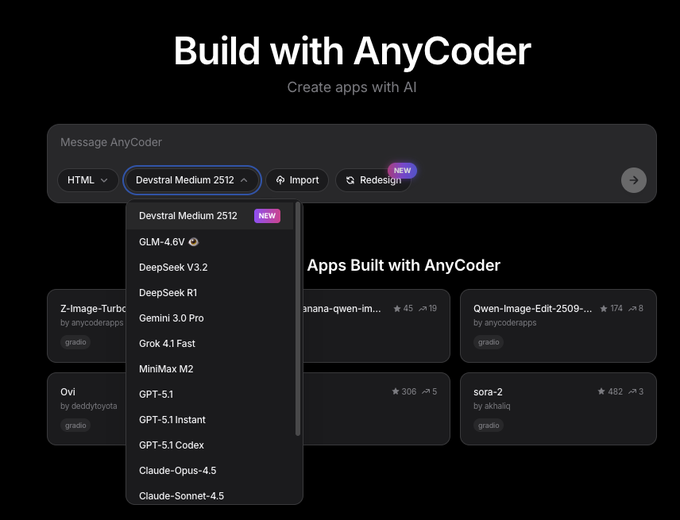
AnyCoder’s web IDE quietly added a Devstral Medium 2512 option to its model menu, alongside DeepSeek V3.2, GLM‑4.6V, Gemini 3 Pro, GPT‑5.1, Grok, Claude 4.5 and others, making it one click to route new app builds through Mistral’s coder stack. AnyCoder update
For people gluing creative tools together in HTML/JS—dashboards, prompt UIs, review tools—this means you can A/B Devstral against your existing models inside the same “build with AnyCoder” flow, and quickly see which one gives cleaner front‑end code, fewer hallucinated APIs, and better adherence to your design specs.
🏆 Showreels and festival picks
Notable shorts and music videos made with AI tools—useful for inspiration and pipeline benchmarking. Excludes tool feature news.
Diesol drops TV‑MA ninja short "LIVE BY SWORD" built on full AI stack
Creator and director Diesol released LIVE BY SWORD, a TV‑MA ninja action short that pays homage to ’90s and early‑2000s John Woo‑style cinema, and shared the complete AI‑heavy pipeline behind it. live by sword thread The film mixes Nano Banana Pro (inside Flow), Seedream 4.5, Veo 3.1, Sora 2 Pro, Kling 2.6, Topaz, Magnific, Photoshop, Premiere Pro, and DaVinci Resolve into a single 4K workflow, with Kling 2.6 also handling both dialogue and native audio. (4k hdr note, kling video mention)

For working filmmakers, this isn’t a tech demo; it’s a near‑complete action short where AI is threaded through traditional post steps. Images are designed in NB Pro and Seedream, animated via Veo/Sora/Kling, then finished with conventional tools for cleanup, grading, and sound, showing how AI slots into familiar editing and color pipelines rather than replacing them. Diesol is already teasing another “heads will roll” short built on Seedream 4.5 and Kling 2.6, new short tease which suggests this style of AI‑assisted action filmmaking is moving from one‑off experiments toward a repeatable personal pipeline.
OpenArt Music Video Awards reveal sponsor and feature picks
OpenArt has followed up its genre winners with a new wave of Sponsor Awards and special features that spotlight some of the most polished AI music videos released this year, building on genre winners from two days ago. Kling, Fal, and Epidemic Sound each selected a favorite, including the hyper‑cute "My Matcha Latte Not Yours," the nature‑driven "Primal Call," and the dreamy "ROSA," alongside a Best AI Superstar nod to Tilly Norwood’s performance short. (sponsor awards thread, tilly superstar award, primal call mention, rosa mention)

For filmmakers and music artists, this thread is a curated playlist of what festival‑level AI work currently looks like: tight narrative beats, strong song–picture alignment, and multi‑model pipelines combining tools like Kling for visuals and Epidemic Sound for audio. Watching how these videos handle pacing, transitions, and character continuity is a useful benchmark if you’re aiming to submit to festivals or brand briefs that still want “human‑grade” storytelling even when the pipeline is mostly AI‑driven.

Veo 3.1 used for atmospheric "giants of the end times" short via Wavespeed
A creator working with Wavespeed’s Veo 3.1 endpoint released an atmospheric short about ancient giants crumbling back into sand, built entirely from prompt‑generated video. (giant colossus short, veo model page) The film shows a towering stone colossus in a desolate landscape slowly disintegrating as winds pick up and the camera drifts through empty dunes, matching a poetic narration about forgotten guardians.

For storytellers and previs artists, this is a strong example of Veo 3.1’s ability to maintain large‑scale environmental continuity over ~75 seconds: the giant’s proportions stay coherent, the lighting and atmosphere feel consistent, and the motion reads as deliberate rather than chaotic. The director notes the piece is "COMPLETELY FREE" to watch on Vadoo, free vadoo note which also hints at a distribution pattern where AI shorts move from prompt to hosted player without traditional post houses in the middle.
"Pinkington: The Visitor" showcases character‑driven Hailuo dog short
The whimsical short Pinkington: The Visitor surfaced as a fully AI‑generated character piece made with Hailuo, featuring a confused CGI dog reacting to a mysterious glowing drone. pinkington hailuo short The video plays like a mini‑episode: Pinkington notices the floating sphere, approaches warily, barks, and the scene resolves with a title card, framing it as part of a larger series.

For animators and brands, this is a clean example of how far you can push a single recurring character with today’s tools: the dog’s design, environment, and motion stay consistent across shots, and the narrative arc fits neatly into social‑length runtime. It’s the sort of clip you could imagine turning into a recurring mascot series or children’s micro‑show, and a good reference if you’re planning to build your own AI‑animated character franchise inside tools like Hailuo.
Luma’s Dream Machine Ray3 powers abstract "Future Frontiers" image‑to‑video short
Luma Labs shared Future Frontiers, an abstract, metallic structure brought to life using the new Ray3 image‑to‑video mode inside Dream Machine. future frontiers tweet The short leans into slow camera arcs, glowing blue accents, and flowing light trails to show how Ray3 handles detailed geometry and reflective surfaces when animating from a single still frame.

If you’re doing concept art, motion branding, or title sequences, this is a useful reference for what current image‑to‑video can do with non‑character subjects: it keeps form and texture stable while adding cinematic movement and lighting shifts. The piece reads more like a motion design reel than a narrative short, making it a good benchmark for designers thinking about using AI as a first pass for logo stings, opener loops, or abstract interludes rather than full story scenes.
🎁 Credits, contests, and holiday sales
Opportunities to save or earn credits relevant to creators; mostly holiday‑timed promos. Tool features themselves are covered elsewhere.
Higgsfield Holiday Sale: up to 67% off plus 365-credit blitz
Higgsfield is running a three-day Holiday Sale with up to 67% off all plans and a full year of unlimited generations on its top image models, with the offer expiring on December 11. sale announcement

On top of the discount, there’s a 9-hour flash promo where anyone who retweets, replies, and quote-tweets the announcement gets 365 free credits via DM, which is a nice way to stockpile test budget for new looks or client work over the holidays. sale announcement
Freepik 24AIDays Day 8 hands out 120,000 credits
Freepik’s #Freepik24AIDays promo continues with Day 8 offering 120,000 credits total, split as 12,000 credits each for 24 winners, building on the broader campaign covered in 24 AI Days. day8 announcement Creators enter by posting their best Freepik AI creation, tagging @Freepik, using the hashtag, and submitting the official form. (entry reminder, submission form)

For illustrators and designers already working in Spaces, this is essentially a shot at a month or more of heavy Nano Banana Pro use without touching the wallet, which is ideal for experimenting with new series or pitches.
InVideo launches $25K Money Shot product ad challenge
InVideo has opened a Money Shot challenge for AI-powered product ads, putting up a $25,000 prize pool and setting a deadline of December 20 for submissions. challenge announcement The contest centers on its new Money Shot workflow, which turns a few product photos plus a prompt into ads that match your real product, so it’s a good excuse to refine spec-commercial style, test what “real product” consistency looks like, and potentially get paid for experiments you’d run anyway.
Hedra offers first 500 Audio Tags users a free month
To push its new emotion-aware Audio Tags feature, Hedra is giving the first 500 followers who reply “Hedra Audio Tags” a full month of access free. promo details
For filmmakers, VTubers, and avatar creators, it’s a low-risk window to try tagging lines with cues like [angry], [whisper], or [laughing] and see how well it syncs with Kling Avatars or Character-3 pipelines before deciding if it belongs in your regular voice stack.
Producer AI Holiday Song Challenge offers up to 1,000 bonus credits
Producer AI kicked off a Holiday Song Challenge asking users to create an original festive track (Christmas, Hanukkah, Kwanzaa, or New Year), with winners receiving up to 1,000 bonus credits. challenge launch Submissions are due in their Discord by December 11 at 12pm PT, so music makers have a short window to turn a seasonal idea into a finished piece and, if it lands, effectively pre-fund a lot of future experiments on the platform.
PolloAI Lucky Draw #2 awards 300-credit Lite membership
PolloAI announced the second winner of its December Funny Weekly Lucky Draw, granting @inna254319 a 1‑month Lite membership worth 300 credits, with three more weekly draws still to come. week2 winner The draw runs across all valid submissions from the week, and because entries roll in through community showcases, uploading more polished clips both boosts your odds and gives you portfolio material even if you don’t win that round.
💸 Fal’s $140M round and creator fund
Capital flowing into generative media tooling, plus a dedicated fund for startups—relevant for creative founders.
Fal raises $140M Series D to scale generative media platform
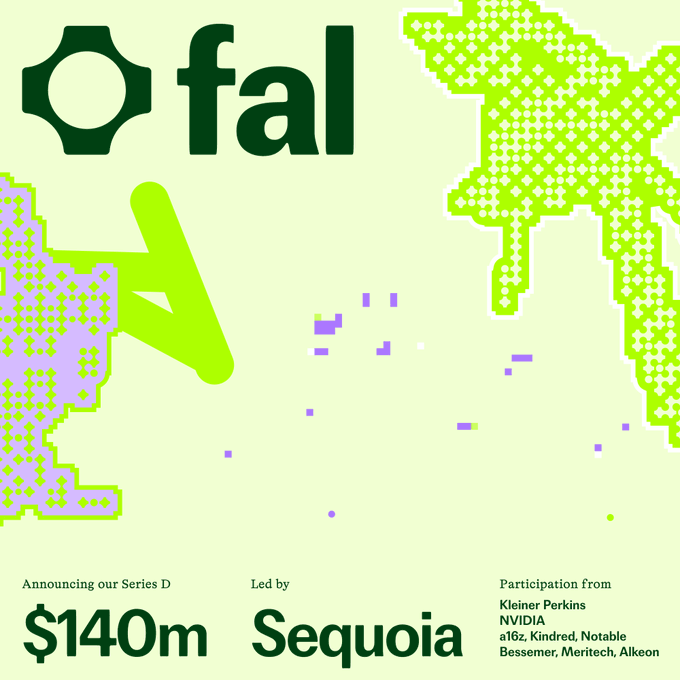
Fal closed a $140M Series D led by Sequoia with Kleiner Perkins, Nvidia, a16z and others, and says it will use the money to scale its generative media platform and grow its ~70‑person team globally. Series D announcement
For creatives, this means the company behind many fast, API‑driven image/video tools is likely to expand capacity, add features, and deepen integrations rather than staying a niche infra vendor. The raise, plus name‑brand investors aligned with GPU supply, suggests Fal will be a long‑term backbone option for apps that need high‑volume rendering, upscaling, and media‑specific AI workflows rather than rolling their own stack.
Fal launches Generative Media Fund with up to $250k per startup
Alongside the Series D, Fal announced the Generative Media Fund, offering up to $250k per team in a mix of cash and Fal credits to startups building on generative media—tools for creators, enterprise content pipelines, and image/video/audio applications. (fund announcement, fund details) For AI creatives and founders, this is effectively a vertical seed program: you get infra covered and some runway, as long as you’re shipping real products on top of Fal’s stack. The focus on pragmatic use cases (creator tools, workflow automation, production‑grade media) means filmmakers, designers, and music/video app builders can pitch ideas that go beyond demos and actually sit in professional pipelines.
Fal CEO claims 3–4× faster inference on Nvidia models
Fal’s CEO told Bloomberg TV that the company’s proprietary inference engine can run Nvidia‑based models three to four times faster than standard setups, positioning Fal as a performance‑first host for generative media workloads. Bloomberg interview If this holds up in real projects, it matters directly to creatives: faster renders mean more iterations per hour for image sequences, video shots, and audio experiments, and lower unit cost for heavy campaigns or apps serving millions of generations. Combined with the new funding, Fal is pitching itself as the place where you can run big, media‑focused models at near real‑time speeds instead of waiting minutes per pass.
🔭 Model watch: image v2 whispers and delays
Rumors and sightings relevant to creatives—handled separately from confirmed tool releases.
DesignArena “chestnut” and “hazelnut” spark rumors of OpenAI image v2
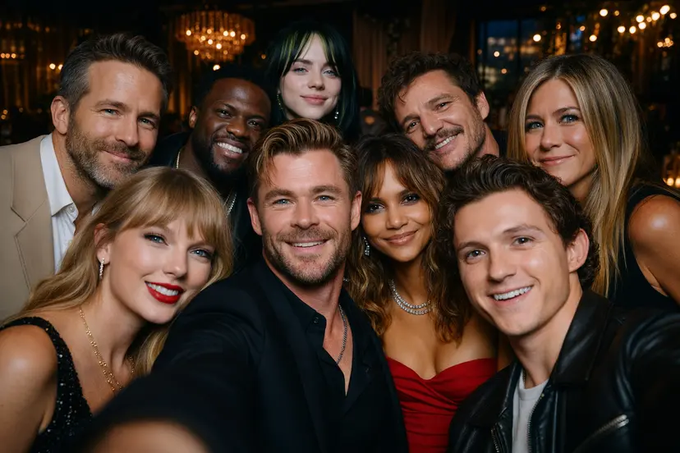
New image models labeled “chestnut” and “hazelnut” on DesignArena are generating speculation that OpenAI is quietly testing a next‑gen ChatGPT image model, after users posted hyper‑coherent celebrity group selfies with strong lighting and expression consistency. Arena chestnut rumor A second creator shared an almost identical celeb selfie from “hazelnut” and openly wondered if these models can beat Nano Banana Pro on photoreal portraits, which would mark the first time in months that OpenAI looks competitive again in high‑end image work. Hazelnut selfie shots
For creatives, this feels like an early signal to expect a more serious OpenAI image stack soon, even though chestnut/hazelnut are unofficial endpoints and could still change or disappear before any formal “Image v2” branding shows up.
GPT‑5.2 placeholder stream and timing rumors swirl without confirmation
A YouTube “GPT‑5.2” placeholder stream dated December 9, paired with community threads, has people expecting a 5.2 release sometime this week despite no official word from OpenAI. GPT 5.2 stream teaser One watcher claims “rumours suggest OpenAI targeting Thursday now” and frames it as the next round in the model race, with Google possibly following soon with Gemini 3 Flash and Nano Banana 2 Flash. GPT 5.2 timing Others joke that OpenAI “delayed GPT‑5.2 because they need some time to fix graphs”, underscoring that all current timing talk is still rumor, not roadmap. Delay meme comment
If you’re planning creative workflows on top of ChatGPT, the practical move is to stay flexible on this week’s schedule, but assume another capability and pricing reset is coming soon enough that it’s not worth hard‑coding around 5.1 as the long‑term ceiling.
Meta’s “Avocado” model reportedly delayed to 2026 and may not be open
Meta’s next major Llama‑family model, codenamed “Avocado”, has reportedly slipped from an end‑2025 target into 2026 and might not be released under an open‑source license at all, according to a CNBC report circulating in screenshot form. Avocado delay report
For studios and toolmakers that leaned on Llama 2/3’s permissive terms for custom creative assistants, this hints at a longer window where open ecosystems like DeepSeek, Qwen, and Mistral remain the primary foundations for bespoke art, writing, or production agents—and a future where Meta’s best models could behave more like proprietary cloud offerings than drop‑in checkpoints.
Creators say rumored ChatGPT image upgrade still looks “plastic” next to NB Pro
One creator shared what they describe as outputs from ChatGPT’s upcoming visual model, saying the images “look pretty good” but still complaining about a strange plastic texture that, in their view, lags behind Nano Banana Pro’s realism. ChatGPT image texture Another user contrasted this with Google’s trajectory “from the Gemini image disaster to nano‑banana pro currently the best image model”, reinforcing that NB Pro is now the reference point many artists use when judging new photoreal models. NB Pro comeback praise
If you rely on ChatGPT’s built‑in image tools for quick storyboards or social assets, expectations should be calibrated: a likely step up from today’s GPT‑Image‑1, but still not the first choice for ultra‑natural skin and material detail among power users who already shifted their serious work to NB Pro.
🧪 Research: motion control and fast reasoning
Paper drops and demos on motion‑controllable video, zero‑shot reference‑to‑video, and faster parallel reasoning—useful signals for near‑term tools.
Meta’s Saber scales zero‑shot reference‑to‑video with strong identity preservation
Meta AI’s Saber system, described in the paper Scaling Zero‑Shot Reference‑to‑Video Generation, takes a single reference image plus a motion prompt and generates identity‑preserving video clips without per‑shot fine‑tuning. paper recap

The pipeline projects dense point trajectories into the latent space and propagates first‑frame features along them, so each pixel’s motion is explicitly controlled while the character’s look stays locked in. ArXiv paper For filmmakers and animators this points toward one‑image character sheets turning directly into moving shots: consistent hero identity, new angles and actions, and no need to retrain a model per character the way many current I2V hacks still require.
VideoCoF uses reasoning tokens for mask‑free object edits and swaps in video
VideoCoF introduces a Chain‑of‑Frames (CoF) approach where the model "thinks" about what to edit before touching pixels, predicting reasoning tokens that mark edit regions and then generating the new video—no user‑drawn masks required. videocof summary It handles object removal, addition, and swapping and was trained on only about 50K video pairs while still supporting up to 4× length extrapolation for longer clips. blog article
For editors and VFX artists this points toward a future where you describe the change in plain language and let the model infer consistent masks across frames ("remove the red car", "turn this mug into a glass"), with the reasoning step reducing classic problems like flickering boundaries or drifting masks that plague many current vid2vid tools.
Alibaba’s Wan‑Move adds trajectory‑level motion control to image‑to‑video models
Wan‑Move proposes a motion‑controllable video generation framework that injects dense point trajectories directly into the latent space of an image‑to‑video model like Wan‑I2V‑14B, giving fine‑grained control over how objects move without extra motion encoders. wan move summary It propagates features along these trajectories to build an aligned spatiotemporal feature map, which then guides the video synthesis step. Hugging Face paper For motion designers and previs teams this is a big deal: instead of vague "run forward" prompts, you can in principle define actual paths and speeds for characters or cameras, making AI shots behave more like keyframed animation while still being generated from a single still.
Native Parallel Reasoner teaches Qwen3‑4B genuine parallel reasoning with 4.6× speedups
The Native Parallel Reasoner (NPR) framework lets a Qwen3‑4B model learn to perform real parallel reasoning instead of fake "serial but split into bullets" chains, using a self‑distilled training schedule plus a Parallel‑Aware Policy Optimization algorithm. npr paper summary The authors report gains up to 24.5% across eight reasoning benchmarks and inference speedups up to 4.6× while maintaining 100% genuine parallel execution, rather than secretly falling back to standard autoregressive decoding.
For tool builders this matters because complex agent chains—planning scenes, scheduling multi‑tool pipelines, reorganizing long scripts—can get both faster and cheaper when reasoning actually branches and merges instead of pretending to, which eventually flows through to snappier creative assistants and layout agents.
DoVer auto‑debugs LLM multi‑agent systems with targeted interventions
Microsoft’s DoVer framework tackles one of the messier problems with multi‑agent setups: figuring out why the swarm of bots failed and how to fix it. dover paper summary Instead of only generating natural‑language hypotheses, DoVer actively intervenes in the system—changing agent instructions, tools, or intermediate states—to test those hypotheses and measure progress toward success.
On benchmarks like GAIA and AssistantBench this intervention‑driven loop improves reliability over passive analysis, and it gives teams building agentic pipelines for research, asset generation, or video post‑production a concrete pattern: treat debugging as an experimental process the AI helps run, not something you do manually after reading 200‑message logs. ArXiv paper
EgoEdit releases dataset, streaming model, and benchmark for egocentric video editing
The EgoEdit project introduces a combined dataset, real‑time streaming model, and benchmark focused on editing egocentric (first‑person) video, a format that’s notoriously hard because hands, tools, and viewpoint change constantly. egoedit announcement

Their pipeline is built for low‑latency streaming edits, which means tasks like removing or replacing objects in POV footage, cleaning up GoPro‑style shots, or tweaking AR capture sessions can happen as the video plays instead of in offline batches. project page For creators experimenting with wearable cameras or immersive tutorials, this kind of specialized benchmark is a signal that research is finally catching up to how people actually shoot.
ThreadWeaver adds adaptive multi‑trajectory reasoning to Qwen3‑8B with lower latency
ThreadWeaver is a framework for adaptive parallel reasoning that runs multiple reasoning "threads" in parallel and learns when to branch or prune them, demonstrated on top of Qwen3‑8B. threadweaver paper summary It combines a two‑stage parallel trajectory generator, a trie‑based mechanism that shares partial computations, and a reinforcement learning objective that is aware of parallelization cost, yielding up to 1.53× speedup in token latency while still hitting around 79.9% on AIME24—competitive with much heavier sequential reasoners.
For anyone building long‑context planning tools (multi‑scene story beats, large deck structuring, multi‑shot edit plans), this kind of adaptive threading is a template for getting "think more"‑style models that aren’t painfully slow every time they branch.
While you're reading this, something just shipped.
New models, tools, and workflows drop daily. The creators who win are the ones who know first.
Last week: 47 releases tracked · 12 breaking changes flagged · 3 pricing drops caught