Lightricks LTX‑2 ranks #1 open AV – 16–24 GB RTX PCs go local

Stay in the loop
Free daily newsletter & Telegram daily report
Executive Summary
Lightricks’ LTX‑2 open audio‑visual model moves from lab release to production stack: Artificial Analysis now ranks it #1 on the open‑weights leaderboard for both text‑to‑video and image‑to‑video; NVIDIA’s AI PC team publishes a ComfyUI quick‑start that walks RTX owners through NVFP8‑optimized weights, multiple checkpoints (base, 8‑step, camera LoRA, upsampler, IC‑LoRAs), and concrete VRAM guidance for 16 vs 24 GB cards, turning Rubin/desktop optimizations into a copy‑paste workflow; Replicate launches LTX 2 Distilled with PrunaAI to cut inference cost and latency for AV storyboards and shorts. Creators call LTX‑2 on PC a “game changer,” posting eyebrow‑on‑beat performance tests and side‑by‑side t2v/i2v runs; a community Tear FX LoRA lands days after weights dropped, signaling early specialization of the open AV core.
• Director control and continuity: Dreamina Multiframe adds up to 20 keyframes and frame‑level locks; Kling 2.6 Motion Control powers two‑character dialogue and collectible‑figurine dioramas via HeyGlif agents; Runway’s Seamless Transitions and Luma’s Ray3 Modify focus on consistent subjects and stylized environment swaps.
• Research, infra, and markets: InfiniDepth, DreamStyle, SOP, and Large Video Planner target depth, stylization, and VLA training; Hugging Face’s “chat with papers” assistant rides GLM‑4.6; Anthropic is reportedly raising ~$10B at a ~$350B valuation as Similarweb pegs ChatGPT at 64.5% of GenAI traffic; Utah’s $4 AI prescription renewals and ChatGPT Health’s walled data space test how far autonomous models can move into regulated workflows.
While you're reading this, something just shipped.
New models, tools, and workflows drop daily. The creators who win are the ones who know first.
Last week: 47 releases tracked · 12 breaking changes flagged · 3 pricing drops caught
Top links today
- Qwen multi-angle image edit on fal
- Fal guide to training custom LoRA
- Qwen multi-angle LoRA model weights
- OmniHuman 1.5 720p avatar model
- InfiniDepth depth estimation research paper
- LTX-2 audio-visual foundation model paper
- Guide to running LTX-2 in ComfyUI
- LTX-2 distilled on Replicate
- Open-source video model research paper
- Demo for open-source video model
- DreamStyle video stylization research paper
- Real-ESRGAN Upscale on Runware
- Prodia models via Vercel AI SDK
- Story Grid sequence generator tool
- OpenArt 101 beginner AI video course
Feature Spotlight
Open AV video goes production‑ready (LTX‑2 momentum)
LTX‑2 jumps from release to production: tops the open‑weights leaderboard, gets a faster distilled build, NVIDIA’s ComfyUI guide, and new community LoRAs—making local, controllable AV video practical for creators.
Continues yesterday’s LTX‑2 story: today brings a distilled checkpoint, RTX quick‑start, open‑weights leaderboard wins, and early community LoRAs—shifting the open AV stack from “release” to real creator workflows.
Jump to Open AV video goes production‑ready (LTX‑2 momentum) topicsTable of Contents
🎥 Open AV video goes production‑ready (LTX‑2 momentum)
Continues yesterday’s LTX‑2 story: today brings a distilled checkpoint, RTX quick‑start, open‑weights leaderboard wins, and early community LoRAs—shifting the open AV stack from “release” to real creator workflows.
LTX-2 tops Artificial Analysis open-weights leaderboard for video generation
LTX-2 (Lightricks): LTX-2 now ranks #1 on Artificial Analysis’ open-weights leaderboard across both text-to-video and image-to-video tasks, according to the model team’s summary of the latest index update leaderboard note; this follows the open-sourcing of the full audio-visual model and trainer, which moved LTX-2 from lab release into a broadly adoptable foundation for creators initial launch. The ranking reinforces that an open, downloadable audio‑visual diffusion model can match or beat many closed systems on headline quality and control, as framed in the original paper and model card on Hugging Face paper mention and the LTX model site model site. For filmmakers, designers, and animators, it signals that an open-stack AV model is credible enough to anchor production experiments rather than serving only as a research curiosity.
NVIDIA AI PC posts ComfyUI quick-start guide for running LTX-2 locally
LTX-2 on RTX PCs (NVIDIA / LTX model): NVIDIA’s AI PC team published a step‑by‑step ComfyUI quick-start that shows how to download LTX-2 templates, pick NVFP8-optimized weights, and run the model locally on RTX GPUs rtx quick guide; this builds on the earlier announcement of optimized pipelines for Rubin and desktop GPUs by turning them into a copy‑pasteable workflow rather than an expert‑only setup rtx nvfp4. The guide’s summary notes support for multiple LTX-2 checkpoints (base, 8‑step, camera control LoRA, latent upsampler, IC‑LoRAs), plus concrete VRAM and performance suggestions, which matters for small studios choosing between 16 GB and 24 GB cards.
• Practical impact: The quick start describes using ComfyUI’s Template Browser to pull LTX-2 graphs, then swapping in NVFP8 weights for speed on RTX 40‑series GPUs, as detailed in the NVIDIA article linked from the announcement rtx quick guide.
The net effect is that the same open AV model creatives saw in cloud demos can now run as a local, tweakable node graph on a single PC, tightening the design‑to‑render loop for previs and short‑form content.
Replicate launches LTX 2 Distilled for faster, cheaper AV generation
LTX 2 Distilled (Replicate): Replicate introduced a distilled variant of LTX-2 that is advertised as faster and lighter, aimed at cutting inference times and costs for audio‑visual generation workloads distilled launch; the team notes they partnered with PrunaAI again to squeeze more speed out of the stack, which continues the shift from research demo to production‑friendly service. The short announcement clip highlights "FASTER & LIGHTER" alongside a rising efficiency graph, pointing squarely at higher-throughput storyboards, animatics, and short-form content rather than one-off hero shots.

For AI filmmakers and motion designers, a smaller LTX 2 Distilled checkpoint means more iterations per dollar on platforms like Replicate while still retaining the AV synchronization that made the base model stand out.
Community Tear FX LoRA pops up for the open LTX-2 model
Tear FX LoRA (community on LTX-2): A community creator released a "Tear FX" LoRA trained on the open‑sourced LTX-2 weights to add stylized ripping and tearing effects to objects in generated video tear lora mention; the author frames it explicitly as building on the newly open model, underscoring that independent fine‑tuning has begun almost immediately after release. While details like dataset size and training hyperparameters are not in the tweet, it reinforces that LTX-2’s open license and available trainer are already being used to specialize the base AV model for niche visual effects rather than only generic scenes.
This points toward a likely ecosystem of small, task‑specific LoRAs—damage passes, glitches, transitions—that filmmakers and editors can stack on top of a single open AV core instead of juggling multiple proprietary generators.
Creators dub LTX-2 on PC a “game changer” and share first-day tests
Early LTX-2 usage (creator community): Early adopters running LTX-2 on their own hardware and through hosted services are posting test clips and calling it a major step for open AV tooling, with one creator summarizing it as "LTX-2 on PC? Absolute game-changer" pc sentiment; others share text‑to‑video runs under the same prompt in both t2v and i2v modes, noting similar quality at slightly faster speeds for text‑to‑video side-by-side demo. Another user highlights a first‑try character performance where eyebrow raises land on beat, praising that the model "got it right on the first generation" expression test, which hints at good motion and expression fidelity even before fine-tuning.
Taken together with the leaderboard and tooling news, these clips show working artists already trying LTX-2 for stylized beauty shots, character close‑ups, and anime‑adjacent scenes rather than treating it as a purely experimental research release.
🎬 Director control: motion capture, transitions, and keyframe edits
Shot design tools saw real upgrades and uses today—Kling 2.6 performance capture in dialogue, Runway’s consistent‑subject transitions, Dreamina’s frame‑level editing, and Luma’s Ray3 Modify looks. Excludes LTX‑2 (feature).
Dreamina Multiframe adds frame-level local edits and 20 keyframes
Multiframe (Dreamina AI): Dreamina overhauled its Multiframe system into a more director-friendly tool, adding up to 20 keyframes for long-form clips, 0–8s timing control with 0.5s precision, and frame-level local editing where parts of a shot can be locked while others regenerate, as detailed in the Dreamina features and expanded in the feature breakdown. This shifts Multiframe from "generate a long video and hope" toward iterative shot planning more like an editing timeline.

• Keyframed structure: Creators can now lay out as many as 20 visual beats over an 8-second window, then nudge exact in/out timing for each segment in 0.5s steps, which directly supports matching to music or dialogue cues per the Dreamina features.
• Local refinement: Lock/unlock controls mean you can preserve a successful character pose or camera move while reworking only a background or transition region, reducing the need to regenerate entire clips when one element feels off in the Dreamina features.
Kling 2.6 Motion Control powers two-character dialogue performance capture
Kling 2.6 Motion Control (Kling): Creator Uncanny Harry shared a rough-cut dialogue scene where Kling 2.6’s motion control transfers his own performance onto two separate AI characters, Terry and Carol, without mocap suits or 3D cleanup, extending the creator trend noted in Kling trend where Motion Control spreads from dance clips into more narrative work, as described in the dialogue WIP. The same take drives both characters, with one voice pitched up and motion mapped into different bodies, giving a single performer control over an entire conversation.

• Dialogue blocking from webcam: The scene uses a plain background and relies on body language, eyelines, and timing captured from home video to create an engaging talking-head exchange, showing that performance direction—rather than prompt tweaking—can now drive how AI characters act in the dialogue WIP.
HeyGlif expands Kling Motion Control agent into smooth transitions stacks
Kling Motion Control agent (HeyGlif): HeyGlif published new workflows where Kling 2.6 Motion Control is stacked with Nano Banana and Kling 2.5 to bridge shots using smooth camera moves, whipped "smoothie" transitions, and consistent character poses, building on the earlier multi-angle contact-sheet setup from Contact agent as shown in the smoothie workflow. A separate demo turns 1:6-scale figurine dioramas into animated vignettes driven by real performance video, so physical-to-digital motion carries across scenes in the figurine diorama.

• Stacked tool recipe: The shared tutorial runs performance through Kling 2.6 for motion, uses Nano Banana for high-consistency stills, then hands those back to Kling 2.5 for in-between shots and camera bridges, giving directors one agent that understands both motion continuity and visual style across a sequence in the smoothie workflow and agent page.
• Miniature performance capture: In the figurine example, the same workflow pushes human motion into a collectible-style character in a cube diorama, letting storytellers treat desk toys like cast members whose blocking and camera language they can iterate on rapidly, according to the figurine diorama.
Luma’s Ray3 Modify gets used for stop-motion and neon car looks
Ray3 Modify (LumaLabsAI): Creators leaned on Luma’s Ray3 Modify not just for environment swaps but for very specific stylistic control—one demo spins a LEGO brick through a series of morphing, jittery stop-motion shapes, while another turns a street shot into a chrome supercar in a neon-lit "Neo City" street, both from existing footage as shared in the stop-motion workflow and stylized car demo. These clips show Ray3 acting like a post-production style pass that respects motion but lets the director pick the visual language.

• Emulated frame jitter: The LEGO piece demo mimics traditional stop-motion by baking in a lower, uneven frame cadence while continuously changing form, giving motion designers a quick way to prototype tactile, handmade-feeling animation passes using Ray3’s Modify controls in the stop-motion workflow.
• Look-dev from live plates: The car clip keeps the underlying camera move and street layout while pushing into glossy, reflective materials and saturated neon signage, suggesting a path for previs or spec work where teams test different aesthetic directions on the same base plates, as seen in the stylized car demo.
Runway ships Seamless Transitions workflow for consistent-subject scene changes
Seamless Transitions (Runway): Runway introduced a new "Seamless Transitions" Featured Workflow that keeps a single subject consistent while you cut between different scenes, outfits, objects, and environments, all from one multi-shot generation pipeline as shown in the Runway workflow. This targets a classic headache for AI filmmakers and editors—maintaining character identity across shots—without complex prompt choreography.

• Director-style control: The workflow locks subject appearance while letting you vary props, backgrounds, and lighting, so you can build narrative beats or product spots instead of isolated clips, according to the Featured Workflows description in the Runway workflow.
Autodesk Flow Studio used to choreograph home-shot combat short
Both of Me (Autodesk Flow Studio): Autodesk highlighted "Both of Me", a choreographed combat sequence captured in a controlled home setup, then refined in Flow Studio and finalized in 3ds Max so animation, timing, and visual rhythm stay in sync across the pipeline, following the broader Flow Studio orchestration work shown in Switch short and detailed in the Flow Studio explainer. The piece underlines that creators can iterate on complex action beats without a full stage or mocap volume while still keeping director-level control over beats and pacing.

• From living room to final shot: The promo notes that the actor performed against a simple white wall, with Flow Studio used to shape cuts, slow motion, and emphasis before the work moved into 3ds Max for final polish, which is a workflow that collapses previs and final into one loop in the Flow Studio explainer.
💡 Relight and JSON prompting: faster look direction
Higgsfield Relight threads show 3D light placement, softness, and temperature with strong before/after results; fofr’s JSON prompting app for Nano Banana Pro tightens spec‑to‑image control. Heavier than yesterday on relight use‑cases.
Higgsfield Relight thread unpacks 3D lighting fixes for creators
Higgsfield Relight (Higgsfield): Higgsfield’s Relight tool gets a fuller creative breakdown as Azed shows how 3D-movable virtual lights, soft vs hard shadow toggles, and color temperature controls turn flat or badly lit photos into studio-style portraits and setups, building on the 3D lighting layer first highlighted in Relight launch. The new thread walks through rescuing dim creator rooms, adding depth by shifting the key light off-center, and converting neutral midday captures into warm “golden hour” shots without reshooting, as seen in the before/after demos in the Relight overview and targeted use cases like streamer lighting and mood shifts in creator room example and sunset tone shift.


• Creator and streamer rescue: Azed emphasizes that streamers and YouTubers can take an already-recorded clip in a dim room and dial in a brighter, cleaner “creator studio” look by moving the light source, sharpening or softening it, and raising overall brightness while keeping skin believable in the creator room example.
• Portrait and mood control: Additional clips show one portrait frame pushed from glowing soft light to punchier, shadow-heavy "cinematic" contrast with a single switch, and another where Relight’s temperature dial shifts the same shot from cool midday to warm sunset palette, changing narrative mood without altering composition in portrait contrast example and sunset tone shift.
• Depth and salvage vs reshoot: Azed contrasts the “old workflow” of reshooting or heavy manual edits with a new flow where sliding the light away from camera adds dimensional shadows in seconds and where ugly shadows on faces can be fixed by repositioning the virtual light, as summarized in the recap and call-to-action post in Relight workflow thread.
The thread positions Relight as a virtual-set lighting rig for stills: one captured frame can be repurposed into many lighting looks, which matters for AI filmmakers, thumbnail designers, and portrait-heavy storytellers trying to keep reshoot costs down.
fofr’s JSON Studio sharpens Nano Banana Pro spec-to-image control
JSON Studio for Nano Banana (fofrAI): Prompt engineer fofr extends his Nano Banana Pro JSON prompting work by showcasing JSON Studio, a dark-themed interface that pairs structured JSON scene specs with live image previews for tighter control over framing and subject details, following up on the guide and starter app described in json guide. In the latest demo, a single JSON object describing a "first-person POV hand holding a smartphone"—with fields for hand appearance, grip, lighting, and device type—drives two different yet consistent shots (a modern Android gallery view and a retro Blackberry-style device) within the same room context, as shown in the IDE-style layout and outputs in JSON Studio demo and the side-by-side recap in JSON Studio comparison.
• Structured scene description: The JSON schema explicitly separates subject, hand details, device hardware, and environment, which lets creators swap phones, adjust lighting, or change background while preserving camera POV and hand pose, as visible in the code panel of JSON Studio demo.
• Storyboard-friendly previews: Two vertically-aligned previews in the UI demonstrate how a single spec can generate multiple variations of a shot—useful for storyboard passes, A/B testing props, or iterating on continuity-sensitive sequences without rewriting free-form prompts, which the comparison tweet underscores in JSON Studio comparison.
For AI photographers, designers, and filmmakers using Nano Banana Pro, this pushes prompting toward a more “layout file” approach where JSON keys act like shot parameters rather than one-off prose descriptions.
🖼️ Reusable looks and prompt packs for stills
A strong day for shareable styles and prompts: Renaissance anatomical‑study template, Midjourney neon sref, retro‑futuristic anime look, and children’s oil‑pastel storybook style. Mostly creator guides, fewer tool launches.
Renaissance anatomical study prompt pack spreads across fantasy and fandom
Renaissance anatomical prompt (azed_ai): Azed AI shared a reusable prompt template for "A Renaissance anatomical study of a [subject]" with graphite cross‑hatching, tissue overlays, and Latin labels, plus multiple example images covering animals, mythical creatures, and human anatomy, giving artists a plug‑and‑play look for any character or species they slot into the bracketed subject field, as detailed in the prompt thread.
• Community remixes: Creators are already adapting the recipe to pop‑culture heroes like Captain America in a half‑mechanical dissection study captain remix and to a labeled velociraptor skeleton sheet raptor sheet, showing this is turning into a shared style kit rather than a one‑off image.
Midjourney neon purple–orange sref 6547143459 becomes a go‑to look
Neon sref 6547143459 (azed_ai): Azed AI published a new Midjourney style reference --sref 6547143459, showcasing a consistent purple/blue base with striking orange accents across boxing gloves, an architectural maquette, a touring bike, and a sculptural moose, turning it into a ready‑made palette and lighting recipe for futuristic product and character shots style overview.
• Versatile applications: Follow‑up tests apply the same look to stylized superheroes captain variant and surreal action portraits in saturated infrared‑like landscapes action tests, indicating the sref travels well across fashion, vehicles, and pop‑culture remixes while keeping its signature purple–orange contrast.
Retro‑futuristic anime sref 3694285212 captures classic 80s cyberpunk
Retro anime sref 3694285212 (Artedeingenio): Artedeingenio surfaced a Midjourney --sref 3694285212 that locks in late‑80s/90s Japanese cyberpunk anime—biomech skulls, glowing circuitry, and oppressive megacities inspired by Akira and Ghost in the Shell—with multiple sample frames showing cyborg portraits, towering night skylines, and rooftop snipers style explanation.
• Use case for storytellers: The prompt description emphasizes themes like body vs machine, visible implants, and human insignificance, framing this sref as a fast way for filmmakers and illustrators to keep world‑building visuals on‑model across concept art, keyframes, and posters without re‑prompting the whole aesthetic each time style explanation.
Children’s oil pastel sref 1396018678 delivers ready‑made storybook pages
Storybook oil pastel sref 1396018678 (Artedeingenio): A separate Midjourney style ref, --sref 1396018678, focuses on expressive children’s illustrations in thick oil pastels—wide‑eyed kids, chalky night skies, and warm interior scenes—giving children’s authors a consistent visual tone for entire picture books storybook style.
• Scene diversity: Example panels cover solitary kids under moons, rocket rides over towns, kitchen vignettes with pets, and reading corners ringed by chalk doodles storybook style, which signals that once the sref is set, creators can roam across many beats of a story while preserving a single, cohesive hand‑drawn feel.
Grok Imagine nails realistic drift footage that creatives can study frame‑by‑frame
Realistic drift style (Grok Imagine, xAI): Azed AI highlighted Grok Imagine’s ability to render a highly realistic automotive drift sequence—smoke, tire marks, and camera motion all holding up under scrutiny—which points to a practical look recipe for car commercials and racing shots rather than just stylized animation drift demo.

• Broader realism signals: The same account also posted a photorealistic portrait with detailed skin texture and natural lighting from Grok Imagine portrait realism, suggesting the model can handle both human close‑ups and fast motion, which matters for creatives who want consistent realism across posters, thumbnails, and matching video beats.
Arctic Showgirl Nano Banana prompt shows cinematic telephoto portrait recipe
Arctic Showgirl prompt (ai_artworkgen): Ai_artworkgen shared a detailed Nano Banana Pro photography recipe for "The Arctic Showgirl"—shot on imaginary Kodak Tri‑X 400 with a 200mm telephoto, using compression to pull stormy glaciers up behind a sequined performer—which reads like a reusable blueprint for dramatic, location‑driven portrait series prompt breakdown.
• Teaching composition logic: The thread spells out the rationale for lens choice and framing (using compression to flatten icy backdrops against the subject), and the resulting contact‑sheet‑style images show variations from tight sequin close‑ups to wide shoreline vistas prompt breakdown, giving photographers and illustrators a concrete template to adapt for other characters and environments.
New Midjourney moodboard prompt code fuels contrasty portrait experiments
Odd‑couple moodboard code (bri_guy_ai): Bri_Guy shared a new Midjourney prompt code --p r1vmc92 while posting a high‑contrast portrait that splices a soft‑lit face with an exposed skull half, against a flat yellow background and halo of radiating lines, positioning it as a reusable moodboard starter for surreal character studies moodboard example.
• Community reuse intent: The post frames Midjourney’s style codes as "endless creativity" and invites others to try "my latest, baby" moodboard example, which signals this code is meant to be swapped onto different subjects to keep a recognizable graphic look across narrative series, cover art, or campaign characters.
🧩 Angles, grids, and continuity for characters
Tools and prompts that keep subjects consistent across angles and panels: fal’s multi‑angle camera LoRA, a broadcast‑style ‘Big Brother’ grid prompt, and a contact‑sheet agent for multi‑angle fashion frames. Focused on staging over effects.
fal ships multi-angle LoRA for Qwen-Image-Edit camera control
Qwen-Image-Edit Multiple-Angles LoRA (fal): fal released an open-source LoRA for Qwen-Image-Edit-2511 that gives artists precise camera control over 96 poses (4 elevations × 8 azimuths × 3 distances), keeping a subject consistent across front, back, side, low-angle, high-angle, close-up, and wide shots in a single edit flow, as described in LoRA announcement and the Hugging Face repo.

• 3D-trained, creator-ready: The LoRA is trained on 3,000+ Gaussian Splatting renders with full support down to −30° low angles for dramatic hero shots, and it runs as a commercial image-to-image tool on fal—plus fal exposes a dedicated trainer so creators can fine-tune their own multi-angle LoRAs using the same stack, according to the fal model page and LoRA trainer.
Big Brother 2×2 prompt turns Nano Banana into reality TV grid
Big Brother grid prompt (Techhalla): A detailed Nano Banana Pro prompt from Techhalla lays out a reality-TV style 2×2 storyboard—domestic friction in the kitchen, an emotional confessional, night-vision bedroom plotting, and an explosive garden fight—each with mandated timestamps, camera labels, channel logo, video noise, and compression artifacts so four character moments read as a single coherent broadcast frame prompt walkthrough.
• Staging over style: The spec forces wide CCTV vs fisheye close-up vs infrared vs handheld chaos per quadrant, helping filmmakers and storyboarders test character dynamics and blocking across angles while preserving a unified “live show” aesthetic in one generated image prompt walkthrough.
HeyGlif’s Contact Sheet agent generates multi-angle fashion boards
Contact Sheet Prompting Agent (HeyGlif): Building on contact sheet where HeyGlif used a contact-sheet agent to plan Kling 2.6 shots, the team now highlights a Multi-Angle Fashion Shoot agent that turns a single fashion image into a six-frame contact sheet of different camera angles and poses while keeping styling and identity locked for lookbooks and previsualization agent mention and the agent page.
📖 AI‑native shorts and experiments
Creators shared new narrative pieces and WIPs: a fan‑made Frodo & Gandalf dialogue with Kling 2.6, mood‑forward teasers for ECHOES, and poetic anime portals via Grok. Less focus on benchmarks; more on tone and beats.
Fan-made Frodo & Gandalf AI short shares full Kling 2.6 dialogue blueprint
Frodo & Gandalf parody (Heydin + Kling 2.6): Creator @heydin_ai breaks down a full fan-made dialogue scene of Frodo and Gandalf riding a wagon, built with Kling 2.6 plus custom voices and shared as a beat-by-beat prompt for other filmmakers to study process overview. He explains that the project started from three stills (some re-used from an earlier AI video), which were turned into a shot list and then regenerated one by one in Kling 2.6 using detailed blocking, facial expression, and camera notes for each line of dialogue image prep and prompt details.
• Voice and direction in-prompt: Two bespoke voices for Frodo and Gandalf were uploaded, then the full narration and emotional direction were written directly into the Kling prompts so that timing, delivery, and performance followed the script rather than being added later in an editor voice setup.
• Edit like a live-action scene: After all clips rendered, he cut them together as a conventional dialogue sequence, pointing people to the final result and framing this as evidence that current tools can already support engaging, multi-shot character scenes with consistent performance final edit.
The net effect is a reusable mini–production bible for anyone wanting to stage character-driven fan parodies inside current video models rather than sticking to single-shot “demo vibes.”
Victor Bonafonte teases ECHOES, an AI-driven short that prioritizes craft over speed
ECHOES short film (Victor Bonafonte): Director @victorbonafonte keeps teasing ECHOES, a moody AI-assisted short that is nearly finished, sharing multiple atmosphere-heavy clips while explicitly rejecting the usual "I did this in 3 days for $X" framing heartfelt teaser. One teaser shows a lone figure in a stark subway station, another focuses on a typewriter and recording setup, and he stresses that for this project he refuses to measure value in time or budget but in whether the work "comes from my heart" station teaser and heartfelt teaser.

Tools and pipeline (Freepik + Runway): In at least one post he tags Freepik and Runway, implying a hybrid workflow where AI image/video tools feed into a more traditional editing and grading pipeline rather than a pure one-click generation tool credits. Across the thread he frames ECHOES as a meditation on creativity itself, positioning AI as part of the toolkit but not the story, which is a useful counterpoint to “how fast/cheap?” posts that dominate current AI film discourse.
Artedeingenio pushes Grok Imagine into kinetic, line-dissolving anime experiments
Kinetic line-dissolve anime (Artedeingenio + Grok Imagine): Beyond the portal journeys, @Artedeingenio highlights a specific Grok Imagine test where a girl runs against strong wind until her outline peels away into loose, flowing lines that become pure motion, describing it as "poetic, kinetic transformation" running girl short. The animation holds an 80s OVA look—thick outlines, film-like grain, and expressive timing—while the body-to-lines transformation reads more like an experimental music video beat than a simple style filter.

Taken together with his earlier and parallel clips, this positions Grok as a canvas for compact, formally playful anime shorts where the underlying motion ideas (dissolution, portals, self-erasure) matter as much as the model’s rendering quality angelic style clip and portal journey clip.
Grok Imagine keeps powering poetic anime motion shorts and portal journeys
Poetic anime shorts (Grok Imagine): Artist @Artedeingenio continues exploring Grok Imagine for expressive 80s‑style anime micro-shorts, following up on earlier vampire and flower OVA clips Grok anime shorts with new experiments where a girl runs into the wind and dissolves into flowing line art, or traverses glowing portals between fantasy spaces running girl short and portal journey clip. One new piece has the character’s outline peel away into pure motion lines that the wind carries forward, described as "poetic, kinetic transformation," while another shows a character stepping through luminous portals with a style he calls "as delicate as an angel’s feathers" running girl short and angelic style clip.
These shorts position Grok Imagine less as a raw capability demo and more as a canvas for mood-heavy, tightly art-directed sequences—especially for creators who miss the Niji 7 anime flavor and are now treating Grok as a new home for that look portal journey clip.
HeyGlif turns home motion capture into a 1:6 collectible figurine AI short
Collectible figurine dance (HeyGlif + Kling 2.6): The HeyGlif team shares an experiment where a simple home-recorded performance is transferred into a hyper-realistic 1:6 scale collectible figurine inside a transparent cube diorama, using Kling 2.6 Motion Control plus a highly specific prompt about painted resin figures, macro lenses, and LED-lit miniature environments figurine motion test and diorama prompt. The resulting clip shows a toy-like character moving with human nuance inside a physical-looking display case, selling the illusion that it’s a shot of an expensive Hot Toys-style figure rather than a CGI render.

They route this through a dedicated Kling Motion Control agent on Glif, which wraps the motion‑transfer workflow so others can feed in their own footage and apply similar prompts without wiring the stack by hand agent link and agent page. For storytellers, this suggests a path to "collectible"‑style shorts where performances are played out through miniature dioramas instead of full-scale characters.
Kling 2.6 powers one-spin transformation from anime avatar to realistic girl
Anime-to-real spin (Kling 2.6, James Yeung): Creator @jamesyeung18 shows a tight transformation gag where an anime girl turns into a realistic live-action style girl in a single spinning move, generated using Kling 2.6 anime to real clip. The clip starts with a cel‑shaded avatar; as she spins, the model resolves into a photoreal young woman holding the same pose and expression, with the caption "From Anime Girl to a Real Girl" underscoring how continuous the motion feels.

He credits another creator as inspiration and frames the effect as something that "only takes one spin" with Kling, which is a concrete example of how current video models can handle identity‑preserving transitions between stylized and realistic character depictions inside a single shot anime to real clip.
ProperPrompter builds anime-to-realistic emotional shorts with Freepik Spaces and Seedance
Anime-to-real vignettes (Freepik Spaces + Seedance): Creator @ProperPrompter details a workflow where anime-style images are turned into realistic short videos using Freepik Spaces for image conversion and Seedance 1.5 Pro for motion, describing the tools as "so good I could cry" anime to real workflow. In Spaces, he feeds in anime panels and uses models like Nano Banana Pro to generate realistic photo variants, then connects those frames to a video node to animate them without re-prompting each time onion tears demo.

One example short shows a woman explaining she is crying because she is cutting onions; Seedance adds subtle gestures and highly realistic tear tracks, which he calls out as proof that the model can handle fine emotional details like moisture and eye behavior onion tears demo. The thread positions this stack as a way to turn static webtoon-style art into grounded, emotionally legible micro-dramas rather than just stylized loops.
AI-made micro drama “What Remains” earns Chroma Awards honorable mention
What Remains micro drama (WordTrafficker): Filmmaker @WordTrafficker reports that his AI-driven short “What Remains” was selected as an Honorable Mention in the Chroma Awards Season 1 Micro Drama category, placing roughly in the top 10% out of 6,649 submissions award note. The logline—"An assassin. A forgotten past."—signals a compact genre story, while the Escape AI listing credits an AI-heavy pipeline involving Kling AI, Midjourney, and Runway ML for imagery and motion film page.
This recognition slots an AI-native narrative alongside more traditional shorts on a curated festival-style platform, giving other storytellers a concrete example of how fully AI-assisted projects are starting to be judged on story and craft rather than novelty alone film page.
David M Comfort drops three longer AI short films with 4K follow-ups
Concrete Bloom, Le Chat Noir and more (David M Comfort): Creator @DavidmComfort shares a small slate of AI-assisted shorts—Concrete Bloom, Le Chat Noir, and a third unnamed piece—each released as a first pass plus a separate 4K version for higher-fidelity viewing Concrete Bloom short, Le Chat Noir short and third short. Concrete Bloom runs nearly four minutes, Le Chat Noir approaches eight minutes, and the extra short adds another ~3 minutes, putting this well beyond the 6–10 second clips that dominate many AI timelines Concrete Bloom short.

While the tweets focus on sharing links rather than detailing every tool, his parallel posts about AI image critique, Claude-built filmmaking utilities, and 4K exports frame these as longer-form AI-native experiments that lean into pacing, atmosphere, and editorial rhythm instead of quick visual gags AI image critique post and filmmaking tools note.
PZF blends AI portraiture and original poem in introspective “What I Am” piece
What I Am poem (PZF): Artist @pzf_ai posts an original poem titled “What I Am” alongside a detailed AI-generated portrait of a cybernetic figure whose skin and neck are interwoven with circuitry and cables, haloed by a ring of lights AI poem post. The text explores identity, feeling, and consciousness in language that mirrors how generative models work (“I arrive mid-sentence… with no memory of learning how to speak”), pairing it with imagery that visually stages an AI‑adjacent being looking up into diffuse light.
For storytellers and visual poets, this is a compact example of blending model-made stills with original writing to build a single, self-contained piece about what agency and awareness might feel like from the system’s side rather than ours AI poem post.
🧪 Papers to bookmark: depth, VLA training, stylization, planners
Mostly research drops and demos relevant to creative tooling—depth at arbitrary resolution, scalable online post‑training for VLA, unified video stylization, and video‑based robot planners—plus HF’s “chat with papers.”
InfiniDepth proposes arbitrary‑resolution, fine‑grained depth via neural implicit fields
InfiniDepth (research): A new depth‑estimation method called InfiniDepth targets arbitrary‑resolution, fine‑grained depth maps by representing scenes with neural implicit fields instead of fixed output grids, promising sharper, zoomable depth for compositing and 2.5D work, as outlined in the paper link shared in the paper thread. This matters for creatives because cleaner, scale‑free depth underpins better parallax, relighting, and camera‑move effects compared to today’s often blurry, low‑res depth passes.

For filmmakers, designers, and VFX artists, InfiniDepth hints at future tools where a single RGB frame could yield production‑quality depth at any resolution for stylized DoF, object isolation, and stereo conversion—though the tweets do not yet provide independent benchmarks or open weights for direct testing, so results are still demo‑only.
Large Video Planner uses video foundation model to plan zero‑shot robot actions
Large Video Planner (Boyuan Chen et al.): The Large Video Planner (LVP) project trains an internet‑scale video foundation model to output visual plans that robots can execute in new environments, enabling zero‑shot control on tasks like opening cabinets, scooping coffee, and pressing elevators, as described on the project site linked in the planner page. The core idea is to plan in video space rather than text, so the agent “imagines” an action sequence visually before execution.
• Zero‑shot generalization: The authors highlight LVP’s ability to produce workable plans for unseen scenes and tasks, which is evaluated on third‑party‑selected tasks and real‑world robots in the project page.
• Creative robotics angle: For installation artists, animatronics teams, and interactive exhibit designers, this kind of video‑conditioned planner hints at robots that can be directed with high‑level demonstrations or storyboards instead of dense low‑level code, though the current release is research‑grade and assumes a significant robotics stack around it.
The tweets frame LVP as an early step toward general‑purpose robot control via video priors rather than a ready‑to‑use creative tool, but the planning‑from‑video approach overlaps tightly with how many creators already think in shot sequences and animatics.
DreamStyle unifies video stylization into a single controllable framework
DreamStyle (research): The DreamStyle paper proposes a unified framework for video stylization that preserves motion and structure while applying diverse looks, with a short comparison clip showing multiple stylized outputs from the same source footage in the stylization demo. This speaks directly to filmmakers and motion designers who want painterly or graphic treatments without the temporal flicker and geometry drift common in earlier style‑transfer pipelines.

The authors position DreamStyle as a single system that can handle different style types rather than ad‑hoc per‑look models; for creators, that hints at future tools where a video’s style can be dialed like a LUT—swapped, blended, or iterated—while keeping choreography and layout intact, though there is no tooling release in the tweets beyond the research teaser.
SOP introduces scalable online post‑training for vision‑language‑action models
SOP (research): A paper on SOP (Scalable Online Post‑training) presents a training system that keeps improving vision‑language‑action (VLA) models from continuous long‑video experience instead of static offline datasets, aiming for more robust embodied agents, according to the summary shared in the SOP overview. For creative technologists building interactive characters or camera robots, this points to agents that adapt their behavior over time from real deployments rather than being frozen at pretrain.

By framing VLA training as an ongoing post‑training loop on streaming video, SOP connects today’s generative video and robotics pipelines: story‑driven robots, automated camera ops, and in‑engine actors could all benefit from action models that learn from their own rollouts instead of one‑shot supervised finetunes, though the tweets do not yet detail per‑task gains or open tooling for creators.
Hugging Face adds "chat with this paper" assistant to its arXiv mirrors
Chat with Papers (Hugging Face): Hugging Face has wired a paper chat assistant into every Hugging Face–hosted arXiv paper, letting readers ask questions, get summaries, and explore sections conversationally via HuggingChat and the HF MCP server, according to the demo in the paper chat UI and the follow‑up commentary in the assistant note. For creatives and technical directors who browse a lot of ML papers but do not live in academic tooling, this lowers the friction of skimming methods, limitations, and creative implications.

The assistant sits as a small chat window on the paper page and can, for example, summarize key ideas, clarify a paragraph, or extract method steps while you scroll—a workflow described in the feature explainer; the tweets emphasize that it runs on open‑weights models such as GLM‑4.6 rather than closed LLMs, which also aligns with people building on open ecosystems.
🧰 Pipeline utilities and SDK integrates
Handy add‑ons for production pipelines today: Prodia models in Vercel’s AI SDK/Gateway, a cheap Real‑ESRGAN upscaler on Runware, and AIAnimation’s Story Grid for one‑pass image sequences/storyboards.
Prodia image models land in Vercel AI SDK and AI Gateway
Prodia × Vercel AI Gateway (Prodia/Vercel): Prodia’s image models are now selectable first‑class providers inside Vercel’s AI SDK and AI Gateway, with example code showing generateImage wired to prodia.image('inference.flux-fast.schnell.txt2img.v2') so builders can swap in Flux‑Fast‑style text‑to‑image with one config change, as shown in the Vercel integration and detailed in the gateway models.
• Pipeline fit: The sample uses standard AI SDK patterns (env PRODIA_TOKEN, generateImage helper, local file write), which means existing Vercel projects for thumbnails, covers, or social art can route through Prodia without new client code, as illustrated in the code example.
Runware adds ultra‑cheap Real‑ESRGAN upscaler at $0.0006/image
Real‑ESRGAN Upscale (Runware): Runware rolled out a hosted Real‑ESRGAN service priced at $0.0006 per upscale, which they frame as roughly 1,600 images for $1, aimed at batch pipelines and production jobs that need quick, detail‑preserving enlargement for concept frames, key art, or thumbnails, according to the launch thread and the upscaler page.

• Use in creative stacks: The model supports 2× and 4× upscales with a web playground and API, so teams can bolt it after image‑gen (Midjourney, Nano Banana, Grok Imagine) to clean up storyboards, mood boards, or stills without rerendering at higher resolutions, as emphasized in the pricing note.
AIAnimation.com ships Story Grid for one‑pass storyboard image sequences
Story Grid (AIAnimation.com): AIAnimation.com introduced Story Grid, a tool that generates an entire sequence of images in a single run so filmmakers and storytellers can get a full board or previs pass instead of isolated keyframes, with examples showing multi‑shot cinematic grids laid out in one interface, as shown in the Story Grid launch and described on the platform overview.

• Workflow angle: The demo highlights better framing continuity and character consistency across the grid, positioning Story Grid as a pre‑production utility for storyboards, animatics, and AI‑assisted video generation rather than a one‑off prompt toy, according to the Story Grid launch.
📊 Model traffic, capability rankings, and product gaps
Audience and analyst snapshots creators care about: traffic share standings, an updated Intelligence Index v4.0, and pros flagging Grok Imagine’s low output resolution as a blocker.
GPT-5.2 xhigh tops Artificial Analysis Intelligence Index v4.0
Intelligence Index v4.0 (Artificial Analysis): Artificial Analysis’ refreshed Intelligence Index v4.0 scores OpenAI’s GPT‑5.2 xhigh at 50 points, ahead of Anthropic’s Claude Opus 4.5 at 49 and Google’s Gemini 3 Pro Preview (high) at 48 on a composite scale spanning agents, coding, scientific reasoning, and general tasks, as detailed in index breakdown. The same release cites a GDPval‑AA ELO of roughly 1,442 for GPT‑5.2 xhigh versus 1,403 for Claude Opus 4.5, while also noting that Gemini 3 Pro leads their AA‑Omniscience subindex with a score of 13 and 54% accuracy but an 88% hallucination rate, underscoring reliability gaps even in top‑tier models.
For filmmakers, designers, and storytellers choosing a "brain" behind creative agents or production tools, this third‑party bar chart in index breakdown offers one more external signal about which generalist models currently balance raw capability with trustworthy reasoning, even though it remains just one benchmarking view among many.
ChatGPT holds 64.5% of consumer GenAI traffic in Similarweb data
GenAI traffic share (Similarweb): Similarweb’s 2 Jan 2026 snapshot shows ChatGPT commanding about 64.5% of global consumer GenAI web traffic, with Gemini at 21.5%, DeepSeek 3.7%, Grok 3.4%, Perplexity and Claude both 2.0%, and Microsoft Copilot trailing at 1.1%, according to the breakdown in traffic share tweet. For AI creatives and tool builders, this points to where chat-centric UX, plug‑ins, and shareable chats currently have the largest built‑in audience.
The stacked bar chart also suggests OpenAI’s share has eased slightly while Gemini’s has grown over the past year, as indicated by the shrinking blue and expanding red segments in earlier vs. “Today” columns in traffic share tweet; that shift matters for anyone betting on which ecosystems will surface their creative apps, bots, or branded assistants by default.
Pros say Grok Imagine’s 420p cap blocks serious video use
Grok Imagine resolution gap (xAI): A working creator describes Grok as “one of the best AI video generators” on many fronts but says its current ~420p output makes it unusable for serious professionals, calling for at least 720p export so clips can survive editing and platform compression, as argued in creator complaint. The attached graphic dramatically crosses out “1080p,” highlights “Only 420p!,” and labels Grok “BEST BUT WORST,” which captures how a single missing spec can neutralize otherwise strong motion and styling features for commercial editors, advertisers, and social teams.
For AI video pipelines where other tools already offer 720p–1080p or higher, this mismatch between Grok Imagine’s creative strength and its resolution ceiling in creator complaint is being treated as a hard blocker rather than a minor inconvenience.
🏢 Studios, funding, and events shaping creator tools
Business signals relevant to creative AI: Infosys deploying Devin with Cognition, WSJ report on Anthropic’s $10B raise at $350B, and ElevenLabs’ London summit speaker reveal.
WSJ: Anthropic reportedly raising $10B at a $350B valuation
Anthropic funding (Anthropic): The Wall Street Journal is reporting that Anthropic, maker of Claude, is raising about $10 billion at a roughly $350 billion valuation from investors including GIC and Coatue, as shown in the screenshot shared in Anthropic raise rumor; commenters immediately link this scale of capital to expectations for a next Opus release, asking "Claude Opus 5 when??" in the same thread Anthropic raise rumor.
• Impact for creatives: A valuation on par with the largest AI labs signals sustained investment in frontier models that underpin writing, code, and video tools used by creators, while the community’s focus on an "Opus 5" timeline suggests many are already planning future workflows around Anthropic’s next high‑end model Anthropic raise rumor.
Infosys partners with Cognition to roll out Devin across engineering and client work
Devin deployment (Infosys/Cognition): Infosys is partnering with Cognition to deploy the Devin AI software engineer across its internal engineering teams and global client projects, according to the announcement in Infosys Devin deal; the post frames the move as a direct impact on junior-level engineering work, hinting that autonomous coding will increasingly sit inside large IT service pipelines that build and maintain many creative and media platforms.
• Scope and tone: The line "Junior engineers at Infosys just got cooked" signals that Devin will handle at least a portion of implementation tasks for both in‑house systems and external client builds, which could shorten delivery cycles and lower costs for companies commissioning AI‑heavy creative tools Infosys Devin deal.
ElevenLabs announces London summit with Klarna CEO as first speaker
ElevenLabs Summit (ElevenLabs): ElevenLabs is hosting the ElevenLabs Summit in London on February 11, positioned as a gathering for leaders rethinking how people interact with technology, with Klarna co‑founder and CEO Sebastian Siemiatkowski announced as the first speaker in the event teaser summit speaker reveal; the company notes Klarna handles millions of transactions daily for over 114 million users, signaling a focus on high‑scale, real‑world applications of voice and AI assistants rather than lab demos.

• Relevance to audio creators: For voice, film, and game teams already using ElevenLabs voices, a dedicated summit promises roadmap signals and case studies on production use of synthetic speech, while the choice of a fintech CEO as early headliner points to AI narration and support agents embedded deep in commercial workflows rather than only in creative experiments summit speaker reveal.
Pictory spotlights AppDirect training results and offers 25% off 2026 annual plans
Pictory growth (Pictory): Pictory is promoting a new case study where B2B platform AppDirect reports a 500% increase in learner engagement and a 10× lift in course interaction after switching from slide decks to Pictory‑generated training videos, as summarized in AppDirect case promo and detailed further in the linked write‑up AppDirect case study; alongside the case, Pictory is running a "LockIn2026" promotion that offers 25% off any annual plan, positioned as a way to "lock in your best price for 2026" for video creation tools annual discount offer and Pictory app page.
• Enterprise signal for creators: The AppDirect numbers show enterprise training teams moving real volume to text‑to‑video pipelines, while the discount on annual plans lowers the barrier for independent educators, YouTube educators, and studios who want predictable costs for scripted explainer content through 2026 AppDirect case promo and annual discount offer.
GMI Cloud lines up Signal ’26, CES sessions, and workshops for AI video creators
Creator events (GMI Cloud): GMI Cloud is stacking in‑person programming for early 2026, promoting its Signal ’26 gathering in San Francisco on January 17 as a chance to hear from "heavy hitters" around its GMI Studio ecosystem GMI Signal announcement, while also inviting people at CES to an "AXES &" after‑hours meetup that promises a break from standard expo booths and buzzwords GMI CES meetup; a separate post thanks instructors for a recent GMI Studio workshop and notes there is one more workshop coming before the event push GMI workshop thanks.
• Why this matters for film teams: For filmmakers, animators, and designers already experimenting with GMI Studio and partner video models, this cluster of events and workshops suggests the company is investing in community training and live discussions around workflows, not only feature drops, which can shape how quickly teams move from tests to real productions GMI Signal announcement and GMI workshop thanks.
🎁 Creator deals, credits, and courses
Heavy promo day: Higgsfield’s last‑chance 85% bundle, Lovart cutting credit costs, OpenArt’s 101 course with bonus credits, and Apob’s 1,000‑credit faceless‑creator push.
Higgsfield’s 85% Nano Banana Pro bundle hits true last‑chance window
Nano Banana Pro bundle (Higgsfield): Higgsfield is pushing the final hours of its 85% off deal—2 years of unlimited Nano Banana Pro plus all image models, and 7 days of unlimited Kling 2.6, Seedance 1.5 Pro, and Hailuo 2.3 Fast, framed as a “gone forever” last chance and requiring engagement (RT + reply + like + follow) for a 215‑credit DM drop, following up on Higgsfield deal which first reopened this bundle for long‑term access at a steep discount Higgsfield offer. The company underlines that the promotion will not return and narrows the window repeatedly from 9 hours to 6 hours to 2 hours, turning it into an urgency‑driven on‑ramp for image and video tools in one package final countdown.

For AI filmmakers and designers, this concentrates two years of stills plus a trial week of three popular video engines into a single cut‑price buy, which is why the offer keeps circulating through creator timelines.
Lovart halves Nano Banana Pro credit costs and trims others by 40–70%
Lovart credits (Lovart AI): Lovart says Nano Banana Pro generations on its platform now consume 50% fewer credits, while “other models” see 40–70% credit reductions, pitching this as its big 2026 pricing move for creators Lovart discount. The follow‑up link steers users straight into the redesigned app so they can test how many more images or clips they can now push through the same budget Lovart entry, with plan details outlined in the design agent page.

For working illustrators, brand designers, and indie filmmakers who rely on high‑volume iteration, the immediate effect is more shots per dollar rather than new features—shifting Lovart’s appeal from niche tool to more practical production workhorse.
Apob AI leans into faceless creator wave with 1,000‑credit push
Faceless toolkit (Apob AI): Apob AI is reframing its stack as a “toolkit for faceless creators”, combining high‑end character generation with Revideo‑style syncing so TikTok and YouTube hosts never need to appear on camera, while again offering 1,000 credits for 24 hours to users who like, follow, retweet, and reply, following up on Apob promo which emphasized Remotion portrait animation as the main hook Apob faceless pitch. The current thread stresses long‑term persona consistency—create one digital host and reuse it across shorts, explainers, and ads—so the credits function both as a trial budget and a prompt to test longer‑running series concepts rather than one‑off clips.

For anyone building “faceless” channels or brand spokes‑avatars, this is pitched less as a generic discount and more as a funded experiment in whether synthetic hosts can sustain engagement over time.
OpenArt launches 101 AI video course with 500‑credit goal challenge
Beginner course (OpenArt): OpenArt is promoting a “101 Beginner Course” for AI video creation and tying it to a participation challenge: quote‑tweet their post with a short video visualizing what you want to achieve in 2026, and they’ll drop 500 credits into your account OpenArt course. The company positions this as a first‑step pipeline—learn the basics through structured lessons and then immediately spend the bonus credits inside their video tools, with more supporting material listed on the tutorials page.

For storytellers and musicians who have ideas but no prior motion‑design background, the pairing of a structured intro course with a sizable credit buffer lowers both the skills and cost barrier for trying full narrative pieces.
Pictory discounts annual plans by 25% with LockIn2026 code
Annual plan discount (Pictory): Pictory is advertising a 25% discount on any annual plan for users who apply the code LockIn2026, pitching it as a way to lock this year’s price for text‑to‑video tooling while they continue to add features Pictory discount. Alongside the promotion, they highlight an AppDirect case study where switching training content to Pictory‑generated videos reportedly boosted learner engagement by 500% and tripled production scale, as described in the training case study.
For educators, course creators, and B2B storytellers, the combination of a long‑term price lock and a concrete enterprise example frames Pictory less as a novelty editor and more as infrastructure for recurring video output.
Pollo AI offers 45 credits in 12‑hour winter community promo
Winter promo (Pollo AI): Pollo AI is running a 12‑hour community spotlight around a frosty character piece made on its platform, granting 45 free credits to users who follow, retweet, and reply during the window Pollo credits. The credits are small compared to bigger bundles but are explicitly framed as a quick way to try their image and video tools while engaging with other artists in the thread.

For illustrators and motion designers watching new platforms, this kind of time‑boxed micro‑promo gives a no‑cost opportunity to test Pollo’s look and UX before deciding whether it deserves a place in their main toolkit.
⚖️ Health AI boundaries and autonomous care pilots
Policy and safety news intersecting creative AI platforms: Utah’s AI prescription renewals with staged oversight, and ChatGPT Health’s private space with explicit data‑use limits and app integrations.
ChatGPT Health adds private health space with app integrations and strict data use
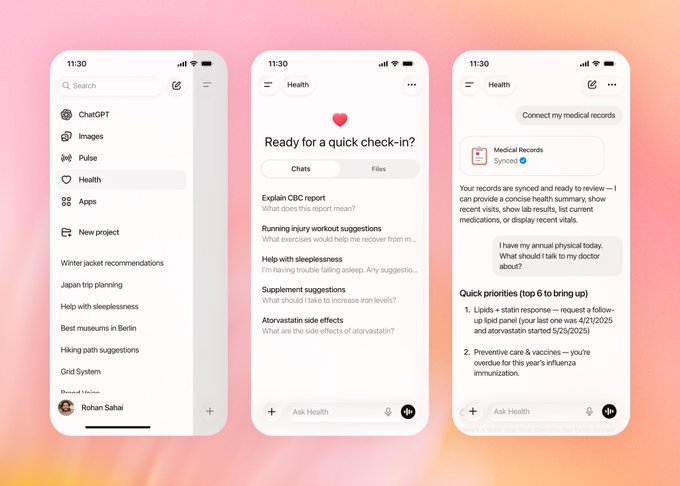
ChatGPT Health (OpenAI): OpenAI is rolling out ChatGPT Health, a dedicated health section inside ChatGPT that can connect to services like Apple Health, Function Health, MyFitnessPal and other wellness apps while keeping those conversations in a separately protected space with stricter privacy rules, as shown in the product screenshots ChatGPT Health UI. The company highlights that Health chats are not used to train foundation models and that users can see and revoke each integration, while positioning the feature for tasks like explaining lab results, preparing doctor visits, and planning sleep, exercise, or nutrition changes rather than for diagnosis or prescribing, according to the deeper explainer thread Health feature overview.

• Context‑aware but bounded support: Example prompts in the interface include “Explain CBC report,” “Running injury workout suggestions,” and “Atorvastatin side effects,” and the synced‑records view suggests talking points for an annual physical—like overdue vaccines or lipid follow‑ups—based on prior labs and medications shown in the UI mockups ChatGPT Health UI.
• Evaluation and clinician input: OpenAI describes the feature as being “built with physicians” and tied to a HealthBench evaluation framework that scores responses on safety, clarity, escalation, and respect for personal context, framing the assistant as a way to interpret fragmented health data rather than to replace clinical judgment Health feature overview.
For creatives and product teams working near health or wellbeing, this is an early example of a mainstream model carving out a regulated‑adjacent space with explicit privacy walls, granular consent flows, and clearly stated limits on what the AI should and should not do.
Utah pilots $4 AI prescription renewals across 190 low‑risk meds
Utah AI prescription pilot (Doctronic/State of Utah): Utah is running a statewide pilot where an AI system autonomously renews prescriptions for 190 medications at $4 per renewal, with a staged oversight phase before full autonomy, according to the program breakdown in the Utah pilot summary. The workflow runs through a Doctronic web page that verifies the patient’s location, reviews history, and asks structured clinical questions before approving a refill, while excluding high‑risk drugs such as opioids, ADHD meds, and injectables, as outlined in the same report Utah pilot summary.
• Staged autonomy and guardrails: For each drug class, the first 250 renewal decisions are double‑checked by clinicians, and only if safety metrics hold does the system shift to fully automated approvals, a structure that effectively treats the AI like a medical resident on probation before independent practice Utah pilot summary.
• Policy signal for AI in care: The pilot’s low fee, rural‑access framing, and explicit omission of complex / abuse‑prone drugs make it a live test case for where US regulators might later draw lines between decision support, semi‑autonomous workflows, and regulated “medical device” AI Utah pilot summary.
The program is positioned as a response to clinician shortages and refill lapses rather than as a diagnosis tool, but its performance and any FDA view on whether this counts as a software medical device are likely to influence where similar autonomous workflows appear in other high‑stakes domains.
While you're reading this, something just shipped.
New models, tools, and workflows drop daily. The creators who win are the ones who know first.
Last week: 47 releases tracked · 12 breaking changes flagged · 3 pricing drops caught