Higgsfield Cinema Studio adds 6 pro bodies, 4K – AI shoots feel blockable

Stay in the loop
Free daily newsletter & Telegram daily report
Executive Summary
Higgsfield flipped Cinema Studio live in the browser, and it’s a quiet reset for AI video people who think in shots, not vibes. Instead of slot-machine prompts, you pick from 6 named camera bodies, 11 lenses, and 15+ director-style moves, then render straight to 4K. The result: frames that look like they came off an ARRI or RED with a real dolly, not a generic zoom filter stapled on after the fact.
Early testers are treating it like “real filmmaking” for short-form. One workflow turns a single still—a woman with a gun in the woods—into an ARRI Alexa 35 action beat with a dolly-out and timed explosion, all from inside the same tab. Another starts with a text prompt, generates a grid of stills that already feel like a shot list, then pushes them into motion while keeping angles, lensing, and character performance consistent. Building a TikTok or Reels narrative in under two minutes stops sounding like marketing copy and starts looking plausible.
Zooming out, Cinema Studio lines up neatly with what we’ve seen from Kling 2.6 and Luma’s Ray3 Modify: the center of gravity is shifting from “describe a cool clip” to “direct this camera,” and that’s a much more native language for working filmmakers.
While you're reading this, something just shipped.
New models, tools, and workflows drop daily. The creators who win are the ones who know first.
Last week: 47 releases tracked · 12 breaking changes flagged · 3 pricing drops caught
Top links today
- Higgsfield Cinema Studio launch page
- Runway Gen-4.5 video model overview
- Luma Dream Machine Ray3 Modify
- BytePlus Seedance 1.5 Pro video demo
- Bria Video Eraser on fal platform
- ComfyUI Template Library introduction
- ElevenLabs Agents Versioning feature
- ChatGPT app store and connectors
- Pictory presentation to video converter
- Google SynthID watermark detection update
- Qwen-Image-Layered layered image editing paper
- Autoregressive video diffusion self-resampling paper
- IC-Effect video effects editing paper
- DEER diffusion plus autoregressive video paper
- Autodesk Flow Studio for students guide
Feature Spotlight
Higgsfield Cinema Studio goes pro (feature)
Higgsfield Cinema Studio ships a browser‑based cinematography toolkit (6 pro bodies, 11 lenses, 15+ moves, 4K), letting creators direct shots like a real set—then animate—without model wrangling.
Cross‑account buzz: a browser studio with real camera grammar lands for creators. Today’s posts show presets for bodies/lenses/moves, one‑click still‑to‑animation, and early hands‑on tests—squarely for filmmakers and designers.
Jump to Higgsfield Cinema Studio goes pro (feature) topicsTable of Contents
🎥 Higgsfield Cinema Studio goes pro (feature)
Cross‑account buzz: a browser studio with real camera grammar lands for creators. Today’s posts show presets for bodies/lenses/moves, one‑click still‑to‑animation, and early hands‑on tests—squarely for filmmakers and designers.
Higgsfield launches Cinema Studio with pro camera bodies and 4K output
Higgsfield has officially launched Cinema Studio, a browser‑based production environment that bakes real "camera grammar" into AI image and video creation, with 6 professional camera bodies, 11 lenses, 15+ director‑style movements, and 4K output aimed squarely at filmmakers and designers launch CTA. The product page stresses that you choose bodies like ARRI, RED, Panavision, Sony Venice, or IMAX, then pair them with lens and move presets, so your AI shots inherit believable optics and motion rather than random pans and zooms product page.

For creatives, the shift is that you no longer fight a generic text‑to‑video model to behave like a dolly, crane, or handheld rig; you pick those concepts first and prompt second, much closer to how a real set works teaser montage. Short‑form creators are already calling this a real "toolkit" rather than a one‑off effect box, with built‑in 4K renders giving enough resolution for serious post, reframing, and platform crops short film take.
Creator workflow shows Cinema Studio turning prompts into multi‑angle stills and animations
Early hands‑on threads walk through Cinema Studio’s workflow: click the new "Cinema Studio" tab, type a prompt (e.g. a retro robot walking in a neon city), then pick a camera body, lens, and focal length to generate a grid of cinematic stills that already feel like frames from a shot list rather than random key art robot workflow.

A follow‑up project shows the same interface using an ARRI Alexa 35 preset to frame a forest zombie hero, with the right panel exposing camera settings and the ability to "Recreate" or publish images—making it easy to iterate angle, lens, and performance while keeping continuity zombie project.
Once you have a sequence of stills, Cinema Studio lets you push them into motion, so the same camera/lens logic drives animated shots; creators are already planning to design full scenes as still storyboards inside Higgsfield, then animate them without ever touching a 3D package teaser montage. For AI directors used to guessing prompts until a model stumbles into the right move, this preset‑first flow is a big time saver and lowers the gap between concept art, previz, and final shots.
Filmmakers praise Cinema Studio as ‘real filmmaking’ for short‑form AI
Independent creators are already stress‑testing Cinema Studio on real storytelling beats and reporting that it "feels like real filmmaking" instead of prompt roulette short film take. Turkish creator Ozan Sihay notes that you can choose camera model, lens, define camera angles and movements, then from a single reference generate multiple scenes, complete with voiceover and dialogue—"Her şeyi yapıyor"—which makes it viable as an end‑to‑end tool for shorts and explainers rather than a single effect pass Turkish review.

Another test from WordTrafficker takes a grounded still of a woman with a gun in the woods, runs it through Cinema Studio with an ARRI Alexa 35 preset, and turns it into a full action beat: the character sprinting through trees as an explosion erupts behind her, captured with a smooth dolly‑out move and synced sound explosion workflow. Meanwhile, Kangaikroto frames it as a gift to short‑form filmmakers: build a cinematic scene in under two minutes by picking body, lens, and focal length like you would on set, instead of wrangling abstract style prompts short film take. Taken together, these early tests suggest Cinema Studio is already good enough for TikTok/Reels narrative pieces, concept trailers, and pitch visuals, especially for teams who think in shots and lenses more than in pure text prompts.
🕹️ Kling 2.6 motion control and performance capture
Continuing momentum, but new creator tests stress precision moves, stability, and voice‑locked characters. Excludes Higgsfield feature; this focuses purely on Kling 2.6 capabilities and field reports.
Creators crown Kling 2.6 Motion Control the strongest model so far
Kling 2.6 Motion Control is starting to look like the default for serious AI video moves, with creators calling it "now clearly the best model in this area" and even the "next era of motion control." Following up on initial launch where Kling first shipped Motion Control, Turkish creator Ozan Sihay’s endorsement plus community threads frame it as the most reliable option for complex camera and subject animation so far turkish review motion control tease.

For filmmakers and animators, the takeaway is that Motion Control is no longer a gimmick: people are getting stable, controllable results often enough to build real pieces around it, though they still warn it can behave unpredictably on some prompts. If you shelved Kling after earlier versions, this wave of hands-on praise is a strong signal to retest it with your own hero shots and action beats.
Performance capture trials push Kling 2.6 toward near‑mocap acting
New side‑by‑side tests show Kling 2.6 getting uncomfortably close to true performance capture: creators feed it a live‑action reference and an image, and it reproduces the actor’s movement, timing, and framing on the stylized character with convincing fidelity performance capture A/B. Following up on performance capture which first highlighted near‑mocap behavior, reviewers now say they’ve "seen things you people wouldn’t believe" while also flagging some morph cuts and occasional weird transitions overview thread.
Action‑anime tests built on Kling 2.6 lean hard into this, delivering fast camera moves, dynamic angles, and persistent character poses that feel close to big‑studio fight scenes, reinforcing that the model can sustain coherent motion over complex sequences rather than just short loops anime action test. The practical read for storytellers is clear: performance‑driven shots are on the table, but you still need to watch for hidden glitches in edits and be ready to re‑roll or cut around them.
Dance and robotics tests highlight Kling 2.6’s fine motion control
Creators are stress‑testing Kling 2.6 Motion Control with precise subjects—solo dance and robotic arms—and reporting that it tracks body parts and timing far better than prior tools. A Japanese breakdown runs a single dancer through full‑body, upper‑body, expression, and finger‑movement tests across live‑action, oil‑painting, and anime styles, showing that the model can obey subtle rhythm and pose changes rather than devolving into jitter dance test thread.
In a separate clip, a robotic arm sequence stays smooth and stable as it pauses and repositions between actions, suggesting the system can handle mechanical, non-organic motion as well robotic arm test

. For you as a director or animator, that means Kling 2.6 is now viable for choreography, product demos, and motion‑design shots where tiny timing wobbles used to give AI video away.
Kling 2.6 Voice Control now keeps character timbre across shots
On the audio side, creators say Kling 2.6’s Voice Control has finally solved the "same character, same voice" problem across multiple shots. Building on voice control which introduced custom voice support, new demos show a character maintaining a consistent timbre and delivery from clip to clip, instead of drifting between takes as many earlier pipelines did voice control demo.
People are also sharing practical recipes: upload a 5–30 second sample, give that cloned voice a name, then tag it directly in the prompt (using an @handle) so Kling routes all generated dialogue through the same voiceprint voice setup screenshot voice prompt clip. For narrative work—series, ads, or UGC characters—that means you can now plan multi‑shot scenes with both body motion and vocal identity staying locked, rather than treating every line as an isolated one‑off.
🎚️ Dream Machine Ray3 Modify: direct with footage
Luma’s Ray3 Modify advances video‑to‑video direction: keyframes, start/end control, identity lock, and stronger physical logic. New today are identity continuity and layered scene‑aware transforms.
Luma’s Ray3 Modify lets you direct Dream Machine videos from real footage
Ray3 Modify is now live inside Dream Machine, letting you drive video-to-video edits from real footage using keyframe-level controls, Start/End frame selection, and layered, scene-aware transforms instead of pure prompt guessing. Ray3 launch thread

For directors and editors, the key hooks are the ability to lock a character’s identity, costume, and likeness across an entire modified clip, preserve the original blocking and physics, and treat it as a “shoot once, reimagine later” pass that fits cleanly into hybrid live-action + AI pipelines. (Ray3 launch thread, workflow breakdown)
Early Ray3 Modify tests show worlds reacting to your performance
Early creators say cranking up Ray3 Modify’s imagination strength makes the generated environment behave as if it’s reacting to their captured motion, turning a basic walk or gesture into an interactive, stylized world that still respects the original performance. creator test

The sentiment is that this shifts AI video from prompt roulette to practical directing: capture one good take, then iterate on look, set, and character identity while keeping timing, emotion, and physical logic intact for short-form films, music videos, and experimental pieces. (creator test, director perspective)
🎞️ Wan 2.6: multi‑shot, pacing, and ‘Starring Roles’
Wan 2.6 keeps spreading into creator workflows; today’s clips emphasize multi‑shot consistency, motion balance, heavy‑motion tracking, and when to use ‘Starring Roles.’ Excludes Cinema Studio feature.
Wan 2.6 creator tests highlight smoother motion balance and heavy‑action tracking
Two fresh motion experiments on GMI Cloud show Wan 2.6 handling both delicate and extreme movement with cleaner pacing than 2.5. In one clip, an anime character’s sprint generated from a single still frame stays light and jitter‑free across the shot, with the creator calling out the “motion balance” and stable run cycle anime motion test.

A second A/B comparison pits Wan 2.5 against 2.6 on a complex, fast‑moving object with camera moves and added audio; 2.6 delivers noticeably smoother camera travel, more consistent object tracking, and more cinematic audio alignment 2.5 vs 2.6 heavy motion. For AI filmmakers pushing whip‑pans, crashes, or VFX‑heavy action, this suggests 2.6 is the safer choice when you care about continuity under stress, especially when paired with GMI’s tuned runtime (cluster engine page).
Wan 2.6’s ‘Starring Roles’ gets a dedicated how‑to for character‑led video
A new walkthrough unpacks how Wan 2.6’s Starring Roles control should be used, framing it as a tool for keeping a chosen character consistent across shots rather than a magic switch you always leave on. The creator focuses on when locking a “lead” helps—dialogue scenes, hero shots, or narrative shorts—and when it can get in the way, such as chaotic crowd scenes or more abstract motion pieces Starring Roles demo.

For filmmakers and animators, the takeaway is that Starring Roles looks less like a gimmick and more like a directing knob: you use it to preserve identity and focus for key characters in multi‑shot sequences, while still leaving room to generate secondary movement and background variety in other passes.
Creator shows Wan 2.6 on GMI Cloud syncing dialogue, SFX, and style in one pass
A new creator test on GMI Cloud has Wan 2.6 generating two short films in very different visual styles from voice‑driven prompts, with lip movements, dialogue, and sound effects reported as blending more smoothly than earlier runs dual style test. Following up on audio motion tests that already showed solid sync and camera work, this one emphasizes that scenes feel “more efficient and practical,” with less need for manual SFX patching between cuts.

Because everything runs through GMI’s hosted stack, the same workflow—voice prompt in, stylized story out—can be rerun with alternative looks or pacing, letting small teams iterate on both performance and art direction without rebuilding each sequence from scratch (cluster engine page).
🎬 Alt video engines and post: Runway, Bria, Grok
Outside today’s feature, creators highlight Runway Gen‑4.5 access/realism, Firefly Boards usage, Bria’s object removal, and Grok Imagine’s live‑action+animation play.
Runway Gen‑4.5 now powers cinematic video inside Adobe Firefly Boards
Runway is pushing Gen‑4.5 beyond its own app as Adobe starts showcasing the model directly inside Firefly Boards, so creatives can generate cinematic clips from within Adobe’s environment instead of bouncing between tools. Runway reiterates that Gen‑4.5 is "available now" with a teaser focused on sweeping, world‑hopping visuals aimed at storytellers and filmmakers Runway promo clip, while Adobe’s Firefly demo highlights Gen‑4.5 driving rich, abstract video textures on Boards canvases Firefly boards teaser Firefly boards demo.


For people already living in Photoshop, Premiere or broader Creative Cloud, this deepens the practical bridge between Gen‑4.5 and existing pipelines, following its recent rollout to all paid Runway plans all plans. It means mood films, motion references, and background plates for edit timelines can be spun up where the rest of the project lives, which should matter to small teams trying to keep version control and branding consistent across tools.
Bria Video Eraser comes to fal for high‑fidelity object and person removal
Inference host fal has added Bria Video Eraser, a model that removes objects or people from footage while keeping background realism and temporal consistency across frames fal launch note. The launch demo shows a person walking through a street scene, then being erased cleanly with the environment reconstructed in motion, which is exactly the kind of fix editors usually burn hours rotoscoping by hand

.
For AI‑savvy editors and social teams, this slots in as a post tool: clean up logos, bystanders, or bad takes without reshoots, and choose between prompt‑based erasing, masked regions, or keypoint guidance depending on how surgical you need to be (erase with prompt, erase with mask ). The key value is speed plus continuity: instead of patchy frame‑by‑frame edits, Bria aims to treat the video as a whole, which should help when you’re iterating on last‑minute client notes or tightening continuity on story pieces.
Grok Imagine is emerging as a playful hybrid live‑action + cartoon video tool
Creators are leaning on Grok Imagine as a sandbox for mixing live‑action footage with animated characters that can speak and react inside the same shot, rather than as a pure text‑to‑video engine. One clip shows a hand entering real‑world footage to greet a wizard character who responds in synced dialogue, giving the whole thing a lightweight, storybook feel that’s very usable for quick shorts or explainers Wizard hybrid test

.
Another example focuses on straight cartoon animation, where simple characters wave, wink, and emote in a way that feels closer to classic 2D TV bumpers than to static image‑to‑video tests Cartoon animation clip

. For storytellers and educators, the appeal is obvious: you can prototype kid‑friendly scenes, mascot interactions, or social content without setting up a full animation stack, and still keep enough emotional expression and dialogue timing to feel like a "real" character interaction.
🖼️ Image direction: GPT‑Image 1.5, Nano Banana, and prompts
Today’s image stack centers on control and iteration: GPT‑Image 1.5 inside Leonardo, NB Pro in Gemini (plus Circle to Search edits), and fresh prompt kits. Excludes Cinema Studio video angle.
Circle to Search adds Nano Banana inline image editing on Android
Google quietly turned Circle to Search into an on‑device image editor powered by Nano Banana: you can circle an object on screen, tap “Edit with Gemini,” and remove or alter it directly from the system UI instead of exporting to a separate app. In the demo, a circled banana vanishes cleanly from the scene, hinting at very fast, localized inpainting and background reconstruction tuned for everyday phone use rather than pro UIs. circle to search demo

For creatives this means quick plate cleanup, object removal, or visual exploration can now happen at the OS layer—storyboard tweaks, mood‑board edits, and rough comps become something you can do on the couch without opening Photoshop‑class tools.
Creators show GPT Image 1.5 in Leonardo fixes control, speed, and text
Leonardo users are stress‑testing GPT Image 1.5 across seven workflows—restoration, restyling, product shots, art styles, B‑roll, background swaps, and manga layouts—reporting far cleaner instruction following, more reliable text, and up to ~4× faster generations than before. Building on Leonardo’s initial launch integration of GPT‑Image‑1.5 launch partner, this new thread shows one‑click colorized photo repair, consistent brand assets, and style changes that don’t destroy details. leonardo feature thread
For AI illustrators and designers, this pushes GPT Image 1.5 from “nice to have” into a serious art‑direction tool: you can iterate product campaigns, storyboard panels, or manga pages from a single asset while keeping logos, faces, and typography locked in.
GPT Image 1.5 + Kling pipeline nails consistent characters across animated shots
ImagineArt wired GPT Image 1.5 into a Kling 2.6 workflow so you design a character once in stills, then animate them through multi‑shot scenes with tight identity and costume consistency. Creators report “total character consistency, amazing camera transitions, transformations” as they move from stills to motion, with prompts and project settings shared openly for others to copy. (kling pipeline demo, extra prompt examples)

For storytellers this means you can art‑direct a hero, generate a handful of key frames with GPT Image 1.5, then let Kling handle cinematic motion without the usual off‑model drift that ruins low‑budget animated pieces.
Miniature ‘product worlds’ prompt spreads as a Nano Banana Pro signature look
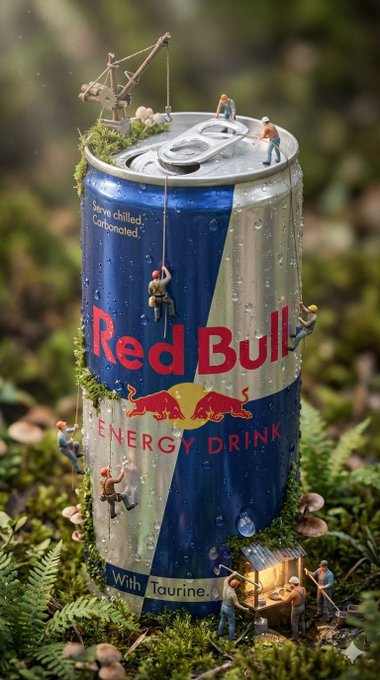
Azed’s longform prompt for an “ultra‑detailed, miniature, surreal world built entirely around the product shown in the attached image” is turning into a recognizable Nano Banana Pro style: soda cans and bottles become skyscrapers, work sites, or villages populated by tiny, lifelike figures. The original Red Bull can diorama spawned Diet Coke, Monster, Moutai, and other brand riffs from the community, all maintaining photoreal macro depth of field, soft volumetric light, and tiny workers interacting with the product as environment. (miniature world prompt, diet coke variant)
For art directors and brand designers, this is a ready‑made concept: drop in a product photo and you get a miniature ecosystem that both highlights features and feels like a self‑contained narrative scene.
Nano Banana Pro in Gemini shines with hyper‑detailed portrait prompts
Power users are pushing Nano Banana Pro inside the Gemini app with page‑long portrait prompts that read like full camera sheets—down to lens, aperture, ISO, lighting direction, pose, and even tattoo placement—and getting photoreal results that match spec surprisingly well. Threads showcase indoor hotel‑room portraits, harsh‑sun beach selfies, and K‑pop‑style dance‑studio shots, each driven by meticulous JSON‑like descriptions of demographics, styling, exact anatomy, and photographic settings. (indoor portrait prompt, beach selfie prompt, kpop selfie prompt)
For photographers, designers, and character artists, the takeaway is clear: if you treat Nano Banana Pro like a DP—feeding it real‑world camera language instead of loose adjectives—you can get directionally accurate framing, depth of field, and lighting that are usable as shot concepts or faux photo sets.
Retro anime tests deepen GPT Image 1.5 vs Nano Banana style rivalry
Following earlier benchmarks where GPT Image 1.5 tended to win on structure and Nano Banana Pro on style structure vs style, Ai_ArtworkGen ran both models through a new gauntlet: transforming favorite retro anime frames into more realistic renders inside Leonardo. Early results suggest Nano Banana better preserves the painterly anime mood while GPT Image 1.5 adds more detail and realism, and the author vents about GPT’s limitation to three aspect ratios (no 16:9 or 9:16), which hurts layout flexibility. (retro anime comparison, aspect ratio gripe)
If you care about anime‑adjacent work, the lesson is that tool choice still depends on whether you prioritize faithful style or structural fidelity, and GPT’s aspect‑ratio caps remain a practical annoyance for storyboard and key‑art use.
‘Classic comics’ prompt pack gives MJ v7 bold superhero aesthetics
Azed shared a reusable Midjourney v7 prompt template for “Classic comics”: 2D cartoon characters charging forward in dynamic poses, with bold black outlines, vivid primary colors, expressive motion lines, and exaggerated perspective for high‑impact panels. ALT text on multiple examples shows how swapping the subject (“cyborg ninja,” “robot gladiator,” “warrior princess”) while keeping the core phrasing yields consistent, print‑ready comic frames. classic comics prompt
If you’re storyboarding action beats or designing key art, this pack gives you a reliable recipe for old‑school superhero energy without reinventing the style every time.
Graphite sketch illusion prompt turns selfies into 3D pencil drawings with Nano Banana
Ai_for_success shared a structured Nano Banana Pro prompt for Gemini that converts an uploaded reference photo into a hyper‑realistic graphite sketch on textured paper—complete with an anamorphic trick where the subject’s hand seems to emerge from the page holding a pencil. The spec breaks down demographics, hair, wardrobe, environment (sketchbook on wooden table), and even dual lighting (internal shading vs external desk lamp), plus macro‑lens settings to emphasise paper grain and graphite sheen. graphite illusion prompt
For illustrators and educators this is a neat template: you can offer “drawn from life” looks and pseudo‑3D desk shots without actual hand sketching, and reuse the JSON‑like structure to build other trompe‑l’œil effects.
Nano Banana Pro movie mashups turn random films into cohesive posters
Creators are turning Nano Banana Pro into a mashup engine, feeding it prompts like “DVD screengrab that is a mashup of these movies: [movie names]” and getting surprisingly coherent hybrid scenes that merge costumes, lighting, and set design from both films. Examples include Avengers Endgame crossed with Who Framed Roger Rabbit?, Se7en with Toy Story, and There Will Be Blood with The Ring, all rendered as single unified frames instead of split‑screen collages. (dvd mashup example, more mashup examples)
The base natural‑language prompt (“choose two random movies that have nothing to do with each other and make a funny mashup movie poster”) base mashup prompt is now a meme format, and for writers or directors it’s a fast way to prototype tonal mashups and genre‑bending worlds.
New Midjourney style ref 8484089068 yields translucent glass figurine aesthetic
Azed introduced a new Midjourney style reference, --sref 8484089068, that consistently produces semi‑transparent, frosted‑glass objects: rockets, cameras, warriors, and abstract seated figures all rendered as glossy, gradient‑tinted sculptures on clean white backgrounds. The look sits somewhere between UI icon set and high‑end product render, with subtle purple/blue color shifts and soft shadows that make the assets feel ready for branding or editorial use. style examples
For designers, this is a handy one‑shot aesthetic for logos, hero images, and app mascots—especially when you want a consistent “glass toy” language across multiple objects without hand‑tweaking every prompt.
🤖 Agent ops and on‑device control
Practical agent plumbing for creatives: on‑device function calling, record‑to‑code automation, agent version control, and a budding app store. Excludes model benchmark chatter covered elsewhere.
Google ships FunctionGemma, a tiny on‑device function-calling model for offline agents
Google released FunctionGemma, a 270M‑parameter Gemma 3 variant tuned specifically for function calling that runs fully on phones and edge devices, turning natural language into API actions without touching the cloud. FunctionGemma overview For creatives, that means you can build offline assistants that control smart lights on set, trigger renders, organize media, or drive custom tools in galleries and installations with low latency and strong privacy.

The model is designed to either complete tasks locally or route harder requests up to larger models, and Google is publishing a training recipe so teams can fine‑tune it for their own toolchains and domains. Google blog post If you’ve been hesitant to wire agents directly into production accounts, this offers a path to keep sensitive operations on-device while still benefiting from structured tool use.
ChatGPT launches an app store, turning connectors into installable apps
OpenAI rolled out an in‑product app store for ChatGPT where “connectors” are now treated as apps, with early entries like Canva, Adobe Photoshop, and Airtable featured in the catalog. Store screenshot For creatives, this shifts ChatGPT from a single assistant into a hub where you can chat while directly pulling in design tools, data sources, and project systems—all from one conversation.
The store surfaces categories like Lifestyle and Productivity, and shows prompt hints such as “@Canva create social posts,” which suggests a more natural, tag‑based way to call tools instead of memorizing slash commands. Longer term, this gives filmmakers, designers, and music teams a new distribution surface for their own niche tools and agents once OpenAI opens submissions more widely.
ElevenLabs adds full Versioning for voice agents, with diffs and staged rollouts
ElevenLabs shipped Versioning for its Agents, giving teams a complete history of every configuration change plus diff views that show what changed, who edited it, and when. Versioning launch You can branch a new version, compare prompts and settings side‑by‑side, and then route only a slice of traffic to the new variant while keeping a stable primary.

For studios using voice agents to handle narration, support, or interactive stories, this is a very practical safety net: you can A/B-test updated scripts or behaviors without risking a full fleet rollout, then lock in the winner. Versioning also gives compliance teams a reproducible log of which exact agent config handled each conversation, which should make audits or rights disputes much easier to resolve. Compliance note
In short, this moves ElevenLabs Agents closer to proper software deployment practices—branches, staged rollouts, and observability—rather than one‑off prompt tweaks that nobody can trace later.
Notte’s new Demonstrate Mode turns browser actions into automation code
Notte introduced Demonstrate Mode, which records your browser actions step‑by‑step and converts them into production‑ready automation code you can edit and reuse. Demonstrate mode summary Compared to the earlier natural‑language Agent Mode we covered via Agent mode, this lets non‑coders “show, don’t tell” for workflows like uploading cuts to platforms, updating Notion bibles, or pulling stats from multiple dashboards.
The promise for creatives is faster, more accurate scripting of all the boring web chores around a project—without spending time describing every click in a prompt. You perform the task once in a real browser, inspect the generated code, then hand it to a technical teammate (or future you) to harden and version‑control like any other script.
📊 Benchmark & platform watch: Gemini 3 Flash pressure
Creators share fresh cost/speed signals rather than new model drops: Gemini 3 Flash outpacing Claude 4.5 on browser automation and posting strong ARC‑AGI cost/score points.
Gemini 3 Flash posts strong ARC-AGI scores at low cost per task
Verified ARC‑AGI Prize results put Gemini 3 Flash Preview at 84.7% on ARC‑AGI‑1 for about $0.17 per task and 33.6% on ARC‑AGI‑2 at roughly $0.23 per task, establishing a new score‑vs‑cost Pareto frontier at several test‑time compute levels. arc-agi summary
Compared with models like GPT‑5.2 Pro at much higher dollar spend per query, this reinforces the narrative from earlier creative benchmarks that Flash offers “Pro‑adjacent” reasoning at a fraction of the price benchmarks, which is why builders are starting to frame Google’s move as direct competitive pressure on OpenAI’s pricing and default model choices code red joke.
Gemini 3 Flash beats Claude 4.5 on browser automation speed and cost
Hyperbrowser’s HyperAgent demo shows Gemini 3.0 Flash completing a live browser‑automation workflow around 2× faster than Claude Sonnet 4.5 while also running more cheaply, reinforcing earlier cost/perf claims from Google’s launch benchmarks benchmarks. browser automation demo

For AI creatives building research agents, social posting bots, or “operate my SaaS dashboard” tools, this is a practical signal that routing automation traffic to Gemini 3 Flash can cut latency and API spend without giving up capability, which is why some devs are openly asking for a verdict on Flash and joking that OpenAI should be in “Code Red” mode on pricing now verdict question code red joke.
🧩 Workflow kits: ComfyUI templates, contact sheets, PPT→video
Hands‑on scaffolding for creators: curated node workflows, multi‑angle contact sheets for shot continuity, and slide decks to narrated videos. Smaller but practical updates today.
ComfyUI ships Template Library of ready-made workflows with local import
ComfyUI has rolled out a new Template Library that lets creators start from curated, task-focused workflows (text-to-image, image-to-image, ControlNet, etc.) instead of wiring nodes from scratch, following up on manager update which aimed to make complex graphs more approachable for non-experts. template library clip Templates can be downloaded and dragged straight into a local ComfyUI install, with the team stressing that users should check required models and custom nodes up front, and hinting that better tagging and metadata for local compatibility is coming soon. local usage note

For AI filmmakers, designers, and illustrators, this is essentially a preset shelf for full node graphs: you can grab a proven pipeline, tweak a few prompts and sliders, and keep all the graph-level control when you’re ready to customize—closing the gap between "one-click" tools and full node-based power.
Glif’s Contact Sheet agent turns a single shot into multi-angle storyboards
Glif has introduced a Contact Sheet Prompting Agent that takes the end frame from a WAN Animate sequence and generates a six-frame contact sheet of new angles for the same moment, designed to feed into Kling 2.5’s Start Frame → End Frame flow for continuous motion. agent announcement Building on their earlier WAN+Kling agents that turned a single idea into full videos auto-video pipelines, this tool focuses specifically on shot coverage—letting you plan over-the-shoulder, close-up, and wide variants around one anchor pose before animating them. workflow overview

For storytellers and ad teams, this behaves like a virtual coverage shoot: you establish performance once in WAN, then use the contact sheet to design edit-friendly angles that Kling can animate into a coherent sequence, instead of rolling the dice per-shot with unrelated prompts.
- Use it to keep wardrobe, lighting, and blocking consistent across a scene while experimenting with framing.
- Treat the contact sheet as a mini storyboard you can share with collaborators before burning more credits on full video.
Pictory converts PowerPoint decks into narrated videos using AI layouts and voice
Pictory is pushing a PPT→video workflow that turns PowerPoint presentations into fully designed videos with AI narration, visual layouts, and branding—positioned for onboarding, training, and marketing content. ppt to video promo Following up on layouts feature, which brought consistent design templates, this update ties layouts to slide structure so you can import a deck, get synchronized scenes per slide, and have AI handle pacing, VO, and scene composition from one dashboard. pictory overview
For creatives who live in Keynote/PowerPoint but need video, this means your existing slide narratives can be reused as scripts: titles become lower thirds, bullet lists become sequences, and you can iterate on narration and style without touching a timeline editor.
Autodesk Flow Studio pitches AI story pipelines to film and design students
Autodesk’s Flow Studio team published a new guide aimed at students, framing the tool as a way to turn class projects into portfolio-ready films and experiments by using AI for previs, layout, and iteration loops. student blog teaser The post encourages using Flow Studio to test big ideas quickly—treating AI as a sandbox where you can fail fast on structure, timing, and look before committing to full production—and links to an educational access program so schools and learners can get in more easily.flow studio blog

For emerging filmmakers and designers, the message is that AI story tools aren’t only for commercial teams: Flow Studio can be slotted into coursework as the place where you block scenes, try different camera moves, and assemble rough cuts, while reserving scarce live-action or 3D time for the concepts that survived that gauntlet.
🧪 Research notes for creative pipelines
Mostly method papers immediately useful to editors and TDs: layered editability, VFX editing, diffusion training fixes, long‑video reasoning, and faster decoding for agent UX.
Qwen-Image-Layered turns any poster into fully editable semantic layers
Qwen-Image-Layered decomposes a flat input image into multiple semantically disentangled RGBA layers (backgrounds, characters, text, objects), so editors can recolor, replace, resize, or move elements without re-generating or repainting the rest of the frame. Qwen layered diagram
For creatives this acts like auto-Photoshop for complex key art: you can swap product shots, translate or restyle typography, or remove characters while preserving the original layout and lighting, all driven by the model’s layer separation rather than handcrafted PSDs. The paper frames this as “inherent editability” and shows consistent results across recolor, revise, remove, and reposition operations, which could slot directly into poster, thumbnail, and UI mockup pipelines once exposed in tools. Arxiv paper
IC-Effect uses instruction-guided DiT for precise, temporally stable video VFX
IC-Effect proposes an instruction-guided DiT-based framework for video visual effects editing that adds things like flames, particles, or characters while keeping the original background intact and maintaining temporal consistency. It trains in two phases—general editing adaptation, then effect-specific finetuning—so it can learn to inject effects from limited paired data without destroying the base footage. IC-Effect summary For VFX and motion designers this promises effect-level prompts like “subtle blue sparks from the sword only when it swings” rather than full scene regeneration, with the model respecting camera motion and scene geometry over many frames. That’s exactly the gap current text-to-video tools struggle with, and if IC-Effect’s in‑context scheme holds up in practice, it could become a drop-in backend for timeline-based VFX editors and TikTok-style effect layers. Arxiv paper
Self-Resampling fixes exposure bias in autoregressive video diffusion
End-to-End Training for Autoregressive Video Diffusion via Self-Resampling tackles the exposure-bias problem that plagues long video generations: models are trained on clean histories but tested on their own imperfect outputs. The authors introduce “Resampling Forcing,” where history frames are deliberately degraded during training, plus a sparse causal mask and parameter-free history routing that let the model learn to recover from its own mistakes while still training in parallel. (Self-resampling summary, Arxiv paper) For creative pipelines this translates to longer, more stable sequences—fewer character melts and camera jitters 10+ seconds in—with no need for complex knowledge distillation or multi-stage hacks. TDs integrating future video models that use this recipe should see better temporal consistency for music videos, multi-shot ads, and narrative pieces without having to micro-edit between segments.
DEER drafts video with diffusion then verifies with autoregressive models
The DEER framework (“Draft with Diffusion, Verify with Autoregressive Models”) decouples video generation into a fast diffusion drafting phase followed by a slower autoregressive verifier that corrects or rejects bad continuations. The idea is to get the diversity and speed of diffusion while letting an AR model enforce stronger temporal coherence and detailed structure, especially for longer clips. DEER teaser clip

For filmmakers and tool builders, that hybrid approach matters because it can cut iteration time: you explore looks and beats with the draft layer, then only pay AR costs on shortlisted candidates. It also maps nicely onto UI metaphors—"quick preview" vs "lock this take"—that editors already understand, and future engines could expose this as a quality slider rather than a wholly different model. Arxiv paper
Jacobi Forcing makes causal parallel decoding 3.8× faster for creative agents
The Jacobi Forcing method shows how to turn pretrained autoregressive transformers into efficient parallel decoders without losing their learned causal reasoning, delivering up to 3.8× wall‑clock speedups on coding and math benchmarks. Instead of training only on teacher-forced sequences, the model is progressively distilled on its own parallel decoding trajectories, aligning training with how it will be used at inference. (Jacobi Forcing recap, Arxiv paper) For creative tools this mostly hits agent UX: story-editing bots, layout assistants, and code-heavy pipeline helpers can respond several times faster while keeping quality. That means tighter live-feedback loops in NLE panels or design tools, and makes multi-step agent chains (e.g. “draft script → break into shots → plan VFX”) feel more like a continuous interaction instead of a series of long pauses.
SAGE trains any-horizon video agents that skim or deep-watch as needed
SAGE (“Smart Any-horizon aGEnts”) presents a multi-turn video reasoning system that learns when to skim, when to dive deep, and when to stop watching, instead of processing every frame of long videos. Using synthetic data from Gemini‑2.5‑Flash plus reinforcement learning, its controller SAGE‑MM decides whether to request more frames or answer now, yielding up to 6.1% gains on open-ended tasks and 8.2% on videos longer than 10 minutes on the new SAGE-Bench. SAGE abstract card
For storytellers and editors, this hints at future assistants that can answer story questions (“where does the pacing sag?”, “when does the character first betray trust?”) over entire cuts without frame-by-frame brute force. It also matters for QC bots that scan dailies or social content libraries for continuity issues, brand risks, or missing beats while staying within reasonable compute budgets. Arxiv paper
Puzzle Curriculum GRPO sharpens vision-language reasoning via self-supervised puzzles
Puzzle Curriculum GRPO (PC‑GRPO) trains vision-language models on three self-supervised “puzzle” environments—PatchFit, Rotation, and Jigsaw—to improve visual reasoning without any external labels. Rewards are structured (binary for rotation, graded partial credit for Jigsaw), and a difficulty-aware curriculum peaks at medium difficulty to avoid flat reward landscapes that usually hurt RL training. (PC-GRPO description, Arxiv paper) For creatives this matters indirectly: stronger vision-centric reasoning is what lets future models better understand storyboards, page layouts, and shot compositions instead of just describing colors and objects. A VLM that’s learned to solve jigsaw-like tasks is more likely to grasp when panels are out of order, when continuity breaks between shots, or when a layout feels structurally off, which is exactly what you want from an AI assistant checking comics, animatics, or moodboards.
Step-GUI’s calibrated rewards boost GUI automation for creative apps
The Step-GUI technical report describes a self-evolving training pipeline for GUI agents, combining a Calibrated Step Reward System with the GUI-MCP protocol to make multi-step UI automation more reliable and sample-efficient. Trained and evaluated on the AndroidDaily benchmark, these agents learn to navigate complex interfaces through step-level rewards rather than only success/fail at the end of a task. Step-GUI summary card
For creative-tool teams this research is a blueprint for “click what I mean” copilots inside editors: think agents that can re-time clips in a timeline, batch-export assets, or configure render settings by actually operating the UI. Calibrated step rewards matter because creative apps often require many precise operations; rewarding partial progress makes agents far more likely to succeed in those long chains. Arxiv paper
🛡️ Authenticity and policy: watermarking and detection limits
Content verification inches forward while detectors struggle on high‑fidelity video; a legal discovery order adds pressure on logs. For creatives: plan proof‑of‑origin and audit trails.
US court orders OpenAI to hand over 20M anonymized ChatGPT logs
A US judge has ordered OpenAI to produce 20 million anonymized ChatGPT user logs in an ongoing copyright case, massively expanding discovery into how people actually use the model. court order summary For creative teams, this signals that detailed interaction logs can be pulled into legal disputes, which raises the stakes on how AI tools log prompts, training references, and outputs that mix your IP with model suggestions. If you’re using ChatGPT (or similar tools) in client work, it’s a good time to tighten your own record‑keeping and contract language around AI assistance, since platform logs are clearly becoming part of the evidence trail.
Gemini adds SynthID checks for AI audio and video
Gemini can now scan media for Google’s SynthID watermark across both audio and video streams, confirming whether content was created with Google AI. SynthID announcement

For filmmakers and editors, this is one of the first mainstream tools that can validate AI provenance inside the same stack you already use for generation, which helps when clients ask "is this actually AI?" and when you need to separate stock, human-shot, and model-made assets. It only works on Google’s own models for now, so it’s not a universal detector, but it’s a concrete step toward routine proof‑of‑origin checks in creative pipelines.
Oxford study shows AI video detectors barely beat coin‑flip on Veo 3.1
Oxford researchers tested whether current AI detectors can spot Veo 3.1 text‑to‑video, and the best model only reached 56% accuracy on a tough ASMR video set, while human experts hit 81% and random guessing would be 50%. detector benchmark

For storytellers, this means highly polished AI video can already pass as real to most automated systems, so you should not rely on generic "AI detection" services for authenticity claims or takedown disputes. Practically, it reinforces the need for positive signals like watermarks and signed export logs from your own tools, plus project‑level documentation, instead of hoping a third‑party classifier will prove what’s real.
🏆 Challenges, credits, and seasonal boosters
Ways to level up or save money today: Freepik’s 500k credits day, Kling’s Motion Control contest, Hailuo’s Xmas pool, OpenArt’s viral push, and Pollo AI credits.
Freepik 24AIDays Day 17 hands 500k AI credits to 100 creators
Freepik’s #Freepik24AIDays rolls into Day 17 with a fresh 500,000‑credit drop: 100 creators will each get 5,000 AI credits if they post their best Freepik AI creation, tag @Freepik, use the event hashtag, and submit the link via the official form within the window. This is a strong chance for designers, illustrators, and video editors already dabbling with Nano Banana Pro and other Freepik models to lock in a sizable production budget for upcoming work. Freepik 24AIDays

If you want to enter, make sure the piece was made with Freepik AI and follow the exact submission flow in the form; the team will select 100 winners for 5,000 credits each, as outlined in the campaign details and rules. (see submission form and campaign overview)
Kling 2.6 Motion Control Dance King contest offers up to $1,000 per work
Kling is using the launch of its 2.6 Motion Control feature to run the “Dance King” contest, dangling cash rewards up to $1,000 per winning work plus large credit grants (up to 16,000 credits for first‑tier winners) for creators who choreograph standout motion‑controlled pieces. Submissions run from Dec 17–31 (PT) and must be both uploaded through the Kling event page and shared on social platforms with the Kling watermark and the required hashtags, making this a timely way for animators and filmmakers to experiment with precise motion capture while potentially offsetting their credit costs. Kling motion contest
If your piece performs well or reaches high view counts, you can land in one of several prize tiers, and top entries may also be featured on Kling’s homepage and official channels, which is extra visibility on top of the cash and credit rewards. (see event page and submission form)
Hailuo Xmas Chaos Universe contest splits a $4,000 prize pool
Hailuo has launched its Xmas Chaos Universe event, inviting creators to quote‑post their Christmas‑themed Hailuo videos (either original works or based on the official Xmas template) with @Hailuo_AI and #HailuoChristmas for a share of a $4,000 prize pool. This runs from Dec 19 to Jan 5 and is tuned for video artists and storytellers already exploring Hailuo 2.3+ to turn holiday concepts into short, stylized clips. Hailuo Xmas event

Because entry is based on content you’re likely making anyway for the season, this contest effectively subsidizes experimentation with new looks or narrative ideas; the linked event page breaks down the reward tiers and judging criteria so you can tailor your submissions toward what Hailuo plans to highlight. (see event details)
OpenArt Viral Video Challenge hits final day for its $6,000 pot
OpenArt’s $6,000 Magic Effects Viral Video Challenge has reached its final day, with creators reminded to submit up to ten ≤10‑second Magic Effects clips generated on OpenArt (everyone gets at least one free run) and tagged with #OpenArtViralVideo by 11:59 PM PST. Following up on viral challenge, which flagged the last three days of the contest, this is now a true last call for motion designers and short‑form storytellers to turn one more experimental idea into a potentially paid, featured template. OpenArt final call

Given the short runtime requirement and the built‑in free generation, this is a low‑risk way to try bolder visual tricks or transitions; the challenge page lays out how winners will be selected and notes that standout entries may become official Magic Effects templates, which can funnel more traffic and credit usage back toward your work. (see challenge page)
Pollo AI’s weekly pet showcase includes a 56‑credit giveaway window
Pollo AI is running a 12‑hour promo alongside its weekly pet and animal showcase, offering 56 free credits via DM to anyone who follows the account, reposts the showcase tweet, and leaves a comment within the time window. For illustrators and character designers curious about Pollo’s style but not yet on a paid tier, those 56 credits are enough to explore multiple variations of custom pet mascots or stylized creatures without touching your own budget. Pollo showcase promo

Because the promo is tied to a short time box, it’s worth acting quickly if you want a small but useful cushion of credits to experiment with Pollo’s look and possibly build assets for future client work or social content.
🎭 Creator culture: boundaries, memes, and sentiment
The discourse itself is news today: a well‑read thread on paying experts for labor, and viral memes dunking on anti‑AI gatekeeping. Useful pulse‑check for marketers.
Turkish AI educator’s viral rant pushes back on “exposure” as payment
Turkish creator Ozan Sihay shared that one of the country’s biggest brands invited him to deliver a 3–4 hour in‑office AI session for free, framing the chance to "meet managers" as his compensation, which he firmly declined as an insult to 25 years of work unpaid ai invite. His thread – "tanışıklık bir nezakettir, ödeme yöntemi değil" – is resonating with AI educators, designers, and filmmakers who are increasingly being asked to do strategic AI work for visibility instead of money, and it’s strengthening the norm that serious AI training and consulting should be budgeted like any other professional service, not bartered for access or clout.
AI creators turn “pick up a pencil” gatekeeping into recurring meme fuel
AI artists spent the day remixing anti‑AI talking points into jokes, from the "zombie vs AI hater" brain gag zombie meme panel to Artedeingenio mocking critics whose posts "average between 0 and 4 likes" while arguing that 1.3k likes is meaningless low engagement jab. Following up on AI haters debate where creators framed detractors as free marketing, new clips dramatize people screaming "AI ARTISTS ARE NOT ARTISTS" and "you literally have to pick up a pencil"

, while others quietly show someone admitting "I don't know how to draw" at a desk

. The mood is clear: pro‑AI creatives see gatekeeping as out of touch, treat anti‑AI meltdowns as content fodder rather than threats, and double down on the idea that audiences care about results, not whether a pencil or a model made them gamer meltdown quote excuses to avoid ai.
Benetton’s AI-heavy FW25 campaign lands with little backlash, seen as “new visual language”
Commentator Eugenio Fierro argues that Benetton’s AI‑driven FW25 visuals mark a cultural turn: fully AI‑generated work like the earlier "Benetton Formula" spot drew acceptance rather than the usual outrage, suggesting audiences now read AI as a legitimate visual language when it fits a brand’s long‑standing identity

. In his view, Benetton’s history of provocative imagery and Colors‑era visual culture means AI doesn’t feel like a gimmick but like another tool for bold casting, textures, and atmospheres that still honor its inclusive DNA benetton ai thread. For fashion and design creatives, the takeaway is that when a brand’s voice is strong and consistent, using AI unapologetically can enhance rather than dilute its image – and backlash seems to shrink when the work feels intentional, not like a cost‑cutting shortcut.
Small boutique’s ChatGPT selfie prompt shows AI portraits going mainstream
A local shop called The Turquoise Door went semi‑viral on Facebook by telling followers to "run to ChatGPT," upload a selfie, paste a detailed Christmas‑themed prompt, and then share their AI portraits in the comments, which quickly filled with women posting their results
. The prompt itself reads like a mini creative brief – lens choice, lighting, wardrobe, pose, and set design – and a marketer on X highlighted it as "the new age of marketing," where non‑tech businesses treat generative AI as a playful, participatory photo booth rather than a niche tool local business promo. For AI‑savvy creators and agencies, it’s a signal that scripted prompts and co‑created AI imagery are starting to feel normal to everyday customers, not just people deep in model culture.
Library talk on “Latent Space Cinema” shows curiosity across non‑technical creatives
Artist Wilfred Lee described a packed evening at Toronto’s North York Central Library discussing "Latent Space Cinema" – how independent storytellers can use AI in film – with a room full of mixed ages and backgrounds who didn’t need a "technical manual" to engage
. He and Nick Fox‑Gieg walked through how constraints, evolving tools, and imagination interact in AI‑assisted filmmaking, projecting surreal space‑themed visuals and concept art while fielding what he called generous, grounded questions library talk recap. For filmmakers, animators, and writers, it’s a small but telling sign that public institutions and non‑tech audiences are keen to explore AI as part of storytelling craft, not only as a controversial topic or a purely technical subject.
Prompters push back on engagement obsession, focus on joy and boundaries
Some AI prompt‑driven creators are openly rejecting the grind for likes, with ProperPrompter saying they "don't care about engagement" and only measure smiles, laughs, and backflips – metrics social platforms can’t track engagement sentiment. Their feed reinforces that stance with gentle boundary memes like a bench‑scene titled "How to tune out the noise" and "How to leave people alone"
, plus a pixel art Pikachu firing lightning into a wind turbine captioned "real power is choosing what receives your energy" choose energy pixel. For AI artists and storytellers, it’s a reminder to treat algorithm metrics as secondary to maintaining mental health and sustainable creative practice in a noisy, sometimes hostile discourse.
While you're reading this, something just shipped.
New models, tools, and workflows drop daily. The creators who win are the ones who know first.
Last week: 47 releases tracked · 12 breaking changes flagged · 3 pricing drops caught