Google Gemini Personal Intelligence beta connects 4 apps – starts for 2 paid tiers

Stay in the loop
Free daily newsletter & Telegram daily report
Executive Summary
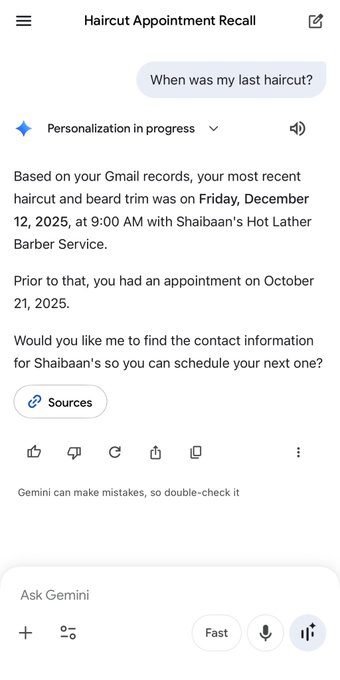
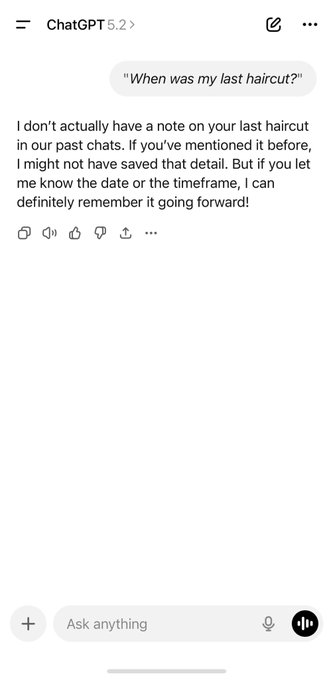
Google began rolling out Gemini “Personal Intelligence” beta: an opt‑in personalization layer that can reason over connected Google data across Gmail, Photos, YouTube, and Search; launch is described as US-first for Google AI Pro and Ultra subscribers; Google leans on consent language (off by default; app-by-app connectors; disable anytime). Public understanding is being shaped by a viral comparison screenshot where Gemini surfaces an exact haircut appointment time and barber name “based on Gmail records,” complete with a “Sources” button; it’s retrieval over accounts more than chat-memory, but there’s no independent audit of how attribution, retention, or failure modes behave across apps.
• Obsidian agent hub pattern: an “AI Command Centre” dashboard treats agents as named operators owning tasks/projects; echoes the same demand for persistent state, outside any single assistant.
• Solar Open report: describes a bilingual 102B MoE model; claims 4.5T synthetic tokens inside a 20T-token curriculum; training details are the artifact, not a shipped product.
Unknowns: connector breadth beyond the 4 apps; whether there’s an API surface vs consumer-only Gemini UI; what “Sources” resolves to when multiple accounts conflict.
While you're reading this, something just shipped.
New models, tools, and workflows drop daily. The creators who win are the ones who know first.
Last week: 47 releases tracked · 12 breaking changes flagged · 3 pricing drops caught
Top links today
- LTX-2 download and model page
- Kling 2.6 Motion Control tutorial
- Kling 2.6 Motion Control on fal
- Nano Banana Pro on fal
- Topaz video upscaler on Freepik
- Runway AI Summit registration
- Hedra ambassador program application
- Wan App download for Starring challenge
- ComfyUI frame interpolation docs
- ArenaRL paper on open-ended agents
- ShowUI-π paper on GUI control
- Solar open technical report
- Tencent Hunyuan 3D creation engine
- Tencent Hunyuan 3D API access
- ModelArk Coding Plan product page
Feature Spotlight
Gemini “Personal Intelligence” beta: opt‑in memory via Gmail/Photos/YouTube/Search
Gemini Personal Intelligence connects your Google data (opt‑in) to make the assistant context-aware—shifting AI from generic chat to life-based recall, planning, and creative support, with privacy controls positioned as “off by default.”
Today’s dominant cross-account story is Google’s Gemini Personal Intelligence beta: a personalized assistant that can (optionally) reason over your connected Google apps. Includes creator chatter comparing Gemini’s recall/context to ChatGPT and early privacy/rollout details.
Jump to Gemini “Personal Intelligence” beta: opt‑in memory via Gmail/Photos/YouTube/Search topicsTable of Contents
🧠 Gemini “Personal Intelligence” beta: opt‑in memory via Gmail/Photos/YouTube/Search
Today’s dominant cross-account story is Google’s Gemini Personal Intelligence beta: a personalized assistant that can (optionally) reason over your connected Google apps. Includes creator chatter comparing Gemini’s recall/context to ChatGPT and early privacy/rollout details.
Google rolls out Gemini Personal Intelligence beta with opt-in Gmail/Photos/YouTube/Search
Gemini Personal Intelligence (Google): Google is rolling out a Gemini beta that can securely connect to your Google apps—Gmail, Photos, YouTube, and Search—to answer with more personal context, starting in the US for Google AI Pro and Ultra subscribers as described in the rollout overview.

The pitch is practical for creators: less re-explaining your own history and more “use my real stuff” assistance (travel planning from emails, decor ideas from your photos), while leaning hard on consent—off by default, you choose which apps to connect, and you can disable it anytime per the rollout overview.
• Use cases shown: examples include trip planning by reasoning over flight/hotel emails and suggestions driven by Photos memories, as shown in the rollout overview.
• Why it’s a competitive shot: the most viral framing today is that deep personal recall is the wedge against ChatGPT, with one poster calling it “the first real step toward an AI that understands your life” in the competitive claim.
What’s still unclear from the tweets: which connectors are available beyond those four, how “Sources” attribution behaves across apps, and whether there’s an API surface or only the consumer Gemini app experience so far.
Gemini Personal Intelligence meme highlights Gmail-sourced recall vs ChatGPT memory limits
Personal recall demo (Gemini vs ChatGPT): A side-by-side screenshot is spreading where ChatGPT says it can’t find a user’s “last haircut,” while Gemini Personal Intelligence reports an exact appointment date/time and barber name “based on your Gmail records,” including a “Sources” button as shown in the haircut comparison.
This is less about a new feature drop and more about how the beta is being understood in public: “memory” as retrieval over your accounts, not just chat history, which is why the post argues “Gemini will eat ChatGPT” in the haircut comparison. The privacy implication is also part of the meme’s impact: the assistant is explicitly citing access to email records, making the opt-in and account-connection model feel tangible rather than abstract.
Obsidian “AI Command Centre” shows an agent-driven second-brain task hub pattern
Agent hub workflow (Obsidian): A creator shared an Obsidian-based “AI COMMAND CENTRE” dashboard built by their agents—tasks, projects, research queues, and owners like “Claude” and “Codex”—framing it as the start of a “second brain” system in the Obsidian hub screenshot.
The connection to the day’s Gemini news is conceptual rather than technical: people want persistent personal context and task state, whether it’s centralized inside Gemini via connected apps or externalized into a workspace hub. The screenshot makes that desire concrete by treating agents as named operators with ongoing work-in-progress, not one-off chat replies.
🎬 Motion-control video rush: Kling 2.6 dance workflows, Wan “Starring,” PixVerse ‘Infinite Flow’
Video creators are clustering around performance-driven generation and continuity: Kling 2.6 Motion Control tutorials + promos, Wan’s ‘Starring’ digital-twin style clips, and PixVerse’s ‘Infinite Flow’ loop narratives. Excludes Gemini Personal Intelligence (covered as the feature).
PixVerse pushes “Infinite Flow” loops with an Aquarium-style evolving scene demo
PixVerse R1 (PixVerse): Following up on R1 reveal (interactive world-model pitch), PixVerse is now showcasing “Infinite Flow” as a looping, continuously evolving video language via “Aquarium,” while also dangling 50 invite codes for engagement in the Aquarium showcase.

The clip is structured like a living loop—each generation mutates the scene while keeping a coherent motif—positioning R1 less as “make one clip” and more as “keep a world running.”
Glif’s Kling Motion Control agent targets actor-to-character transfer for short videos
Kling Motion Control Agent (Glif/heyglif): heyglif is pitching a “dance at home” setup where your own movement becomes the driving reference for a character built from an image, positioning it as usable for socials and client work in the Tutorial teaser.

The core promise is a tighter loop for performance-driven clips—record a reference, pick a character image, and let the agent handle the Motion Control handoff—see the agent entry point in the Agent link.
Kling AI Dance Challenge pushes deadline rules and a 260M-credits prize pool
Kling AI Dance Challenge (Kling): Kling is pushing a deadline reminder for the #KlingAIDance contest centered on Kling 2.6 Motion Control and the “one photo → dance” format in the Challenge reminder.

• Compliance requirements: Entries need the Kling watermark, the hashtag, the phrase “Created By KlingAI,” tagging @kling_ai, and a UID DM before the deadline per the Challenge reminder.
• Timeline + reward tiers: The campaign poster in the Rewards poster spells out the Jan 11–21 submission window and the 260 million credits framing.
A behind-the-monitor Kling Motion Control demo shows controlled set walkthroughs
Kling Motion Control (Kling): A Replicate repost highlights a behind-the-scenes style capture: a monitor-recorded walkthrough of a miniature/prop-like environment with a smooth, directed camera move, framed as “Stranger Things with Kling Motion Control” in the Monitor capture demo.

This kind of clip matters because it spotlights motion control as a “virtual camera” tool (blocking and parallax) rather than only as character dance transfer.
Adobe spotlights an end-to-end Firefly Video Editor workflow plus a Jan 15 cutoff promo
Firefly Video Editor (Adobe): A creator walkthrough emphasizes doing prompt-based video edits and sequencing inside the Firefly Video Editor as a single workflow, as shown in the Workflow walkthrough.

A separate promo post ties this to an “unlimited generations” window that ends January 15, covering image models and the Firefly Video model for Pro/Premium and eligible credit plans, per the Promo details.
Creators claim 30-second motion-control clips are becoming usable
Longer-form motion control (Video AI): A community RT is calling out a notable threshold—30-second video length with “very decent stability,” with the post attributing the performance clip (shown on-screen) to JulianoMass on IG, per the 30-second stability claim.
The evidence here is social proof rather than a reproducible benchmark (no settings, seeds, or prompt spec shared in the RT), but it signals that creators are starting to judge motion control on sustained temporal coherence, not just 5–8 second bursts.
PixVerse continues to frame R1 as a real-time stream that responds to input
PixVerse R1 positioning (PixVerse): A separate promo post reiterates the core claim that R1 is architected for real-time, responsive generation (described as an interactive stream rather than a fixed clip), explicitly calling out 1080p output and fluid response to user input in the R1 recap clip.

This is mostly reiteration rather than new specs, but it shows PixVerse leaning hard on “persistent world” language as the differentiator, not cinematic style or prompt adherence.
Ray3 Modify gets a new “walk through realities” demo in Dream Machine
Ray3 Modify (Luma Dream Machine): Following up on Modify demo (time-of-day transforms), Luma is now showing a variant where a single walking shot transitions through multiple environments—effectively “scene morphing” while keeping a moving subject—per the Reality-walk demo.

The visible emphasis is continuity across edits (same subject motion, different worlds), which keeps pushing Modify toward an editorial tool, not just a generator.
Wan App’s #starringwithwan challenge publishes dates and a weighted scoring formula
#starringwithwan challenge (Alibaba Wan): Wan is running a timed contest—Jan 15–Jan 28—requiring creators to use the “Starring” feature and post with specified hashtags, with Top 20 prizes listed in the Challenge context and reiterated in the Challenge announcement.

A separate rules post also spells out a weighted engagement formula—Total Score = (Likes × 10) + (Comments × 15) + (Bookmarks × 20) + (Views ÷ 10)—and a data snapshot cutoff at 23:59 UTC, Jan 28, per the Scoring formula.
A Wan 2.2 + SVI2.0Pro pipeline targets longer, steadier clips (81+ frames)
Longer-form Wan workflow (Alibaba Wan): Wan is amplifying a developer workflow that combines Wan 2.2 with SVI2.0Pro v1.1 to produce 81+ frame generations with improved stability, while also describing a method to mitigate slow-motion artifacts in Lightx2v, according to the Workflow note.
This is an implementation detail rather than a new model release, but it maps directly to a creator pain point: extending shot length without the “drift” and timing artifacts that show up in longer generations.
🧩 Workflow recipes & agents: Freepik Variations storyboards, product agents, multi-tool filmmaking graphs
Most practical creator value today is in repeatable pipelines: image→storyboard grids, agent-driven short video assembly, and product visualization workflows. Excludes Kling-centric motion-control news (covered in Video).
Freepik Variations turns one image into coherent storyboards; 9 images now, 16 rumored next
Freepik Variations (Freepik): Creators are treating Variations as an image→storyboard generator—drop in a single image and it outputs a coherent multi-shot panel grid without needing a text prompt, as shown in the [workflow thread](t:120|workflow thread) and echoed in early tests from [storyboard preview](t:95|storyboard preview).

• Scale and structure: One creator reports it supports up to 9 images at once, with work underway toward 16-image support, and that it auto-cuts and upscales each generated frame, according to the [capacity notes](t:209|capacity notes).
• From panels to video: The same thread claims you can generate a video from the new frames inside Freepik, with the creator citing Veo 3.1 for the final clip in their pipeline, per the [video step notes](t:209|video step notes).
A separate example set shows what the output panels look like in practice in the [results collage](t:223|results collage).
Sora Pro workflow claim: generate one-shot product videos from a product grid
Sora Pro (OpenAI): A workflow claim is making the rounds that you can one-shot product videos by feeding a product grid into Sora Pro, with “no editing needed,” as demonstrated in the [grid-to-video clip](t:127|grid-to-video clip).

The evidence shown is a drag-and-drop of the grid followed by multiple polished outputs; no details are given about constraints (grid layout requirements, clip length limits, or failure modes) beyond what’s visible in the demo.
Flora.ai multi-tool pipeline: two images in, multi-shot “doomed pirate ship” sequence out
Flora.ai (Flora): A creator shares a concrete multi-stage film pipeline that starts from two images (a location plus a character reference) and produces a multi-shot “doomed pirate ship” sequence, with results shown in the [sequence preview](t:38|sequence preview).

A follow-up post shows the underlying node graph with chained steps (including prompt blocks and intermediate thumbnails), giving a more “production graph” view of how the shots are assembled, as captured in the [workflow graph screenshot](t:149|workflow graph screenshot).
The graph view is the main new artifact here: it makes the pipeline legible as a reusable pattern (inputs → staged generations → outputs) rather than a one-off prompt.
heyglif ships Deconstructed Product agent for Nano Banana Pro exploded-view loops
Deconstructed Product agent (heyglif): heyglif says the agent is now live for turning a single product image into an “exploded” deconstruction via Nano Banana Pro, then animating the transition and reversing it for a loop, as described in the [agent launch post](t:121|agent launch post).

The access entry point is the [agent link](link:228:0|Agent page), which frames it as an automated deconstruction + loopable animation workflow rather than manual keyframing.
Leonardo’s Luxury Product Contact Sheet Blueprint spreads as a fast product-grid workflow
Luxury Product Contact Sheet Blueprint (Leonardo): A step-by-step workflow is circulating for generating studio-style product shot grids in minutes using Leonardo’s “Luxury Product Contact Sheet Blueprint,” starting from “any image,” per the [workflow intro](t:86|workflow intro) and the [setup steps](t:216|setup steps).
• Optional pre-step: The thread suggests isolating the product first with Nano Banana Pro (“Show me the [PRODUCT] alone on a black background”), as outlined in the [isolation step](t:217|isolation step) and run on the [Leonardo generator page](link:217:0|Leonardo generator page).
• Blueprint entry point: The blueprint is accessed from Leonardo’s home UI, as described in the [blueprint step](t:218|blueprint step) with the landing surface at the [Leonardo home page](link:218:0|Leonardo home page).
The posts emphasize a repeatable “product photo → isolate → grid” pipeline, rather than promptcrafting a single hero image.
heyglif reiterates Food Talking agent: 40-second short in under 10 minutes (script→voice→captions)
Food Talking agent (heyglif): Following up on Talking food agent (agent-driven talking-food shorts), heyglif now quantifies the pitch as a ~40-second video in under 10 minutes, with the agent handling script → character → animation + voice → music → captions, per the [updated tutorial post](t:106|updated tutorial post).

The only additional artifact in today’s tweets is a direct tutorial pointer, referenced in the [tutorial follow-up](t:222|tutorial follow-up), but no technical knobs (voice model choices, style controls, or export settings) are spelled out beyond the pipeline list.
SAM-3D shows up as a fal Serverless building block for 3D-from-image workflows
SAM-3D on fal Serverless (fal): fal highlights a build that uses SAM-3D via fal Serverless, positioning it as a composable API step inside larger creation pipelines, as stated in the brief [usage note](t:59|usage note).
There aren’t details in the tweet about output formats, latency, or how SAM-3D is being chained with render/texture steps, but the signal is that creators are operationalizing 3D-from-image as a callable service rather than a local-only experiment.
🖼️ Image model show-and-tell: ImagineArt 1.5 Pro realism, Grok Imagine character/style demos
Image generation today is dominated by capability demos and model comparisons (especially high-detail realism), plus ongoing Grok Imagine style experiments. Excludes pure prompt/template drops (tracked separately).
ImagineArt 1.5 Pro teased with native 4K output and micro-detail realism
ImagineArt 1.5 Pro (ImagineArt): Early-access posts frame 1.5 Pro as a realism-forward upgrade with “native 4K” output and unusually fine surface detail, per the Early access claim and the follow-up examples in 4K detail thread; positioning also leans toward a directed “cinematic workflow” rather than lots of prompt fishing, as echoed in the Cinematic workflow tease.
• Detail style people are pointing at: The thread calls out “bark-like skin” micro-texture on a forest-elf/dryad concept in the 4K detail thread, and keeps reinforcing “lighting, reflections, textures” as the main sell, as shown in the Lighting stress test.
• Availability signal: The same author says the model “isn’t available just yet” and claims launch is “VERY SOON,” according to the Availability note.
There’s no spec sheet, pricing, or public release date in these tweets, so the only hard signal today is the quality claim plus the attached examples.
ImagineArt 1.5 vs 1.5 Pro side-by-side shared using a rooftop pool prompt
ImagineArt 1.5 vs 1.5 Pro (ImagineArt): A direct A/B comparison post uses the same “rooftop infinity pool” fashion prompt to contrast 1.5 with 1.5 Pro, presenting Pro as the higher-fidelity option in the Side-by-side comparison.
The tweet doesn’t include settings, seeds, or any systematic eval—just a paired visual—so it reads as a quick quality snapshot rather than a benchmark.
Grok Imagine keeps spreading via fantasy scenes, character likenesses, and cartoon dialogue beats
Grok Imagine (xAI): Creators continue posting short capability demos that emphasize “world-building” vibes, recognizable character renderings, and style-consistent cartoon scenes, as shown across the fantasy-world clip in the Fantasy world demo, the likeness post in the Saul Goodman demo, and the cartoon-interaction example in the Cartoon dialogue demo.

• Likeness-style test: One post claims it “absolutely nails Saul Goodman,” paired with a short reveal/zoom clip in the Saul Goodman demo.
• Cartoon interaction framing: Another focuses on “dialogues for any cartoon style,” highlighting multi-character beats rather than single portraits in the Cartoon dialogue demo.
• World-render mood: Separate clips pitch the experience as “stepping into a fantasy world” and “create magical worlds,” as described in the Fantasy world demo and Magical worlds demo.
Midjourney “still raw” clip shows messy early generations improving within a run
Midjourney (Midjourney): A short screen-recording argues Midjourney can look rough at first but converges toward a usable result after iterations, using “a cat wearing a suit” as the example in the Generation convergence clip.

The post is framed as a reminder that cherry-picked finals can hide how many odd drafts appear mid-run, per the Generation convergence clip.
Nano Banana Pro “Street View” surrealism expands with an abandoned-casino Vegas set
Nano Banana Pro “Street View” (Google): Following up on Street View trend (surreal Street View-style realism tests), a new set of images frames an “abandoned casino” location in Las Vegas with table games, chips, and slot machines rendered as if captured by Google Street View, as shown in the Vegas Street View set.
• Meme adjacency: In the same broader thread ecosystem, a Street View-like mashup swaps in a Pikachu head on a tactical body in the Pikachu Street View parody, showing how quickly the format is becoming a remix template.
These are still artifacts more than product updates—useful as a fast “does it hold up to documentary UI framing?” stress test, not as a new feature announcement.
🧪 Prompt packs & style references: Midjourney srefs, Nano Banana JSON scenes, ‘B‑movie still’ formula
A heavy day for reusable recipes: Midjourney style references, long structured prompts (JSON-like), and shareable aesthetic formulas for creators. Excludes tool capability announcements and multi-tool workflows.
Crochet doll-style prompt template spreads with cozy, handcrafted yarn aesthetics
Prompt template (Image gen): A reusable “crochet doll-style” recipe is circulating, specifying soft yarn texture, handcrafted detail, vivid accent colors, a prop, and a cozy warm setting as the core controllables, as written in the Crochet doll prompt examples.
• What creators are copying: The structure cleanly parameterizes [subject], [color1], [color2], [prop], and [setting], which makes it easy to batch-generate consistent “doll” series across characters, as shown in the Crochet doll prompt.
Grok prompt formula: cinematic close-up still from an invented B-movie genre
Prompt formula (Grok Imagine): A simple but reusable “invented nostalgia” template is circulating: “cinematic still from an [genre] movie… close up shot… wearing [outfit]… [action]… looking at camera… in the style of a scene a b-movie,” as posted in the Prompt formula.
• Why it’s sticky: The formula is short, slot-based, and deliberately under-specified on plot, which makes it suited to generating a series of plausible ‘frames’ from movies that never existed, per the Prompt formula.
Luxury packaging reveal / premium unboxing prompt template for product shots
Prompt template (Product photography): A long-form “luxury packaging reveal” prompt is being shared that locks in macro product-photo composition, pristine hands at frame edges, tactile materials (matte paper, emboss, foil), clean white background, and a strict “no watermark / no extra text” constraint, per the Unboxing prompt text.
• Why it’s reusable: The template is written to be drop-in for any [product] and leans on lighting + micro-texture language to keep outputs looking like controlled studio photography, as reflected in the Shared unboxing grid.
Nano Banana Pro JSON: 2×2 art process sheet (sketch→line→shade→final) without labels
Nano Banana Pro prompt (Process grid): A detailed JSON prompt is being shared to generate a square 2×2 “timelapse process sheet” layout—top-left sketch (non-photo blue), top-right clean lineart, bottom-left strict grayscale shading, bottom-right final—while hard-banning any labels or UI, as specified in the Process sheet JSON.
• Constraint design: It explicitly enforces same composition across panels and adds a long negative prompt list (text/watermarks/desk/hands/3D look), which is the core trick for keeping the grid usable as a clean social post, per the Process sheet JSON.
Veo 3.1 prompt: street dance performance with handheld orbit and reactive smoke
Veo 3.1 (Flow) prompt (Video): A structured “Street Dance Performance” prompt is being shared with explicit choreography beats (freeze → isolations → spin → stomp), plus a low-angle handheld orbit and volumetric smoke reacting to movement, per the Veo 3.1 prompt.

• Look targets encoded: It calls out wet reflective floor, a single vertical yellow light bar, and flicker synced to the beat—useful anchors for maintaining a music-video stage vibe, as seen in the Veo 3.1 prompt.
Kling vs Seedance comparison prompt: skier escaping volcanic eruption
Comparison prompt (Video): A single “Skier escaping eruption” prompt is being used to contrast model behavior, specifying a helicopter pan/tracking shot beside a lava river melting snow and generating steam, as written in the Skier prompt.

• Why this prompt works for comparisons: It forces both large-scale environment dynamics (lava glow on snow, steam plumes) and precise framing (skier locked in lower-left third), which makes visual tradeoffs easier to spot, per the Skier prompt.
Midjourney style ref --sref 4202157130: retrofuturistic engineering blueprint look
Midjourney (Style reference): A specific style reference, --sref 4202157130, is being shared for a vintage engineering manual / cutaway-diagram aesthetic (technical drawings, annotations, blueprint paper), as described in the Style reference description.
• Where it shines: The examples emphasize multi-view schematics and internal cutaways (submarines, airships, robots), suggesting it’s strong for “designed object” storytelling frames, as shown in the Style reference description.
Midjourney style ref --sref 703306635: 70s/80s children’s anime cel aesthetic
Midjourney (Style reference): A new-to-this-feed style reference, --sref 703306635, is being positioned as a 70s/80s European-Japanese children’s TV anime look with flat color, analog grain, and hand-painted backgrounds, per the Style reference writeup.
• Practical use: It’s framed as a way to get consistent “cel texture” nostalgia for character shots and simple environments, matching the Style reference writeup.
Wan 2.5 Pro prompt: downhill go-kart chase with GoPro action aesthetic
Wan 2.5 Pro prompt (Video): A copy-ready prompt block for a “Downhill Kart Race” scene specifies an action-adventure GoPro look, dynamic chase-cam weaving, dust/grass debris, and edge motion blur, as shared in the Wan 2.5 prompt.

• Key control lever: The prompt’s camera section (“Dynamic Chase Cam… weaving left and right”) is doing most of the work to sell speed and realism, as visible in the Wan 2.5 prompt.
Midjourney style drop --sref 6277370345: illustrative caricature set (cat/superhero)
Midjourney (Style reference): A “newly created style” reference, --sref 6277370345, is shared as an illustrative set that holds across caricature portrait, textured cartoon animals, and superhero character poses, as shown in the Sref share.
• What to notice: The look leans on chunky outlines and a pastel/limited palette with crayon-like texture, based on the Sref share.
🛠️ Finishing passes: Topaz Upscaler updates, frame interpolation, restore pipelines
Today’s post tools focus on making AI footage publish-ready: upgraded upscaling/restoration controls and workflow templates for smoothing motion or adding structure. Excludes net-new generation models.
Freepik updates Topaz Upscaler Video with scene-by-scene restoration controls
Topaz Upscaler Video (Freepik): Freepik is rolling out an updated Topaz Upscaler experience positioned as a full restoration pipeline—highlighting “more flexibility and better quality scene-by-scene,” not just a one-click 4K upscale, as announced in the Update announcement.

The same update is being framed by creators as a practical “publish-ready” step for AI video and heavily compressed footage, because it bundles multiple finishing passes in one place—see the breakdown in Restoration pipeline recap.
• What’s in the pipeline: Upscale, denoise, restore, stabilize, and interpolate frames are all called out as core knobs for “all video types,” according to the Update announcement.
• Why scene-by-scene matters: The pitch is that you can tune enhancement per shot (faces vs fast motion vs dark scenes) rather than applying one aggressive setting across a whole export, as described in the Restoration pipeline recap.
Availability is stated as “now available on Freepik,” with a direct “try it now” CTA in the Try it now link.
ComfyUI publishes reusable preprocessor template workflows for Depth/Lineart/Pose/Normals
Preprocessor templates (ComfyUI): ComfyUI shared a new set of reusable “core conditioning” template workflows—Depth, Lineart, Pose, Normals, plus Frame Interpolation—aimed at consistency and faster iteration across image and video projects, as outlined in the Template workflows thread.

Rather than being model-specific, this is about standardizing the prep steps that many pipelines repeat (ControlNet-style structure extraction, relight-friendly normals, pose capture), so teams can swap generators without rewriting the scaffolding, per the Template workflows thread.
Frame interpolation as a finishing pass for smoothing low-FPS AI video (16fps focus)
Frame interpolation (ComfyUI): ComfyUI is explicitly pitching interpolation as a finishing-pass tactic: generate in-between frames to smooth motion and lift low-FPS outputs—calling out ~16fps as a common pain point—without re-generating the underlying video, as explained in the Interpolation explainer.
This frames interpolation less as a “VFX luxury” and more as a practical post step for AI-native footage, where motion cadence can be the limiting factor even when single frames look strong, per the Interpolation explainer.
🖥️ Open & local video stacks: LTX‑2 momentum and real-world speed notes
Open-source video tooling remains a key creator beat, with LTX‑2 adoption milestones and fresh performance anecdotes. Excludes cloud-only promos and non-runtime platform news.
LTX-2 crosses 1,000,000 Hugging Face downloads
LTX-2 (Lightricks): Following up on Audio claims (open-source video+audio positioning), the team says LTX-2 has hit 1,000,000 Hugging Face downloads, framing the growth as “in the open” and “trained with community” in the Download milestone post.

The practical signal for local-video builders is demand density: a big enough user base tends to harden installs, forks, optimizations, and third-party nodes faster than closed models—especially when creators are pushing real-world workflows instead of toy demos, as implied in the Download milestone post.
LTX-2 community speed note: 20s 720p in 99s
Local LTX-2 performance: Following up on Speed anecdote (early local timing reports), a new screenshot claims ~20 seconds of 720p output generated in 99 seconds, alongside a system resource readout, in the Timing screenshot.
This kind of “wall clock” report is the sort creators actually plan around (scene count per hour, queue expectations), even though it’s still anecdotal without full settings disclosure (steps, sampler, VRAM pressure), as shown in the Timing screenshot.
LTX-2 repost spotlights local 4K and audio claims
LTX-2 (Lightricks): A community repost positions LTX-2 as a “next level” open-source video model that runs locally, claims up to 20 seconds of 4K, and can generate video with audio, per the JP capability recap.
This is still claim-level (no attached eval artifact in the tweet), but it’s a useful shorthand for where LTX-2 is trying to compete: longer shots and higher-res outputs without leaving the open ecosystem, as described in the JP capability recap.
Replicate repost claims ~19s video+audio generation for LTX-2
LTX-2 on Replicate (Replicate): A Replicate repost cites a speed datapoint that LTX-2 can generate video + audio in ~19 seconds for a short clip, as stated in the Speed claim repost.
Because this is a reposted performance note without the full harness details (GPU, batch/steps, duration, resolution), it reads more like a “what’s possible” ceiling than a portable benchmark—still, it’s a concrete number that creators will recognize as iteration-loop relevant, per the Speed claim repost.
LTXStudio posts a short community clip tagged to LTX-2
LTXStudio (Lightricks ecosystem): A short “Eat Me” clip gets shared while tagging the LTX model account in the Community clip, a small but concrete signal that people are publishing outputs (not just benchmarking) around the model.

It doesn’t include settings or a workflow breakdown, but it adds to the pattern that LTX-2 usage is spreading through creator-native posting, as seen in the Community clip.
🧱 3D creation & evaluation: Tencent HY 3D workshops + new benchmarks
3D creation shows up as both community practice (workshops + engine) and evaluation infrastructure. Excludes 2D image-only prompts and pure video motion-control items.
Meta releases MapAnything benchmark on Hugging Face for multi-view 3D reconstruction eval
MapAnything (Meta): Meta is reported to have released the MapAnything benchmark on Hugging Face, positioning it as a universal evaluation suite for multi-view 3D reconstruction, as noted in the Benchmark mention.
For 3D builders, the practical value is that reconstruction systems tend to get compared across mismatched datasets; a “universal” benchmark claim implies more standardized scoring and cross-model comparability, although the tweet itself doesn’t include metrics, task breakdowns, or baseline tables beyond the Benchmark mention.
Tencent HY 3D hosts Shenzhen creator workshop, citing 3M+ downloads since 2024
Tencent HY 3D (Tencent): Tencent says it brought creators to its Shenzhen HQ to test the latest HY 3D capabilities; it also claims the open-source HY 3D model has passed 3 million downloads since its 2024 launch, while positioning its 3D Engine (and API) as the production surface for global creators, as described in the Workshop announcement.
• Community co-creation format: Tencent frames the session as rapid, feedback-driven building—teams producing “high-quality models in just one hour,” per the Workshop announcement.
• Distribution signal: The “3 million downloads” number is the clearest adoption datapoint in the post, and it’s presented alongside the productization push (engine + API) in the Workshop announcement.
Tencent HY 3D shares “Emotional Series” object set (Sadness/Joy to Peace)
HY 3D example set (Tencent): Tencent highlighted a themed “Emotional Series” of simple 3D objects meant to show fast iteration and concept clarity (not character realism), tying it back to the Shenzhen workshop sharing culture in the Workshop context and the follow-up examples in the Fear and Surprise set.
• Objects as emotion carriers: Examples include “Sadness” as a melting candle and “Joy” as a bubbling drink (recapped in the Workshop context), plus “Anxiety” as a 99+ notification bubble and “Anger” as a pressure cooker (also recapped in the Fear and Surprise set).
• Later pair + capstone: The follow-up shows “Fear” as a crying poo emoji and “Surprise” as a gift-box character, then points to “Peace” as a chair, as outlined in the Fear and Surprise set.
📅 Creator programs & gatherings: Runway AI Summit, Hedra ambassadors, Wan challenge
A busy calendar day: a major NYC summit, multiple creator/ambassador programs, and app challenges aimed at showcasing character-driven generation. Excludes purely promotional credit farming.
Runway sets a March 31 NYC AI Summit with Kathleen Kennedy keynote
Runway AI Summit (Runway): Runway announced a daylong, in-person AI Summit in New York on March 31, 2026, positioning it as a cross-industry gathering across media, film, advertising, and tech, with the inaugural keynote set to be Kathleen Kennedy (Lucasfilm) as stated in the Summit announcement.

The registration site is already live—see the Registration page referenced in the Registration post—and the page copy lists an early bird price of $350 alongside an expanded speaker roster (including Adobe and NVIDIA leadership) beyond the initial keynote tease.
Hedra opens applications for its Ambassador Program
Hedra Ambassador Program (Hedra): Hedra formally launched an Ambassador Program with applications open now, offering ambassadors full access to creative tools, early feature previews, a direct feedback channel to the team, and a creator community, as outlined in the Program launch post.

The monetization angle is explicit in the application flow: the program page describes a 15% commission on paid subscriptions for up to one year, tracked via an affiliate link, as detailed on the Application page shared in the Apply link.
Wan App launches #starringwithwan challenge running Jan 15–28
#starringwithwan (Wan App / Alibaba Wan): Wan App kicked off a creator challenge running Jan 15–Jan 28, where entries are made using the “Starring” feature (cast a lead character into a video) and shared on X with #starringwithwan and #wanapp; top 20 creators are slated to receive a 1-month Premium membership code, per the Challenge announcement and the product framing in Starring feature post.

The official challenge hub is linked from the announcement—see the Challenge page—which also sits next to Wan’s broader pitch that “Starring” is about consistent, character-driven clips (a “digital twin” feel) rather than one-off generations, as described in the Starring feature post.
Wan App posts the scoring formula for #starringwithwan (likes, comments, bookmarks, views)
Contest mechanics (Wan App / Alibaba Wan): Wan App published a fully engagement-weighted scoring formula for #starringwithwan entries—Total Score = (Likes × 10) + (Comments × 15) + (Bookmarks × 20) + (Views ÷ 10)—and says the final snapshot will be recorded at 23:59 (UTC), Jan 28, 2026, according to the Scoring formula post.
• Anti-cheat + rights: The same ruleset includes a stated zero-tolerance policy for bots/fake engagement and notes that participants grant Wan permission to feature submissions on official channels, as written in the Terms and conditions.
ImagineArt circulates a Creator Program intake call
ImagineArt Creator Program (ImagineArt): A Creator Program intake post is being circulated via reposts, inviting AI creators to apply/join as members, as seen in the Creator program repost. Details on benefits, selection criteria, and compensation aren’t specified in the captured repost text, so this reads as a recruitment signal rather than a product capability update.
🎞️ Finished work & narrative drops: indie AI films and looping world pieces
A few standout releases and showcases: a longer-form short film release and experimental ‘infinite loop’ video art. Excludes generic tool demos without a named piece.
Victor Bonafonte releases ECHOES, an AI-assisted emotional sci‑fi short about illness and time
ECHOES (Victor Bonafonte): A new long-form narrative drop landed today—ECHOES, described as a sci‑fi concept that turned into “something far more intimate and emotional,” focusing on illness, time, and memory-coping “mental planets,” as written in the ECHOES release note and reiterated in the repost with credits.

• Production + toolchain context: The post frames it as “not a one-day experiment” and calls out collaborators and tools—produced by @wearedivastudio with special thanks to @freepik and @runwayml (and also @WildCatRecords in one version), as listed in the ECHOES release note and echoed in the repost with credits.
The piece reads less like a tool demo and more like a statement about slower, intention-driven AI filmmaking—see the way the creator foregrounds craft and iteration in the ECHOES release note.
PixVerse showcases “Aquarium” as an ‘Infinite Flow’ evolving loop built with PixVerse R1
Aquarium (PixVerse): PixVerse highlighted “Aquarium” by @kikkawa_mese as a looping, continuously evolving scene—positioning it as proof of PixVerse R1’s “Infinite Flow” direction (interactive, never-ending video behavior) in the Aquarium showcase.
• What’s notable for storytellers: Instead of a single fixed clip, the demo emphasizes a persistent world feeling—each generation “breathes new life into the tank,” per the framing in the Aquarium showcase, which aligns with PixVerse’s broader “real-time world model” pitch shown in the R1 positioning recap.
The open question is how controllable these loops stay over longer runs (continuity, drift, and directing), since today’s posts are showcase-first rather than a spec/controls breakdown.
📚 Research & benchmarks to watch: RL tournaments, GUI action models, new open reports
Research posts skew toward agents and interaction: RL ranking methods, GUI control, and big technical reports, plus a few Hugging Face benchmark drops. Excludes any bioscience/medical research content.
ArenaRL proposes tournament-style RL to avoid reward-model “discrimination collapse”
ArenaRL (paper): A new RL setup for open-ended agent tasks replaces scalar “score each answer” rewards with tournament-based relative ranking—aiming to prevent reward models from collapsing into near-ties and noisy gradients, as outlined in the paper link and detailed on the Hugging Face paper page in Hugging Face paper page.
The core idea is pairwise comparisons within groups (process-aware ranking) rather than point scoring, which the authors argue scales better when differences between agent trajectories get subtle.
• Why creatives should care: this kind of reward shaping tends to show up later in “agentic” creative tools (research, planning, long-horizon editing) because it can make iterative self-improvement less brittle when tasks don’t have a single obvious correct answer.
Solar Open technical report describes a 102B bilingual MoE with 4.5T synthetic tokens
Solar Open (technical report): The Solar Open report describes a bilingual Mixture-of-Experts model at 102B parameters, emphasizing data-scarce language coverage via synthetic data generation and RL-style optimization, as summarized in the paper link and expanded on the Hugging Face paper page in Hugging Face paper page.
It claims 4.5T tokens of high-quality synthetic data and a 20T-token progressive curriculum, plus an RL framework called SnapPO for reasoning optimization.
This is mostly a “how they trained it” artifact, not a creator tool drop. Still, these reports tend to foreshadow what capabilities (and language coverage) will be cheap and widely available in downstream creative models.
ShowUI-π demos flow-based GUI control as “dexterous hands”
ShowUI-π (research demo): A short demo shows a flow-based generative approach for interacting with GUIs—framed as turning models into “dexterous hands” for interface actions, per the demo post.

The visible takeaway is less about chat and more about control primitives (cursor/drag-like action sequences), which is the building block for agents that can actually drive creative software and web tools, not just describe steps.
Meta’s MapAnything benchmark targets universal 3D reconstruction evaluation
MapAnything (Meta): Meta is said to have released the MapAnything benchmark on Hugging Face, positioned as a universal evaluation suite for multi-view 3D reconstruction, according to the benchmark repost.
For AI filmmakers/designers working with 3D-from-images/video, benchmarks like this matter because they push model builders toward measurable improvements in geometry consistency, not just prettier renders.
Microsoft’s FrogMini (Qwen3-14B base) claims strong SWE-Bench performance
FrogMini (Microsoft): A reposted note says Microsoft released FrogMini on Hugging Face, built on Qwen3-14B, with claims of state-of-the-art performance on SWE-Bench-style coding evaluation, as mentioned in the release repost.
The tweet is headline-only (no linked eval artifact in the dataset here), so treat performance claims as provisional until there’s a reproducible benchmark card or run log surfaced alongside the model.
Open-source AI question: what would help startups contribute more?
Open science (community prompt): A discussion prompt asks what startups and mid-size tech companies need in order to contribute more to open science and open-source AI, as echoed in the discussion repost (and repeated in duplicate repost).
This isn’t a product release, but it’s directly tied to whether creative tooling stays “API-only” or continues to get credible open alternatives (models, evals, datasets, reproducible training notes).
🗣️ Voice agents & conversational video control: enterprise deployments + flow models
Voice news is lighter today but includes a notable enterprise customer-service deployment and a model aimed at controlling conversational flow for real-time video interactions.
ElevenLabs brings AI voice agents to Deutsche Telekom customer support
ElevenLabs (ElevenLabs): ElevenLabs says it’s partnering with Deutsche Telekom to roll out “realistic AI voice agents” for customer service via both app and phone—positioned as 24/7 coverage with no waiting time, and framed as augmenting support with more human-like interactions in the partnership announcement.
• Deployment framing: The messaging emphasizes availability and customer experience (always-on, reduced queues) rather than headcount replacement, as described in the partnership announcement.
What isn’t specified yet: timelines for launch, which languages/markets are included beyond “Europe’s largest telco,” and whether this is a full agent replacement for IVR flows or a more limited escalation layer.
Tavus introduces Sparrow-1 to control conversational flow for real-time video
Sparrow-1 (Tavus): Tavus is being cited as introducing Sparrow-1, a model aimed at conversational-flow control for real-time conversational video—i.e., controlling pacing/turn-taking and dialog progression as a first-class capability, per the Sparrow-1 mention.
The tweets don’t include a paper link, benchmark table, or demo clip today, so claims like “sets the benchmark” should be treated as unverified until Tavus publishes an eval artifact or public samples.
🏗️ Where creators run models: platform plans, model marketplaces, ‘Netflix of AI’ pitches
Platform-layer news includes multi-model access plans and new places to run/generate creative work. Excludes single-model capability demos (covered under image/video).
BytePlus launches ModelArk Coding Plan with multi-model switching from $5/month
ModelArk Coding Plan (BytePlus/ByteDance): BytePlus is pitching a new ModelArk Coding Plan that bundles access to multiple coding-capable models—GLM‑4.7, Deepseek‑V3.2, GPT‑OSS‑120B, Kimi‑K2‑thinking, and ByteDance‑Seed‑Code—with an Auto mode that selects a model per task, as described in the [plan announcement](t:158|plan announcement). A launch offer claims pricing starts at $5/month (50% off list) with an extra 10% referral discount, according to the same [plan announcement](t:158|plan announcement).
• Tooling surface: The positioning explicitly calls out working with Claude Code, Cursor, and “other mainstream IDEs,” with manual model switching or Auto routing, per the [plan announcement](t:158|plan announcement).
This reads less like a single-model release and more like a “one subscription, many backends” layer for day-to-day coding workflows.
Runware adds Bria FIBO Lite endpoint for faster text-to-image generation
Bria FIBO Lite (Runware): Runware says Bria FIBO Lite is now available on its platform, positioning it as a speed-focused image model trained via a two-stage distillation approach to get “high-quality outputs in fewer steps,” per the [availability note](t:126|availability note). The model is listed with a runnable playground via the [model page](link:236:0|model page).
This is a straightforward marketplace availability update: another production-ready image option added to Runware’s hosted catalog.
Crystal Upscaler video upscaler goes live on Replicate as a hosted endpoint
Crystal Upscaler (Replicate): Replicate amplified that Crystal Upscaler is now “live on Replicate,” pointing to a hosted page for running the upscaler as an API/playground workflow, per the [Replicate reshare](t:37|Replicate reshare) and the linked [endpoint page](link:37:0|endpoint page). The listing emphasizes portrait/face/product upscaling and “fidelity to the original,” based on the [endpoint page](link:37:0|endpoint page).
This matters as distribution: it’s another “run it without hosting it” option for teams standardizing on Replicate for media pipelines.
FableSimulation teases a “Netflix of AI” catalog and opens early access
FableSimulation (Fable): FableSimulation is marketing an early-access product framed as “the Netflix of AI,” with a UI teaser showing a catalog-like interface and a call to join via bio, according to the [early access teaser](t:82|early access teaser).

The pitch is explicitly about packaging many AI capabilities as a browsable media/catalog layer, rather than showcasing a single underlying model.
💳 Access changes worth noting: Firefly unlimited window + recurring trial nudges
Pricing chatter is mostly limited-time access windows and trial prompts that affect how much creators can generate this week. Excludes the Kling/Higgsfield bundle details (covered in Video).
Adobe Firefly offers unlimited generations for paid plans through Jan 15
Adobe Firefly (Adobe): Adobe is running a limited window where Firefly Pro, Firefly Premium, and some credit plans get unlimited generations on Firefly’s image models and the Firefly Video model through January 15, as described in the promo note shared alongside a Firefly video-editing workflow in Promo callout and reiterated with the same cutoff date in Unlimited generations details.
This matters mainly as a throughput unlock for teams batch-generating variations (concept frames, boards, and short video iterations) while the cap is lifted; the tweets don’t specify which “eligible credit plans” qualify beyond the wording in Unlimited generations details, and there’s no pricing delta called out in the posts.
ChatGPT shows 30-day Plus trial modal; users cite regional offer confusion
ChatGPT Plus (OpenAI): A ChatGPT web modal is circulating that pushes a “Try Plus free for 30 days” upgrade, framing benefits as “more personalization,” “advanced reasoning,” “higher file upload limits,” and “expanded image generation,” as shown in the screenshot posted in Trial modal screenshot.
• User sentiment: One poster explicitly says they’re “not subscribing again” and adds they “barely use ChatGPT,” tying their reluctance to pricing/offer fatigue in Trial modal screenshot.
• Regional offer mention (unverified): The same post claims “in India, ChatGPT Go is free for a year,” but provides no official source beyond the anecdote in Trial modal screenshot.
Net: today’s signal is less about model capability and more about recurring upgrade prompts and mixed clarity on what’s available where.
📣 Creator mood & distribution reality checks: algorithms, “cook quietly,” and Hollywood anxiety
Discourse today is less about new tools and more about creator psychology: frustration with the algorithm and debates about judging AI work from WIP clips. Excludes product announcements unless the conversation is the point.
“Pixar didn’t post every broken render”: a pushback on WIP-driven GenAI criticism
Creative discourse (GenAI): A widely shared argument compares today’s GenAI backlash to judging Pixar by internal test renders—i.e., social feeds over-index on rough experiments, while professional workflows are being refined off-camera, as laid out in Pixar WIP analogy and clarified in Follow-up note.

• What it’s responding to: The post frames “random WIP clips and rough experiments” as a distorted sample of what’s actually being built, per Pixar WIP analogy.
• What it’s not claiming: The author explicitly says this isn’t an anti-sharing stance; it’s about how people place judgment on open experimentation, as stated in Follow-up note.
AI workflows compared to synthesizers’ normalization arc in music
Creator psychology (Normalization argument): A post draws a straight line from early synth backlash to eventual mainstream adoption—claiming “79% of all chart music” uses synthesizers in some form—and positions AI workflows as the next version of that arc, per Synthesizer analogy.
The point isn’t a new tool release; it’s a cultural claim that legitimacy debates fade once workflows become boring infrastructure, as argued in Synthesizer analogy.
Creators vent about X’s algorithm and posting incentives
Creator distribution (X): A recurring creator complaint sharpened into a blunt question—“Is anyone actually happy with the algorithm?”—paired with the claim that current ranking dynamics feel like they actively discourage posting, as framed in Algorithm frustration post.
The practical subtext for AI creatives is that discovery volatility is becoming part of the production constraint: you can have strong work and still feel punished by timing/format swings, according to the Algorithm frustration post framing.
“Hollywood is cooked” becomes shorthand for AI-video anxiety
Entertainment disruption sentiment: A short, punchy “Hollywood is cooked” post continues the meme that AI-native production will undercut traditional pipelines, with the mood carried more by vibe than specific claims in Hollywood cooked post.

What’s notable is how the rhetoric is now anchored to “performance” (acting/motion) rather than only image quality—i.e., the fear is about workflow replacement, not just visuals, as implied by the framing in Hollywood cooked post.
🧰 Single-tool how-tos: instant film credits and text animation templates
A small set of practical, single-tool tutorials aimed at speeding up finishing/editing work—especially for filmmakers and short-form creators. Excludes multi-tool pipelines (handled in Workflows).
Mitte AI turns a name list into cinematic end credits via a single prompt
Mitte AI (Mitte): A simple “finishing” workflow is circulating for generating film end credits by typing “create ending credits” and pasting the credits list, as demonstrated in the end credits demo and spelled out step-by-step in the quick instructions; the flow also includes choosing a style preset (e.g., “VanGogh”) before generating, per the end credits demo.

The core value for filmmakers is that it treats end credits as a promptable asset (layout + typography + motion) rather than a timeline edit, with the “paste names” step acting like a lightweight template mechanism, as shown in the end credits demo. For reference, the tool entry point is shared in the Mitte site.
Mitte AI’s end-credits flow extends to sci-fi typography looks
Mitte AI (Mitte): A follow-on example emphasizes that the same end-credits prompt flow can be pushed into a sci-fi treatment, with typography and overall vibe controlled via description rather than manual design, as shown in the sci-fi credits example and framed as “flexible…not just one style” in the sci-fi credits example.

This is less about a new feature and more about a repeatable single-tool finishing pattern: generate credits once, then iterate on typography/motion direction in text until it matches your film’s tone, as discussed alongside the original “create ending credits” walkthrough in the end credits workflow.
Pictory AI shares a template workflow for animating on-screen text
Pictory AI (Pictory): Pictory is pushing a practical tutorial on animating text overlays (titles/captions) to keep short-form videos moving visually, with an example walkthrough in the text animation demo and a deeper step-by-step guide linked in the Text animations guide.

The guide highlights a menu of entry/exit animation types plus speed adjustments (useful when you need the same script to feel punchier without changing footage), as described in the Text animations guide.
While you're reading this, something just shipped.
New models, tools, and workflows drop daily. The creators who win are the ones who know first.
Last week: 47 releases tracked · 12 breaking changes flagged · 3 pricing drops caught