HunyuanImage 3.0-Instruct ships 80B MoE – 13B active for edits

Stay in the loop
Free daily newsletter & Telegram daily report
Executive Summary
Tencent rolled out HunyuanImage 3.0‑Instruct as a native multimodal image-editing model: 80B MoE with 13B activated params; positioned as “understand → reason → synthesize” via a native Chain‑of‑Thought schema and MixGRPO alignment. The demos emphasize targeted add/remove/modify with minimal collateral damage plus first-class multi-image fusion; the immediate rollout friction is access—Tencent’s public try link is labeled PC‑only—and there are no independent benchmarks or eval artifacts in the launch thread yet.
• Clawdbot: community setup guides push back on “Mac mini required,” with Raspberry Pi claims; deployed “one agent brain, many surfaces” across Telegram/Slack; auth tokens expiring show up as the recurring ops pain.
• Artlist: reframes from stock library to AI production platform; cites $260M ARR and +50% YoY; targets Spring 2026 for a unified workflow and a “Artlist Original 1.0” image model with 4 styles.
• ProtoMotions v3.1 (NVlabs): modular sim-to-real stack; full control-loop ONNX export; claims AMASS-scale training in <24h.
Across these threads, “thinking” edits, agent orchestration, and one-click UIs are converging into pipeline stories; reliability and access constraints (PC-only trials, missing dependencies) remain the unglamorous bottleneck.
While you're reading this, something just shipped.
New models, tools, and workflows drop daily. The creators who win are the ones who know first.
Last week: 47 releases tracked · 12 breaking changes flagged · 3 pricing drops caught
Top links today
- HunyuanImage 3.0-Instruct image editor demo
- Hedra Elements creative building blocks signup
- Adobe Firefly Boards workflow page
- Runway Gen-4.5 image-to-video example
- Lovart Veo start and end frames tutorial
- PixVerse Berlinale AI film submission call
- PixVerse Berlin submission portal
- Runway Summit 2026 registration
- HeyGen agent skill for avatars
- Pictory AI Studio custom visuals guide
- AI video progress breakdown article
- Cinematic AI influencer workflow article
Feature Spotlight
Clawdbot goes mainstream: local agents, setup guides, and agent-everywhere memes
Clawdbot is exploding across creator Twitter as the “agent that actually does things,” with practical setup guides and integrations—signaling a shift from chatbots to always-on personal automation for creatives.
Cross-account surge around Clawdbot as the current “agent that actually does things” obsession—people swapping setup tips, hardware myths (Mac mini vs Raspberry Pi), and agent integrations. This category excludes video/image model releases and focuses purely on agent tooling + how people run it.
Jump to Clawdbot goes mainstream: local agents, setup guides, and agent-everywhere memes topicsTable of Contents
🤖 Clawdbot goes mainstream: local agents, setup guides, and agent-everywhere memes
Cross-account surge around Clawdbot as the current “agent that actually does things” obsession—people swapping setup tips, hardware myths (Mac mini vs Raspberry Pi), and agent integrations. This category excludes video/image model releases and focuses purely on agent tooling + how people run it.
Clawdbot setup chatter says a Raspberry Pi is enough
Clawdbot (community): A practical setup narrative is spreading that pushes back on the “buy a Mac Mini” myth—one creator says they run Clawdbot from a Raspberry Pi and “have many agents running from it,” alongside a walkthrough + tips roundup in the setup guide roundup. This matters because it reframes Clawdbot as a low-friction, always-on helper you can host cheaply, not a desktop-only toy.
The same thread implies the real bottleneck is less the hardware and more the operational bits (tokens, channel integrations, and keeping agent sessions stable), as described in the setup guide roundup.
HeyGen ships an “any agent” skill that can run Clawdbot behind avatars
HeyGen (HeyGen): HeyGen released a “Claude Code (any agent) skill,” with explicit callout that you can power avatars using your preferred agent—including Clawdbot—according to the skills announcement. For creators, the interesting part is the implied wiring: agent generates the script/logic, HeyGen generates the avatar performance, and Remotion handles programmatic rendering.
The artifact shown in the skills announcement frames it as a 4-step production loop (write script → generate avatar → build composition → render video), which is closer to a repeatable pipeline than a one-off demo.
Builders are already hooking Clawdbot into Replicate for image tasks
Clawdbot + Replicate (community): An early builder update says their “Day 1” Clawdbot progress includes hooking it up to Replicate “for image gen and editing,” as echoed in the Replicate RT. That’s a concrete sign Clawdbot is being used as an orchestrator—handing off creative actions (generate, edit) to hosted model endpoints instead of trying to do everything inside one agent runtime.
What’s still unclear from the snippet in the Replicate RT is which model(s) they chose on Replicate and how they’re handling output review/approval loops.
Multi-channel Clawdbot setups are becoming the default pattern
Deployment pattern: People are treating Clawdbot less like a single chat and more like infrastructure—deploy it into multiple channels (Telegram, Slack) and even shared rooms alongside other “agent CLIs” (Codex CLI, Gemini CLI, Claude Code), as laid out in the multi-channel setup note. That’s a concrete shift toward “one agent brain, many surfaces,” which is exactly how creators end up using these tools day-to-day.
• Ops friction: The same post flags Discord-style auth as a pain point (“token… keep expiring”), which is a useful warning if you’re trying to keep always-on agents alive, per the multi-channel setup note.
A ClawdBot meme ties into “ChatGPT 5.2 cites Grokipedia” claims
ClawdBot (virality signal): A new meme thread claims “ChatGPT 5.2 is citing Grokipedia as a source across a wide range of queries,” framing it as ecosystem cross-pollination and tagging it “ClawdBot,” according to the Grokipedia claim.
The post doesn’t include reproducible examples or screenshots beyond the meme image in the Grokipedia claim, so treat the citation claim as unverified; the measurable part is the branding—ClawdBot is being used as shorthand for “agents everywhere,” even when the underlying behavior is about other models.
Clawdbot is getting a “JARVIS” identity (and retro-hardware cosplay)
Clawdbot (community): People are anthropomorphizing it as a personal assistant—one thread asks “Did anyone else name their Clawdbot JARVIS?”, as seen in the JARVIS naming post. The vibe is reinforced by a novelty mockup showing “Clawdbot — THE AI THAT ACTUALLY DOES THINGS” running on an Apple Newton MessagePad in the Newton mockup.
This kind of branding matters because it nudges expectations toward autonomy and reliability (the “assistant” promise), not just chat.
Clawdbot’s adoption wave is being memed as “Mac Mini required” life automation
Clawdbot (meme economy): The current virality engine is overtrust humor—“went to the store while clawdbot fixed everything wrong in my life,” paired with the running gag that someone bought a Mac Mini “just to run clawdbot,” as shown in the Mac Mini boots to CLI.

There’s a visible tension between the meme and the practical guidance: other creators keep emphasizing you don’t need that hardware, per the Raspberry Pi claim. The jokes (including “she’s a 10 because she bought a mac mini…”) still function as social proof, as seen in the reply riff.
Clawdbot is being positioned as what Siri/Recall never became
Clawdbot (comparative narrative): A reaction clip frames Clawdbot as the thing people wish legacy assistants were—“People who have worked on Windows Recall, Siri etc… looking at people gushing about Clawdbot,” per the reaction clip.

It’s not technical evidence, but it’s a useful signal: creators are narrating Clawdbot as an “agent that actually does things,” and that story is spreading faster than feature lists.
🎬 Cinematic motion tests: Kling 2.6 fights, Runway worlds, and Grok Imagine clips
Hands-on video outputs and motion quality checks from creators—mostly Kling 2.6 camera choreography, Runway Gen‑4.5 worldbuilding, and short Grok Imagine experiments. Excludes Clawdbot (feature) and excludes prompt dumps (covered in Prompts/Style).
Lovart uses Veo 3.1 Start & End Frame to turn two stills into a shop promo
Veo 3.1 Start & End Frame (Lovart): Lovart demos an ad workflow that starts from two anchors (a shop photo + a product image) and generates a short cinematic promo between them, explicitly positioning it for quick storefront marketing in the Shop promo demo.

The key creative idea is treating “start” and “end” images as art-direction constraints, with the in-between motion doing the persuasion work, as shown in the Shop promo demo.
Runway Gen-4.5 I2V test: on-screen 'mode switch' into thermal heat-map grading
Gen-4.5 image-to-video (Runway): A creator is stress-testing Gen-4.5 on VFX-style “UI + color pipeline” tricks—starting with a night-vision look and snapping into a thermal/heat-map grade via an on-screen mode switch, as described in the Mode-switch spec and framed as a broader camera/VFX exploration in the Gen-4.5 motion thread.

This is less about photorealism and more about whether Gen-4.5 can preserve motion continuity through an aggressive grade transformation and overlay moment, as shown in the Mode-switch spec.
Runway Gen-4.5 worldbuilding vibe check: Alternate Mars, 1984
Gen-4.5 image-to-video (Runway): A longer worldbuilding piece (“Alternate Mars, 1984”) is being shared as an atmosphere test—tone, environments, and continuity across shots—rather than a single hero VFX moment, according to the Alternate Mars post.

The emphasis here is “build worlds,” with the clip functioning like a mini lookbook for production design ideas, as shown in the Alternate Mars post.
Kling 2.6 combat readability check: one clean hit, one clear reaction
Kling 2.6 (Kling AI): A “warrior vs giant creature” clip is framed like a readability test—can you track the attack, feel the impact, and see the opponent react—per the Combat clip post.

The action is staged around a single decisive beat (strike → flash → recoil), which is often the most reliable structure for current text-to-video fight shots, as shown in the Combat clip post.
Kling 2.6 creators are talking about physics, intent, and 'directing behavior'
Kling 2.6 (Kling AI): Beyond individual clips, there’s a creator framing emerging that Kling 2.6 is crossing into more usable action because motion feels more inertial and impacts/collisions read more logically, with EugenioFierro3 explicitly arguing “we’re starting to direct behavior” in the Kling 2.6 framing thread.

Treat this as sentiment, not a benchmark—there are no quantified evals in the tweets—but the language shift toward “control” and “consistency” is the notable signal in the Kling 2.6 framing thread.
Kling 2.6 gets a typography-and-timing stress test with kinetic title cards
Kling 2.6 (Kling AI): A short graphic/typography animation pushes timing, interpolation, and legibility (big kinetic type, fast beat changes) rather than character realism, as shown in Uncanny_Harry’s Typographic clip post.

• Why it matters for filmmakers: These “title card” style shots are often the easiest place to hide model artifacts—motion blur and graphic design can carry polish even when character animation would break, as seen in the Typographic clip post.
Captain Tsubasa as a mecha: a transformation-to-kick motion gag using Grok Imagine
Grok Imagine (xAI): A short “sports-to-mecha” transformation gag is being shared as a motion+staging test (energy build, silhouette change, payoff kick), with Artedeingenio explicitly calling out mixing Midjourney with Grok Imagine in the Mecha Tsubasa post.

This kind of sequence is a compact way to test temporal continuity across a hard-to-render event (full-body morph) while still ending on a readable key pose, as shown in the Mecha Tsubasa post.
Grok Imagine gets a low-poly motion demo that holds style through a camera move
Grok Imagine (xAI): A low-poly, stylized animation test is being shared as a “style holds up in motion” check—broad shapes, simple shading, and readable movement—per the Low-poly style demo.

This kind of style is a practical stress test because it reveals temporal wobble quickly (edges, silhouettes, flat gradients) without needing photoreal texture detail, as shown in the Low-poly style demo.
Grok Imagine VFX-style test: moon collision with Earth in a short simulation clip
Grok Imagine (xAI): A speculative “what if” VFX beat—moon impacting Earth—is being used as a quick plausibility/timing test for large-scale destruction motion and scale cues, as shown in cfryant’s Moon impact post.

It’s a useful kind of clip for evaluating whether the model can sell speed + scale without the shot turning into abstract noise, as seen in the Moon impact post.
Silhouette + flash background is still the fastest way to sell impact in 6 seconds
Micro-animation timing pattern: A short Venom-like scream animation uses a classic “black silhouette on flashing background” approach to create perceived intensity with minimal detail, as shown in the Venom micro-clip.

The technique is a reminder that, for very short clips, contrast design and cut rhythm can carry the moment even when fine facial animation isn’t the point, as seen in the Venom micro-clip.
🧩 Copy‑paste prompts & style refs: Midjourney srefs + Nano Banana ad recipes
Today’s shareable, reusable creative inputs: Midjourney style references and full prompt blocks (especially product/ad photography). Excludes multi-tool workflows (covered in Workflows) and excludes pure capability announcements.
Nano Banana Pro prompt for cinematic photo restoration upgrades
Nano Banana Pro (Freepik): Techhalla shared a long, structured restoration prompt that treats the input as a “compromised source” and instructs the model to rebuild it into an “iconic… ‘Master Shot’ photograph” while preserving likeness/pose/geometry, as shown in the [prompt screenshot](t:32|Prompt screenshot).
The prompt is unusually production-minded: it calls for “cinematic lighting” (including Rembrandt/chiaroscuro), “8K hyper-realism” texture upgrades, a large-format camera look with shallow DOF and creamy bokeh, plus a film-emulsion grade, all specified in the [prompt screenshot](t:32|Prompt screenshot).
Midjourney style ref --sref 1151159020 for vintage Ghibli look-lock
Midjourney: Artedeingenio shared --sref 1151159020 as the style reference behind a “beautiful vintage Ghibli aesthetic,” explicitly framing it as a starting point for creating video with that look, according to the [sref share](t:23|Sref share).
The attached examples lean into hand-painted backgrounds, warm transit/travel motifs (streetcar, airship, train station), and soft color grading that stays readable in wide shots, as shown in the [sref share](t:23|Sref share).
Nano Banana Pro skincare ad prompt for clean macro flat-lays
Nano Banana Pro (Freepik): Azed shared a copy-paste prompt for “high-end skincare advertising” that reliably yields premium, e-comm-ready packshots—top-down flat lay, ingredient surround, glossy wet surfaces, and a frozen splash moment, as written in the [prompt share](t:2|Prompt share) and reposted verbatim in the [raw prompt text](t:39|Raw prompt text).
The core recipe is very specific: “100mm lens look”, “f/8 sharp focus”, “warm beige seamless background”, “soft directional sunlight”, “crisp realistic shadow”, “ultra realistic macro product photography”, “no extra text”, “8k”, “1:1” according to the [prompt share](t:2|Prompt share).
Runway Gen-4.5 prompt for night-vision to thermal “mode switch” effect
Runway Gen-4.5 (Image to video): ai_artworkgen shared a full, copyable prompt that bakes in a VFX-style “UI switch” plus an aggressive color-grade transition—green night vision → on-screen mode switch overlay → thermal heat map—per the [prompt text](t:92|Prompt text).
The prompt is explicit about the palette and readability: “subject burns in bright orange and yellow” against a “deep cool blue background,” with the scene described as “running frantically through the forest snow,” as written in the [prompt text](t:92|Prompt text).
Midjourney style ref --sref 5816413498 for moody teal fog concept art
Midjourney: Azed dropped a “newly created style” reference code, --sref 5816413498, alongside a small set of example images that show a consistent palette (teal/cyan atmospherics, warm orange/red accents) and fashion/editorial character framing, as shown in the [style drop post](t:15|Style drop post).
The examples include smoky portraits, teal-mist character designs, and a silhouette samurai scene—useful when you want cohesion across a set without rewriting a full style prompt, per the [style drop post](t:15|Style drop post).
Midjourney style ref --sref 983752010 for anime-fantasy concept art characters
Midjourney: Another Artedeingenio style reference drop, --sref 983752010, is described as “digital illustration in an anime fantasy concept art look” with influence from westernized anime, video game art, and editorial illustration, per the [style reference note](t:28|Style reference note).
The examples skew toward clean, isolated character sheets (bold costume silhouettes, readable props, high-contrast capes/armor) that are handy for RPG cast exploration, as shown in the [style reference note](t:28|Style reference note).
Niji 7 mashup prompts: The Walking Dead in Attack on Titan style
Niji 7 (Midjourney): Artedeingenio posted a mashup concept—The Walking Dead adapted into an Attack on Titan aesthetic—and says the full prompts are provided in the image ALT text, as noted in the [mashup post](t:36|Mashup post).
This is a practical way to “port” an IP’s character archetypes into a different visual language while keeping consistent framing (9:16, cinematic lighting, stormy skies, ruin), as shown across the [Rick prompt example](t:36|Mashup post) and the accompanying set in the same post.
Storyboard prompting: “2×2 grid split stack” as the anchor phrase
Adobe Firefly Boards: Heydin_ai highlighted a keyword-level constraint for storyboard grids: include the exact phrase “2×2 grid split stack” and describe each panel’s scene, because a 2×2 grid implies four panels, as explained in the [prompt requirement note](t:85|Prompt requirement note).

The workflow is positioned as a speed tactic for exploring multiple beats of the same moment while keeping continuity (characters, camera logic, set), as described in the [storyboard breakdown](t:13|Storyboard breakdown).
“QT your …” as a micro-prompt format for remix threads
Community remix prompts: Azed is repeatedly using ultra-short “QT your …” calls (“gold”, “black and white art”, “cinematic shot”) as a lightweight way to trigger public prompt-and-output sharing in replies/quote-tweets, as seen in the [gold hook](t:34|QT your gold), the [black-and-white hook](t:20|QT your black and white), and the [cinematic hook](t:42|QT your cinematic shot).
Unlike a full prompt block, the “prompt” is the constraint itself (subject + style bucket), and the proof-of-work is the attached example image that sets the target vibe, as shown in the [gold hook](t:34|QT your gold).
🧠 Production workflows you can steal: storyboard grids, consistency tricks, and real ad pipelines
Multi-step creator practice dominates here: grid-based storyboarding, start/end frame continuity tactics, and case-study production pipelines that mix AI generation with traditional finishing. Excludes raw prompt drops (Prompts/Style) and excludes single-tool tips (Tool Tips).
Mercedes-Benz ‘Satellite of Love’ shows an AI+CGI ad pipeline with LoRA consistency
Mercedes-Benz ‘Satellite of Love’ (Spellwork): A case study thread frames the spot as a real production pipeline—AI image/video generation guided by CGI layouts, plus multiple LoRAs trained to keep the Mercedes-Benz CLA consistent across angles and lighting, per the pipeline breakdown.

Finishing is emphasized as the differentiator. The same thread calls out stabilizing key elements, continuity passes, grading, and sound as the steps that turn generations into deliverables, and it puts the effort at 2.5 months with a custom pipeline, according to the pipeline breakdown.
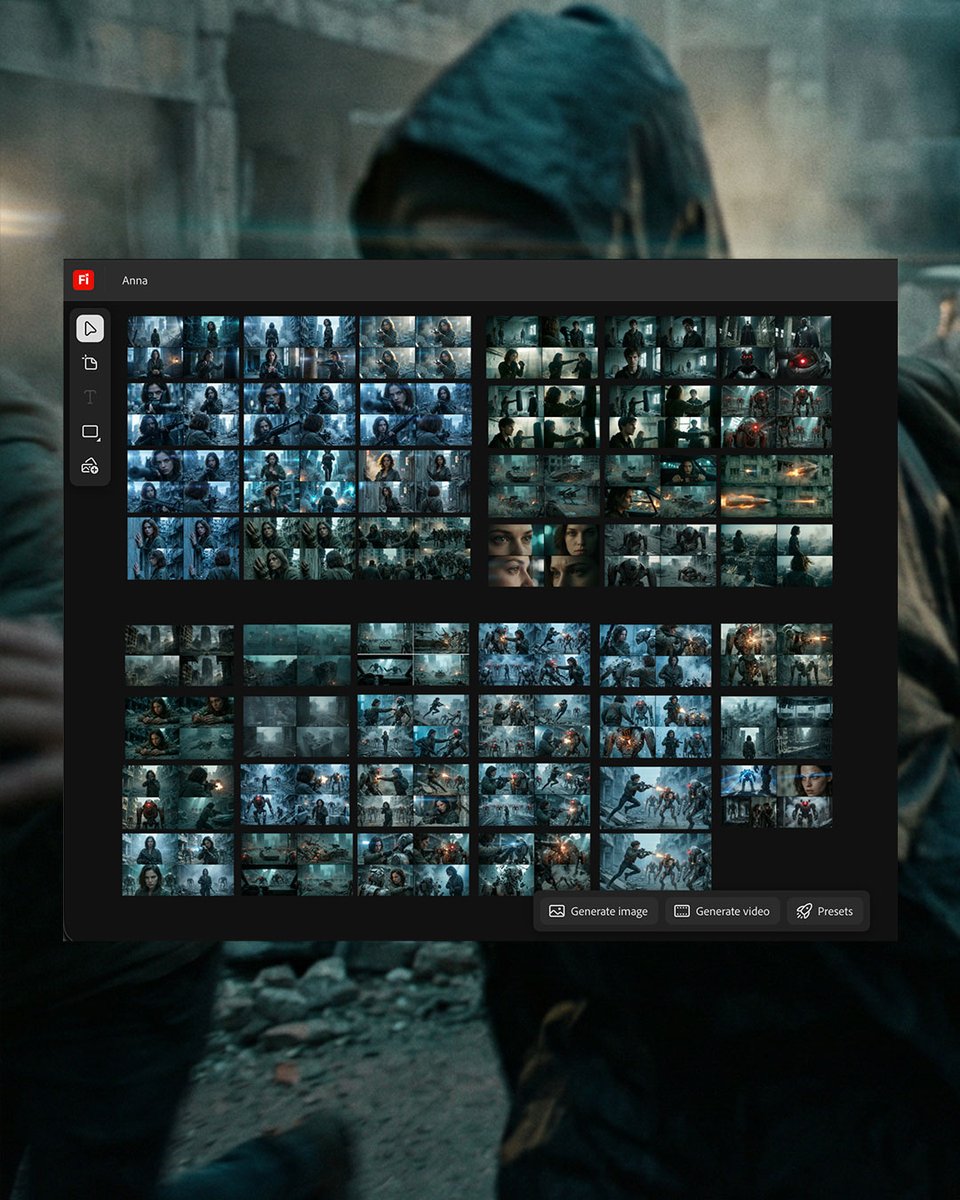
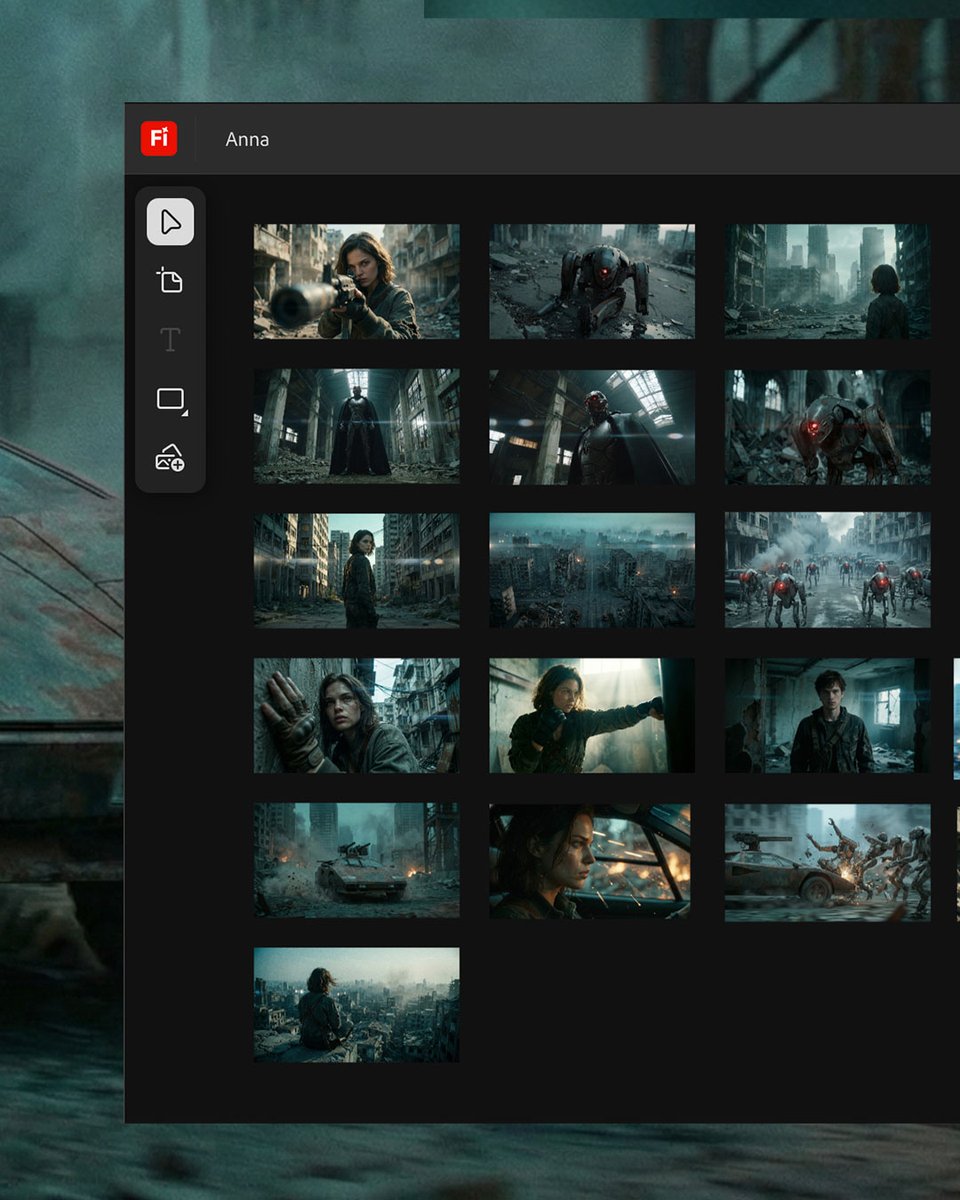
Firefly Boards storyboard grids: 2×2 split-stack to iterate fast with continuity
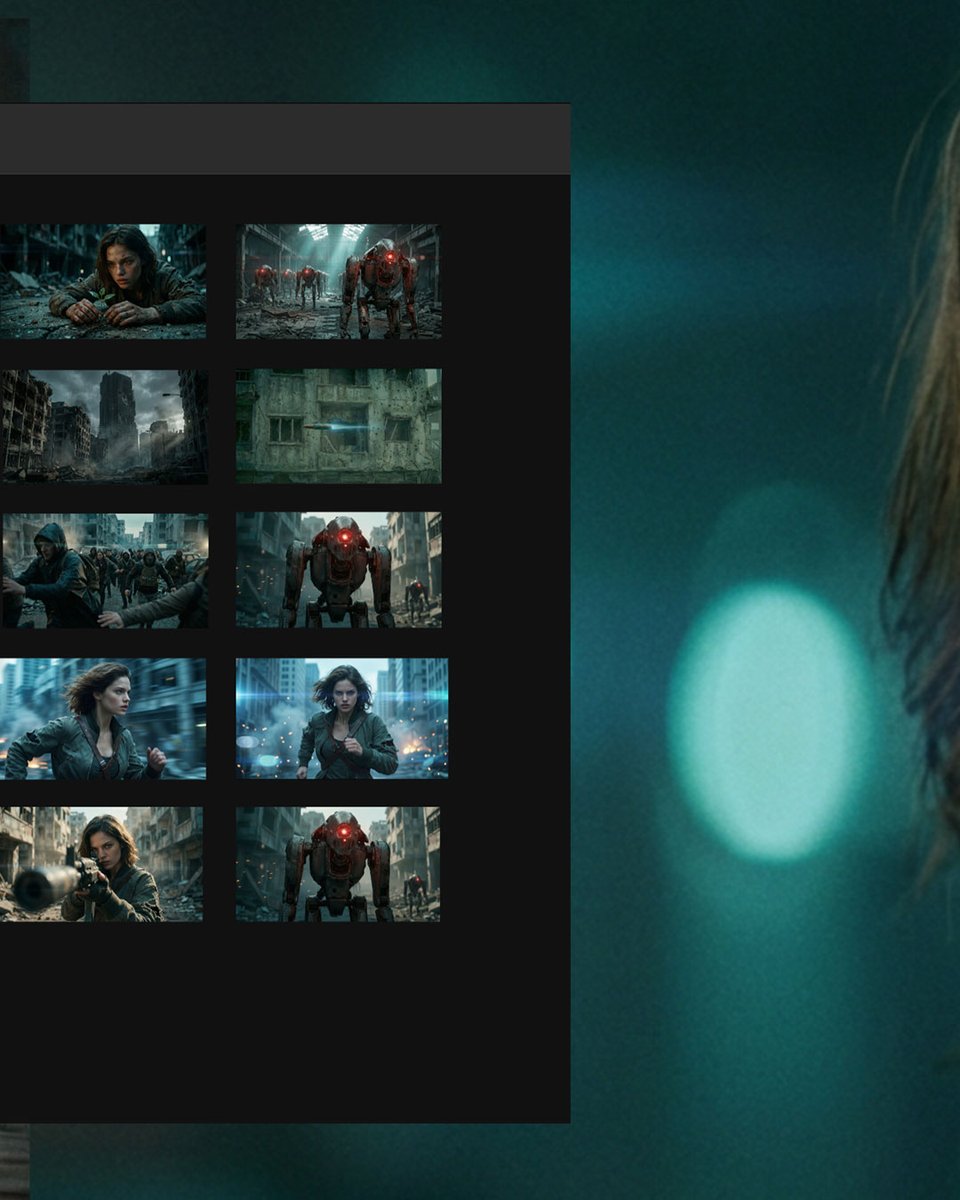
Adobe Firefly Boards + Nano Banana Pro (Workflow): A storyboard-first pipeline is being documented where you generate 3×3 or 2×2 grid split-stacks inside Firefly Boards, treating each panel as a beat of the same moment to preserve camera logic and set continuity, as described in the workflow walkthrough and expanded in the grid split-stack explanation.
The method is specific about prompting. It requires the literal phrase “2×2 grid split stack,” with per-panel descriptions, according to the prompt requirement note.
Curation math is part of the workflow. One example claims 43 generations → ~172 image options (4 panels each) before selecting final storyboard stills, as stated in the selection math. The workflow write-up also points people to the Firefly Boards page.
Grid prompting plus start/end frames to stabilize AI video consistency
Nano Banana Pro + Kling 2.6 (Workflow): A practical recipe for shot consistency is circulating: generate a controlled set of variations via grid prompting, then feed start and end frames into Kling 2.6 so the model interpolates motion while staying anchored to fixed keyframes, as demonstrated in the consistency demo.

The point is to reduce “identity drift” across a sequence. It’s framed as a way to keep wardrobe, face, and background more stable while still getting smooth movement, based on the consistency demo that this was made with Nano Banana Pro and Kling 2.6.
Runway Gen-4.5 I2V paired with Suno and CapCut for a finished short pipeline
Runway Gen-4.5 + Suno + CapCut (Workflow): One creator explicitly describes an end-to-end stack—generate footage with Runway Gen-4.5 image-to-video, add music with Suno, then assemble in CapCut, as stated in the toolchain note and shown in the teaser clip.

The creative control lever here is a “grade switch” effect. A full prompt is shared for a clip that starts in green night-vision and flips into a thermal heat-map look via an on-screen “mode switch,” according to the prompt text.
Veo 3.1 Start & End Frame on Lovart turns product photos into a cinematic promo
Veo 3.1 Start & End Frame (Lovart): A straightforward ad workflow is shown: provide a shop interior photo and a product image, then use Start & End Frame to generate a short cinematic promo that bridges the two, per the workflow clip.
It’s positioned as a templateable format for small ecommerce promos. The demo is explicitly framed as “Shop Photo + Product Image = Cinematic Promo,” as written in the workflow clip.
📣 AI marketing content: influencer playbooks, one‑image ad templates, and product promo loops
High volume of creator-adjacent tactics: AI influencer monetization framing and ‘one image → full ad campaign’ content loops (especially product photography templates). Excludes tool capability releases and keeps focus on marketing assets and distribution tactics.
Higgsfield pairs an AI influencer playbook with a 4-hour engagement bounty
AI influencer playbook (Higgsfield): Higgsfield is marketing a “How to make MILLIONS with AI Influencers in 2026” short guide and tying it to a time-boxed distribution loop—“retweet & reply for 50 credits” for 4 hours, as stated in the guide teaser and bounty.

The practical signal for creators is less the “millions” headline and more the tactic: bundling an educational asset with an expiring credit incentive to spike reach quickly, as framed in the guide teaser and bounty.
Mitte AI creators push a one-image prompt loop for full product ad grids
One-image ad template loop (Mitte AI): Azed is promoting a repeatable “one image, one click” pattern on Mitte AI that outputs multiple product-ad creatives from a single reference, positioning it as a “viral prompt” workflow in the one image one click pitch.

A concrete example is the 3×3-style product-campaign grid (multiple angles, environments, and hero shots) shown in the shoe campaign collage.
The same grid-based ad output format is also shown with a snack brand layout in the Pringles ad grid example, reinforcing the “upload once → get a carousel set” positioning.
ProperPrompter argues “AI influencers” are being dismissed as cringe—then drops a workflow article
AI influencer positioning (ProperPrompter): ProperPrompter claims there’s “massive opportunity” in AI influencers that many creators ignore because it feels “cringe,” and points to a longer write-up on their “full workflow + secrets for cinematic AI social media content,” as described in the workflow article pitch.
The post is explicitly framed as a distribution edge (cinematic look + repeatable workflow), not a tool release, per the workflow article pitch.
Azed shares a copy-paste skincare ad prompt template for Nano Banana Pro
Product photography prompt (Nano Banana Pro on Freepik): Azed shared a ready-to-reuse prompt aimed at premium skincare advertising—top-down flat lay, ingredients framing, glossy wet look, frozen splash, macro lens look (100mm, f/8), 8k, square aspect—calling it a “high-end skincare advertising” template in the prompt share intro and providing the full prompt text in the full copy-paste prompt.
This is being positioned as a fast way to generate consistent product creatives without iterating from scratch each time, per the prompt share intro.
Azed’s “QT your ___” posts show a repeatable prompt-viral distribution tactic
Engagement loop pattern (Azed): Azed repeatedly uses “QT your ___” calls (gold, cinematic shots, black-and-white) to invite followers to quote-tweet their own images—functioning as a lightweight UGC funnel for style/prompt communities, as seen in the QT your gold hook, the QT your cinematic shot hook, and the QT your black and white art hook.
The consistent structure is the point: a single theme keyword becomes both a creative constraint and a distribution mechanic, as evidenced by the repeated phrasing across those posts.
Lovart markets Veo 3.1 Start & End Frame as a shop-ad generator
Ad assembly workflow (Lovart + Veo 3.1): Lovart is explicitly pitching “Start & End Frame” as an ad format: provide a shop photo and a product image, then generate a cinematic promo sequence, as described in the shop photo plus product pitch.
The core marketing takeaway is the template structure (two inputs that define the edit’s endpoints) rather than any new model capability, matching the “ad in seconds” framing in the shop photo plus product pitch.
Pictory leans into AI avatars as a no-camera brand update format
AI avatar comms format (Pictory): Pictory is marketing AI Avatars as a way for teams to ship frequent brand updates without filming—“no camera, no studio,” while keeping “brand consistency,” as stated in the no camera no studio pitch.

They also point to AI Studio for generating custom visuals from text prompts in the AI Studio visuals CTA, positioning the combo as a lightweight “update video” stack rather than a filmmaking toolchain.
🧽 Polish passes: upscaling, photo restoration, and texture/detail upgrades
Posts focused on improving existing images/frames: upscaling, restoration, and texture/detail refinement (Magnific, Runway, Freepik flows). Excludes generating-from-scratch prompts and focuses on finishing quality.
A long-form Nano Banana Pro prompt template for aggressive photo restoration on Freepik
Nano Banana Pro (Freepik): A detailed restoration prompt is being shared as a reusable template to turn a “compromised source” photo into an “award-winning master shot,” with explicit constraints like preserving likeness/pose/geometry while upgrading to 8K hyper-realism, cinematic lighting (Rembrandt/chiaroscuro), and “large format cinema camera” lensing (50mm/85mm) as shown in the Restoration prompt screenshot.
• What makes it actionable: The template is structured like a checklist—directive, content preservation rules, then lighting/texture/lens/color-grade specs—so you can swap in any reference photo and keep edits focused on fidelity rather than redesign.
The post claims this can be done “in seconds” on Freepik using a single prompt plus the reference image in Restoration prompt screenshot.
Texture-first polish in Runway: iterate with extreme close-ups before final export
Runway: A texture/detail polish workflow is being emphasized as its own iteration loop—tweak materials and surface fidelity first, then judge results via full-resolution previews and cropped close-ups, as shown in Texture tweak workflow and the “tickling out those textures” breakdown panels in Texture close-up breakdown.
• How it’s presented: The posts treat texture as the bottleneck (skin, armor, latex/metal speculars), using stacked close-ups to verify what would otherwise get missed in a full-frame shot.
The key behavioral cue is the explicit “tap and hold for full quality” note in Texture tweak workflow, i.e., QC at the highest available resolution before you lock a shot.
Magnific gets positioned as the finishing step for print-ready environment stills
Magnific: Creators are framing upscaling as the last-mile polish pass—generate your scene, then push it to “final” texture/detail with Magnific, as shown in a 4-image “Parallel Universe” environment set that explicitly credits Magnific for the upscale in Parallel universe set.
In practice, this is the pattern where you treat the generator output as “draft pixels,” and the upscaler as the step that locks in micro-contrast, star fields, building edges, and distant city lights without re-composing the image.
Using Grok as OCR to turn prompt screenshots back into copy-paste text
Grok (xAI): A practical sharing workaround is surfacing for very long prompts: post the prompt as a screenshot, then tell people to “ask Grok to extract it” so they can copy/paste the full text without manual transcription, as described in Prompt extraction tip.
This matters specifically for restoration/upscale pipelines because the most effective “do not change geometry” prompts tend to be long—and get truncated or mangled when retyped.
🧱 3D scene intelligence: image→Blender reconstruction + sim-to-real motion stacks
3D and motion intelligence posts: reconstructing editable scenes in Blender from images and pushing motion models toward deployable real-world behavior. Excludes 2D image/video generation and focuses on 3D pipelines.
VIGA turns a single image into an editable Blender scene using an iterative code–render–verify loop
VIGA (Vision-as-Inverse-Graphics Agent): VIGA is presented as an “analysis by synthesis” agent that converts a single reference image into a fully editable Blender scene by iterating: write Blender-editing code → render → evaluate mismatches → refine, as explained in the agent overview.

• Editable scene graph, not just meshes: The pitch is that VIGA rebuilds geometry, materials, lighting, and camera into a programmable scene you can actually modify inside Blender, per the agent overview.
• Interaction as the differentiator: The thread highlights physics-driven interactions inside the reconstructed environment (e.g., throw a ball to knock objects) rather than static reconstruction, as shown in the agent overview.
• Benchmark signal: A dedicated benchmark, “BlenderBench,” is cited as evidence of gains over baselines in the agent overview, but no separate eval artifact is included in the tweets.
ProtoMotions v3.1 focuses on sim-to-real deployability with modular components and ONNX export
ProtoMotions v3.1 (NVIDIA/NVlabs): ProtoMotions v3.1 is framed as a “sim-to-real” upgrade aimed at real deployment rather than research demos—re-architected into swappable modules (Control, Observations, Rewards, Terminations), plus a cleaner deployment path via full control-loop ONNX export (sensor in → motor commands out) as described in the release rundown.

• Training speed claim: The post claims a motion tracker can learn the full AMASS dataset in under 24 hours, positioning the stack as fast enough for iteration-heavy locomotion work, per the release rundown.
• Transfer knobs that matter in practice: Built-in sensor noise, random pushes (balance robustness), and friction settings that translate across IsaacGym, IsaacLab, and Newton are called out in the release rundown.
Implementation details are available in the project’s GitHub, linked via the GitHub repo.
🎙️ Voice that travels: local TTS + identity-preserving translation (with consent caveats)
A smaller but meaningful voice cluster: running a modern TTS locally and voice translation that preserves the speaker’s identity—plus explicit consent concerns. Excludes video-generator-native voice features.
HeyGen shows voice-preserving translation—and raises the consent question
HeyGen (HeyGen): A Davos 2026 clip is shown localized into multiple languages while aiming to keep the speaker’s real voice, tone, and delivery, positioning this as translation rather than generic dubbing, according to the Davos localization demo.

• Creator framing: The pitch is “global communication changes fast” for conferences, institutions, and training content—where speed matters but speaker identity also matters—per the Davos localization demo.
• Consent risk: The same post flags consent as the key issue when a voice can be “moved anywhere,” since the utility/misuse boundary gets thin, as stated in the Davos localization demo.
Qwen3‑TTS can be run locally via a 1‑click Gradio web UI
Qwen3‑TTS (Qwen): A community-made Gradio web UI is being shared as a “1‑click” way to run Qwen3‑TTS on your PC, lowering the friction for local voice generation compared to hand-wiring scripts and dependencies, as described in the Gradio UI for Qwen3-TTS.
The concrete creative value is portability: local TTS means you can iterate on dialogue/VO without shipping scripts or scratch audio to a third-party web app, which matters for rapid previs, animatics, and temp narration pipelines when you’re moving fast.
Local TTS is increasingly shipped as “click-to-run” Gradio apps
Local TTS UX pattern: Instead of “download model + write Python,” local voice models are increasingly arriving as Gradio wrappers that behave like a small self-hosted app—search, run, and generate—illustrated by the Qwen3‑TTS 1‑click UI callout in the Gradio UI for Qwen3-TTS.
For creative teams, this shifts local audio tooling from an engineering task to a repeatable production utility: the interface becomes the product, and the model becomes a swappable backend.
🖼️ Image editing gets smarter: ‘thinking’ multimodal edits and multi-image fusion
Image category is dominated by a single major capability drop: a multimodal image-editing model positioned around reasoning + precise edits. Excludes prompt-only shares (Prompts/Style) and focuses on model capability claims and demos.
Tencent ships HunyuanImage 3.0-Instruct, a reasoning-first image editing model
HunyuanImage 3.0-Instruct (Tencent): Tencent announced HunyuanImage 3.0-Instruct as a native multimodal model built specifically for image editing—positioned around “understand the input image, reason, then synthesize,” per the Launch thread; it’s described as an 80B MoE model with 13B activated params, and is being framed as a “Thinking” model via a native Chain-of-Thought schema plus their MixGRPO alignment method, as outlined in the same Launch thread.

• Targeted edits without collateral damage: The headline claim is precise add/remove/modify while keeping non-target regions intact, shown in the Launch thread and demonstrated in the
.
• Multi-image fusion as a first-class feature: Tencent calls out blending elements from multiple source images into one coherent scene, per the Launch thread.
• Access constraint: The public try link is labeled PC-only, which is part of the rollout friction noted in the Launch thread.
The pitch is that this closes the gap between “prompting for a new picture” and doing production-style image revisions—especially when you need consistent preservation of the original frame while changing specific objects or regions.
📅 Where to show up: summits, festival calls, and creator awards deadlines
Event-heavy day for AI filmmakers: multiple deadlines, screenings, and registrations (Runway Summit, PixVerse Berlinale call, Bionic Awards, workshops/masterclasses). Excludes tool launches and focuses on dates and submission hooks.
PixVerse opens a Berlinale call for AI films with a Jan 31 deadline
PixVerse (Berlinale call): PixVerse is soliciting AI films for Berlinale-adjacent market screenings, positioning it as “featured screening” + “global exposure,” with a 30,000 credits incentive for selected entries, as described in the [call post](t:98|Call post) and reiterated in the [incentive details](t:109|Credit incentive).
• Submission requirements: PixVerse lists 1080p+, 16:9 landscape, 24+ FPS, created after Jan 1, 2025, with narrative (1 min+) “highly encouraged,” as laid out in the [specs note](t:110|Submission specs).
Deadline is stated as January 31, 2026, with the submission CTA repeated in the [submission follow-up](t:107|Submission CTA).
Runway Summit 2026 registration is being pushed as the main CTA
Runway (Summit 2026): A registration push for Runway Summit 2026 is circulating, with Diesol posting “See you there” in the [Summit mention](t:52|Summit mention) and then pointing directly to the registration page in Registration page.
No agenda, location, or ticket/pricing details appear in the tweets; the concrete update is that the registration link is live per the [registration follow-up](t:116|Registration follow-up).
Bionic Awards posts a final-call deadline for entries tonight
Bionic Awards: Uncanny_Harry flags that judging starts Tuesday night and calls out that the entry deadline is tonight, stating “23:55 (UK) Jan 25” in the same event rundown in the [deadline post](t:53|Entry deadline callout).
No submission link is surfaced in the tweet text beyond the poster shown in-thread; the time-bound detail that matters is the cutoff timestamp provided in the [same update](t:53|Bionic deadline detail).
CapCut × London Short Film Festival schedules a GenAI masterclass session
CapCut × London Short Film Festival: Uncanny_Harry says they’ll be part of a group delivering a “Gen AI masterclass with @capcutapp” as part of the festival’s programming, per the [schedule post](t:53|Schedule post).
The same post frames it as the start of a packed week of AI-film-adjacent events, with the CapCut session called out specifically for Monday in the [same update](t:53|Week plan).
A Prompt Club Paris premiere is queued for Tuesday
Prompt Club (Paris): Uncanny_Harry says they’re traveling to Paris on Tuesday to premiere a new short “for the Prompt Club with Gilles Guerraz,” with the note that it will be posted on socials afterward, as written in the [week schedule](t:53|Prompt Club premiere).
The tweet doesn’t include a venue page or ticket link; the update is the stated premiere timing (Tuesday) and that a public release is planned after, per the [same post](t:53|Premiere plan).
SILVERSIDE announces a creator roundtable date: Feb 3, 2026
SILVERSIDE (creator roundtable): Uncanny_Harry lists an upcoming creator roundtable titled SILVERSIDE scheduled for 3/2/2026 (Feb 3, 2026) and names multiple participants, as outlined in the [event rundown](t:53|Roundtable mention).
The post treats it as part of a multi-stop calendar (London → Paris → judging → roundtable), but the discrete new detail is the date and that it’s framed as a creator roundtable, per the [same schedule](t:53|SILVERSIDE date).
🧰 Platforms turning into ‘studios’: AI toolkits, creator ecosystems, and promptless features
Platform-level moves that change how creators work: creator suites evolving into end-to-end production environments and ‘no prompting’ features meant to speed casual creation. Excludes individual prompt drops and standalone model capability tests.
Artlist signals a shift to “studio-as-a-service” with an AI production platform roadmap
Artlist (Artlist): Artlist is repositioning itself from “music + stock” toward an AI end-to-end production platform, citing $260M ARR by end of 2025 and +50% YoY growth, alongside a Spring 2026 target for an AI production workflow in the Roadmap and metrics thread. The creator-facing pitch is less “prompt better” and more “direct scenes,” with promises of set-like control (locations + camera angles) while maintaining visual consistency, as described in the Roadmap and metrics thread.
• AI Toolkit direction: A single interface that combines video, image, and narration/voice tools into one workflow—positioning the platform as a production pipeline rather than a marketplace, per the Roadmap and metrics thread.
• Artlist Original 1.0: A “cinematic image model” trained on their proprietary catalog, with 4 dedicated visual styles aimed at professional outputs, as outlined in the Roadmap and metrics thread.
Access details (pricing, availability, how “directable” the camera/location controls really are) aren’t specified in today’s post.
Higgsfield’s “What is Next” bets on promptless scene continuation for fast remixes
What is Next (Higgsfield): A creator demo shows Higgsfield testing a promptless feature that “continues” a known scene by predicting the next visuals—framed as a quick, playful option when you don’t want to write prompts, according to the Feature demo and notes.

The example extends the viral “penguin walking to the mountains” moment into additional generated shots, with the author calling it “fast and fun” for casual experimentation and remix-style posts, as described in the Feature demo and notes. For filmmakers and storytellers, the key capability is rapid ideation for “next beat” imagery (what happens after this shot) without building a full prompt stack; the tweet’s framing suggests it’s meant for speed over fine-grained control, per the Feature demo and notes.
🏁 Finished work & spotlights: AI shorts, reels, and showcase drops
Named projects, reels, and creator spotlights that function as inspiration/reference points (rather than tool tutorials). Excludes pure tool announcements and focuses on released works and curated showcases.
AI FILMS Studio spotlights DON EDUARDO, a grim butcher tale from Colombia
AI FILMS Studio: The studio spotlight today is DON EDUARDO (by @sinmenteai), framed as a narrative short with an explicit “not a children animation” warning and a logline about a beloved butcher in a quiet Colombian town, as described in the Spotlight post. It’s presented as a finished piece to watch and reference. It’s short.

The teaser leans into gritty texture and unease (close-up performance beats, abrupt violent inserts), which makes it useful as a tone reference for anyone trying to land “adult animation” pacing in AI-made shorts, as shown in the Spotlight post.
AI FILMS Studio spotlights FRACTURED, a 48-hour crime-thriller setup
AI FILMS Studio: Another featured spotlight is FRACTURED (by Vincent Bennett), pitched as a crime thriller where a crash leads to a dead body “in his trunk he didn’t put there,” with a 48-hour chase premise spelled out in the Spotlight logline. It reads like a trailer-first project. That’s the point.

The teaser uses rapid montage (running, crash beats, gun threats) and big title-card punctuation—useful as a reference for how creators are packaging AI-made narrative concepts into “sellable” short-form promos, per the Spotlight logline.
Cyberpunk Cherry Blossom mixes neon signage with organic pink canopies
Image series drop: @jamesyeung18 posted “Tap for a Cyberpunk Cherry Blossom,” a four-image set built around a dense neon-street canyon aesthetic overrun with bright pink blossoms, as shown in the Cyberpunk Cherry Blossom set. It’s a strong palette study. It’s consistent.
Across the variations, the compositional trick is using blossoms as a foreground frame against vertical signage and fog depth, which gives immediate scale and layering cues, per the Cyberpunk Cherry Blossom set.
Parallel Universe environment studies lean on mood, scale, and upscale polish
Environment art showcase: @jamesyeung18 shared a four-image set titled “Sunday Exploration of the Parallel Universe,” explicitly crediting Magnific for the upscale in the Parallel Universe set. It’s a moodboard-style drop. It’s all about atmosphere.
The set spans starfield-night rural architecture, foggy hillside-to-megacity contrast, and planet-over-city sci-fi scale cues, as shown in the Parallel Universe set. The throughline is cinematic lighting and readable silhouettes—good reference material when you’re building consistent world tone across disparate scenes.
A small-account spotlight: Artedeingenio highlights aimikoda’s work for reach
Creator visibility: @Artedeingenio used a standalone post to highlight @aimikoda’s creativity and explicitly call out the distribution problem for smaller accounts, asking followers to help widen reach as stated in the Visibility boost. It’s not a tool demo. It’s a signal about how discovery still works.
The post functions as a “curated spotlight” mechanic: a larger creator lending attention to a smaller one, with the entire framing captured in the Visibility boost.
📊 Creative AI temperature check: hype cycle talk + “AI video is crossing believability” narratives
High-level signals about where the ecosystem is headed: hype-cycle framing and claims about rapid gains in temporal consistency and production economics. Excludes specific tool how-tos and focuses on trend narratives creators will hear (and need to sanity-check).
The “AI video is believable now” storyline gets a numbers-first pitch
AI video progress narrative: One widely shareable claim packages the last two years as a step change in temporal consistency—“glitchy 6 second clips in 2024” to “25 second cinematic shorts by early 2026”—and ties it to physics-informed motion and cost compression, per the Believability breakdown.
• Why it’s “happening” (claimed): The thread credits Neural Radiance Fields with helping models internalize 3D geometry (reducing jitter), and points to feature examples like Sora 2 Character Cameos and Runway Gen-4.5 physics as signs of improved continuity, as described in the Believability breakdown.
• Industry impact (claimed): It asserts “studio grade costs dropped 70%” and flags VFX job-growth pressure as pipelines mature, while also name-checking festival validation (“Sundance 2026 showcased”), all in the Believability breakdown.
Treat the numbers and causal story as provisional—this post doesn’t include primary sources or eval artifacts beyond the summarized assertions in the Believability breakdown.
A creator pushes back: AI filmmaking isn’t “easier than drawing”
Creative labor discourse: Following up on craft-erasure backlash (the “it’s just a prompt” argument), a creator claims AI filmmaking is harder than drawing because it requires tool literacy across image/video/audio, editing competence, and a top-down creative vision—“seeing the whole board,” as argued in the Skills comparison post.
The post frames the gap as process complexity rather than raw ability—stating that while “anyone can draw,” a beginner wouldn’t know where to start assembling an AI-made short, per the Skills comparison post.
Creators ask where AI sits on the hype cycle right now
Hype-cycle framing: A Gartner-style hype cycle chart is making the rounds again as a simple way to argue about whether AI is still at a “peak,” sliding into a “trough,” or already climbing toward productivity, as posed in the Hype cycle question.
The practical takeaway for creative teams is less about the curve itself and more about how quickly narratives get laundered into “common knowledge” without any shared definitions—especially when people conflate model progress, creator tooling, and monetization into one line on one chart, as implied by the Hype cycle question.
📉 Distribution reality on X: shadowbans, small-account reach, and algorithm misinformation
Creator distribution friction is the story here: shadowban complaints, small accounts struggling for reach, and warnings about misinformation around the X algorithm. Excludes marketing how-tos (Social Marketing) and focuses on platform dynamics.
Shadowban anxiety resurfaces as creators post “can you see this?” checks
X distribution (Shadowban signal): A creator explicitly asks “Can you see this?” and says “Shadowbanned by X is the worst,” framing it as reach suppression rather than content performance, as shown in the [visibility check post](t:114|Visibility check post).
Warning: X algorithm “score/time” claims spreading without GitHub support
X algorithm chatter (Misinformation check): A creator warns that “gibberish” claims about the X algorithm (including specific “scores and times”) are circulating even though they “aren’t quoted at all in the GitHub repo,” per the [misinfo warning](t:80|Misinfo warning).
“Small creators are still suffering” frustration post signals reach stagnation
Creator economy on X (Reach frustration): A short, blunt post argues that “we’re in 2026” and “small creators are still suffering,” capturing a mood that distribution still feels bottlenecked even as AI content volume rises, per the [reach frustration post](t:59|Reach frustration post).
Community “signal boosting” posts used to help small AI art accounts break out
X distribution (Community boost tactic): One creator explicitly spotlights a smaller account and says they want to “help make her work known,” treating public shoutouts as a workaround for weak algorithmic discovery, as described in the [small-account highlight](t:35|Small-account highlight).
🛠️ Friction points: missing model dependencies and access constraints
Small but actionable reliability and access issues creators hit in practice—dependency management in node-based workflows and platform constraints (e.g., desktop-only demos). Excludes distribution/algorithm complaints (covered in Creator Platform Dynamics).
HunyuanImage 3.0-Instruct launches, but the public demo is PC-only
HunyuanImage 3.0-Instruct (Tencent Hunyuan): Tencent introduced HunyuanImage 3.0-Instruct as a native multimodal image-editing model (80B MoE with 13B active) with “thinking”/reasoning framing and features like precise edits and multi-image fusion, as described in the Launch thread; the practical catch for creators today is that the try link is explicitly “PC only,” limiting who can test it in mobile-first workflows, per the Launch thread.
ComfyUI’s “Missing Models” popup is the everyday blocker for shared workflows
ComfyUI (local pipelines): A ComfyUI load attempt can halt at the last mile when the graph references model files that aren’t on disk; TheoMediaAI shared a “Missing Models” dialog listing multiple unresolved dependencies (text encoder, latent upscaler, LoRAs), which is the kind of friction that stops a shared node graph from being plug-and-play, as shown in Missing models screenshot.
• What’s missing in practice: The dialog enumerates specific filenames and folders (e.g., text_encoders/…, latent_upscale_models/…, loras/…) with partial download/progress indicators, reinforcing that “I have the workflow” often isn’t enough without the exact dependency set, per the Missing models screenshot.
While you're reading this, something just shipped.
New models, tools, and workflows drop daily. The creators who win are the ones who know first.
Last week: 47 releases tracked · 12 breaking changes flagged · 3 pricing drops caught