Runway Gen‑4.5 ships 10s 720p clips – GWM‑1 previews live worlds

Stay in the loop
Free daily newsletter & Telegram daily report
Executive Summary
Runway turned its Research Demo Day into a real product push: Gen‑4.5 is now the flagship text‑to‑video model for all users, outputting 16:9 720p shots at 5, 8, and 10 seconds and topping Runway’s internal Elo board at 1,247. Native audio and true multi‑shot timelines are labeled “soon,” which matters because it points to a single Runway stack where images, camera moves, and soundtracks live together instead of being stitched across three different tools.
The bigger swing is GWM‑1, an autoregressive “General World Model” built on Gen‑4.5 that predicts the next frame as you move, click, or control a robot arm—turning video generation into an ongoing simulation, not a one‑off render. GWM Worlds lets you turn one scene into a navigable environment for virtual scouting, GWM Avatars syncs faces and bodies to any audio track, and GWM Robotics exposes the same physics‑aware engine as synthetic training data for real robots. Early creator tests show stronger tracking shots and environmental coherence, alongside occasional slapstick glitches that prove the model is still, well, learning to walk.
While GPT‑5.2 chases 50–70%+ scores on ARC‑AGI‑2 and GDPval, Runway is quietly betting that the real power move for filmmakers is treating models as living sets where you can keep shooting forever.
While you're reading this, something just shipped.
New models, tools, and workflows drop daily. The creators who win are the ones who know first.
Last week: 47 releases tracked · 12 breaking changes flagged · 3 pricing drops caught
Top links today
- OpenAI GPT-5.2 model announcement
- Runway Gen-4.5 and GWM-1 launch blog
- Google Gemini Deep Research agent docs
- Nano Banana Elements style set tool
- PixVerse 5.5 video generation on Freepik
- Wan Vision Enhancer video upscaling on fal
- Creatify Aurora image-to-avatar model on fal
- OmniPSD diffusion to layered PSD paper
- Tencent HY multimodal model family overview
- Apple diffusion language model unmasking paper
- Towards a Science of Scaling Agent Systems paper
- Runware Gen-4 image and Turbo API
- GPT-5.2 playground on Replicate
- OpenArt holiday advent rewards for creators
- GLIF contact sheet prompting agent
Feature Spotlight
Runway Gen‑4.5 + GWM era begins
Runway moves AI video from clips to simulations: Gen‑4.5 ships audio + multi‑shot, while GWM‑1/Worlds/Avatars/Robotics preview real‑time, controllable worlds—big for directing, previs, and virtual production.
Runway’s Research Demo Day lands for filmmakers: Gen‑4.5 adds native audio and multi‑shot editing, and the GWM family (Worlds/Avatars/Robotics) previews real‑time, explorable simulations. Multiple creator tests show coherence and control.
Jump to Runway Gen‑4.5 + GWM era begins topicsTable of Contents
🎬 Runway Gen‑4.5 + GWM era begins
Runway’s Research Demo Day lands for filmmakers: Gen‑4.5 adds native audio and multi‑shot editing, and the GWM family (Worlds/Avatars/Robotics) previews real‑time, explorable simulations. Multiple creator tests show coherence and control.
Runway Gen‑4.5 goes public with native audio and multi‑shot editing on deck
Runway used Research Demo Day to confirm Gen‑4.5 as its flagship text‑to‑video model and open it up to all users, with native audio generation/editing and multi‑shot timelines shown as the next wave of features. event kickoff Following up on event teaser, they demoed 16:9 720p clips at 5, 8, and 10 seconds today, with arbitrary‑length multi‑shot editing and in‑model soundtracks labeled as "soon" rather than months away. (Gen-4.5 update, feature list) A recap thread notes Gen‑4.5 now tops Runway’s internal Elo leaderboard at 1,247, suggesting a meaningful quality jump over Gen‑4 for motion, coherence, and prompt following. feature recap For filmmakers and designers, the key shift is that image, video, camera, and audio are converging into one Runway stack, which should cut down round‑tripping between separate generators, audio tools, and NLEs when building short pieces.

Runway unveils GWM‑1, an autoregressive world model built on Gen‑4.5
Runway introduced GWM‑1 as its first "General World Model", taking the Gen‑4.5 backbone and running it autoregressively so it predicts each next frame based on what came before instead of spitting out a fixed clip. GWM-1 announcement In the demos you can move through space, manipulate a robot arm, or interact as an agent, and the model updates the scene in response to those actions, effectively turning video generation into an ongoing simulation rather than a one‑off render. world model recap Runway argues that these simulators, trained today on human‑scale video, can extend to very different spatial and temporal scales and will matter not only for storytelling but also for physics, life sciences, and robotics research. world model recap For creatives, the takeaway is that "set" and "shot" are starting to decouple: you build a world once, then keep staging new shots and interactions inside it instead of re‑prompting every angle from scratch.

GWM Avatars delivers audio-driven, expressive characters for photoreal or stylized films
To handle humans inside these simulated worlds, Runway announced GWM Avatars, an audio‑driven interactive video model that turns a voice track into synchronized lip‑sync, facial expression, and body motion for arbitrary characters. GWM Avatars overview Demo clips emphasized natural eye blinks, micro‑expressions, and emotional reactions across both photoreal and stylized characters, going after the "uncanny" problem that makes many avatar systems hard to watch for more than a few seconds. GWM Avatars overview Runway says Avatars will roll out to the web product and API alongside other GWM‑1 components in the coming weeks, positioning it as a drop‑in building block for dubbed performances, interactive hosts, or fully synthetic cast members. world model recap For storytellers, this could move lip‑sync and acting direction from a separate post step into the same generative pipeline as world and camera.

GWM Worlds turns a single scene into an infinite explorable environment
As the third announcement, Runway showed GWM Worlds, a world‑model variant that focuses on real‑time environment simulation from a static starting scene. Worlds overview You give it a single image or scene and it generates an immersive explorable space—with geometry, lighting, and physics—where you can move as a person in a city, a drone over mountains, or a robot in a warehouse, all while the model keeps the world coherent as you traverse it. Worlds overview Runway frames this as giving everyone access to their own world simulator and says early signs suggest GWM‑1 can generalize across very different spatial and temporal scales. world model recap For filmmakers and game artists, that sounds like virtual location scouting and previs: you can walk the space, test camera paths, and plan coverage in a persistent generated world instead of stitching together disconnected clips.

Early Gen‑4.5 tests show stronger camera work, coherent worlds, and some odd glitches
Creators jumped on Gen‑4.5 as soon as it dropped, and their tests paint a picture of a more capable but still quirky model. Proper Prompter’s low tracking shot following a rat along a grimy New York sidewalk shows convincing depth and motion blur, rat tracking demo while another clip tracks a dragon flying over a gloomy Westeros‑style landscape with stable framing. dragon flyover Cfryant put a tiny woman diving into a household fish tank and swimming among fish, tiny swimmer demo and Unhindered’s test has a character walking as the environment smoothly morphs from sunny forest to snowy mountains without breaking the walk cycle, hinting at much better environmental consistency. environment morph video Other users explored 3D‑like martial arts moves, fighter animation painterly scenes resolving into photoreal vistas, painting transform and an ocean wave smash‑cut to a Mars landscape under the Runway logo. ocean and Mars test Not every shot works—the viral runway‑model faceplant clip is a reminder that Gen‑4.5 still hallucinates awkward physics and timing—but overall the early footage suggests real gains in camera control, depth, and scene coherence compared to Gen‑4. runway fail clip


GWM Robotics uses learned simulation to generate synthetic data for robot training
Runway’s fifth announcement, GWM Robotics, applies its world‑modeling work to robotics by turning GWM‑1 into a learned simulator that can generate synthetic video data for scalable robot training and policy evaluation. GWM Robotics post The team says they’ve been collaborating with leading robotics companies and are now opening an SDK—available by request—so labs can feed these simulations into their training stacks instead of relying solely on slow, hardware‑bound data collection. GWM Robotics post The idea is that the same engine that keeps a virtual set physically plausible for storytelling can also produce diverse, controllable experiences for robot arms and mobile platforms, which matters if you’re thinking about robot actors on set or smart physical installations powered by AI. world model recap

🧠 GPT‑5.2 for creators: speed, cost, and proofs
Frontier LLMs hit feeds with new evals, pricing, and integrations focused on real work. Excludes Runway’s model news (covered as the feature). Today is about GPT‑5.2’s benchmarks, platform access, and early field reports.
GPT‑5.2 tops ARC‑AGI‑2, AIME 2025, and GDPval, plus strong Code Arena debut
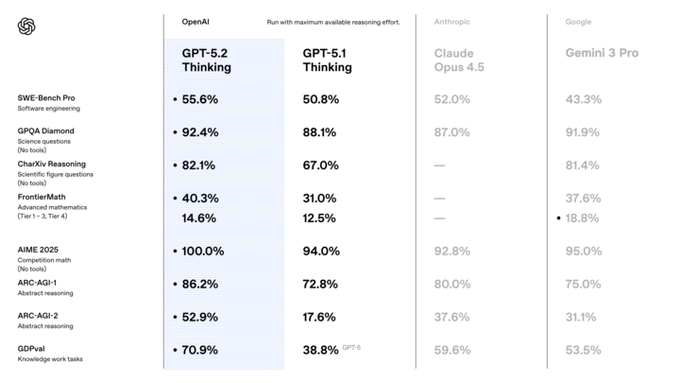
OpenAI published a dense benchmark sheet for GPT‑5.2 Thinking showing big jumps over GPT‑5.1 and competitive or leading scores against Claude Opus 4.5 and Gemini 3 Pro on most hard‑reasoning tasks benchmark chart garlic scores. On ARC‑AGI‑2, the abstract reasoning benchmark many watch as a proxy for "general" problem‑solving, 5.2 lands at 52.9% vs 17.6% for 5.1; on SWE‑Bench Pro it hits 55.6% resolved GitHub issues vs 50.8% for 5.1 and 52.0% for Claude Opus 4.5, while AIME 2025 competition math is a clean 100% vs 94% on 5.1 and mid‑90s for competitors benchmark chart.
For economic and knowledge‑work tasks, the new GDPval benchmark is the standout: GPT‑5.2 Thinking scores 70.9% win‑or‑tie against human professionals vs 38.8% for GPT‑5.1 (labeled GPT‑5) and 59.6% for Claude Opus 4.5, with 5.2 Pro pushing that even higher to 74.1% and 60% on the stricter "clear wins" slice gdpval table creator breakdown. That’s the metric OpenAI is explicitly pointing at when they claim GPT‑5.2 exceeds human‑level performance on many real‑world, billable tasks.
Developers also got an external stress test via the Code Arena WebDev leaderboard, where models must build fully working web apps and tools from a single prompt: GPT‑5.2‑high (the Pro‑like variant) debuts at #2 with a score of 1486, while standard GPT‑5.2 sits at #6 with 1399, edging out Claude Opus 4.5 and Gemini 3 Pro but still trailing GPT‑5‑medium code arena. For creatives who rely on code to glue their pipelines together—custom render dashboards, asset managers, automated edit scripts—these scores are a strong signal that 5.2 can be trusted to generate not just snippets, but complete working tools that actually run.
OpenAI ships GPT‑5.2 and pricey GPT‑5.2 Pro across ChatGPT and API
OpenAI has formally launched GPT‑5.2 and GPT‑5.2 Pro across ChatGPT and the API, moving from leaks to a real, selectable model with a fresh August 2025 cutoff. Following up on Cursor sighting of GPT‑5.2 in third‑party tooltips, users now see "GPT‑5.2" and "GPT‑5.2 Pro" in official model menus and docs, with the Pro tier explicitly marketed as "research‑grade" and optimized for long, hard problems blog mention chatgpt ui.
On pricing, GPT‑5.2 (and gpt‑5.2‑chat‑latest) comes in at $1.75 per million input tokens and $14 per million output, while GPT‑5.2 Pro jumps to $21 input and $168 output per million—significantly above GPT‑5.1’s $1.25 / $10 and GPT‑5‑pro’s $15 / $120 pricing tweet. That cost structure makes 5.2 the new default workhorse for most workflows, but positions 5.2 Pro as something you only light up for truly gnarly research, long‑horizon planning, or make‑or‑break deliverables.
The API picker already lists a concrete gpt-5.2-pro-2025-12-11 variant alongside the base 5.2 model, confirming that you can route specific calls or tools to Pro while keeping the rest of your stack on the cheaper tier api screenshot. For creatives and product teams, this split suggests a hybrid strategy: everyday outlining, scripting, and brief writing on 5.2, with occasional Pro calls to deeply reason about multi‑step story structure, budgets, or technical pipelines when the extra $ is justified.
GPT‑5.2 quickly lands in Cursor, Perplexity, Replicate, and Glif with mixed speed/cost trade‑offs
Beyond OpenAI’s own UI, GPT‑5.2 is already showing up in the day‑to‑day tools many builders and creatives live in, turning the launch from abstract benchmarks into something you can actually click on. Cursor users can manually add gpt-5.2-high and gpt-5.2 as custom models in settings, then confirm real traffic and spend in their OpenAI usage dashboard—so even before first‑class support, people are hacking 5.2 into their coding loop cursor walkthrough.

On the research side, Perplexity Max now exposes "GPT‑5.2" as a selectable model with a "with reasoning" toggle, which effectively gives writers, analysts, and creative directors a one‑click way to route specific deep‑dive questions to the slow, thinky mode and keep everything else on faster defaults perplexity picker. Replicate has added a public GPT‑5.2 endpoint positioned for knowledge work, coding, and long‑context reasoning, making it easy to script your own tests or wire it into custom dashboards without building full infra yourself replicate card. Glif plugged GPT‑5.2 into its agent platform as well, pitching "advanced reasoning, lightning‑fast responses, and enhanced multimodal understanding" for contact‑sheet agents, thumbnail designers, and other creative helpers glif announcement.
Early power users are bullish but clear about the trade‑offs. Matt Shumer says GPT‑5.2 has been his daily driver since late November and "beats out Opus 4.5 in most things," but notes the catch that serious queries can take many minutes—GPT‑5.2 Pro can "think for over an hour" on really hard problems, which forces you to treat it more like a slow research partner than a chat bot review teaser pro praise Pro deep dive. Others frame 5.2 and especially 5.2 Pro as the beginning of AI as a senior co‑developer: expensive today, but likely to get orders of magnitude cheaper over the next year, so workflows that already bake in its strengths—long‑form reasoning, multi‑step planning, end‑to‑end deliverables—will age better than ones that only rely on instant answers pricing tweet cost trajectory. For creatives, that points toward using 5.2 for things like full campaign plans, shot lists, story bibles, technical breakdowns, and pipeline‑automation scripts, while keeping faster, cheaper models for lightweight copy and quick ideas.
🎙️ Dubbing, avatars, and singing voices
Voice and narration tools scale up—enterprise dubbing partnerships, emotional lipsync editing, and single‑image talking avatars—useful for localization, characters, and VO passes.
ElevenLabs powers dubbing and voices across Meta apps with 11k‑voice library
ElevenLabs has signed a major deal with Meta to provide expressive AI audio across Instagram Reels, Horizon, and other Meta surfaces, turning its 11,000+ voices in 70+ languages into infrastructure for global dubbing and character audio. partnership details For creatives, this means Reels and other content can be auto‑dubbed into local languages with synced timing, while Horizon experiences get AI‑generated character voices and even music.
Commentary frames this as a signal that “voice is becoming one of the next major frontiers of AI” and that dubbing—long a sensitive, culturally loaded craft—is about to scale far beyond human‑only pipelines. analysis thread Good news: small teams and solo creators should gain studio‑grade localization and character VO inside the platforms where their work lives. The tension: professional voice actors and local dub studios will need to lean into directing and supervising these systems, or risk being bypassed by built‑in AI options.
fal launches Creatify Aurora: single‑image to talking avatar model
Fal has released Creatify Aurora, an image‑to‑avatar model that turns a single reference photo and a voice track into a speaking, moving avatar with strong facial expression and motion detail. model summary The pitch is ultra‑realistic or stylized presenters that feel consistent and scalable across many videos.

For course creators, marketers, and character‑driven channels, Aurora offers a way to standardize a host or mascot without full 3D rigs or manual animation. Because it accepts different styles and scenarios, you can keep the same identity while testing formats—explainer, ad read, or in‑universe character monologue—using the same base image and a new script.
SyncLabs react‑1 lands on Replicate with emotional lip‑sync controls
SyncLabs’ react‑1 performance‑editing model is now hosted on Replicate, adding fine‑grained dubbing controls like emotion presets (angry, sad, surprised, happy) and the ability to constrain movement to just the lips, face, or head. release note That turns it from a research demo into something you can wire directly into pipelines for last‑mile VO fixes.

For filmmakers, advertisers, and YouTube creators, react‑1 means you can retime or replace dialogue on existing shots, then dial down head bobbing or broaden the expression without re‑rendering the whole scene. Because it runs on Replicate, you can batch‑process takes via API and experiment with different emotional reads on the same line before locking picture.
Gemini speech demos show singing TTS that handles interruptions and resumes
New user tests of Google’s Gemini speech models show they can not only sing known tunes like “Happy Birthday” but also recover gracefully after spoken asides, resuming the song in time and on key. happy birthday test Separate clips have the model invent short musical ditties about everyday scenes, hinting at more flexible melody and prosody control than standard TTS. gemini ditties

For musicians, storytellers, and character creators, this points toward AI voices that can handle sung dialogue, jingle sketches, and musical call‑and‑response without slicing audio by hand. It’s early and still very much a lab‑style demo rather than a product with knobs for tempo or key, but it suggests future tools where you type both lyrics and stage directions (“pause, whisper an aside, then belt the chorus”) and get a usable performance back in one pass.
🛠️ Agentic shot design and chained pipelines
Creators share practical agents that pre‑visualize scenes and chain body animation → image extraction → motion, cutting friction for storyboard‑to‑shot workflows. Excludes Runway’s GWM feature set.
Glif Contact Sheet Prompting agent now targets any style and auto-writes animation prompts
Following up on the earlier Contact Sheet agent launch, which turned a single image into a 6–9 frame multi‑angle grid for NB Pro video work Contact sheet agent, Glif is now pushing a “Contact Sheet Prompting Agent” that works in any visual style and also writes matching animation prompts. The new demos show it building cohesive scenes in stylized looks—not only realism—then generating per‑panel prompts tailored for downstream video models like Kling 2.5. Contact sheet thread

Creators on the livestream describe it as making contact sheets “as easy as it could possibly be,” with the agent handling framing language (MCU, WS, HA, etc.) plus the first draft of motion directions for each shot. Livestream recap The shared agent link stays the same, so this looks like a capability upgrade rather than a new product; if you’re already using NB Pro + Kling, this turns the old manual shot‑list into something you generate, tweak, and then feed straight into your animation pipeline. (Agent feature blurb, Agent page)
Glif ships agent that chains Wan 2.2 → Nano Banana Pro → Kling 2.5 for full-motion shots
Glif is promoting a new agent that automates an end‑to‑end pipeline: Wan 2.2 for body motion, Nano Banana Pro for style/frames, and Kling 2.5 for final image‑to‑video, so creators can stay in one flow instead of juggling three separate apps. You upload a reference, the agent proposes body animation, extracts and styles frames, then hands them off to Kling for motion, with human approval at each step. Chain agent demo

This matters if you’re building character pieces or ads where you want consistent poses across angles, but don’t want to manually re‑prompt each tool or re‑wire a ComfyUI graph. The same link is being shared as a “try it here” call‑to‑action, suggesting it’s live for anyone using Glif’s agents. Agent entry point You can treat it as a higher‑level storyboard assistant: decide on motion and look once, then let the agent orchestrate the specialist models behind the scenes. Agent page
Techhalla shares Nano Banana Pro → Veo 3.1 CSI pipeline with row/column frame extraction
Techhalla walks through a practical crime‑drama workflow: start from a single selfie, use a Nano Banana Pro grid prompt to create a 3×3 "CSI" contact sheet, then extract specific cells by telling NB Pro exactly which row and column you want before animating each still with Veo 3.1 Fast on Freepik. CSI workflow demo The key trick is treating NB Pro as a frame extractor as well as a generator, using prompts like “attached you'll find a 3x3 grid… extract ROW 3 COLUMN 3” so you get clean, high‑res stills for each beat. Grid extraction tip

Once the frames are pulled, they’re sent into Veo 3.1 with tight, cinematic prompts (e.g., extreme close‑up detective monologue, exterior night with police lights) to get short animated shots that still match the original character. Veo animation examples The full thread is framed as “from a single image, you can create CSI scenes in minutes,” and plugs a Freepik walkthrough, so this is immediately usable for anyone already inside that ecosystem who wants to turn portrait grids into short, on‑brand narrative clips. (Freepik tutorial link, Freepik workflow guide)
🧩 Consistency kits: characters, sets, and angles
Tooling to keep subjects coherent across shots: reusable style/character elements, auto angle packs, face swaps, motion‑driven animation, and few‑shot LoRA creation.
Krea ships Nano Banana Elements for reusable style and character sets
Krea introduced Nano Banana Elements, a new way to build reusable sets of styles, objects, or characters from just a few reference images and then call them by name in prompts inside the Nano Banana tool. This turns ad‑hoc style reference into a proper "style bible" that illustrators and filmmakers can keep consistent across shots and projects. elements announcement

Following up on Krea’s earlier API for programmatic style training creator API, Elements focuses on artists working in the UI: you upload a handful of images, group them as a Style Set, and then re‑use that look without re‑attaching refs every time. For AI creatives doing series work—episodes, comics, branded explainer sets—this should cut a lot of prompt boilerplate while keeping characters and worlds visually coherent.
Higgsfield SHOTS turns one photo into 9 cinematic, consistent angles
Higgsfield’s new SHOTS feature takes a single uploaded image and generates a 3×3 grid of nine cinematic angles of the same subject, which you can then selectively upscale to 4K—currently for 4 credits per run. shots overview
Creators are using SHOTS as a contact‑sheet generator for characters and product shots, then sending selected frames into Nano Banana Pro and Kling 2.5/2.6 to animate motion across those exact angles, keeping wardrobe, lighting, and pose logic intact. (multi app pipeline, holiday finale)

For designers, filmmakers, and art leads, this is effectively an AI camera crew: you lock one hero frame and instantly get MCUs, profiles, wides, and backs that all still “feel” like the same shoot, instead of gambling with separate prompts.
Kling O1 shows off face-accurate character replacement in classic clips
A new demo from Kling O1 shows it doing precise character replacement: it takes a Star Trek Klingon shot and swaps in a modern human face while preserving costume, lighting, and motion, yielding a convincing new performance in the original scene. kling character demo

For storytellers, this hints at a practical "re‑casting" tool: keep your blocking, FX, and grade, but audition different faces or clients in‑scene without re‑shooting. Used carefully and with consent, it could help previs teams, indie directors, and advertisers test casting options or localize talent while keeping environments and camera work perfectly consistent from version to version.
Qwen‑Image‑i2L creates LoRA-style character rigs from 1–5 images
The Qwen‑Image‑i2L demo shows a vision model that skips the usual long training loop and instead turns 1–5 reference images into LoRA‑style weights in seconds, ready to reuse across generations. qwen i2l intro For AI illustrators and product teams, this means you can quickly “rig” a specific actor, outfit, or prop into a reusable mini‑model, then call it in prompts for new poses, angles, and scenes while keeping identity intact. It compresses what used to be a tricky, offline fine‑tuning job into an interactive step in your style toolkit, making consistency runs—like book series art, character sheets, or episodic thumbnails—much more approachable.
Kinetix Kamo‑1 beta maps your moves onto styled game characters
Kinetix’s Kamo‑1 model, now in early beta, lets you record yourself on video and drive the motions of stylized characters—like Street Fighter’s Ryu—using that performance plus a single reference image and a camera template. kamo street fighter demo

In the demo, a creator’s webcam punches and kicks are mapped onto a 90s‑anime Ryu close‑up, with the camera template handling framing and cuts, so the character stays on‑model while your timing and body language come through. For animators and fight‑scene directors, this is a lightweight mocap‑to‑toon pipeline: you keep motion consistency across shots by reusing the same reference image and camera setup, instead of hand‑keying or re‑prompting each angle.
🎞️ Other video engines and techniques (non‑Runway)
Beyond the feature, fresh tools for short‑form and editing tricks land: PixVerse adds audio and multi‑clip cameras, O1 BTS shows single‑pipeline workflows, and Grok Imagine reveals clever split‑frame prompts.
PixVerse 5.5 adds 10s clips, native audio, and multi‑clip cameras on Freepik
PixVerse rolled out version 5.5 with 10‑second videos, built‑in audio generation, dynamic multi‑clip camera work, and smarter prompt optimization, all available through Freepik’s interface. PixVerse 5.5 launch

For AI filmmakers and social creators this turns PixVerse from a one‑shot clip toy into a more serious short‑form engine: you can script multi‑angle sequences, have the model generate synced sound, and lean on its improved prompt handling instead of micro‑tuning every line. The Freepik distribution also matters because it drops these tools directly into a design‑centric workflow where teams already manage assets and brand visuals, making it easier to test AI video in campaigns without standing up new tooling. PixVerse try link
Grok Imagine users turn split‑frame prompts into in‑model video editing tricks
Creators are showing that Grok Imagine can act like a lightweight video editor by using prompt‑only split‑frame instructions such as “the two horizontal frames turn into a single vertical one” to merge panels, create transitions, and build effects without touching a timeline. Grok tip thread

One thread demos multiple variations—two sky shots fusing into a tall frame, starfields collapsing into a single panel, and abstract textures re‑composed—driven only by textual instructions about how frames should combine, not low‑level keyframes. Landscape merge demo Other examples stack this with style and mode switches: a single image plus a few generations becomes an almost full cartoon episode by hopping between Normal/Fun modes, and a popular anime style reference gives the outputs a consistent look across clips. (Cartoon episode example, Anime style clip) For storytellers, the takeaway is that you can rough‑cut, reframe, and add visual beats inside the model session, then export fewer, more intentional clips into a traditional editor.
Kling O1 BTS shows an entire short film built in a single generative pipeline
Following up on Wonderful World, which showed Kling O1 carrying a full short film, today’s behind‑the‑scenes reel breaks down how every scene of A Wonderful World was generated, edited, and extended within one Kling O1 pipeline. Kling O1 BTS thread

The clip walks through a unified workflow: initial shots created in O1, iterative edits and extensions to refine pacing and framing, then consistent scene‑to‑scene transitions, all without leaving the Kling environment. That matters for indie directors and motion designers because it demonstrates you can treat a single video model as storyboard artist, layout, and final renderer, rather than juggling separate tools for ideation, key‑framing, and polish. It also hints at a future where a “project file” is basically a prompt history plus keyframes, which could make revising or localizing entire films a prompt‑level operation instead of a full re‑edit.
🔬 Edit‑safe layers, stereo video, and multi‑scale worlds
Mostly creator‑relevant research drops: layered PSD generation/decomposition, monocular‑to‑stereo video with geometry constraints, and zoomable 3D world generation; plus an open mobile VLM agent.
OmniPSD uses a Diffusion Transformer to generate fully layered, edit‑ready PSDs
OmniPSD proposes a Diffusion Transformer that outputs full Photoshop‑style PSDs rather than flat images, decomposing scenes into semantically meaningful, editable layers backed by an RGBA‑VAE. OmniPSD video demo

For creatives this means you can generate key artwork and immediately tweak text, objects, lighting, and backgrounds on separate layers instead of trying to re‑mask a baked render. The paper also tackles decomposition of existing images into layer stacks, so you can retrofit legacy art into non‑destructive workflows (swapping products, recoloring garments, re‑lighting scenes) without rebuilding from scratch. For layout‑heavy work like posters, covers, and UI skins, OmniPSD points toward a future where "AI image" essentially equals an editable PSD document, not a dead‑end JPEG.
WonderZoom generates zoomable 3D worlds from a single image
WonderZoom is a multi‑scale 3D world generator that turns one image into a navigable 3D scene, using scale‑adaptive Gaussian surfels for representation and a progressive detail synthesizer that adds finer structure as you zoom in. WonderZoom paper link The authors show it can smoothly transition from wide landscapes down to local detail, outperforming prior video and 3D models on quality and alignment. ArXiv paper Following up on world model carrier which showed an early Gaussian‑splatting world model in a browser, WonderZoom pushes the idea toward creator‑ready zoom shots: start with a concept frame, then dive into cities, rooms, or micro‑scenes that didn't exist in the original input. For storytellers, that suggests new workflows for title sequences, explainer videos, and music visuals where a single keyframe becomes a whole explorable world, rather than a static matte painting.
AutoGLM open‑sources a phone‑screen‑aware VLM mobile agent
AutoGLM has been open‑sourced as a vision‑language agent that understands smartphone screens and can act on them autonomously, effectively serving as a "universal app operator" for Android‑style UIs. AutoGLM announcement It parses buttons, text, and layout directly from screenshots, then decides what taps or swipes to perform to complete a goal.
For creatives, this points toward hands‑off automation of repetitive mobile tasks around content: batch‑posting clips, cross‑checking uploads, running A/B tests in ad managers, or pulling references from social apps without custom integrations. Because the model is open, teams can also fine‑tune it on their own app flows or build safety layers that restrict it to specific tasks (for example, "manage my Instagram drafts" but never touch billing). It’s an early but important step toward agentic "phone operators" that complement desktop‑centric tools.
StereoWorld turns monocular footage into geometry‑aware stereo 3D video
StereoWorld introduces a geometry‑aware model that converts single‑camera video into stereo pairs, using spatio‑temporal tiling and depth regularization trained on an 11M‑frame dataset to keep parallax and disparities physically plausible. StereoWorld announcement

For filmmakers and motion designers, this offers a way to retrofit existing footage for VR headsets, 3D TVs, or spatial displays without a stereo rig on set. Because the system reasons over time as well as space, it aims to avoid the common monocular‑to‑stereo artifacts (flickering depth, popping edges, inconsistent disparity across cuts) that make 3D uncomfortable to watch. If the research holds up, StereoWorld points toward a post‑production step where you can treat "2D vs 3D" as an export choice, not a production constraint.
⚖️ IP platforms: Disney × OpenAI Sora deal
Licensing shifts for fan‑made stories: Disney invests and licenses 200+ characters for Sora with planned Disney+ curation. Excludes any Runway model policy—this is about IP access and distribution.
Disney invests $1B in OpenAI and licenses 200+ characters to Sora
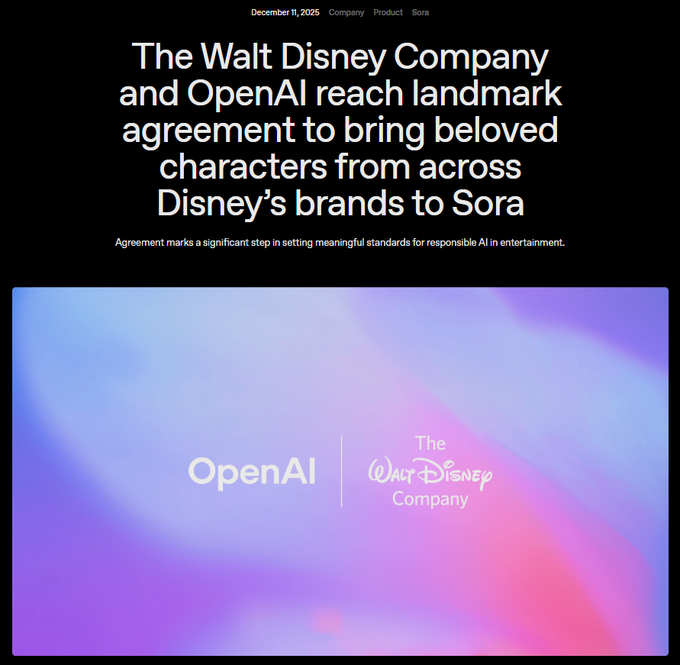
Disney announced a $1 billion equity investment in OpenAI alongside a three‑year licensing deal that lets Sora and ChatGPT Images generate content featuring more than 200 characters across Disney, Marvel, Pixar, and Star Wars, with first consumer experiences planned for early 2026. deal announcement
For AI filmmakers and artists this is the first official pipeline to make Sora shorts with marquee IP (and even insert yourself next to characters) under studio-sanctioned rules, with Disney+ set to host a curated selection of fan‑inspired Sora videos and Disney itself adopting OpenAI APIs inside Disney+ and internal tools. (deal announcement, mouse commentary) Creatively it opens a huge brief space—promos, fan stories, spec spots—while also concentrating distribution and moderation inside Disney’s ecosystem, so anyone building around this will need to think in terms of pitching into a tightly controlled platform, not open UGC.
Creators see Disney–Sora as a massive fan‑powered R&D funnel
Independent creatives are already framing the Disney–OpenAI deal as turning Disney’s IP catalog into an "idea gateway" where millions of Sora fan shorts effectively become free R&D for the studio. fan content funnel One prominent take sketches a loop where >99% of experiments fail safely as "fan work", while Disney scouts the few breakout formats or character mashups and then decides which ones to upscale into official productions, avoiding another $100M bet like Ahsoka without audience proof. ashoka comparison Posts describe the arrangement as "the Disney Vault is open", with users able to legally play in the sandbox of 200+ characters while Disney maintains full control over curation and monetization. (vault open claim, wish granted comment) For AI storytellers this looks like a new ladder: Sora shorts become a quasi‑spec portfolio inside Disney’s ecosystem, but you’re trading away leverage on IP and story concepts, so treating these projects as exposure + learning (not your core original IP) will likely be the safer move.
Disney–OpenAI deal intensifies debates over artists, AI, and authorship
The partnership is already a flashpoint in creator circles, with breakdown videos both celebrating the reach of Sora‑powered fan films and spending minutes criticizing Disney’s historic treatment of artists and the risk of AI being used to further squeeze labor. video analysis Commentators argue that Disney is "the perfect example" of a studio that chose to join, not fight, AI—and predict every major animation house, even Studio Ghibli, will eventually adopt similar tools despite earlier public resistance. studio competitive view
At the same time, some artist‑educators tell peers that if you’re not using AI, "the market will close its doors on you", casting deals like this as proof that AI is now part of the baseline skillset rather than an optional experiment. ai for artists For working creatives, the message is conflicting but clear: you’ll gain huge new canvases for fan‑driven work, but you also need to think hard about how much of your time goes into building someone else’s IP versus nurturing original worlds you fully control.
📽️ Showreels and festival picks
A quieter but quality day of finished pieces: hybrid shorts and music contest winners showcase AI as an extension of film craft, lip‑sync, and scoring.
AI-assisted shorts enter the Oscar race under new Academy rules
A longform piece making the rounds today breaks down how three AI‑assisted shorts—Ahimsa, All Heart, and Flower_Gan—are competing in this year’s Oscar cycle, the first since the Academy clarified that using generative tools “neither help nor harm nominations” as long as humans remain the core authors. (Oscars overview, Oscars article) Ahimsa uses Runway and Google Veo to depict AI warfare and non‑violent resistance, All Heart trains a custom Asteria model only on commissioned art to avoid scraped data, and Flower_Gan leans into critique by visualizing the environmental cost of generative models via GAN‑grown flowers and real‑time energy stats. More film details For AI filmmakers this is a watershed moment: the Academy has effectively blessed AI as a legitimate part of the pipeline, but the films that get attention are the ones with a clear stance on authorship, ethics, and what the technology means—not tech demos.
DISRUPT and DAIFF festivals spotlight AI-assisted shorts where craft still leads
Leonardo AI highlighted winners from DISRUPT, TBWA Sydney’s gen‑AI film festival, where judges repeatedly stressed that tools matter less than the craftsperson wielding them. DAIFF summary The festival report quotes the line “AS WITH ANY TOOLS IN HUMAN HISTORY, IT'S THE SKILL OF THE CRAFTSPERSON WIELDING THEM, THAT MAKES THE DIFFERENCE,” and showcases category winners like Unhold (Best Student Film), Erase (Long Film), Lens Wide Open (Short Film), and Grand Prix winner Black Box, all of which use AI for imagery or motion without handing it full creative control. (Disrupt winners, festival report) For filmmakers, these picks act as a bar: structure, character, and editing need to stand on their own, with AI serving visual ambition and timeline constraints rather than dictating style.
FRAMELESS short film shows how Kling and Nano Banana can carry emotional storytelling
Halim Alrasihi released FRAMELESS, a short film about imagination that was built entirely with Kling video models and Nano Banana Pro imagery, treating AI as a full cinematic stack rather than a one-off effect. Frameless film post

He credits Kling 2.6 for unusually convincing lip sync and emotional acting, calling its prompt adherence and reactions “the most realistic” he’s used so far, with Nano Banana Pro providing the keyframe imagery that Kling O1/2.5 then morphs and transitions between. (Lip sync details, Keyframe workflow) For creatives, it’s a concrete template: concept → NB Pro keyframes → Kling for performance, transitions, and final polish.
Cinderella Man spec ad shows a full Nike-style spot built on an AI stack
Creator GenMagnetic unveiled Cinderella Man | NIKE, a full spec commercial that pushes Nano Banana Pro, Kling, Google DeepMind video, and Topaz tools into a cohesive, minute‑plus boxing spot instead of a single hero shot. Cinderella Man ad

The film mixes grainy black‑and‑white training sequences, stylized sprinting shots, and bold title cards, all stitched from AI‑generated imagery and upscaled/enhanced in post, with sound design carrying much of the emotional weight. He frames it as the payoff of two years of experimentation (sharing an old Midjourney v4 still as the seed idea) and argues that 2025 is the first year he could literally show the vision in his head end‑to‑end with off‑the‑shelf models. Early concept art For commercial directors and art directors, it’s a strong proof that spec spots can now be developed and iterated almost entirely in‑house before any live shoot.
La Nuit Américaine positions AI as part of a director’s toolkit, not the star
Director Victor Bonafonte shared La Nuit Américaine, a moody hybrid short where AI tools like Runway, Freepik and Magnific sit behind the scenes while rhythm, composition, and emotional beats stay firmly in charge. La Nuit post

He frames it explicitly as a “calling card” for hybrid filmmaking—“I’m a director, not a prompter”—arguing that AI should extend cinematic language (blocking, pacing, texture) rather than replace it. For filmmakers experimenting with gen‑AI, it’s a clear example of how to keep authorship and taste at the center while still leaning on models for shots, transitions, and look development.
Producer AI crowns six winners in its Holiday Song Challenge and drops playlist
Producer AI announced six winners from its Holiday Song Challenge, which drew the highest number of submissions they’ve ever had, and published all the tracks in a public playlist. Holiday songs earlier covered the prize structure; now we see the finished music and lyrics people delivered. Song winners

“Frozen Distance” by Lightspeed took 1st place, with “Sweet – Bring on Santa” and “Christmas Time Brings Everyone Near” sharing 2nd, and three more tracks rounding out 3rd place; all six are bundled into a dedicated listening page for inspiration and benchmarking. songs playlist For AI musicians and lyricists, this shows what currently impresses judges: strong hooks, coherent storytelling, and production polish, not just model novelty.
“Father, I can” pairs Nano Banana Pro stills with Vadoo for a quiet character short
Kangaikroto shared a heartfelt short built from Nano Banana Pro images animated with Vadoo, telling the story of a boy who loses his father and grows into quiet resilience under the refrain “Father, I can.” Father I can film

The piece leans on NB Pro for painterly, emotionally charged stills and uses a prompt‑driven film generator by D Studio Project to sequence shots and captions into a coherent narrative, showing how solo creators can tackle intimate themes without live actors or locations. It’s a useful reference for storytellers who want to test emotional arcs and visual motifs with AI before committing to larger productions.
🎁 Credits, contests, and holiday drops
Opportunities to save or earn in creative stacks: advent calendars, merch co‑design, and bundle teasers relevant to daily creative work.
OpenArt launches 7‑day Holidays Advent Calendar with ~20k credits in gifts
OpenArt is rolling out a 7‑day Holidays Advent Calendar running Dec 19–25, with surprise gifts worth roughly 20,000 credits, including access to tools like Nano Banana Pro, Kling O1, and Wonder Plan for upgraded users who log in daily. advent launch

For AI artists and video makers this is basically a week of subsidized experimentation: each day unlocks a different bundle of credits or model access you’d otherwise pay for, and OpenArt is pushing people toward effects like its Magic Effects video tools, which pair well with those image and video models. (advent landing, effects overview)
Freepik #Freepik24AIDays Day 10 lets one designer co‑create official merch
Freepik’s #Freepik24AIDays shifts from pure credits to co‑creation: following up on Day 8 gifts that dropped 120k credits into the ecosystem, Day 10 invites designers to co‑design an official piece of Freepik merchandise, with one winner getting multiple physical units of their design. day 10 brief

To enter, creatives need to post their best Freepik AI creation today, tag @Freepik, include the #Freepik24AIDays hashtag, and submit the post via the official form, turning everyday prompt play into a shot at having your style printed and shipped as real merch. (entry reminder, submission form)
Higgsfield’s SHOTS holiday finale adds a full year of Nano Banana Pro
Higgsfield is closing out its holiday sale by upgrading the SHOTS bundle: on top of unlimited Kling 2.6 video generations, buyers now get 365 days of Nano Banana Pro access, turning what started as a discounted bundle into a year‑long creative stack for contact‑sheet‑style workflows. (Shots bundle, holiday finale)
For filmmakers and designers who leaned into SHOTS’ nine‑angle grids from a single reference, this finale offer means you can keep generating consistent characters and motion across all of 2026 without worrying about per‑render caps, while still piggybacking on the earlier 67%‑off pricing if you move before the sale window closes. shots workflow
Runware prices Runway Gen‑4 image models at $0.02 per render via API
Runware has added Runway’s Gen‑4 image and Gen‑4 Turbo models to its inference platform at a flat $0.02 per image, positioned as API‑only endpoints for sharp, detailed outputs or faster, cheaper iterations. gen4 pricing

For studios and tool builders this creates a very concrete budgeting lever: instead of opaque credit systems, you can price Gen‑4‑quality stills directly into client quotes or in‑app pricing, and Runware’s broader $50M Series A push to deploy low‑latency inference pods suggests these image rates are meant to be sustainable at scale rather than a short‑term promo.
While you're reading this, something just shipped.
New models, tools, and workflows drop daily. The creators who win are the ones who know first.
Last week: 47 releases tracked · 12 breaking changes flagged · 3 pricing drops caught