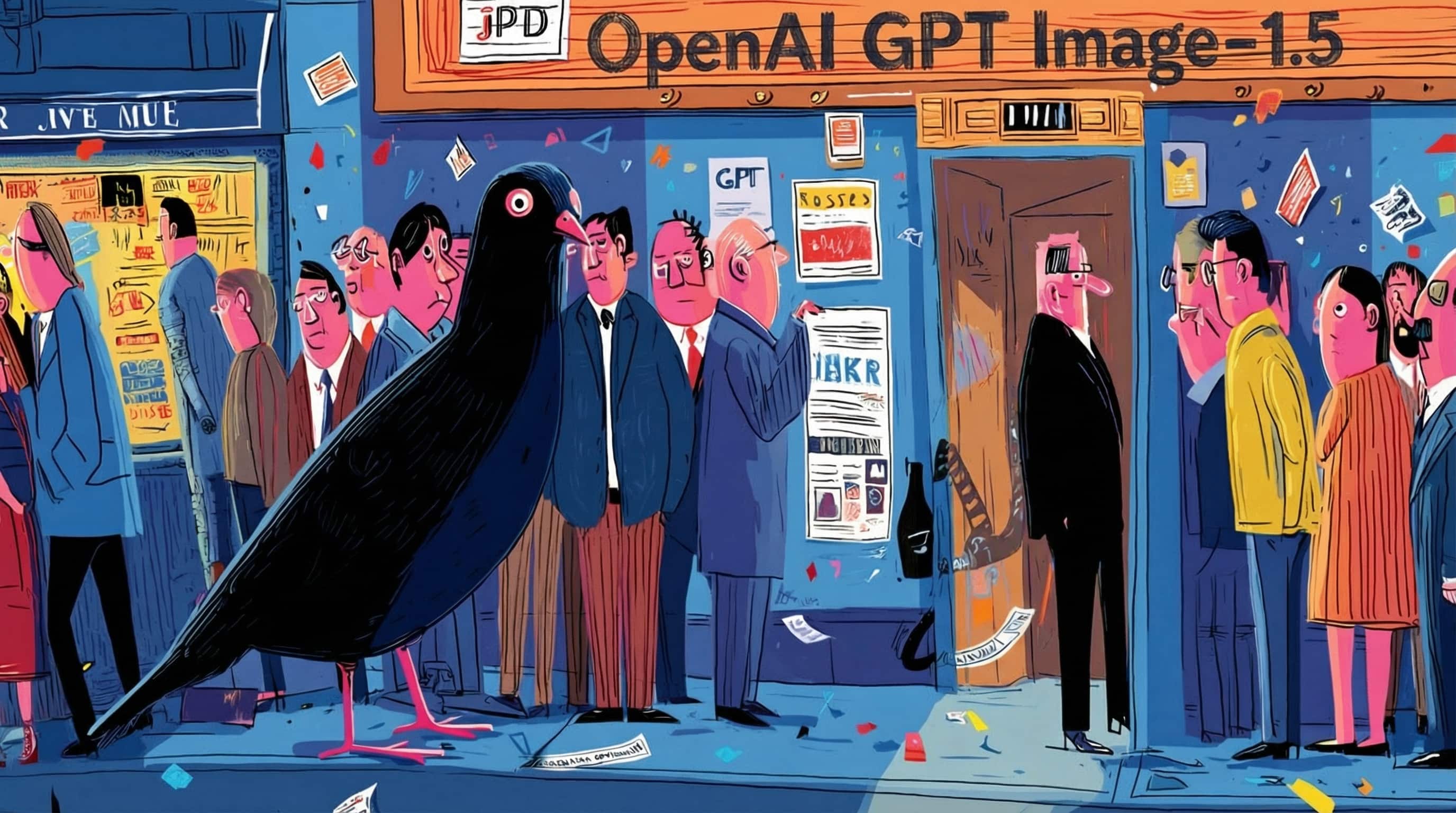
GPT Image 1.5 hits ChatGPT, fal, Freepik – 4× faster renders

Stay in the loop
Free daily newsletter & Telegram daily report
Executive Summary
OpenAI’s new GPT Image 1.5 didn’t tiptoe in today; it landed everywhere at once. ChatGPT now has a dedicated Images workspace powered by the model, promising up to 4× faster generations plus much tighter instruction following, especially for dense posters, UI layouts, and infographics where the text stays legible instead of melting. The new Images tab adds style presets, reusable prompts, and a proper gallery, so image work finally feels like a workspace, not one-off attachments in a chat thread
The real story is how fast the ecosystem snapped it up. Higgsfield wired GPT Image 1.5 into its image stack within hours and is dangling 340 free credits in a 9‑hour promo, on top of its 67%‑off unlimited models deal. Freepik swapped its engine to GPT Image 1.5 and is giving Premium+ and Pro users a full month of unlimited runs, while fal, Runware, and Replicate all exposed it behind their standard REST and SDK patterns so existing Flux/Wan pipelines can bolt on GPT‑class text handling and precise edits without re‑architecting
Between community leaderboards and early shootouts, GPT Image 1.5 now looks like a genuine contender alongside Nano Banana Pro and FLUX.2 [max]—especially when your brief is heavy on structure, typography, and iterative edits rather than pure cinematic flair.
While you're reading this, something just shipped.
New models, tools, and workflows drop daily. The creators who win are the ones who know first.
Last week: 47 releases tracked · 12 breaking changes flagged · 3 pricing drops caught
Top links today
- OpenAI ChatGPT Images launch blog
- GPT Image 1.5 on Higgsfield
- FLUX.2 Max text to image on fal
- Wan 2.6 cinematic video model page
- Runway Gen-4.5 video model overview
- HY World 1.5 real-time world demo
- HY World 1.5 world model GitHub repo
- Meta SAM Audio Segment Anything playground
- Hunyuan 3D 3.0 text to 3D on fal
- Microsoft Trellis 2 image to 3D release
- NoSpoon AI movie trailer competition form
- Animating Dreams from Image Batches in ComfyUI
- Tencent HY HolidayHYpe 3D ornament challenge
- Kling 2.6 voice cloning on fal
Feature Spotlight
ChatGPT Images (GPT Image 1.5) lands across creator stacks (feature)
OpenAI’s GPT Image 1.5 arrives everywhere (Higgsfield, fal, Runware, Replicate, Freepik), bringing 4x speed, precise editing, and better text—instantly useful for brand-safe ads, posters, and iterative art direction.
Massive day-zero availability for OpenAI’s new image model across creator platforms; threads show faster renders, precise edits, readable text, and new ChatGPT Images UI. This dominates today’s creative workflow news.
Jump to ChatGPT Images (GPT Image 1.5) lands across creator stacks (feature) topicsTable of Contents
🖼️ ChatGPT Images (GPT Image 1.5) lands across creator stacks (feature)
Massive day-zero availability for OpenAI’s new image model across creator platforms; threads show faster renders, precise edits, readable text, and new ChatGPT Images UI. This dominates today’s creative workflow news.
OpenAI ships GPT Image 1.5 and new ChatGPT Images workspace
OpenAI rolled out ChatGPT Images powered by its new GPT Image 1.5 model to all ChatGPT users and the API, promising up to 4× faster renders, tighter instruction following, and more precise edits with better face and layout preservation Launch recap. The model can now handle long, dense typography-heavy layouts (posters, infographics) with readable text, as shown in the "Introducing GPT‑Image‑1.5" one‑pager example Long text example.
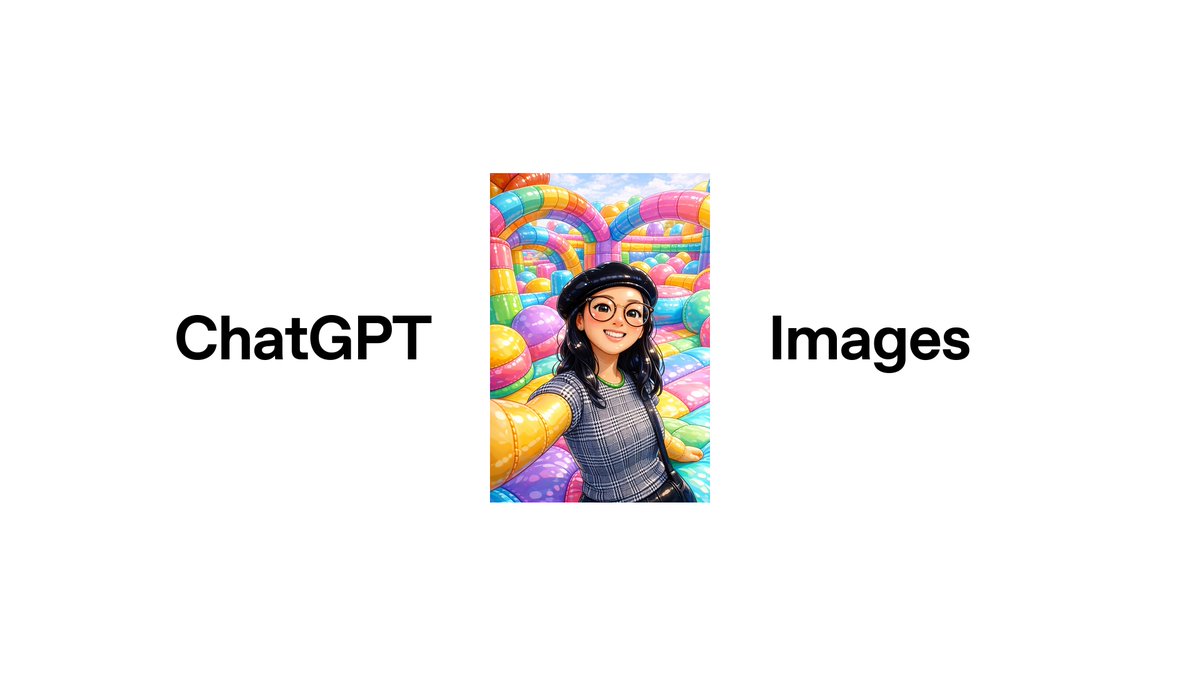
For creatives this means fewer re-rolls: you can add, remove, or restyle elements while keeping lighting, composition, and identity stable instead of the image "jumping" on every edit OpenAI post. Early evaluations also report GPT‑Image‑1.5 entering community image leaderboards at the top for both text‑to‑image and editing, suggesting it’s now competitive with, or ahead of, Nano Banana Pro in many practical workflows Arena ranking.
Higgsfield adds GPT Image 1.5 with aggressive credits promo
Higgsfield turned on GPT Image 1.5 across its image stack within hours of the OpenAI launch and is pushing a 9‑hour promo where retweet/reply/like/follow actions earn 340 credits Higgsfield launch deal.

Creators are already posting 3×3 grids, multi‑object compositions, character replacements, manga pages, and historical scenes to show that the Higgsfield implementation keeps identities, branding, and layouts stable across iterations Higgsfield examples thread. For working artists this effectively makes GPT‑Image‑1.5 a first‑class option alongside Nano Banana Pro and Wan 2.6 inside the same UI, and the promo plus Higgsfield’s longer‑term 67%‑off "unlimited image models" deal lower the cost of serious testing Higgsfield model page.
ChatGPT gets an Images tab with styles, presets, and reuse
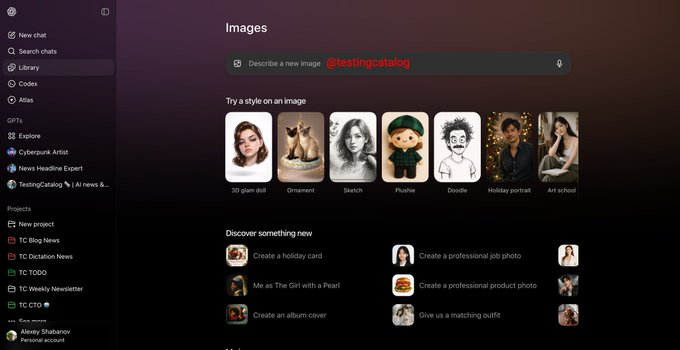
Alongside the new model, OpenAI is rolling out a dedicated "Images" experience inside ChatGPT, with a top‑level Images tab, style presets (3D glam doll, sketch, plushie, ornament, etc.), and suggested prompts like album covers or product shots Images UI screenshot.
The UI also surfaces "Try a style on an image" flows, trending templates, and a gallery of your past images, so image creation feels like a workspace rather than single prompts fired into chat. For storytellers and designers, this means you can stay inside ChatGPT to iterate on a look—swapping styles, tweaking compositions, and returning to prior generations—without juggling separate image apps or rebuilding prompts from scratch.
Early tests show GPT Image 1.5 lifting text and layout reliability
Beyond the official claims, early creator tests point to GPT Image 1.5 being meaningfully better at long blocks of typography and structured layouts than the prior GPT image model. One demo shows a newspaper‑style announcement about GPT‑Image‑1.5 with multiple section headings, paragraphs, and bolded phrases that remain legible across the whole page Long text example.
Comparative threads note that safety policies still block obvious celebrity prompts, but inside supported use cases the new model tends to keep posters, UI layouts, and safety diagrams structurally intact instead of warping text or misplacing panels Launch recap. Combined with the new ChatGPT Images UI and day‑zero availability on platforms like Higgsfield, fal, Freepik, Runware, and Replicate, this is the first GPT image release that many working designers and filmmakers are treating as a serious production option rather than a curiosity.
fal ships day‑0 GPT‑Image‑1.5 with editing and style transfer
Inference platform fal added GPT‑Image‑1.5 on day zero, advertising 4× faster generations than the prior GPT image model plus stronger instruction following, precise region editing, and style transfer workflows Fal launch summary.
fal is framing the model as a control‑oriented tool: their examples show multi‑element historical scenes, cinematic disaster shots, and complex environment changes that keep perspective, lighting, and object relationships intact Fal scene examples. For teams already running models like Flux or Wan on fal, this makes it easy to slot GPT‑Image‑1.5 into existing pipelines (via the same REST/SDK patterns) to handle text‑heavy graphics and fine‑grained edits where other models tend to wobble.
Freepik makes GPT Image 1.5 unlimited for Premium+ and Pro
Freepik switched its image engine over to GPT Image 1.5 and is giving all Premium+ and Pro users a full month of unlimited generations with the new model Freepik launch thread.
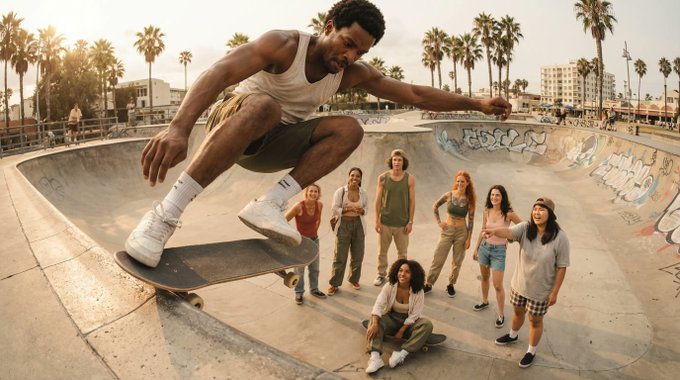
Their positioning is "built for iteration, not re‑generation": the examples show lifestyle and fashion shoots where you can keep a cast consistent across group photos, close‑ups, and action shots while nudging poses, framing, and styling between variants. For agencies and social teams already living in Freepik, this effectively hides the model complexity—GPT‑Image‑1.5 becomes the default way to art‑direct and refine campaigns without burning through a token‑meter.
Replicate exposes GPT Image 1.5 as ImageGen 1.5 for builders
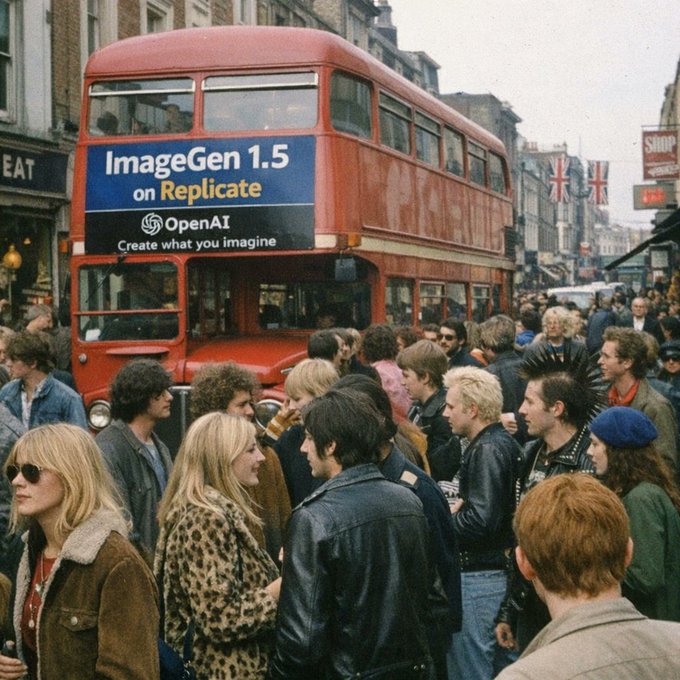
Replicate quietly turned on an "ImageGen 1.5" endpoint backed by GPT Image 1.5, advertised on a London bus ad–style promo graphic that reads "ImageGen 1.5 on Replicate – Create what you imagine" Replicate launch post.
For developers, this means GPT‑Image‑1.5 is now available through Replicate’s standard REST API and client libraries, which many indie tools already use for Stable Diffusion or Flux. It gives small teams the option to add a GPT‑class image mode—especially for layouts and edits—without negotiating OpenAI’s API directly or rebuilding their deployment stack.
Runware adds GPT Image 1.5 for faster, higher‑precision image jobs
Runware integrated GPT Image 1.5 into its model catalog at launch, pitching "faster, more precise, and more natural" generations with stronger text handling, multimodal inputs, and much more powerful editing controls Runware launch note.
Runware’s model page highlights that GPT‑Image‑1.5 now supports text‑to‑image, image‑to‑image, and in‑place edits with improved preservation of small details, and prices it per‑megapixel alongside other premium models Runware model card. For creative studios already using Runware to orchestrate multiple providers, this makes it straightforward to route typography‑heavy posters, infographics, and brand‑sensitive composites specifically to GPT‑Image‑1.5 while keeping other models for look‑dev or style exploration.
🖌️ FLUX.2 [max] goes platform‑wide with grounded generation
BFL’s top image model spreads to fal, Runware, Prodia, Freepik; ranked #2 T2I and editing. Focus here is platform access, grounded web search, pricing, and consistency—excludes today’s GPT Image 1.5 feature.
Black Forest Labs ships FLUX.2 [max] with grounded generation and 10 refs
Black Forest Labs has released FLUX.2 [max], its highest‑quality image model, adding "grounded generation" that can search the web for up‑to‑date context and support for up to 10 reference images to keep products, characters, and styles consistent across shots Model announcement.
On the independent Artificial Analysis leaderboards it debuts at #2 for both text‑to‑image and image editing, just behind Nano Banana Pro but ahead of competitors like Seedream 4.x and GPT‑5’s image stack, which is why many artists are calling it the strongest all‑around alternative in their toolkit Model announcement Leaderboard recap. For working creatives this combo—live web facts plus strong multi‑image conditioning—means more reliable brand work (logos, packaging, fashion), better continuity for character‑driven stories, and historically accurate scenes without manual reference hunting, a sentiment echoed in community reactions like "Nano Banana’dan sonra en yüksek skoru alan FLUX’ın yeni modeli" (Flux’s new model scores right below Nano Banana) Turkish summary.
FLUX.2 [max] goes live on fal with focus on consistent edits
Inference platform fal has added FLUX.2 [max] as a first‑class model for both text‑to‑image and image editing, pitching it as the most creative FLUX variant but with tighter prompt adherence and edit consistency than FLUX.2 [pro] Fal launch.
Fal’s examples show one‑click transformations—sunflower to rose, day skyline to neon cyberpunk, wine to champagne, photo portrait to stylized pop‑art—while keeping framing, lighting, and subject identity intact, which is exactly what ad makers and storyboard artists need when iterating treatments without re‑prompting every time Editing examples. For teams already using fal, this means you can swap FLUX.2 [max] into existing image pipelines (or fine‑tune style prompts) and get more adventurous variations without losing continuity between shots or breaking layout‑sensitive compositions like social tiles and posters.
Freepik unlocks one month of unlimited FLUX.2 Max for top tiers
Freepik has turned on Flux.2 Max across its AI tools and is giving Premium+ and Pro users a full month of unlimited generations from the new model, while regular Premium users get access with normal quotas Freepik launch.

Because these plans already sit in many designers’ stacks, this effectively drops a top‑tier FLUX.2 engine into daily workflows for ad comps, social sets, and moodboards at zero extra marginal cost, especially attractive for teams racing through end‑of‑year campaigns. Freepik also calls out that Flux.2 Max is "powered by @bfl_ml", so you’re getting the same core model as on dev platforms but wrapped in Freepik’s templates, Spaces, and licensing system, which matters if you’re handing client‑facing assets to non‑technical colleagues Powered by BFL note.
Runware adds FLUX.2 [max] with grounded web-aware images from $0.07
Runware has rolled out FLUX.2 [max] in its model catalog, highlighting grounded image generation that ties prompts to real‑time web info—useful for things like current sports scores, live weather, or historically accurate scenes—alongside strong prompt adherence and support for 10 reference images Runware launch.
Pricing starts at about $0.07 per 1‑megapixel image (for example, a 1024×1024 render) with incremental cost for higher resolutions and reference inputs, making it affordable for design teams that need lots of variants during a campaign Runware model page. For creatives already using Runware for Wan or Kling workflows, FLUX.2 [max] slots in as a high‑end stills engine: you can keep character and product consistency across boards while also asking for grounded details like "tonight’s NBA scoreboard on the bar TV" without hand‑compositing those elements later.
Prodia exposes Flux 2 Max for developers building image-heavy apps
Prodia has added Flux 2 Max to its hosted model lineup, giving developers an easy API route to FLUX.2‑class image quality for text‑to‑image use cases Prodia tweet.
The Prodia model page emphasizes simple JSON inputs (prompt, size, seed, safety tolerance) and routes images back via their usual async job pattern, so app builders can drop Flux 2 Max into existing "generate cover", "create thumbnail", or "concept art" endpoints without touching infra Prodia model docs. For indie tools, plugins, or game UIs that need consistent, good‑looking art but don’t want to manage their own GPU fleet, this is a pragmatic way to offer a FLUX‑based style option alongside other engines like SDXL or DALL·E.
Replicate offers FLUX.2 [max] endpoint for quick experiments
Replicate has quietly made FLUX.2 [max] available as a hosted model, promoted with a moody "Flux.2 [max] is here" street‑billboard image and a direct "Try here" link to the run page Replicate launch.
For creatives and small teams, this is a low‑friction way to kick the tires on FLUX.2 [max]—paste a prompt into the web UI, then, if it fits your look, grab the API snippet for scripts, notebooks, or internal tools. Replicate’s pay‑per‑second pricing and no‑setup environment make it handy for one‑off concept sprints, especially if you want to A/B it against other models in their catalog before committing to a deeper integration elsewhere.
🎬 Wan 2.6 integrations and multi‑shot storytelling
Continues yesterday’s rollout with broader access (Krea, Runware, PolloAI, Ima Studio) and generous credit promos. Focus is native A/V sync, multi‑shot, references, and creator tests—excludes today’s GPT Image 1.5 feature.
Wan 2.6 officially targets creators with 15s multi-shot 1080p video and daily free credits
Wan 2.6 is now positioned as a "next era" multimodal engine for creators on wan.video, offering up to 15‑second 1080p clips with multi-shot storyboards, character casting from reference videos, native multi-speaker audio, and advanced image synthesis/editing in one stack Wan feature list Model overview. Following up on 3p runtimes where Wan 2.6 first appeared on fal and Replicate, Alibaba is backing the launch with a 150 free daily credits campaign from Dec 16–23 so filmmakers and designers can trial real projects with no upfront spend Credit card offer (Wan landing page).

For storytellers this means you can go straight from a text prompt (plus a couple of reference stills or clips) to a short, structured sequence with consistent characters, camera language, and synchronized dialogue, instead of stitching single shots together in post. The native A/V stack and multi-image reference support also make Wan 2.6 interesting for ad work and branded shorts where voice, motion, and product continuity all have to line up in one pass.
Early creator tests show Wan 2.6’s audio sync and camera work ready for real stories
Hands-on tests from independent creators suggest Wan 2.6’s native audio and motion stack is already usable for real narrative work, not just quick gifs. TheoMediaAI ran audio‑to‑video experiments where Wan 2.6 generated visual sequences directly from a music track (lyrics and structure driven by Suno), and called the results "pretty impressive" for sync, pacing, and mood Audio to video test Creator recap.

On wavespeed.ai and GMI Cloud, other clips show subtle facial expressions, eye-lines, and camera moves in 3D Pixar‑style beach and forest scenes, with characters holding emotional beats rather than glitching every few frames GMI forest demo Pixar-style beach. For storytellers trying to decide which video model to invest time in this month, Wan 2.6 now looks like a serious candidate when you need both expressive characters and synchronized sound in the same pass.
Wan Muse+ Season 3 launches "In Character" short-film challenge with $14k in prizes
Alibaba’s Wan Muse+ Season 3 "In Character" contest is now open worldwide, offering up to $14,000 for shorts and style pieces built around Wan‑generated characters and performances Contest overview. Building on creator streams that teased a multi-region launch, the full brief splits into a Micro‑Film track (90s–15min complete stories) and an Art Style Exploration track (10s+ visual experiments), with awards for best narrative, animation, visual effects, PSA, and best art style, plus 60+ nomination and inspiration slots Contest overview.
For AI filmmakers this is effectively a funded lab: you’re encouraged to push Wan 2.6’s character consistency, emotional range, and cinematic language, and in return you get feedback from a dedicated jury and early access to future models. The emphasis on "in character"—identity, immersion, and self‑reconstruction—also nudges people away from pure tech demos and toward emotionally coherent work.
Higgsfield makes Wan 2.6 unlimited and pairs it with Nano Banana Pro workflows
Higgsfield switched on "UNLIMITED Wan 2.6" alongside a steep 67% discount, turning its app into an experimental playground where you can bounce between Nano Banana Pro for stills and Wan 2.6 for motion Higgsfield Wan promo. Creators like Techhalla are using this combo to generate 3×3 "inner anatomy" grids in NB Pro and then animate them with Wan 2.6 into surreal, introspective journeys through brains, eyes, and organs Inner world workflow.

Other users are stress‑testing Wan’s multi-shot and motion logic with retro 8‑bit corridor shooters—taking a single character image and asking Wan 2.6 to follow them through a sequence as they fight off bio‑robotic enemies 8-bit fight test. If your work leans toward stylized, narrative‑heavy visuals, Higgsfield’s unlimited plan is one of the less risky ways to iterate heavily on Wan without watching a credit meter.
Krea adds Wan 2.6 to generate multi-scene videos from a single prompt
Krea AI has wired Wan 2.6 into its video tool, showing that one prompt can now create a full multi-scene sequence rather than a single, looping shot Krea launch. In the example clip, the camera glides through several distinct environments and abstract shots in one ~10s generation, which highlights Wan’s built‑in storyboard planning and long-horizon motion rather than frame-by-frame tricks.

For designers and editors who already lean on Krea for look dev, this means you can test narrative beats and transitions inside the same interface where you prototype stills or layouts. You get Wan’s multi-shot logic plus Krea’s prompt history, upscaling, and export options, without adding another separate tool into your stack.
Pollo AI turns Wan 2.6 into a multi-shot storytelling cockpit with video references
Pollo AI has gone live with Wan 2.6 as its core storytelling model, emphasizing three things: automatic multi-shot storyboarding from a simple prompt, 15‑second durations, and the ability to cast characters from reference videos into new scenes Pollo integration. The app wraps this in a holiday promo (50% off subscriptions plus social credit codes), but the real draw is being able to hand Pollo a short clip of your actor or mascot and get several shots back where they behave consistently across angles and locations Pollo feature notes Extra promo.

For creators who don’t want to juggle raw model APIs, Pollo’s presets and timelines make Wan feel more like a lightweight editor: you think in "shots" and "beats" instead of sampling steps and seeds. That’s especially useful for TikTok‑style serials or ad concepts where you need a coherent mini‑arc, not a single hero frame.
Runware hosts Wan 2.6 for 3–15s 1080p text‑ and image‑to‑video with audio
Runware has added Wan 2.6 as a first-class model, letting you generate 3–15 second 1080p clips from either text prompts or reference images, with native audio baked in Runware launch. That puts Wan alongside GPT Image 1.5 and other models in the same dashboard, so teams can route different shots (dialogue, b‑roll, abstract sequences) through different engines while keeping usage, billing, and monitoring unified Runware link.

Because Runware exposes Wan 2.6 via a clean API and per‑second pricing, it’s a practical way for small studios to slot 15‑second, multi-shot sequences into existing pipelines—story reels, social cut‑downs, or shorts—without managing their own GPU infra. You can start with image‑to‑video for style‑locked spots (product frames, key art) and move to text‑only for faster exploratory passes (Runware model page).
Wan 2.6 spreads across SeaArt, wavespeed.ai, Ima Studio, Vadoo, TapNow, and GMI Cloud
Beyond the big aggregators, Wan 2.6 quietly landed on a swarm of creator‑focused platforms: SeaArt.ai, wavespeed.ai, Ima Studio, Vadoo, TapNow, and GMI Cloud all announced support within roughly a day TapNow announcement SeaArt launch. Some, like Ima Studio, pitch "truly free" global debuts with no membership or credits required Ima Studio launch, while wavespeed.ai and GMI Cloud are showing Pixar‑style 3D character moments and branded podcast backdrops rendered entirely with Wan 2.6 GMI forest demo Pixar-style beach.

For filmmakers and designers this means you can pick the host that best matches your workflow: editing‑centric platforms like Vadoo, community‑driven sites like SeaArt, or infra‑oriented partners like GMI Cloud. The common thread is access to the same multi-shot, native‑audio Wan engine, but tuned to very different use cases—from social clips and lyric videos to agency‑grade concept films.
Lovart bakes Wan 2.6 into its design agent with unlimited multi-shot video tiers
Lovart AI is now offering Wan 2.6 as part of its "design agent" subscriptions, giving Pro Annual users a month of Wan 2.6 Unlimited and Ultimate Annual users a full year of unlimited access Lovart offer. In practice, that means the same place you prototype brand visuals and layouts can now generate 15‑second, multi-shot videos with multimodal inputs and character‑consistent sequences.

Because Lovart is built around agent‑style projects rather than single prompts, this integration is attractive if you want a brief‑to‑deliverable flow: description → reference images → Wan 2.6 shot list, all under one job. You can iterate on the visual language (color, lensing, staging) and then let Wan handle the moving piece without exporting to another tool (Lovart site).
🤖 Agents go pro: builders, inbox helpers, and ops security
Creative agents and ops mature: Vidu Agent beta for end‑to‑end video, Google’s Opal Gem builder, Gmail’s CC briefings, OSWorld milestone, and Teleport’s vault‑free PAM. This beat tracks deployable agent workflows.
Glif’s Nano Banana + Kling agents now build full videos from a single prompt
Glif is showing off agents that chain Nano Banana Pro for images with Kling 2.6 for animation and editing, so a single prompt can turn a static reference into a full stylized short—like an "emo pig" getting multiple iconic haircuts with creative transitions and a final stitched video pig hairstyle demo.

The same pattern powers room renovation sequences (from dirty room photo to staged build phases animated with Kling) renovation workflow, as well as documentary‑style explainers such as "The Betrayal That Created the PlayStation" where the agent researches, generates on‑brand frames, and assembles the cut playstation story demo. For solo creators this turns what used to be a half‑day in After Effects into a prompt‑plus‑review loop, as long as you’re willing to iterate on the agent’s script and pacing.
Gmail tests CC, an AI assistant that emails your daily brief
Google Labs launched CC, an experimental agent that lives inside Gmail and sends you a "Your Day Ahead" email each morning summarizing schedule, priorities, and tasks so the inbox behaves more like a planning surface than a message dump feature overview.

CC can be emailed directly or CC’d on threads to help with summaries and follow‑ups, but in this first phase it’s limited to users 18+ in the US and Canada with consumer Google accounts, with priority access going to Google AI Ultra and paid subscribers labs page. For producers juggling shoots, clients, and releases, this is an early glimpse of agents that manage the calendar and communications glue instead of you.
Teleport pitches vault-free PAM with per-agent short-lived certificates
Teleport is promoting a "vault‑free" privileged access model where humans, CI bots, and AI agents get short‑lived certificates tied to identity instead of long‑lived passwords, VPN tunnels, or copied API keys pam diagram.
Certificates can be scoped to a specific resource, duration, and task—"agent can read this database for five minutes"—and then auto‑expire, with a unified audit trail that shows exactly which agent or person touched what identity control explainer. If you’re thinking about letting video or design agents talk to production storage or analytics, this is the kind of access pattern that makes security and compliance teams much less nervous.
Vidu Agent enters global beta as one-click idea-to-video assistant
Vidu has opened global beta signups for Vidu Agent, pitching it as a "professional video creation partner" that takes you from idea to finished video in a single click, with shot-level control and fine-grained editing for different creative scenarios beta announcement.

Early users can apply on the site and use invite code VIDUAGENT to get 800 bonus credits, which makes it practical to stress‑test end‑to‑end workflows like cosmetics ads or narrative trailers without paying upfront credits offer. For filmmakers and marketers, this is a clear sign that video tools are shifting from single models to agents that handle scripting, shot planning, generation, and post in one loop.
Google adds Opal app builder to Gemini as experimental Gem
Google quietly added an experimental Gem called Opal to the Gemini web app, letting you build reusable AI-powered mini apps and custom workflows right inside the Gems manager instead of wiring everything by hand opal interface.
For creatives this means you can turn a recurring flow—like "turn briefs into 3×3 storyboard grids" or "summarize client notes into shot lists"—into a one-click Gem that teammates can run without touching prompts, which starts to make Gemini feel more like an agent platform than a chat box.
Open-source Agent S becomes first to beat humans on OSWorld
Agent S, an open‑source computer‑use agent, reportedly reached 72.6% success on the OSWorld benchmark, nudging past the 72.36% human baseline and up from around 20% agent performance a year ago osworld result. For anyone betting on agents to handle browser UIs, dashboards, and creative tooling, this is a concrete sign that "hands-on" tasks like setting up campaigns or pulling reference material may soon be reliably offloaded to automation instead of interns.
IBM’s CUGA open-source agent hits Hugging Face for complex workflows
IBM’s CUGA, a new open‑source "generalist agent" aimed at complex real‑world workflows, is now live as a collection on Hugging Face, giving teams a reference implementation for agent planning and tool‑use without locking into a vendor stack cuga announcement.
hf collection
While it’s framed around enterprise workflows, the same patterns—multi‑step planning, tool orchestration, and long‑horizon tasks—are exactly what serious creative shops need when stitching LLMs, image models, and video engines into one agent that can handle briefs, assets, and approvals end to end.
🗣️ Voice‑locked characters in Kling 2.6
Kling 2.6 adds Voice Control for stable, custom voices and multi‑speaker lip‑sync. Practical how‑tos and an early bug report help filmmakers plan dialogue scenes—excludes Wan and GPT Image feature.
Kling 2.6 Voice Control promises stable custom voices and singing
Kling has switched on Voice Control in VIDEO 2.6, advertising that "Voice Consistency Now Resolved" and letting creators clone custom voices, switch styles, and even have characters sing while staying in sync. (Feature summary, Marketing copy)

For filmmakers and storytellers this means you can finally lock a distinct voice to a specific character instead of getting a different generic TTS tone every shot, and keep it stable across multiple scenes and projects. The UI shown in the promo makes per‑character voice selection feel like picking a look preset, which lowers the barrier for small teams that don’t have VO talent on call. Marketing copy The missing pieces today are the hard specs: we don’t yet know how much reference audio you need to get a good clone, which languages or accents are supported, or how many distinct voices you can manage in a single project before quality drops. But the messaging is clear: Kling wants you to think of it not just as a video model that adds sound, but as a place where voice is part of character design from the first frame.
fal ships a practical Kling 2.6 voice-cloning workflow for video dialogue
Inference platform fal turned Kling 2.6’s new Voice Control into a concrete three‑step workflow: upload target audio to clone a voice, copy the generated voice ID, then bind that ID when you create a Kling video so the character speaks in that cloned voice. Workflow thread

In the demo, fal shows a full loop: "Cloning voice…" completes, a voice ID appears, the user pastes it into the video‑generation form, and the resulting character speaks the line with that voice instead of a stock narrator.

This matters if you’re trying to keep VO consistent across many clips—series work, explainers, or multi‑episode shorts—without re‑recording. The same mechanism also enables multi‑speaker scenes, since you can assign different IDs to different characters and keep their timbre stable across cuts.
For practical use, this pushes Kling 2.6 closer to a full dialogue tool: you can pre‑clone voices for a brand mascot, a presenter, or fictional characters, then route all your prompts through those IDs from within fal instead of managing TTS in a separate pipeline.
Early bug report: Kling 2.6 voice clone shifts a British accent to American
One early adopter says Kling 2.6’s Voice Control isn’t always faithful to accent: they uploaded a British reference voice but the output kept coming out with an American accent, even after following the documented steps. User bug report This kind of mismatch suggests the underlying TTS backend may be snapping to a default accent or that the clone isn’t yet capturing finer regional cues. If your project depends on a specific dialect or national voice—UK narration, regional characters, or ad work aimed at a local market—it’s a signal to run small tests before committing whole scenes to Kling’s cloned voices.
For now, the feature looks strong on identity and consistency in marketing material, but accent correctness may lag behind, so teams should plan a fallback (alt TTS pass or human pickup) for voice‑critical deliveries.
🎞️ Runway Gen‑4.5 access + world‑sim vision
Runway opens Gen‑4.5 to all paid plans and publishes its long‑horizon “Universal World Simulator” vision. Creators share early motion/continuity tests—excludes today’s GPT Image feature.
Runway opens Gen‑4.5 to all paid plans and leans into world‑sim vision
Runway has rolled out its Gen‑4.5 video model to all paid plans, positioning it as their most cinematic, controllable, and expressive model so far, and pairing the launch with a long essay about building a "Universal World Simulator." runway announcement They argue large video models trained at scale become general world models that learn how objects move and how actions cause effects, and forecast reaching human‑scale, interactive simulations in about half a decade, with accurate physical simulation helping fields like robotics, climate, materials, and energy within a decade. (world simulator essay, world simulator page)

For filmmakers and designers, the practical change is that Gen‑4.5’s higher realism and better control over motion and style are no longer gated to a narrow tier; any paid Runway user can now run the new model, so teams can standardize dailies, previs, and concept passes on the same engine instead of mixing legacy and new models. The world‑sim framing also signals where Runway is trying to go: not just prettier clips, but tools that behave more like physics sandboxes where you can test camera moves, object interactions, and scene changes in a consistent "world" instead of a set of unrelated shots. That’s the part production leads will watch—if Gen‑4.5’s behavior stays stable as they iterate, it becomes a viable backbone for longer pieces rather than one‑off hero shots.
Early Gen‑4.5 tests show smoother motion and stronger continuity for pure text prompts
Creators putting Gen‑4.5 through its paces are seeing noticeably better motion, camera work, and scene cohesion compared to earlier Runway generations, especially from text‑only prompts. Diesol stitched a nature reel entirely from first renders—no re‑rolls—using pure text‑to‑video plus music from Suno, and notes that every shot in the edit came from the first pass, which is a good sign for reliability on tight timelines. nature demo

Heydin pushed fantasy and action scenes—dragons over cities, crystal forests, giant armored figures—and calls out that motion feels more intentional, camera moves are smoother, and complex scenes hold together even under aggressive prompts, all from text‑to‑video without image inputs. fantasy action test Following up on earlier sports‑reel experiments of Gen‑4.5’s motion sports reel, these tests suggest the model is now good enough to block out full sequences directly from script‑like prompts, then refine shots rather than wrestling with jittery or collapsing clips.
For you as a filmmaker or storyteller, the takeaway is simple: Gen‑4.5 looks worth testing as your default for:
- fast concept passes where every shot can’t afford 10 retries
- stylized fantasy or nature sequences that need fluid camera paths
- text‑only workflows where you don’t want to prep boards or reference frames first
🧊 Sketch‑to‑asset: TRELLIS 2 and Hunyuan 3D v3
Strong day for practical 3D: Microsoft’s TRELLIS.2 image→3D with O‑Voxel speeds, and fal’s Hunyuan 3D v3 for text/image/sketch→3D. Holiday 3D ornament challenge adds creator focus.
Microsoft TRELLIS.2 turns a single image into production 3D in seconds
Microsoft’s new TRELLIS.2-4B model converts a single reference image into a textured, PBR 3D asset using its O‑Voxel representation, with reported inference times of about 3 seconds at 512³, 17 seconds at 1024³, and 60 seconds at 1536³ on an H100 GPU. trellis explainer

For 3D artists, game devs, and motion designers this means you can turn concept art or product shots into GLB meshes with full materials and transparency instead of waiting on manual modeling, though it currently targets Linux workstations with ≥24 GB VRAM and is described as a raw foundation model that may need post‑cleanup. Hugging Face model card A sparse 3D VAE compresses a 1024³ asset into ~9.6K latent tokens (16× downsampling), so you get relatively compact data while still supporting complex, non‑manifold shapes and open surfaces that trip traditional SDF pipelines. trellis explainer Hands‑on demos are already live via a web app and Hugging Face space, giving indies and small studios a way to test image→3D workflows without standing up their own infra. trellis app link
fal ships Hunyuan 3D v3 for text, image, and sketch‑to‑3D assets
Inference platform fal launched Hunyuan 3D v3, a 3D generator that claims roughly 3× higher modeling accuracy with 3.6B voxels and up to 1536³ resolution, supporting text‑to‑3D, image‑to‑3D, and sketch‑to‑3D in one tool. hunyuan 3d release
For creatives, this is a very direct sketch‑to‑asset pipeline: you can doodle a character or prop, feed in the line art, and get a fully textured 3D model suitable for stills, animation, or real‑time use in minutes rather than days. sketch demo Because it runs as a managed model on fal, teams don’t have to manage voxel infrastructure themselves and can choose between text prompts, existing concept renders, or rough storyboards as starting points depending on how far along the art direction is. hunyuan 3d release
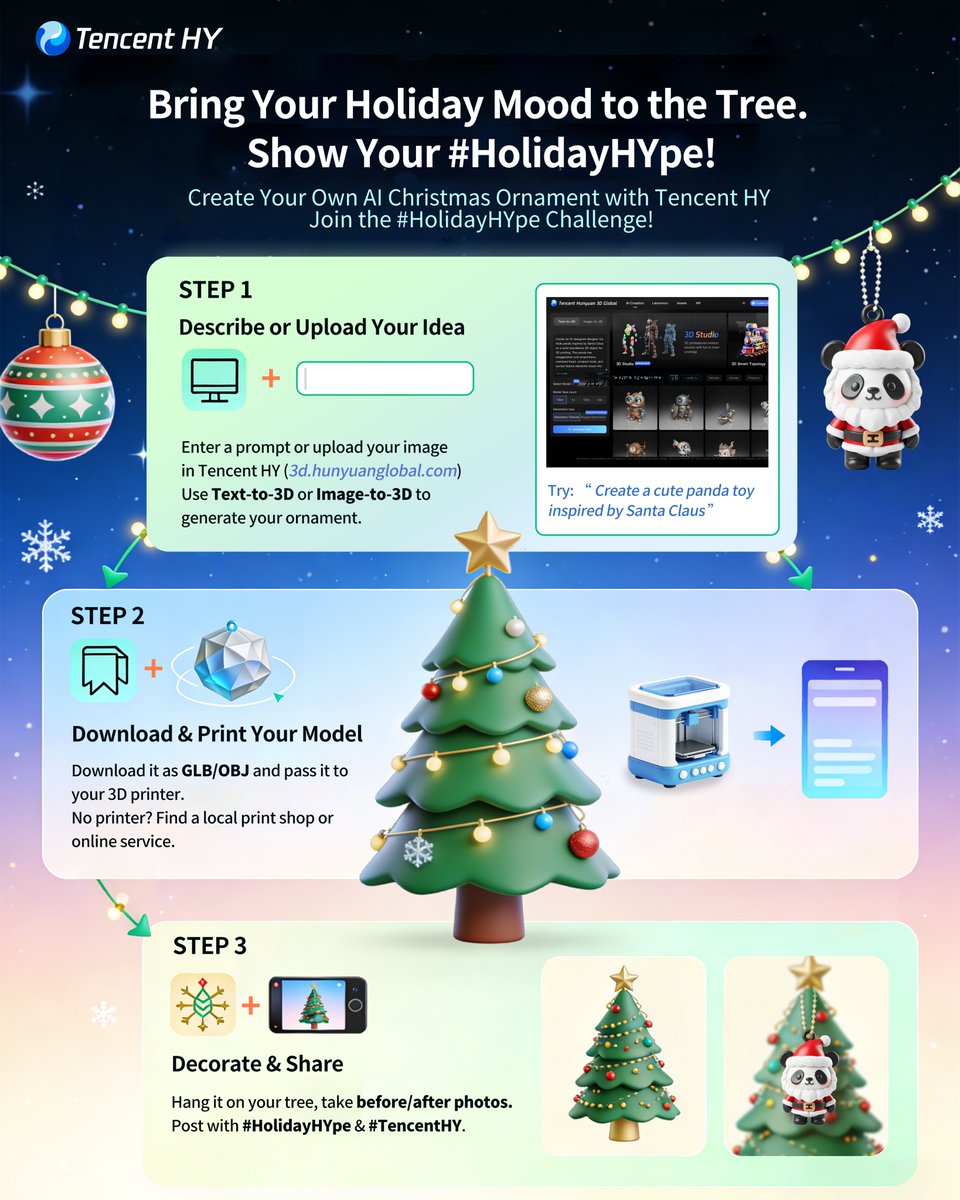
Tencent HY’s HolidayHYpe challenge nudges creators into 3D printing workflows
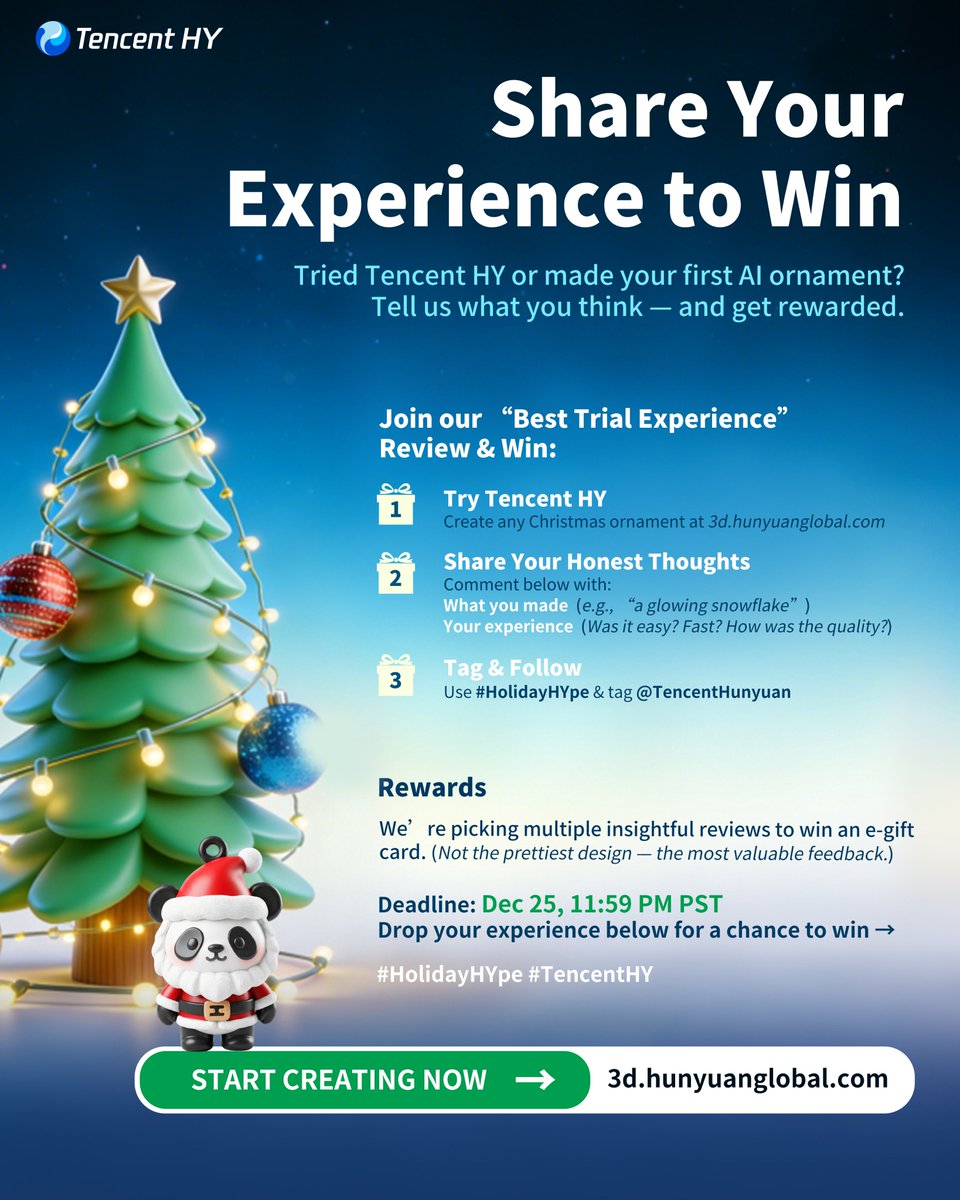
Tencent HY kicked off the #HolidayHYpe challenge, asking people to design Christmas or New Year ornaments with its HY 3D generator, download them as GLB/OBJ, 3D‑print, decorate, then share feedback for a shot at e‑gift cards. holidayhype details

The flow is very practical for artists who’ve stayed mostly in 2D: prompt or upload a reference at the HY 3D site, export a printable model, and see how well the AI meshes survive real‑world fabrication. Tencent HY 3D site Instead of rewarding only the prettiest entries, HY says it will pick multiple “most insightful” reviews, which pushes people to stress‑test the tool and talk openly about ease of use, speed, and printability—useful signal if you’re considering HY as part of a 3D asset pipeline. holidayhype details
🥊 Model shootouts: text, layout, and policy constraints
Creators benchmark image models on text rendering, shape adherence, and policy limits (e.g., celebrities). This is about results and sentiment, not releases—excludes the GPT Image 1.5 launch feature.
Techhalla’s shootout: GPT Image 1.5 wins structure while Nano Banana Pro wins style
Creator Techhalla ran a battery of prompts—GTA‑style 2×2 character grids, a tricky “catch and cook” bird shape, 3×3 grids, a soccer player, and a COVID safety poster—to understand where GPT Image 1.5 beats Nano Banana Pro, and concludes GPT is better at strict structure while Nano Banana still looks nicer overall. (grid shootout thread, covid poster test)
In the GTA 2×2 storyboard, both models follow the narrative framing, HUD elements, and stat cards, but Techhalla notes that GPT Image 1.5 keeps character identity and UI widgets more consistent panel‑to‑panel, while Nano Banana Pro adds extra flair and comic‑book punch at the cost of some prompt precision. grid shootout thread On shape‑sensitive prompts like a triangular bird in a 2×2 “catch and cook” grid, GPT holds geometry more faithfully, whereas NB Pro sometimes warps silhouettes even as it wins on lighting and style. grid shootout thread The COVID poster comparison is even clearer: GPT Image 1.5 nails the four‑panel layout with clean icons and the exact safety copy in each box, while Nano Banana Pro delivers a more cinematic hallway scene where the sign is readable but slightly less canon‑faithful to the specified structure. covid poster test For storyboard artists, UX folks, and comic creators, this suggests a split workflow: prototype structured layouts, diagrams, and panel geometry in GPT Image 1.5, then, if needed, re‑render key frames in Nano Banana Pro when you want maximum aesthetic punch and can tolerate a bit of drift.
Infographic tests show GPT Image 1.5 still lags Nano Banana Pro on dense non‑English text
A Turkish AI‑history timeline prompt exposed how differently GPT Image 1.5 and Nano Banana Pro handle dense, multilingual typography: Ozan Sihay reports GPT still “yazıları yazamıyor” (can’t really write the text), while Nano Banana Pro produces more legible Turkish labels, even if it sometimes duplicates words. (infographic prompt, turkish text verdict)
In the test, both models were asked for a 1950–2025 AI history infographic with cinematic UI styling and Turkish copy; GPT Image 1.5 produced convincing layout and iconography, but the actual labels collapsed into pseudo‑text and broken words, making the design unusable for real infographics. infographic prompt Nano Banana Pro, by contrast, rendered recognizable Turkish phrases along the timeline, albeit with occasional repetition and small errors, which Sihay still counts as a clear win. turkish text verdict A separate demo from ai_for_success shows GPT Image 1.5 comfortably filling a full newspaper‑style announcement in English, suggesting its text engine is strong in single‑language, document‑style layouts but far less reliable once you mix dense UI, timelines, and non‑English copy. long text poster For designers and motion‑graphics folks, the takeaway is blunt: use GPT Image 1.5 for overall layout and placeholders, but lean on Nano Banana Pro or manual typography when the text itself must ship, especially outside English.
Four‑way portrait comparison highlights likeness and mood differences across top image models
Ozan Sihay fed his own photo and a detailed Turkish café prompt into GPT Image 1.5, Nano Banana Pro, FLUX.2 [max], and Seedream 4.5 to see how each handles likeness, lighting, and everyday realism in a single setup. four model portrait test
All four images show the same man holding a tulip glass of tea in a traditional kahvehane, lit by window daylight with a Rembrandt‑style key, but they diverge noticeably in identity fidelity and atmosphere: one leans into a softer, almost lifestyle‑blog aesthetic, another pushes contrast and shallow depth of field, while others sit closer to documentary photography. four model portrait test Sihay labels the outputs left to right as GPT Image 1.5, Nano Banana Pro, FLUX Max, and Seedream 4.5, inviting followers to decide which feels most like the original face versus an attractive stranger. For filmmakers and portrait photographers testing AI doubles or key art, this kind of four‑way bake‑off is a useful pattern: lock a single reference photo and prompt, generate across several models, then judge them not just on “prettiness” but on whether they maintain bone structure, skin tone, and ambient story details you actually care about.
Photographers compare GPT Image 1.5 vs Nano Banana Pro on cinematic realism
Ozan Sihay ran side‑by‑side tests of GPT Image 1.5 and Nano Banana Pro on a moody Galata Bridge sunset and a rural flatbread‑baking scene, and says OpenAI’s model still feels “sepya ve plastik” compared with Google’s. (galata comparison, flatbread comparison)
For the Istanbul fishermen prompt, both models hit the silhouettes, mosque skyline and seagulls, but Nano Banana Pro’s version carries more believable haze, depth and color separation, while GPT Image 1.5 leans into warmer, almost filter‑like grading. galata comparison In the village oven test, Sihay argues GPT’s output looks over‑processed and nostalgic, whereas Nano Banana Pro keeps grittier light, soot and flour details that feel closer to documentary photography. flatbread comparison For filmmakers and photographers trying to choose a default model, this thread reinforces an emerging pattern: GPT Image 1.5 is competitive on composition and prompt adherence, but many shooters still prefer Nano Banana Pro when they care most about realistic texture and grading rather than a polished commercial look.
ChatGPT Images blocks “random famous people” selfies, underscoring GPT Image 1.5 policy limits
Kolt Regaskes showed that asking ChatGPT Images to “create a selfie of a bunch of random famous people” now returns a hard policy error, with GPT Image 1.5 refusing to generate the scene at all. celebrity block screenshot
The UI responds with "This image generation request did not follow our content policy" without offering a softer variant, which makes it clear OpenAI is enforcing strict guardrails around celebrity likeness and possibly any prompt framed as “famous people” even if you don’t name them. celebrity block screenshot A retweet of the same screenshot reinforces that this is not a one‑off glitch but expected behavior. policy retweet For illustrators, meme artists, and fan‑art creators, the message is simple: GPT Image 1.5 inside ChatGPT isn’t the right tool for celebrity mashups or paparazzi‑style scenes, and you’ll need to either anonymize characters (e.g., “a red‑carpet actor” with no names) or switch to looser‑policy models if famous faces are part of your storytelling toolkit.
🎧 Sound design & native A/V for creators
Audio tools move forward: Meta’s SAM Audio slices complex mixes by text/click/time and Dreamina’s Seedance 1.5 Pro brings native audio + lip‑sync. This is audio craft—excludes Kling’s voice feature above.
Meta ships SAM Audio, a unified “segment anything” model for sound
Meta released SAM Audio, a new model that lets you isolate or remove sounds from complex mixes using three kinds of prompts—text, clicks on the video frame, or time spans—under a single architecture rather than a pile of task‑specific tools. hf collection

For creatives this means you can, for example, click on a drummer in a live video and pull only the drum track, or type “crowd noise” to strip ambience from a podcast without hand‑drawing envelopes. A Turkish walkthrough shows how you can also just type keywords in a simple web UI and have SAM Audio separate or mute those elements in seconds, which can drastically cut cleanup time for editors and podcasters. turkish walkthrough Meta positions this as the first model that unifies text, visual, and time‑span prompting for sound segmentation, and they’ve made it available both for download and in the Segment Anything Playground so you can test it on your own clips. meta explainer Full technical details, including research context and intended use cases in music, film, and accessibility, are in Meta’s announcement. meta blog post A separate overview thread underlines that SAM Audio is especially interesting for indie creators because it replaces multiple plug‑ins with one general model that “reflects how people think about sound”—by asking for “the singer,” not for a spectrogram band. eugenio summary
Dreamina integrates Seedance 1.5 Pro for native audio-synced AI video
Dreamina AI announced that its new Video 3.5 Pro tier is powered by Seedance 1.5 Pro, giving creators native audio generation plus lip‑synced character performance in a single text‑to‑video run instead of stitching sound later. New users who sign up on or after December 16 get three free generations, while enterprise customers can start testing through the ModelArk Experience Center from December 18 in selected regions. dreamina launch
The integration focuses on audiovisual coherence: Seedance 1.5 Pro generates voices, ambient sound, and motion together so facial expressions and sound energy line up rather than feeling dubbed. feature breakdown Dreamina frames this as a step beyond silent concept clips toward finished marketing spots, music visuals, and story moments that already “sound like something” before you ever touch a DAW. For indie filmmakers and social storytellers, the three‑gen trial is an easy way to test whether the model’s audio realism and expressiveness are good enough to replace temp VO or scratch sound in your pipeline. feature breakdown
Early tests say Seedance 1.5’s native audio competes with Veo 3.1
Creators who got hands‑on with Seedance 1.5 are calling out the sound as its standout feature: one early tester shows a character‑driven clip and notes that “the audio is really clean and the video quality is fantastic,” then frames the big question as whether it can rival Google’s Veo line. seedance first look

In the same thread they share Veo 3.1 examples for side‑by‑side comparison, highlighting that Veo still has strong cinematics but Seedance’s native audio and lip sync bring it closer to being a one‑stop tool for finished spots instead of silent proofs of concept.

veo comparison Pair that with Dreamina’s launch of Video 3.5 Pro on top of Seedance 1.5 Pro dreamina context and you get a clear signal: the bar for AI video isn’t just "nice motion" anymore, it’s whether the model can carry dialogue, ambience, and emotional tone directly from your prompt so you spend less time in separate audio tools.
📣 Creator contests, credits, and holiday boosts
Plenty of ways to try tools and get seen: OpenArt’s viral challenge, NoSpoon × Infinite Films trailer comp, Wan and PolloAI credits, Hedra free month, and Freepik’s #24AIDays. Excludes model launch details.
NoSpoon × Infinite Films launch AI movie trailer competition with $1k and dev talks
NoSpoon Studios and Infinite Films opened an AI movie trailer competition for 30–120 second trailers that are at least 65% made in NoSpoon, with a $1,000 prize pool and explicit promise that all entries are scouted for potential development, not just the winners Competition announcement.
Creators need to post on X, tag both partners, reshare the main announcement, and submit via a form by December 28; winners (US$500/250/250) are announced January 1, and Infinite Films says it’s actively looking to finance additional ideas that show strong storytelling, not only slick visuals Entry steps.
OpenArt Viral Video Challenge enters final 3 days with $6k+ in prizes
OpenArt’s Magic Effects Viral Video Challenge is down to its last three days, offering over $6,000 in cash, Wonder subscriptions, and AI Influencer Summit tickets for short ≤10s clips made with one free Magic Effects generation per user. OpenArt contest first covered the launch; now entries compete across Funniest Viral Video, Best Character, and Most Viral (10 winners), as long as posts tag @openart_ai and use #OpenArtViralVideo on social, with up to 10 submissions allowed per creator Challenge mechanics.

For AI filmmakers and meme makers, this is an easy excuse to ship a tiny concept piece, test Magic Effects on real audiences, and potentially walk away with both cash and visibility if a clip catches fire Categories and rewards.
Wan 2.6 promo grants 150 free daily credits for a week
Alibaba is running a Wan 2.6 campaign that gives every user 150 free credits per day from December 16–23 to try its new multimodal video model, explicitly pitched at creators who want to test multi-shot, native-audio storytelling without upfront spend Wan credit banner.
If you’ve been on the fence about Wan 2.6, this week is the moment to prototype narratives, style tests, and reference-based casting workflows at effectively zero cost before deciding whether it deserves a slot in your main toolchain.
Wan Muse+ Season 3 "In Character" offers $14k for AI micro‑films and style pieces
Alibaba’s Wan Muse+ Season 3 theme "In Character" opens a global call for AI-powered work with a US$14,000 prize pool split across a Micro‑Film track and an Art Style Exploration track, focused on immersion, identity, and performance in Wan-generated visuals Wan Muse overview.
Micro‑films (90s–15min) can win Best Narrative, Animated Film, Visual Effects, or PSA, while shorter style experiments compete for Special Inspiration and Best Art Style; winners also get early access to new Wan models, making this one of the more serious opportunities right now for AI filmmakers and visual directors to be seen beyond social feeds Wan Muse overview.
Freepik #Freepik24AIDays Day 15 hands out 500k AI credits to 25 creators
Freepik’s #Freepik24AIDays campaign hits Day 15 with a drop of 500,000 AI credits total: 25 winners will each get 20,000 credits for sharing their best Freepik AI creation, tagging @Freepik, using the hashtag, and submitting the post via a short form Day 15 announcement.

Following earlier days that gave away large credit bundles and licenses Day 13 giveaway, this round is tailor-made for illustrators and designers who already have a standout piece and want to bankroll a month or two of heavier image runs.
Dreamina debuts Seedance 1.5 Pro with 3 free video generations for new users
Dreamina AI globally premiered its Video 3.5 Pro model powered by Seedance 1.5 Pro, bundling native audio and lip‑sync, and is giving every new user who signs up on or after December 16 three free generations to test it Dreamina Seedance launch.
Enterprise teams can start experimenting via ModelArk from December 18, but for indie filmmakers and music video creators the immediate play is to burn those three free runs on ambitious, audio-driven scenes to see where Seedance slots between tools like Veo and Wan in their workflow Feature summary.
Hedra offers first 500 "Transform" users a free month of its avatar tools
Hedra Labs dropped new "Transform Templates" that turn any photo or video into presets like Giant Me, Celebrity Selfie, Style Swap, and 3D Character, and is giving the first 500 followers who reply “HEDRA TRANSFORM” a full free month of access Hedra promo.

For social video makers, this is effectively a zero-cost trial window to see whether their character/face-morph looks hold up in real feeds before paying for yet another subscription.
Tencent HY launches #HolidayHYpe 3D ornament and review challenge
Tencent HY’s #HolidayHYpe campaign invites people to turn text or image prompts into 3D-printable holiday ornaments, hang them on a real tree, and share before/after photos plus feedback for a chance at e‑gift cards HolidayHYpe details.
The challenge has two angles—designing ornaments with HY 3D Studio and writing "Best Trial Experience" reviews—so 3D artists and curious newcomers can both get visibility and potentially monetize thoughtful feedback rather than just polished renders.
Vidu Agent global beta offers 800 bonus credits for early adopters
Vidu Agent, pitched as a one-click “idea to finished video” assistant, is entering global beta on December 16, and the team is giving 800 bonus credits to anyone who applies with the invite code VIDUAGENT Vidu Agent promo.
For small studios and solo creators, those free credits are a low-risk way to see whether Vidu’s templates, shot-level controls, and batch production can actually replace pieces of your current editing and motion graphics stack instead of just adding yet another tool.
🛍️ Reusable prompts for ad‑grade grids & styles
Prompt packs that ship: 3×3 product campaign brief, Midjourney Poetic Ink Sketchbook set, and retro anime srefs. Mostly creator‑ready recipes and lookbooks—excludes model launch news.
One 3×3 prompt is becoming the default for ad‑grade product grids
Azed shared a fully spelled‑out 3×3 campaign prompt that specifies nine shot types (hero, macro, liquid, sculptural, floating, sensory close‑up, color concept, ingredient abstraction, surreal fusion) plus strict rules for shape, label, typography, and lighting, so any product can be dropped in and get an instant lookbook grid. Prompt breakdown
Creators are now stress‑testing it on everything from New Balance sneakersSneaker grid example and Pringles cansSnack grid example to lipstick tubes and skincare jarsLipstick grid example, with remarkably consistent branding across all nine panels. For ad photographers and designers, this acts like a reusable “shot list in a sentence” that you can hand to any top image model and get near‑campaign‑ready boards in one generation instead of art‑directing each frame.
Inner‑world 3×3 grid becomes a reusable concept for motion pieces
Techhalla put together a 3×3 Nano Banana Pro prompt that turns a single portrait into nine surreal "inside your body" scenes (brain landscapes, iris worlds, guts caverns, crystal hearts), then pipes the panels into Wan 2.6 on Higgsfield to animate them into a flowing, character‑consistent sequence. Inner world workflow
For storytellers this is a reusable structure: one photo, nine metaphorical interiors, then a short film that moves through them as if exploring a psyche. It’s less about any specific model and more about a prompt recipe you can reskin (fear, ambition, memories) for music videos, title sequences, or character studies.
Poetic Ink Sketchbook prompts give MJ v7 a literary illustration look
Artedeingenio released a small pack of prompts in the ALT text that push Midjourney v7 toward “European literary sketchbook” ink‑and‑watercolor illustrations: a lonely king facing empty land, an unopened letter on a café table, a traveler at a crossroads, and an empty sunlit room with a single chair. Poetic ink prompts
Each recipe bakes in line quality, muted washes, and emotional tone, so writers, editorial designers, and RPG makers can quickly generate consistent, book‑ready spot art or chapter openers without hand‑tuning style every time. It’s effectively a mini style bible you can reuse across a whole narrative project.
A 6‑shot winter collage prompt nails cozy lifestyle storytelling
Iqra Saifii shared a detailed prompt for Nano Banana Pro that always returns a 2×3 grid: a woman with pine branches at the door, a twilight ski slope, mittens drawing a heart in fresh snow, coffee cups clinking outside a cabin, a gingerbread baking flat‑lay, and a cozy boots–earmuffs–coffee shot. Winter collage prompt Because each cell is specified by scene, angle, and props, the grid doubles as a ready‑made storyboard for holiday campaigns or moodboards—swap in your own brand cups, packaging, or wardrobe and you’ve got six coherent beats of the same vibe without building a shot list from scratch.
New Midjourney style ref nails neo‑retro 80s anime aesthetics
Artedeingenio published Midjourney’s --sref 2930647845 as a go‑to for “cinematic neo‑retro 80s anime,” describing it as traditional late‑80s/early‑90s cel animation with hand‑painted backgrounds and pre‑digital color. Retro anime sref
The sample frames—village girl with basket, city brawlers, mecha hero, biker on a red motorcycle—show clean outlines, period‑accurate fashion, and that hazy sunset palette you’d expect from OVAs. If you’re building pitch frames, faux VHS covers, or anime‑style UI art, dropping this sref into your prompts gives you an instant, reusable visual language instead of trial‑and‑error style hacking.
Sketch‑animation sref 6934671116 adds loose, emotional linework
Azed highlighted another Midjourney style ref, --sref 6934671116, that produces sketch‑like, lightly tinted drawings: kids on bikes, near‑kiss portraits, expressive boxer duos, and stylized headshots with minimal color blocking. Sketchy animation sref
The look mixes rough animation keys with just enough shading to read on a page, which makes it ideal for concept thumbnails, relationship beats, or storyboards where you want emotion and gesture more than polished rendering. Once you lock this sref into your workflow, you can cycle characters and poses while keeping a consistent “indie graphic novel” tone.
“Country food grid” prompt turns cuisine into instant 3×3 travel boards
Charas Power’s "COUNTRY FOOD GRID PHOTOS" prompt, boosted by azed, asks an image model for a multi‑photo grid of a named country’s iconic dishes—one panel per dish—with consistent lighting and framing so it reads like a magazine spread. Country food prompt For travel writers, food bloggers, or tourism boards, it’s a handy reusable pattern: swap [country] and the list of foods, and you get nine cohesive shots suited to carousels, posters, or chapter dividers without manually designing each plate shot.
🧪 World models, stereo diffusion, and representation tips
A quieter but rich research beat: Tencent’s real‑time WorldPlay, a depth‑free stereo approach, and REPA tips for better spatial alignment in generators. For creators tracking what’s next.
Tencent open-sources HY World 1.5 “WorldPlay” real-time world model
Tencent released HY World 1.5 with WorldPlay, an open-source streaming video diffusion model that generates explorable 3D worlds at 24 FPS from text or image prompts, supporting first‑ and third‑person navigation with keyboard/mouse input. worldplay announcement This model focuses on long-horizon geometric consistency using a Reconstituted Context Memory mechanism to rebuild context from past frames, plus a Dual Action Representation so user controls feel stable rather than jittery as you walk, look around, or extend the world.

For creatives, this sits closer to a lightweight game engine than a traditional text‑to‑video model: you can prompt up a scene, then roam it interactively, trigger promptable events, or keep extending the environment instead of baking a fixed clip.project page The team published a full project hub with code, a technical report, Hugging Face demos, and web previews, which makes it one of the first fully open, systemized frameworks for real‑time world modeling rather than offline render‑once video.github repo
iREPA paper highlights spatial structure over semantics for diffusion alignment
A new paper on representation alignment (REPA) for diffusion models finds that the spatial structure of a vision encoder’s features matters more for generative quality than its global semantic accuracy on tasks like ImageNet. irepa summary The authors test 27 encoders and show that aligning diffusion features to preserve patch‑level similarity patterns yields better images than chasing the highest classification score.
They then propose iREPA, a minimal tweak that swaps the usual MLP projector for a simple convolutional layer plus a spatial normalization on the target representation, which consistently speeds up convergence across REPA variants with under four lines of code. irepa summary For people training or fine‑tuning image/video generators, the takeaway is practical: prioritize encoders and alignment schemes that respect geometry and layout, because that’s what ultimately sharpens compositions, structure, and small details that creatives care about.
StereoSpace demos depth-free stereo geometry via end-to-end diffusion
The StereoSpace project shows a stereo vision method that learns 3D geometry with an end‑to‑end diffusion model in a canonical space, without relying on explicit depth maps or traditional stereo matching. stereospace summary Instead of estimating per-pixel depth, the model synthesizes consistent stereo pairs directly from a latent 3D representation, which can then be rendered from different viewpoints.

For filmmakers, 3D artists, and VR creators, this points to a future where you can get stereo or parallax‑rich shots from generative models without bolting on a separate depth estimator. It could make things like stereo concept frames, 3D‑feeling animatics, or lightweight immersive previews more accessible, especially when paired with other world or scene models.
While you're reading this, something just shipped.
New models, tools, and workflows drop daily. The creators who win are the ones who know first.
Last week: 47 releases tracked · 12 breaking changes flagged · 3 pricing drops caught