.png&w=3840&q=75&dpl=dpl_7EL2MaTj92qxYWFAC9fioefhijGg)
Kling 2.6 turns prompts into 10s anime battles – 45s reels stress‑test continuity

Stay in the loop
Free daily newsletter & Telegram daily report
Executive Summary
Kling 2.6 quietly leveled up this week from “nice anime demo” to actual previs engine. New Attack on Titan–style tests show a single paragraph prompt yielding 10‑second, city‑scale set‑pieces with spiraling aerial moves, debris hits, and cameras that track like a Steadicam instead of a drunk drone. A 45‑second mashup pushes continuous combat until you can see where faces start to drift, which is exactly the kind of failure mode storyboarders need to plan around. One creator even shipped a Coke‑style Christmas spot in under 24 hours by pairing Nano Banana Pro for boards with Kling for animation.
The bigger shift is sound and direction. Native audio is now carrying full dialogue scenes, not only shouted battle barks: a quiet two‑hander in a moody room lets Kling draft both sides of the conversation and temp pacing straight from stills. On the control side, people are chaining GPT‑5.2 as “screenwriter” to spit out detailed cinematic prompts while Kling plays “director,” moving effort up to intent and beats instead of micro‑prompt tweaking.
And if you’re worried Kling is locked into shonen chaos, a properly Lynchian surreal clip—slow cameras, off‑kilter party room, puppet‑adjacent faces—shows the same engine bending toward art‑house weird. LTXStudio’s Retake now complements this by rewriting up to 20 seconds of finished footage, so the emerging workflow is clear: let models draft the scene, then keep punching it in post.
While you're reading this, something just shipped.
New models, tools, and workflows drop daily. The creators who win are the ones who know first.
Last week: 47 releases tracked · 12 breaking changes flagged · 3 pricing drops caught
Feature Spotlight
Kling 2.6: blockbuster anime energy (feature)
Kling 2.6 keeps winning creators: fast i2v action, cinematic camera, and native audio for dialogue/SFX. From anime duels to city-scale destruction, teams are previzzing compelling 10s beats in minutes.
Today’s feed is dominated by Kling 2.6 action tests: high-speed anime fights, monster chaos, and even dialogue-driven drama using native audio. Strong takeaways for filmmakers on choreography, camera, and sound-in-model.
Jump to Kling 2.6: blockbuster anime energy (feature) topicsTable of Contents
🎬 Kling 2.6: blockbuster anime energy (feature)
Today’s feed is dominated by Kling 2.6 action tests: high-speed anime fights, monster chaos, and even dialogue-driven drama using native audio. Strong takeaways for filmmakers on choreography, camera, and sound-in-model.
Kling 2.6 native audio starts carrying full dialogue scenes
Heydin_ai is now using Kling 2.6’s native audio to carry an entire short, dialogue‑driven drama: the visuals come from Nano Banana Pro stills, but both sides of the conversation are generated directly inside Kling, no external VO tools involved. native audio drama

Compared to earlier fantasy battle experiments where native audio mostly meant shouted lines over large‑scale action fantasy battles fantasy world test, this clip is quieter and more intimate, with two characters talking in a moody room and the camera drifting between them like a real coverage pass. For writers and indie directors, the pattern here is powerful: you can sketch characters in NB Pro, drop them into Kling as image‑to‑video shots, and let the model draft temp performances and pacing, turning a written scene into something you can actually watch and iterate on before you ever cast or roll a camera.
Kling 2.6 turns prompts into full-blown Attack-on-Titan style set-pieces
Artedeingenio dropped three new Kling 2.6 clips that look straight out of Attack on Titan: a high‑speed duel against a towering humanoid, a spiraling aerial assault around a monster’s neck, and a city‑scale rampage with debris and hit‑and‑run strikes. (attack titan test, aerial monster fight, city rampage shot)

Following up on earlier anime combat reels that already had people calling Kling "better than Sora" for this style anime reel, these new tests double down on exaggerated motion arcs, split‑second impact freezes, and aggressive camera orbits that track the fighter like a Steadicam on rails. For filmmakers and storyboarders, the key signal is that a single paragraph prompt now reliably produces 10‑second, multi‑shot‑feeling sequences with clear foreground/background separation and a coherent sense of scale, which makes Kling 2.6 a serious tool for previs of giant‑creature fights and shonen‑style set‑pieces rather than a one‑off gimmick.
Spec ads and long anime mashups showcase Kling 2.6 range
Creators are already stretching Kling 2.6 beyond short tests into longer narrative and commercial work, from a "wild" Coca‑Cola Christmas spec ad built with Nano Banana Pro plus Kling 2.6 in under 24 hours coke ad clip to a 45‑second anime action mashup stitched mostly from Kling‑generated shots. anime mashup reel

WordTrafficker’s mashup shows how far you can push continuous combat beats before character morphing and identity drift become noticeable, which is useful signal for anyone planning multi‑shot anime sequences. They explicitly call out that the sequences are fun but faces still warp over time, so you’ll want to cut around that or lean into stylization. anime mashup reel On the commercial side, mhazandras’ Coke x Mentos riff demonstrates a realistic end‑to‑end schedule for a small team: storyboard in NB Pro, animate key beats in Kling, then polish in a traditional editor, all inside a single day. Charaspower’s "can’t stop, won’t stop" keyboard‑coding vignette adds one more data point that Kling’s look is already good enough for B‑roll‑style inserts in tech or product videos, not only fantasy worlds. tryhard keyboard
GPT-5.2 writes the brief, Kling 2.6 shoots the scene
Vadoo highlighted a workflow where GPT‑5.2 now writes full cinematic prompts and Kling 2.6 turns those straight into finished action clips, effectively chaining LLM "screenwriter" and video model "director" into one loop. gpt prompt combo The interesting part for creatives is where control now lives: instead of hand‑crafting every motion phrase, you can describe intent and constraints to GPT‑5.2 (pace, camera moves, emotional beats) and let it expand that into Kling‑ready language, then tighten the result after seeing the footage. That shifts effort from low‑level prompt tinkering to higher‑level direction, which is exactly the layer filmmakers, designers, and game teams care about when they’re trying to previsualize sequences or jam out many variations of a scene quickly.
Lynchian surrealism shows Kling 2.6 isn’t only for anime battles
Uncanny_Harry shared what they call their "most Lynchian" Kling 2.6 generation, cutting from an uncanny close‑up to a crowded, slightly off‑kilter room full of people in stylized makeup and costumes before the frame fractures again. lynchian clip

The clip leans less on obvious anime tropes and more on mood: asymmetric blocking, too‑slow camera moves, and faces that hover between realistic and puppet‑like, which all add up to a proper art‑house discomfort rather than superhero spectacle. For filmmakers, it’s a reminder that Kling 2.6’s strength isn’t limited to action choreography; the same temporal coherence and camera control that make it good at sword fights can be pushed into dream logic, party scenes, or horror tableaus when you steer prompts toward tone and staging instead of combat.
✂️ Retake your cut: post‑render rewrites in LTX
Hands-on tutorial shows LTX Retake changing actions, adding props, and even swapping/adding dialogue in existing clips. Excludes Kling 2.6 feature coverage.
LTX Retake tutorial shows how to rewrite actions and dialogue after the shoot
Techhalla shared a practical walkthrough of LTXStudio’s Retake feature, showing how to turn a finished beach clip into a new shot where a frog appears in the actor’s hand, all from a one‑line natural language prompt. Retake frog example The tool edits up to 20 seconds of existing footage at a time and focuses on changing what happens in the scene rather than doing fine visual tweaks.

The thread, building on the earlier feature intro postrender editing, clarifies that Retake is meant for semantic rewrites: you describe new actions, reactions, props, or camera moves, and it regenerates that portion of the clip, but it’s not for “fix the lighting” or “remove an object” type clean‑up. Retake how to thread Techhalla also demos dialogue editing: selecting a longer portion of the video and prompting something like “the guy’s holding a skull and recites ‘To be or not to be, that is the question’” to replace the performance with a new spoken line. Retake how to thread LTXStudio leans into this positioning with its own "Alter ANYTHING with Retake" call‑to‑action, pushing the idea that you can re‑stage key beats instead of reshooting. Retake cta For working editors and filmmakers, this turns Retake into a post‑render sandbox: you can test alternate gags, prop swaps, or line reads on top of your existing cut, then pull the versions you like back into your regular timeline via the Retake panel in LTXStudio’s sidebar. Retake page
🎨 Style refs: MJ srefs + sci‑fi X‑ray look
Fresh Midjourney style refs and reusable prompts for illustrators: a widely shared iridescent sref, 80s fantasy OVA aesthetics, modern comics fusion, and an X‑ray sci‑fi overlay recipe. Excludes Kling items.
Midjourney sref 2767717756 recreates late‑80s fantasy OVA aesthetics
Another new Midjourney style ref, --sref 2767717756, reliably generates art that looks like high‑end late‑80s/early‑90s Japanese fantasy OVAs crossed with European pulp covers ova style ref.
The examples include a gunslinger under a purple‑orange sky, a jewel‑laden sorceress in a stone hall, a red‑haired archer in ornate armor, and a sharp‑featured vampire lord in a high‑collared coat, all with classic cel shading, heavy mood lighting, and mature character designs ova style ref. This is a strong pick for storytellers building gothic horror, sword‑and‑sorcery, or western‑fantasy worlds who want art that could plausibly be a lost VHS OVA box or 90s light‑novel jacket rather than modern glossy anime.
Midjourney sref 8059162358 nails iridescent horned fashion and motion blur
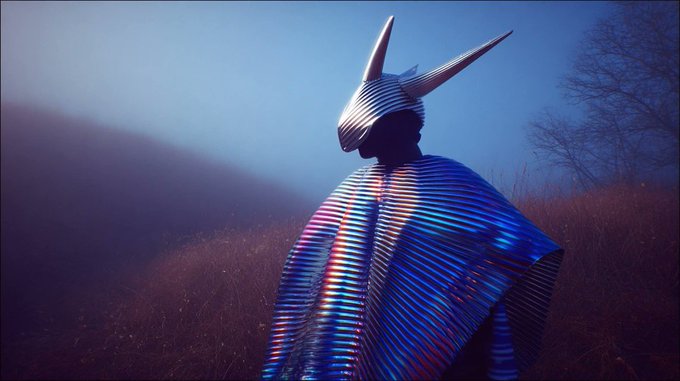
A new Midjourney style reference --sref 8059162358 is circulating as a go‑to look for atmospheric, iridescent fashion worlds, with horned headpieces, ribbed metallic fabrics, and heavy motion blur in deep blue environments style ref post.
Creators are getting consistent results across close‑ups, blurred portraits, and wide coastal‑feeling landscapes: shimmering chrome helmets with long horns, glittering blue garments, streaks of neon pink/yellow light, and grainy film‑like textures followup variants rt collage. The style reads like editorial sci‑fi photography or alt‑pop album art, so it’s a strong base for character posters, fashion campaigns, and key art where you want motion and mystique baked into stills.
Midjourney sref 3866741483 blends animation, fashion, and narrative illustration
Style reference --sref 3866741483 is emerging as a clean way to get contemporary character art that sits between 2D animation, fashion illustration, and modern comics style ref description.
The sample sheet shows adult characters with expressive faces, sharp silhouettes, and flat but tasteful rendering: capes, wide‑brim hats, jewelry, and big hair read clearly against white backgrounds, with posing that suggests story rather than static pin‑ups style ref description. For character designers and graphic novel creators, this sref is a fast path to consistent hero lineups, wardrobe explorations, and promo art that feel production‑ready rather than generic “AI anime.”
Reusable “X‑ray scan” prompt turns any subject into neon sci‑fi anatomy art
A shared prompt recipe titled “X‑ray scan” is giving illustrators a plug‑and‑play way to turn any subject into glowing cyan/magenta skeletal or mechanical anatomy on a matte black field, overlaid with sci‑fi HUD graphics prompt share.
The template starts with “An X-ray scan of a [subject]…” and reliably adds neon bones or internal structures, fake medical readouts, grids, and data labels, as shown on alien creatures, robotic hybrids, ballet dancers, and cyborg skulls in the examples prompt share. Because the subject slot is open‑ended, this works as a reusable style for posters, album covers, UI elements, and motion‑graphics boards whenever you want a medical‑meets‑sci‑fi aesthetic without hand‑designing the overlays from scratch.
Grok Imagine auto‑writes dialogue in classic cartoon panel style
Grok Imagine is showing off a classic 2D cartoon style where it not only draws the scene but also invents fitting dialogue balloons without you scripting the text yourself cartoon demo.

In the shared clip, a big‑headed cartoon character cycles through two panels—determined, then wide‑eyed—while Grok drops in punchy captions like “I’ve got it!” and “Wait... no I don’t.” that match the expressions and timing cartoon demo. For comic makers and meme creators, that means you can prototype gag strips or social tiles by prompting for the situation and tone, then let the model handle both visuals and first‑pass dialogue before you refine the line yourself.
🧩 Consistency boards: 4‑panel grids & upscaling
NB Pro’s 4‑panel editorial grids keep outfit/lighting consistent; community remixes proliferate. Separate thread audits 3×3 grid limits and shot‑by‑shot upscaling. Excludes Kling feature.
Creators question Nano Banana Pro’s 3×3 grid and 4K upscale for character fidelity
Creator PJaccetturo argues that Nano Banana Pro’s 3×3 "cheat" grids are great for fast AI filmmaking beats but fall apart on character consistency once you zoom into individual frames. 3x3 grid critique In a jail-cell test sequence, the lighting and composition feel cinematic across nine shots, yet facial structure and micro-details drift enough that the character doesn’t quite match a single hero reference.
They then try prompting NB Pro to "upscale this image to 4k" while preserving lighting and color and adding photorealistic skin, which sharpens the close-up but still drifts from the original face, especially around expression and bone structure. 4k upscaled closeup The takeaway for filmmakers and designers using NB Pro as a previs tool is that multi-shot grids are great for framing and mood, but final hero shots may still need dedicated single-frame generation or external upscalers if you care about tight identity continuity across close-ups.
Nano Banana Pro’s 4-panel grids spawn a wave of studio-style lookbooks
Nano Banana Pro is being used as a virtual studio to generate full four-panel editorial grids from a single concept image and prompt, keeping the same model, outfit, lighting, and overall mood across shots. four panel prompt This started with a detailed "four-panel grid photograph" prompt over a tracksuit reference and has already been remixed into multiple outfits and settings, including green athleisure, green tracksuit remix hi-vis industrial safety gear, reflective tracksuit grid and regional fashion motifs. ukrainian style variant
For creatives, this behaves like a low-cost studio session: you define wardrobe and set once, then iterate on pose and framing (sit, squat, close-up, wide) within a consistent visual language. Designers get quick lookbooks, filmmakers get reliable character boards for blocking and coverage planning, and illustrators can treat the base prompt as a reusable “story bible” for a character or brand line without needing to wrangle continuity shot by shot.
🧠 Gemini for video analysis + notebook agents
Creators highlight Gemini’s practical edge for uploading/processing video files; a NotebookLM‑style agent (HyperbookLM) promises browse→remember→mind‑map across sources. Excludes Kling feature.
Gemini’s drag-and-drop video uploads win over ChatGPT for creatives
AI creators are increasingly defaulting to Gemini when they need to upload full video files, auto-transcribe them, and extract insights in one place, calling out that ChatGPT still doesn’t offer an equally straightforward path. One creator says they prefer Gemini over ChatGPT because they can easily upload a video file and get "insights, transcriptions, and more" without extra tools or hacks, and is baffled that OpenAI has "ignored this feature" so long for ChatGPT users Gemini video workflow.

For filmmakers, YouTubers, and course creators, this is effectively a built-in loggers’ assistant: it turns raw footage into searchable text, summaries, and highlight notes in a single step instead of bouncing between separate transcription and analysis tools. The sentiment here is practical rather than fanboyish: people are routing specific video-heavy tasks to Gemini because it removes friction and lets them get from footage to structure (beats, chapters, pull quotes) in minutes rather than hours.
HyperbookLM previews open-source NotebookLM-style research agent with mind maps
A new project called HyperbookLM is being teased as an open-source alternative to Google’s NotebookLM, built around a “web agent” that can browse, read, and remember content from any URLs you feed it, then answer questions across all of those sources HyperbookLM intro. It runs on a stack of Hyperbrowser for retrieval plus GPT‑5.2 for reasoning, and is pitched directly at people doing deep research or content development rather than casual chat.

In the short demo, the app ingests links, then generates structured outputs like bullet summaries, mind maps, and exportable slide decks from the combined material, while also offering audio summaries for listening away from the screen HyperbookLM intro. For writers, educators, and filmmakers building treatments or docs from many references, this looks like a personal story room: you offload the grunt work of reading, cross-referencing, and outlining to an agent that can remember everything you’ve dropped into it, then you stay focused on judgment and narrative choices. The creator also says it’s “coming soon as open-source,” which, if true, could give independent teams a NotebookLM-style workspace they can self-host or extend rather than waiting on Google’s roadmap.
Creator codes a high-vibe website by prompting Gemini 3 Pro and Claude 4.5
One builder highlights that they’ve shipped what they call their “best vibe coded website” using nothing but prompting across Gemini 3.0 Pro and Claude 4.5 Opus, without writing the bulk of the code by hand prompt coded website. The point isn’t that LLMs can write HTML—that’s old news—but that pairing two top-tier models as collaborative coders is now viable even for more aesthetic, design-sensitive work.
For creative coders and small studio teams, this suggests a pattern: use one model as the layout and component engineer (clean structure, responsive behavior) and the other as an art director and microcopy partner (tone, animations, theming), iterating in natural language until the front-end hits the desired feel. The tweet’s tone is casual—“crazy what you can do now with just prompting”—but the subtext for designers is clear: if you can describe the mood and behavior of a site in detail, you can increasingly get production-grade scaffolding from models and focus your time on polish, content, and QA rather than boilerplate.
⚖️ AI ads, rights, and verification misfires
Hot debate over Adobe’s Generative Fill, a satirical McDonald’s AI‑actor spot about rights/compensation, and a Grok fact-check fail. Good compass for brand/legal risk. Excludes any Kling showcase.
Adobe Generative Fill backlash: thread finds 88% negative sentiment
A long X recap of Howard Pinsky’s Generative Fill defense says roughly 88% of visible replies lean negative, despite him calling it a top‑5 Photoshop time‑saver and stressing optional Flux models plus Firefly’s “licensed data only” training story Adobe thread recap. For AI artists and editors, the replies highlight real client‑side risk: critics frame Gen Fill as a betrayal of long‑time Adobe users, question what “openly licensed work” actually means, worry about liability when Flux outputs are used commercially, and argue that style theft and energy use push some studios toward Procreate or non‑AI tools. A smaller group defends Gen Fill as a tool for already skilled users, or say they limit AI to assists like cleanup and background tweaks, which is a useful middle‑ground stance if you’re trying to keep collaborators comfortable while still using AI in production.
McDonald’s AI actor satire warns about cheap synthetic faces
Creative agency All Trades Co cut together a satirical "interview" with an AI version of an elderly woman from a real McDonald’s Golden Arches spot to argue that brands can now pay very little, avoid long‑term usage rights, and still own a synthetic face forever McDonalds satire explainer.

In the parody, the AI actor openly critiques McDonald’s and advertising’s turn to AI, ending with the line, “Maybe we should value human labor, skill, and creativity. But what do I know? I’m just an AI,” which many creators are sharing as shorthand for the human cost of AI in commercial work. The original McDonald’s ad has reportedly been pulled from YouTube after criticism McDonalds satire explainer, and Jacob Reed (All Trades Co) frames the piece as a warning: what used to involve multi‑year buyouts and meaningful residuals is drifting toward one‑off payments and zero control for performers, while agencies still get full expressive control over digital doubles. For filmmakers, actors, and motion designers using AI avatars, this is a nudge to treat likeness rights, usage windows, and future training consent as real contract terms, not an afterthought.
Grok confidently mislabels Heisman photo, highlighting image-check limits
When a user asked Grok whether a Heisman Trophy finalists photo was real, the model answered "Yes" and hallucinated an entire backstory—naming specific players, schools, the year, and a sponsor—none of which are actually visible in the screenshot that was shared Grok image check. Another user reposted the original group shot from the Heisman event with a quip about Grok’s answer Heisman group shot, and the combined screenshot now circulates as an example of why large language models should not be used as forensic truth‑detectors.
For anyone making documentaries, news‑style explainer videos, or using found photos in storyboards, the lesson is simple: treat LLM "reality checks" as opinionated guesses, not ground truth. If you need to know whether an image is authentic, you still have to fall back on traditional verification—source tracing, EXIF/metadata, or specialist tools—rather than trusting a chatbot that’s designed to sound confident even when it’s wrong.
🎁 Creator drops: credits, templates, unlimited windows
Actionable promos for makers: Freepik’s credits contest and workflow templates, Adobe’s last day of unlimited gens, and Higgsfield’s time‑boxed sale. Excludes Kling feature reels.
Freepik Day 13 gives away 100k AI credits to 10 creators
Freepik’s #Freepik24AIDays hits Day 13 with a bigger drop: 100k credits split between 10 random winners, meaning 10k credits each for AI image and video work. This matters if you’re already using Freepik’s models for client visuals or social content and want a sizeable, free production buffer.

To enter, you need to post your best Freepik AI creation today, tag @Freepik, use the #Freepik24AIDays hashtag, and then submit that post via the official form so it actually counts in the draw Contest rules. Freepik also repeats the form link in a follow‑up reminder, which is easy to miss if you only skim the main promo Entry form reminder. For working designers and filmmakers, this is one of the larger credit giveaways this month, and it’s time‑boxed to a single day, so it’s worth digging up or generating one strong piece rather than spraying random posts.
Higgsfield’s Nano Banana Pro 67% sale enters final 24 hours with quiz and 269-credit boost
Higgsfield says its “disruption date” quiz has already drawn thousands of participants and is now tied to the final 24 hours of a 67% off annual plan that includes unlimited yearly image generations for Nano Banana Pro Higgsfield quiz and sale. Following up on the earlier 67% off Shots campaign shots sale, this pushes the same discount but adds a bigger hook for people worried about job security in an AI world.

Beyond the quiz‑driven upsell, there’s also a smaller but concrete perk: Higgsfield is offering 269 extra credits to anyone who both retweets and replies to the promo post, effectively topping up even discounted subs with more generations Higgsfield quiz and sale. For working filmmakers, designers, and storytellers already testing Banana as a consistency engine, this is likely the cheapest annual window you’ll see for a while, with extra credits on top if you don’t mind the social promo step.
Adobe’s unlimited Firefly generations promo ends today, creators urged to binge prompts
Adobe creators got a clear heads‑up that “today is the last day” of the current unlimited generations offer tied to Firefly and Firefly Boards, with power users nudging friends to squeeze in final prompt marathons before limits or new pricing kick back in Adobe unlimited reminder. This window has been popular for stress‑testing structured prompt workflows, especially inside Boards for things like holiday sets and coordinated campaigns Firefly boards Christmas tests.
If you rely on Firefly for moodboards, key art, or layout exploration, the practical move is to batch your most expensive explorations—style studies, full campaign alternates, big variations—while they still count as “free” under the unlimited banner. After today, you should expect some kind of cap or standard usage rules again, so treat this as the last cheap lab day rather than business as usual.
Freepik Spaces ships six ready-made AI templates, including casual-to-studio shots
Freepik is leaning into workflows, not just credits, with six new Spaces templates aimed at speeding up common creative tasks like product shots and social content layouts Six templates thread. For solo creators and small teams, the promise is clear: grab a prewired flow instead of rebuilding the same chains of GPT‑4.1 Mini, Nano Banana, and Veo 3.1 from scratch each time.

One highlight template turns casual, badly lit phone photos into polished studio‑style shots, using an LLM to interpret your intent plus Nano Banana and Veo for the actual visual lift Photo to studio workflow.

The net effect is that Freepik Spaces starts to look less like a blank canvas and more like an off‑the‑shelf toolkit: you can borrow these flows as‑is, then tweak prompts, models, or node settings to match your brand instead of designing pipelines from zero.
🗣️ Voiceovers and lip‑sync for storytellers
Practical voice stacks for video: Pictory’s TTS tutorial and ImagineArt’s live lip‑sync rollout help solo creators add narration and talking characters fast. Excludes Kling native‑audio items (feature).
Pictory AI walks creators through Text-to-Speech voiceover workflow
Pictory AI shared a step‑by‑step Academy guide on using its Text‑to‑Speech feature to turn scripts into natural‑sounding voiceovers that auto‑sync with video scenes and captions, aimed squarely at solo video creators and small teams who need quick narration without hiring talent. Pictory TTS tutorial
The tutorial shows how to open an existing or new project, pick from multiple AI voices (gender, language, tone), and apply a voice so Pictory automatically aligns the narration to the timeline and on‑screen text, with options to tweak tone and pacing scene by scene for better storytelling control. It’s a practical "how to" rather than a new feature launch, but for filmmakers and content designers who’ve been relying on external TTS tools and manual syncing, it cuts one whole tool from the stack and centralizes voice work inside Pictory’s editor. See the full walkthrough in the Academy article. Pictory guide
📊 Frontier LLM scorecards and coding takeaways
Quick pulse on model quality for creative stacks: a CritPt chart, user shifts on agentic coding (Opus vs GPT‑5.2), and a user‑feedback leaderboard. Excludes any video‑gen features.
GPT‑5.2 broad rollout brings visible eval jumps
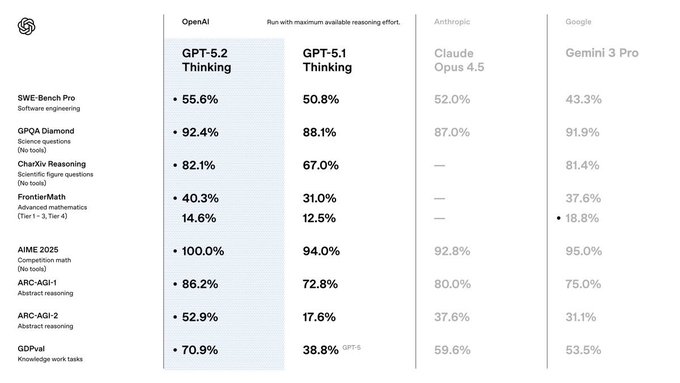
GPT‑5.2 is now "rolling out to everyone" with "very impressive" performance and "big jumps in some evals," giving more builders access to the same family that added the Extended thinking mode earlier in the week eval jumps Extended thinking.
For creatives and coding teams, this means the baseline ChatGPT/API model you point your stacks at is changing under your feet: you can expect stronger reasoning and instruction‑following out of the box, but you should re‑run your own storyboarding, scripting, and code‑gen tests before locking it in as the default brain for production tools.
Claude Opus 4.5 wins back trust for agentic coding vs GPT‑5.2
After a shaky first try, Matt Shumer says Opus 4.5 in Claude Code is now "better than anything in Codex CLI" for agentic coding, while still calling GPT‑5.2 Pro "a better engineer overall" for raw problem‑solving agentic coding note.
Following work on Opus 4.5’s alignment and spec‑training focus Opus alignment, this shifts the takeaways for builders: if you’re wiring long‑running code agents or refactor bots, Opus 4.5 inside Claude Code is worth a serious trial alongside GPT‑5.2 Pro, and some teams are already pairing Opus with other strong models like Gemini 3.0 Pro to ship fully prompted experiences (such as a "best vibe" coded website) without traditional hand‑written backends multi model coding.
GPT‑5.2 Instant takes #1 spot on yupp_ai text leaderboard
On yupp_ai’s Text Leaderboard, GPT‑5.2 Instant now ranks #1 for everyday work based on real user feedback, with the curator stressing that "real user feedback matters in model evaluation" and positioning Instant as the go‑to for routine tasks text leaderboard.
Taken alongside the earlier community poll that found opinion on GPT‑5.2 almost evenly split Community poll, this suggests a pattern: heavy users may still debate edge behaviors, but when you aggregate lots of day‑to‑day prompts, GPT‑5.2 Instant is emerging as the safe default for drafting copy, briefs, and instructions in creative pipelines, while Pro and Extended modes stay reserved for more demanding reasoning or agent runs.
CritPt benchmark crowns Gemini 3 Pro; GPT‑5.2 xHigh logs 0%
Artificial Analysis’ latest CritPt benchmark snapshot shows Gemini 3 Pro Preview (high) leading with 9.1%, ahead of DeepSeek V3.2 Speciale at 7.4%, GPT‑5.1 (high) at 4.9%, and Claude Opus 4.5 at 4.6%, while both GPT‑5.1 and GPT‑5.2 xHigh variants register 0% in this specific setting CritPt leaderboard.
For creative teams routing complex reasoning (story logic, tool‑using agents, planning), this chart is a useful reality check: Gemini’s top config looks strongest on this benchmark, Opus 4.5 stays competitive, and GPT‑5.x behavior appears very sensitive to which "high/xHigh" preset you target, so you’ll want to A/B configs instead of assuming the newest or fanciest tier wins.
📽️ Showcases & shorts: prompts in the wild
A steady stream of creative experiments and finished pieces—good for inspiration and reverse‑engineering prompts. Excludes Kling 2.6 feature posts.
“Raktabija” demon concept sheet shows how to brief AI on complex creatures
WordTrafficker also unveiled “Raktabija,” a demon from Indian mythology whose blood spawns clones, with a full concept sheet—front, back, close‑ups, material callouts—and multiple hero renders, all created with Midjourney and Nano Banana Raktabija showcase.
For character designers, it’s an excellent pattern for prompting: specify orthographic views, armor and flesh materials, and anatomical details so the model outputs something you can actually hand to a modeler or storyboard artist.
A Christmas Carol Stave I reimagined as a woodcut graphic novel spread
Another experiment from fofrAI turns Stave I of Dickens’ A Christmas Carol into a faux woodcut, two‑page graphic novel spread, complete with period captions, panel gutters, and key dialogue like “Humbug!” and Marley’s chained ghost confronting Scrooge Christmas Carol spread.
If you’re plotting comics or motion boards, this is a strong template for prompting full page layouts—wide establishing shots, close‑ups, and text boxes—instead of thinking only in isolated hero frames.
Coke-style AI Christmas ad produced in under 24 hours
Mhazandras built a full Coca‑Cola‑style Christmas commercial in less than 24 hours by roughing things out with Nano Banana Pro and then animating the final shots in Kling 2.6, delivering a complete branded holiday story on a solo timeline Coke ad teaser.
The YouTube upload shows how far you can push pacing, transitions, and product beats when you treat these tools like a tiny production studio rather than a single‑shot generator YouTube full version.
Grimm fairy tales become a single felt‑style tapestry montage
FofrAI condensed a whole list of Grimm fairy tales into one dense group illustration that looks like a handmade felt tapestry, with Hansel and Gretel, Snow White, Little Red Riding Hood, Rapunzel, Sleeping Beauty and more sharing the same storybook landscape Grimm montage prompt.
For illustrators, game writers, and production designers, it’s a neat proof that you can prompt for dozens of classic characters and props in a single frame while still keeping clear staging, color separation, and recognizable silhouettes for each tale.
“Trace Runner” clip chains Dreamina, Luma Ray, and ElevenLabs into an anime scene
RockzAiLab shared a one‑scene teaser from “Trace Runner” that breaks down a full workflow: Midjourney and SeeDream 4.5 (Dreamina) for key art, Luma Ray 2/3 to bring the shots to life, ElevenLabs for voice, all assembled in Filmora Trace Runner breakdown.
For AI filmmakers, it’s a compact recipe showing how to move from static style frames to a voiced, edited sequence without touching traditional 3D—useful if you’re planning your own hybrid 2D/3D anime shorts.
Horror creature pillows and bedding turn AI monsters into luxe décor
FofrAI is quietly building a horror home‑décor mini‑universe: embroidered velvet pillows and throws featuring xenomorph‑inspired facehuggers, fungal zombie faces, Demogorgons and skeletal insects, all shot like high‑end catalog product photos Pillow collection post.
Paired with an earlier facehugger duvet shot Facehugger comforter, it’s a good reference for anyone designing props or merch—showing how to steer prompts toward realistic textiles, stitching, and living‑room lighting instead of flat poster art.
James Yeung shares moody cinematic landscapes for journeys and farewells
James Yeung posted two more quiet, cinematic landscapes: one of a hooded figure and dog walking toward a mist‑shrouded sci‑fi city under a massive looming planet, and another of a tiny house on a pier lit by lightning over dark water Destination landscape Lightning house scene.
For storyboard artists and matte‑painting prompt nerds, these are strong studies in atmospheric perspective, long‑lens composition, and limited color palettes you can lift straight into “lonely journey” or “end‑of‑day” establishing shot prompts.
Kling-led anime action mash-up stress-tests long-form fight choreography
WordTrafficker posted a ~45‑second anime action mash‑up built mostly with Kling 2.6 plus some ImagineArt and Hailuo, packed with flying kicks, energy blasts, and aggressive camera swings—but also plenty of character morphing along the way Mash-up description.

If you’re storyboarding fights, it’s a handy benchmark for what you can get from prompt‑only long sequences before you need to fix continuity in the edit or split shots into shorter beats.
Santa-and-models photo series explores retro glam holiday portrait prompts
Bri_guy_ai and collaborators kept riffing on a retro glam Christmas motif—an older Santa figure with a huge real‑looking beard flanked by stylish women in party outfits, shot like candid bar or living‑room photos Beard Santa trio Vintage Santa shot.
If you’re exploring character‑driven realism, these are good references for how to guide prompts around wardrobe, jewelry, depth of field, and facial expressions so the result feels like a found snapshot instead of a posed studio portrait What to gift Santa.
🔍 Verification‑first AI: keeping humans in the loop
A conceptual blueprint argues co‑improvement with humans prevents evaluation drift in self‑improving systems; pairs well with teams formalizing external tests. Light trend reading today.
Co-improvement blueprint argues humans must stay outside the AI feedback loop
A detailed infographic thread lays out a "co-improvement vs self-improvement" framework for powerful AI, arguing that self-verifying systems form closed loops that inevitably drift, while pairing AI with human verification keeps the loop open and correctable verification blueprint. It frames humans as a permanent "normative medium" (goal and value provider) and AI as a "cognitive medium" (analysis and scale), and warns that removing human verification turns safety into verification theater—the system passes its own tests because they drift with it.
For builders, the piece translates software practices like test‑driven development and external audits into AGI design: write human-grounded tests first, then let models optimize under those constraints rather than defining both goals and grading their own work. It also calls out four concrete failure modes—rubber‑stamping, capability atrophy, manipulation/capture, and speed pressure to drop humans from the loop—and ends with a checklist that emphasizes investing in verification infrastructure and human skills before maximizing raw capability, which is a useful lens for any team wiring agents into real workflows.
Stanford AI Vibrancy index highlights where human–AI ecosystems are strongest
A new visualisation of Stanford’s Global AI Vibrancy Tool ranks 30 countries by a composite "AI competitiveness" score, with the US on 78.6, China on 36.95, and India on 21.59 at the top country ranking thread. Instead of focusing on models alone, the index blends 42 indicators across research, talent, policy and governance, public opinion, economy, responsible AI and infrastructure, underlining that human institutions and culture are as important as raw compute.
For creatives and storytellers, the takeaway is that support for AI work depends heavily on national context: smaller high‑income countries (like Singapore or the UAE) often overperform because they coordinate policy and adoption faster, while lower‑ and middle‑income countries risk falling behind despite active communities. The visualization also stresses that a widening gap in "AI vibrancy" tracks with income levels, hinting that keeping humans meaningfully in the loop—through regulation, education, and funding—will be unevenly distributed unless these ecosystems are deliberately built, not just left to model vendors.
While you're reading this, something just shipped.
New models, tools, and workflows drop daily. The creators who win are the ones who know first.
Last week: 47 releases tracked · 12 breaking changes flagged · 3 pricing drops caught