![AI Primer creative report: FLUX.2 [klein] ships 4B Apache weights – ~500ms interactive image edits – Thu, Jan 15, 2026](/_next/image?url=%2Fcms%2Fapi%2Fmedia%2Ffile%2FJulia_Iskandarian_httpss.mj.runD9qclxPIU8Y_Daylight_creative__062a99d4-66e9-4442-8216-0246feaa62e7_2.png&w=3840&q=75&dpl=dpl_8P5vK4vf12zexrDqzD3r2KN8zCZZ)
FLUX.2 [klein] ships 4B Apache weights – ~500ms interactive image edits

Stay in the loop
Free daily newsletter & Telegram daily report
Executive Summary
Black Forest Labs rolled out FLUX.2 [klein] as a compact image gen + edit model aimed at tight iteration loops; Klein 4B is Apache 2.0 while Klein 9B ships as open weights; launch partners pushed “deployable day one” packaging across API + local runs, with Replicate citing ~500ms generation for fast 0→1 and edit passes, though there are no independent latency/quality benchmarks in the launch posts. BFL also published RTX-focused quantized variants—FP8 and NVFP4—claiming up to ~40% and ~55% lower VRAM respectively, framing sub‑second interaction as feasible outside the cloud.
• Ecosystem distribution: ComfyUI, fal, Runware, Replicate, and Cloudflare Workers AI all surfaced endpoints/workflows; ComfyUI emphasized multi-reference conditioning with up to 5 input images.
• TranslateGemma (Google): open translation family at 4B/12B/27B across 55 languages; reports SFT+RL with MetricX‑QE/AutoMQM rewards, but third-party eval artifacts aren’t linked.
Unknowns: how edit precision holds up under heavy quantization; whether “sub‑second” performance generalizes beyond curated demos and specific GPUs.
While you're reading this, something just shipped.
New models, tools, and workflows drop daily. The creators who win are the ones who know first.
Last week: 47 releases tracked · 12 breaking changes flagged · 3 pricing drops caught
Top links today
- FLUX.2 [klein] on Replicate
- Gemma Cookbook for TranslateGemma
- TranslateGemma models on Kaggle
- TranslateGemma on Hugging Face
- TranslateGemma technical report
- FLUX.2 [klein] on fal
- ImagineArt 1.5 Pro on fal
- FLUX.2 [klein] on Runware
- ImagineArt 1.5 Pro on Runware
- LTX Studio Storyboard Builder product page
- Exploded view layering agent
- Forbes coverage of Higgsfield and Kling
- Reuters coverage of Higgsfield and Kling
Feature Spotlight
FLUX.2 [klein] speed wave: sub‑second image gen + precise edits (open & deployable)
FLUX.2 [klein] makes “interactive” image generation real: ~500ms 1MP and <2s 4MP plus coherent edits and multi-reference inputs—available via API and locally (4B Apache-2.0; 9B open weights).
Today’s cross-account headline is Black Forest Labs’ FLUX.2 [klein] rollout—framed around ultra-fast interactive generation + editing, multi-reference conditioning, and practical deployment (API, local, quantized RTX variants). Includes a noticeable ecosystem push (ComfyUI/Replicate/fal/Runware/Cloudflare mentions).
Jump to FLUX.2 [klein] speed wave: sub‑second image gen + precise edits (open & deployable) topicsTable of Contents
⚡ FLUX.2 [klein] speed wave: sub‑second image gen + precise edits (open & deployable)
Today’s cross-account headline is Black Forest Labs’ FLUX.2 [klein] rollout—framed around ultra-fast interactive generation + editing, multi-reference conditioning, and practical deployment (API, local, quantized RTX variants). Includes a noticeable ecosystem push (ComfyUI/Replicate/fal/Runware/Cloudflare mentions).
Black Forest Labs launches FLUX.2 klein for sub-second image generation and editing
FLUX.2 [klein] (Black Forest Labs): Black Forest Labs rolled out FLUX.2 [klein] as a compact model that does both image generation and image editing, positioning it for rapid “0 → 1” ideation and fast iterative edits in the Launch announcement and the follow-up packaging notes in Quantization variants.

The rollout is unusually “deployable on day one”: Klein 4B is under Apache 2.0 while Klein 9B ships as open weights, with both API and local run paths called out in the Launch announcement. Speed claims are central—Replicate frames it as ~500ms for 1MP and under 2s for 4MP, plus image-to-image and precise edits, as stated in the Replicate speed specs.
• Ecosystem distribution: ComfyUI highlights the “two models, two modes” story and points to workflow material in the ComfyUI overview; fal lists both 4B Base and 9B Base with a “new text encoder” note in the fal listing; Runware advertises multiple SKUs including a distilled 4-step variant in the Runware SKUs; Cloudflare Workers AI support gets amplified via the Workers AI rollout.
A small but telling sentiment signal: a launch partner says they’d been “waiting for a sub 500ms image editing model” in the Launch partner note, and the model’s “under 1 second” headline is already spreading outside English in the Turkish pickup.
FLUX.2 klein ships FP8 and NVFP4 quantized variants for RTX inference
FLUX.2 [klein] quantization (Black Forest Labs + NVIDIA AI PC): Alongside the launch, BFL says it’s releasing FP8 and NVFP4 quantized variants built with NVIDIA AI PC to widen hardware support and reduce VRAM pressure, according to the rollout thread addendum in Quantization variants.
The concrete targets are speed and footprint: BFL claims FP8 is up to 1.6× faster with ~40% less VRAM, while NVFP4 is up to 2.7× faster with ~55% less VRAM, as spelled out in Quantization variants. This is positioned as the way to run FLUX.2 [klein] across “even more hardware,” especially RTX GPUs, rather than treating the sub-second loop as cloud-only.
FLUX.2 klein multi-reference conditioning enables edits guided by up to five images
Multi-reference conditioning (FLUX.2 [klein]): ComfyUI is pushing a very specific creative control pattern for FLUX.2 [klein]—guiding generation and edits with multiple input images at once to combine subjects, styles, and materials, as described in the multi-reference post in Multi-reference conditioning.

This isn’t framed as “style transfer” so much as compositional steering: Replicate highlights “precise editing with up to 5 input images” in the Replicate speed specs, while ComfyUI pitches it as a compact architecture that keeps you iterating without restarting from scratch in the ComfyUI overview. The practical creative implication is that moodboards, material swatches, character references, and product shots can all be supplied as constraints in one go—if the platform implementation exposes those reference slots consistently.
🧩 Production-ready workflows: ads, game cinematics, and concept-to-photoshoot recipes
Heavily workflow-driven day: multiple multi-tool pipelines for ad-grade realism and cinematic sequences (Freepik “CGI-level” campaign recipe, GTA cinematic workflow, and automotive concept-to-photoshoot). Excludes FLUX.2 [klein], covered as the feature.
Freepik shares “OFF SCALE” AI workflow for CGI-level city takeovers
OFF SCALE workflow (Freepik): Freepik laid out a full “CGI-level campaign without a traditional CGI pipeline” recipe built around phone-camera realism (street-level framing, imperfect crops) plus outsized “objects taking over the city,” as described in the [step-by-step thread](t:6|step-by-step thread).

The thread is explicitly about getting believable composites first (iPhone aesthetics + realistic reflections), then chaining tools for coherence (reference images, upscalers, animation, finishing), with the core prompt skeleton and the “what to avoid” notes repeated later in the [prompt recap](t:64|prompt recap) and the [workflow wrap-up](t:90|workflow wrap-up).
Freepik consistency trick: start/end frames for “object drop” animation in Kling 2.5
Consistency trick (Freepik): To keep a product/object consistent across motion, Freepik suggests generating a clean first image (Seedream 4.5 or Nano Banana Pro), upscaling it, removing the product, then animating between a start frame and end frame in Kling 2.5, as described in the [object consistency step](t:95|object consistency step) and summarized in the [full workflow](t:90|full workflow).

The example prompt structure explicitly describes a street-level shot where an object “falls into” a box—using the edited image as the start frame and the original as the end frame, per the [animation prompt](t:95|animation prompt).
Freepik’s prompt skeleton for “iPhone street photo” CGI realism
Prompt template (Freepik): The core realism trick is to prompt for a smartphone photo with street-level perspective, natural daylight, and handheld imperfection—then specify the CGI object and the environment so the model “blends” it into reflections and lighting, as spelled out in the [prompt structure](t:6|prompt structure) and reiterated in the [standalone template](t:64|standalone template).

This prompt pattern is meant to bias toward casual compositions (slightly off-center, imperfect crop) instead of “rendered” framing, which is why it shows up as the foundation for the rest of the OFF SCALE pipeline in the [workflow summary](t:90|workflow summary).
GTA V cinematic workflow: Rockstar Editor keyframes → Higgsfield stills → AI animation
GTA cinematic workflow (Techhalla): The pipeline is to record gameplay footage in Rockstar Editor, extract key frames for consistent character/setting, feed those into Higgsfield AI to create cinematic stills, then animate and extend coverage, as explained in the [thread opener](t:8|workflow intro) and the [access + steps post](t:124|steps and access).

Kling gets called out as the go-to for action animation (“hands down the best… for this kind of action footage”), per the [tooling notes](t:124|tooling notes), making this a practical “game capture → frame control → generative coverage” recipe rather than pure text-to-video.
MALBORO DAKAR T5 pipeline: concept truck to photoshoot using Weavy + Nano Banana + Kling
Concept-to-photoshoot (Ror_Fly): Ror_Fly details a multi-step automotive workflow—generate a base T5 model, apply the livery to a render, iterate shots, “bring to life” with Nano Banana Pro, then generate video with Kling, as laid out in the [process post](t:1|process post).

The framing is production-minded: lots of iteration, then an intentional “drone aesthetic” and deep DoF grouping to make the renders read like a real shoot, per the [workflow notes](t:1|workflow notes).
Anime adrenaline montage workflow: Midjourney + Grok Imagine + GPT Imagine 1.5 + CapCut
Anime montage workflow (Artedeingenio): A creator shares a toolchain for short, high-intensity anime edits using Midjourney and Grok Imagine, optionally using GPT Imagine 1.5 for variations, then finishing the cut in CapCut, as described in the [tool list post](t:2|tool list post).

This reads like a practical assembly line: generate consistent style frames fast, make controlled variations when needed, then rely on a conventional editor for pacing and typography, per the [workflow claim](t:2|workflow claim).
Drone + deep DoF module generates nine shot prompts from a contact sheet
Shot-generation module (Ror_Fly): A specific add-on step takes a contact sheet plus a long-shot image, analyzes the truck + aesthetic, and outputs nine “drone logic” prompts with deeper depth-of-field, according to the [drone + DoF step](t:126|drone DoF step).
It’s presented as a reusable way to turn one strong render set into coherent aerial coverage—keeping the same subject identity while varying angle language, per the [workflow framing](t:126|workflow framing).
Exploded-layers agent workflow: device image in, assembled↔exploded animation out
Exploded-view workflow (heyglif): heyglif shows an agent that takes a device image and turns it into an exploded, layered animation—supporting assembled↔exploded transitions, reversing the effect, and chaining multiple angles, as described in the [agent overview](t:51|agent overview) and followed by the [agent link post](t:123|agent link post).

The demo frames this as an ad/education-friendly visual (parts reveal), with optional external editing for effects, per the [workflow notes](t:51|workflow notes).
Freepik tip: avoid “phone UI” keywords to reduce hallucinated interfaces
Prompt hygiene (Freepik): A specific gotcha in “smartphone footage/photo” prompting is that UI-ish words can cause the model to invent interface overlays; Freepik calls out avoiding those keywords as a reliability tactic in the [key tips list](t:71|key tips list) and again in the [full workflow recap](t:90|full workflow recap).
This is framed less as aesthetics and more as defect prevention (random UI elements) when you’re trying to ship “found footage” realism.
Freepik’s “handheld phone footage” motion prompt: shaky framing + sporadic zooms
Motion prompting (Freepik): For video, Freepik isolates what makes phone footage feel real—shaky movement, uneven framing, and unexpected zooms—and then prompts those traits directly, as shown in the [handheld prompt snippet](t:89|handheld prompt snippet).

This is positioned as a way to get “imperfect” camera behavior on purpose, instead of letting the model drift into stabilized, ad-like moves that break the illusion, per the [workflow recap](t:90|workflow recap).
🎥 Video models in the wild: motion control, modify passes, and POV generation
Mix of short capability demos and creator outputs across Kling, Luma Dream Machine (Ray3 Modify), Veo/Flow, PixVerse, and Runway. This category is about what the video tools can do (not multi-tool recipes).
Ray3 Modify in Dream Machine demos a day-to-night transform pass
Dream Machine Ray3 Modify (Luma): Luma shared a “Day to Night” behind-the-scenes clip that highlights Ray3 Modify being used to shift time-of-day within a shot—framed as a modify pass rather than full regeneration, as shown in the short demo post Day-to-night BTS.

This is another clear “edit layer” example: the creative intent is a controlled lighting/time change, not a new scene, which is exactly the kind of change filmmakers keep asking for in iterative post workflows, as seen in Day-to-night BTS.
Veo 3.1 in Flow shows a smooth POV motorcycle shot at 1080 (upscaled)
Veo 3.1 (Google / Flow): A frames-to-video example made in Flow shows a steady, gliding POV futuristic motorcycle cruise through a glass skyway over a cyberpunk city, explicitly framed as 1080 upscaled output with a “steady dolly forward” camera spec, per the prompt + result post Flow POV prompt.

The clip is a tight demonstration of camera discipline (no shake, deep reflections, continuous forward motion) rather than character acting, which is often where POV sequences succeed or fail, as shown in Flow POV prompt.
Adobe Firefly short “Stranded” spotlights a Firefly-to-Premiere finishing workflow
Firefly Video (Adobe): A short film titled “Stranded” is shared as a Firefly-driven piece, with the creator explicitly crediting Adobe Firefly Video editing plus downstream Premiere Pro color grading and Lightroom/Photoshop refinement, making the “gen → edit → grade → polish” stack very legible for filmmakers shipping socials or shorts, as laid out in the workflow post Toolchain credits.
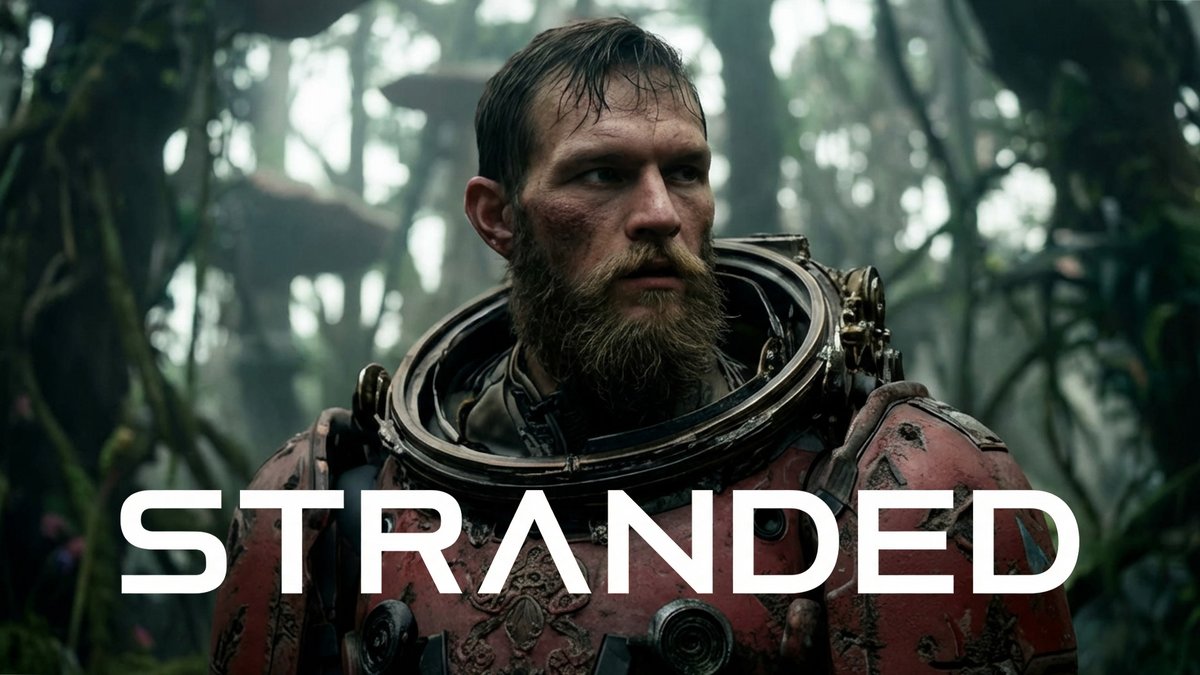
The post is mostly a credits-style proof rather than a feature announcement, but it’s a useful snapshot of how teams are treating Firefly outputs as footage that still benefits from traditional grading and finishing, per the same Toolchain credits note.
Runway Story Panels get a real-photo narrative expansion example
Story Panels (Runway): A creator compares a real rainy Tokyo street photograph with a set of Runway-generated story panels derived from it, highlighting the “one photo → panelized sequence” use case for visual development and scene exploration, as shown in the comparison post Tokyo photo comparison.
The side-by-side makes the intended workflow clear: treat a real reference frame as the anchor, then branch into storyboard-like continuity frames without leaving the panel format, as demonstrated in Tokyo photo comparison.
Kling 2.6 gets a maximal-explosions stress-test montage
Kling 2.6 (Kling AI): A viral-style montage frames Kling 2.6 as willing to go absurdly hard on action—“everything, including the kitchen sink”—by rapidly multiplying explosions across the frame, as shown in the re-shared clip Explosions montage.

It’s not an eval, but it’s a useful sanity check for how Kling handles dense, high-motion VFX-like beats in a single sequence, per the same Explosions montage post.
Vidu Agent posts a one-minute prompt-to-video walkthrough
Vidu Agent (ViduAI): A quick tutorial video walks through Vidu’s Agent flow—prompt entry, generation, and rapid iteration inside the product UI—positioned as a “create videos in minutes” loop, as shown in the short how-to post One-minute tutorial.

This is primarily an interface demo (not a capability benchmark), but it does show the product’s emphasis on fast cycles from prompt to usable clip, as depicted in One-minute tutorial.
Wan 2.6 image-to-video shows up in a narrative, voiceover-led clip
Wan 2.6 image-to-video (Alibaba / WaveSpeed): A sentimental short-form narrative clip is explicitly tagged as made with alibaba/wan-2.6/image-to-video and credited to a WaveSpeed pipeline, which is useful as a real-world “story beat” example (timing, emotion, continuity) rather than a pure VFX demo, per the creator credit post Wan 2.6 credit.

The post doesn’t add new model specs, but it does show Wan 2.6 being used for complete micro-stories where the point is mood and performance continuity, as indicated in Wan 2.6 credit.
Kling Motion Control clip goes viral for uncanny motion-transfer artifacts
Motion Control (Kling AI): A short humanoid-robot side-step clip is circulating because the motion transfer looks awkward and jittery—played for humor—which makes it a compact example of the kinds of limb/weight artifacts creators still hit in controlled animation passes, as shown in the repost Robot side-step clip.

The value here is diagnostic: it’s an easy reference point for “what can go wrong” when motion constraints are tight and the body mechanics don’t quite reconcile, as seen in Robot side-step clip.
🧠 Prompts & aesthetic recipes: flat illustration, ad posters, graffiti, and sref finds
High volume of shareable prompts and style references across Midjourney/Niji/Nano Banana—mostly ready-to-copy templates for illustrators, ad creatives, and stylized character work. (Not tool capability news.)
Azed’s flat illustration prompt template spreads for clean, minimal character art
Flat illustration prompt (azed_ai): A copy-ready template for front-facing, minimal flat-design characters is being shared as a reliable “default style” for quick icon/character concepts, with the full variable structure shown in the Prompt share template and multiple example renders visible in
.
A follow-up shows the same template being reused to generate classroom-ready food visuals, reinforcing it as a repeatable “swap the subject” recipe rather than a one-off prompt, as described in the Food lesson examples.
Midjourney style ref 571804509 targets a Rick and Morty-like cartoon look
Midjourney style reference (Midjourney): A specific style ref—--sref 571804509—is being passed around as a fast way to push outputs toward a Rick and Morty-esque cartoon aesthetic, with the key usage note that adding “cartoon” biases it closer, per the Style reference tip.
The examples also hint it’s most faithful on characters already near the show’s proportions, while other subjects drift toward a broader “adult cartoon” look, as shown in the Style reference tip.
Nano Banana Pro “3D ad poster” master prompt becomes a reusable product template
3D advertising poster prompt (Nano Banana Pro): A reusable master template is being shared for high-end product posters—floating hero product, vortex element, fantasy environment, and a forced tagline in bold typography—positioned as an Octane-style CGI look, per the Master prompt template.
The examples show it generalizing across categories (perfume, sneakers, phones, coffee) while keeping the same composition and typography placement, as seen in the Master prompt template.
Nano Banana Pro on-camera-flash couple prompt standardizes pose + camera specs
Nano Banana Pro prompt (Google): A highly structured couple fashion prompt is circulating that locks down pose anatomy, wardrobe, and camera details (35mm, direct on-camera flash, hard wall shadows) to get repeatable “editorial flash” results, as fully written in the Full prompt block.
The prompt’s main trick is treating the shot like a rig: explicit limb placement, environment dressing, and lighting instructions reduce the model’s freedom, matching the output shown in the Full prompt block.
Midjourney style drop 4958514235 circulates as a clean character-illustration look
Midjourney newly created style (Midjourney): A fresh --sref 4958514235 is being shared alongside a small gallery of what it does well—simple, clean character illustrations with lots of negative space—according to the Style drop post.
The samples read like a solid base for brand mascots, sticker packs, and light editorial characters, based on the range shown in the Style drop post.
Niji 7 Saint Seiya prompts push Sorayama-style metallic armor
Niji 7 prompts (Midjourney): A set of Saint Seiya character prompts is being shared with a consistent “hajime sorayama” influence—highly reflective chrome armor, aggressive foreshortening, and glossy highlights—using Niji 7 parameters as shown in the Prompt set in ALT.
The practical value is in the repeatable formula (character name + Sorayama cue + rendering stack), which appears to hold the look across multiple characters in the Prompt set in ALT.
fofrAI’s graffiti risograph prompt nails stippling and tag typography
Graffiti risograph prompt (fofrAI): A tightly art-directed prompt spec is being shared for hard-edge graffiti lettering with a risograph-print feel—pure white background, stochastic stippling / sand-like noise in fills, thick black outline, plus a sprayed-tag tagline—spelled out in the Prompt text.
It’s notable as a “print recipe” prompt: it doesn’t just name a style, it enumerates the mechanical artifacts (noise, outlines, distortion constraints) visible in the Prompt text.
“Always be promptin’” becomes a reusable micro-tagline for prompt art
Prompt micro-slogan: “always be promptin’” is showing up as a reusable tag-line motif—easy to drop into poster, graffiti, or fake-brand compositions—starting from the short standalone line in the Slogan post.
The phrase also appears embedded as a sprayed-tag line in a graffiti composition, which makes it feel like a portable branding element rather than a one-off joke, as shown in
.
Techhalla indexes a “Movie Poster prompt” resource for creators
Prompt resource index (techhalla): A larger “must-have resources” thread points people to a dedicated “Movie Poster prompt” item, positioning it as a ready-made recipe for poster-like key art, as listed in the Resource list item and introduced via the Resources thread intro.
No prompt text is included in the tweets themselves, so treat this as a pointer to a prompt pack rather than a fully copyable template in-feed, per the Resource list item.
Techhalla links “Minimalist branding prompts” as a brand system recipe
Branding prompt pack pointer (techhalla): The same resource thread also highlights “Minimalist branding prompts,” framing it as a reusable system for clean brand outputs rather than one-off images, as called out in the Resource list item.
As with the poster item, the tweets provide the index but not the underlying prompt text, with the intent signposted in the Resources thread intro.
🧪 Finishing passes that sell the shot: upscalers, enhancers, grading, and final polish
A noticeable “last-mile” cluster: creators emphasize upscaling, skin/texture cleanup, and classic NLE grading as the difference between ‘AI-looking’ and campaign-ready output.
Freepik workflow calls out Magnific Precision for detail without “reinterpretation”
Magnific Precision (Upscaling): In Freepik’s campaign pipeline, Magnific Precision is positioned as the go-to for large scenes/landscapes when the goal is added detail while preserving composition—summed up as “detail, not reinterpretation,” as stated in the [Magnific step](t:98|Upscale guidance) and situated inside the broader [OFF SCALE thread](t:90|Thread overview).
Freepik workflow highlights Topaz as the final pass for upscaling + FPS increase
Topaz (Video finishing pass): Freepik’s “OFF SCALE” workflow frames Topaz as the last-mile polish step—upscaling plus FPS increase—after generation and coherence work, as described in the [final pass note](t:109|Final pass details) and reinforced in the [full workflow recap](t:90|Workflow recap).

• Model mix callout: The thread explicitly names Proteus, Artemis, and Theia as the main models, with per-video tuning implied (“each video required its own mix”), according to the [model list](t:109|Topaz model list).
Freepik workflow recommends Skin Enhancer to remove the “AI look” in close-ups
Skin Enhancer (Portrait cleanup): Freepik spotlights Skin Enhancer as a close-up finishing tool aimed at removing the “AI look” from portraits, placing it as a specific cleanup stage after generation, as shown in the [close-up step](t:94|Skin enhancer demo) and referenced in the [full workflow write-up](t:90|Workflow context).

InVideo launches UltraRes, its highest-quality video enhancer
UltraRes (InVideo): InVideo announced UltraRes as its highest-quality enhancer yet, with launch messaging tied to a giveaway (top generative plan plus $1,200 in credits) in the [UltraRes post](t:81|UltraRes announcement). Pricing or technical deltas weren’t specified in the tweet.
CapCut shows up as the final assembly editor in a multi-model anime montage workflow
CapCut (Editing finish): A creator’s “adrenaline” anime workflow lists Midjourney + Grok Imagine + GPT Imagine 1.5 for generating/variations, then uses CapCut for the final edit/assembly, as described in the [workflow list](t:2|Toolchain for montage).
Premiere Pro used as the final color-grade step in an Adobe Firefly short
Premiere Pro (Adobe): The short “Stranded” credits Premiere Pro specifically for color grading after an Adobe Firefly-driven generation/edit workflow, per the [tool credit post](t:7|Toolchain credits).
Lightroom and Photoshop called out for image refinement in a Firefly video pipeline
Lightroom + Photoshop (Adobe): The same “Stranded” workflow explicitly names Lightroom and Photoshop for image refinement—positioning still-image polish as part of the finishing stack around Firefly video work, as credited in the [production breakdown](t:7|Refinement credits).
🧰 Single-tool walkthroughs: Firefly edit loops, LTX storyboards, and agent UIs
Multiple “here’s how it works” posts focused on a single product UI at a time—especially Firefly’s edit loop and LTX’s script-to-storyboard builder. This is technique/UI guidance rather than new model capability claims.
Adobe Firefly walkthrough: generate a clip, prompt-edit it with Runway Aleph, then finish in the browser editor
Adobe Firefly (Adobe): Following up on Firefly editor workflow (end-to-end editor flow), a detailed UI walkthrough shows the “generate → Edit tab → pick a partner model → regenerate” loop inside Firefly, with Runway Aleph called out as the edit model in the step list shared in the Step list for edits and framed as a “full AI production workflow in one stop” in the sponsored overview Full workflow claim.

The same thread then moves to the Firefly Video Editor (beta) as the final assembly surface—browser-based timeline, transcript-driven text editing, and importing clips from generation history—spelled out in the feature rundown Editor feature rundown.

A small but practical detail for iteration is using Firefly Boards as the container: click a generated video and open the Edit panel to keep versions organized, as shown in the Boards-specific tip Boards edit panel. Example prompt edits (background, hair, outfit, adding a second character) are demonstrated across the clip-by-clip posts in Initial Veo prompt, Outfit change , and Add character.
LTXStudio Storyboard Builder walkthrough: script-to-storyboard layout in about 60 seconds
Storyboard Builder (LTXStudio): LTX demoed a stepwise flow where a script or treatment becomes a structured scene/shot layout “in 60 seconds,” positioned for pitching and fast prototyping in the Storyboard builder intro.

• Script in: Upload or type an outline; the tool generates a structured breakdown with scenes, shots, and characters, as shown in Upload script step.
• Edit the elements: Adjust project settings, styles, cast/characters, and choose a generation model before you proceed, as shown in Edit elements step.
• Refine inside Gen Space: Add or edit shots, expand scenes, and adjust pacing/tone in-place, as shown in Refine outline step.
• Export for pitching: Share/collaborate or export an animatic for stakeholders, as shown in Share or pitch step.
The open question from the posts is how much creative control (custom styles, shot language) lands beyond presets—LTX notes a “custom style (coming soon)” surface in the step UI described in Edit elements step.
Vidu Agent walkthrough: one-minute prompt-to-video demo inside the agent UI
Vidu Agent (ViduAI): A short “1-minute tutorial” shows the agent UI flow—enter a prompt, watch generation confirm, then cycle through example outputs—aimed at getting creators to usable results quickly, as shown in the One-minute UI demo.
The clip focuses on the interface rhythm (prompt → generate → preview) rather than new model capabilities, so the main takeaway is how Vidu is packaging generation as an agent-led workflow rather than a single-shot render screen, per the framing in One-minute UI demo.
💻 Coding assistants & agentic dev workflows: Claude, Grok, and “built by GPT” stories
Coding discourse shows up as a distinct beat today: comparisons between frontier coding models, plus excitement around Claude’s tool/connector ecosystem and the “AI-built” browser narrative. (Not general creator tools.)
Claude desktop extensions list highlights big install counts for MCP-style tools
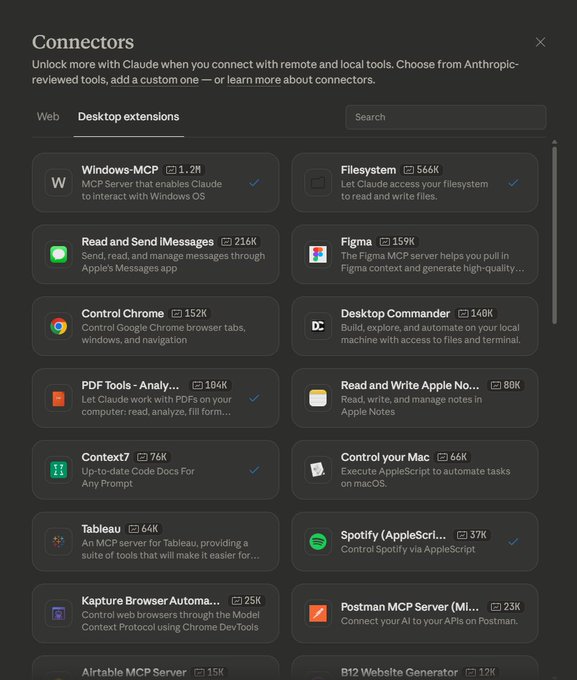
Claude connectors (Anthropic): A screenshot of Claude’s “Desktop extensions” catalog spotlights how quickly tool-bridges have scaled inside the ecosystem, with tiles showing Windows-MCP at 1.2M installs and Filesystem at 566K, alongside Control Chrome at 152K and other integrations, as shown in the connectors screenshot.
• What’s new here: Not a feature launch, but a distribution signal—the UI presents these as “Anthropic-reviewed tools,” implying a curated channel for letting Claude act on local OS, files, and browsers, per the connectors screenshot.
The open question from today’s tweets is how much of Claude’s practical “agent” advantage is model capability versus connector availability and adoption density.
Cursor team claims it built a browser from scratch using GPT 5.2 (3M+ LOC)
Cursor (Anysphere): A viral “built by AI” story claims the Cursor team built “a browser from scratch using GPT 5.2,” describing “3M+ lines of code across thousands of files,” as stated in the browser built with GPT claim. The tweets don’t include a repo, architecture, or postmortem, so treat this as an unverified scale anecdote—but it highlights how AI-assisted development is now being marketed via total codebase size, not just feature velocity.
Elon frames Grok 4.20 as weaker at coding than Claude Opus 4.5
Grok 4.20 (xAI): A circulating claim says Elon Musk expects Grok 4.20 “might not beat Claude Opus 4.5 at coding,” while positioning it as stronger in “other areas,” as relayed in the coding comparison claim. No benchmarks or release details were included in the tweets, so this reads as directional positioning rather than a measurable update.
The immediate creative-dev implication is that “best coding model” narratives are still being used as product positioning—even when the claim is explicitly framed as a tradeoff, per the coding comparison claim.
Anthropic’s “special sauce” for coding models becomes a discussion prompt again
Claude coding performance (Anthropic): The same thread that cites Grok-vs-Claude positioning also kicks off a broader question—“what is Anthropic’s special sauce when it comes to coding models?”—as posed in the coding models question. There’s no new technical disclosure in the tweets, but it’s a clear signal that coding-model differentiation (training, tooling, eval focus, or UX loops) remains a live debate.
🧱 Builder tools & inference economics: “full-cycle” app builders and provider comparisons
Smaller but relevant builder/dev tooling beat: solo-founder ‘full cycle’ builders plus a concrete speed/price comparison for agentic inference providers. Kept separate from coding-assistant discourse.
GLM-4.7 hosting comparison cites Cerebras speed and DeepInfra cost floor
GLM-4.7 (Z AI): A shared “speed vs price” snapshot for serving GLM-4.7 calls out Cerebras Inference at ~1,445 tokens/sec with ~1.6s latency for real-time tasks but a 131k context limit, while flagging DeepInfra as a low-cost option at $0.43/M input and $1.75/M output with caching discounts, per the Provider comparison blurb.
The same blurb also claims GLM-4.7 beats DeepSeek V3.2 on agentic benchmarks like “Tau2 Telecom,” again as stated in the Provider comparison blurb. There’s no linked chart artifact or eval report inside today’s tweets, so the numbers read as an informal provider comparison rather than a reproducible benchmark pack.
Atoms pitches an end-to-end builder flow from market research to deployed full-stack apps
Atoms (Atoms): Atoms is being positioned as a “full cycle” AI app builder that doesn’t stop at generating snippets; it’s framed as going from market research → architecture → full-stack build (including auth, database, Stripe/payments) → deployment, plus an initial SEO push, as described in the Full cycle claim.
The practical implication is a tighter loop for solo founders who want something that resembles a shipping pipeline (backend + payments + deploy) instead of a UI mock or partial repo. The tweets don’t include pricing, supported stacks, or any reliability metrics yet, so treat it as positioning rather than a verified capability set based on the Full cycle claim.
📚 Research worth bookmarking: open translation models + faster embodied reasoning
Research/news skews practical for creators building multilingual or embodied experiences: TranslateGemma details + technical report, and new efficiency work for vision-language-action planning; plus an open-vocab 3D scene understanding paper.
Google releases TranslateGemma open translation models (4B/12B/27B, 55 languages)
TranslateGemma (Google): Google introduced TranslateGemma, an open translation model family built on Gemma 3 with 4B/12B/27B sizes and coverage across 55 languages, including lower-resource ones, as summarized in the [launch breakdown](t:20|Model family overview) and distributed via the [model collection](link:30:0|Hugging Face collection).
• Quality vs size signal: the [launch breakdown](t:20|Model family overview) claims the 12B variant beats the larger Gemma 3 27B baseline on WMT24++, and that 4B rivals 12B—positioning it for mobile/edge translation where latency and memory matter.
• Creator-relevant capability: TranslateGemma is described as retaining multimodal ability to translate text inside images (localizing posters/UI/frames), per the [launch breakdown](t:20|Model family overview).
• How it’s trained: the [technical report link](t:42|Technical report link) points to a two-stage recipe—supervised fine-tuning + reinforcement learning, with RL guided by reward models MetricX-QE and AutoMQM as described in the [paper page](link:42:0|Paper page).
No independent eval artifact shows up in the tweets, so the benchmark claims are best treated as the authors’ reported numbers for now.
Fast-ThinkAct paper claims 89.3% lower latency for vision-language-action planning
Fast-ThinkAct (Research): A new vision-language-action framework proposes “verbalizable latent planning” to cut inference overhead while keeping long-horizon behavior, with the headline claim being an 89.3% latency reduction, as linked in the [paper post](t:44|Paper link) and detailed on the [paper page](link:44:0|Paper page).
The hook for creators building embodied characters or interactive installations is the promise of faster decision loops without fully dropping explainability (the “verbalizable” part), although the tweets don’t include example videos or a public benchmark dashboard beyond the paper.
OpenVoxel proposes training-free voxel grouping and captioning for open-vocab 3D scenes
OpenVoxel (Research): OpenVoxel is shared as a method for training-free grouping and captioning voxels for open-vocabulary 3D scene understanding, per the [paper mention](t:67|Paper mention).
For 3D-heavy storytelling workflows, this kind of approach points toward turning raw reconstructions into semantically labeled “parts” (objects/regions) without needing a new fine-tune for every domain—though the tweet doesn’t include a link, benchmarks, or qualitative examples.
🏁 Finished pieces & narrative drops: shorts, trailers, and cinematic studies
A handful of named or clearly-packaged creative outputs circulate today—short films, concept trailers, and cinematic photo/story experiments—separate from tool demos and prompts.
Mister ChatGPT spotlight frames AI filmmaking as performance-first, frame-by-frame
Mister ChatGPT (Sundermann2026 / FRAME EIGHT): A creator spotlight positions the film as a “performance-first” AI production where direction stays manual—“nothing was left to automatisation” and they “worked AGAINST AI,” per the description shared in spotlight writeup.

Instead of selling a single tool trick, the framing is about craft discipline: treating AI actors like actors (rhythm, timing, subtext) and iterating shot-by-shot until the performance matches intent, as described in spotlight writeup.
Stranded: an Adobe Firefly-made short with a desert-isolation mood
Stranded (heydin_ai): A named short titled Stranded circulated with explicit tool credits—generated/edited in Adobe Firefly Video, then color-graded in Premiere Pro and refined via Lightroom and Photoshop, per the creator’s post in toolchain credits.
The piece reads like a compact “mood film” study (solitude, harsh landscape, slow pacing) more than a product demo, with the credits functioning as the transparency layer for how it was assembled.
Walking Between Two Parallel Universes: a Grok Imagine micro-concept clip
Grok Imagine (xAI): A short concept video shows the “parallel universes” gag—an arm pushing through a mirror-like boundary into a shifted version of the same room—presented as a self-contained idea beat in parallel universe clip.

It’s less about character work and more about selling the transition: one continuous motion, one spatial trick, and a clean, loopable premise that reads like a cold-open for a sci‑fi short.
ECHOES: Characters clip focuses on time passing through performance and silence
ECHOES: Characters (victorbonafonte): A character-focused segment reframes the project as performance-led—time is conveyed through “small gestures, pauses and expressions” rather than plot mechanics, as written in creator statement.

The clip itself plays like an acting study (static framing, subtle facial change, time-jump effect), and it’s explicitly positioned as solving the “show time passing” problem without leaning on exposition, per creator statement.
The Devil Within: surreal photo set built around liminal horror imagery
The Devil Within (jamesyeung18): A packaged surreal image set dropped as a cohesive micro-story—underwater trenchcoat figure, a levitating silhouette under a streetlight, and a towering glass cube containing a monstrous face, as shown in image set.
The throughline is “quiet dread” composition: minimal dialogue cues, strong negative space, and one impossible object anchoring each frame, which makes it useful as a visual reference for horror/psychological-thriller tone boards.
Warcraft: Tanaris Sands of War concept trailer circulates as a fan homage drop
Warcraft: Tanaris Sands of War (LittleTinRobot): A “concept trailer” homage post was boosted via a retweet, framing it as a standalone release-style drop rather than a workflow thread, as indicated in concept trailer RT.
No tool breakdown is attached in the tweet itself, so what’s most actionable here is the packaging: title card + trailer framing + fandom target, which keeps the piece legible as a shareable unit.
🗂️ Where creators run things: model endpoints, studios, and ‘all-in-one’ creation surfaces
A smaller access/distribution beat: creators point to where models/features are available (fal/Runware links) and highlight studio-style surfaces (LTX, Firefly) as the place work actually happens.
Adobe Firefly pushes in-app video generation plus prompt-based edits via partner models
Firefly video workflow (Adobe): Adobe Firefly is being marketed as a single place to generate a video and then keep editing it via prompts, including using partner models like Runway Aleph for targeted changes, as described in the [one-stop workflow post](t:17|In-app workflow pitch) and broken into steps in the [how-to thread](t:93|Edit steps).
• Editing surface: The Firefly Video Editor (beta) is framed as browser-based with a multi-track timeline, transcript navigation for dialogue edits, and the ability to pull from generation history, as listed in the [editor feature rundown](t:107|Editor feature list).
• Iteration management: Firefly Boards is pitched as an organizational layer for keeping variations in one place, per the [Boards tip](t:114|Boards editing tip).
This reads less like a “model drop” and more like Adobe trying to make Firefly the default workspace where iterative video edits happen, per the [workflow description](t:17|In-app workflow pitch).
Higgsfield claims $200M ARR and announces $130M Series A at $1.3B valuation
Higgsfield (company): Higgsfield says it doubled from $100M to $200M annual run rate in 2 months, hit $200M ARR in under 9 months, and raised a $130M Series A at a $1.3B valuation, pointing to Forbes/Reuters coverage in its [milestone thread](t:12|ARR and Series A claim).
For creators, this is primarily a distribution/supply signal: the company is explicitly tying growth to creator usage and partner reach, as implied by its “fastest-scaling” framing in the same [announcement](t:12|ARR and Series A claim).
LTX Studio ships Storyboard Builder for script-to-storyboard in ~60 seconds
Storyboard Builder (LTX Studio): LTX Studio is promoting a new Storyboard Builder that turns a script/treatment into a structured outline with scenes and shots, then into a storyboard layout in about 60 seconds, as shown in the [product walkthrough](t:22|Storyboard builder demo) and positioned as “available now” in the [availability post](t:103|Availability note) with the Product page.
• Workflow steps: The flow starts with uploading a script/treatment as shown in the [Step 1 clip](t:82|Upload script step), then editing cast/style/model choices per the [Step 2 clip](t:83|Edit elements step), refining shots in “Gen Space” per the [Step 3 clip](t:88|Refine outline step), and exporting an animatic for pitching per the [sharing step](t:86|Export animatic step).
This is a clear “studio surface” move: less emphasis on which underlying model wins, more emphasis on getting from writing to a pitchable layout quickly, per the same [launch framing](t:22|Storyboard builder demo).
fal adds ImagineArt-1.5 Pro as a hosted 4K realism image model
ImagineArt 1.5 Pro (fal): fal says ImagineArt-1.5-pro is now available as a hosted text-to-image model, positioning it for “true life-like realism” with 4K output and poster-ready aesthetics, as framed in the [endpoint announcement](t:26|Endpoint drop) and reinforced with “try it here” links in the [follow-up post](t:97|Launch links).
Treat the performance claims as provisional for now—today’s tweets are mostly launch positioning, with the most concrete evidence being early output examples like the macro realism test set shown in the [initial testing thread](t:69|Early output tests).
MasterClass On Call says 75% of users now choose voice after ElevenLabs rollout
On Call (MasterClass) + ElevenLabs: MasterClass says that since deploying ElevenLabs, over 75% of users interact with MasterClass On Call via voice rather than chat, and emphasizes instructor “personality” via pacing/tone, according to the [adoption metric post](t:36|Voice adoption metric).

This is a platform distribution datapoint more than a model spec: voice UI is becoming the primary mode for the product, as quantified in the same [ElevenLabs note](t:36|Voice adoption metric).
Runware lists ImagineArt 1.5 Pro with native 4K at $0.045 per image
ImagineArt 1.5 Pro (Runware): Runware says ImagineArt 1.5 Pro is live with “native 4K images,” improved texture/lighting, and more repeatable composition, while pricing it at $0.045 per image, according to the [availability + pricing post](t:65|Runware pricing note) and the [launch link](t:139|Runware launch link).
The strongest creator-facing detail here is the “repeatable outputs” framing (less variance run-to-run), which matches the kind of product-shot and poster pipelines Runware tends to optimize for, as described in the [Runware note](t:65|Runware pricing note).
💳 Access windows & plan nudges (only the ones that change creator output)
A few promos materially affect what creators can produce today (unlimited windows / major access offers). Kept tight to avoid becoming an ads section.
Adobe Firefly’s unlimited generations window reaches its last day
Adobe Firefly (Adobe): Following up on Unlimited window—unlimited generations across Firefly image models and the Firefly Video model—Adobe’s creator posts are now explicitly framing Jan 15 as the cutoff, noting “today is the last day” in the Last day reminder.

The practical impact is throughput: if you’re iterating heavily on video prompts or running lots of visual variations, the “unlimited” window changes what you can afford to brute-force today, per the Last day reminder.
Higgsfield is being pitched as “unlimited access” across Kling models
Kling access (Higgsfield): A fresh round of creator hype says Higgsfield “just dropped UNLIMITED access to all Kling models,” with the framing that it’s time to “burn their servers,” according to the Unlimited access claim.
Terms (duration, plan requirements, and caps) aren’t specified in the tweets, but the positioning is clear: use volume-heavy generations while it’s open, as described in the Unlimited access claim.
Invideo’s UltraRes launch is paired with a $1,200 credits giveaway
UltraRes (Invideo): Invideo is marketing UltraRes as its “highest-quality enhancer yet,” and bundling the launch with a contest to win a top generative plan plus $1,200 in credits, as stated in the UltraRes giveaway pitch.
The post is incentive-led rather than spec-led (no before/after metrics shown), but it’s a concrete credits offer that can directly change how much upscaling/enhancement a creator can run this week, per the UltraRes giveaway pitch.
A subscriber-gated anime style bundle is being sold as “you can create this”
Subscriber style access (creator monetization): A creator is selling an “anime style” as a subscriber-only perk, claiming the look is reproducible with Midjourney plus Grok Imagine and optional GPT Imagine 1.5 variations, then edited in CapCut, per the Subscriber workflow pitch.
The access control here is the style recipe itself: tooling is commodity, but the prompt/style pack is positioned as the paid layer, as stated in the Subscriber workflow pitch.
Apob AI pushes a 24-hour “engage for 1,000 credits” offer
Apob AI (promo mechanic): A creator-growth pitch is paired with an explicit 24-hour engagement-for-credits offer—“retweet&reply&follow&like for 1000 credits”—as described in the Credits incentive post.

It’s a straightforward output lever: more credits can fund more avatar swaps and repurposing tests, while also incentivizing engagement loops, as spelled out in the Credits incentive post.
📣 Platform quality & distribution: anti-slop policy moves and feed frustration
Platform meta becomes the news in a few posts: X policy enforcement aimed at reducing incentive-driven spam, plus creators commenting on worsening algorithms/feed quality.
X bans reward-for-posting apps to curb AI slop and reply spam
X developer API (X): X is revising its developer API policies to ban apps that reward users for posting (labeled “infofi”), citing “AI slop & reply spam,” and says it has already revoked API access from those apps, as shown in the policy screenshot shared in policy screenshot.
• Enforcement + fallout: The post claims “your X experience should start improving soon” once bots stop getting paid, and notes some developer accounts were terminated, per policy screenshot.
• Explicit off-ramp messaging: X’s message tells affected developers to reach out for help transitioning “to Threads and Bluesky,” which is unusually direct platform-exit language for an API policy notice, as stated in policy screenshot.
Creators keep reporting worse reach as X feed complaints continue
X distribution (Creators): A fresh creator gripe says “the algorithm is still bad” and “it’s gotten a bit worse,” adding another datapoint that feed quality/reach remains a live frustration for people sharing AI art and workflows, as written in algorithm complaint.
There’s no measurable change described (no impressions or RPM), but it matches the broader pattern of creators attributing outcomes to ranking behavior rather than content quality, per algorithm complaint.
The “Following” feed gets mocked as support-ticket spam
Feed quality (X): A meme post jokes that the “Following” feed is “now featuring Google customer support tickets,” pointing to a perceived rise in low-signal posts crowding out creator work, as shown in feed screenshot.
The screenshot example is a Google support reply (“We’ve sent you a DM with the next steps”), which is the kind of engagement-bait content creators argue can drown out art/process posts in timeline ranking, per feed screenshot.
ChatGPT-as-a-background-tab gets framed as the new normal
ChatGPT usage norms (OpenAI): A throwaway line claims “almost anyone with a pulse has a ChatGPT tab open,” capturing how generative tools are treated as ambient utilities rather than special-purpose apps, as phrased in normalization quip.
For AI creatives, that matters because “default tool” status tends to shape where audiences expect outputs to come from—and which platforms end up flooded with lookalike generations—echoed by the cultural tone in normalization quip.
While you're reading this, something just shipped.
New models, tools, and workflows drop daily. The creators who win are the ones who know first.
Last week: 47 releases tracked · 12 breaking changes flagged · 3 pricing drops caught