ClawdBot makeugc v2 claims ~550 UGC shorts/day – hooks target $35k/month ads

Stay in the loop
Free daily newsletter & Telegram daily report
Executive Summary
ClawdBot paired with makeugc v2 is being pitched as a UGC content factory that can output ~550 realistic shorts/day; the thread describes a single engine chaining scriptwriting → synthetic creator render → delivery animation → automated hook A/B tests; the stack name-drops Sora 2 Pro, Veo 3.1, and Kling, and even claims “ugc cost $0,” but there’s no independent accounting of compute, queueing, or rejection rates.
• Ampere.sh / OpenClaw: “Vercel for OpenClaw” positioning; managed deploy “under 60 seconds,” with reliability framed around preconfigured/monitored Chrome; promo includes “$500” in Claude Opus 4.6 credits.
• Kling 3.0 / Freepik: LOVELESS trailer workflow claims 3.5 hours under a single creative direction; sequence prompting template formalizes Scene→Subject→Timeline→Camera→Audio; aggregators (SocialSight, OpenArt) signal broader distribution, not new specs.
• LTX‑2 local video: creators repeat 3.3M downloads in 1 month plus “up to 4K at 50 FPS” and ComfyUI workflow JSON sharing; benchmarks remain mostly anecdotal.
Across threads, “volume + control plane” is emerging as the moat; the missing pieces are auditability—true unit costs, rate limits, and reproducible eval artifacts.
While you're reading this, something just shipped.
New models, tools, and workflows drop daily. The creators who win are the ones who know first.
Last week: 47 releases tracked · 12 breaking changes flagged · 3 pricing drops caught
Top links today
- LTX-2 open-source video and audio repo
- Ampere managed OpenClaw hosting
- Ampere personal AI agent hosting
- Lindy Assistant overview and setup
- Grok prompts for business plan generation
- Workflow for continuous POV AI video
- Kling 3.0 trailer breakdown and prompts
- Kling 3.0 on SocialSight product page
- Higgsfield Cinema Studio 2.0 access
- Paul Schrader clip on AI films
- BLVCKLIGHTai YouTube channel of AI stories
- Route 47 connected AI TV show universe
- Op-ed on fake camera controls in AI
- Call for AI projects and creator engagement
- Video primer on LTX-2 and Comfy setup
Feature Spotlight
Kling 3.0 becomes the daily driver for cinematic shots (zooms, mood, and repeatable sequences)
Kling 3.0 is the clip-of-the-day engine: creators are stressing realistic zooms, mood/suspense shots, and structured prompting for repeatable sequences—useful if you’re shipping trailers, ads, or short films fast.
High-volume creator testing around Kling 3.0’s “cinematic feel”—especially realistic zoom language, suspense/horror tone shots, and repeatable prompt structures for multi-shot sequences. Excludes Seedance-focused legal/IP discussion (covered in trust_safety_policy).
Jump to Kling 3.0 becomes the daily driver for cinematic shots (zooms, mood, and repeatable sequences) topicsTable of Contents
🎬 Kling 3.0 becomes the daily driver for cinematic shots (zooms, mood, and repeatable sequences)
High-volume creator testing around Kling 3.0’s “cinematic feel”—especially realistic zoom language, suspense/horror tone shots, and repeatable prompt structures for multi-shot sequences. Excludes Seedance-focused legal/IP discussion (covered in trust_safety_policy).
A structured prompt format is emerging for multi-shot Kling 3.0 sequences
Kling 3.0 (Kling AI): Freepik shared a structured prompt format for more repeatable sequence generation—[Scene/Context] + [Subject & Appearance] + [Action Timeline] + [Camera Movement] + [Audio & Atmosphere]—positioning it as a way to keep multi-shot intent coherent across generations, as shown in Prompt structure share.

The key detail is the inclusion of an explicit “action timeline” and “camera movement” block, which frames the model like a shot list instead of a single description, per the guidance in Prompt structure share.
A time-boxed trailer pipeline built around Kling 3.0 + Freepik’s stack
Freepik x Kling 3.0 (Kling AI): Freepik shared a concrete “small team, single direction” trailer workflow—LOVELESS—reporting 3.5 hours under one creative direction while using Kling 3.0 for video generation, Nano Banana Pro for images inside Freepik Spaces, and Freepik for music/SFX, as described in LOVELESS trailer post and expanded in Tooling breakdown.

• What makes it replicable: The workflow is presented as a repeatable pipeline (assets → shots → sequence), not a one-off prompt win, per the process notes in LOVELESS trailer post.
The open question is how stable this remains when you scale beyond a trailer into longer continuity, since the posts emphasize speed/time-boxing more than iteration counts.
Kling 3.0 is being stress-tested on suspense pacing, not spectacle
Kling 3.0 (Kling AI): A recurring test is whether the model can hold ambiguity—slow, ominous pacing; readable composition; and “what’s happening?” energy—rather than relying on fast cuts, as argued in the Mystery shot example built around a hazmat-suit hallway walk-up.

This matters for filmmakers because it’s closer to directing than prompting: the shot is trying to preserve negative space, grain, and restrained movement (the stuff that usually breaks first) as demonstrated in Mystery shot example.
Kling 3.0 zoom language is getting used as a signature camera move
Kling 3.0 (Kling AI): Creators are showcasing Kling 3.0 as a “camera” model—where the win is believable zoom language rather than just a pretty frame, as shown in the Realistic zoom showcase that starts on macro circuitry and pulls out into a huge futuristic structure.

The practical creative read is that Kling 3.0 is being treated like an intro/establishing-shot generator: start with a tight texture or object, then reveal scale without the shot collapsing into mush (a common failure mode in older video models), per the framing in Realistic zoom showcase.
Kling 3.0’s positioning shifts to control over wow-factor
Creator sentiment (Kling 3.0): One visible line of debate frames Kling 3.0 as the tool for directed filmmaking, with Seedance cast as high-impact but harder to steer—“Seedance feels like a quick flash… it lacks control and intention,” according to Control vs Seedance take.
The creative implication is that camera behavior (zooms, pacing, deliberate reveals) is becoming the differentiator creators argue about, not raw realism—see the zoom-language example in Realistic zoom showcase alongside the control-centric critique in Control vs Seedance take.
Kling 3.0 distribution expands via creator platforms (SocialSight, OpenArt)
Kling 3.0 (Kling AI): Multiple aggregator platforms are posting “try now” availability—SocialSight’s announcement video in SocialSight availability clip and an OpenArt claim that Kling 3.0 (and “Kling 3.0 Omni”) are available to all users in OpenArt availability claim.

Treat this as distribution signal, not a spec drop: the posts are about access surfaces and platform availability rather than new model capabilities, as stated in SocialSight availability clip and OpenArt availability claim.
⚖️ Hollywood vs generative video: consent, “AI bounty hunters,” and the fake-camera marketing backlash
Today’s policy/safety discourse centers on IP/likeness enforcement and creator trust: Hollywood org responses, consent panic, and critique of AI tools marketing “lens/aperture” controls as if a real camera existed. Excludes Kling 3.0 capability testing (feature).
SAG-AFTRA joins Disney/MPA pressure on Seedance 2.0 over likeness and voice use
Seedance 2.0 (ByteDance): Following up on MPA demand—MPA takedown pressure—newer circulation includes a SAG-AFTRA statement condemning Seedance 2.0 for “unauthorized use” of member voices/likenesses and calling it an existential threat, as quoted and screenshotted in a Turkish IP/biometrics roundup from IP and consent deep dive.
The same post aggregates escalation claims—Disney allegedly sending a notice tied to Star Wars/Marvel IP and MPA framing viral celebrity-likeness clips (e.g., “Tom Cruise”/“Brad Pitt”) as “massive-scale infringement”—and also repeats that ByteDance paused a photo-driven voice/likeness capability amid backlash, per IP and consent deep dive.
NAKID argues camera-rig controls in AI tools are a marketing illusion
Freepik/Higgsfield-style “lens UI” backlash: An op-ed argues AI image/video tools don’t simulate optics—they simulate probability—so presenting “lenses,” “f-stops,” and “aperture” as if a camera existed is closer to persuasion than disclosure, as previewed in Op-ed teaser and published via the Op-ed text.
This continues the trust/disclosure thread from Camera UI claims—earlier creator pushback on “real camera” metaphors—by focusing less on capability and more on how UI language shapes what filmmakers think they’re controlling.
Paul Schrader: 90-minute AI films could be made in “2–3 weeks”
AI film production timeline signal: A screenshot of Paul Schrader’s post predicts that within a year, film students could create 90-minute photorealistic AI dramas in “2–3 weeks” on zero budget, with “originality of the story” becoming the main differentiator and distribution/monetization potentially landing on YouTube-like platforms, as captured in Schrader prediction screenshot.
This frames generative video disruption as a workflow compression problem (time-to-feature and budget-to-feature), not only a model-quality problem—especially for writers/directors competing on narrative rather than production access.
Studios lean toward output policing with “AI bounty hunters” claims
Hollywood enforcement trend: A circulating claim says Hollywood is hiring “AI bounty hunters”—enlisting internet users to identify AI outputs that appear to reproduce copyrighted material—framed as a response to rapidly spreading generative video remixes, per Bounty hunters claim.
Details are thin in the tweet (no named vendors, program rules, or jurisdictions), but it signals a shift toward crowdsourced detection and takedown mechanics alongside formal demands already aimed at video models and platforms.
Creators reassert “real vs synthetic” disclosure as a line worth keeping
Disclosure/ethics stance: A filmmaker/creator frames their position as maintaining a clear boundary—“There is a line between real and not real… [and] I am not on the team… wanting that line to disappear”—in reaction to increasingly convincing AI filmmaking outputs, per Stance quote and the matching context in Creativity post.
The point is less about banning tools and more about audience transparency becoming part of the craft as generative video starts to pass for conventional production.
🧩 Agents in production: managed OpenClaw hosting, iMessage-native assistants, and “orchestrator fatigue”
Workflows and ops for running agents day-to-day: fully managed OpenClaw hosting pitches, personal assistants that live in messaging apps, and builders venting about broken orchestration UX. Excludes pricing-only promos (kept in creator_pricing_promos).
Ampere.sh pitches managed OpenClaw hosting with 60-second deploy and prebuilt Chrome
Ampere.sh (OpenClaw hosting): Ampere.sh is being pitched as fully managed OpenClaw hosting—“one-click deploy” with an agent live “in under 60 seconds,” explicitly targeting the pain of self-hosting (cron jobs failing, Chromium crashing, updates wiping configs) as described in the Ampere announcement and Self-host pain list.

• Browser automation as the headline feature: The thread frames OpenClaw’s value as reliable web automation (scraping, form-filling, “API capture,” site interaction), arguing Ampere’s preconfigured/monitored Chrome makes it usable day-to-day as stated in the Browser automation pitch.
• Ops + incentives: The promotion leans on “actually free” hosting plus a launch offer of free model credits, including a claim of “$500 worth of Claude Opus 4.6 credits” in the Credits offer, with more feature bullets (memory/model routing/security) outlined on the Product page.
The operational detail (Chrome reliability + uptime) is the core differentiator; pricing/credits are presented as the adoption lever.
Lindy Assistant is pitched as an iMessage-native agent that replaces a local server setup
Lindy Assistant (Lindy): Lindy is being positioned as a personal agent that runs through iMessage—so you don’t need a “$600 Mac Mini or VPS”—while connecting to “100+ apps” for meetings, email, and docs, per the Product overview.

• Memory + meeting follow-through: The pitch emphasizes “perfect recall” across conversations/projects and shows a contract review catch as an example in the Contract issue example, plus meeting participation that goes beyond notes into actions (follow-up invite + follow-up email + coaching) as shown in the Meeting actions demo.
• Multimodal capture to documentation: A specific workflow is “whiteboard photo + voice memo → Notion doc,” described in the Whiteboard to Notion flow.
The thread also frames this as “a smart computer” that can take high-level goals and execute middle steps, as stated in the Smart computer claim, with onboarding routed through the Signup page.
Orchestrator fatigue shows up as “terminal juggling” plus broken chat UX for OpenClaw
Agent ops UX friction: A recurring pain point is operational, not model quality: one builder says the main blockers are “the bloody terminal to juggle agents” and that “every interface for talking to OpenClaw” (Telegram topics/threads, Slack, Discord, many bot setups) makes them more unorganized, as laid out in the OpenClaw UX rant.
The complaint broadens into a general “reinvent everything” stance—browsers, todo/notes apps, OS, and email clients—captured in the Reinvent everything follow-up and Email apps add-on.
🏷️ Deals & access windows creators actually care about (video, hubs, and credits)
Time-sensitive access/value shifts: free/unlimited windows for video generation, “all-model” bundles priced like a consumer subscription, and new-region access. Excludes Kling 3.0 creative capability testing (feature).
GlobalGPT pitches an “all-models” bundle priced below a Netflix subscription
GlobalGPT (platform bundle): A promo thread claims a single subscription bundles GPT-5.2, Claude 4.5, Sora 2 Pro, Gemini 3 Pro, and Midjourney-style image generation “for less than a Netflix subscription,” emphasizing no separate subscriptions and “100+ AI tools,” as described in the Bundle claim and shown in the Product breakdown.

Treat the positioning as marketing until there’s a clear public pricing/limits page; what’s concrete here is the packaging: one dashboard meant to collapse model/tool switching into a single seat.
ImagineArt promo: Kling 3.0 free + unlimited on Team Scale plan (limited time)
Kling 3.0 (ImagineArt): ImagineArt is advertising a time-limited access window where Kling 3.0 is “FREE + UNLIMITED” for the Team Scale plan, per the Team Scale promo. The offer framing is promotional (no end date disclosed in the tweet), but it’s a meaningful swing for creators who are doing lots of iteration and need predictable volume.
GlobalGPT “AI Image Hub” bundles Nano Banana Pro, Sora Image, Seedream, Flux
GlobalGPT (AI Image Hub): The same bundle push breaks out an “AI Image Hub” that groups Nano Banana Pro, Sora Image, Seedream 4.5, Flux into one surface, framed as “pro-level image generation for the price of two coffees a month,” per the Image hub blurb and the Image hub clip.

This matters if your workflow is constantly bouncing between image models for lookdev and edits, since the pitch is consolidation + low monthly cost (specific pricing isn’t shown in these tweets).
GlobalGPT claims Sora 2 Pro is now available with “unlimited generations”
Sora 2 Pro (via GlobalGPT): A thread segment says “Sora 2 Pro just dropped on GlobalGPT” and markets unlimited generations / no restrictions, plus short clip durations called out as 5s, 10s, 15s, according to the Sora 2 Pro claim.

No independent detail is provided here about rate limits, watermarking, or queue priority—so the practical “unlimited” terms remain unclear from today’s tweets alone.
Google AI Studio + Gemini API expand availability to 4 additional countries
Google AI Studio / Gemini API (Google): Availability expanded to four additional countries—Moldova, Andorra, San Marino, and Vatican City—as announced in the Availability expansion. This is a small change globally, but for creators in those regions it flips access from “blocked” to “live” for the Studio UI and Gemini API.
🖥️ Local-first creation stacks: LTX‑2 open video + running big models on your own machine
Creators are pushing local control: LTX‑2’s open-source audio-video model narrative (downloads, workflows, hardware notes) plus “what’s the best local LLM on a Mac” threads. Excludes agent hosting (in creator_workflows_agents).
LTX-2 claims 3.3M downloads and leans hard into local, open A/V creation
LTX-2 (LTX Model): Creators are amplifying LTX-2 as an open-source audio-video generation stack you can run locally—framed as “A-tier video quality on YOUR hardware” in the open-source framing and as “+3.3 million downloads in 1 month” in the downloads claim, with a direct “download or clone the repo” pointer shown in the download note alongside the model page.

The practical subtext for filmmakers and storytellers is ownership and iteration loops: local runs mean fewer platform constraints, and open workflows mean creators can share reproducible setups instead of just clips.
An RTX6000 Image→Video workflow JSON for LTX-2 is circulating (with demos)
LTX-2 (LTX Model): A practical “here’s my exact pipeline” drop showed LTX-2 running on an RTX6000, paired with a downloadable ComfyUI-style workflow JSON in the RTX6000 workflow share, plus additional community workflow sharing in the another I2V workflow.

• Reusable artifact: The workflow file is linked as a workflow JSON, which is the kind of share that lets other creators reproduce motion/consistency instead of guessing settings.
• On-ramp content: A beginner-friendly walkthrough for local setup is also being passed around via a beginners guide, per the guide link.
Net-new value here is the move from “look at this clip” to “here’s the graph/file,” which is what local-first stacks need to compound.
LTX-2 performance claims center on 4K/50FPS and VRAM efficiency for local runs
LTX-2 (LTX Model): A set of creator-shared specs is getting repeated—“supports up to 4K output at 50FPS,” “runs insanely efficient on VRAM,” and “works beautifully in ComfyUI” per the specs post, reinforcing the earlier claim that local generation is the point of the project in the local ownership angle.

Treat this as creator-reported until there’s a single canonical benchmark artifact, but the emphasis is clear: performance-per-VRAM and ComfyUI-level controllability are the selling points creators keep citing.
Creators show Seedance-generated video localized via LTX-2 dubbing
LTX-2 (LTX Model): A hybrid workflow is getting explicit examples: generate video in a closed model (Seedance 2.0 is the named example) and then localize it via LTX-2 dubbing, with a concrete dubbed clip posted in the dubbed example and the “IP holders can easily dub to new markets” framing repeated in the dubbing use case.

This matters to filmmakers doing multilingual distribution because it separates “visual generation” from “audio localization,” and the second step can be pulled into a local-first toolchain.
LTX-2 Video-to-Video motion control plus local lip-sync gets a concrete example
LTX-2 (LTX Model): A specific local editing use case is being highlighted: Video-to-Video motion control plus a new lip-sync pass done locally, where the source video was originally made in Unreal years earlier—described in the VtV lip-sync note and framed as part of the broader “iterate and refine” pitch in the production-ready loop claim.

This is a different creative promise than pure text-to-video: keep your blocking/camera language from an existing clip, then iterate on performance and mouth motion without sending footage to a hosted tool.
Qwen 3 30B reportedly runs at ~35 tok/sec on a laptop in a creator setup
Qwen 3 30B (local inference): A creator reported getting Qwen 3 30B “running smooth” at roughly 35 tokens/sec on a laptop in the local speed datapoint, then immediately shifted to the practical question—what to build next and whether to spin up a “clanker in a VM”—as echoed in the follow-up VM follow-up.
The thread continues as an open prompt for use cases (especially agent-style automation and creative tooling ideas) in the OpenClaw use-case ask, but today’s concrete piece of signal is the speed number tied to a real laptop setup.
A Mac 128GB LM Studio thread spotlights Qwen2.5 32B Q5 as a candidate
LM Studio (local LLM runtime): A creator asked for the current “very BEST LLM” to run locally on a Mac with 128GB RAM in LM Studio, noting they’re downloading “Qwen2.5 32B in Q5 quant” and explicitly requesting “bonus points” for uncensored behavior in the model selection question.
No benchmark receipts are provided in-thread, but it’s a useful snapshot of what local-first creators are currently trialing: mid-size dense models at heavier quants as the default starting point on high-RAM Macs.
🧪 Copy/paste aesthetics: Midjourney SREF cheat codes + creator-ready prompt templates
High-signal prompt drops dominate: multiple Midjourney SREF “cheat codes,” anime style references, and a full Nano Banana lookbook prompt template. Excludes general image capability demos (in image_generation).
Nano Banana Pro prompt: multi-angle fashion lookbook collage with macro details
Nano Banana Pro: A full, copy/paste multi-angle fashion lookbook prompt template is circulating, specifying a grid collage with a main full-body editorial shot plus 3–4 macro detail frames (fabric/hardware/stitching) in the lookbook prompt template and re-posted with the full text in the full prompt text.
• Aesthetic + “camera” spec: It hard-codes a “High-End Lo-fi” look (film grain, scanlines, distressed prints) and a 35mm film emulation (“Kodak Portra 400,” f/5.6) as written in the full prompt text.
• Why creators use it: The author frames outputs as directional assets for pre-production, client alignment, and brand audits—rather than finals—spelled out in the where it fits list.
PromptsRef’s current top Midjourney SREF maps to a risograph-style “imperfect print” aesthetic
Midjourney SREF (PromptsRef): Following up on SREF trend (daily top-code tracking), PromptsRef’s Feb 13 board lists Top 1 SREF as --sref 7462501467 for --niji 7, along with a long-form style read on why the “misaligned print / grain / spot colors” look performs well, as detailed in the daily top Sref report and browsable via the sref library.
• What to expect visually: The writeup emphasizes risograph-like halftone texture, limited-but-loud palettes, and intentional imperfection (color layer drift), as described in the daily top Sref report.
• Where it’s used: PromptsRef explicitly calls out applications like zine covers, posters, packaging, and children’s illustration, with prompt keyword starters included in the daily top Sref report.
Midjourney SREF 1001476910: retro 80s–90s anime finish for character portraits
Midjourney (Artedeingenio): A new anime style reference drop shares --sref 1001476910 as a blend of classic 80s–90s anime with a modern finish—explicitly name-checking late-70s/80s shōjo/seinen vibes and “retro OVA aesthetics” in the anime style reference.
The examples skew toward close-up portrait framing and jewelry/wardrobe detail (useful for key art and character posters), consistent with the visuals shown in the anime style reference.
Midjourney SREF 1645572536: 90s-inspired military sci‑fi anime keyframes
Midjourney (Artedeingenio): A second reference drop shares --sref 1645572536 as an action-seinen “90s-inspired military sci‑fi anime style,” described as “Halo, reinterpreted in anime form” in the military sci-fi style reference.
The shared frames show armored squads, corridor lighting, and visor highlights (strong for squad posters and storyboard beats), as seen in the military sci-fi style reference.
Midjourney SREF 2876302312 leans into Baroque chiaroscuro for dark fantasy art
Midjourney (PromptsRef): Another copy/paste style code making rounds is --sref 2876302312, pitched as Baroque chiaroscuro (deep blacks + sharp golden highlights) in the Baroque Sref drop, with the supporting prompt structure compiled in the style guide page.
The same thread positions it for gothic/medieval illustration and metal-album cover aesthetics, as described in the Baroque Sref drop.
Midjourney SREF 8059162358 targets a dark neo-noir glitch film look
Midjourney (PromptsRef): A “Dark Glitch Film Aesthetic” recipe is being shared around --sref 8059162358 --v 7, described as heavy analog noise + chromatic aberration + motion-blur vibes in the dark glitch code post, with a more structured breakdown collected in the prompt guide.
Treat it as a fast way to get away from “clean AI renders” into synthwave/neo-noir boards; the post also frames it for album covers, cyberpunk concept frames, and horror/thriller storyboard plates in the dark glitch code post.
Midjourney SREF 943201857 blends Art Nouveau elegance into cyberpunk compositions
Midjourney (PromptsRef): The --sref 943201857 “cyberpunk aesthetics” code is framed as a specific hybrid—Art Nouveau linework + high-contrast neon cyberpunk—in the cyberpunk Sref note, with a more formal prompt breakdown hosted in the prompt breakdown page.
It’s being positioned for sci-fi game concepts, esports visuals, and album cover layouts, with the defining traits called out in the cyberpunk Sref note.
“Kintsugi” is being used as a compact prompt seed for cracked-gold aesthetics
Prompt seed (Kintsugi): A three-word prompt idea—centered on “Kintsugi,” the Japanese broken-pottery repair aesthetic—is shared for creators to remix across subjects in the three word prompt share, with follow-on community examples showing gold crack networks on bowls and objects in the kintsugi texture examples.
This is showing up as a reusable “aesthetic keyword” for props and product-shot looks, based on the variations visible in the kintsugi texture examples.
Midjourney prompt: lightbulb terrarium concept with an SREF blend and high chaos
Midjourney: A shareable prompt format drops a concrete recipe for “a glowing lightbulb with a miniature lush forest growing inside,” including parameters and an SREF blend in the prompt image.
The exact string shown is: A glowing lightbulb with a miniature lush forest growing inside --chaos 30 --ar 4:5 --exp 50 --sref 3886613874 2238063778, as captured in the prompt image.
🖼️ Still-image breakthroughs & weird delights: Gemini Deep Think ASCII art, procedural icons, and AI cards
Image-centric experiments: Gemini Deep Think used for ASCII animation and interactive tool generation, plus procedural icon generation for games and lightweight creator use-cases like custom Valentine cards. Excludes SREF/prompt dumps (in prompt_style_drops).
A procedural item-icon generator aims for consistent loot art at scale
Procedural item art (Game UI): A dev shares a custom tool that rapidly generates “Diablo-style” item icons with affixes/rarities, explicitly to get more consistent art for an in-progress game, as described in the Item generator clip.

The key creative pattern is separating system design (item schemas, rarities, affix sets) from asset output, so the look stays coherent while the content explodes in variety—exactly what the Item generator clip is demonstrating with fast iteration.
Gemini 3 Deep Think turns one prompt into an ASCII animation loop
Gemini 3 Deep Think (Google): A creator reports generating a moving ASCII “scene” (mountains plus skiers/snowboarders) from one text prompt, leaning into terminal aesthetics rather than pixel art, as shown in the ASCII animation test.

The practical takeaway for designers is that ASCII-as-motion is now a usable format for intros, interludes, and lyric-video cuts where the “low-fi” look is the point, not a constraint—see the animated timing and added background characters in the ASCII animation test.
Adobe Firefly “Hidden Objects” puzzles become a repeatable format
Adobe Firefly: The “Hidden Objects” format keeps getting systematized—each image is a dense scene plus a short list of items to find (5 objects), as shown in the Level 012 puzzle and the Level 013 puzzle.
A follow-up post notes an accompanying write-up (“24 puzzles, 12 days, every number shared”) in the Article update, suggesting this isn’t a one-off image but a repeatable content product.
ChatGPT Image gets a lightweight productized use case: pet Valentine cards
ChatGPT Image: A small but shippable template emerges—upload a pet photo, generate a Valentine card background packed with hearts, and add a custom pun line, as shown in the Pet Valentine examples.
This is useful because it’s a repeatable “micro-product” format: consistent layout + variable subject + one-line copy, all visible in the two card variants shared in the Pet Valentine examples.
Gemini 3 Deep Think gets used for design-from-reference tool concepts
Gemini 3 Deep Think (Google): A demo claims that giving the model an image of a 3D spider web and asking for an interactive design tool results in a full design-tool concept/output, per the Spider web design tool demo.
This matters for creative technologists because it’s a clean example of image-to-software-spec behavior (reference → UI/tool concept), not “make a pretty picture,” as described in the Spider web design tool demo. No UI screenshots are included in today’s tweet, so treat it as directional until the underlying artifact is shared.
Nano Banana Pro gets used for poster-style sports lookdev
Nano Banana Pro: A creator shows a sports “wallpaper poster” treatment—big hero typography, dramatic lighting/VFX (fire), and tightened composition—made from a basketball moment, as shown in the Poster-style transformation.
They also share an earlier rough source sketch/graphic for the same player identity in the Jersey sketch, which hints at a workable loop: start with a simple identity asset, then iterate toward key art in Nano Banana Pro as seen in the Poster-style transformation.
Midjourney niji 7 gets used as a fast style discovery reel
Midjourney niji 7: A creator posts a quick “unique styles” montage—rapidly cycling through distinct anime looks—positioning niji 7 as a style exploration surface more than a single locked aesthetic, per the Niji 7 styles montage.

No fixed style recipe is shared in that clip, but the artifact itself is a useful deliverable: a short reel that helps a director or client pick a direction before committing to character sheets, as implied by the breadth shown in the Niji 7 styles montage.
🧱 3D for creatives: Gaussian-splat worlds and fast character/asset builders
3D-enabled creativity shows up as “image → explorable world” and quick 3D squad/character building. Excludes pure 2D image style prompts (in prompt_style_drops).
Raelume Worlds turns a single 2D image into an explorable 3D scene
Worlds (raelume): Raelume says Worlds is live, letting you turn any 2D image into an explorable 3D environment using Gaussian splatting—you can move through the scene and add objects, per the Worlds launch note. This lands as a practical middle ground between pure text-to-video (no staging) and full 3D DCC work (too slow).

A quick early “creator proof” shows up in LloydCreates’ #GoogleGeminiArtRemix submission, where they describe using Nano Banana Pro + Veo 3.1 “built in @raelume,” as written in the toolchain note. The missing piece is still product detail (pricing, limits, export formats), which isn’t in these tweets yet.
Meshy spotlights themed 3D character squads (hockey roster)
Meshy (MeshyAI): Meshy is marketing a quick “build your own 3D hockey squad” flow, positioning the product as a fast character/asset builder for scene-ready teams, as teased in the hockey squad prompt. It’s a small post, but it reflects a broader creator need: generating coherent sets of characters (same style, same scale) beats one-off hero renders when you’re trying to block scenes or produce repeatable episodes.
🎵 Music & audio tools: Suno reliability drama and fast music-video generation
Audio creators are split between tool friction (Suno complaints) and speed wins (music video generators and AI music-video drops). Excludes general video generation (feature).
Suno Create flow outage complaints followed by a same-day “fixed” report
Suno: Creators reported Suno’s Create flow as “100% unusable” and asked for alternatives in the unusable Create complaint, with another post showing ongoing frustration (“on every freaking Create?”) in the repeat error gripe. A follow-up shortly after claimed “It’s fixed!!!!” in the issue resolved update.
The practical takeaway for audio creators is less about the specific bug (not described) and more about reliability risk: when your workflow is your instrument, a Create-path regression can stop releases mid-session, even if it recovers quickly.
Rendergeist G1 teases one-shot music-video storyboards powered by Grok Imagine
Rendergeist G1 (bennash): A forthcoming music video generator app is teased as being powered by Grok Imagine, with a claim that it can one-shot an entire storyboard from one prompt plus song lyrics, then export in about 6 minutes, as described in the Rendergeist G1 demo clip and the creator context note.

The notable creative angle is the “lyrics → storyboard → stitched clips” loop: if it holds up outside this example, it compresses the time between writing a track and having a cuttable visual draft (titles included), without the usual shot-by-shot prompt grind.
Building an AI “catalog” shows up as a distribution strategy for story-first creators
AI narrative catalog strategy: One creator marked hitting 420 videos on a YouTube channel positioned around original AI narrative IP in the 420 videos milestone, while also describing a 2025 output of 25+ connected TV-show concepts (“Route 47”) in the Route 47 universe post.

This matters to music-video and audio-visual storytellers because it’s a different moat: volume + consistent worlds + discoverability over time, instead of betting everything on a single flagship film or one viral clip—see the channel link in YouTube channel and the longform writeup in Escape.ai journal.
AI music-video accounts keep shipping holiday-timed shorts as programming
AI music-video publishing pattern: An AI music video account dropped a Valentine’s-timed short (“ST^TIC Happy V-Day”), framed like regular programming for a feed, per the Valentine short announcement.
What’s relevant for music creators is the cadence: these pages are treating AI clips as episodic drops (holiday slots, recurring formats) rather than one-off tool demos, which changes how often you need new visuals—not just how good a single clip looks.
📣 AI marketing content factories: UGC at scale and stop-scroll hook mechanics
Marketing-focused creator talk: mass-producing UGC-style shorts, automated hook testing, and “objects acting human” as the new attention pattern. Excludes platform payout mechanics (in creator_platform_dynamics).
ClawdBot + makeugc v2 pitch: 550 UGC-style shorts per day with auto hook testing
ClawdBot + makeugc v2: Following up on UGC factory (earlier “hundreds/day” claims), a new thread claims a pipeline that outputs ~550 short-form videos/day by chaining “one engine” that writes the script, renders a synthetic creator, animates delivery, and automatically A/B tests multiple hooks, as described in the UGC factory thread.

The pitch leans on “fully realistic UGC” cues (eye movement, subtle expressions, pacing/lighting that reads as native to TikTok) and frames unit cost as “ugc cost $0,” with the stack name-dropping Sora 2 Pro, Veo 3.1, and Kling in the same workflow description, per the UGC factory thread.
Stop-scroll hook: “objects acting human” as the new UGC opener
Hook mechanics: Building on Objects hook (objects-as-UGC framing), one thread argues that higher-spend performance ads (“$35k+/month ads”) are now starting with unexpected anthropomorphic objects instead of people—“a leaf sitting in a glass,” “a lemon reacting to heat,” “an onion showing frustration”—because it reads like content before it reads like advertising, as laid out in the hook breakdown.
This is presented as a format that benefits from volume: generate many variations cheaply, then keep the hooks that retain attention, per the hook breakdown.
Synthetic spokesperson ads: “choose the look, outfit, and mood” with AI faces
AI faces for ads: A promo claims you can generate “a whole range of AI faces” where “no two are alike,” then pick “the look, outfit, and mood that sell your product,” with a time-boxed push (“Only 12 hours left”), as stated in the AI faces promo.
There aren’t workflow details or example outputs in the tweet, but it’s another signal that ad stacks are packaging synthetic presenters as a selectable creative variable rather than a one-off character build, per the AI faces promo.
Workflow distribution loop: “comment keyword + RT” to receive the setup
Workflow distribution: A recurring go-to-market pattern shows up again: the creator gates the “full workflow” behind public engagement—“comment ‘V2’ + RT and I’ll DM the full workflow,” plus a second CTA to “rt + comment ‘objects’ and I’ll send the setup,” as written in the comment and RT CTA.
The mechanic matters because it bundles template sharing + audience growth into one step (the thread becomes the funnel), using DMs for the actual implementation details per the comment and RT CTA.
📊 Reach & monetization reality checks on X: payouts, spam flags, and feed-training hacks
Creators are reverse-engineering distribution: payout volatility, unclear premium-interaction metrics, and explicit “train your feed” tactics to get shown more of what you want. Excludes ad-creative strategy (in social_marketing).
X creator payouts look volatile vs impressions, based on creator self-reports
X monetization (X): A creator reports a sharp mismatch between reach and earnings—“10 weeks with 1M impressions total with zero payout” followed by “2 weeks with only 220k impressions” paying “$100,” framing it as inconsistent and hard to reason about from public metrics in the Payout volatility claim. Another creator mentions “$62 for 1.5M impressions,” reinforcing that payout outcomes can feel weakly correlated with impressions alone in the Low payout example.
The common thread is distribution and monetization being treated as a black box: creators can see impressions, but they can’t see the variables that supposedly drive revenue.
Rumor: X payouts depend on Premium-user interactions (a private metric)
X monetization (X): A creator says X support told them payouts are based on “a post’s interactions from premium users,” calling it a private metric creators can’t observe or optimize directly in the Premium interaction rumor. That claim is being discussed alongside broader frustration about earnings unpredictability in the Payout volatility claim.
If accurate, it implies two dashboards matter—public impressions/engagement vs an internal “Premium interactions” counter that creators can’t audit—so payout reverse-engineering stays probabilistic rather than measurable.
X creator revenue can be paused for spam flags, then reinstated months later
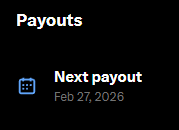
X creator revenue (X): One creator says they were flagged as spam / “reply guy,” had creator revenue paused for months, then got it officially unpaused—posting a payout screen showing a “Next payout” date of Feb 27, 2026 in the Unpaused payout screenshot.
This is a concrete enforcement-to-reinstatement arc (pause → dispute → restore) that affects whether creators can rely on X as a stable income stream while posting frequently and interacting heavily.
Feed-training checklist: a simple 7-day routine to reverse-engineer what X boosts
X monetisation workflow (X): A creator shares a “reverse-engineering” routine for shaping what X shows you and learning from top-performing posts: scroll 15 minutes/day, engage only with posts you truly like, track best performers, adopt techniques, and adjust your content accordingly, as laid out in the Feed training checklist.
The post frames the output as a more “algo-friendly” personal dataset: examples that resemble what you want to make, plus clues on composition and writing that earned distribution.
Creators push “signal to the algorithm” to surface more AI art and AI accounts on X
Feed-shaping campaign (X): A post explicitly asks people who “enjoy seeing AI accounts on X” to signal the algorithm by posting their AI projects and engaging with other AI/ML creators, as stated in the Signal AI accounts post.
This is distribution-as-coordination: instead of individual optimization, it’s a community trying to push a content cluster (AI art/accounts) into more timelines via mutual interaction loops.
🧰 Small, shippable tricks: LLM prompt packs and dev-UX tweaks you can use today
Single-tool, immediately actionable tips: copy/paste prompts for business planning plus tiny quality-of-life tweaks for working in code terminals. Excludes aesthetic style recipes (in prompt_style_drops).
Copy/paste business plan generator prompt styled as a McKinsey engagement
Grok (xAI): A shareable prompt template frames the model as a “senior strategy consultant at McKinsey & Company” and forces a full plan output—Exec Summary; TAM/SAM/SOM; competitor table; moat; pricing and unit economics (CAC/LTV/payback); 3-year projections with assumptions; and a ranked risk/mitigation section, as laid out in the 10-prompt thread (duplicated verbatim in the prompt repost).
• Prompt text you can reuse: The template explicitly asks for “tables for financials” and to “flag every assumption explicitly” plus “be brutally honest about weaknesses,” which tends to reduce fluffy outputs when you’re turning the result into a deck or memo, per the 10-prompt thread.
The tweet positions it as “replacing $50K strategy consultations,” but the main creator-value is the structured sections (especially assumptions + kill criteria) that make it easier to iterate and compare versions across models.
A lightweight checklist for deciding if middleware is worth it
Dev heuristic: One post distilled a quick “middleware is good if / risky if” checklist that’s useful when you’re wiring LLM features into a product and deciding whether to add another abstraction layer, according to the middleware checklist.
• Green flags: Middleware tends to help when it stays simple, predictable, lightweight, broadly applicable, and removing it would create duplication, per the middleware checklist.
• Red flags: It becomes a liability when it hides core logic, grows complex, surprises other developers, or controls too much behavior, as described in the middleware checklist.
It’s not an AI-specific pattern, but it maps cleanly onto common “LLM wrapper” decisions (routing, eval gates, tool-call shims) where teams accidentally bury product logic in glue code.
Claude Code prompt to increase terminal line height for readability
Claude Code (Anthropic): A tiny dev-UX trick making the rounds is to ask Claude Code to change your terminal’s line height—literally prompting “please set my terminal line height to 1.3,” as shown in the line height tip.
This is the kind of comfort tweak that matters when you’re reading long diffs, logs, and agent traces all day; the post suggests Claude can apply it directly in your environment/config rather than you hunting through terminal settings manually, per the line height tip.
🏁 What creators shipped: AI short films, remix projects, and growing story catalogs
Named projects and published outputs: an AI short film made with Nami Story, large narrative back-catalogs (YouTube), and a worldbuilt ‘TV network’ concept. Excludes Kling 3.0-focused trailer breakdowns (feature).
Infinite Frames: a new AI short film built with Nami Story
Infinite Frames (Nami AI): Creator Junie Lau released an AI short film, framing it as a personal “love letter to cinema” and explicitly calling out that it was made with Nami AI’s newly launched Nami Story, per the release writeup in film statement. It’s presented as a multi-universe narrative following a 17-year-old protagonist (EDEN) across “love, battle, doubt, and rupture.”

The useful creative signal here is less “look what AI can do” and more “story-first packaging.” The post emphasizes intent—using the tool to express a film vocabulary—rather than selling the model, as described in film statement and linked again in thread link.
Route 47: one creator’s interconnected AI TV universe goes public
Route 47 (BLVCKL!GHT): BLVCKLIGHTai published a worldbuilding concept that bundles 25+ original “TV shows” into a single connected universe (“Route 47”), naming shows like “Cryptid Dating Game” and “Gorbo’s Swim Hole,” as summarized in Route 47 overview. It’s positioned as deliberate world coherence rather than one-off generations.
The longer writeup is available through the Escape.ai journal post, while the short animated ident in Route 47 clip shows how it’s being packaged like a channel brand, not a standalone short.
BLVCKL!GHT’s 420-video catalog as an AI-native IP strategy
BLVCKL!GHT (YouTube): BLVCKLIGHTai says they’ve reached 420 videos on their channel and frames it as “one of the larger collections of genuinely new IP and narrative stories” in the AI space, as stated in 420 video milestone. That’s a concrete example of “catalog building” as the product, not a single viral clip.
The channel link is shared directly via the YouTube channel, with community validation showing up in replies like channel praise.
Rendergeist G1 teaser ships a music video storyboard cut
Rendergeist G1 (Grok Imagine): bennash posted a preview of “Rendergeist G1,” describing it as a music video generator powered by Grok Imagine, and claims a full storyboard was one-shot from one prompt plus song lyrics with generation + export taking about 6 minutes, as stated in Rendergeist teaser and expanded in workflow context.
The deliverable here is the “Kitty Kat” clip itself (a cut of multiple shots), while the post frames speed as the differentiator—see the concrete timing claim in workflow context.
Young Woman With A Spine: a Gemini Art Remix submission built with Nano Banana Pro + Veo
Google Gemini Art Remix (creator submission): lloydcreates posted “Young Woman With A Spine” as a submission for #GoogleGeminiArtRemix, explicitly tying it to a Rijksmuseum/Artcrush context in remix submission. The companion note says the underlying project is an “alternative world” reinterpretation of a classical portrait, created with Google AI, using Nano Banana Pro and Veo 3.1 inside Raelume, as detailed in toolchain note.
This is a clean example of “institutional source → AI reinterpretation → contest-ready deliverable,” with the toolchain called out plainly in toolchain note.
Hidden Objects puzzles: an AI-generated, repeatable content series format
Hidden Objects (Adobe Firefly): GlennHasABeard is publishing a “Hidden Objects” puzzle series made in Adobe Firefly, with numbered drops like “Level .012” and “Level .013,” shown in Level 012 puzzle and Level 013 puzzle. They also state the longer breakdown is live—“24 puzzles, 12 days, every number shared”—in article update.
What’s notable is the format design: each image is both artwork and an interaction prompt (find 5 items), and it’s being treated like a productized series rather than a single post, per article update.
🛠️ Workflow friction reports: when the tools fight you (and what breaks first)
A cluster of “this sucks” posts: coding assistants behaving badly, UI friction when managing agents, and small UX annoyances that accumulate into lost creator time. Excludes Suno-specific audio drama (in audio_music).
OpenClaw ops friction: terminal juggling plus chat UIs that make you less organized
OpenClaw day-to-day ops: Following up on Agent UI fatigue (agent UI fatigue), a creator distills their current productivity drag into two failures—“I use the bloody terminal to juggle agents” and “every interface for talking to OpenClaw SUCKS,” after trying Telegram topics/threads plus Slack/Discord variants in the Interface rant. They extend the complaint to “browsers… todo apps… notes apps… the OS” in the Everything needs reinventing addendum, then explicitly calls out “and email apps!!!!” as the next workflow break point in the Email apps too follow-up.
• Why it matters for creators: This is less about model quality and more about the missing “agent control plane”—a place to route tasks, track state, and keep multiple automations coherent without living in terminals and chat threads, as described in the Interface rant.
Codex 5.3 Spark gets tagged as "very fast" but unreliable
Codex 5.3 Spark (OpenAI): A blunt field report calls “codex 5.3 spark” “a VERY VERY very fast idiot,” capturing the classic speed-vs-correctness trade for anyone using LLMs as daily creative/coding assistants in the Fast idiot quote. The useful signal here is that latency improvements can still feel like regressions if they increase supervision load (more retries, more verification) for the same creative output.
Claude Code UX papercut: whimsical loading messages become the irritant
Claude Code (Anthropic): A small-but-real productivity tax shows up when a user says they’ve reached the point of being “annoyed by claude code’s whimsical loading messages,” framing it as a sign they need a break in the Loading messages complaint. For heavy iteration loops (prompt, run, inspect, rerun), even cosmetic UI choices can become friction when you’re in the tool all day.
Tooling fatigue thesis: browsers, notes, OS, and agent UIs all feel obsolete
Creator computing stack: The same thread that complains about agent juggling expands into a broader claim that “everything… sucks and we need to REINVENT,” explicitly listing browsers, todo apps, notes apps, and the OS in the Reinvent everything rant. This is a creator-side demand signal for software shaped around long-running agents and parallel projects rather than single-app, single-task workflows.
Friction endurance as the differentiator in agent-heavy workflows
Workflow psychology: A short maxim reframes the creator bottleneck as how much friction you can “sustain and for how long,” rather than a secret tool choice, as stated in the Friction endurance quote. In the context of today’s agent/UI complaints, it reads like a diagnosis: current stacks leak attention and energy faster than they ship output.
While you're reading this, something just shipped.
New models, tools, and workflows drop daily. The creators who win are the ones who know first.
Last week: 47 releases tracked · 12 breaking changes flagged · 3 pricing drops caught