PixVerse R1 targets 1080p real-time video – 1–4 step sampling stream

Stay in the loop
Free daily newsletter & Telegram daily report
Executive Summary
PixVerse introduced R1, pitching it as a “real-time world model” where video generation becomes an interactive, continuous scene rather than a fixed clip; the company claims 1080p real-time output plus “infinite streaming” for longer-horizon continuity, and says an “Instant Response Engine” can sample in 1–4 steps for low-latency steering. PixVerse also says R1 has passed “final internal verification”; access is being seeded via a 72-hour campaign offering 300 invite codes and 500 credits, alongside a live entry point at realtime.pixverse.ai; no independent latency or quality benchmarks are provided in the launch posts.
• Runway/Story Panels: a mini app turns one image into a 3-panel cinematic sequence; companion Panel Upscaler targets per-panel finishing.
• ElevenLabs Agents: claims 230+ ElevenReader interviews in <24h; 85% on-topic; ~10-minute calls; “95%” didn’t notice AI, per thread.
• BabyVision benchmark: 388 visual-reasoning tasks; top model cited at 49.7 vs adult human 94.1; maps to object-permanence/spatial misses in multimodal tools.
Net: “world model” branding is converging with continuity-first creator workflows, but today’s evidence is mostly demos and positioning; rollout scope and eval artifacts remain unclear.
While you're reading this, something just shipped.
New models, tools, and workflows drop daily. The creators who win are the ones who know first.
Last week: 47 releases tracked · 12 breaking changes flagged · 3 pricing drops caught
Top links today
- PixVerse R1 technical report
- PixVerse R1 early access signup
- Runway Story Panels app
- Try Runway Story Panels
- Kling 2.6 Motion Control in ComfyUI
- Crystal video upscaler on fal
- LTX-2 LoRA trainer on fal
- GLM-Image model on fal
- Seedance 1.5 1080p with audio on fal
- Qwen Image 2512 on Runware
- Qwen Image Edit 2511 on Runware
- Qwen Image Layered on Runware
- Talking nutrition characters agent
Feature Spotlight
PixVerse R1 pushes “video as a live world”: real‑time, infinite streaming generation
PixVerse R1 positions generative video as a real‑time, interactive world (1080p, infinite streaming, 1–4 step latency), shifting creators from clips to continuous, steerable simulations.
Today’s dominant cross-account story is PixVerse R1 framing generative video as an interactive, persistent world: 1080p real-time output, “infinite streaming,” and ultra-low latency sampling. This category focuses only on PixVerse R1 and excludes other video tools (covered elsewhere).
Jump to PixVerse R1 pushes “video as a live world”: real‑time, infinite streaming generation topicsTable of Contents
🌍 PixVerse R1 pushes “video as a live world”: real‑time, infinite streaming generation
Today’s dominant cross-account story is PixVerse R1 framing generative video as an interactive, persistent world: 1080p real-time output, “infinite streaming,” and ultra-low latency sampling. This category focuses only on PixVerse R1 and excludes other video tools (covered elsewhere).
PixVerse unveils R1 “real-time world model” for interactive, continuous 1080p generation
PixVerse R1 (PixVerse): PixVerse is pitching R1 as a “first real-time world model” that turns video generation into an infinite, interactive stream—framed as “video just became a world” in the launch post Launch framing, with 1080p real-time output and “infinite streaming” called out in the technical thread 1080p and streaming claim.

The big creative promise here is continuity: instead of rendering a fixed clip, you steer an ongoing scene that keeps responding as you change intent, which PixVerse positions as a bridge toward AI-native interactive media (games/sims/cinema) in the R1 description 1080p and streaming claim.
PixVerse claims R1 “instant response” sampling at 1–4 steps for low-latency interaction
PixVerse R1 (PixVerse): The core technical claim is an “Instant Response Engine” that samples in 1–4 steps for low-latency interaction, paired with an autoregressive “infinite streaming” approach for longer-horizon consistency, as listed in PixVerse’s highlights thread Technical highlights and reiterated in the follow-up post Highlights repost.
• Omni-model packaging: PixVerse describes an “Omni-Model” that unifies text, audio, and video processing in one system, per the same highlights list Technical highlights.
• Long-horizon output framing: “Infinite streaming” is explicitly positioned as the mechanism for consistent, ongoing generation rather than fixed clips, according to the R1 thread Technical highlights.
No independent latency measurements are shown in the tweets; the only concrete number presented is the 1–4 sampling steps Technical highlights.
PixVerse says R1 passed “final internal verification” and is ready to let users “play”
PixVerse R1 (PixVerse): PixVerse claims “final internal verification” is complete and frames a shift from “static video generation” to “dynamic, ongoing world simulation,” with language about being “ready to let the world play” in the verification post Final verification claim.

This is the clearest readiness signal in today’s tweets (as opposed to pure positioning): it’s explicitly saying the system is past internal checks and moving into broader external testing via invites Final verification claim.
A community recap highlights R1’s unified token stream and memory-augmented attention claims
PixVerse R1 (PixVerse): A recap post summarizes R1 as unifying text/image/video/audio into “a single token stream,” using “memory-augmented attention” for long-horizon generation, and adding latency tricks (Temporal Trajectory Folding, Guidance Rectification, Adaptive Sparse Attention), while noting it trades some physics precision for speed Recap breakdown.
The same recap also ties the creative applications to interactive films, VR sims, and AI-native games, framing this as “persistent, interactive worlds” rather than clip generation Recap breakdown.
PixVerse opens realtime.pixverse.ai as the “Try on” live demo entry point for R1
PixVerse R1 (PixVerse): PixVerse is circulating a live entry point at realtime.pixverse.ai, shared as “Try on” in the R1 thread Try on link, which links to the product surface described in the site preview Live demo site.
While the tweets don’t show UI details, the repeated “try” links indicate there’s a hands-on surface (not just a research teaser) for creators to test the real-time stream framing Try on link.
PixVerse runs a 72-hour early-access campaign for R1 with 300 invite codes + 500 credits
PixVerse R1 (PixVerse): PixVerse is pushing early access via a limited-time campaign: “RT+Reply+Follow” for a chance at 300 invite codes plus 500 credits, described as a 72-hour window in the R1 promo post Invite campaign details and repeated again alongside “final internal verification” messaging Verification plus invite push.
This is less about specs than distribution: it’s an explicit attempt to seed creators onto the real-time surface quickly, before broad availability is mentioned anywhere in the tweets.
Creators react to PixVerse R1 with “take this through its paces” curiosity
Early builder reaction: The visible response is curiosity more than detailed evaluation—e.g., “Would love to take this through its paces” in a reply Try it reaction, plus additional “Would love to try this out!” comments Want to try.
There’s not enough public benchmarking or workflow breakdown in the tweets to call winners/losers yet; today’s signal is mostly that the “world model” label is prompting creators to ask for access rather than debate specs Try it reaction.
🎞️ Storyboarding from one image: Runway Story Panels + continuity-first shots
Runway’s Story Panels becomes the day’s continuity/storyboarding focus: turning a single character or product image into a cinematic multi-panel sequence, plus related ‘panel upscaling’ and product-shot continuity talk. Excludes PixVerse R1 (feature).
Runway launches Story Panels for instant 3-panel storyboards from one image
Story Panels (Runway): Runway introduced Story Panels, a small app that takes a single character or product image and expands it into a three-panel cinematic sequence, with the core interaction shown in the Launch demo. It’s also being framed as generally available “for all users,” with creators describing it as the backbone of a broader storyboard workflow in the All users rollout note.

Across the repeated “original vs panel” examples Runway is posting, the intent is continuity proof—same subject, new beats—highlighted in the Original vs panel example and echoed again in the Original vs panel example.
Story Panels adds a product-shot continuity workflow for client work
Story Panels for products (Runway): Creators are pointing out a client-friendly use case—add a product name in the optional prompt field and Story Panels will generate fresh shots of the same product for iterative creative work, as described in the Product continuity example.

• Prompting surface: The “type product name → generate new shots” loop is demonstrated directly in the Screen-recorded walkthrough, making it clear this is meant for fast art-direction passes, not just character storytelling.
Runway adds Panel Upscaler to upscale individual Story Panel frames
Panel Upscaler (Runway): A companion Panel Upscaler app is being released alongside Story Panels, positioned to upscale each individual image inside a Story Panel for higher-quality finishing and handoff, as described in the Workflow note.
This lands as a practical “make it shippable” step: generate a 3-panel sequence first, then upscale each frame before edit/comp.
Story Panels gets framed as “parallel universe” scene exploration
Creative usage pattern: One emergent pitch for Story Panels is rapid narrative branching—“peek into the parallel universe of a scene with a single click,” as written in the Parallel universe framing.
This is less about shot-by-shot precision and more about fast exploration of alternate beats, lighting, and implied off-screen events while keeping a scene’s core identity coherent.
Story Panels gets used to expand a film still into a 3-shot sequence
Story Panels in film referencing: Ozan_sihay tested Story Panels by feeding it a single movie-frame reference (an Odyssey trailer still) and generating a three-panel sequence, sharing the before/after set in the Odyssey still test.
The result reads like a quick pre-vis storyboard: establishing/insert/action beats built from one anchor frame, with the source image acting as a continuity constraint.
🖼️ New image models & look quality: GLM‑Image, Riverflow v2 preview, Midjourney aesthetics
Image-gen news centers on new/available models and quality showcases: GLM‑Image’s hybrid architecture, on-brand generation previews, and ongoing Midjourney look comparisons. Excludes prompt dumps and sref codes (those are in Prompts & Style Drops).
Z.ai releases GLM-Image (9B AR + 7B diffusion) for text rendering and editing
GLM-Image (Z.ai): GLM-Image is now out as a new image-gen model with a hybrid design—an autoregressive generator paired with a diffusion decoder—positioned for strong semantic control plus better in-image text and editing behavior, as shown in the release pointer and detailed in the Model card.
The public artifact here is the Hugging Face listing, which is enough for builders to start testing composition, typography, and I2I edit reliability against their current defaults—but there aren’t independent eval charts in today’s tweets.
Replicate previews Sourceful Riverflow v2 for consistent on-brand images and editing
Riverflow v2 (Sourceful) on Replicate: Replicate posted a preview of Riverflow v2 aimed at consistent “on-brand” image creation plus more precise edits, with the full version expected “in the next couple of weeks,” per the preview announcement.
This reads like a brand-control play: the examples emphasize repeatable packaging/label look and product-shot continuity, which is exactly where many general image models still drift when you iterate variations.
GLM-Image goes live on fal for text-to-image and image-to-image workflows
GLM-Image (fal): fal says GLM-Image is now available on its platform, pitching it for text-to-image plus editing-style I2I tasks like style transfer and identity preservation, according to the fal availability note.
The practical implication for creatives is distribution: you can test GLM-Image without standing up local inference, and compare it directly against other hosted image models in the same stack—while the core model release context is in the release pointer.
Midjourney gets another “still the GOAT for aesthetics” photoreal showcase thread
Midjourney (aesthetics): A new round of creator posts keeps the same claim—Midjourney remains a default choice when the priority is cinematic “feel” over toolchain features—paired with dark, filmic photoreal frames in the aesthetics showcase.
There’s no benchmarking here; the signal is continued taste-leader positioning via examples that lean into lighting, grain, and lens-y composition rather than novelty features.
Nano Banana Pro “Street View” anomalies trend adds new surreal location captures
Nano Banana Pro (Street View realism/absurdity): Following up on Street View mockups (Street View UI as a storytelling wrapper), a new post adds four fresh “captures” that mimic Google Street View’s metadata and framing—e.g., London Notting Hill and Scotland—with big surreal disruptions inserted into otherwise ordinary scenes, as shown in the Street View anomalies.
The recurring pattern is that the Street View interface itself becomes part of the aesthetic: the timestamp/location UI sells plausibility while the scene content goes fully uncanny.
Breaking Bad characters remixed into Akira-style character portraits (prompt-in-ALT set)
Style remix set: A creator posted a cohesive “Breaking Bad in Katsuhiro Otomo/Akira” re-style run, highlighting that the look holds across multiple characters (and a notably graphic Gus Fring variant), with prompts included in alt text per the Akira style set.
For working artists, the takeaway is less about the fandom and more about how far a single, specific art-direction target can be pushed across a small cast while staying visually consistent.
🧠 Creator workflows & agents: auto-story videos, Freepik camera control, multi-tool acting transfer
Workflow posts cluster around ‘how to make it’: Freepik-guided camera transitions, agent-made explainer formats, and performance-driven pipelines that combine still grids + motion transfer. Excludes single-tool tutorials (separate category) and PixVerse R1 (feature).
Performance-driven dialogue workflow: Nano Banana Pro 3×3 grids → Kling 2.6 Motion Control
Nano Banana Pro + Kling 2.6: A repeatable “acting transfer” pipeline is being pitched as a way to get more controllable narrative video—generate a 3×3 shot grid (storyboard coverage) in Nano Banana Pro, then transfer performance (body timing and implied lip-sync/expressions) onto those shots via Kling 2.6 Motion Control, as outlined in the Workflow summary and backed by the full prompt structure in the 3×3 prompt template.

• Why it’s different from single-shot prompting: The emphasis is on locking coverage (establishing, singles, inserts) before motion, which makes edits and pacing less hostage to one generation, per the Workflow summary.
• Prompt modularity: The shared grid prompt bakes in shot-by-shot framing rules (rearview insert, hood POV, back seat master), as shown in the 3×3 prompt template.
ElevenLabs Agents ran 230+ customer interviews for ElevenReader in under 24 hours
ElevenLabs Agents (ElevenLabs): ElevenLabs says it used its Agents product to conduct 230+ customer interviews for the ElevenReader app in under 24 hours, reporting 85% of calls were on-topic/successful and ~10 minutes average duration, with insights shipped the next day, as stated in the Interview automation post and expanded in the Call analysis notes.

• Behavioral signal: They claim ~95% of respondents interacted naturally without acknowledging it was an AI interviewer, according to the Call analysis notes.
• Operational loop: The thread emphasizes turning transcripts into structured issues and fixes (bug reports addressed next day), also described in the Call analysis notes.
Techhalla shares a Freepik workflow for “global politics as Game of Thrones” visuals
Freepik camera-control workflow: Techhalla shared a step-by-step build for turning “global politics like Game of Thrones” into a short, directed sequence inside Freepik—starting with character generation (they mention making 14 characters) and map frames, then using camera-control nodes for guided moves, and finally stitching transitions where they claim Kling 2.6 worked for most cuts but map transitions required Seedance 1.5 Pro, as described in the Workflow walkthrough.

• Scene planning: The process is framed as “generate cast → generate map plates → add camera angle nodes,” with the camera tool presented as understanding spatial continuity across frames in the Workflow walkthrough.
• Transition reality check: They call out tool-specific reliability (Kling vs Seedance for certain transitions) in the same Workflow walkthrough, which is useful signal because it’s about what failed, not only what worked.
heyglif’s “Talking Food Videos” agent automates script-to-edited short videos
Talking Food Videos (heyglif): heyglif is pushing a single-agent format for short-form explainers where the agent handles the whole chain—script, character animation, editing, captions, and music—demonstrated with berries turned into “talking nutrition characters,” as shown in the Agent output example and reiterated in the Tutorial post.

• End-to-end packaging: The claim isn’t just generation; it’s bundled post (captions/music/edit), which is explicitly listed in the Agent output example.
• Productized entry point: The agent is linked as a reusable template in the Agent link, positioning it as a repeatable content format rather than a one-off prompt.
Apob AI “Recharacter” repurposes one dance into five different AI influencer variants
Recharacter (Apob AI): Apob AI is promoting a repurposing pattern where one source performance (dance/tutorial) gets remapped into multiple distinct “AI influencer” variants—framed as “1 video → 5 styles” and positioned for rapid niche testing, as shown in the Five-variant demo.

The evidence here is primarily the demo clip and marketing framing in the Five-variant demo; there aren’t technical details on identity controls, rights/consent workflow, or failure modes in these tweets.
Dreamina Video 3.5 Pro workflow: Nano Banana Pro first frame → kaiju-kitten action clip
Dreamina Video 3.5 Pro: A sponsored workflow breaks out a two-step “first-frame then animate” recipe—generate a strong starter image in Nano Banana Pro, then feed it into Dreamina’s Video 3.5 Pro with an action prompt (“giant kaiju sized kitten destroying the landmark”), as demonstrated in the Kaiju kitten demo and spelled out as steps in the Step-by-step prompt.

• Prompt structure: The creator separates the composition prompt for the still (location/landmark framing) from the motion prompt (runaway crowd, street-level action), per the First-frame recipe and the Step-by-step prompt.
heyglif teases an “overpriced RAM deconstruction” agent-driven video format
Product deconstruction videos (heyglif): Following up on agent tease (agent-generated “deconstructed product shots”), heyglif previewed an “overpriced RAM” variation where an agent-driven pipeline produces teardown/explainer visuals that feel like a new repeatable video meme format, as described in the Teaser clip.

The post frames this as “emergent videos” from a prompt-first agent workflow rather than manual compositing, per the Teaser clip, but there’s no public spec yet on which generation stack it’s using under the hood.
🧩 Prompt drops & style references: product-photo templates, 3×3 grids, Midjourney srefs
Today’s prompt culture is heavy: reusable photography templates, structured grid/story prompts, and Midjourney style-reference IDs for consistent looks. This category is only for copy/paste prompts and style codes (not tool launches).
Nano Banana Pro prompt: 3×3 couple fashion editorial grid with shot-by-shot poses
Nano Banana Pro (prompt format): A detailed JSON-like prompt is circulating for generating a 3×3 “pre-wedding / high-end fashion editorial” collage; it specifies pose variations panel-by-panel (full-body → medium shots → close-ups), monochrome conversion, and camera settings like 85mm and f/8 to keep both subjects sharp, as laid out in the full prompt.
The attached result shows the intended structure (consistent couple/outfits, varied staging) working as a storyboard-style character sheet for couples photography, according to the full prompt.
Midjourney style reference --sref 438756315 shared for character sheets
Midjourney (style reference): A style reference ID, --sref 438756315, is being passed around as a purpose-built look for character sheets—dominant reds, sketch lines, and handwritten notes—positioned as a consistent “concept-art page” aesthetic in the style note.
The attached examples show the repeated motif (tan paper, red scribbles, marginalia) holding across different characters, matching the intent described in the style note.
Nano Banana Pro prompt: “celebrity as 50‑story giant under construction” concept
Nano Banana Pro (prompt format): A surreal “giant celebrity in a city, under construction” template is being shared; it calls for scaffolding mapped to the body, miniature workers, cracked asphalt, and a specified scale (“~50 stories tall”), with a Taylor Swift likeness example in the prompt block.
The attached grid shows the same structural idea applied to multiple subjects (not just Swift), reinforcing it as a repeatable format for poster-like composites, as shown in the prompt block.
Nano Banana Pro prompt: night motorcyclist + sportbike scene with 28mm/ISO 1600 spec
Nano Banana Pro (prompt format): A long-form, parameter-heavy prompt is being shared for a “female motorcyclist leaning on a supersport bike” night scene; it hard-codes pose anatomy (crossed arms; one foot on peg), environment (stadium-like lit architecture), and camera values (28mm, f/2.8, 1/60s, ISO 1600) as written in the prompt breakdown.
The sample output demonstrates the prompt’s intent: wide-angle scale, cool color grade, and an accent “engine bay” blue glow, as shown in the prompt breakdown.
Nano Banana Pro prompt: overhead “three women on pink faux fur” gothic coquette styling
Nano Banana Pro (prompt format): An overhead, direct-top-down fashion prompt is circulating for a three-subject composition on bright pink faux fur; it specifies a triangular “intertwined” layout, consistent makeup, black corset textures, and lens/lighting choices (50mm, f/5.6, butterfly light) as detailed in the prompt text.
The example output matches the prompt’s core goal—high contrast between pale skin/jet-black outfits/pink texture—according to the prompt text.
Product photography studio-shot prompt template circulates
Product Photography prompt (template): A reusable studio-shot recipe is being shared for clean, high-end commercial renders—high-key lighting, soft ambient shadows, smooth gradient backdrops, shallow DoF, and “premium DSLR” clarity—meant to be copy/pasted and swapped with a single [PRODUCT] + [background], as shown in the prompt block examples.
The shared examples (pen, earbuds, wallet, skincare jar) illustrate how the same base prompt holds a consistent “catalog + luxury” look across very different materials, per the prompt block.
Veo 3.1 Fast prompt: aggressive tabby cat chef stir-frying shrimp fried rice
Veo 3.1 Fast (prompt): A cinematic “anthropomorphic tabby cat chef” video prompt is being shared; it specifies close-up commercial-kitchen realism, a blazing wok with visible flames/steam, and a frustrated human sous chef in the background, as written in the prompt text.

The generated clip demonstrates the prompt’s intended pacing and framing (medium shot, dynamic angle) with a strong action focus, as shown in the prompt text.
Midjourney “newly created style” --sref 8140885817 targets moody monochrome editorial
Midjourney (style reference): A newly shared --sref 8140885817 clusters around a desaturated, moody editorial look—hard chiaroscuro, haze, silhouette-first compositions—presented as a fresh style drop in the style share.
The included portraits and fashion silhouettes show the consistent lighting bias (deep shadow falloff; minimal palettes) that makes this reference useful for a cohesive series, as shown in the style share.
Midjourney style reference --sref 2654825270 shared for modern TV cartoons
Midjourney (style reference): A cartoon lane is being codified via --sref 2654825270, described as “modern TV cartoon” reminiscent of Family Guy / American Dad, with occasional educational-anime vibes, per the style description.
The attached images show the expected simplified shapes, bold outlines, and flat color fields that make the reference useful for consistent character iterations, as shown in the style description.
Nano Banana Pro prompt: “woman with Bengal tiger licking her hand” sanctuary scene
Nano Banana Pro (prompt format): A scene-locked interaction prompt is being shared for a wildlife-sanctuary photo: a woman in a white outfit extends her hand while a Bengal tiger licks it; the prompt pins environment details (wire mesh, roof slats, rocks/waterfall) plus framing (35mm, medium shot) as specified in the prompt text.
The example output emphasizes “trusting, peaceful” body language and dappled daylight, consistent with the original constraints in the prompt text.
✨ Finishing passes: 4K upscalers, restore modes, and last‑mile clarity tools
Post/finishing news is dominated by video upscaling and restoration: new endpoints for 4K upscales and ‘unblur+upscale’ style restoration. Excludes core video generation (PixVerse is the feature; other video tool news is elsewhere).
Crystal Video Upscaler lands on fal for 4K upscaling
Crystal Video Upscaler (fal): Following up on Crystal video upscaling—the upscaler is now available as a hosted endpoint on fal, positioning it as a drop-in finishing step to take existing clips up to 4K with a “super sharp” look and a stated focus on text/product details and faces, as described in the fal launch post.

• Where creators will feel it: fal frames this less as “make it bigger” and more as “recover legibility,” especially for product shots and portrait-heavy edits, according to the fal launch post.
• More distribution signal: a separate writeup calls out that Crystal’s video support is spreading across common pipelines (including fal), as noted in the Clarity recap post.
Qwen Image Edit 2511 gets a “clean restore” unblur+upscale LoRA
Qwen Image Edit 2511 (Alibaba/Qwen): A new adapter LoRA for Qwen-Image-Edit-2511 is being shared as a “clean restore” finishing pass—explicitly combining unblur + upscale in one step, with a recommended trigger prompt and a before/after example, as shown in the LoRA restore post.
• Prompted restore behavior: the shared trigger text is “unblur and upscale to high resolution preserving sharp details natural textures and realistic colors,” per the LoRA restore post.
• Expectation setting: the same post warns that extreme blur forces reconstruction (more guessing), which can introduce small detail/identity drift, as explained in the LoRA restore post.
🛠️ Single-tool how‑tos: ComfyUI motion nodes, LoRA animation tricks, creator UI walkthroughs
Practical, single-product tips today are mostly about getting motion features working inside creator tooling (ComfyUI) and short tutorial-style walkthroughs. Excludes multi-tool pipelines (covered in Workflows).
ComfyUI adds Kling 2.6 Motion Control node for reference-video-driven character animation
ComfyUI (ComfyUI): Kling Video 2.6 Motion Control is now available as a ComfyUI node, enabling motion transfer from a reference clip onto a character image with an emphasis on full-body movement, gestures, and consistent animation, as shown in the Motion Control in ComfyUI walkthrough.

• Basic setup: The announced flow is “reference video + character image → generate,” with ComfyUI framing it as motion being applied cleanly while preserving character consistency, as described in the Motion Control in ComfyUI post.
• Best-practices guidance: The accompanying write-up calls out practical constraints (for example, matching proportions and keeping the character fully visible) in the Best practices blog, shared alongside the Blog pointer.
Freepik ships “Change Camera” to generate a 360º view from one image
Change Camera (Freepik): Freepik is demoing a “Change Camera” feature that generates a 360º view from a single image—positioned as a creator-facing camera/perspective tool—shown directly in the Change Camera UI demo.

Ray3 Modify: tutorial link shared for Luma Dream Machine’s Modify workflow
Ray3 Modify (Luma Dream Machine): A short pointer says a hands-on tutorial is out showing how “Tony” uses Ray3 Modify, per the Tutorial pointer post.

The only concrete artifact in today’s tweets is a Ray3 Modify example clip from Luma showing a modified shot in motion, as shared in the Ray3 Modify demo.
ComfyUI tip: Wan Animate with an “inflation” LoRA
Wan Animate (ComfyUI): A quick creator tip shows Wan Animate running in ComfyUI with an “inflation” LoRA, positioned as a simple add-on for a specific transformation effect, as noted in the Wan Animate inflation LoRA mention.
🏷️ Big credit shifts & ‘unlimited’ windows (filtering out small giveaways)
Today’s meaningful pricing/access beat is creator-facing ‘unlimited’ windows and large credit promos that change what’s feasible to produce this week. Excludes small comment-for-code giveaways unless unusually large.
Higgsfield’s “ALL‑IN” promo removes caps: unlimited Kling 2.6 and Nano Banana Pro windows
Higgsfield (ALL‑IN promo): Higgsfield is pushing a time‑boxed “remove the limits” offer that includes unlimited Kling 2.6 for 7 days, Kling Motion free, and unlimited Nano Banana Pro for 365 days, as laid out in the launch pitch in All‑in offer text and reiterated with the countdown in Final offer details.

The framing is explicitly about creators not having to “count credits” while iterating—i.e., trying to make high-iteration video workflows (generate → revise → stylize → re-render) economically feasible for the next week/year under the bundle, per the language in All‑in offer text.
Higgsfield offers 220 credits for engagement during a short window
Higgsfield (credit promo): Alongside the “ALL‑IN” messaging, Higgsfield is running a 9‑hour engagement mechanic (retweet/reply/follow; later also “like”) that awards 220 credits, as stated in the initial post in 220 credits mechanic and the later reminder in 220 credits reminder.

The same 220-credit framing also appears in their Mixed Media push (“grab Mixed Media exclusively on Higgsfield”), suggesting the credits are meant to accelerate trial/experimentation across their creator tools rather than a single feature, per Mixed Media credit mention.
Apob AI runs 24-hour 1,000-credit promo tied to avatar-based content repurposing
Apob AI (credits + repurposing pitch): Apob AI is advertising a 24‑hour incentive of 1,000 credits in exchange for engagement actions, pairing it with a “faceless TikTok/YouTube” positioning and a template-based avatar workflow in Faceless channel pitch, plus a second post emphasizing its Recharacter flow (one source video turned into multiple influencer variants) in Recharacter offer.
The offer is positioned as making rapid niche-variant production cheaper to test at volume (one performance clip → multiple identities/styles), with the “1 video → 5” demo serving as the concrete example in Recharacter offer.
🧰 Creator hubs & unified studios: Pollo Chat, Freepik UX features, model marketplaces
Platform surface-area updates today: unified creation UIs, library-management features, and multi-mode studios that reduce friction for creators. Excludes PixVerse R1 (covered as the feature in Video & Filmmaking).
Freepik introduces Change Camera for generating a 360º view from one image
Change Camera (Freepik): Freepik is promoting a Change Camera feature that generates a 360º view from a single image, intended to help creators find an exact perspective without re-prompting from scratch, as shown in the Change Camera demo reply.
This is framed as viewpoint exploration (not just reframing/cropping), with the UI demo emphasizing angle discovery—“every angle to find the exact perspective you need”—per the Change Camera demo reply.
Pollo Chat launches as a unified creation window across Pollo AI pages
Pollo Chat (Pollo AI): Pollo says Pollo Chat is live now, positioning it as one chat surface you can open from multiple parts of the product (Home/Feed/Video/Image pages) while switching between T2I, I2I, T2V, I2V, and reference-to-video modes, as described in the Launch announcement and reinforced in the Feature breakdown.

• Unified UX: The pitch is “no more digging through menus,” with fast mode switching inside a single window, per the Product positioning clip.
• Short-window promo: A 24-hour engagement mechanic offers 222 free credits, with an anti-bot check that requires an X profile photo, as stated in the Launch announcement.
Freepik adds Favorites to save creations into a dedicated library section
Favorites (Freepik): Freepik rolled out Favorites, letting you “like” generated assets so they’re easier to find later in a dedicated Favorites area, as announced in the Favorites feature post and shown again in the Favorites follow-up.

The change is small but directly aimed at reducing iteration friction when you’re generating lots of variants and need quick retrieval without manual naming or folder hygiene, as implied by the “quickly find them” framing in the Favorites feature post.
Runware adds Qwen Image 2512, Qwen Image Layered, and Qwen Image Edit 2511 endpoints
Runware (Qwen Image models): Runware says it now supports Qwen Image 2512, Qwen Image Layered, and Qwen Image Edit 2511, aiming at more controlled generation/editing workflows for developers, as announced in the Runware availability post.
• Direct endpoints: Runware shares launch links for Qwen Image 2512 via the Model page, plus Qwen Image Edit 2511 via the Edit model page, and Qwen Image Layered via the Layered model page, as collected in the Launch links thread.
No benchmarks or pricing details are included in these tweets; the signal here is expanded marketplace access and SKU choice rather than a performance claim, per the Runware availability post.
Lovart promotes its “Design Agent” surface and links a limited-time discount
Lovart (Design Agent): Lovart is pushing traffic to its product with a “try it now” prompt in the Try it now post, positioning itself as an end-to-end design agent; the linked product page describes automation from concept to outputs spanning images, video, and 3D, as summarized in the Product page.
The same page summary also mentions a limited-time flash sale up to 50% off on some plans, per the Product page, though the tweet itself stays at promo level and doesn’t detail what’s discounted.
🧑💻 Agent desktops & browser tools: Claude Cowork momentum and Gemini auto-browse
Non-creative-but-essential tooling today: agent desktops that manage files and browser automation features that change research + production workflows. Excludes outages/permission pain (tracked under Tool Issues).
Anthropic releases Claude Cowork with file-aware desktop workflows
Claude Cowork (Anthropic): Following up on initial preview (Claude gets folder access), a release/demo thread shows Cowork letting Claude pull from local documents and thumbnails for “everyday tasks,” with prompts like “Show me my notes from last week” driving file retrieval as shown in the Cowork workflow demo.
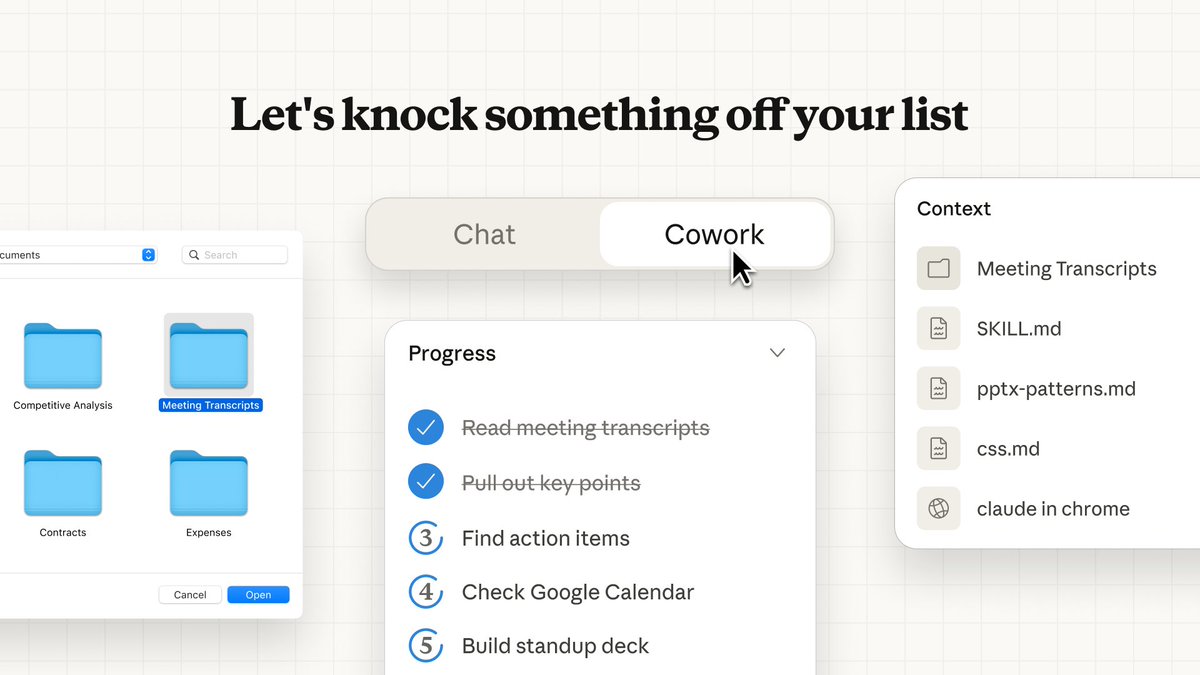
• What creatives will notice first: it’s pitched less like “coding in a terminal” and more like “assistant with a file cabinet,” where the UI foregrounds document browsing and selection rather than copy/paste context, as shown in the Cowork workflow demo.
• Platform gap still discussed: community replies keep calling out Windows availability questions, including “Looking forward to the Windows version,” in the Windows version request.
Gemini UI preview shows an “Auto browse” browser tool option
Gemini (Google): A Gemini UI screenshot circulating today shows an “Auto browse” tool option beside the input area, implying first-party browser automation inside Gemini, as highlighted in the Auto browse toggle screenshot.
The same post frames it as similar to Google’s separate Antigravity browser agent—“their browser agent is extremely good”—in the Auto browse toggle screenshot, but there’s no official rollout date or capability spec in the tweets.
Claude Code is claimed to have written all of Cowork in about 1.5 weeks
Claude Cowork (Anthropic): Following up on all-code claim (the “All of it” quote), multiple posts repeat that Claude Code wrote 100% of Cowork and that it shipped after “a week and a half,” with the quote screenshot spreading widely in the All of it screenshot and a reposted capture in the Boris Cherny quote image.
The evidence here is anecdotal (a single quoted assertion) rather than a public engineering writeup, but it’s becoming part of Cowork’s positioning as a “made by agents” desktop app, as framed in the Week and a half claim.
Fabi 2.0 launches with broad data connectors and dashboard/workflow outputs
Fabi 2.0 (Fabi): Fabi 2.0 is described as an AI analyst that connects to common business data sources and turns natural-language questions into dashboards or repeatable workflows, per the Launch positioning and the longer capability rundown in the Connectors list.
• Connector surface area: posts name sources including Postgres, Snowflake, Google Sheets, HubSpot, PostHog, Shopify, Stripe, and Google Ads in the Connectors list.
• Creation-adjacent angle: it’s framed as a “plug into any tool you use” layer for teams doing content + growth + reporting loops, rather than a creative generator, as described in the Launch positioning.
Google Antigravity adds “agent skills” support
Antigravity (Google): Antigravity is now said to support agent skills, and a community member says they’re meeting the team soon and collecting feedback to pass along, according to the Agent skills announcement and the Agent skills announcement.
What’s still missing in the posts is a concrete definition of “skills” (packaging format, sandboxing, permissions, sharing), so the operational meaning remains unclear from today’s evidence.
🖥️ Local + open video stacks: LTX‑2 performance, training, and deployment surfaces
Compute/runtime news today is about running and customizing open video models: LTX‑2 performance anecdotes, training endpoints, and where creators can fine-tune styles. Excludes general video creation headlines (PixVerse is the feature).
fal launches LTX-2 Trainer to train custom LoRAs for LTX-2
LTX-2 Trainer (fal): fal shipped an LTX-2 Trainer endpoint aimed at training custom LoRAs for style transfers, effects, and visual filters, as announced in the trainer launch.
• Training surface: The follow-up links in trainer links point to a hosted training flow for LTX-2 LoRAs, with pricing details shown on the Training page.
This is one of the more direct “personalize an open video model” surfaces referenced in today’s tweets, shifting LTX-2 from inference-only chatter to repeatable customization.
fal adds an LTX-2 video-to-video trainer for custom datasets
LTX-2 Video-to-video trainer (fal): fal also exposes a separate video-to-video training surface for LTX-2, framed as “video-to-video transformations on custom datasets” in the trainer announcement and linked directly in v2v trainer links.
• Cost and interface: The product page described in the V2V training page includes a per-step pricing model (default session cost is shown there), which is distinct from the base LoRA trainer flow.
Net: this is a different path than style-only LoRAs—more targeted at learned transformations conditioned on video inputs.
LTX-2 claims native audio and lip-synced dialogue with open-source quality positioning
LTX-2 (Lightricks): The team is explicitly positioning LTX-2 as an open-source video model that can generate audio and lip-synced dialogue natively, framed as “leading open-source quality” in the native audio claim.

For creators, the practical implication is a single-model path for “talking character” clips—audio, timing, and mouth motion staying coupled—rather than stitching TTS + separate lip-sync after the fact; today’s posts are still mostly positioning, with no standardized evals or spec sheet attached in the tweets.
A new local LTX-2 speed anecdote: RTX 5090 reports ~90s for 15s at 540p
Local LTX-2 performance: Following up on local speed—earlier local runtime anecdotes—one creator reports running LTX-2 on an RTX 5090, getting 15s generations at 540p in under 90 seconds, per the RTX 5090 speed claim.
This is still a single datapoint (unknown settings, batch/steps, and memory constraints in the tweet), but it’s another concrete “what this feels like on consumer GPUs” number for teams considering a local open video stack.
ComfyUI spotlights LTX-2 as a flexible “one model, many ways” local workflow
LTX-2 in ComfyUI (workflow positioning): ComfyUI shared a “One Model, Many Ways To Create” framing for LTX-2 in the workflow positioning, reinforcing it as a modular local stack rather than a single fixed UI.
There aren’t specifics in the tweet itself (no node graph or settings shown), but it’s a clear signal that LTX-2 is being treated as a composable building block inside creator pipelines, not just a standalone generator.
LTX-2 community shares another 1080p test clip
LTX-2 (community quality tests): A new community repost highlights a “second 1080p test” with emphasis on detail, as referenced in the 1080p test repost.

This is more qualitative than benchmarked, but it adds evidence that people are actively pushing higher-res outputs (not just quick low-res loops) as part of their local/open evaluation.
📚 Research & benchmarks creators should track (agents, vision gaps, video reasoning)
Paper/benchmark chatter today is mostly about agent learning loops and where multimodal systems still fail—useful for creators betting on reliability for long-form work. Excludes any healthcare/medical research items entirely.
BabyVision benchmark says today’s MLLMs still miss “kid-level” visual primitives
BabyVision (benchmark): A new 388-task benchmark isolates visual reasoning beyond language and reports a large gap between top multimodal models and human baselines, as summarized in the Benchmark post and expanded in the ArXiv paper. The headline number circulating is that a leading model hits 49.7 versus adult human 94.1 on this suite, echoed in the Result recap.
For filmmakers and designers leaning on reference images, consistency edits, or storyboard-to-video tools, this kind of deficit tends to surface as “obvious to humans” misses—counting-like errors, spatial confusion, and brittle object permanence—rather than trivia knowledge failures, as argued in the ArXiv paper.
VideoDR benchmark targets open-web “video deep research” agents
Watching, Reasoning, and Searching / VideoDR (benchmark): A new benchmark focuses on video-conditioned open-domain QA where models must extract visual anchors across frames, retrieve supporting info from the web, and then do multi-hop verification, per the Benchmark pointer and the accompanying ArXiv paper. It also reports a practical result creators care about: “agentic” setups don’t automatically beat more structured workflows; performance depends on whether the model can preserve its initial plan and evidence chain, as discussed in the ArXiv paper.
This maps closely to long-form video work (researching clips, identifying locations/objects, verifying references) where missing one key frame detail can derail the whole narrative thread.
Dr. Zero proposes a data-free self-evolving loop for search agents
Dr. Zero (research): A new paper frames a way to improve multi-turn search agents without curated training data—by running a self-evolution loop where a “proposer” generates questions and a “solver” learns to answer them, both bootstrapped from the same base model, as described in the Paper share and detailed in the ArXiv paper. The point is to automate a curriculum (the proposer escalates difficulty as the solver improves) while keeping compute manageable via a policy-optimization method the authors call HRPO.
For creators building research-heavy assistants (story bible retrieval, lore checking, long-form documentary fact-finding), this is a direct attempt to make agents ask better sub-questions and stay coherent over longer investigative loops, per the ArXiv paper.
VerseCrafter teases a video world model with 4D geometric control
VerseCrafter (research demo): A teaser clip positions VerseCrafter as a “dynamic realistic video world model” with explicit 4D geometric control, as introduced in the Demo post.

The creative relevance is straightforward: this is an attempt to make camera/object control feel more like directing in a simulated space (consistent geometry across time) instead of prompting single shots and hoping the motion stays physically plausible, as implied by the Demo post. Details are still thin in today’s tweets—no public evals or ablations shown yet beyond the clip.
MHLA targets a common weakness in linear attention: expressivity
MHLA (research): A method called MHLA is being shared as a way to restore expressivity in linear attention by introducing token-level multi-head behavior, per the Method share.

If it holds up, this line of work is aimed at the same pain point creators hit in practice: long-context generation that stays responsive without collapsing into uniform, mushy attention patterns. The tweet itself doesn’t include benchmark numbers yet, so treat it as an early pointer rather than a validated win, per the Method share.
OctoCodingBench lands as an instruction-following benchmark for coding agents
OctoCodingBench (benchmark): MiniMaxAI is being cited as releasing OctoCodingBench on Hugging Face, a benchmark aimed at whether coding agents actually follow instructions rather than “sort of” solving the task, per the Benchmark mention.
For creative tooling teams shipping assistants that touch real repos (render pipelines, asset tooling, generative media backends), instruction-following is a reliability issue as much as a coding one—especially when the agent is asked to preserve style rules, naming conventions, or project structure across many edits, as the Benchmark mention frames it.
📅 Challenges & community programs: dance contests, winner lists, and creator calls
Event-style posts today skew toward creator challenges and winner announcements that drive tool adoption (especially dance/motion trends). Excludes general discounts (handled in Pricing).
Kling AI Dance Challenge adds new 50/300/1,000-like reward tiers
Kling AI Dance Challenge (Kling): Following up on Dance challenge—the 260M-credit pool promo—the challenge now has upgraded reward tiers, adding 50-like, 300-like, and 1,000-like milestones as described in the Rewards upgraded note.
The post doesn’t specify exact payout amounts per tier in today’s tweet, but the new thresholds signal a broader “more people can qualify” structure (more small-to-mid creators hitting 50/300 likes).
Pollo AI runs a one-week 50% off dance effects promo with a 49-credit contest
Pollo AI Dancing Effects (Pollo AI): Pollo is running 50% off all “Dancing Effects” for a week and pairing it with a creator prompt—post your best dance video reply to win 49 credits, as announced in the Dancing Effects promo.

• Contest mechanic: The call-to-action is “drop ur best Pollo AI dance video below,” with the prize and discount framed together in the Dancing Effects promo.
Tencent Hunyuan posts #HolidayHYpe winner list with $10 e-gift cards
Tencent HY / Hunyuan (#HolidayHYpe): Tencent HY announced 10 selected voices as winners for #HolidayHYpe and says each will receive a $10 e-gift card via DM, according to the Winner announcement.
• Distribution detail: The post emphasizes winners should “keep an eye on your DMs,” as stated in the Winner announcement.
🚧 Friction watch: Claude Code permission fatigue and other creator pain points
Today’s reliability/friction chatter is mostly about agent-desktop UX getting in the way of real work, especially repeated permission prompts. Excludes the core Cowork announcement (covered under Dev Tools & SDKs).
Claude Code Mac app is getting a “skip permissions” option after repeated allow prompts
Claude Code (Anthropic): Ongoing Mac desktop friction—constant permission prompts for routine commands like git push—is turning into a concrete UX fix, with a user reporting the team will add a “skip permissions” option “very soon,” per the Skip permissions note.
The complaint pattern is sharply spelled out by a builder saying their “sole job today” was clicking “Always allow” repeatedly, with a screenshot showing the per-command approval dialog even for basic Git actions in the Allow once screenshot. The fix, if it ships as described, is aimed at reducing the approval churn without changing the underlying “ask before running commands” security posture—though details (scope, defaults, and whether it’s project-scoped) aren’t specified in today’s posts.
While you're reading this, something just shipped.
New models, tools, and workflows drop daily. The creators who win are the ones who know first.
Last week: 47 releases tracked · 12 breaking changes flagged · 3 pricing drops caught