.jpg&w=3840&q=75&dpl=dpl_7EL2MaTj92qxYWFAC9fioefhijGg)
Higgsfield Influencer Studio adds Earn payouts – $50,000 challenge, 85% off

Stay in the loop
Free daily newsletter & Telegram daily report
Executive Summary
Higgsfield is trying to make “AI influencer” a built-in business loop: AI Influencer Studio builds a persona, then Higgsfield Earn routes posts into guaranteed payouts plus performance bonuses; creator threads pitch it as getting paid “regardless of account size,” including an onboarding snippet citing $30 for an Instagram account with 1k followers. Product positioning leans on repeatability—“zero retakes,” stable identity across clips; Studio is framed as a unified builder with 100+ creative parameters and up to 30s HD video, plus a multi-persona playbook for running multiple characters across niches.
• Distribution incentives: a claimed $50,000 X article challenge runs on a 4-day window; separate engagement loops offer 220 credits via DM for retweet/reply.
• Pricing lever: Higgsfield advertises 85% off “unlimited” Nano Banana Pro plus access to “all KLING models,” arguing economics via generation-count comparisons.
• Consent/IP pressure: parallel threads flag deepfake scam funnels and Hollywood pushback on scanned-likeness deals; Higgsfield’s persona monetization lands amid tightening scrutiny, with no disclosure/brand-safety guarantees stated in the posts.
While you're reading this, something just shipped.
New models, tools, and workflows drop daily. The creators who win are the ones who know first.
Last week: 47 releases tracked · 12 breaking changes flagged · 3 pricing drops caught
Top links today
- Higgsfield AI Influencer Studio and Earn
- Krea Realtime Edit beta signup
- Runway Gen-4.5 image to video info
- ComfyUI Partner Nodes with Vidu Q2
- Houdini ComfyUI Bridge GitHub repo
- Fal Wan Olympics video contest page
- Hugging Face blog lab updates feed
- Railway Claude Code skill install guide
- ElevenLabs Davos livestream and agenda
- Adobe Podcast audio cleanup and captions
- Luma Dream Machine Ray3 Modify feature
- Hedra Elements contest rules and prizes
Feature Spotlight
AI influencer monetization goes “built‑in”: Higgsfield Influencer Studio + Earn payouts
Higgsfield is pushing AI influencers from “cool demos” to an on-platform business model: build a persona, publish via Earn, and get guaranteed payouts + performance bonuses—plus aggressive credits/discounts to drive creator adoption.
A cross-account surge around Higgsfield’s AI Influencer Studio + Higgsfield Earn: creators can build AI personas and submit posts for guaranteed payouts plus performance bonuses. Includes heavy incentive mechanics (credits/discounts) and creator playbooks focused on going viral without showing a face.
Jump to AI influencer monetization goes “built‑in”: Higgsfield Influencer Studio + Earn payouts topicsTable of Contents
🧑🎤 AI influencer monetization goes “built‑in”: Higgsfield Influencer Studio + Earn payouts
A cross-account surge around Higgsfield’s AI Influencer Studio + Higgsfield Earn: creators can build AI personas and submit posts for guaranteed payouts plus performance bonuses. Includes heavy incentive mechanics (credits/discounts) and creator playbooks focused on going viral without showing a face.
Higgsfield Earn offers guaranteed payouts for AI Influencer Studio submissions
Higgsfield Earn (Higgsfield): Higgsfield is pushing a direct monetization loop—build a persona in AI Influencer Studio, submit content via Earn, and receive guaranteed payouts plus performance bonuses, as stated in the monetization thread opener and reiterated in a creator walkthrough in the Earn submit flow.

This matters because it shifts “AI influencer” from a tool demo into a campaign/commission pipeline that doesn’t rely on platform-native monetization programs, which is the core claim in the monetization barrier claim.
Higgsfield Earn’s pitch: monetization without platform eligibility
Monetization eligibility bypass (Higgsfield Earn): Creators are explicitly selling Earn as a way to get paid for viral posts “regardless of your account size,” even if you’re “not qualified for monetization,” per the barrier lowering thread.

One onboarding detail being circulated is an example incentive—“if you already have 1k followers on Instagram… $30”—as written in the onboarding detail snippet.
A practical feature map of Higgsfield’s AI Influencer Studio workflow
AI Influencer Studio (Higgsfield): Creator threads are framing the product as a single “character builder → motion → video” workflow with unlimited customization and up to 30s HD video, as described in the launch explainer and broken into feature clips like the unified builder demo and 30s video output.

• Controls over prompting: The same thread emphasizes “100+ creative parameters” and a “prompt editing workflow,” as shown in the parameter control clip and prompt editing clip.
• Where to try it: Multiple posts point to the public product page, including the product page, which outlines the “create → make it move → download” flow.
Higgsfield pitches an 85% off window for Nano Banana Pro and Kling access
Nano Banana Pro + Kling access (Higgsfield): Higgsfield is running an “85% OFF” offer framed as UNLIMITED Nano Banana Pro plus ALL KLING models, positioned as a last-chance window in the 85% off promo.

A separate creator post includes a side-by-side generation-count comparison graphic, which captures how the discount is being argued in terms of output volume rather than subscription price, as shown in generations comparison chart.
Creators market AI Influencer Studio as a multi-persona content strategy
Multi-persona publishing pattern: Several posts describe using AI Influencer Studio to operate multiple characters for different niches/audiences, rather than tying output to a single “personal brand,” as shown in the multiple personas clip.

A parallel pitch connects this to monetization—one persona build running “24/7” while Earn pays for performance—using a dashboard-style metaphor in the persona runs 24/7 clip.
Higgsfield promotes a $50,000 X article challenge tied to creator narratives
Distribution incentive (Higgsfield): A creator post claims $50,000 is allocated to an X article challenge with a 4-day window to publish entries about AI influencers/filmmaking/creating with Higgsfield, as described in the challenge summary.
The same incentive is echoed more generally as a “$5k to 10 people” write-up contest in the article challenge mention, indicating multiple layers of creator payouts are being used to drive awareness alongside Earn.
Higgsfield runs a 220-credit DM bounty for retweet + reply
Higgsfield Earn acquisition loop (Higgsfield): Multiple posts promote a time-boxed engagement mechanic—“retweet & reply” (and sometimes “follow & like”) in exchange for 220 credits sent via DM, framed as a limited window in the 220 credits callout and repeated in the engagement instructions.

The same credit hook is also used alongside the pricing push in the 85% off countdown, suggesting credits are being used as an on-platform growth lever as well as a creator incentive.
Higgsfield’s creator pitch centers on identity consistency and fewer retakes
Consistency positioning (Higgsfield): The dominant creator framing is that AI Influencer Studio reduces “production hell” by keeping characters consistent—“zero retakes” and stable faces/expressions across outputs—stated directly in the zero retakes claim and reinforced by an “identity consistency is solved” example in the identity consistency demo.

🎬 Runway Gen‑4.5 I2V reality check: coherence + a “Turing Reel” indistinguishability test
Continues yesterday’s Gen‑4.5 momentum, but today’s angle is validation: Runway is pushing public testing and creators are sharing first I2V results. Focus is on cinematic feel, longer-story coherence, and how hard it’s getting to tell AI video from real.
Runway’s “Turing Reel” test says only 9.5% could reliably spot Gen-4.5 video
The Turing Reel (Runway Research): Following up on Paid rollout (Gen-4.5 I2V shipped to paid plans), Runway says a 20-video blind test with 1,043 participants found only 9.5% performed with statistically significant accuracy, a result Runway summarizes as “over 90%… couldn’t tell the difference,” as stated in the Take the test prompt and detailed on the Research writeup.

• What the numbers look like: one shared result screenshot shows a participant scoring 13/20 (65%), which the site frames as only “2 videos better than the average person,” as shown in the Result screenshot.
• How to participate: Runway is pushing this as a public, shareable benchmark loop—“Can you?”—with the interactive quiz available via the Interactive test and the broader framing reiterated in the Take the test prompt.
Treat the “indistinguishable” framing as their positioning; the underlying claim is the distribution of human accuracy reported in the research page, per the Research writeup.
“GLIMPSE” montage tests Gen-4.5’s cinematographic feel (grounded motion + texture)
Gen-4.5 Image to Video (Runway): A short film-essay montage positions Gen-4.5’s differentiator as “beautiful and grounded” cinematography rather than novelty, with the creator explicitly testing the model’s “cinematographic character,” per the GLIMPSE film essay.

This is less about prompts and more about whether Gen-4.5 can carry mood across disparate shots—lighting, camera pacing, and surface texture—based on what’s shown and said in the GLIMPSE film essay.
Runway outlines a Nano Banana Pro → Gen-4.5 Image-to-Video “cinematic universe” workflow
Gen-4.5 Image to Video (Runway): Runway reframes Gen-4.5 I2V as a longer-form storytelling workflow—first build a consistent world from a single image, then plan shots, then generate expressive video with explicit camera intent, as laid out in the Workflow thread intro, Step one clip , and Step three clip.

• Worldbuilding first: the thread’s Step One uses Nano Banana Pro inside Runway to “build out a cinematic world with a single starting image,” then prompts individual shots (aspect ratio + resolution choices called out), as described in the Step one clip.
• Storyboard before motion: Step Two explicitly says to assemble a catalogue of consistent images so you can decide camera movement and character actions before generating video, as explained in the Step two guidance.
The pitch is that shot planning (not more prompting) is what makes Gen-4.5 feel coherent over multiple beats, per the Workflow thread intro.
Story Panels + Gen-4.5 I2V: creators pitch storyboard panels as a shot engine
Story Panels + Gen-4.5 (Runway): A creator callout frames “Story Panels + Gen-4.5” as a high-leverage way to translate a planned sequence into motion—essentially treating panels as the control layer for continuity—per the God mode post and a follow-up tease in the Breakdown coming soon.

The practical implication for filmmakers is that Gen-4.5 I2V becomes less about one heroic prompt and more about feeding a pre-structured shot list/panel set into generation, as implied by the “God Mode” framing in the God mode post.
Gen-4.5 I2V is being used to “revive” older Midjourney art into anime action shots
Gen-4.5 Image to Video (Runway): A first test shows the common creator move of taking legacy Midjourney stills and turning them into character-action clips (DBZ Trunks flying) using Gen-4.5 I2V, as shown in the Trunks flying test with extra variations shared in the Follow-up clips.

The notable part is the reuse loop: archives of strong stills become a “shot bank” once I2V is good enough to add motion without losing the core look, as implied by the “bringing new life into old midjourney art” framing in the Follow-up clips.
Turkish Gen-4.5 I2V demo: animating Nano Banana Pro images and asking for quality feedback
Gen-4.5 Image to Video (Runway): A practical “how do these results look?” check shows Gen-4.5 I2V being used to animate a batch of pre-made Nano Banana Pro images into motion clips, per the Turkish I2V demo.

It’s a straightforward quality probe (no heavy tutorial claims): take existing stylized images, run them through Gen-4.5 I2V, and judge motion/coherence by eye, as shown in the Turkish I2V demo.
Gen-4.5 I2V expectation gap: some users assumed outputs would include sound
Gen-4.5 Image to Video (Runway): A small but telling reaction highlights an assumption many creators now bring to video models—audio bundled with generation—captured in a blunt “I thought it would have sound,” per the No sound comment.
It’s not a spec change (no new capability claimed), but it’s a reality check on product expectations as more video tools ship audio-enabled modes elsewhere, as reflected by the No sound comment.
🧩 Workflows you can steal: solo-film pipelines, mocap hacks, and content agents
Today’s most actionable content is step-by-step: a full short-film replication breakdown (Freepik stack), a simplified dance/mocap recipe, and agents that turn one frame into multi-angle coverage or viral explainer formats. Excludes the Higgsfield influencer monetization story (covered as the feature).
Freepik’s “Les Fleurs” solo short-film replication checklist (3.5h, 40k credits)
Freepik (Freepik): A concrete “recreate this short” breakdown is circulating, framed as a one-person pipeline that takes ~3.5 hours and ~40k credits (Premium+) to reach a 100k+ view result, as outlined in the [stack list](t:20|tool stack) and [starter checklist](t:144|Starter checklist). It’s a practical example of stitching multiple generators + enhancement tools into one coherent film workflow, rather than treating any single model as the whole pipeline.

• Tool stack called out: Freepik Image/Video Generator plus Magnific Precision, Skin Enhancer, and Topaz Video Upscaler; models listed include Seedream 4.5, Google Nano Banana Pro, Kling 2.6, Kling 2.5, and Seedance Pro, as detailed in the [stack list](t:20|tool stack).
• Time/credit budgeting: The “3.5 hours / 40k credits” framing makes the workflow easy to scope for a weekend build, per the [starter checklist](t:144|Starter checklist).
Freepik’s “enter the painting” transition: Kling 2.5 start/end frames + zoom prompt
Kling 2.5 (Kuaishou/Kling): A specific transition recipe is spelled out for an “enter the painting” move: generate a framed painting shot and a photoreal version of the same image (image prompts shown in the [setup notes](t:160|Transition setup prompts)), then use those as start/end frames in Kling 2.5 with a camera-zoom instruction from wide shot into the artwork, as demonstrated in the [Kling clip prompt](t:161|Kling start-end prompt).

The key operational detail is that the motion prompt is simple, but the continuity comes from locking both endpoints, per the [Kling clip prompt](t:161|Kling start-end prompt).
Freepik’s analog lookdev template prompt for consistent shot language
Lookdev consistency (Freepik): A reusable “visual direction” prompt template is shared for keeping a film’s shots on the same photographic baseline—grain, color grade, skin texture, and lighting—using token slots for the shot type and lighting, as shown in the [prompt template](t:118|Lookdev prompt). It’s explicitly paired with Seedream 4.5 and Google Nano Banana Pro in the same workflow, per the [prompt template](t:118|Lookdev prompt).
• Template structure: “Analog-style photography. Subtle grain and cinematic color grading. [TYPE OF SHOT] of [CHARACTER DESCRIPTION]… [LIGHTING]. Editorial composition.” is provided verbatim in the [prompt template](t:118|Lookdev prompt).
Glif “talking food” explainer agent: reverse-engineered viral nutrition shorts workflow
Glif (Talking food videos): Glif claims a specific viral educational format—“talking food” explainers—can be systematized; they point to a page doing 10M+ views/month and say they reverse-engineered the workflow into a reusable agent, per the [agent intro](t:138|Viral format breakdown). The post also name-checks chaining Kling 2.6 Motion Control with “contact sheet” style continuity prompting, per the [agent intro](t:138|Viral format breakdown).

You can jump straight to the build surface via the [agent page](link:255:0|Agent page), which Glif links alongside the format analysis.
Glif Contact Sheet Prompting Agent: one frame → multi-angle continuity + smooth transitions
Glif (Contact sheet prompting): A single-frame → multi-angle continuity workflow is demoed on a tactile app UI concept; the claim is that the agent handles “contact sheet prompting” and produces smooth transitions from minimal input (“1 frame and an idea”), as shown in the [tactile UI demo](t:171|Tactile UI demo).

The agent itself is linked as a reusable template on Glif, see the [agent page](link:297:0|Agent page).
Kling 2.6 dance/mocap shortcut: one image + a “resource video” for full-body motion
Kling 2.6 (Kling): A simplified dance workflow is promoted as “1 image + a resource video” to get full-body motion capture plus expressions—a fast route to short-form dance content when you already have a reference performance, as claimed in the [workflow demo](t:73|Mocap shortcut). A companion post points to a walkthrough link in the [tutorial post](t:156|Tutorial post), though the tweets don’t list exact Kling settings.

The main takeaway is the input structure (still + motion reference) rather than elaborate prompting, per the [workflow demo](t:73|Mocap shortcut).
Freepik match-the-look step: per-clip color grading via preset + manual tweak
Color matching (Freepik): A concrete “normalize across shots” step is shared: Edit Clip → Color grading → select a preset → adjust settings until the set matches, as shown in the [editor walkthrough](t:166|Color grading steps).

It’s positioned as the practical glue between otherwise-good generations that don’t naturally cut together, per the [editor walkthrough](t:166|Color grading steps).
Freepik storyboard continuity tactic: Variations → Storyboard mode
Freepik (Freepik): A continuity tactic is highlighted for keeping a coherent visual language across multiple clips: run your sequence through Tools → Variations → Storyboard mode so the set reads as one project rather than isolated generations, as described in the [storyboard tip](t:159|Storyboard mode tip).

This is presented as the “style lock” step before you start doing per-clip edits and polish, per the [storyboard tip](t:159|Storyboard mode tip).
🛠️ Single-tool technique notes: Audio‑to‑Video performance alignment (LTX) and camera-intent prompting
Short, practical technique posts: LTX’s Audio‑to‑Video prompting is being treated like performance direction (emotion/tone alignment), plus guidance on describing multi-step actions and camera intent plainly for more coherent movement. Excludes multi-tool pipelines (kept in Workflows).
LTX Audio-to-Video works best when the prompt directs the performance already in the audio
LTX Audio-to-Video (LTXStudio): The team is doubling down on a core directing rule—match your prompt’s performance cues (tone, emotion, delivery) to what’s actually in the audio—because when those align, the lip sync and body motion read as more believable, as stated in the Performance cue tip and reinforced via their Prompting guide repost.

This framing also clarifies why LTX prompting feels different from “classic” avatar/lip-sync tools: you’re not just asking for mouth shapes, you’re steering acting choices that the model is trying to ground in the soundtrack, per the Prompting guide repost.
A practical LTX music-video trick: split the song into short chunks and generate per chunk
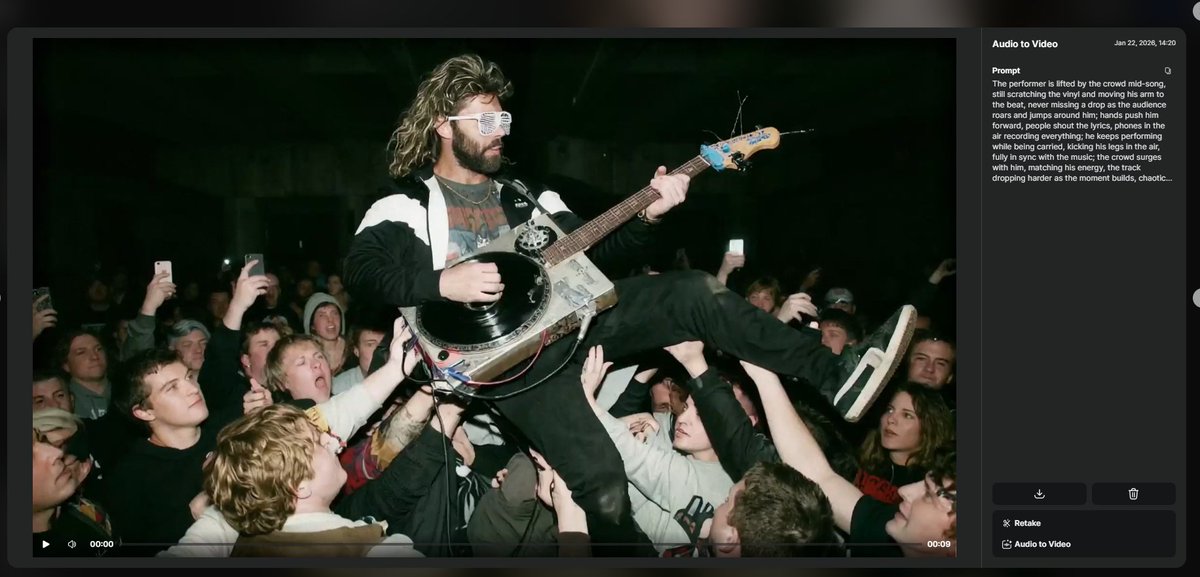
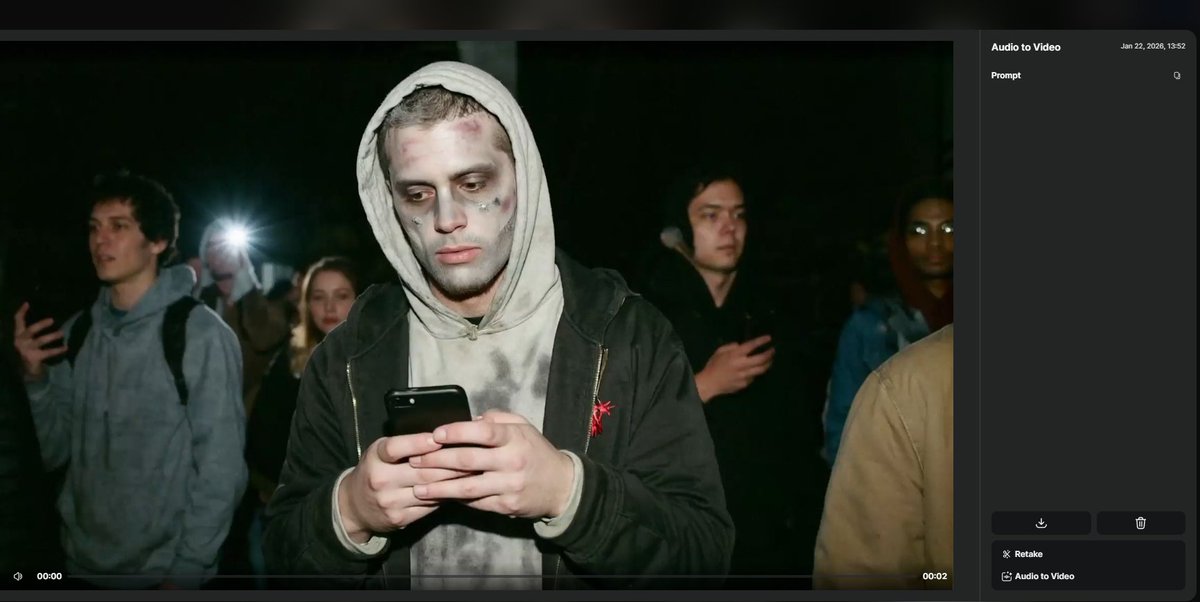
LTX Audio-to-Video (LTXStudio): A creator walkthrough shows a repeatable way to keep music-video motion feeling “on beat”: split a full song into shorter audio segments, then run Audio-to-Video per segment with the same character image, as demonstrated in the Step-by-step screenshots alongside the broader model pitch in the Audio-to-Video overview.

• Prompting optionality: The example notes you can run with “no prompt needed,” or add a detailed action description to force specific staging (e.g., crowd-surfing while playing), as shown in the Step-by-step screenshots.
• Control triangle: The workflow leans on the same three inputs—prompt, image, audio—that the Audio-to-Video overview claims you can use to control “every part” of the clip.
Vidu Q2 prompting: describe actions and camera moves plainly to reduce motion weirdness
Vidu Q2 (ComfyUI): ComfyUI is explicitly recommending “plain language” prompts that spell out multi-step actions and camera intent to get more coherent movement/shot behavior, rather than relying on vague style cues, as shown in the Prompting guidance clip following the node availability announcement in the ComfyUI integration post.

• Camera-language specificity: The guidance centers on writing what the camera should do (and when) alongside the subject’s action, per the Prompting guidance clip.
• Why this matters for continuity: Vidu’s Partner Nodes pitch emphasizes identity/scene stability plus multi-subject reference (up to 7) as a controllability lever, as described in the Partner Nodes feature list.
🧬 Identity stability tools: multi-subject references and character replacement without drift
Character consistency is a recurring pain point, and today’s posts focus on two angles: multi-subject reference stacks for stable identities and “modify” workflows that swap characters while extending scenes. Excludes Higgsfield’s influencer persona system (covered as the feature).
Vidu Q2 is now available inside ComfyUI Partner Nodes
Vidu Q2 (Vidu + ComfyUI): Vidu Q2 is now exposed as a Partner Node inside ComfyUI, with the integration emphasizing multi-subject reference stacks (up to 7 images) to hold identity and scene details steady across iterations, as announced in the [ComfyUI post](t:32|ComfyUI integration clip) and reiterated in the [Vidu post](t:43|Partner Nodes feature reel).

• Multi-subject reference: The integration spotlights “up to 7 reference subjects” for repeatable characters/outfits/props in one workflow, as stated in the [ComfyUI announcement](t:32|ComfyUI integration clip) and echoed in the [Vidu feature list](t:43|Partner Nodes feature reel).
• Stability + speed positioning: Vidu frames the node as “industry-leading identity & scene stability” plus “3× faster generation,” and adds “camera language control” as part of the pitch in the [Vidu post](t:43|Partner Nodes feature reel).
No independent benchmark artifact is shared in the tweets, so treat the “3× faster” line as vendor positioning until you can time it on your own jobs.
Ray3 Modify is being used for character swaps plus set extension in one generation
Ray3 Modify (Luma Dream Machine): Luma is pitching Ray3 Modify as a “click into any reality” workflow for transforming an existing shot, as shown in the [Dream Machine demo](t:19|Ray3 Modify promo clip), and a creator stress test claims it can do character replacement and set extension in a single generation, per the [cfryant test](t:99|64-style swap stress test).

The practical takeaway is that “modify” is being treated less like a small inpaint and more like a combined identity swap + environment rewrite pass—useful when you want to preserve timing/blocking but fully change who’s on screen and what world they’re in.
A prompt pattern for Vidu Q2: sequence actions and state camera intent
Prompting pattern (ComfyUI + Vidu Q2): ComfyUI’s Vidu Q2 guidance leans on plain-language shot direction—explicitly describing multi-step actions and camera intent—to reduce incoherent motion and keep behavior consistent, as shown in the [ComfyUI tip video](t:218|Camera intent prompting tip).
The advice pairs naturally with the node’s multi-reference setup (up to 7 subjects), which ComfyUI highlights in the [integration announcement](t:32|ComfyUI integration clip), because the refs lock “who/what,” while the prompt more reliably locks “what happens and how it’s filmed.”
🧠 Prompts & style refs you can copy: action realism, vintage arch sketches, and “Surprise me” chaos prompts
High-signal prompt drops and aesthetic recipes: Kling action realism, Midjourney style refs for architecture sketchbooks, Niji prompts embedded in ALTs, plus reusable “increase variation” prompt patterns for concept generation. (Kept separate from tool capability news.)
Kling 2.6 fight-scene prompt that bakes in camera whip + sound cues
Kling 2.6 (Kling): Azed shared a copy-paste fight-scene recipe that forces “handheld chaos” while also calling out specific micro-cues (impact sounds, breathing, cloth tearing) to push perceived realism, as written in the prompt share.

The prompt text (as posted in the prompt share):
“Close-up handheld shot during a fast fight scene. The camera whips with each strike. Sharp impact sounds synced to punches, heavy breathing, clothing tearing slightly, feet scraping against the floor. Intense, raw cinematic realism.”
A reusable “Surprise me” meta-prompt to force variety and avoid repeats
Prompting pattern (Concept generation): Cfryant shared a “Surprise me” wrapper prompt designed to reliably produce high variation by forcing 64 distinct concepts and then randomly selecting one, explicitly instructing anti-repetition/chaos, as shown in the meta-prompt screenshot.
The prompt text (as posted in the meta-prompt screenshot): “Surprise me. Come up with 64 completely different wholly original concepts in entirely different styles and pick one at random. Introduce chaos to ensure a different result every time I run this prompt.”
Midjourney style ref 2635714692 for sepia architectural sketchbook plates
Midjourney (Style reference): Artedeingenio dropped a very specific look target for architecture concepts—pen-and-ink technical lines on aged paper with warm sepia watercolor washes—anchored to --sref 2635714692, as described in the style ref description.
This is positioned as “vintage conceptual architectural illustration,” blending “architect notebook / old blueprints” with Renaissance sketch influences and organic forms (Calatrava/Gaudí), per the style ref description.
A 90s handycam prompt recipe for Kling 2.6 or Seedance Pro
Kling 2.6 / Seedance Pro (Video prompting): Freepik shared a short prompt string for a 90s “handycam” feel—handheld shake plus sporadic zooms—positioned as a reusable look recipe in the handycam prompt.

The prompt text (as posted in the handycam prompt): “Handy cam style video. Handled. the camera is slightly shaking. Sporadic zoom ins and zoom outs. mobile phone style video with sporadic zoom ins and zoom outs.”
Niji 7 Attack on Titan prompt set, with full prompts embedded in ALT
Niji 7 (Midjourney): Artedeingenio posted Attack on Titan character/action frames and noted the full prompts are in the image ALT, including camera/composition cues and the reusable “keyframe” framing, as shown in the AOT prompt images.
Examples (verbatim from the ALT shown in the AOT prompt images):
• Colossal scale horror: “Colossal Titan emerging behind the wall, steam everywhere, terrified soldiers below, massive scale, dramatic lighting, epic horror mood. --ar 9:16 --raw --niji 7”
• ODM action frame: “Eren Yeager in Attack on Titan anime style, using ODM gear, flying between buildings, determined scream, wind tearing his cape, dramatic sky, motion blur, cinematic framing, intense action scene. --ar 9:16 --raw --niji 7”
• Combat freeze moment: “Mikasa Ackerman slicing through a Titan mid-air. Attack on Titan style, scarf flowing, blade swing frozen in time, blood spray, extreme perspective, dynamic camera angle, epic combat. --ar 9:16 --raw --niji 7”
A Midjourney cartoon style pack teased for subscriber release
Midjourney (Style development): Artedeingenio teased a “new cartoon style” they created in Midjourney and said they’ll share it with subscribers tomorrow, per the style teaser.
What’s observable from the examples in the style teaser is a consistent glossy cartoon-render portrait look (large expressive eyes, clean gradients, fashion/character-poster compositions), but the actual prompt/settings aren’t included in today’s post.
Midjourney portrait parameter string using raw + multi-profile + stylize 1000
Midjourney (Parameter recipe): Bri Guy AI shared a copyable parameter string for a specific portrait look, combining --raw, multiple --profile tokens, and --stylize 1000, as shown in the parameter string.
The parameters (as posted in the parameter string): “--raw --profile tlnt7wp djgeyjw jls63zz nuco5d2 --stylize 1000”.
🖼️ Lookdev & visual exploration: architecture moodboards and stylized image experiments
A lighter but useful cluster of image-first posts: futuristic architecture boards and stylized experiments that can feed story worlds and production design. Excludes pure prompt dumps (handled in Prompts & Style Refs).
James Yeung’s futuristic architecture set doubles as production design reference
Architecture lookdev (moodboard): James Yeung posted a 4-image set of futuristic architecture—spiraling, glass-and-metal interiors; glossy, high-ceiling transit/industrial halls; and sweeping elevated curves from an aerial view—as shown in the Building the Future set.
These frames read like ready-made references for sci-fi environments (stations, megastructure campuses, “clean dystopia” corridors), especially when you need consistent materials (dark reflective floors, cool lighting) and strong leading lines for shot composition.
Seedream 4.5 prompt card for Silent Hill-style key art framing
Seedream 4.5 (BytePlus): BytePlus shared a one-card “cinematic Silent Hill shot” spec—foreground character clutching a letter; Pyramid Head looming in fog; falling ash; desaturated psychological-horror palette—positioned as a compact lookdev brief in the Seedream 4.5 prompt card.
This is less about the exact prompt text and more about the composition recipe (foreground prop, background threat silhouette, particulate atmosphere) that translates well into posters, thumbnails, and opening frames for horror shorts.
Sports recap reframed as cinematic key art (football as battlefield tableau)
Cinematic composite still (sports-to-poster): Ozan Sihay posted a match recap image that reframes a football pitch as a battlefield—single hero-back figure in the foreground, an advancing “army” of opponents through smoke and dark clouds—shown in the Match recap composite.
The value for lookdev is the clear poster staging: strong silhouette read, center framing, depth via haze, and “genre swap” production design that can be reused for recap thumbnails or event promos.
Grok Imagine used as a fast style-variation sketchpad
Grok Imagine (xAI): A short clip shows rapid iteration on a single theme (“cosmic nebula”), cycling through multiple distinct image variants quickly—useful for palette exploration and picking a direction before committing to a final keyframe, as shown in the variation demo.

This is the “moodboard in motion” pattern: generate several options back-to-back, then capture the strongest frame as your look reference for the rest of the sequence.
🧱 3D + animation pipelines: ComfyUI↔Houdini bridge and new “animated mesh” research
3D creators got concrete pipeline news (Houdini + ComfyUI bridge) and fresh research aimed at producing animation-ready meshes faster. This section stays focused on 3D assets/motion—not general video generation.
Houdini–ComfyUI Bridge goes open-source for hybrid CG + diffusion pipelines
Houdini–ComfyUI Bridge (Community/ComfyUI): A community Houdini plugin that embeds ComfyUI directly into Houdini’s node graph has been open-sourced, aiming to make “CG + diffusion” workflows feel native rather than round-tripping through separate apps, as described in the open-source announcement.
• ComfyUI-in-COPs: It can load ComfyUI nodes directly into COPs, so image-generation and image-processing graphs can live alongside Houdini compositing, per the open-source announcement.
• Import/export beyond images: The bridge calls out bidirectional I/O for “images, meshes, audio, etc.” as part of the workflow handoff between Houdini and ComfyUI, as noted in the open-source announcement.
• Batchable pipelines via TOPs: A TOPs submitter is included to run custom, scalable pipelines that combine Houdini proceduralism with ComfyUI generative nodes, as outlined in the open-source announcement.
ActionMesh claims fast, topology-consistent animated 3D meshes via temporal diffusion
ActionMesh (Research): A new approach frames “production-ready animated 3D meshes” as a feed-forward generation problem using temporal 3D diffusion (3D diffusion with an added time axis), with the goal of keeping motion consistent across frames, as summarized in the ActionMesh explainer.

• Downstream-friendly output: The pitch emphasizes being rig-free and topology-consistent, which is the practical requirement for texturing, retargeting, and standard 3D pipelines, according to the ActionMesh explainer.
• Multiple input modes: It’s presented as supporting video→4D, text→4D, image+text→4D, and mesh+text→4D generation paths, as listed in the ActionMesh explainer.
Implementation details and examples live on the public site linked in the project page.
Motion 3-to-4 explores 3D motion reconstruction feeding 4D synthesis
Motion 3-to-4 (Research): A research drop frames a pipeline where 3D motion reconstruction becomes the conditioning signal for 4D synthesis, targeting more usable animation outputs by separating “recover motion” from “generate consistent 4D,” as introduced in the paper share.

The tweets don’t include benchmarks or a method breakdown, but the positioning in the paper share makes it relevant to teams trying to bridge captured/estimated motion into generative 4D asset creation.
🎛️ Finishing & cleanup: noise removal, subtitles, and upscale decisions that hold up
Posts that focus on making outputs shippable: audio cleanup/subtitles and practical upscale heuristics (wide vs close-up), plus final export quality pushes. (Generation workflows live elsewhere.)
Adobe Podcast is getting used as a one-click cleanup pass for AI clips
Adobe Podcast (Adobe): Creators are repurposing Adobe’s Podcast tool as a finishing step for AI-generated video/audio—cleaning up background noise and stray music while boosting voice clarity, as described in the Cleanup and subtitles tip. It’s also being used to generate subtitles and make them easier to edit, per the same Cleanup and subtitles tip.
The post is anecdotal (no before/after samples shared), but it’s a clear “last-mile” pattern: treat generative audio as rough dailies, then run a dedicated enhancement/transcription pass before export.
Topaz export step: bump to 60 fps and use Proteus
Topaz Video Upscaler (Freepik workflow): The final polish pass in Freepik’s “Les Fleurs” replication notes a specific Topaz recipe—raise output frame rate to 60 FPS and use the Proteus model to increase perceived quality, as shown in the Topaz export step. The broader stack explicitly includes Topaz as a last-mile tool in the checklist shared by Freepik, as listed in the Tool stack checklist.
<InlineVideo src="https://video.twimg.com/amplify_video/2014359330355863552/vid/avc1/1290x720/1vicYMSbCdIHwOPs.mp4?tag=14" poster="https://pbs.twimg.com/amplify_video_thumb/2014359330355863552/img/2i-w6UJN_20eoM43.jpg" caption="Topaz Proteus and 60fps" width="2752" height="1536" />
ైర
A simple upscale heuristic: wides vs close-ups use different tools
Freepik workflow (Magnific + Skin Enhancer): A practical finishing heuristic circulating in the Freepik “Les Fleurs” breakdown is to upscale differently based on shot type—wide shots go through Magnific Precision, while close-ups go through Skin Enhancer, as stated in the Upscaling heuristic.

This is framed as a time-saving decision rule rather than a universal quality claim; no specific settings are shared in the Upscaling heuristic.
📅 Deadlines & stages: creator contests, live workshops, and upcoming launches
Time-sensitive opportunities that matter to working creators: cash-prize challenges, submission windows, and live training sessions. Excludes Higgsfield’s push (covered as the feature).
Hedra Labs opens a $6,000 Elements contest with $3,500 for 1st place
Elements contest (Hedra Labs): Hedra is running a $6,000 total-prize video contest for creators using Elements, with cash awards of $3,500 / $1,500 / $500 for the top 3 plus a $500 bonus, as announced in the contest post and restated in the prize breakdown.

• Submission mechanics: submit a video that features Elements, add #HedraElements, and tag @hedra_labs, as spelled out in the how to enter and reinforced in the reminder post.
The eligibility constraint (“Ambassadors only”) is explicit in the contest post, so access may be gated even if you have the tool.
fal and Alibaba Cloud run a Wan video contest tied to Milano Cortina 2026
Wan contest (fal × Alibaba Cloud): fal is partnering with Alibaba Cloud on a Milano Cortina 2026 fan-video contest where entries must be generated primarily with Wan and submitted by Jan 26, with prizes including Olympics tickets and potential featuring in the Olympic Museum, per the contest announcement.

• Rules snapshot: videos must be 5–15 seconds, 16:9 landscape, and inspired by a Winter Olympic sport (figure skating, short track, alpine skiing, or snowboarding), with Wan as the primary model, as listed in the contest announcement.
• How to participate: publish to TikTok/Instagram/YouTube with #YourEpicVibe and #AlibabaCloudAI, then enter via the submission form, according to the participation steps.
Autodesk schedules a Jan 28 Flow Studio class on mocap-to-final animation
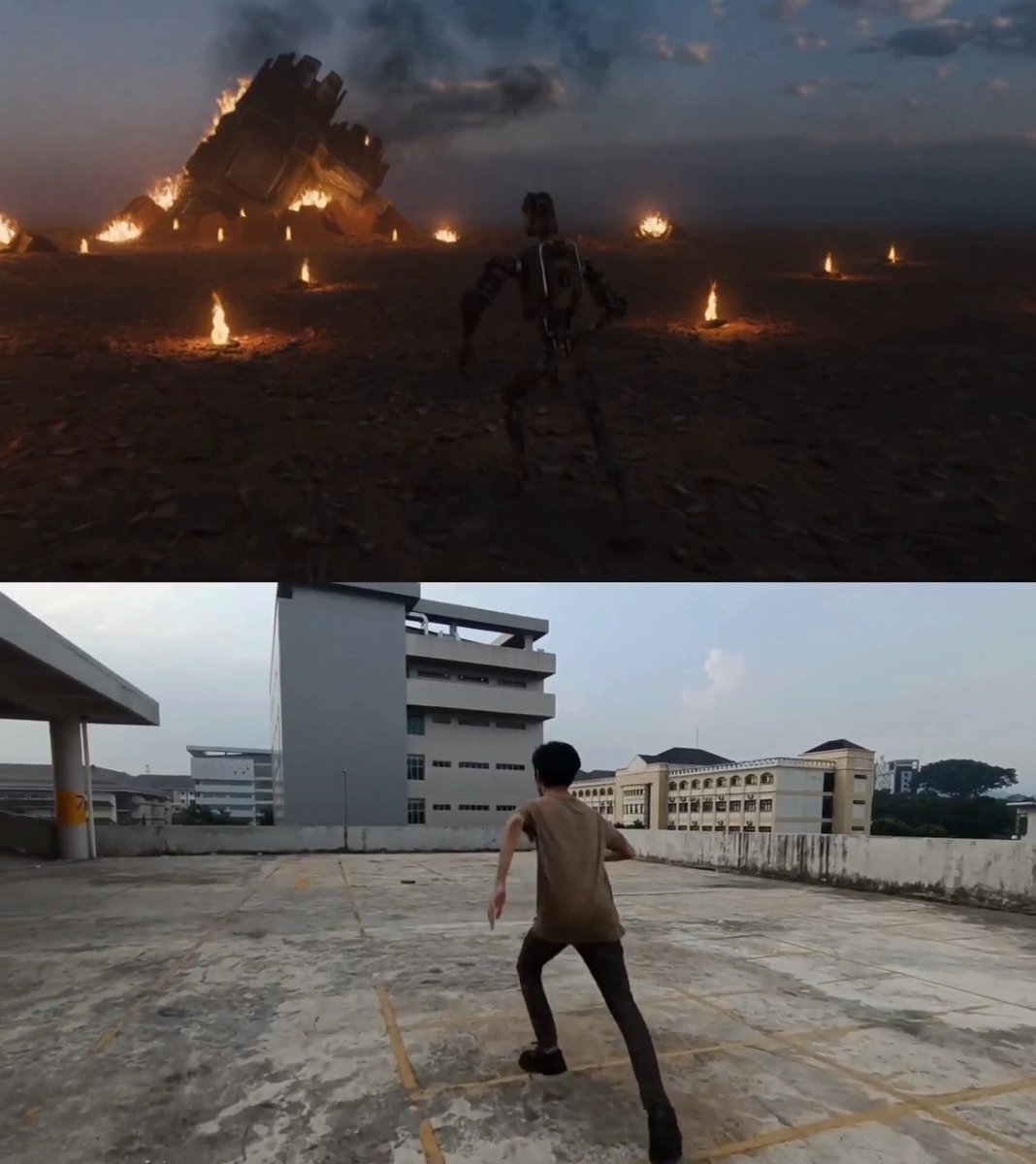
Flow Studio live class (Autodesk): Autodesk Flow Studio is hosting a live session on Jan 28 (9am PT / 12pm ET) where filmmaker Fadhlan Irsyad walks through using Flow Studio to complete an animated thesis film—from filming tips and AI motion capture through final polish—with a live Q&A, as described in the event announcement.
Curious Refuge opens registration for a new AI Animation course
AI Animation course (Curious Refuge): Curious Refuge opened registration for a new AI Animation course, positioned as attracting both established Hollywood professionals and emerging creators, as stated in the registration post and referenced in the thread context.
The tweets don’t include dates, pricing, or a syllabus outline, but the “registration opening” framing makes it a time-sensitive enrollment window.
Adobe launches Firefly Foundry; Promise cites immediate workflow integration
Firefly Foundry (Adobe): Promise Advanced Imagination says it’s integrating Adobe Firefly Foundry into its production workflow, framing it as a way to push ideas while giving partners confidence in how genAI is used, as written in the integration note.
The post reads like an adoption signal for studio-facing genAI controls, but it doesn’t include pricing, availability tiers, or a public technical breakdown beyond the announcement framing.
Wondercraft teases a Tuesday launch (Jan 27) for a new release
Wondercraft (Wondercraft): Wondercraft posted a product teaser saying it’s “launching something big on Tuesday,” which—given today’s date—points to Jan 27, 2026, per the launch teaser.

No feature details are specified in the tweet beyond the upcoming release timing.
ElevenLabs joins Davos 2026 and speaks on Europe’s tech sovereignty
Davos 2026 (ElevenLabs): ElevenLabs says it’s attending Davos 2026 via the WEF Innovator Community, with co-founder Mati Staniszewski scheduled on a main session titled “Is Europe’s Tech Sovereignty Feasible?” at 12:15 GMT / 13:15 CET (Jan 22), as shared in the Davos announcement.
This is an industry-stage visibility signal for voice AI rather than a tool release; the tweet doesn’t mention product updates.
🧰 Where creators run things: ComfyUI nodes, Hugging Face discovery, and creator apps
Platform-layer updates: new integrations and UI/UX changes that affect how quickly creators can find models, manage outputs, and run workflows. Excludes model capability deep-dives (kept in modality sections).
Sekai launches an X bot that generates playable mini-apps from a tagged post
Sekai (@sekaiapp): Sekai launched an X bot where you tag @sekaiapp with an app idea and it generates a working mini-app that runs directly in the browser, framing it as “software as a new social content format,” according to the launch description.
The creative angle is distribution: interactive “posts” (playable toys, storyworld microsites, branded mini-experiences) become shareable artifacts without an app-store submission loop—though the tweets don’t yet show constraints like supported UI complexity, persistence, or monetization.
Hugging Face expands its Blog feed to include posts from external AI labs
Hugging Face (Community Blog/Articles): The Hugging Face blog feed is being positioned as a broader discovery surface—showing updates from “top AI labs” beyond Hugging Face itself, as announced in the feed expansion post and visible in the updated listings.
This matters for creative tool scouting because it reduces the time spent hopping across individual lab blogs to catch workflow-relevant drops (new models, guides, and creator-facing announcements), with the entry point linked in the blog feed page.
Hugging Face Hub adds parameter-count sorting for faster model scouting
Hugging Face (Model Hub): The Hub UI now includes sort options for “Most parameters” and “Least parameters,” which makes it faster to scan for small-footprint models (on-device / low-VRAM) versus frontier-scale checkpoints, as shown in the sort menu screenshot.
For creators running local image/video/audio pipelines, this is a practical filter when you’re deciding what’s feasible on your hardware before you even click into a model card.
Character.AI reveals chat history is tucked behind the persona icon menu
Character.AI (App UX): Character.AI responded to “where did History go?” by pointing out that chat history didn’t disappear—it’s accessible by tapping the persona icon next to the chat bar, per the in-app steps post.
This is a pure discoverability fix, but it affects day-to-day creator workflows when you’re iterating long-running character stories and need to retrieve earlier variants, prompts, or roleplay continuity.
🎵 AI music & sound experiments: from Suno tracks to impossible instruments
Light but relevant audio beat: creators are using generated songs as drivers for video tools and exploring novel instrument-generation concepts. Excludes voice synthesis (kept in Voice & Narration).
Suno track as the “source of truth” for LTX Audio-to-Video clips
Music-first workflow: A creator shows a repeatable way to turn a Suno-made song into a sequence of tightly synced video moments by splitting the track into short segments, pairing each segment with an image, and running LTX Audio-to-Video per segment, as demonstrated in the Step-by-step thread.
What’s concrete here is the control surface: the audio chunk becomes the timeline anchor, while the prompt is used to “stage” what happens during that chunk—see the crowd-surfing + vinyl-scratching prompt text referenced in the Step-by-step thread. The thread also shows that some segments can work with “no prompt needed,” which is useful when you want the audio performance to drive motion without extra direction, as shown in the Step-by-step thread.
Generating brand-new instruments and snapping them to a track
Generative instrument concept: A short demo claims an AI tool can generate instruments “that didn’t even exist” and keep them musically synchronized, with the visual/interaction loop shown in the Instrument sync demo.

Because the tool name isn’t specified in the tweet, treat this as a transferable pattern: invent an instrument form factor first, then lock its motion/interaction to beat-level structure rather than free-animating visuals over audio, per the framing in Instrument sync demo.
Light chatter about “Gemini music generation” bubbles up again
Gemini music speculation: The “are we getting Gemini music generation soon?” question pops up again as a recurring aside in creator tooling threads, as seen in the Speculation aside and echoed alongside an “all agents in one UI” demo in the AionUi screenshot thread.
There’s no concrete product artifact in these tweets beyond the repeated question itself, so this reads as ambient expectation-setting rather than a confirmed launch signal.
💻 Creator-dev corner: Claude Code skills, autonomous deploys, and agent GUIs
Developer tooling that creators actually use to ship: Claude Code add-ons/skills, autonomous deployment loops, and GUIs that unify multiple agents. Kept distinct from creative tool tutorials.
Claude Code Railway Skill enables agent-run deploys via Railway
Claude Code Railway Skill (mattshumer_): A new Claude Skill for Railway lets agents deploy code and manage Railway projects autonomously, installed via npx add-skill mshumer/claude-skill-railway as shown in the [install snippet](t:60|install snippet).
• Why it matters for creators shipping tools: this moves “agent writes code” into “agent ships code,” so demos, landing pages, and small apps can iterate with fewer human handoffs—especially when paired with other agent loops people already run in terminal-based coding flows, per the [Skills prompt](t:7|Skills prompt).
Creators are stress-testing agentic deploy loops on real apps
Agentic deployment workflow: One practitioner describes running an agent that deploys, watches logs for errors, and iterates until a site is live, as captured in the [deployment anecdote](t:37|deployment anecdote).
• Practical implication: this frames “deployment” as part of the agent’s closed loop (deploy → observe → patch → redeploy) rather than a manual last step, aligning closely with tool-empowering Skills like the [Railway Skill release](t:60|Skill release note).
A Claude Code checklist emphasizes verification and session hygiene
Claude Code workflow hygiene: A shared checklist pushes an explicit loop—Explore → Plan → Code → Commit—plus early verification (tests/screenshots/expected results), context management (/rewind, subagents), and avoiding mega-sessions, as outlined in the [best-practices post](t:130|best practices).
• Why it matters for creator-devs: the guidance is less about “better prompts” and more about keeping long-running build sessions correct and recoverable, which becomes more important once agents start taking actions like deploys (see the [deploy loop note](t:37|deploy loop note)).
AionUi unifies multiple coding agents behind one desktop UI
AionUi (agent GUI): AionUi is pitched as a single GUI that can run Gemini CLI, Codex, and Claude on Windows/macOS/Linux and auto-detect installed agents, per the [AionUi overview](t:109|AionUi overview).
• Creator relevance: for people swapping models per task (planning vs implementation vs debugging), a unified surface reduces “terminal sprawl” and makes multi-agent workflows feel more like a workstation than a set of separate tools, as suggested in the [multi-terminal complaint framing](t:109|multi-terminal framing).
An infinite canvas add-on is being treated as a Claude Code essential
Claude Code UI add-on: An “infinite design canvas” extension is being circulated as a must-have Claude Code enhancement—positioned alongside other agent add-ons—according to the [tool shout](t:139|tool shout).
• What it’s used for: the framing suggests using a spatial canvas to keep specs, plans, and artifacts visible while iterating with agents, which complements the “Explore → Plan → Code” structure described in the [best-practices checklist](t:130|best-practices checklist).
Claude Skills are becoming a shareable “plugin layer” for agent workflows
Claude Skills ecosystem: A prompt asking “most useful Claude Skills you have installed” signals that Skills are being treated as a portable kit builders curate and share, with installability via npx add-skill ... shown in the [skills question](t:7|skills question).
• Early example: the same thread points to a concrete ops-oriented Skill—Railway deploy management—described in the [Railway Skill install post](t:60|Railway Skill install post).
📈 Distribution reality on X: can small accounts still go viral?
Meta-discussion that affects creative strategy: whether X’s algorithm gives small accounts a path to virality, and the tension between posting for reach vs posting what you want. This is discourse-as-news, not tool updates.
Creators question whether X still gives small accounts a path to virality
X distribution (small accounts): A creator challenges the common advice that X “favors small creators,” arguing that accounts under ~2,000 followers often see only ~10–50 impressions per post—making “going viral” feel like it would require an unlikely amplification event (e.g., a major repost) rather than algorithmic discovery, as laid out in the [small account reach question](t:13|small account reach question).
This matters for AI creators because many “ship daily” workflows assume reach is a controllable variable; the post reframes the bottleneck as initial distribution, not production speed.
The “post for the algorithm or for yourself?” question keeps resurfacing on X
X distribution (creative strategy): A short prompt captures a recurring creator dilemma—whether to optimize content for what the algorithm rewards or to post what you genuinely want to make—framed explicitly in the [algorithm vs authenticity prompt](t:21|algorithm vs authenticity prompt).
For AI-driven creators (who can produce more variations faster), this tension often shows up as a choice between trend-chasing formats and a consistent personal style lane, even when the latter grows slower.
One creator claims a “new algo” breakthrough after hitting five-figure impressions
X distribution (anecdotal signal): A creator reports they “mastered the new algo” and hit “5-figure impressions” on a single post, positioning it as a measurable step-change compared to typical performance, as stated in the [impressions spike claim](t:106|impressions spike claim).
No concrete mechanic is shared in the tweet, but the post is a reminder that creator sentiment is currently split between “small accounts are stuck” and “there are still sudden breakout moments.”
🛡️ Likeness, IP, and consent pressure rises (Sora in Hollywood, deepfake scams, constitutions)
Trust and governance threads that directly affect creative work: who controls likeness, how IP-safe generation is framed, and how deepfake economics are evolving. No tool demos—this is about rights, disclosure, and policy posture.
Hollywood agencies reportedly resist OpenAI’s Sora “Cameo” likeness terms
Sora (OpenAI) & Hollywood likeness rights: A reported “Sora Tour” pitch to major studios ran into resistance from top talent agencies, centering on who controls a performer’s scanned likeness and how royalties/permissions would work, as summarized in the breakdown.
The dispute, per the same breakdown, is framed around a “Cameo” flow where talent can be captured via a short face scan and turned into an AI character—agencies allegedly arguing for talent-controlled “digital keys” and clearer residuals, while OpenAI’s posture is described as shifting from opt-out to opt-in with commercial licensing negotiations still forming.
AI influencer accounts use fake celebrity explicit images as a monetization funnel
Non-consensual likeness abuse: A scam pattern on Instagram is described as AI-generated influencer accounts posting fake explicit images that imply sex with celebrities, then funneling attention to adult platforms selling AI-generated nude content, as outlined in the scam pattern.
The thread in scam pattern emphasizes two creator-adjacent pressure points: weak/absent disclosure (AI not labeled) and the economics of “manufacture scandal → monetize clicks,” which increases downstream risk for legitimate synthetic-character creators as platforms tighten enforcement.
Adobe positions Firefly Foundry around IP-safe, franchise-tuned generation
Firefly Foundry (Adobe): Adobe’s Firefly Foundry is framed as entertainment-focused genAI that can be tuned to a brand/franchise “creative universe” so outputs stay on-model and commercially safer, with broader multi-format ambitions (image/video/audio/3D/vector) described in the Foundry overview.
The same Foundry overview claims deep workflow adjacency (citing “85% of 2026 Sundance entrants” using Adobe Creative Cloud tools) and names partnerships spanning talent agencies and production/VFX collaborators, while a studio-side endorsement frames Foundry integration as giving partners confidence in how genAI is used, per the workflow endorsement.
Anthropic publishes a long-form “Claude’s Constitution” to explain model behavior
Claude (Anthropic) governance: Anthropic’s new “Claude’s Constitution” is described as a ~12,500-word values document that prioritizes judgment over rigid rules, including explicit hard constraints and safety-first framing, as summarized in the constitution notes.
The longer explainer in expanded thread adds that the constitution is positioned as training-relevant (used to guide behavior and tradeoffs), and that it explicitly discusses uncertainty about the model’s “nature” (moral status/wellbeing) alongside practical goals like honesty and harm avoidance—an approach that can materially shape what creative prompts get refused, redirected, or allowed.
Creators react to report OpenAI may take a cut of AI-aided discoveries
OpenAI commercialization backlash: A screenshot of a report titled “OpenAI Plans to Take a Cut of Customers’ AI-Aided Discoveries” is circulated with a negative reaction, calling it “embarrassing” given OpenAI’s nonprofit origins, as shown in the complaint post.
The post in complaint post doesn’t include details on scope (which products, what percentage, or how attribution would be measured), so treat the claim as unresolved based on the tweets alone.
🧪 Research radar (creative-adjacent): scaling Transformers and test-time discovery
A smaller research set today, mostly general ML techniques and evaluation-style posts rather than creator-ready releases. Included only where it plausibly impacts future creative tooling performance/cost.
A new “embodied world” framing for video generation models
Embodied video generation (paper): A research post titled “Rethinking Video Generation Model for the Embodied World” is circulating with a short visual demo and a discussion link, as shared in the Paper share. The practical creative relevance is the direction of travel: “embodied” framings typically push video models toward better physical consistency, controllable interactions, and longer coherent sequences—exactly the failure modes that still show up in character/action shots.

Today’s tweets don’t provide concrete metrics or an API/tool drop; it’s primarily a signal about what the next generation of video model evaluation might optimize for.
STEM replaces FFN up-projection with an embedding lookup to cut Transformer cost
STEM (paper): A new Transformer efficiency idea swaps the usual FFN “up-projection” for a static, token-indexed embedding lookup, aiming to reduce per-token FLOPs/parameter access while keeping training stable even under extreme sparsity, as outlined in the Paper listing and described on the Paper page. This matters for creative tools mainly as a cost lever: if the architecture holds up, it’s the kind of change that could make large, high-quality multimodal models cheaper to run at scale.
• Efficiency claim: The paper description notes it can “eliminate about one-third of the parameters typically found in FFN layers,” per the Paper page.
No creator-facing implementation details are in today’s tweets, but it’s directly in the lane of “better models for the same serving budget.”
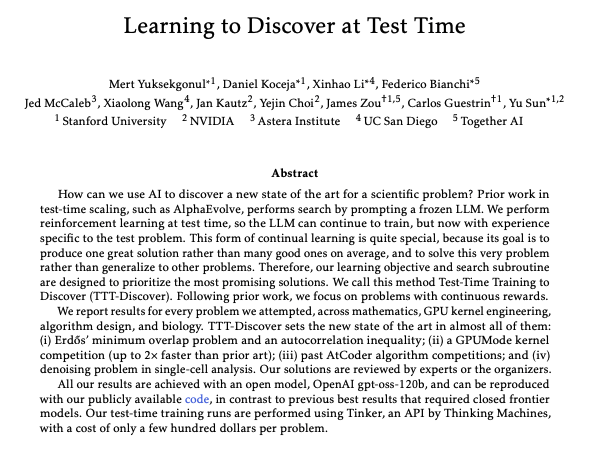
TTT-Discover trains at test time to search for one best answer
TTT-Discover (Stanford/NVIDIA/Astera/Together, paper + code): The authors propose reinforcement learning at test time so an LLM can keep optimizing on the fly to produce “one great solution” for a specific problem, rather than generalizing broadly, as described in the Paper screenshot and accompanied by a public GitHub repo. For creative tooling, the relevant angle is how this could change “stuck” tasks (hard prompts, tricky edits, procedural generation): instead of rerolling, the system tries to improve itself within the session.
• Reported domains: The abstract screenshot highlights results in math, GPU kernel engineering, and algorithm design, per the Paper screenshot.
The tweets don’t include practical guidance on compute cost/latency, which is the obvious tradeoff for creators if test-time training becomes common.
NVIDIA’s VibeTensor claims an agent-generated deep learning software stack
VibeTensor (NVIDIA): NVIDIA is presenting VibeTensor as open-source “system software for deep learning” that was fully generated by AI agents under high-level human guidance, per the Title page screenshot and the linked GitHub repo. For creators, this lands less as a direct production tool and more as a credibility marker for agent-written infrastructure: if this approach works, expect more pipeline tooling (render orchestration, dataset curation, fine-tuning harnesses) to be produced and iterated by agent loops.
The tweet doesn’t include benchmarks or adoption proof; it’s mainly a release-and-positioning snapshot plus the repo pointer.
🎙️ Voice & speech updates: cloning, voice libraries, and pro-audio positioning
Voice-specific items (separate from video tools): voice cloning specs, voice library drops, and industry positioning moments. Audio cleanup tools live under Post-Production.
Qwen drops Qwen3‑TTS with 3‑second voice cloning and low‑latency streaming claims
Qwen3‑TTS (Qwen): Qwen is being shared as having landed on Hugging Face with voice cloning from ~3 seconds of audio, 10-language support, and a ~97ms streaming latency claim, as summarized in the Hugging Face specs. For voice creators, that combination points to quicker “try a voice, iterate the script” loops and more plausible real-time dubbing/character VO experiments across languages—though the tweets don’t include an official model card or eval artifact, so treat performance/quality as provisional pending direct tests.
MITTE AI previews a voice library with an in-product “introduce yourself” demo
Voice library UX (MITTE AI): MITTE AI teased a new voice library by having the catalog “introduce itself,” effectively demoing discovery/preview as a product surface rather than just a list of voices, as shown in the voice library intro.

The clip is light on specs (no language coverage, cloning constraints, or licensing terms mentioned), but it’s a clear signal that voice vendors are competing on catalog experience—how quickly you can audition and pick a voice for a character or project—not only on model quality.
ElevenLabs brings its voice brand to Davos 2026 with a “tech sovereignty” panel slot
Enterprise positioning (ElevenLabs): ElevenLabs highlighted its first appearance at Davos 2026 as part of the WEF Innovator Community, with its co-founder slated for a main session on “Is Europe’s Tech Sovereignty Feasible?”, according to the Davos announcement.
For creative teams, this doesn’t change tooling day-to-day, but it’s a useful signal that voice platforms are leaning into policy/enterprise credibility (sovereignty, governance, procurement comfort) alongside creator-facing product work.
🚧 What broke flow today: outages, missing features, and “where did it go?” moments
Friction posts that interrupt production: service downtime, missing expected features (e.g., sound), and UI confusion that makes creators think data is gone. Kept separate from pricing/promos and capability wins.
Claude downtime chatter interrupts agent workflows
Claude (Anthropic): Creator/dev chatter flags an availability disruption—“CLAUDE IS DOWN” appears as the thread context around a LiveKit shoutout in Claude is down reference. This matters because a lot of creative pipelines now depend on Claude for automated planning, writing, and agent loops; when it drops, everything from shot lists to deployment-style automation stalls.
There’s no official RCA or timeline in today’s tweets, so treat it as an incident signal rather than a confirmed outage report.
Character.AI: chat history didn’t vanish, it moved into a hidden menu
Character.AI (Character.AI): The team addresses a production-stopping UI panic (“where did History go?”) by pointing users to a buried navigation path—tap the persona icon next to the chat bar to reveal a menu that includes chat history, per Chat history location tip.
This is a discoverability issue more than a feature change; the practical impact is that creators who rely on long-running roleplay/story sessions can recover prior context without assuming data loss.
Runway app link shows a client-side load error
Runway (Runway): The upgrade CTA in Runway upgrade CTA points to the Runway web app, but the destination appears to surface an “Unexpected Application Error” related to loading a CSS chunk, as described in the Runway app error page. For creators on deadlines, this kind of front-end failure is functionally an outage even if the backend is healthy, because it blocks access to generation and project workflows.
Runway Gen-4.5 I2V hits an “where’s the audio?” expectation gap
Gen-4.5 Image-to-Video (Runway): A creator reply highlights an expectation mismatch—“I thought it would have sound,” as posted in No sound expectation. For filmmakers and storytellers, this is a workflow break because people are increasingly testing “finished-shot” assumptions (picture + sync sound) during early iteration; silent outputs force an extra pass through audio tools (music, SFX, VO) before a clip is postable.
Unexpected “token” appearance after a project ship confuses builders
Launch-side confusion: A builder reports shipping a project and then noticing “there’s a token somehow,” with uncertainty about what triggered it, in Unexpected token after ship. For creative toolmakers, this is the kind of surprise that derails launch week—sudden token associations can pull attention into damage control, user comms, and verification work instead of product iteration.
No concrete details on the token’s origin are in today’s tweets, so it remains an unresolved incident report rather than a verified exploit or platform feature.
While you're reading this, something just shipped.
New models, tools, and workflows drop daily. The creators who win are the ones who know first.
Last week: 47 releases tracked · 12 breaking changes flagged · 3 pricing drops caught