Nano Banana Pro Inpaint adds mask-true edits – 67% cut, 269-credit promo

Stay in the loop
Free daily newsletter & Telegram daily report
Executive Summary
Higgsfield’s Nano Banana Pro got a real power-up today: BANANA INPAINT, a mask-true editing mode that lets you repaint outfits, hair, or entire props while leaving identity, lighting, and composition untouched. They’re pushing it hard with a 67% discount and a 9-hour campaign where liking, retweeting, and replying nets you 269 credits on the Higgsfield platform.
We’ve already seen Nano Banana Pro used for glossy spec ads and aging grids, but this is the first time it really behaves like Photoshop on top of a reasoning-heavy model. The mask acts as a hard logical boundary, so you can fix a sleeve, swap a product label, or relight a window without the model “helpfully” redrawing half the scene. For ad shops and character artists, that means fewer full regenerations and more surgical tweaks inside a single, trusted frame.
In parallel, video is getting the same post-first mindset. LTXStudio’s Retake lets you rework dialogue, pacing, and product reveals inside a finished spot and spin out 10 A/B variants from one render, while Kling o1’s new slot in InVideo turns cleanup, relighting, and sky swaps into a one-stop browser pass. The pattern is clear: generate once, then iterate hard in post.
While you're reading this, something just shipped.
New models, tools, and workflows drop daily. The creators who win are the ones who know first.
Last week: 47 releases tracked · 12 breaking changes flagged · 3 pricing drops caught
Top links today
- Nano Banana Pro Inpaint on Higgsfield
- Omni-Attribute attribute encoder paper
- MotionEdit dynamic image editing paper
- MotionEdit project demos and resources
- Z-Image-Turbo image generation model
- LTX Studio Retake feature overview
- Freepik 24 AIDays contest submission form
- ElevenLabs Father Christmas voices collection
- Pictory AI video creation platform
- Pictory AI Brand Kits tutorial
- Higgsfield Nano Banana Pro workflow guide
Feature Spotlight
Nano Banana Pro Inpaint: mask‑true edits
Higgsfield ships Nano Banana Pro Inpaint: mask‑true, identity‑safe edits (outfits, hair, scene swaps). Creators post tests and a deep dive. A limited 67% promo and credits giveaway push rapid adoption.
Big image‑editing drop focused on precise, mask‑bounded changes. Multiple creator demos and a deep analysis thread show outfit/hair/scene swaps with identity, lighting, and context preserved. Heavy promo energy today.
Jump to Nano Banana Pro Inpaint: mask‑true edits topicsTable of Contents
🖌️ Nano Banana Pro Inpaint: mask‑true edits
Big image‑editing drop focused on precise, mask‑bounded changes. Multiple creator demos and a deep analysis thread show outfit/hair/scene swaps with identity, lighting, and context preserved. Heavy promo energy today.
Higgsfield’s BANANA INPAINT brings precise, mask‑bounded edits to Nano Banana Pro
Higgsfield has rolled out BANANA INPAINT for Nano Banana Pro, a new mode where you paint a mask and the model edits only that region—swapping outfits, hair, or entire scene elements while leaving everything outside the mask untouched. The launch comes with a 67% discount on the tool and a 9‑hour promo where liking, retweeting, and replying earns 269 credits, available exclusively on Higgsfield’s platform. launch details
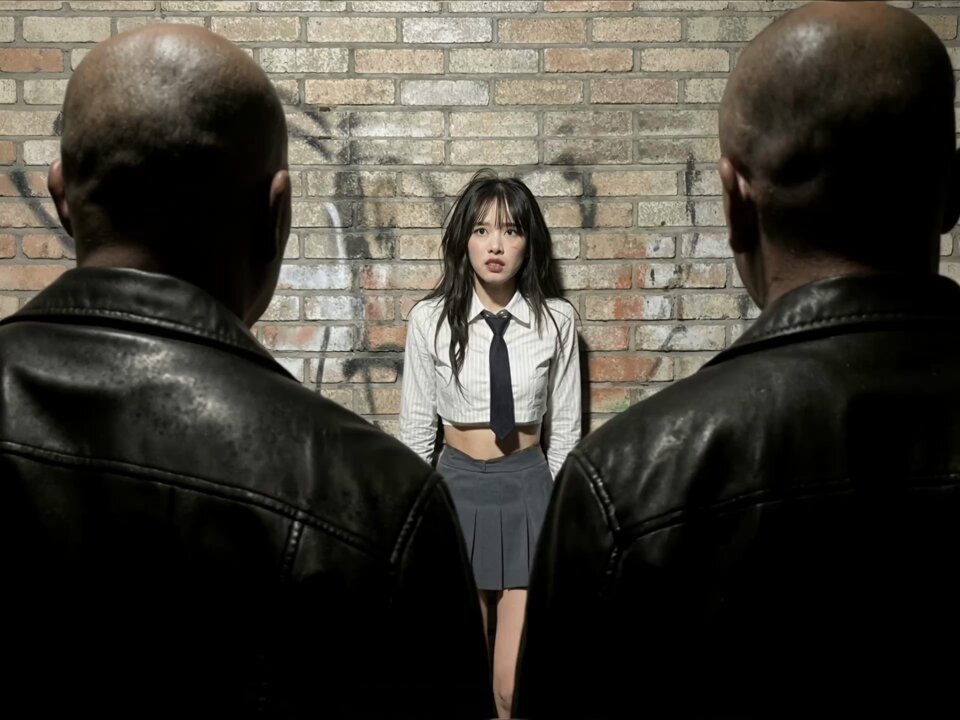
For image creators, the key shift is control: BANANA INPAINT treats the mask as a “logical boundary”, so identity, lighting, and composition remain consistent while the selected area changes, rather than regenerating half the frame or warping faces when you try to fix a detail. feature analysis This leans on Nano Banana Pro’s reasoning-heavy image model, which understands structure, perspective, and materials well enough to remove or replace objects cleanly and keep shadows and reflections believable.
The result is a Photoshop-like workflow on top of a generative model: you can do wardrobe variations for a campaign, re-skin props for product shots, or patch continuity issues in a character sheet without rolling the dice on every new generation. Early reactions in the replies show Higgsfield’s own team leaning into the buzz with playful “🍌😎” comments as creators start testing how far they can push precise, single-region edits. community reply
🎛️ Post‑render rewrites & AI cleanup
Practical post tools for ad makers and editors: Retake updates dialogue/tone/locale inside the same clip, and InVideo adds cleaning/relighting/swaps. Excludes NB Pro Inpaint (covered as the feature).
LTXStudio’s Retake turns finished ads into editable multi-version assets
LTXStudio is pushing Retake as a true post‑render editor: you can now change dialogue, tone, reactions, pacing and even key visual beats inside an already rendered clip, then spin up 10 A/B ad variants "before lunch" without regenerating the base shot. retake overview

Follow‑up clips show Retake swapping product reveals and backgrounds to localize a single master ad for different countries or seasons, again reusing the same underlying render. localization example Another demo focuses on creative iteration: testing alternate reactions, refining reveal timing, or adjusting VFX‑heavy moments while everything else (framing, lighting, performance) stays locked, which is exactly what production teams need when clients ask for "one more version" late in the process. iteration example A shorter snippet stresses the core benefit for editors and marketers: reshoots and full re-renders become optional, because the system edits inside the timeline you already have. dialogue tweak clip
Kling o1 lands inside InVideo for one-click cleanup and relighting
Azed_ai notes that Kling o1 is now integrated directly into InVideo, turning it into a one‑stop post‑production station where you can do cleanup, relighting, swaps, sky replacement, and tracking in a single tool. kling invideo note For ad makers and short‑form editors this means a lot of the usual comp work—erasing distractions, fixing exposure, changing backgrounds or skies—can be handled with AI inside the browser instead of bouncing clips through multiple desktop apps, which tightens feedback loops and lowers the skill floor for solid-looking polish.
⚔️ Kling 2.6 action reels & longform
Fresh creator reels push high‑energy anime/action plus a longform holiday project. Useful for filmmakers testing choreography, camera tilt, and pacing. Excludes NB Pro Inpaint.
“A Very AI Yule Log 2” turns 630 Kling 2.6 clips into a 1h45m feature
Kling AI and Secret Level released A Very AI Yule Log 2, a 1 hour 45 minute “holiday chaos” project stitched from 630 unique 10‑second Kling 2.6 scenes, all scored with original AI‑generated music. yule log description

The teaser races through surreal fireplace vignettes—dancing gingerbread, melting snowmen, bizarre cutaways—showing how short generative clips can be assembled into a longform, themed experience instead of isolated memes. For editors and showrunners experimenting with AI, it’s a concrete blueprint: lock a format (in this case, a looping yule‑log frame), batch‑generate hundreds of micro‑beats with consistent tools, then rely on human taste for sequencing, pacing, and comedic rhythm.
Kling 2.6 anime reel showcases brutal multi-enemy combat “better than Sora 2”
Artedeingenio dropped a 5‑second Kling 2.6 reel of an agile vampire slicing through multiple demons with exaggerated motion arcs, freeze‑frame impacts, and cinematic tracking, calling it “better than Sora 2” for action anime. This builds on earlier usage of Kling 2.6 for high‑speed anime fights anime fights, and the official Kling account boosted the clip, signaling it as a reference for how to stage dense multi‑opponent choreography. (anime fight prompt, kling retweet)

For filmmakers and storyboarders, the prompt reads like a shot list—continuous acrobatic combat, aerial spins, enemies torn apart mid‑motion—which makes it a handy template for testing timing, camera tracking, and gore tolerance before committing to hand‑animated passes. The same creator argues that resisting AI art means “living anchored in bitterness,” a reminder that these reels are also shaping the cultural tone around AI tools in anime‑style work. ai art comment
Kling 2.6 vertical chase test highlights height, gravity and tilt-camera work
A second Artedeingenio test uses Kling 2.6 for a 10‑second, high‑speed vertical chase: an agile fighter sprints upward through collapsing platforms while a massive creature charges from below, with wall‑kicks, pose freezes, and an upward‑tilting camera that sells extreme height and gravity. vertical chase prompt

For action directors and previs teams, this shows Kling 2.6 can handle not just lateral motion but stacked vertical geography, continuous momentum, and dynamic camera tilt without the scene falling apart. It’s a good pattern to borrow when you need to test platformer‑style sequences or tower climbs before investing in full 3D layout or stunt previs.
🖼️ Style refs and ad‑grade looks
Prompt packs and style refs for ads, sumi‑e, horror anime, and tactile knitted looks across models. Focuses on image stylecraft; excludes NB Pro Inpaint (feature).
Nano Banana Pro “explosive product ad” prompt pack goes mini-viral
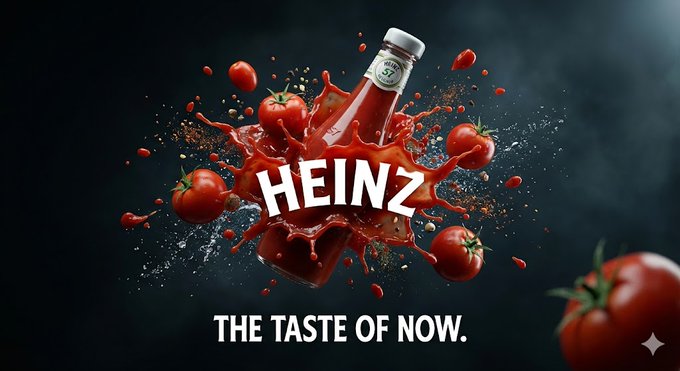
Azed_ai shared a long, cinematic product‑ad prompt for Nano Banana Pro that reliably turns any brand into a glossy, splash‑FX commercial image—showcased with Doritos, Chanel N°5, MAC lipstick, and Heinz ketchup, complete with logos and slogans baked into the style. Nano Banana ad prompt
Creators are now reusing and tweaking the same structure for spec ads across categories—power tools, headphones, energy drinks, burgers, and big brands like Monster, Red Bull, Omega, Pepsi, Tesla, Neuralink, xAI, and SpaceX—making it a de facto “cinematic ad look” template for AI art and motion boards that need agency‑grade polish fast.
Four modern color‑block portrait prompts for editorial‑style character shots
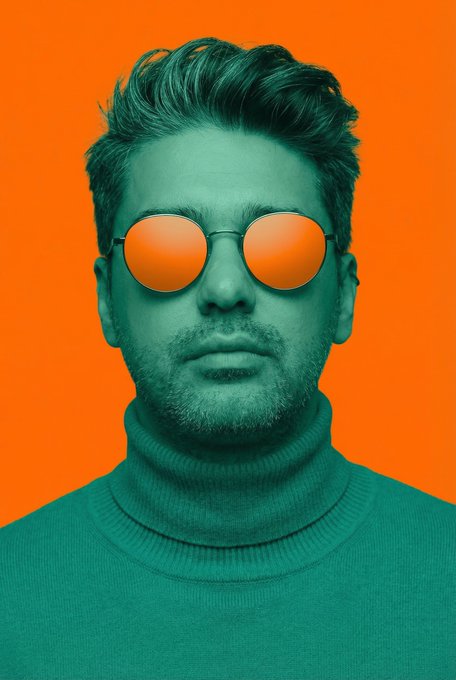
Ozan Sihay shared a four‑prompt set for avant‑garde fashion portraits that keep strict character consistency while rendering the subject in a single matte tone against a bold, flat complementary background (royal blue on crimson, charcoal on gold, violet on neon lime, teal on orange), complete with rim lighting specs and 85mm‑lens framing. Color block prompts The prompts bake in pose, wardrobe structure, sunglasses design, and lighting (from hard chiaroscuro to soft frontal), giving art directors and poster designers a recipe for graphic, high‑impact portraits that still feel like the same person across an entire campaign.
Midjourney sref 2073388288 captures psychological horror anime aesthetics
Another Midjourney style ref, --sref 2073388288, is being flagged as a "dark psychological horror anime" look: nervous inking, cold palettes, gritty shading, and deeply unsettling expressions that echo Japanese horror manga. Horror anime sref
Artedeingenio’s gallery—eerie city backdrops, a TV‑monster looming over viewers, blood‑smeared grins, and glowing predator eyes—gives horror filmmakers, comic creators, and title‑sequence designers a ready‑made visual language for adult, seinen‑style dread without building a style guide from scratch.
New Midjourney sref 5900468804 builds fuzzy knitted 3D illustration worlds
Azed_ai introduced Midjourney style ref --sref 5900468804, which turns characters and objects into highly tactile, knitted or flocked 3D figures—soft, stippled materials, chunky sweaters, fuzzy boxing gloves, yarn‑like bikes, and toy‑gun‑toting grandpas. Knitted style samples
The lookbook shows a coherent, black‑background presentation ideal for brand mascots, kids’ book covers, and cozy explainer visuals, making this sref a strong option for anyone wanting a consistent "soft toy" universe without manually engineering material and lighting details in every prompt.
Reusable Japanese ink‑wash prompt anchors a full sumi‑e lookbook
Azed_ai published a flexible Japanese ink‑wash prompt that turns any subject into expressive sumi‑e art with flowing black lines, soft color tints, and rice‑paper bleed, demoed on cherry blossoms, a samurai, koi, and a geisha. Sumi-e prompt card
The prompt’s structure—"a traditional Japanese ink wash painting of [subject]" plus two accent colors—gives illustrators, book cover designers, and title‑card artists a quick way to get coherent, serene ink‑wash series across tools, and other users are already riffing on it in variants and alternative models while keeping the same core aesthetic.
Midjourney sref 3423541258 nails classic 2D cartoon villains and heroes
Artedeingenio surfaced Midjourney style reference --sref 3423541258, which produces traditional 2D animation with bold character acting, sharp facial designs, and especially tasty villain looks, and reports that it pairs well with Grok Imagine for full scenes. Classic animation sref
The shared examples—an unhinged duck, glam femme fatale, Frankenstein‑like brute, and screaming vampire—show consistent line weight, color blocking, and era, giving storyboard artists and character designers a go‑to style when they want something that feels like 80s–90s TV animation without hand‑tuning every prompt.
🧩 Consistency kits: elements, shots & aging
Tools and recipes for consistent characters and angles: Krea’s Elements, Higgsfield’s SHOTS, and NB Pro aging grids. Excludes NB Pro Inpaint (feature).
Nano Banana Pro “Chronological Mirror” builds 3×3 age grids plus morph clips
Techhalla’s new “Chronological Mirror” recipe uses Nano Banana Pro to generate a 3×3 grid of one character aging from 35 to 100, then feeds the youngest and oldest frames into Veo 3.1 to produce a smooth young→old morph video. Chronological Mirror workflow

The prompt tags each tile with an explicit age, and the workflow lets you re‑render any one by issuing follow‑up commands like “make age 62 full screen,” treating NB Pro more like an LLM that “actually understands everything you ask” than a blind image sampler. Chronological Mirror workflow Techhalla also shared a Higgsfield workflow link so others can slot the grid and morph steps into their own pipelines with minimal wiring. Higgs workflow guide For character designers, game teams, and filmmakers, this is a practical way to build aging bibles, flash‑forward/flashback beats, or long‑arc documentaries where one face needs to stay recognisable over decades.
Higgsfield SHOTS proves real‑world 9‑angle consistency on a street grillmaster
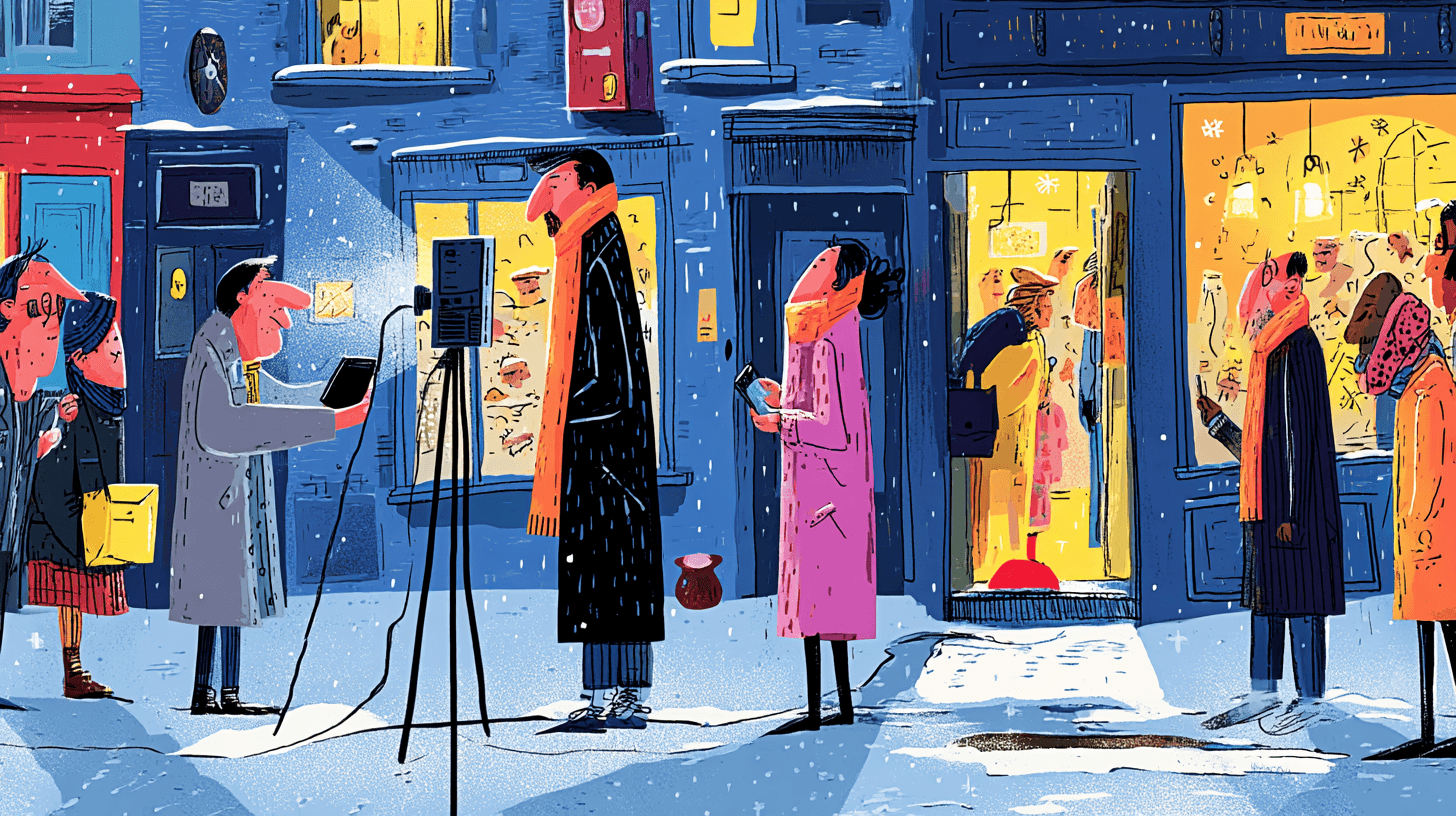
A new example from Turkish creator Ozan Sihay shows Higgsfield SHOTS turning a single candid photo of a grillmaster in front of a clock tower into a 3×3 board of nine coherent camera angles, all with stable pose, outfit, props, and background landmarks. Grillmaster shots example
Following up on earlier launches where SHOTS generated nine cinematic shots from one still Shots launch, this demo matters for creatives because it proves the system can keep key set details (like the tower and market street) locked across close‑ups, over‑the‑shoulders, and wides, which is exactly what you need for storyboards, product shoots, and character sheets. Shots autoprompt RT For filmmakers and advertisers, the takeaway is you can now get something close to a full coverage pack from a single well‑shot reference, without re‑prompting or re‑posing every angle.
Nine‑panel puppet prisoner grid shows how far multi‑angle character boards have come
ProperPrompter posted a 3×3 collage of a Muppet‑style old man in an orange prison jumpsuit, all inside the same tiny stone cell, with every shot—front, side, back, over‑the‑shoulder—keeping his face, costume, and environment perfectly locked. Locked-in puppet collage
Even without naming the underlying tool, the set looks like the output of modern SHOTS‑style systems: one production‑ready character, nine coverage angles, and a consistent set you could drop straight into a storyboard, pitch deck, or animatic. For storytellers and designers, it’s a nice proof that multi‑angle character boards are now a one‑prompt task instead of a day of manual posing and repainting.
🎙️ Seasonal voices & expressive lip‑sync
Voice packs and lip‑sync pipelines for festive campaigns and character work. Good for marketers, animators, and storytellers.
ElevenLabs rolls out Father Christmas voice pack for holiday campaigns
ElevenLabs has launched a "Father Christmas and Characters" voice collection aimed squarely at holiday storytelling, marketing spots, and festive content, bundled inside the Voice Library under the Handpicked section for quick use by teams. Collection announcement

The set covers warm Santa-style narrators plus whimsical creature and elf voices, and is pitched at creators, marketers, and storytellers who want seasonal reads without having to cast and record talent right now. Collection announcement ElevenLabs highlights that you can browse the broader library, customize voices, and share them across a team, making it easy for a studio or brand to standardize holiday sound across trailers, ads, audiobooks, or in‑app events. Library placement For AI creatives, this is a ready-made way to give December content a consistent, professional vocal identity without building a bespoke voice from scratch.
ImagineArt LipSync turns any photo into a talking character
ImagineArt has turned on LipSync, a tool that takes a single image plus a script or audio file and returns a talking character with synced mouth movement and expressive facial animation. Launch details

Under the hood it chains several high-end models—Kling 2.6, OmniHuman 1.5, Kling Avatar 2.0, Veo 3.1 (fast and full), Wan Speak and Infinite Talk—so the face, voice and motion are driven as one performance rather than a generic mouth flap. Launch details It supports multiple languages and vocal styles, which matters if you’re localizing seasonal campaigns or character shorts. For animators and marketers, this means you can start from a still character render or brand mascot and quickly produce talking heads for social clips, explainers, or holiday promos without going through a traditional animation pipeline.
OmniHuman 1.5 demo shows near-real singing from a still image
Creator tests with OmniHuman 1.5 inside ByteDance’s Dreamina app show how far expressive lip‑sync has come: a Seedream 4.5‑generated still of a girl at a piano is animated into a believable singing performance with strong facial emotion. OmniHuman analysis

In the shared workflow, the song is a real vocal track that was cleaned and tweaked so the model could better follow timing and articulation, and the result often feels like live footage until you stare at the hands, which still hit random keys, or notice occasional drift in the lip‑sync. OmniHuman analysis For filmmakers and music creators, it’s a good snapshot of the current trade‑offs: faces and emotional read are getting very convincing, but full-body performance—especially instrument interaction—still lags, so you’d frame tightly or cut around those weaknesses in a serious piece.
HAL2400’s fictional musician blends Suno vocals with Kling visuals
Japanese creator HAL2400 put out an entire "fictional musician" package—Hosono Kenji—where the song is composed by Suno, lyrics are human‑written, and the music video visuals are generated with Kling, then cut together as a full MV. Fictional musician credit For AI musicians and storytellers, this is a concrete example of an end‑to‑end stack: AI handles the vocal and instrumental performance plus moving imagery, while a human keeps control over narrative and lyrics. It shows how you can credit each component (lyrics, composition, direction, video generation) in a release while still shipping something that feels like a cohesive artist project, which is particularly relevant if you’re planning stylized or seasonal character bands and want to be clear about where AI sits in the process.
🔬 New controls for attributes, motion, and mocap
Fresh research drops: disentangled attribute control, motion‑centric image editing, and cross‑species motion retargeting. Mostly practical papers/demos for creatives.
Snap’s Omni-Attribute encoder disentangles identity, lighting, and style
Snap Research introduced Omni-Attribute, an open-vocabulary attribute encoder that separates visual concepts like identity, expression, lighting, and style into distinct representations rather than one tangled embedding, enabling creators to recombine attributes from multiple images (for example, keep one face but swap in another shot’s lighting and painterly style) with far more control and fewer artifacts paper video.

The model is trained on semantically linked image pairs using positive/negative attribute supervision plus a dual objective that balances generative fidelity with strong disentanglement, so "identity only" or "identity + style + lighting" recombinations stay coherent instead of drifting into visual noise analysis thread. For filmmakers, character artists, and brand designers, this points toward next‑gen tools where you can lock identity, relight scenes, or restyle costumes independently instead of prompt‑tweaking and praying the model doesn’t forget who your character is.
MotionEdit benchmarks motion-centric image editing with new MotionNFT training
The MotionEdit project reframes image editing around motion and interaction rather than static appearance, releasing a dataset of video-derived image pairs where subjects change actions (running, turning, picking up objects) while identity and scene stay fixed, plus a benchmark that shows current diffusion editors consistently struggle to edit motion while preserving structure project explainer ArXiv paper.

To close that gap, the authors propose MotionNFT, a post‑training method that aligns predicted motion flow between source, edited, and ground‑truth images, improving motion fidelity without destroying the model’s broader editing abilities, and they provide a rich gallery of examples on the project page for anyone building tools that need to change poses, gestures, or interactions without wrecking character or layout project page. For AI filmmakers, illustrators, and storyboard artists, this is a step toward editing "what the subject is doing" inside a frame with the same precision you currently have for color or style.
🧠 Reasoning modes for storytellers
LLM knobs that affect drafting and direction tone: extended thinking in ChatGPT 5.2 Pro and a breakdown of Opus 4.5’s spec‑trained alignment. Useful for writers and directors.
GPT-5.2 Pro adds Extended thinking mode for deeper reasoning
OpenAI has quietly added a Thinking time: Extended toggle to GPT‑5.2 Pro in ChatGPT, letting the model “think even longer than before” for a single response, following up on initial launch that centered on raw performance and pricing. extended thinking test This gives writers and directors a new knob: you can trade speed for more deliberate planning, structural tweaks, and alternative beats on complex scenes.
For AI creatives, this matters when you’re asking for multi-step work like episode arcs, branching narrative outlines, or nuanced rewrites where the default pass feels shallow. The early tester expects a noticeable difference in depth (“I have high expectations here”extended thinking test), so it’s worth A/B-ing Standard vs Extended on your own prompts and seeing where the extra latency actually buys you better story logic instead of more words.
Claude Opus 4.5 alignment shaped by spec training and hands-on researchers
A long breakdown of Claude Opus 4.5’s training gives a rare look at how Anthropic tunes its flagship model’s behavior, not just its scores. opus alignment analysis The post says Opus 4.5 is trained directly on a detailed "spec" describing what it means to be a good Claude, and that this spec influences the model’s self-concept rather than being used only as a reward signal.
It also claims alignment researchers stayed in the loop throughout training instead of handing things off to a separate finetuning team, adjusting data, rewards, and procedures “like a cook adjusting technique rather than rigidly following a recipe.”opus alignment analysis For storytellers, the promise is a model that holds tone instructions, ethical constraints, and long-form direction more consistently—useful when you’re asking for sensitive themes, character-driven dialogue, or multi-chapter plans where you don’t want the model to wander outside your brief.
🎁 Holiday drops, credits, and challenges
Active promos and contests relevant to makers; good time to stock up credits and try new stacks. Excludes model/paper news covered elsewhere.
Freepik #Freepik24AIDays Day 12 offers 50k credits to 100 AI creators
Freepik’s #Freepik24AIDays promo moved into Day 12 with a new challenge: 50,000 credits are up for grabs, split across 100 winners who share their best Freepik AI creation and submit it via a short form. Following Freepik contest on merch co‑creation, this round is pure output‑driven—no theme, just your strongest piece generated with Freepik AI tools. Day 12 explainer

To enter, you need to post your artwork on X tagging @Freepik and #Freepik24AIDays, then register the post in Freepik’s official entry form so it counts toward the 100‑winner pool. (Entry reminder, submission form) For working artists, motion designers, or social content teams already experimenting with Freepik Spaces or its image models, this is an easy way to stockpile credits ahead of 2026 client work while also stress‑testing what kind of pieces actually stand out in a large AI art contest.
Lovart launches $20k holiday challenge around Nano Banana Pro + Veo 3.1
Lovart kicked off a holiday creativity push with a $20,000 prize pool and a recommended stack built on Nano Banana Pro for images plus Veo 3.1 for video, positioning the platform as a home base for seasonal shorts and promos. Lovart holiday thread Instead of a narrow prompt brief, Lovart is framing this as an open holiday‑themed playground where you can mix image generation, character work, and Veo‑driven motion into anything from festive ads to narrative vignettes, then submit directly through their platform. For AI filmmakers, TikTok/Shorts creators, and illustrators wanting to level up into motion, it’s a good excuse to try the NB Pro + Veo workflow in a competitive setting where strong storytelling and style consistency are likely to matter as much as raw model quality.
⚖️ IP enforcement: Disney vs AI video
Moves from chatter to takedowns: Google removes AI videos with Disney IP after a formal notice, while licensing with Sora expands. For creators, expect stronger guardrails and platform filters.
Disney forces Google to pull AI videos with its IP from YouTube and Shorts
Disney has formally ordered Google to remove dozens of AI‑generated videos featuring Mickey Mouse, Deadpool, Star Wars and Simpsons characters, many made with its Veo video model, and Google has started taking them down across YouTube and Shorts Disney enforcement clip, as also summarized in Turkish creator channels Turkish overview.

Following initial C&D that tied this cease‑and‑desist to Disney’s separate $1B deal licensing 200+ characters into OpenAI’s Sora, creators now see a clear shift from permissive fan AI mashups toward tightly controlled, paid access to studio IP. For AI filmmakers, designers and meme‑makers, this signals three concrete changes: platform‑level filters and automated removals for unlicensed branded characters, contractual bans on using those characters for model training, and a future where a handful of “official” partners decide which tools are allowed to touch major franchises at all.
🗺️ Workflow boards & spaces for creators
Node‑based and brand‑system tooling to assemble pipelines fast. Mostly Freepik Spaces tests/feedback and brand kits tips; helpful for solo teams.
Freepik Spaces gets real-world stress test as end‑to‑end AI video board
Creator Kol Tregaskes runs a full pipeline in Freepik Spaces—Midjourney still → upscale → multiple new camera angles → animated clips—then stitches six outputs in CapCut and upscales with Topaz, effectively using Spaces as a node-based AI storyboard tool. spaces workflow test
The test surfaces concrete UX gaps important for filmmakers and designers: no way to chain generations into longer clips in one go, exports only one image from a group, connection ends can’t be dragged to new nodes, zooming makes node text tiny, and there’s no quick way to toggle nodes or use multiple prompts into a single tool. spaces workflow test He explicitly asks for features like video extension nodes, overlay/templates for signatures or watermarks, better shortcuts (e.g., merging selection and hand tools), and Topaz-style upscaling hooks so Spaces can become the central board where AI and traditional tools meet in one canvas. spaces workflow test
Pictory AI Brand Kits help solo teams keep video branding consistent
Pictory is pushing its Brand Kits feature as the way for creators to lock in logos, colors, and fonts once, then apply that system across all AI-generated videos from a single tab in the editor. brand kits tutorial You define a kit in the dashboard (logo upload, palette, fonts), then pick it in the Branding tab so every cut of a series keeps the same visual identity without manual re-styling each time, a big deal for small content teams and solo YouTubers.
The team also notes they’ve crossed 50M YouTube views—more than the population of greater Tokyo—which hints that these workflow helpers are being adopted at scale, not bolted onto an unused side panel. youtube milestone For designers and marketers, the practical takeaway is that Pictory is evolving from “AI turns script into a clip” toward a light brand system: you can standardize lower-thirds, title styles, and color schemes once so that experiments with AI narration or B‑roll don’t blow up your brand guidelines. brand kits guide
BytePlus Unwraps turns Seedream 4.5 prompts into reusable holiday boards
BytePlus opens its 12‑day "Unwraps" campaign with a Seedream 4.5 + Seedance demo that generates a joyful "ugly" Christmas sweater portrait, complete with the full natural‑language prompt printed on the card like a mini storyboard for other creators to reuse. holiday unwraps
The prompt block reads like a production brief—shot type, lighting, environment, and mood all spelled out—which effectively turns the campaign into a library of pre‑tested creative setups rather than just eye candy. For AI illustrators, ad designers, and social teams, these daily drops are less about the specific sweater and more about accumulating scene blueprints you can tweak (swap character, room, or brand cues) while keeping a proven compositional and lighting recipe driven by Seedream 4.5 and Seedance. holiday unwraps
While you're reading this, something just shipped.
New models, tools, and workflows drop daily. The creators who win are the ones who know first.
Last week: 47 releases tracked · 12 breaking changes flagged · 3 pricing drops caught