Google Gemini API pulls free access Jan 15 – preview SKUs retire Feb 17

Stay in the loop
Free daily newsletter & Telegram daily report
Executive Summary
Google’s Gemini API churn is hitting downstream creator apps in production: a builder says their free Gemini Canvas app “PORTAL” went dark after Google removed free API support for certain models on Jan 15; the evidence trail is release-notes screenshots rather than an in-app warning; the same notes list a Feb 17, 2026 support end for preview endpoints including gemini-2.5-flash-preview-09-25 plus imagen-4.0-*-preview-06-06, and claim gemini-2.5-flash-image-preview is already closed.
• OpenAI Codex limits: a UI shows a hard lockout until Jan 22, 2026 6:41 PM; prompts a switch to gpt-5.1-codex-mini as “cheaper, faster, but less capable.”
• Anthropic Claude: UI screenshot shows “Voice mode active” with ⌘V; rollout timing and platform coverage are implied, not confirmed.
• Creator economics: an AI anime MV spend is posted at ¥6,442, via Kling $25 + Nano Banana $13 credits.
Across tools, the theme is operational volatility: preview SKUs, rate limits, and UI-surface shifts are becoming the gating factor as much as model quality; independent confirmation of the Gemini deprecation scope is still thin beyond screenshots.
While you're reading this, something just shipped.
New models, tools, and workflows drop daily. The creators who win are the ones who know first.
Last week: 47 releases tracked · 12 breaking changes flagged · 3 pricing drops caught
Top links today
- Mixed Media on Higgsfield product page
- Tweeted article on AI plan pricing
- Niji 7 John Wick style example
- Nano Banana Pro luxury hero prompt
- In-person generative AI training signup
- Google API free tier removal update
- Tripo workflow for 3D to video
- Veo 3.1 on Lovart try now page
- LTX-2 workflow updates and additions
- Veo 3.1 4K and vertical breakdown
- Generative AI workshop registration link
- Pictory tutorials and resources hub
Feature Spotlight
Ultra-low-budget AI production pipelines: anime MV for ¥6,442 plus “research to prototype” loops
A creator shared a concrete cost breakdown for an AI anime MV (Kling + Nano Banana totaling ~¥6,442), reinforcing a repeatable “cheap clip factory” pattern when paired with prompt packs and lightweight post. In parallel, creators are normalizing agentic work loops (Deep Research → prototype build → polished comms) that compress pre-production and delivery.
Today’s highest-signal creator content was practical: a real spend breakdown for an AI anime MV, plus repeatable “research → build → deliver” agent workflows that shorten the time from idea to shippable output.
Jump to Ultra-low-budget AI production pipelines: anime MV for ¥6,442 plus “research to prototype” loops topicsTable of Contents
🧩 Ultra-low-budget AI production pipelines: anime MV for ¥6,442 plus “research to prototype” loops
Today’s highest-signal creator content was practical: a real spend breakdown for an AI anime MV, plus repeatable “research → build → deliver” agent workflows that shorten the time from idea to shippable output.
AI anime MV for ~¥6,442: buying small credit packs per tool
AI anime MV budgeting: A creator shared a real spend breakdown for an AI anime music video totaling about ¥6,442, driven by buying small credit blocks—Kling $25 (~¥3,975) plus Nano Banana $13 (~¥2,067)—as shown in the cost breakdown RT.
This is a concrete reference point for planning “one project at a time” production spending (credits per tool instead of a single large subscription), especially when your pipeline spans multiple generators.
A tight delivery loop: Deep Research report to prototype to final email
Gemini Deep Research + Copilot: A workflow loop was spelled out end-to-end: run Gemini Deep Research, step away, come back to a downloadable report, translate it into clear requirements for Copilot to build a prototype, test it, then ask Gemini to draft the final explanatory email—laid out in the step-by-step post with the “Start research” UI visible in the [research button screenshot](img:20|Start research button).
The notable pattern is treating AI as three different roles in one day: researcher, builder, and communicator, with the handoff points explicitly written down.
As visuals get easier, creators call out story as the limiting factor
AI filmmaking constraints: One creator summarizes a common production feeling: AI filmmaking has reached “more than the average,” but the bottleneck “still seems to be storytelling,” as stated in the storytelling bottleneck note.
This frames the competitive edge shifting from image/video generation access to planning, pacing, and scene intent (the parts that don’t auto-generate yet).
HyperPages generates a sourced article, images, and editable structure from a topic
HyperPages (Hyperbrowser): A new “research page builder” called HyperPages is shared as open source; it takes a topic, searches the web, gathers sources, generates structured sections, adds images, and formats the page with an interactive editor, according to the tool description.

The demo shows the core creative value: turning “research + outline + layout” into one pass you can then edit, rather than starting from a blank doc.
🧠 Prompts, style refs, and copy‑paste recipes (Midjourney srefs, Kling scene scripts, Nano Banana product shots)
The feed is heavy on immediately-usable prompts and Midjourney style references, spanning neon line art, luxury product photography, kids’ book doodle characters, retro cartoons, and cinematic emotional blocking for Kling.
Kling 2.6 prompt: emotional dawn bedroom scene with SFX cues
Kling 2.6 (Scene prompt): A detailed “cinematic blocking + sound design” script is shared for an emotional bedroom scene at dawn—static medium shot, slow push-in, visible micro-acting (tremble/tears), and specific audio cues (breathing, fabric squeeze, birds, minimal piano), as shown in the Prompt share clip.

Copy-paste prompt:
Neon minimal line-art prompt template (blue/pink on black)
Midjourney prompt pattern: A reusable “minimalistic line art” template is shared for clean abstract outlines with neon blue/pink edging on a solid black background—explicitly calling for no facial features, no texture, and “luminous simplicity,” as written in the Line art prompt share.
Copy-paste template:
Niji 7 prompt: Otomo-style neon-rain action (John Wick test)
Niji 7 (Midjourney): A concrete prompt example for “Katsuhiro Otomo’s anime style” action framing (rain, neon signage, gritty realism) is shared via ALT text, with multiple generated frames shown in the John Wick Otomo result.
Copy-paste prompt (from the shared ALT text):
Midjourney --sref 3145484278 for doodle kids’ book monsters
Midjourney (Style reference): A new --sref 3145484278 is being shared as a reliable “naïve children’s illustration / doodle cartoon” look with standout kawaii monster characters, per the Style reference notes.
Use it as a drop-in style anchor:
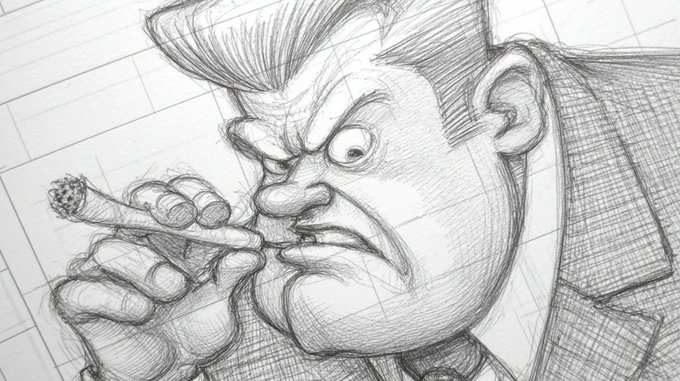
Midjourney --sref 4844497079 for caricatured crosshatch pencil sketches
Midjourney (Style reference): A “newly created” --sref 4844497079 is shared as a heavily stylized pencil sketch + crosshatching caricature look, with example heads/figures shown in the New sref samples.
Quick start:
Midjourney --sref 532902428 for flat 70s–90s TV cartoon frames
Midjourney (Style reference): --sref 532902428 is framed as a “classic TV cartoon vibe” style ref with 70s–90s European/American influences (Dexter’s Laboratory / Powerpuff Girls / Foster’s Home references), as described in the Vintage cartoon sref post.
A minimal starting prompt:
Midjourney --sref 647396184 for 80s–90s shojo anime vibes
Midjourney (Style reference): --sref 647396184 is being used for classic 80s–90s shojo anime aesthetics (Sailor Moon / Creamy Mami / Lady Oscar), as introduced in the Retro anime sref post; one creator also calls out animating the look with Grok Imagine in the Animation example clip.

A compact usage snippet:
Nano Banana Pro prompt for luxury product hero shots
Nano Banana Pro (Prompt recipe): A copy-paste product photography prompt is circulating for high-end “hero shots” with a dark velvet set, single top-down spotlight, thin mist haze, dramatic rim light, and an “85mm f/4” shallow DOF callout, as written in the Prompt share post and repeated in the Full prompt text.
Copy-paste:
🎬 Video creation & model access: Veo 3.1 “creator-ready” packaging continues via Lovart
Veo 3.1’s rollout continues through creator platforms, emphasizing sharper outputs (1080p/4K upscaling), improved reference consistency, and vertical support for Shorts/Reels production.
Lovart adds Veo 3.1 with 4K upscaling, vertical output, and Ingredients consistency
Lovart (Veo 3.1 / Google AI): Lovart says a Veo 3.1 upgrade is live in its product—calling out 1080p & 4K upscaling, improved ingredients-to-video consistency, and vertical format support, positioned as “sharper frames” and “smarter motion” in the feature list post; Lovart also runs a short-window promo where “10 lucky winners” get 500 credits if they like/repost/reply/follow within 12 hours, as described in the time-boxed giveaway and framed within the Lovart platform overview on its product page.

• Creator implication: the three knobs Lovart highlights map directly to Shorts/Reels deliverables (vertical), delivery quality (upscaling), and continuity (Ingredients), which is the practical pain point for short-form “series” work mentioned in the feature list post.
Creator discourse shifts toward “true AI UGC” as clip quality improves
AI UGC quality signal: A Kling repost claims “the era of TRUE AI UGC has started,” arguing that for a long time AI clips felt “sloppy, cheap and cringe” but now creators can make “high quality” work, as stated in the quality-shift repost. The evidence here is rhetorical (no side-by-side benchmarks in the tweet), but it’s a clean snapshot of how the creator conversation is moving: less “AI video is obviously fake,” more “production value is now the differentiator,” per the quality-shift repost.
🖼️ Image generation as finished deliverables: posters, ad layouts, and “cinéma” still packs
Creators are using image models less as “concept art” and more as final marketing assets—poster variants, multi-format banner ad sets, and cinematic still collections.
Nano Banana Pro used to mock up a full multi-size banner ad set
Nano Banana Pro: A single image is used as a full deliverable pack—multiple standard banner sizes (leaderboard, skyscraper, medium rectangle, etc.) are mocked up together, reframing the “Inception” concept as targeted ads in the Banner ad collage joke.
This is a concrete pattern for performance creative: one generation yields a multi-placement set, which is closer to what designers hand off to media teams than a standalone illustration.
Nano Banana Pro generates poster-ready key art variants for The Shining
Nano Banana Pro: A clean example of using an image model as final key art—two The Shining poster variants are presented side-by-side for an A/B pick (“Left or right?”) in the Poster variant poll, with the output reading as layout-ready (title lockup, negative space, consistent framing).
The practical takeaway is the deliverable format: generating multiple finished poster directions in one pass (or one brief) so the “design decision” becomes selection and minor tweaks, not re-composition from scratch.
“Pure cinéma” image packs keep emerging as a finished deliverable format
Cinematic still packs: A multi-image drop leans into “gallery as deliverable”—dark, high-production frames (e.g., skeletal regalia in rain, armored riders, ornate helmet portraits) are posted as a cohesive look set in the Pure cinéma stills.
This format matters because it treats AI images like a finished campaign “stills pack” (mood, casting, wardrobe, lighting continuity) rather than one-off generations.
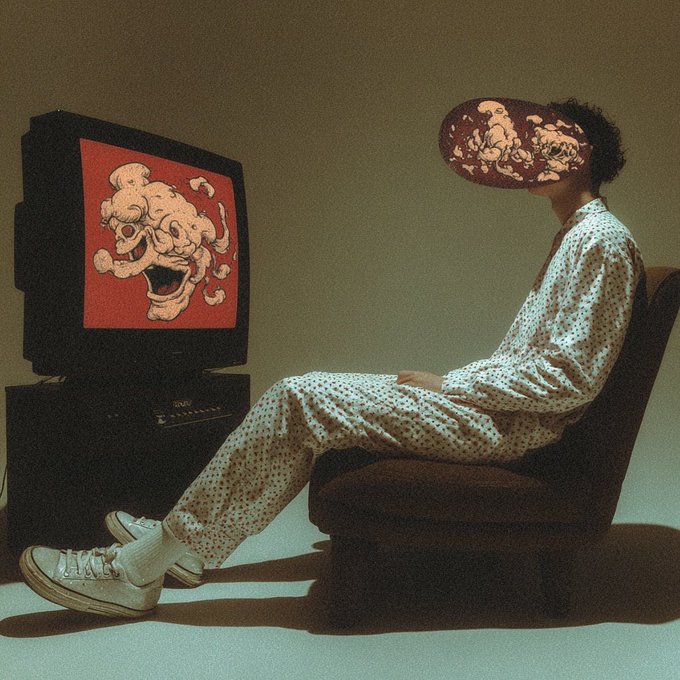
Conceptual “rectangles” photo set frames screen addiction as campaign imagery
Conceptual photo series: A 4-image set plays a consistent theme—screens/frames as literal rectangles separating people from life—in the Rectangles concept series.
This reads like finished editorial/campaign photography (consistent styling and motif across a set), not “concept art,” which is exactly the shift many creators are aiming for.
Neon wireframe ballerina becomes a repeatable “glowing mesh” still aesthetic
Glowing mesh stills: A neon, point-and-line ballerina render on a pure black background shows up as a polished, poster-like single frame in the Ballerina wireframe render.
As a finished-deliverable style, it’s notable for being inherently layout-friendly (high contrast, lots of negative space for type, strong silhouette).
🧊 3D-to-video control workflows: Tripo models as the continuity backbone
A clear control-oriented filmmaking pattern: generate or obtain a 3D asset, then use it as the stable “source of truth” for consistent, directable video outputs.
Tripo-to-video workflow: use a 3D model as the stable continuity backbone
Tripo + Kling (workflow pattern): A creator workflow is getting reframed around control—generate or obtain a 3D asset, then use that model as the “source of truth” for consistent outputs, with the core claim that pairing Tripo with Kling helps solve the directability gap in AI filmmaking, as described in the Tripo plus Kling workflow.

• Continuity backbone: The demo pattern is “wireframe spin → photoreal render,” reinforcing the idea that locking character geometry first reduces drift when you later animate or shot-build, as shown in the Tripo plus Kling workflow.
• Practical pipeline shape: The thread description points to a simple entry point—upload a character/model image into Tripo, then carry the resulting asset forward into a Kling animation workflow for repeatable shots, per the Tripo plus Kling workflow.
This is a control-first alternative to pure text-to-video iteration, even though the tweet doesn’t include granular settings or export formats yet.
🎙️ Voice interfaces for creators: Claude voice mode is imminent
Voice-first creation keeps moving upstream into core tools: Claude voice mode is shown as active in-product, with expectations it lands across desktop and mobile.
Claude UI shows “Voice mode active (⌘V)”, pointing to near-term voice rollout
Claude (Anthropic): A Claude UI screenshot shows “Voice mode active” with a ⌘V shortcut and a dedicated “Voice” control in the composer, as shared in the [voice mode screenshot](t:34|voice mode screenshot); the post frames this as “finally coming,” with hopes it lands on Claude desktop for both macOS and Windows as well as mobile clients, per the same [rollout speculation](t:34|rollout speculation). This is a meaningful shift for creators. Voice becomes a faster “director interface” for revisions and ideation.
The same thread also mentions “various widgets” arriving, according to the [widgets note](t:34|widgets note), suggesting the voice feature is part of a broader UI surface expansion rather than a one-off toggle.
🧰 Platforms & creator hubs: research page builders, design agents, and subscription spaces
Tooling is consolidating into “one surface” platforms: auto-research page builders, design-agent studios, and gated creator spaces bundling prompts and assets.
HyperPages auto-builds sourced research pages with images and an editor UI
HyperPages (built on Hyperbrowser): A new open-source “research page builder” generates a full article from a single topic prompt—pulling web sources, drafting structured sections, adding images, and leaving you in an interactive editor for cleanup and re-ordering, as described in the tool overview.
For creators, the practical hook is the “research-to-first-draft” surface: one place to collect citations and visuals before you rewrite into a script, treatment, or pitch deck, as shown in the tool overview.
Lovart adds Veo 3.1 upgrade with 4K upscaling, improved Ingredients consistency, and vertical
Lovart (Design agent hub): Lovart says Veo 3.1 is now upgraded inside its platform with 1080p and 4K upscaling, improved Ingredients-to-video consistency, and native vertical format support, per the upgrade bullets and availability post.
• Time-boxed credits promo: Lovart pairs the upgrade announcement with a “next 12 hours” giveaway of 500 credits to selected winners, as stated in the upgrade bullets.
Lovart’s own positioning stays “one surface” design workflow—see the Lovart product page for how it frames the hub.
Creators are reselling access to Freepik Space via $5/month X subscriptions
Freepik Space (creator access layer): A monetization pattern is showing up where creators sell “exclusive access” to a Freepik Space plus prompts/templates as part of an X subscription, with one example pricing it at $5/month in the subscription pitch.

This matters as a hub trend: platforms provide the workspace, while individuals package the “how to use it” (prompt packs, reusable grids, workflow assets) into a paid gate, as demonstrated in the subscription pitch.
🛠️ Reliability & deprecations: free Gemini API access removals break creator apps
A creator reports their free Gemini Canvas app stopped working after Google removed free API support for certain models, with release notes pointing to upcoming model retirements.
Google Gemini API free access removal breaks creator apps built on free endpoints
Gemini API (Google): A creator reports their free Gemini Canvas app “PORTAL” stopped working after Google removed free API support from certain models as of Jan 15, which they only discovered after getting “lots of messages” from users in the PORTAL outage report. This is an operational reliability hit for creators shipping hobby-to-production tools on “free preview” endpoints—suddenly the app is down, not degraded.
The same post points to Gemini API release notes (shown in the screenshot set) as the evidence trail behind the break, rather than an in-product warning in the creator’s app flow, per the PORTAL outage report.
Gemini API release notes flag Feb 17 retirements for multiple preview models
Gemini API (Google): A screenshot of the Gemini API release notes shared by a creator lists a support end date of Feb 17, 2026 for preview endpoints including gemini-2.5-flash-preview-09-25, imagen-4.0-generate-preview-06-06, and imagen-4.0-ultra-generate-preview-06-06, while also indicating gemini-2.5-flash-image-preview is already closed, as captured in the release notes screenshot. This matters to creative-tool builders because it’s a clear example of “preview SKU churn” landing on an app timeline.
The post connects these retirements to real downstream breakage (the PORTAL app), which is the practical consequence creators feel first, as described in the release notes screenshot.
Pattern: assume free preview endpoints can disappear and design a fallback
Reliability pattern: The PORTAL outage report frames a common failure mode for creator-built AI products—building on “free API support,” then getting surprised when it’s removed—using Google’s Jan 15 change as the concrete example in the PORTAL outage report. The implied resilience move is architectural (not prompt-level): separate your app’s UX from a single preview SKU so model swaps or billing transitions don’t equal downtime.
The same thread anchors this in official-ish artifacts (release notes screenshots listing dated retirements), which is the kind of change signal builders can monitor, per the PORTAL outage report.
🧑💻 Coding agents & orchestration: multi-model control dreams meet rate limits
Creator-devs are asking for a single UI to run multiple paid assistants (Gemini/Codex/Claude) with task management, while real usage screenshots highlight hard limits and model-switch nudges.
Codex hits usage limits and nudges users toward a cheaper codex-mini
Codex (OpenAI): A live UI screenshot shows hard throttling—“You’ve hit your usage limit… try again at Jan 22nd, 2026 6:41 PM”—plus a built-in suggestion to switch to gpt-5.1-codex-mini “for lower credit usage,” framed as “cheaper, faster, but less capable,” as captured in the Usage limit screenshot. This is the kind of friction that makes “single console” orchestration attractive. It also makes model-routing a cost-control problem, not just a quality problem.
The screenshot also shows an “Approaching rate limits” flow with options to switch models or suppress future reminders, as shown in the Usage limit screenshot.
Google Antigravity adds “Agent skills” support, echoing Anthropic’s skills idea
Google Antigravity (Google): Antigravity is now explicitly advertising “Agent skills” support—positioned as a portability layer for agent behaviors—per the Agent skills announcement. This is a concrete sign that “skills libraries” are becoming an expected surface in agent IDEs. Short sentence: it’s moving from concept to checkbox.
The post frames this as Anthropic’s skills standard “spreading,” as stated in the Agent skills announcement.
Demand spikes for a single “multi-agent control plane” across Gemini, Codex, Claude
Orchestration UI (Concept): A creator asks for “a multi agent app/repo with a user friendly UI” that can run “multiples of Gemini, Codex and Claude” from one place—explicitly wanting task management, skills, and sub-agents, even from a Raspberry Pi—per the Multi-agent UI request. Short sentence: this is a control-plane request.
The same thread context cites OpenAI’s “capability overhang” framing (adoption/agency as the limiter, not raw model quality), as summarized in the Capability overhang note.
A single-flag joke captures the permission bottleneck in agent workflows
Agent permissions (Workflow friction): A widely relatable ops-style quip asks for a flag like “--dangerously-skip-permissions-except-rm,” per the Permissions flag joke. Short sentence: people want fewer prompts.
The subtext is that current agent tools often interrupt long-running work with repetitive approval steps, and builders want a configurable safety boundary (auto-approve most actions, but guard destructive ones) rather than constant modal confirmations, as implied by the Permissions flag joke.
📉 Distribution & attention economics: ads, engagement loops, and signal-to-noise collapse
Creators are loudly reacting to declining feed quality and the ad/engagement economy around AI tools—ranging from “AGI = Ad Generated Income” jokes to fears that serious creation becomes paywalled.
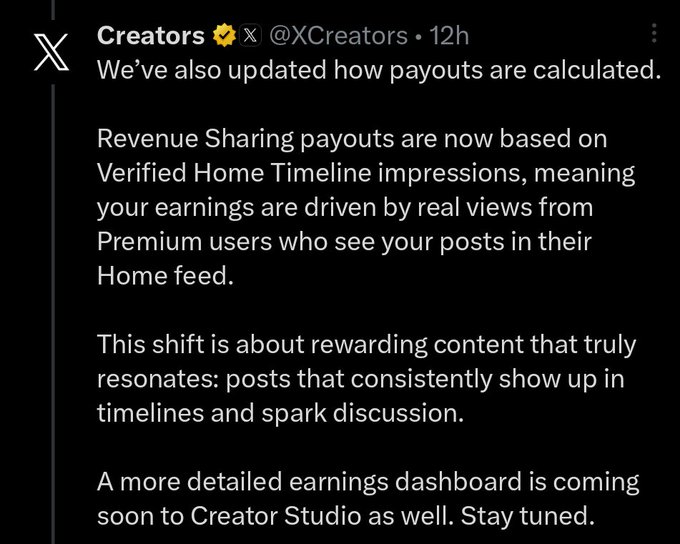
X changes creator payouts to Verified Home Timeline impressions
X Creators (X): X says revenue sharing payouts are now based on “Verified Home Timeline impressions,” emphasizing “real views from Premium users” and promising a more detailed earnings dashboard soon, as shown in the Creators program screenshot.
For AI creatives, this is a direct incentive tweak: it ties earnings more tightly to what Premium users see in their Home feed, which can push creators toward formats that spark replies and repeated resurfacing rather than slower, process-first posts.
Engagement-for-credits promos keep shaping AI-creator timelines
Giveaway mechanics: Two separate promos reinforce the same pattern—“retweet & reply & follow” as the exchange layer for AI tool credits. Higgsfield pushes an engagement-gated drop tied to “220 symbols,” per the Higgsfield promo, while Lovart runs a “next 12 hours” raffle for 10 winners of 500 credits each, as stated in the Lovart giveaway post and repeated in the Giveaway reminder.
• Platform impact: These campaigns are straightforward growth hacks, but they also contribute to feed dilution—more reposts of promos, fewer original tests—especially when the product carrot is meaningful free generation time, as implied by the Lovart project page.
Pricing anxiety grows: “$1000 AI plan” fear meets calls for a $20–$200 sweet spot
AI pricing sentiment: The post “The future could be scary if you cannot afford a $1000 AI plan” frames an access/power-user gap as a looming creative constraint, as argued in the 1000 plan fear. That sentiment is echoed (in a more constructive way) by creators polling for a “sweet spot” between $20 and $200/month and referencing rumors of an OpenAI mid-tier around $70–$80, as shown in the Mid-tier rumor screenshot.
The net signal: creators are treating subscription design as a workflow limiter (iteration speed, tool choice, experimentation), not a background detail.
AI UX satire about “unskippable ads per prompt” spreads as a paywall fear signal
Attention economy satire: A meme framing “Vibe coders in 2030” as having to watch “10 unskippable ads to type next prompt” encapsulates creator anxiety about ad-loaded AI interfaces and slower creative iteration loops, as shown in the Unskippable ads meme.
The joke lands because it ties two real creator pain points together: rising subscription costs and product teams experimenting with ads as the default monetization layer for free usage.
X incentive talk: creators list the formats they think the algo rewards
X incentive critique: A creator claims the current playbook is “one line sentences,” “images of girls,” and “creators not making their content but sharing others content,” inviting others to pile on in the What works on X.
This matters for AI creatives because it’s an explicit statement that platform incentives may be drifting away from craft signals (experiments, prompts, shot breakdowns) and toward lightweight engagement loops.
Creators keep flagging feed quality collapse on X
X distribution quality: A blunt “Signal to noise ratio is way off on here right now” points to ongoing frustration with discovery for serious AI creative work on X, per the Signal-to-noise gripe.
In practice, this kind of complaint usually correlates with more engagement-bait content winning distribution, while process-heavy threads (workflows, breakdowns) get buried.
The “$5,000 to never see ads” question captures attention monetization fatigue
Ads as a tax: The hypothetical “$5,000 dollars and you never see an ad as long as you live—would you pay it?” turns ad load into an explicit lifetime price tag, per the Ad-free hypothetical and the Poll with variants.
Even though it’s not AI-specific on its face, it’s showing up adjacent to AI creator chatter because creators increasingly experience ads, subscriptions, and engagement gating as one combined constraint on production and distribution.
“AGI = Ad Generated Income” shows up as the shorthand critique for AI monetization
Attention economy language: The line “AGI = Ad Generated Income” gets posted as a compact critique of where AI business models might drift—toward extracting attention rather than shipping creator value, per the AGI ad joke.
It’s not a product update, but it’s a useful read on creator sentiment: skepticism is increasingly about monetization mechanics, not model capability.
💳 Pricing, credits, and plan pressure: giveaways + the “missing middle tier” conversation
Alongside credit giveaways, creators are fixated on plan affordability—especially the gap between $20 “hobby” tiers and $1,000 “pro” tiers—and speculation about a mid-range OpenAI subscription.
Lovart rolls out Veo 3.1 upgrade with a 12-hour 500-credit giveaway
Lovart (Lovart): Lovart says the Veo 3.1 upgrade is live in its product, calling out 1080p & 4K upscaling, improved “ingredients-to-video” consistency, and vertical format support, alongside a 12-hour giveaway where 10 winners get 500 credits each, as described in the upgrade announcement and the giveaway reminder.
• What creators get: the pitch is sharper frames + better continuity + native vertical output (short-form friendly), all bundled into Lovart’s “design agent” positioning—see the product blurb for how they frame it as a multi-format design hub.
• Time box: entry mechanics are explicitly engagement-gated (like + repost + reply + follow) and framed as “next 12 hours,” per the promotion post.
The “missing middle tier” debate centers on a rumored $70–80 ChatGPT plan
ChatGPT pricing (OpenAI): A pricing thread frames $20–$200/month as the workable “sweet spot” for power users, while resurfacing a claim that OpenAI has discussed a new tier between Plus and Pro in the $70–$80/month range, as shown in the sweet spot prompt and the embedded mid-tier rumor screenshot.
The discussion is driven by creators trying to avoid the jump from hobby tiers to high-end plans while keeping enough capacity for heavy creative workloads (image/video iterations, long-context planning, and agent-style usage), per the pricing question.
Higgsfield gates a “Mixed Media” drop behind a 9-hour 220-symbol promo
Higgsfield (Higgsfield): Following up on Credit promo (engagement-for-credits offer), Higgsfield is again running a short window—“for 9 hours”—asking users to retweet/reply/follow in exchange for “220 symbols,” while also directing them to grab Mixed Media “exclusively on Higgsfield,” as stated in the promo post.
🏛️ Creator showcases: moody mega-structures, solitude studies, and cinematic still galleries
Named mini-series and themed galleries continue to be a high-performing format for AI creators: consistent art direction, repeated motifs, and “drop-style” publishing.
Pure cinéma: curated dark-fantasy still pack as a publishing unit
“Pure cinéma” (curated still pack): Azed’s multi-image drops continue the “gallery as a unit” pattern—here leaning into dark fantasy regalia, armored riders, ornate helmets, and rain-soaked close-ups, as established in the still gallery and echoed through follow-on posting in the repost.
What makes this format useful to other creators is the tight art direction: repeated materials (metal, bone, feathers), controlled palettes, and consistent depth-of-field across images—so the set reads like lookdev frames from one production rather than a grab bag, as seen in the still gallery.
The Dam: Niji 7 mega-structure mood set built from multiple --sref codes
The Dam (Niji 7): A cohesive mini-series of colossal, industrial “mega-structure over water” images is circulating as a repeatable gallery format; the creator explicitly frames it as Niji 7 + 3 style references, making it easy to reuse the look across multiple shots, as noted in the series caption and amplified via the repost.
The set’s consistency comes from repeating a few anchors—curved concrete/metal arcs, mist, tiny human scale figure, and teal/gray atmospherics—so it reads like one world rather than disconnected generations, as seen in the series caption.
Mysterious reflections: mirror-parallax shot as a micro-motif for AI clips
Mysterious reflections (shot motif): A short clip demonstrates a simple but strong visual idea—using a car side mirror to create perspective shifts and distortion as the mirror moves, per the short video.

It’s a compact motif that can be reused as an “identity reveal” or scene transition (reflection-first, world-second) without needing complex blocking, as shown in the short video.
Solitude series: single-figure underground booth as a repeatable motif
Solitude (themed still series): A new “Solitude” drop uses a single subject in a lit, glass-enclosed booth under the London Underground sign—an example of the “one motif, many variations” approach that performs well as a portfolio unit, per the series post.
The visual recipe is clear in the frame: one practical light source, heavy negative space, and recognizable signage for instant context—so future posts can iterate via location swaps, wardrobe swaps, or time-of-day changes while keeping the same signature composition, as shown in the series post.
📚 Story craft signals: adaptive movies, “AI as tool” framing, and the story bottleneck
Even with better generative video, creators keep circling the same constraint: story. The discussion is shifting toward audience-adaptive narratives and clearer mental models of AI as a creative instrument.
Speculation grows: movies that watch viewers and adapt pacing in real time
Adaptive storytelling: A thread argues that future films will “watch the audience and adapt themselves accordingly,” changing speed, clarity, and reiteration if the viewer seems bored, confused, or overwhelmed, as laid out in the Adaptive movie speculation.
The post frames this as a direct extension of what human storytellers already do live; it also riffs on contemporary platform pressures, pointing to a Hollywood Reporter item about Netflix wanting plots reiterated multiple times for phone-distracted viewers, as shown in the
.
AI filmmaking visuals feel “above average,” but story remains the bottleneck
Story craft signal: One creator sums up a sentiment that keeps resurfacing—AI filmmaking is now “above average” on the visuals, but the limiting factor is still writing and structure, as stated in the Story bottleneck note.
The practical implication is that tool progress (better motion, higher resolution, more consistency) isn’t automatically translating into more watchable shorts; the conversation is shifting toward pacing, scene intention, and what information the audience needs when (rather than what model to use).
Ben Affleck clip circulates: AI as a tool, human collaboration as the glue
Ben Affleck (industry framing): A widely shared clip is being used to push a “less black-and-white” stance: AI is framed as a creative tool, not “the creative,” while film sets still depend on human collaboration and mixed skillsets, as described in the Affleck framing thread.

A follow-on post explicitly says the value here is where the conversation needs to happen—trying to move discussions away from constant arguing and toward integrating AI into existing creative teams, per the Thread follow-up note.
“Win an Oscar WITH AI” vs “win an Oscar BY AI” becomes a north-star debate
AI authorship debate: One thread proposes a clean split in where serious AI film culture could go: “Oscar for movies made with AI” (AI as VFX/tooling) versus “Oscar for a film made by AI” (AI as the authorial intelligence), as argued in the Oscar framing post.
A reply sharpens the second path into a stronger claim—AI making work from an “artistically legitimate” perspective, like a non-human observer expressing what it sees in human life—per the Non-human art angle.
While you're reading this, something just shipped.
New models, tools, and workflows drop daily. The creators who win are the ones who know first.
Last week: 47 releases tracked · 12 breaking changes flagged · 3 pricing drops caught