Kling O1 unifies AI video editing and generation – 2.6 API at $0.35/5s

Stay in the loop
Free daily newsletter & Telegram daily report
Executive Summary
Kling’s video push leveled up today from “cool clips” to something closer to a real stack. O1 is now framed as a unified engine you keep reworking instead of a one‑off generator, while Runware exposes Kling VIDEO 2.6 as an audio‑native API at $0.35 per 5 seconds. Add Higgsfield’s SHOTS bundle—365 days of unlimited Kling 2.6 plus Nano Banana Pro at 67% off—and the economics for daily experimenting look very different from last week’s pay‑per‑shot mindset.
On the creative side, Kling is working hard to prove O1 can carry real stories, not just hero shots. WildPusa’s “A Wonderful World” short holds a consistent ship and world across multiple scenes, and fresh how‑tos show practical recipes: a 45° isometric mini‑city spun into a rotating 3D pass from one still, and 2.5 Turbo’s Start/End Frame trick turning a locked makeup portrait into a polished motion beat without wrecking the look.
The bigger pattern: audio and motion are collapsing into single passes, not tool salads. Runware’s endpoint returns sound‑designed shots in one call, and in parallel Adobe’s free Photoshop/Express/Acrobat tools inside ChatGPT turn chat itself into the control room where you rough in assets, then hand off layers for real finishing.
While you're reading this, something just shipped.
New models, tools, and workflows drop daily. The creators who win are the ones who know first.
Last week: 47 releases tracked · 12 breaking changes flagged · 3 pricing drops caught
Feature Spotlight
Audio‑native, unified AI video gets real
Kling O1 + 2.6 push AI video toward production: one engine to generate/edit/restyle/extend, and native audio–video co‑gen now available via API with clear, practical use cases and creator picks.
Today’s feeds center on Kling’s momentum for filmmakers: a unified engine (O1) plus native audio–video co‑generation (2.6 via API) and creator how‑tos. Excludes other video research and contact‑sheet agents covered below.
Jump to Audio‑native, unified AI video gets real topicsTable of Contents
🎬 Audio‑native, unified AI video gets real
Today’s feeds center on Kling’s momentum for filmmakers: a unified engine (O1) plus native audio–video co‑generation (2.6 via API) and creator how‑tos. Excludes other video research and contact‑sheet agents covered below.
Kling O1 pitches itself as a unified engine for video creation
Kling is positioning O1 as its “first unified video model,” a single engine that can generate, edit, restyle, and extend shots rather than forcing creators through separate tools for each task. Unified model promo

The promo reel shows O1 handling everything from character pieces to stylized environments, with in‑place restyling and shot extension that feel closer to Photoshop‑style layers than one‑off generations. For filmmakers and designers, this matters because it hints at a workflow where you keep iterating on the same shot—adding motion, changing look, or extending runtime—without losing continuity every time you touch the model.
Runware exposes Kling VIDEO 2.6 API with native audio–video output
Runware has turned Kling VIDEO 2.6 into an API‑only service priced from $0.35 per 5 seconds, letting teams script native audio–video co‑generation instead of driving a web UI. Runware launch Following up on native audio, which first put talking characters and ambience directly inside Kling clips, this moves 2.6 into real pipelines: product demos, promo spots, explainers, seated interviews, music performances, and atmospheric VFX sequences are all shown with visuals, dialogue, ambient sound, and effects produced in a single pass. Music and performance For small studios and tool builders, the point is: you can now hit one endpoint and get a finished, sound‑designed shot back, instead of stitching a silent video model, a TTS system, and an SFX bed together by hand.
‘A Wonderful World’ shows Kling O1 can carry a full short film
Creator WildPusa’s fully AI‑generated film “A Wonderful World” is being highlighted by Kling as a flagship example of what O1 can do when you push it beyond single clips into cohesive storytelling. Wonderful World case

The short leans on O1 for all visuals while maintaining a consistent ship, world, and aesthetic across multiple shots, which is the part long‑form storytellers care about most. For AI filmmakers, this is a signal that O1 isn’t just a flashy demo engine—it can sustain a look and mood long enough to make an emotionally coherent piece.
Higgsfield’s SHOTS bundle delivers unlimited Kling 2.6 plus Nano Banana Pro at 67% off
Higgsfield closed out its Holiday Sale with a SHOTS bundle that offers unlimited Kling 2.6 access plus 365 days of unlimited Nano Banana Pro, advertised at 67% off and sweetened with 249 free credits for people who like, reply, and retweet. Shots sale promo

SHOTS itself is pitched as “one image in, cinematic shots from every angle out,” giving creatives a way to generate fully consistent coverage while having cheap, always‑on access to Kling 2.6 for the moving pieces. For indie filmmakers and designers who were price‑sensitive on per‑clip billing, this kind of flat‑rate year‑long access changes the math on experimenting with audio‑native AI video every day.
Kling O1 tutorial turns a static mini city into a rotating 3D shot
Kling shared a concrete how‑to for using O1 to generate a 45° isometric miniature “New York” city scene and then rotate it in 3D via Image‑to‑Video, giving motion‑graphics vibes from a single prompt. Mini city tutorial

The prompt specifies PBR‑style materials, current weather baked into the scene, a clean background, and a bold “New York” title, then uses an image‑to‑video pass to orbit the camera around the mini city. For motion designers, this is a useful pattern: lock style and composition in one still, then treat O1 as a camera‑move generator rather than trying to describe the whole animation in one giant text prompt.
Kling 2.5 Turbo Start/End Frame used to polish a makeup look in motion
Kling is showing 2.5 Turbo’s Start and End Frame controls as a way to animate beauty shots: first generate a still with fantasy purple‑and‑yellow makeup, then script a short motion where the subject lifts her head into an overexposed glow and drops her gaze back to camera. Makeup walkthrough

For commercial and beauty creators, this demonstrates a practical recipe: lock lighting, pose, and wardrobe in the base image, then describe only subtle movements and lighting shifts in the video prompt so the model “finishes” the makeup on camera instead of hallucinating new looks every frame.
🧰 Photoshop/Express/Acrobat inside ChatGPT
Adobe brings core creative tools into ChatGPT so designers can iterate edits conversationally, then hand off to Ps Web with layers intact. Excludes Firefly unlimited promos and Kling feature news.
Adobe ships Photoshop, Express and Acrobat as free tools inside ChatGPT
Adobe is rolling out free integrations that let you call Photoshop, Acrobat, and Adobe Express directly from inside ChatGPT, so you can iterate on images, PDFs, and social assets conversationally and then hand off to Photoshop Web with layers intact. launch overview The UI shown in early screenshots includes background removal, creative looks (Glitch, Duotone), and brightness/contrast/color sliders, plus an "Open in Photoshop" handoff that preserves adjustment layers for deeper work.
A detailed creator breakdown says Photoshop in ChatGPT can blur or remove backgrounds, apply preset looks, tweak exposure via sliders, and accept drag‑and‑drop uploads, while Acrobat handles edits, merging, and quick PDF cleanups, and Express lets you browse templates and swap colors, text, and images for social posts and mockups without leaving the chat. feature explainer One power tip from an early user is that typing prompts starting with Adobe Photoshop, … reliably kicks off the right tool flow, which matters if you want to script repeatable edits or teach non‑technical teammates how to invoke it. Photoshop invocation tip A Turkish community post frames the move as Adobe helping ChatGPT “stay in the race,” highlighting how important this feels in the ongoing Gemini vs. GPT tooling battle for creatives. turkish commentary For designers, filmmakers, and marketers who already live in both Ps and ChatGPT, this effectively turns chat into a front‑end for quick comps and fixes, then a single click back into full‑fidelity Adobe apps for final polish.

📽️ Contact‑sheet prompting as direction
Agents now output multi‑angle, consistent frames from one upload—useful for lookbooks, coverage planning, and storyboards. Continues yesterday’s agent trend; excludes Kling feature items.
Glif’s Contact Sheet agent gains creative examples and a dedicated deep‑dive stream
Glif is doubling down on its Contact Sheet Prompting Agent that turns a single uploaded image into six consistent camera angles, pitching it as a director‑style tool for framing, lookbooks, and storyboards. agent explainer Following up on contact sheet agent which first introduced the multi‑angle NB Pro grid, the team is now sharing more polished demos, including a "Mullet Chicks" fashion sheet made live on stream, and hosting The AI Slop Review to walk through techniques and use‑cases. (follow-up demo, mullet chicks example, livestream details)


For AI creatives, this pushes contact sheets from a manual Photoshop layout into something closer to a virtual DP: one hero still becomes a package of matching coverage you can cut into motion, test crop ideas, or hand off as boards. The livestream focus on shot planning, contact‑sheet prompting, and agent workflows suggests this pattern is stabilizing into a reusable part of the toolkit rather than a one‑off gimmick, and it’s likely to spread into other NB Pro agents and verticals next.
JSON "Auto Cinematic 9‑Angle Grid" prompt standardizes contact‑sheet shot language
A new JSON prompt spec for Nano Banana Pro turns contact‑sheet prompting into a mini shot taxonomy, explicitly defining nine camera setups—Macro Close Up, Medium Shot, Over‑the‑Shoulder, Wide Shot, High Angle, Low Angle, Profile, Three‑Quarter, and Back—and requiring them in a labeled 3×3 grid. prompt spec The instructions force the model to treat an input image as ground truth for character, lighting, and grading, then infer full‑body look and environment while keeping identity locked and burning shot abbreviations (MCU, MS, OS, etc.) into each tile.
For directors, storyboard artists, and photographers testing compositions, this moves contact sheets from "nice collage" toward a repeatable pre‑vis tool: one reference portrait can yield a disciplined coverage pack matching real‑world camera language, which you can then map directly to lens choices or blocking in a live shoot.
🍌 NB Pro: advanced prompts & continuity
Power‑user prompts and workflow hygiene for Nano Banana Pro dominate today—identity‑safe character work, cinematic grids, and tips to avoid quality loss.
Flowith project shares Nano Banana Pro master prompt for realistic shoots
Ai_for_success responded to community requests by releasing their "master" Nano Banana Pro prompt, packaged inside a Flowith project that acts as a free alternative host for NB Pro with a canvas UI. Master prompt share They use Flowith’s boards to organize references, prompts, and results in one place, and claim this setup produces realistic, campaign‑ready imagery that outperforms other image models for lifestyle scenes and wardrobe detail. Wardrobe sample

For designers and marketers, the takeaway is that you can clone this Flowith board, study the full prompt engineering (camera, lighting, styling, pose constraints), and adapt it to your own brand decks—getting a repeatable NB Pro stack for lookbooks, ads, and UGC‑style shots without paying for another dedicated NB Pro host.
NB Pro 3×3 organ journey grid nails filmic continuity and shot variety
Following Techhalla’s earlier structured NB Pro workflows 4step workflow for consistent shots, today’s "Tiny Explorer" prompt pushes Nano Banana Pro into full storyboard territory: a 3×3 grid of cinematic frames where a miniaturized version of the subject traverses their own organs, all rendered as 90s Kodak 35mm film. Organ journey prompt Each tile has a tightly defined shot type (wide, medium, close‑up, POV, action), location (brain, eye, heart valve, lungs, stomach, intestines, kidney, bladder), and lighting recipe mixing natural light and harsh on‑camera flash.
For filmmakers and illustrators, the value is in how much continuity work the prompt does: it locks wardrobe across all nine frames, enforces visible grain, color cast, and analog imperfections, and even specifies emotional beats (awe, hazard, relief) tied to composition. You can drop in any portrait and get back a coherent, narrative grid that feels like contact sheets from a practical VFX shoot.
NB Pro football prompt auto‑picks club, kit, and celebration pose
Techhalla shared a multi‑phase Nano Banana Pro prompt that analyzes a person’s face, infers a plausible nationality, picks a matching top‑flight club, dresses them in the correct current home kit, and then stages one of four classic goal celebrations as a hyper‑real telephoto sports photo. Footballer prompt This is tuned for continuity and realism: sweat, grass stains, compressed long‑lens look, rim‑lit stadium lighting, and heavy crowd bokeh are all explicitly specified so creatives can one‑shot poster‑ready frames or social thumbnails.
For AI photographers and sports brands, this acts like a reusable blueprint: swap in any input face and NB Pro handles region inference, team choice, kit details (crest and sponsor), and emotional performance, so you focus on copy, layouts, and campaign context instead of micro‑prompting every detail.
NB Pro “Hero’s Journey” prompt auto‑maps a still into story beats
Wilfred Lee prototyped a Nano Banana Pro "Hero’s Journey" prompt that takes one base image, infers where that moment sits on the classic story arc, and then generates a sequence of new images matching the key narrative beats. Hero journey prompt The system starts from a single, richly composed portrait and expands it into a visual progression—call to adventure, trials, transformation, return—while keeping character identity and aesthetic continuity grounded in the original shot. Base image shot
For storytellers and concept artists, this is an early pattern for narrative automation: you supply one strong frame and a structural template, and NB Pro does the heavy lifting of staging variations across time, which you can then refine into animatics, comics, or episodic thumbnails.
NB Pro workflow tip: batch refs and edits before frame extraction
Halim Alrasihi shared a key Nano Banana Pro workflow hygiene tip: when working from contact sheets, you should apply all reference images and text edits in a single run before extracting a specific frame, instead of repeatedly editing the same still. NB Pro quality tip The guidance is simple but important—NB Pro quality tends to degrade with excessive per‑image edits, so minimizing edit passes per frame preserves sharpness and fidelity.
For anyone building fashion boards, character sheets, or angle grids, this nudges you to design prompts and references up front, commit them once, then cut your final frames, rather than iterating destructively on exported shots.
🎵 AI music videos in one prompt
Musicians get turnkey MV tools: narrative multi‑shot clips, lip‑sync singing, dance loops, and cover‑art loops—plus an image‑to‑video tutorial for strong prompts.
Pollo AI launches four one-prompt music video modes
Pollo AI rolled out a dedicated AI Music Video Generator with four preset modes that let musicians turn a song or prompt into a complete MV in one shot: Narrative (audio → auto storyline → multi‑shot video up to 90s), Singing (character lip‑sync across multiple scenes), Dance (12s dance clips from a text prompt), and Cover Art MV (looping visuals from lyrics). launch thread

The launch is aimed squarely at indie artists and creators who need quick visuals for tracks without editing skills: you upload audio or write a prompt, pick a mode, and get a ready‑to‑post clip with coherent shots and timing. A follow‑up post reiterates that all four modes are live and points to a single entry point to try them, reinforcing this as Pollo’s main creative surface rather than a side feature. mode overview To seed adoption, Pollo is running a promo where anyone who follows, reposts, and comments “AIMV” gets 123 free credits to test the generator on real releases or drafts. launch thread A separate CTA emphasizes that all four modes are available now, framing this as a turnkey way to convert new songs into narrative videos, performance clips, or looping cover art without leaving the app. cta post
Vidu Q2 drops detailed image‑to‑video prompt tutorial
Vidu AI released a ViduQ2 "Image to Video" tutorial that walks creators through how to write stronger prompts to animate still images into short clips, giving musicians and visual storytellers a clearer recipe for turning album art or character art into motion. tutorial video

The video shows a split‑screen view of a prompt being refined on the left while the generated animation plays on the right, focusing on practical phrasing—camera movement, atmosphere, and character actions—rather than vague style tags. That matters for music videos and visualizers where you often start from a single cover or concept art frame and need it to feel alive without breaking the original look. For AI‑native creatives already using ViduQ2 for portraits and stills, this tutorial effectively upgrades it into a more usable tool for lyric videos, looped hooks, and social snippets built from existing imagery rather than full storyboarded shoots.
🧩 Creator APIs, CLIs, and integrations
New endpoints and CLIs let teams wire creative workflows into apps. Excludes Kling 2.6 API (covered as the feature) and focuses on ecosystem tooling and claims.
Krea launches creator API with image, video, and style‑training endpoints
Krea is turning its creative tools into infrastructure, launching an API that lets teams generate images and video and even train custom styles via HTTP endpoints instead of only using the web app Krea API announcement.

Docs walk through token setup, popular models, and an interactive playground so you can test requests before wiring them into apps or pipelines API intro docs. A separate tutorial shows how to train LoRA‑style custom image aesthetics through the API, from preparing image sets to submitting a /styles/train job and then using the resulting style ID in generation calls style training guide. For AI creatives, this means you can standardize a house style once, then hit the same look across tools—whether that’s a site’s on‑the‑fly hero images, batch social assets, or in‑app art generators—without keeping everything manual in the UI.
New llama-cli adds multimodal and command-driven chat control
The maintainer of llama-cli dropped a new build that turns the tool into a more serious daily driver: it now supports multimodal inputs, has a cleaner TUI, and lets you steer conversations via slash‑style commands llama cli update. For creative coders and power users, this means you can script against local or remote LLMs from a terminal, pipe prompts from other tools, and quickly inspect images or mixed media without jumping into a browser UI—handy for batch prompt tests, asset tagging, or lightweight creative ideation loops right from the shell.
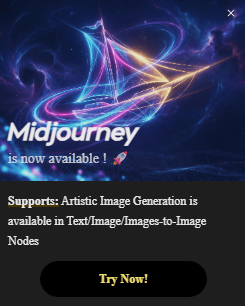
Kling Lab touts “Midjourney Demo” despite no public MJ API
Kling’s web Lab is advertising Nano Banana Pro, GPT‑Image‑1 and a “Midjourney Demo” node, complete with a pop‑up saying “Midjourney is now available!” and a Midjourney VIP selection inside a Text‑to‑Image block, even though Midjourney itself still has no official public API Kling Midjourney question.
For builders, this raises questions about what’s actually wired under the hood—whether Kling is proxying Discord interactions, mimicking MJ’s style with its own models, or using some private arrangement. Until there’s clarity, it’s a reminder to be careful about assuming third‑party “integrations” are first‑class or production‑safe when the underlying provider doesn’t offer a documented API.
🎨 Prompt packs and style refs for shooters
Fresh prompt recipes and style refs for product shots and editorial looks, plus instruction‑following sketch tests. Excludes NB Pro pipeline tips (covered above).
NB Pro turns image‑embedded directions into raven and Pikachu sketches
Fofr shows Nano Banana Pro can follow instructions that are inside an image—taking a screenshot card that says “follow instructions in the image to make a hand drawn raven sketch… just the final output on white” and returning exactly that: a clean black‑line raven on white. raven sketch test
A second card asks for a colorful Pikachu built out of the letters “pika pika pika!”, and NB Pro produces a yellow Pikachu silhouette whose body is formed entirely from repeating PIKA text. pikachu text art For prompt designers, this opens up a new format: you can ship prompt‑cards or moodboards with embedded written directions, and the model will read and act on those, which is very different from the usual plain‑text prompt box.
Studio product photography prompt template for premium DSLR‑style shots
Azed shares a flexible product photography prompt that creators can reuse across skincare, headphones, lipstick, sneakers, and more, spelling out studio setup, lighting, depth of field, and aesthetic in one block. prompt template
The pattern is: “studio shot of [PRODUCT], placed on a [background], surrounded by soft shadows and gradient background, high-key lighting, shallow depth of field, ultra-sharp focus… premium product photography… minimal aesthetic, subtle reflections,” which you can drop into any model that understands rich text prompts. For AI shooters, this acts like a mini lighting diagram in words—swap product and background, keep the rest, and you’ll get consistent, ad-ready imagery without reinventing the phrasing every time.
3×3 Joshua Tree album‑cover prompt gives a full shoot shot list
Azed posts a detailed 3×3 "album cover" prompt that turns any character description into a full Joshua Tree desert shoot, complete with shot list and sequencing. grid prompt
The prompt specifies nine frames: top row wide golden‑hour landscapes, a middle row of portraits and detail shots (boots, campfire guitar), and a bottom row of iconic poses including a high‑noon wide and a black‑and‑white sunglasses shot. For music photographers and poster designers, you can swap in your artist description and keep the structure, effectively storyboarding an entire campaign from one block of text.
Midjourney sref 1449457290 nails late‑80s/90s retro anime portraits
A new Midjourney style reference, --sref 1449457290, delivers late‑80s/90s OVA‑style anime portraits with detailed, semi‑realistic faces and an HD digital finish. style reference
The sample sheet shows multiple female characters rendered like classic OVAs—big expressive eyes, jewelry and fabrics sharply rendered, and backgrounds that feel like painted cels. For character designers and cover artists, this sref gives you a fast way to lock into a specific retro anime lane without manually steering style in every prompt.
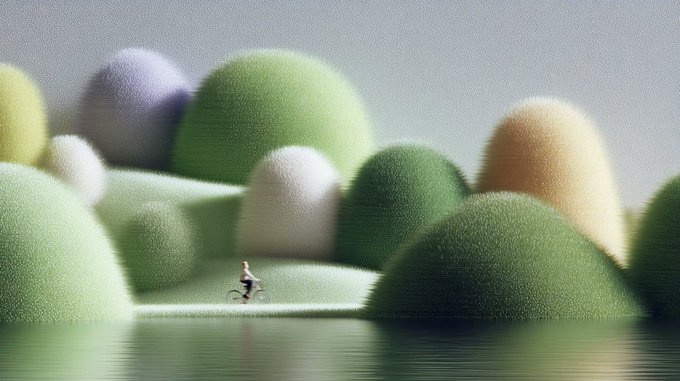
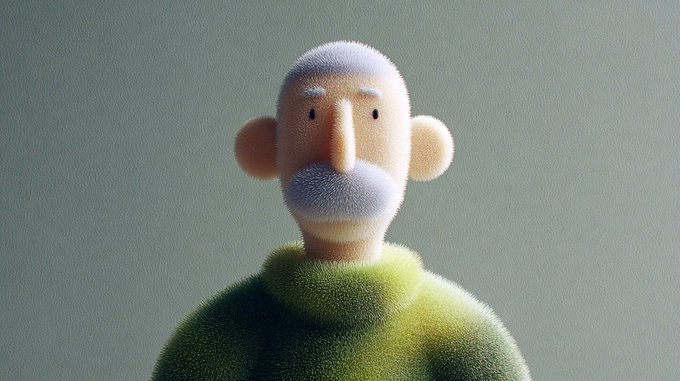
New Midjourney sref 7059676107 creates fuzzy, tactile 3D characters
Midjourney’s new --sref 7059676107 style builds a world of fuzzy, bristled characters and environments that look halfway between plush toys and stylized 3D renders. style lookbook
The examples range from mossy, dome‑shaped hills to a mustachioed bust and a horned blob creature, all sharing dense micro‑fibers and soft lighting. This is a ready‑made look for brand mascots, toy explorations, or kid‑friendly key art when you want tactile texture without writing a long material description every time.
🧪 Video coherence, motion control, and cleanup
Mostly lab‑driven advances today: multi‑shot memory, reflection removal, Gaussian splatting world models, dynamic scene recon, and point‑level motion control.
Meta’s OneStory tackles coherent multi‑shot video with adaptive memory
Meta is previewing OneStory, a research system for coherent multi‑shot video generation that uses adaptive memory to keep characters, styling, and scene state consistent across a sequence of shots rather than in a single clip. paper thread For filmmakers experimenting with AI storyboards, this moves closer to "same actor, different angles" instead of today’s disjointed, one‑off shots.

The attached paper positions adaptive memory as a way to carry over narrative context between shots so a character’s outfit, lighting, and staging evolve plausibly over time, instead of resetting every generation. project paper For AI directors and previs artists, the big implication is fewer hacks with manual reference boards or cut‑and‑paste compositing to fake continuity; you can start thinking in scenes and coverage rather than in single prompts.
Diffusion‑based reflection removal cleans window shots for filmmakers
A new method, "Reflection Removal through Efficient Adaptation of Diffusion Transformers," shows convincing before/after clips of in‑flight window shots with cabin reflections stripped out while preserving the outside view. method teaser For travel, doc, and run‑and‑gun creators, this targets a classic headache: glass reflections ruining an otherwise great plate.

The authors fine‑tune diffusion transformers for reflection suppression rather than full image synthesis, giving a controllable cleanup tool that looks far less destructive than brute‑force inpainting. ArXiv paper A companion web app wraps the technique into a usable tool, so you can upload your own window or storefront footage and test it today without touching code. (reflection app, demo app) If it holds up off‑demo, this could slot into color/cleanup passes right after denoising or stabilization.
Visionary debuts WebGPU Gaussian‑splatting world model carrier
The Visionary project is pitching itself as a "world model carrier" built on WebGPU‑powered Gaussian splatting, with a long demo showing smooth camera motion through richly reconstructed scenes in the browser. project overview For directors, game artists, and previs teams, this hints at interactive, scene‑aware spaces where you can scout angles and motion paths directly from learned 3D representations.

Running on WebGPU means the heavy splat rendering and navigation happen client‑side, turning a standard browser into a lightweight viewer for dense, photoreal 3D point clouds. project page That lowers the friction to share environments with collaborators—think sending a link instead of shipping EXR sequences—while still giving enough fidelity to block shots, plan dolly moves, or design VFX interactions around real geometry and parallax.
Wan‑Move motion control spreads to ComfyUI and tops HF Daily Papers
Wan‑Move, Alibaba’s point‑level motion control add‑on for Wan image‑to‑video, is moving from paper to practice: it’s now available as a ComfyUI integration, ComfyUI note has hit #1 on Hugging Face Daily Papers, hf ranking and arrives with a detailed production‑oriented breakdown of what its trajectory brushes can do. feature rundown For creators following Wan Move, this is the next step from "cool research" to something you can slot into real pipelines.

The blog summary highlights per‑point trajectory editing, multi‑object control, and camera motion specification, all while matching Kling 1.5 Pro‑level visual quality in 5‑second, 480p clips. motion blog Combined with ComfyUI’s node graph, that means you can sketch exact paths—hands, props, camera arcs—rather than gambling on prompt‑only motion, giving independent filmmakers and motion designers much tighter control over how AI‑generated shots actually move.
D4RT proposes efficient dynamic scene reconstruction for moving shots
The D4RT paper, "Efficiently Reconstructing Dynamic Scenes One D4RT at a Time," showcases animations where moving scenes are reconstructed into temporally consistent 3D, rather than treating each frame independently. paper overview For AI cinematography and virtual production, that opens the door to turning messy handheld clips with motion into usable 3D sets for later camera work.

D4RT’s focus is efficiency: the demos suggest smooth motion and coherent geometry without the heavy artifacts you often see when static NeRF‑style methods try to handle moving subjects. project page In practice this could mean: shoot quick reference video on location, reconstruct a dynamic scene, then re‑light, re‑frame, or insert CG elements inside that reconstructed space while preserving real‑world motion cues.
📊 Factuality scoreboard for working models
DeepMind + Kaggle’s FACTS suite arrives with a public leaderboard so teams can judge factual accuracy across Parametric/Search/Multimodal/Grounding. Useful for tool choice.
DeepMind’s FACTS benchmark crowns Gemini 3 Pro on factual accuracy
Google DeepMind and Kaggle launched the FACTS Benchmark Suite to systematically score LLM factual accuracy across four settings—Parametric, Search, Multimodal, and Grounding—on 3,513 examples, with a public leaderboard creators can track. FACTS overview
On the first board, Gemini 3 Pro leads with a 68.8% overall FACTS Score, including 76.4% on Parametric (internal knowledge) and 83.8% on Search, edging out both Gemini 2.5 Pro (62.1% overall) and a GPT‑5 entry (61.8%) on most dimensions. FACTS overview Multimodal factuality is still the weak spot for everyone—no model breaks 50% there, and all remain under 70%—so image‑plus‑text storytelling or product explainer workflows still need human fact‑checks. For working teams choosing a "default" model, the leaderboard gives a concrete way to route research‑heavy tasks toward Gemini 3 Pro while recognizing that high‑stakes visual Q&A and grounding still demand careful prompting and editorial oversight.
🗣️ Realism shock and AI‑native social
Creators react to hyper‑real video and test agentic social layers. Discourse centers on authenticity, identity, and where AI fits in creative culture.
Creator’s “social media is cooked” post spotlights near-indistinguishable AI video
A popular AI creator says they “cannot believe how good this is” after sharing what they call the most realistic AI video they’ve ever made, arguing that by next year people won’t be able to reliably tell AI clips from real ones on social platforms. creator reaction Following the NB Pro “nothing is real” meme about casual photoreal imagery photoreal meme, this escalates concern for filmmakers and influencers who rely on viewers trusting what they see.

For AI-native storytellers this is both an opportunity and a warning: hyper-real style is now accessible to solo creators, but the line between cinematic fiction, sponsored content, and outright deepfakes will get thinner, so being explicit about process and disclosure will matter more for long-term audience trust.
Second Me pitches AI identities that pre‑chat to find deeper human matches
Second Me lays out an “AI-native social” model where you create an AI version of yourself that talks to other people’s AI identities first, screens for personality-level matches, and then hands conversations over to the humans once there’s rapport. feature thread The team stresses every profile maps to a real person (“no AI girlfriends, no fake accounts”) so the AI acts as a social buffer and icebreaker rather than a replacement. real people focus

For creatives and storytellers this hints at a future where your “character sheet” is semi-autonomous: agents learn your taste, language, and boundaries, then network on your behalf, potentially reshaping how collaborations, fandoms, and even cast/crew hiring happen online.
AI avatar “Flamethrower Girl” temporarily takes over creator’s channel and beats his shorts
TheoMediaAI shares a full breakdown of how an AI avatar (“Flamethrower Girl”) effectively “took over” his channel for a test run, walking through avatar creation, a three‑avatar shootout, and performance metrics across three social platforms. avatar tutorial In the follow‑up he notes the AI character’s shorts outperformed his own, raising real questions about how much audiences prioritize personality continuity versus literal human presence. shootout results For video creators this is a live experiment in identity: you can now split yourself into stylized on‑screen personas that you direct off‑camera, but you also risk training your audience to bond more with a character than with you, which has implications for long‑term brand and parasocial dynamics.
Apob leans into consistent AI characters as the new influencer trust layer
Apob positions its tooling as having “solved” the hardest part of AI influencers—keeping a face and identity perfectly consistent across content—arguing that “consistent character = trust = sales” and that the barrier to launching virtual brands is now effectively zero. influencer pitch In a separate highlighted creator workflow, Apob is used to train a digital twin and swap faces into trending videos, all driven by prompts rather than live shoots. training explainer

For marketers and storytellers this reframes authenticity: brand‑safe, evergreen characters can front campaigns without fatigue or schedule conflicts, but the real contest becomes whose synthetic persona audiences emotionally invest in, and whether you disclose the human, if any, behind the mask.
Veteran artists frame AI as the latest tool in a long creative continuum
A 25‑year 3D veteran reminds followers that Photoshop and 3D were once dismissed as “not real art,” yet are now ubiquitous, arguing AI is following the same path and “the debate is over” in production contexts. 3d veteran quote Filmmaker Diesol echoes this, saying his career has been about finding new ways to tell stories and that every tech wave—from practical to digital to AI—exists to get him back to his “happy place: making things and telling stories with people.”filmmaker reflection
Together with takes like “the greatest artistic talent is abstract thinking… tools are secondary,”abstract thinking comment the mood among many working creatives is pragmatic: AI is another production layer to master, not a replacement for taste, collaboration, or authorship.
Artists revisit old nightmare imagery with NB Pro to match what’s in their head
Artist Chris Fryant compares one of his earliest Photoshop pieces—an endless, undulating pattern of fingers from a sleep-paralysis vision—to a new Nano Banana Pro render that finally matches how the hallucination actually felt. old vs new art He urges other artists with pre‑AI work to feed their old concepts through modern models to get closer to the mental image they had years ago.
For illustrators, concept artists, and horror filmmakers, this is a practical pattern: AI isn’t only for new prompts, it’s also a way to “remaster” your own back catalog of ideas into more faithful, production-ready imagery that would have been prohibitively hard to paint or render by hand.
👀 Rumors, teasers, and sightings
Chatter spikes around possible drops and IDE sightings. This section tracks what builders are seeing—not confirmations. Excludes benchmark results, which are covered separately.
GPT‑5.2 shows up as “latest flagship” in Cursor tooltips, but most users still can’t run it
Cursor is now surfacing a tooltip for a model labeled “GPT‑5.2 – OpenAI’s latest flagship model” with a 272k context window and "medium reasoning effort," even though the model itself isn’t available in the picker yet cursor tooltip. Following up on gpt-5-2 rumors about unannounced streams and placeholder IDs, this is the first time builders are seeing a concrete product string and context size leak inside a mainstream coding IDE rather than on a leaderboard or rumor screenshot.

Some devs report they still don’t see GPT‑5.2 in their Cursor accounts, which suggests either a staged rollout, internal testing toggle, or a premature UI push rather than a full launch cursor rollout comment. The community is already treating it as half‑real, half‑mythical: one meme clip has “GPT‑5.2” failing spectacularly after users have been trying Gemini 3 for weeks, capturing a mix of hype and skepticism about whether this will truly leapfrog Google’s latest release speculation. For AI creatives and coders, the practical takeaway is that a higher‑context flagship appears close enough that tools are wiring in labels and help text, but there’s still zero official word from OpenAI on capabilities, pricing, or when you’ll actually be able to route workloads to it.
Runway teases “5 things” announcement for tomorrow, sparking Gen‑4.5 model speculation
Runway posted a minimalist teaser promising “5 things. Tomorrow 12pm ET.”, with no further details on whether this refers to features, models, pricing or templates runway teaser. Turkish creators are already reading it as “five new features from Runway tomorrow,” with at least one guessing that one of them will be a Runway 4.5‑class video model update on top of smaller UX or workflow changes speculation thread.
For filmmakers and motion designers, this kind of pre‑announcement matters because Runway’s bigger jumps tend to change what’s viable on a laptop in a weekend—Gen‑2 and 3 both reshaped the short‑form AI video landscape. The teaser format also tells you something about their confidence: you don’t trail a specific time slot and count (“5 things”) unless you think the package hangs together as a story. If you rely on Runway in your stack, tomorrow is worth blocking off; if not, it’s still a good moment to compare where their generative video feels headed next to Kling, Veo, and the open‑source Wan stack.
Report suggests DeepSeek v4 could arrive around Lunar New Year 2026, but founder resists hard deadline
A new report says some DeepSeek employees are hoping to roll out the next‑generation model—informally called DeepSeek v4—by the Lunar New Year holiday in mid‑February, while founder Liang Wenfeng is reportedly prioritizing performance over schedule and hasn’t set a firm launch date deepseek rumor news article. That combination (internal target, external caution) usually means the model is in late‑stage training or eval, but leadership doesn’t want to repeat the pattern of announcing before they’re clearly ahead.
For creatives and engineers who’ve started treating DeepSeek as a serious alternative to US labs, the rumor points to a rough window to watch for new multimodal or coding capabilities without over‑committing roadmaps around a specific day. The article’s framing—employees pushing for a festive debut, founder resisting pressure—also signals that they see quality and benchmarks as core to brand, not just low‑cost access. Until there’s harder data, this sits firmly in the “plan around February, don’t promise clients February” bucket, but it’s enough to keep DeepSeek in the mental shortlist when you think about 2026 model rotations.
🎁 Credits, contests, and holiday drops
Plenty of limited‑time perks for creators today: unlimited trials, cash prizes, hackathons, and seasonal blueprints. Excludes Higgsfield’s bundle (covered in the feature).
ElevenLabs kicks off one-night worldwide conversational agents hackathon
ElevenLabs is running what it calls its biggest in-person hackathon yet, focused on building the “future of conversational agents” in a single night across 33 cities. More than 4,000 people applied and 1,300 were accepted, with 121 judges on deck and a dedicated @ElevenLabsDevs feed sharing updates from hubs like Auckland as teams get three hours to prototype voice-driven agents and experiences. Hackathon kickoff
OpenArt pairs unlimited Seedream 4.5 with cash and credit contests
OpenArt is turning Seedream 4.5 into a holiday playground: two time-boxed unlimited passes plus stacked prizes for both images and video. Building on its role as a near-real campaign workhorse Seedream prompts, OpenArt now offers Wonder (2 weeks of unlimited Seedream 4.5) and Infinite (1 week unlimited) alongside a contest where five creators can win 20,000 credits each, and is simultaneously running a 10-day #OpenArtViralVideo challenge with 6,000 dollars in cash rewards and a Wonder plan, giving every entrant one free Magic Effects video to get started. Seedream unlimited thread

Bolt and MiniMax announce VIBE HACKERS online hackathon with up to $10K
MiniMax and Bolt are teaming up for VIBE HACKERS, a 2‑day online hackathon where builders ship apps or sites powered by Bolt and MiniMax text models for a cash pool that can grow to 10,000 dollars. The prize pot starts at 2,000 dollars split across six categories (50% for first, 20% for second, 10% for third, plus awards for social views, judges’ pick, and fan favorite), with participants also getting a 75% Bolt discount and MiniMax credits while collaborating over Discord from December 13–15. Hackathon details
Freepik 24AIDays Day 9 offers 1:1 session with design tools lead
Freepik’s 24AIDays promo shifts from credits to mentorship on Day 9, putting a single winner in a private session with the company’s Head of Design Tools. Following earlier drops of bulk credit packs and prize trips Week 2 prizes, today’s challenge asks creators to post their best Freepik AI work, tag the account, use #Freepik24AIDays, and submit the post via a form to enter for the one-off consultation slot. Day 9 announcement

Leonardo drops 20+ Holiday Blueprints including bauble pet portraits
Leonardo is leaning into seasonal content with more than 20 Holiday Blueprints that can auto-style frames into on-theme cards, portraits, and scenes. One standout is the Bauble Macro Portrait Blueprint, used in their “down under” pet portrait examples, and the team is inviting creators to riff on the sets and debate which animal wears the ornament look best. Holiday blueprint teaser

Pollo AI’s music video generator launch comes with 123 free credits
Pollo AI rolled out an AI Music Video Generator covering four modes—Narrative, Singing, Dance, and Cover Art loops—and is seeding usage with a small credit drop. Creators who follow, repost, and comment “AIMV” can claim 123 free credits to experiment with up to 90‑second narrative MVs, lip‑synced performances, short dance clips, or looping cover art visuals from lyrics. Music video launch
DORLABS extends free trial to 1,000 more users and 30% discount window
Following stronger-than-expected demand, DORLABS is widening access to its AI creative tooling by adding 1,000 extra spots to its free trial and extending a 30% discount for another 24 hours. At the same time it is opening applications for a Creator Partnership Program, which offers pro or premium access tiers in exchange for showcasing DORLABS in public posts, giving early adopters both cheaper access and a way to earn from promotion. Trial and CPP update
ImagineArt launches mobile app with concurrent holiday deals
ImagineArt has released a mobile app and is pairing the launch with unspecified but “pretty good” promotional offers, giving AI image creators another on-the-go option during the holiday promo wave. Details on pricing and limits are light, but the timing suggests the app is meant to slot into the same seasonal discount window as existing ImagineArt web offers for people experimenting with AI visuals on phones. Mobile app mention
While you're reading this, something just shipped.
New models, tools, and workflows drop daily. The creators who win are the ones who know first.
Last week: 47 releases tracked · 12 breaking changes flagged · 3 pricing drops caught