Google Gemini 3 Flash undercuts Pro 4× – 3× faster multimodal runs

Stay in the loop
Free daily newsletter & Telegram daily report
Executive Summary
Google flipped the switch on Gemini 3 Flash today, and it’s quietly a big deal for anyone paying their own API bill. The new "Fast" brain across Gemini surfaces runs roughly 3× faster than Gemini 2.5 Pro and comes in at about a quarter of Gemini 3 Pro’s price: $0.50 per 1M input tokens, $3 per 1M output, plus $1 for audio. Benchmarks put Gemini 3 Flash (Reasoning) wedged between Gemini 3 Pro Preview and Claude Opus 4.5, so the headline is simple: near‑Pro quality at a 4× discount.
Google’s infra story backs that up. Context caching can shave up to 90% off repeated context, and the Batch API promises around 50% savings on async jobs like bulk script analysis or image review. Flash is already wired into the Gemini app (Fast mode), Search’s AI Mode, AI Studio, Vertex AI, Gemini Enterprise, the Gemini CLI, Android Studio, and Antigravity IDE, plus it’s now selectable in Perplexity alongside GPT‑5.2 and Opus 4.5. Creators are calling it their mobile daily driver because the latency finally matches constant checking, outlining, and sketching.
The pattern is clear: Pro‑class models are becoming the "weekend deep work" tools, while cheaper, fast variants like Gemini 3 Flash take over the every‑hour storyboarding, copy, and UX iteration loops
While you're reading this, something just shipped.
New models, tools, and workflows drop daily. The creators who win are the ones who know first.
Last week: 47 releases tracked · 12 breaking changes flagged · 3 pricing drops caught
Top links today
- Wan 2.6 video generation on Higgsfield
- Wan 2.6 official Higgsfield announcement
- WAN 2.6 text-to-video on GMI Cloud
- Trellis 2 image-to-3D on fal.ai
- ElevenLabs Agents WhatsApp integration guide
- Producer Spaces interactive creative environments
- FLUX.2 Max image generation in LTX
- GPT Image 1.5 free on Hailuo
- Lovart Slides AI presentation builder
- Techhalla roundup of 11 free AI resources
- MiniMax VTP visual tokenizer GitHub repository
- TurboDiffusion fast video diffusion paper
- WorldPlay real-time world modeling paper
- HunyuanWorld 1.5 real-time world model breakdown
- Gemini 3 Flash overview and demos
Feature Spotlight
Gemini 3 Flash day for creators (feature)
Gemini 3 Flash rolls out across app, IDEs, and partner tools—3× faster, $0.50/M input, $3/M output—with creators reporting snappy mobile use and easy model picks. A practical latency/cost win for daily creative work.
Cross‑account rollout of Google’s fast, low‑cost model with clear UX in the app and tooling. For creatives: quicker ideation, screen context, and cheaper multimodal runs show up across assistants and dev stacks today.
Jump to Gemini 3 Flash day for creators (feature) topicsTable of Contents
⚡ Gemini 3 Flash day for creators (feature)
Cross‑account rollout of Google’s fast, low‑cost model with clear UX in the app and tooling. For creatives: quicker ideation, screen context, and cheaper multimodal runs show up across assistants and dev stacks today.
Google launches Gemini 3 Flash: 3× faster, quarter‑cost creative workhorse
Google rolled out Gemini 3 Flash, a fast, low‑cost multimodal model positioned as the new default "Fast" brain across Gemini surfaces, priced at $0.50 per 1M input tokens (text/image/video), $1 for audio, and $3 per 1M output tokens including "thinking"—around a quarter of Gemini 3 Pro’s cost pricing thread. It benchmarks at 90.4% on GPQA Diamond and 78% on SWE‑bench Verified while running roughly 3× faster than Gemini 2.5 Pro, and it uses ~30% fewer tokens for the same tasks, which matters when you’re iterating long prompts and scripts pricing thread.

For cost‑sensitive creatives, the infra story is almost as important as raw IQ: context caching promises up to 90% cost reduction on repeated context, and Batch API claims ~50% savings on async jobs like mass image or script analysis cost breakdown. Flash is already wired into the Gemini app (the Fast option is 3 Flash), Google Search’s AI Mode, the Gemini API and AI Studio, Antigravity IDE, Gemini CLI, Android Studio, Vertex AI, and Gemini Enterprise, so most builders and storytellers don’t need to wire anything new to start using it surfaces list Google blog post. The practical takeaway: you now get near‑Pro reasoning and multimodal understanding at a "spam it all day" price point, which makes things like daily concept bashing, script revisions, and batch storyboard feedback much more viable inside normal creator budgets.
Benchmarks and early tests cast Gemini 3 Flash as Pro‑adjacent at 4× lower cost
Independent benchmarkers are already slotting Gemini 3 Flash near the very top of their model rankings: one Artificial Analysis chart gives Gemini 3 Flash (Reasoning) a score of 71, sandwiched between Gemini 3 Pro Preview at 73 and Claude Opus 4.5 at 70, and well above Gemini 2.5 Flash’s 54, across a suite of 10 tough evals from MMLU‑Pro to LiveCodeBench and AIME 2025 benchmarks chart. The same graph keeps GPT‑5.2 and Gemini 3 Pro at the very peak, but the gap from Flash to Pro is small enough that the 4× price delta becomes the main story for anyone paying their own bills.

Creators echo that in their own language: one calls it "a heater" and notes that benchmarks are "not too much lower than Gemini 3 Pro — but at 4× less the cost" while using it heavily for code and content creator breakdown. The same person says Pro/Thinking is still their go‑to on desktop for really hard reasoning, but Flash has already become the daily driver on mobile because the latency and cost fit constant checking, drafting, and brainstorming mobile usage note. Another early user reports that as soon as the "Fast is now powered by 3 Flash" banner appeared, they immediately felt the speed bump in normal chats rollout screenshot. Taken together, the signal for creatives is: if you’re storyboarding, outlining scripts, roughing UX copy, or exploring visual ideas, Flash gives you nearly Pro‑level brains at a budget where you don’t need to think twice about another run.
Gemini 3 Flash shows up in Antigravity, Perplexity, and Search AI Mode
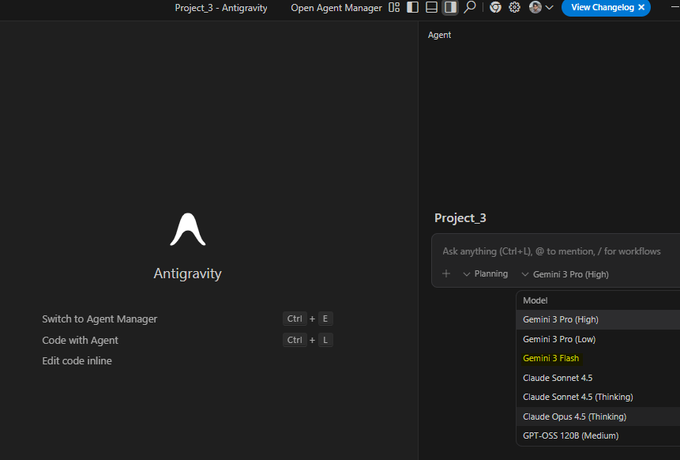
The new Flash model is already embedded in creative tooling stacks: Google’s Antigravity IDE now exposes Gemini 3 Flash alongside Pro in the project model picker, so you can have agents refactor code, scaffold tools, or wire creative pipelines against the cheaper tier without leaving your editor antigravity screenshot. Perplexity Pro and Max users can also select Gemini 3 Flash directly from the model menu, putting it on equal footing with GPT‑5.2 and Claude Opus 4.5 for research and ideation workflows perplexity model list.

On Google’s own side, Flash is powering new multimodal behaviors that matter to designers and game/story devs: a hand‑tracked "ball launching puzzle game" runs in near real time with Gemini interpreting the 3D scene and helping players solve it as they move ball game demo. Another demo has Flash analyzing a complex UI screenshot and overlaying contextually aware captions and hints, which looks a lot like a future live design crit inside your canvas caption overlay demo. There’s also a clip where a single instruction leads Flash to generate and code three distinct loading spinner designs in one pass, hinting at a workflow where you ask for "three alt visual directions" and get production‑ready HTML/CSS back spinner a/b test. For creators, the pattern is clear: Flash isn’t just a chat model; it’s quickly becoming the default brain inside IDEs, search‑driven games, and UI helpers that sit on top of your actual tools.
🎬 Kling 2.6: motion control and human performance capture
For filmmakers: full‑body tracking, cleaner hands, facial/lip‑sync, and timbre‑locked voices draw strong creator demos. Excludes Gemini coverage (feature).
Kling VIDEO 2.6 Motion Control ships with full‑body, hand, and face tracking
Kling has rolled out its upgraded Motion Control in VIDEO 2.6, giving creators full‑body motion tracking, sharper hand articulation, better facial expressions and lip‑sync, plus the ability to drive 3–30 second shots from a single motion‑reference clip and refine them with text prompts.

Commentary threads stress that this isn’t just visual polish but real control over fast, complex actions and expressive performances, with smoother handling of martial arts, dance, and other high‑speed moves than earlier releases or rival models. feature breakdown For filmmakers and animators, this makes Kling far more usable for pre‑vis, action beats, and character work where camera moves, body language, and timing all have to line up in one pass rather than being composited from separate tools.
Creators demo near‑mocap human performance capture in Kling 2.6
Early user tests are showing Kling 2.6’s Motion Control can ingest a live‑action performance and reproduce it on an AI character with surprisingly faithful body motion, facial performance, and lip‑sync, effectively acting as a lightweight performance‑capture pipeline for solo filmmakers.

In one widely shared test, the AI version tracks not only expressions and mouth shapes but also secondary motion like necklace chains and leather jacket stretching; the creator calls it "one of the last blockades to AI filmmaking" and notes it works on both tight close‑ups and long shots.

For people building music videos, monologues, or stylized dramas, this hints that you can direct actors on a cheap camera, then re‑cast them into different worlds and costumes while keeping the underlying performance intact.
Kling 2.6 debuts timbre‑locked voice control for character performances
Kling’s 2.6 update also adds a "timbre control" feature that lets you upload a reference voice and lock that tone to a character, producing stable vocal identity while the model simultaneously generates synchronized video.

In demos, the same spoken line is rendered with two very different tones (bright vs deep) while lip‑sync and expression stay tight, and the creator notes that this workflow is more practical and consistent than bolting on separate lip‑sync tools. timbre control description For storytellers, that means you can cast and direct distinct vocal personas for different characters inside Kling itself, instead of juggling external TTS, dubbing, and sync passes on top of your AI‑generated footage.
Kling 2.6 finds a niche in stylized motion graphics and text animation
Beyond character work, some creators are leaning on Kling 2.6 for motion graphics: typography, logo treatments, and high‑energy stylized sequences that were traditionally done in tools like After Effects. One motion designer asks why no one is talking about how strong it already is for fat type and animated overlays, using it to punch up existing video. motion graphics praise Tests with anime‑style fight scenes and chaotic camera moves show the model holding framing while characters mutate mid‑shot and the camera whips and shakes, which is the same kind of motion complexity that makes kinetic title cards and stinger transitions feel alive.

For editors and designers, that means Kling can double as a quick concept lab for motion language before committing to a full keyframed build.
🎞️ Wan 2.6: multi‑shot video with native audio keeps spreading
Continues yesterday’s Wan 2.6 momentum with new creator threads and platform access—multi‑shot timing, AV in one pass, and multi‑voice mixes. Excludes Gemini feature.
Wan 2.6 on ImagineArt shows true one‑pass video, music, SFX, and voices
Azed’s "Hollywood is cooked" thread breaks down Wan 2.6 on ImagineArt, showing it generating visuals, score, ambient sound, and character voices in a single pass, with no manual editing or external tools Hollywood thread.

The follow‑up posts highlight what matters for filmmakers: multi‑shot stories up to 15 seconds in 1080p, motion/style/composition guided by visual references, multiple characters speaking in one clip, and the ability to use Wan’s open‑source core for more experimental, less sanitized outputs one pass AV demo reference control explainer multishot example open core note 15s consistency demo multi voice clip single model summary. If you’re currently stitching together separate models for video, music, and VO, this is the clearest public proof so far that Wan 2.6 can handle that whole stack for short sequences on its own.
Freepik adds Wan 2.6 for 15s 1080p multishot video with audio
Freepik has rolled Wan 2.6 into its AI Suite, letting users generate up to 15‑second, 1080p multishot videos with scene‑based segmentation and built‑in multilingual audio directly from the same place they already use for images and design assets Freepik Wan announcement.

For designers and storytellers, this effectively turns Freepik into a one‑stop shop where a static Nano Banana Pro frame can become a fully timed video with dialog, music, and cuts, without leaving the ecosystem fashion motion thread. The official WAN integration page walks through how to control shot timing and audio via prompts, so you can treat it more like a tiny editor than a single‑shot generator video studio page.
OpenArt makes Wan 2.6 unlimited for cinematic multi‑shot AI video
OpenArt has turned Wan 2.6 into an unlimited playground, pitching it as a next‑step tool for AI filmmakers with multi‑shot control, up to 15‑second cinematic consistency, and lower per‑clip cost than rivals OpenArt Wan launch.

For creatives, this means you can iterate storyboards, camera moves, and character beats without watching a meter, then pair that with the "copy‑paste" cinematic prompt packs OpenArt is DM‑ing to users who reply "prompt" OpenArt Wan launch. It’s a good place to stress‑test Wan’s scene transitions and pacing if you’re thinking about moving short film or music‑video workflows onto Wan 2.6.
Eugenio Fierro’s Wan 2.6 breakdown focuses on lip‑sync and structured control
Eugenio Fierro attended Tongyi Lab’s Wan 2.6 launch and shared a measured take: it’s not flawless, but it’s a real step up in control, with features like "Starring" (casting characters from reference clips), 15‑second multi‑shot stories with synced audio, and multi‑image control for commercial consistency event recap.

He stress‑tested one of the model’s hardest areas—lip‑sync—by building a music‑video style test where the vocals come from a separate tool but Wan handles performance and timing, and found the sync "honestly promising" compared to current big‑name models event recap. The thread is worth a read if you want a sober view of when Wan 2.6 is ready for production (multi‑shot, timed sequences with clear beats) and where you should still expect artifacts or manual cleanup, especially for long‑form or dialogue‑heavy work.
GMI Cloud leans into Wan 2.6 for music videos, FPV moves, and macro worlds
Following up on GMI Cloud’s role in the wider Wan 2.6 partner rollout partner rollout, creators are now using its WAN endpoints for full music videos, FPV‑style camera paths, macro shots, and Pixar‑like painterly motion music video demo macro world clip.

Kangaikroto’s clips show Cluster Engine running WAN 2.6 through high‑speed FPV sweeps, smooth isometric 3D city tours, and animated impressionist paintings, all processed on GMI’s inference stack with an emphasis on stability and timing rather than raw novelty fpv camera demo painting to video isometric city demo. For filmmakers and motion designers, that combo—serious infra plus a one‑model text‑to‑video backbone—makes GMI a practical place to prototype stylized sequences you might later recreate on a bigger budget.
Higgsfield creator tests Wan 2.6 multishot, lip‑sync, and native audio
On top of Higgsfield’s earlier move to offer Wan 2.6 as an unlimited model Higgsfield launch, ProperPrompter posted a hands‑on thread testing multishot timing, image‑to‑video, text‑to‑video, and the built‑in audio and lip‑sync tools inside Higgsfield’s UI Higgsfield Wan tests.

They show multi‑shot generation adding its own cut‑ins (like an ant crawling insert), text‑to‑video car chases, image‑to‑video character studies, and a singing reindeer clip where Wan’s native audio tracks the lyrics reasonably well from a prompt alone Higgsfield Wan tests. The thread also points to the general Wan 2.6 explainer for people who want to dig into model behavior and options before committing it to a full story pipeline video studio page.
📽️ Other video engines: Runway realism, Seedance 1.5, Vidu Agent
Beyond Wan/Kling: creators test Runway Gen‑4.5’s physical accuracy, Seedance 1.5 lip‑sync/audio, and Vidu’s one‑click agent workflow for ads. Excludes Gemini feature.
Runway Gen‑4.5 leans into car physics and weighty motion
Runway is now explicitly pitching Gen‑4.5 on its ability to simulate realistic vehicle weight, momentum, and tire grip, with cars leaning and skidding in ways that feel physically grounded, available across all paid plans. runway announcement

For filmmakers and motion designers, that means car chases, drifts, and driving shots are less floaty and more usable straight out of the model, instead of needing heavy post to hide weird motion. The demo clip shows a race car banking into corners and sliding on wet asphalt with convincing body roll and inertia, which lines up with earlier creator reports of Gen‑4.5’s stronger motion continuity for pure text prompts sports reel. If you’re storyboarding automotive spots or action scenes, this is one of the first video models that can plausibly stand in for practical plates during previs and early edits rather than only serving as abstract concept art.
Seedance 1.5 Pro earns praise for smoother motion and unobtrusive sound design
A creator who ran several short scenes through Seedance 1.5 Pro says the motion feels smoother than expected and, crucially, the auto‑generated sound design "didn’t fight the visuals"—a small detail that matters a lot in the edit. creator test This echoes earlier positioning of Seedance 1.5 as a native‑audio rival to Veo 3.1, with decent lip‑sync and timing out of the box Veo rival.

BytePlus is also teasing a Christmas‑themed Seedance drop with a chaotic elves‑and‑Santa promo spot, reinforcing that they see it as a tool for short, character‑driven narratives rather than only abstract clips. seedance teaser For editors and directors, the combination of reasonably coherent motion plus sound that supports, instead of clashes with, the picture means fewer passes in a DAW to repair auto‑music and SFX before you can show a cut to clients.
Vidu Agent shows one‑click ad spots in global beta
Vidu has shared fresh examples of Vidu Agent turning a simple idea into finished, ad‑style videos in one click, showing office scenes, animated graphics, and overlaid copy that would fit straight into a social campaign. agent explainer

Following the launch of its global beta with bonus credits global beta, this update is less about new features and more about proving that the agent can structure full sequences—openers, product beats, and outro cards—without timeline editing. For solo marketers and small creative teams, it looks like a low‑friction way to generate first‑pass promo videos and A/B test concepts, with the trade‑off that fine‑grained control over pacing and shot composition still lives in downstream editing tools rather than in the agent prompt alone.
🖼️ Image bake‑offs: GPT Image 1.5 vs Nano Banana, plus new homes
Day‑after expansion: GPT Image 1.5 lands in more apps while creators compare it to Nano Banana Pro for faces, edits, and speed. Excludes Gemini feature.
Hailuo makes GPT Image 1.5 and Nano Banana Pro free and unlimited
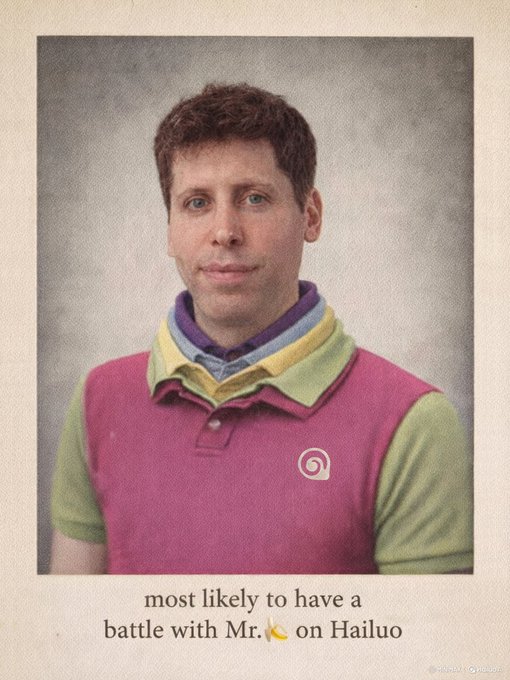
Hailuo is turning into a test bench for image models by making GPT Image 1.5 and Nano Banana Pro both free and effectively unlimited for now, and layering a giveaway of 20 Ultra subscriptions for people who repost with #Hailuo between Dec 17–24. Hailuo launch Creators emphasize that you can spin up as many side‑by‑side generations as you like, which is perfect if you want to see how GPT 1.5’s stronger editing compares to Nano Banana’s style and text rendering. creator note Hailuo itself is leaning into the rivalry, calling it a "GPT vs 🍌 battle" and warning that "servers are about to melt" as people pile in. battle framing For image artists and designers, this is one of the easiest places right now to A/B the two models without worrying about credits or rate limits, especially if you’re still deciding which one should sit in your main workflow. create page
New creator thread stress‑tests GPT Image 1.5 vs Nano Banana Pro across selfies and edits
A detailed seven‑part thread from a creator puts GPT Image 1.5 and Nano Banana Pro through the same prompts—group selfies, reference‑image edits, electric‑spark VFX between hands, hairstyle grids—and finds a more nuanced split than "model A is better". comparison intro Following up on earlier tests that focused on layout and text reliability for GPT 1.5 vs Nano Banana layout structure, this round leans into likeness preservation and edit behavior.
One test uploads a real portrait and asks both models to turn the subject into a falconer on a misty cliff; Nano Banana hits the brief with richer texture and a closer match to the original face, while GPT 1.5 apparently altered the facial structure more. falcon edit prompt In another, the prompt asks for superhero‑style electric sparks between two hands; the author notes that GPT 1.5 "changed face as well as hand a lot", where Nano Banana kept identity more intact. spark test note Several prompts that referenced Lionel Messi and The Flash were declined by ChatGPT Images due to policy, which underlines that some of the wild, pop‑culture heavy prompts still only run on open‑policy models. Messi policy prompt By the end, the creator says they "like both equally" for a 3×2 hairstyle grid, which tracks with a broader pattern: GPT 1.5 is becoming the go‑to for clean, policy‑safe edits, while Nano Banana remains the favourite when you need aggressive stylization or are okay walking closer to the edge of content rules. hairstyle grid test
ElevenLabs brings GPT Image 1.5 into its Image & Video editor
ElevenLabs has wired GPT Image 1.5 directly into its Image & Video toolset, pitching stronger instruction following, tighter edit control, and 4× faster generation than their previous image stack, all available on the free plan. product video For creatives already using ElevenLabs for voices and agents, this means you can now do precise visual edits—add/remove objects, adjust layout, match styles—inside the same environment where you design audio and dialog, instead of bouncing between separate image apps. The announcement focuses on iterative editing rather than pure prompting, which fits how filmmakers, thumbnail designers, and social teams actually work: generate a base frame, then keep refining pose, props, or text while keeping the underlying image stable. If your pipeline already routes narration or character voices through ElevenLabs, this update makes it a plausible one‑stop shop for storyboard frames, thumbnails, or B‑roll plates without leaving their UI.
Leonardo AI becomes an official launch partner for GPT‑image‑1.5
Leonardo AI is now shipping GPT‑image‑1.5 inside its platform as an official launch partner, calling it OpenAI’s fastest, most consistent image model and underscoring three things that matter to working artists: better facial feature preservation, more reliable add/remove edits, and faster turnaround for inline adjustments. Leonardo announcement
Because Leonardo already wraps multiple models with style presets and workflows, GPT‑image‑1.5 slots in as another engine you can point at concept art, product shots, or portraits while leaning on Leonardo’s own templating and upscaling. The marketing here is very edit‑centric: they talk about complex changes feeling smooth in the inline editor—click the image, describe the tweak, and 1.5 tries to surgically alter the region instead of melting the whole scene. For studios and freelancers who already treat Leonardo as their central artboard, this means you can try GPT‑image‑1.5 seriously without leaving your existing pipeline or rewriting tooling around raw OpenAI APIs.
Hailuo positions itself as a dual home for GPT Image 1.5 and Nano Banana Pro
Beyond the raw free‑and‑unlimited access, multiple creators are explicitly framing Hailuo as the place where you can run GPT Image 1.5 and Nano Banana Pro side by side in one interface. creator note Hailuo’s own messaging repeats that both models are available for $0 right now and runs a Dec 17–24 Ultra subscription giveaway to pull in more artists who want to compare outputs without friction. giveaway rules That dual‑model stance matters: instead of forcing you into a single ecosystem, Hailuo is leaning into the bake‑off dynamic, which nudges more people to build workflows that route different shots to different models depending on whether they need stricter editing or wilder style. The vibe in replies—"Servers are about to melt" and "Bananapocalypse" elsewhere—suggests this is actually working as a funnel: it’s less about lock‑in, more about making the comparison itself a draw. battle framing
Lovart adds GPT Image 1.5 with a year of unlimited edits for Pro tiers
Lovart has rolled GPT Image 1.5 into its platform, highlighting it as "great for editing" with strong detail preservation and noticeably faster generations, and is dangling a limited‑time deal that gives 365 days of unlimited access to GPT 1.5 for Monthly and Annual Pro and Ultimate subscribers. Lovart promo For illustrators and social teams using Lovart as a layout and design hub, this turns GPT 1.5 into a high‑volume workhorse: you can iterate on a single visual idea—swapping outfits, nudging lighting, changing backgrounds—without worrying about burning through a small pool of image credits. The promo effectively positions Lovart as a bundled home for GPT 1.5 similar to how some people treat Canva for DALL·E, but with a more explicit focus on preserve‑and‑edit workflows instead of one‑off generations.
Miniature ESC key diorama prompt shows GPT Image 1.5 keeping up with Nano Banana Pro
A popular Nano Banana Pro prompt—"a miniature diorama built inside a giant ESC keycap"—is now being rerun through GPT Image 1.5, giving a clean apples‑to‑apples look at how close the new model gets to NB’s beloved macro style. NB diorama prompt The original Nano Banana version nailed a cozy, hyper‑real miniature room carved into a keycap, and GPT 1.5’s take sticks surprisingly close: warm lighting, tiny bookshelf, ESC label, and a figure reading by lamplight, with the main differences in camera angle and some textural detail.
The creator’s tone is telling—"Same prompt with GPT 1.5 😍"—which reads less like a complaint and more like a sign that GPT 1.5 is now good enough to slot into existing NB‑heavy concept workflows without feeling like a downgrade. GPT diorama output For art directors and illustrators who built libraries of carefully tuned Nano Banana prompts this year, tests like this suggest you can port those prompts into GPT 1.5 on platforms like Hailuo, Leonardo, or Lovart and expect broadly similar structure, then decide shot by shot whether NB’s extra texture or GPT’s stricter editing is more important.
🛠️ Creator build tools: ComfyUI Manager, storyboards, Spaces, more
New UX and pipelines for sharing and iterating: ComfyUI’s built‑in Manager + Simple Mode, DorLabs storyboard mode, Producer Spaces, Cursor’s visual editor, and Notte’s code‑from‑execution. Excludes Gemini feature.
Cinematic motion prompt pack teaches camera grammar for fashion videos
AI Artwork Gen shared a dense prompt pack that treats camera movement like a script, using Nano Banana Pro stills as starting frames and feeding detailed motion prompts into Veo 3.1 and similar models for high‑fidelity fashion clips prompt thread intro. The thread breaks down classic move types—physical tracking arcs, tilts from logo to face, creeping telephoto zooms, handheld "behind‑the‑scenes" wobble, rack focus reveals, crash zooms, whip pans, and paparazzi‑style snap sequences—with full text blocks you can more or less copy‑paste tracking shot example whip pan montage.

For directors and editors experimenting with AI video, this acts like a mini cinematography textbook tuned to current models: instead of vague "smooth camera" prompts, you can specify lens length, movement path, focus behavior, and emotional intent in language the generators reliably respond to thread wrap.
ComfyUI integrates Manager and explores Simple Mode for friendlier workflows
ComfyUI has officially folded ComfyUI‑Manager into the core app, giving creators a built‑in way to discover, search, and manage custom nodes with previews, one‑click "install all missing" and improved dependency conflict and security scanning (malicious packs can be flagged or banned) Manager feature rundown. A new "Simple Mode" view is also being explored to hide overwhelming node graphs behind a cleaner, result‑focused interface, which should make it much easier to share complex workflows with collaborators who don’t want to wrangle spaghetti graphs Simple Mode tease.

For artists and filmmakers who live in ComfyUI, this means less time hunting GitHub repos or debugging broken graphs, and a path toward sharing pipelines as simple, tweakable panels instead of intimidating node forests.
DorLabs adds Storyboard Mode, Rabbit Hole iteration, and saved history
Dor Brothers’ dorlabs.ai studio rolled out a big UX pass: every mode now supports prompting, there’s a new Storyboard Mode that takes an input image plus a scene description and expands it into a full multi‑panel storyboard, and a "Rabbit Hole" feature that lets you iterate directly on any generation to explore variations without starting over DorLabs update. A new storage layer also keeps your full generation history, so you can revisit older boards and branches when you’re refining a film, comic, or ad concept.
For storytellers, this turns DorLabs into more of a visual writing room: you can pitch a shot, branch on the most interesting frames, and keep the whole evolution of a sequence in one place instead of scattered exports.
Notte’s Agent Mode turns natural-language runs into editable code
Notte introduced an "Agent Mode" where you describe a task in plain language, the agent executes it step by step, and then auto‑generates code from that execution trace which you can immediately edit inside their IDE Agent Mode description. The idea is to turn exploratory, one‑off runs into maintainable scripts: you prototype via conversation and actions, then graduate the result into real code instead of leaving it as an opaque chat history.
This is especially useful for creatives who hack together data pulls, batch exports, or simple generators but don’t write robust tooling—Agent Mode gives you a path from "it worked once" to a reusable, version‑controlled script without starting from a blank file.
Producer launches Spaces so artists can build custom tools and experiences
Music‑focused platform Producer introduced Spaces, a way for artists to build their own instruments, plugins, games and interactive canvases that run live inside a session Spaces announcement. Spaces combine editable code with a live preview, so you can tweak behavior while playing, and the team is already highlighting community creations from mastering tools and step sequencers to asteroid shooters and musical drawing apps that others can remix Spaces examples.

This pushes Producer from being a place you use AI tools into a place you design them, which is especially interesting if you want to package repeatable creative workflows or interactive experiences for your own audience.
Cursor previews visual editor aiming to pull some flows from Figma
Cursor, the AI‑assisted code editor, demoed a new visual editor that lets you lay out interfaces and components visually while it manages the underlying code, prompting the question of whether it can replace parts of a Figma workflow for dev‑centric teams Cursor editor demo. In the video, the user drags and tweaks UI elements in a modern canvas while Cursor keeps the implementation in sync, effectively tightening the loop between design tweaks and production‑ready code.

For small product teams and solo builders, this could mean fewer handoffs: rough out a screen visually, let the model scaffold the React (or similar), then stay in one tool as you refine both the look and the behavior.
Pictory AI pushes Layouts to keep video text and branding consistent
Pictory highlighted its "Layouts" system, which lets you define reusable arrangements for titles, lower thirds, logos, and other text elements so that scenes in a project share consistent placement and hierarchy layouts how-to. The accompanying academy guide walks through choosing from built‑in layouts (title, quote, list, etc.) and applying them across scenes, which is especially handy for marketers and educators who need on‑brand subtitles and callouts in many short clips layouts guide.
It’s not a new model, but for creators stitching lots of social edits, having layout logic as a first‑class control can save a surprising amount of manual keyframing and alignment work.
📞 Voice agents at scale: ElevenLabs adds WhatsApp
Omnichannel agents become distribution‑ready for creators and brands—WhatsApp support, unified transcripts/QA, and hackathon outputs show practical voice experiences. Excludes Gemini feature.
ElevenLabs Agents add WhatsApp for true omnichannel voice and chat support
ElevenLabs has plugged its Agents platform into WhatsApp, so you can design a single voice/chat agent and deploy it across web widgets, mobile, phone lines, and now WhatsApp threads without rebuilding flows for each channel WhatsApp launch. This matters if you run a brand character, course assistant, or support bot and want it to live where your audience already spends time rather than forcing them into a custom app.

On the ops side, the same platform now exposes unified transcripts and performance views across every channel, with configuration changes applied once to update behavior everywhere ops overview. For AI creatives and storytellers, this turns a single well‑designed voice persona into something you can safely ship to followers on your site, in apps, over phone, and inside WhatsApp groups while keeping QA, safety review, and iteration in one place rather than juggling separate bots per surface.
Sentinel wins ElevenLabs hackathon with disaster-response voice agent
At the ElevenLabs Worldwide Hackathon, where 1,300 builders across 33 cities shipped 262 projects in three hours, the global winner was Sentinel from Sydney—an autonomous voice agent designed to support disaster rescue teams in real time hackathon stats sentinel winner. Sentinel listens and responds under pressure, helping first responders with on‑the‑spot guidance rather than focusing on casual chat.
Teams at the event also built gaming companions, shopping assistants, and training agents, but the judges picked Sentinel as the top example of voice tech aimed at high‑stakes, real‑world workflows rather than novelty use cases hackathon stats. For filmmakers, game designers, and narrative creators, it’s a strong signal that “agents with a job” — not just personality bots — are where a lot of serious experimentation is going.
🧊 From image to 3D—and real‑time worlds you can walk through
Fast asset creation and interactive worlds: TRELLIS.2 image→3D at up to 1536³, Tencent’s world model demos, and a quick HY image‑to‑3D v3 test. Excludes Gemini feature.
fal hosts TRELLIS.2 for high‑res image‑to‑3D PBR assets
Fal is now running Microsoft’s TRELLIS.2 image‑to‑3D model as a hosted service, turning a single image into up to 1536³ PBR‑textured assets with 16× spatial compression in one call fal trellis launch. This is a big upgrade for asset pipelines.

Following up on Trellis launch, which introduced the base model, this runtime focuses on production details: it emits full PBR maps (base color, metallic, roughness, alpha) and is tuned for arbitrary topology, so you can go from concept art or marketing stills to game‑ready meshes and physically plausible materials without hand‑retopo. For AI filmmakers and realtime designers this means you can prototype props, hero objects or set dressing directly from style frames, then drop them into engines instead of waiting on manual modeling. You can try it immediately in fal’s UI or API for rapid look‑dev and asset libraries try trellis tool.
HY World 1.5 and WorldPlay make prompts into explorable 3D worlds
Tencent’s HY World 1.5 "WorldPlay" stack is now showing real‑time, explorable 3D worlds that maintain geometric consistency as you move, often running around 24 FPS on a single 14 GB GPU worldplay paper demo. That changes how you scout and block scenes.

Building on WorldPlay open-source, creators report typing a ~15‑word prompt and getting a playable environment navigable with keyboard and mouse, with objects and layouts staying stable when you revisit locations instead of melting or re‑rolling each frame short prompt reaction. One breakdown highlights that it’s the first open‑source world model with both real‑time interaction and long‑term geometric memory, and that it runs locally if you have ≥14 GB of CUDA VRAM, though licensing currently blocks direct use in the EU, UK, and South Korea 14gb gpu comment worldplay breakdown. For filmmakers and game‑adjacent teams, this looks like a new kind of virtual location scouting: you can rough out spaces, test camera moves, and generate depth‑rich background plates without hiring a 3D team first, then decide which environments are worth rebuilding with higher fidelity.
Creator test shows Hunyuan 3D v3 image‑to‑3D costs and quality
A hands‑on test with Tencent Hunyuan’s new image‑to‑3D v3 model turns a McDonald’s XXL fries promo shot into a fully textured 3D asset in about a minute, at a reported cost of roughly $0.37 per run creator fries test. That’s cheap enough to batch‑experiment.
Following Hunyuan 3D runtime, which brought the model to fal, this test confirms it outputs PBR‑style textures and plausible geometry from a single product photo—good enough for rotating hero shots, simple AR try‑ons, or stylized previs. For AI art directors and motion teams, the takeaway is practical: you can treat product packshots or key art as input to a 3D pipeline, then decide case‑by‑case when to keep the auto‑generated mesh versus handing it off for cleanup in Blender or a DCC once a concept proves worth investing in.
🏆 Creator programs, contests, and holiday boosts
Holiday‑season momentum: Kling’s Elite Creators and Christmas Remix, Freepik’s #24AIDays mentorship, Wondercraft winners, and GMI’s WAN 2.6 challenge. Excludes Gemini feature.
Kling launches Christmas Tree Remix contest with 70 prize slots
Kling’s “Christmas Tree Remix” contest asks creators to reinvent the idea of a Christmas tree using Kling video, with entries due December 31 and winners announced February 5, 2026. Remix contest brief
The prize pool is structured to spread rewards wide: 5 first‑prize winners get 7,500 credits each, 10 creators get 3,500, 20 get 1,320, and 30 honorable mentions get 660 credits, with a chance to be featured on the Kling AI homepage. For AI filmmakers, designers, and animators this is an excuse to push weird seasonal ideas—trees as characters, architectural trees, abstract light sculptures—while stockpiling credits for 2026 projects.
Kling re-opens Elite Creators Program with free plans and early access
Kling is relaunching its Elite Creators Program, offering selected power users free monthly plans, extra credits, early access to new features, direct team contact, and a visible "Elite" badge on the platform. Program announcement
For AI filmmakers and visual storytellers already leaning on Kling 2.6 for motion control and performance capture, this is effectively a sponsorship tier: you get your run costs subsidized, more say in the roadmap, higher odds of future paid "Creative Partner" slots, plus swag and meetup invites. The bar is "enthusiast and power user" rather than influencer—Kling explicitly calls out people who consistently create and share high‑quality work, so if you’re already posting Kling breakdowns and experiments, this is worth applying for.
ElevenLabs Worldwide Hackathon names Sentinel voice agent as global winner
ElevenLabs has wrapped its Worldwide Hackathon—1,300 builders across 33 cities shipped 262 projects in three hours—and named Sentinel, an autonomous voice agent for disaster rescue teams, as the global winner. Hackathon stats Sentinel, built by a Sydney team, is designed to assist responders in high‑pressure environments with real‑time guidance, showing that creators are already using voice agents for mission‑critical scenarios rather than just novelty chatbots. Global winner details For storytellers and interactive‑media folks, the signal is that voice AI is maturing into a serious medium: the same tools you’d use to build game companions or narrative guides are now being tested against real‑world stakes, and hackathons like this are a good way to stress‑test your own ideas under time pressure.
Freepik #24AIDays Day 16 offers 1:1 session with studio lead
Day 16 of Freepik’s #Freepik24AIDays swaps pure credits for mentorship: one creator can win a 1:1 session with Miky Díez, Freepik Studios’ manager and a photographer leading AI adoption for brands. Freepik day16 post

To enter, you post your best Freepik AI creation, tag it with #Freepik24AIDays, and also submit via the Typeform form so they can contact you if you win. contest form For artists and designers experimenting with NB Pro, WAN 2.6, or GPT Image inside Freepik’s suite, this is less about free generations and more about getting concrete art‑direction feedback on how to make AI work in real client pipelines.
GMI and WAN 2.6 run 5-Day Blind Box Creator Challenge with cash prizes
GMI Cloud and WAN 2.6 are hosting a 5‑Day Blind Box Creator Challenge where you watch a short video, pick a colored ball as your "prompt", then create a WAN 2.6 video around it for cash rewards. Blind box challenge
The idea is to push creators into constraints‑based text‑to‑video storytelling: each color ball maps to a hidden brief, so everyone gets a different surprise rather than the same trending prompt. For filmmakers and motion designers already dabbling with WAN 2.6 via GMI’s inference engine, this is both a reason to explore more aggressive FPV camera moves and a way to potentially offset your GPU spend with prize money.
SkillCreator gives away three Claude Pro passes to workflow builders
SkillCreator is running a small but high‑leverage giveaway: three free Claude Pro passes for people who retweet, follow, and reply with a workflow they use. Claude Pro giveaway For creators and educators who rely on Anthropic’s model for scripting, lesson outlines, or story development, this is effectively several months of “free” higher‑tier access, plus a chance to get your workflow in front of a toolmaker who’s clearly scouting advanced users. As Azed points out, most people will scroll past without realizing it’s full access to one of the strongest models right now, so if Claude is part of your stack this is worth a quick entry.
Wondercraft crowns winners of its 2025 Christmas Creative Challenge
Wondercraft has announced the winners of its 2025 Christmas Creative Challenge, closing out the "Who will save Christmas?" audio‑story contest with four top titles spanning heartwarming and chaotic takes on Santa. Wondercraft winners

Following up on xmas challenge, where listeners could vote and win a free month, Wondercraft now names “The Last Gift Home” as first place, “A Ripped Santa: Crisis at the North Pole” as second, and two third‑place entries, “Steal Xmas” and “Wonda Saves Christmas.” The thread also thanks dozens of participating creators by handle, reinforcing that there’s now an active micro‑scene of AI‑assisted podcasters and audio dramatists using these tools for serialized storytelling.
⚖️ Creator rights & culture: coalition talk and sentiment
A light but notable discourse thread: a new Creators Coalition mention, debates on training rights, and creators reframing “AI haters” as awareness. Excludes Gemini feature.
Creators Coalition on AI forms to organize artists around AI threats
A new Creators Coalition on AI has been announced, framed as a cross‑discipline group for “all creators” facing a shared threat from current AI practices. Coalition mention This is one of the first explicit attempts to formalize a political and cultural bloc around issues like training data rights, compensation, and control over how creative work is used.
For filmmakers, designers, musicians, and storytellers, this signals that AI policy and platform negotiations are unlikely to stay fragmented by medium. If this coalition gains momentum, it could become a focal point for demands on opt‑outs, revenue‑sharing, or labeling standards that directly affect day‑to‑day creative work with AI tools.
Creators clash over whether training on YouTube is an "unethical hurdle"
Alongside coalition talk, some creators are pushing the opposite line: that there are no “big unethical hurdles” in letting Google train models on YouTube at scale, arguing “Google has the right to train on the largest database in the world (YouTube)” and that energy should go into “equipping creators with these tools” instead of “pitchforks.”Training rights debate This reflects a growing split between those focused on consent and compensation, and those who see AI as an inevitable wave to ride.
For working creatives, the point is: the norms around whether your uploads should be used for training are not settled inside the community. If you care about how your back catalog is ingested by models, this is the level of argument you’ll be walking into—between regulation‑first voices and adaptation‑first pragmatists.
AI artists start treating “haters” as free marketing and culture war fuel
Several AI creators are openly reframing anti‑AI backlash as useful oxygen: “People who don’t like AI sure as hell love focusing on it and breathing life into it daily. Thank you.”Haters gratitude One calls AI haters “your best marketing team,” advising artists to “monetize their hatred and get your message across to as many people as possible.”Monetize hate advice Others note that “people enjoy AI art” even when critics drive some of the engagement. AI art sentiment This sits next to more tongue‑in‑cheek culture war lines like “You’d think they’d be for it, since we’re seizing the means of art production”Seizing art line and a self‑description of being “sloptimistic” rather than fully pro‑AI.

Visually, the mood shows up in clips like a cartoon zombie literally smashing through the words “AI Haters,” turning conflict into spectacle.

For AI‑using creatives, this attitude shift matters because it treats controversy as part of distribution strategy. If you publish AI work online, you’re not just shipping images or videos—you’re stepping into an attention economy where pushback, quote‑tweets, and arguments can be intentionally folded into how your work travels.
🔬 Faster diffusion and sparse multimodal modeling
Research‑leaning updates emphasize speed and efficiency—100–205× video diffusion acceleration, sparse masked sampling, and semantic visual tokenizers with scaling signals. Excludes Gemini feature.
TurboDiffusion claims 100–205× faster video diffusion sampling
TurboDiffusion proposes a new way to run video diffusion models 100–205× faster than standard samplers while keeping quality in a usable range for creative work TurboDiffusion teaser. That sort of speedup moves long‑form previz and multi-pass lookdev from "go make coffee" territory into something you can iterate on during a single edit session.

For filmmakers and motion designers relying on text‑to‑video, this kind of acceleration matters more than another 1–2 points of fidelity: faster sampling means more takes, more camera options, and more room to explore motion beats before locking a cut. The authors frame it around video, but the techniques should transfer to any diffusion pipeline that currently chokes on sequence length; it’s worth watching the details once you have time to read the full method in the paper ArXiv paper.
MiniMax VTP: semantic visual tokenizers that keep scaling with compute
MiniMax’s VTP family tackles a long‑standing problem with VAE‑style visual tokenizers: throwing more compute at pixel‑perfect reconstruction hasn’t been improving downstream generative quality VTP overview. VTP trains tokenizers with semantic objectives (CLIP‑like contrastive, DINO‑style self‑supervision, plus reconstruction) so the latents capture meaning, not just RGB values VTP training details.
Across sizes, VTP delivers a 65.8% FID improvement in generation over classic autoencoders, converges 4.1× faster than distillation methods, and hits 78.2% zero‑shot accuracy on ImageNet, with VTP‑Large continuing to improve as you scale parameters, data (100k→100M samples), and FLOPs instead of hitting the early plateau seen in VAEs VTP scaling results. For image and video models that artists actually touch, this kind of tokenizer is infrastructure: better latents mean cleaner textures, fewer weird artifacts when you crank up detail, and more headroom to benefit from future bigger backbones. The team has released multiple sizes on Hugging Face and code on GitHub, so model builders can start swapping VTP into their own diffusion stacks today GitHub repo.
Sparse-LaViDa uses token sparsity to speed multimodal diffusion
Sparse‑LaViDa introduces sparse multimodal discrete diffusion language models that skip low‑impact tokens during sampling to cut compute while retaining output quality Sparse-LaViDa summary. The core idea is simple but powerful for creatives: don’t waste diffusion steps on visual/text tokens that barely change the final result.

In experiments, the authors report up to ~2× faster generation across tasks by truncating masked tokens instead of treating every token equally, which directly translates to more shots or image variations for the same budget. Because it’s a discrete multimodal model, this line of work also matters for future "one model does images, video, and text" agents, where sampling cost can easily dominate interactive workflows project page.
While you're reading this, something just shipped.
New models, tools, and workflows drop daily. The creators who win are the ones who know first.
Last week: 47 releases tracked · 12 breaking changes flagged · 3 pricing drops caught