Luma Ray 3.14 ships native 1080p – 4× faster, 18s Modify

Stay in the loop
Free daily newsletter & Telegram daily report
Executive Summary
Luma Labs shipped Ray 3.14 as Dream Machine’s new flagship video model; headline specs are native 1080p, 4× faster generation, and 3× cheaper runs, with marketing leaning on “detail, stability, and motion consistency.” The blog positions Modify Video as the practical win: edits now reach 18s with stronger prompt adherence and fewer artifacts; early creator tests use it as an animation-polish layer (keep design, reduce temporal wobble) and launch-day “recognizable sci‑fi shot” montages act as informal continuity checks. Caveats are explicit: Modify still lacks character references and HDR/EXR.
• Qwen‑TTS distribution: Replicate and fal both ship 3‑second voice cloning; fal lists 0.6B/1.7B options; workflow packs start bundling it as a default speech layer.
• OpenAI security agent rumor: “Aardvark” onboarding screenshots claim repo-wide threat modeling and patch suggestions; availability/pricing unconfirmed.
• Freepik Seedance Draft: Draft→HD flow claims up to 90% visual match, but conditions aren’t disclosed.
Across threads, the center of gravity is throughput: speed/price claims, draft modes, and agent packaging; independent benchmarks and reproducible evals are still mostly missing.
While you're reading this, something just shipped.
New models, tools, and workflows drop daily. The creators who win are the ones who know first.
Last week: 47 releases tracked · 12 breaking changes flagged · 3 pricing drops caught
Top links today
- Runway tutorials and guides library
- Qwen-TTS on Replicate
- BFL Skills install command for agents
- Luma Dream Machine Ray 3.14 launch page
- Flow Studio YouTube live workflow walkthrough
- Chatbot Arena HunyuanImage 3.0-Instruct listing
- SALAD video diffusion transformer paper
- Memory-V2V video-to-video diffusion paper
- SWE-Pruner context pruning for agents paper
- Jet-RL FP8 reinforcement learning paper
- Dario Amodei essay on AI risks
Feature Spotlight
Ray 3.14 hits “pro video” mode: native 1080p + faster/cheaper Modify workflows
Ray 3.14 is the day’s headline because it pushes “usable, pro” AI video: native 1080p with claimed 4× speed and 3× cost reduction, making iterative Modify workflows much more practical.
Cross-account, high-volume focus today: Luma’s Ray 3.14 dominates creator feeds with claims of native 1080p, improved motion consistency, and big speed/cost gains—plus immediate creator tests and comparisons.
Jump to Ray 3.14 hits “pro video” mode: native 1080p + faster/cheaper Modify workflows topicsTable of Contents
🎥 Ray 3.14 hits “pro video” mode: native 1080p + faster/cheaper Modify workflows
Cross-account, high-volume focus today: Luma’s Ray 3.14 dominates creator feeds with claims of native 1080p, improved motion consistency, and big speed/cost gains—plus immediate creator tests and comparisons.
Luma launches Ray 3.14: native 1080p video, 4× faster, 3× cheaper
Ray 3.14 (Luma Labs): Luma shipped Ray 3.14 as its new flagship Dream Machine video model—positioned around native 1080p, plus 4× faster and 3× cheaper generation; it’s presented as optimized for “detail, stability, and motion consistency,” and is available now across text, image, and video input workflows per the launch announcement.

• What creatives feel immediately: the marketing artifact is the spec card itself (1080p/4×/3×), which creators can use as a quick “why this output looks different” explanation when sharing tests, as shown in the launch announcement.
Ray 3.14 adds longer Modify (up to 18s) and tighter motion consistency
Ray 3.14 Modify workflow (Luma Labs): Ray 3.14 extends “Modify Video” edits up to 18 seconds, while calling out stronger prompt adherence and fewer artifacts as the main quality wins, as detailed in the release blog post shared alongside the learn more post.

• Production caveats: the same release notes list current limits—no character references and no HDR/EXR in Modify yet—so it’s a clean upgrade for iteration speed/clarity, but not a full “reference-driven” pipeline replacement yet per the release blog post.
Ray 3.14 early test: native 1080p Modify for stylized character motion
Ray 3.14 Modify (creator test): A quick day-one experiment shows what “native 1080p Modify” looks like on a single stylized character—bouncy motion with fewer obvious instability jolts than typical v2v warping—framed by the creator as “so fun” in the native 1080p modify test.

The useful takeaway for filmmakers is that Ray’s Modify path is being used as an animation-polish layer (keep the design, improve temporal consistency) rather than only as a style-transfer toy, as implied by the native 1080p modify test.
Ray 3.14 launch meme: recognizable sci‑fi shot recreations as a capability check
Ray 3.14 (launch usage pattern): A common launch-day creator move showed up immediately—recreate “recognizable” sci‑fi compositions and ask viewers to guess the references, using it as a practical test for composition, atmosphere, and motion continuity, as shown in the sci‑fi recreation clip.

This “recognition-game” format doubles as a benchmarking harness: if the model can hold a believable homage shot for a few seconds, it tends to read as more cinematic to general audiences, which is exactly what the sci‑fi recreation clip is optimized to demonstrate.
Ray 3.14 cost/speed pressure: creators react to cheaper runs as the real unlock
Iteration economics (Ray 3.14): Alongside the quality claims, the dominant creator reaction is about value-per-run—“more bang for the buck” sentiment appears right after hands-on time in the value reaction, and the broader framing is that Ray 3.14 is “significantly cheaper and faster to run,” as echoed via the cost pressure RT.
The core creative implication is straightforward: 1080p output matters most when you can afford enough iterations to direct motion; that’s why Luma’s 4× faster / 3× cheaper positioning in the launch announcement is what creators keep repeating, not just “better quality.”
⏳ Big discounts that change throughput: Higgsfield’s 85% off countdown
Today’s only truly ‘material access’ promo is Higgsfield’s urgent 85% off window with unlimited bundles; other smaller coupon posts are noise and are intentionally excluded.
Higgsfield pushes final-hour 85% off with unlimited Nano Banana Pro + all Kling models
Higgsfield (Higgsfield): The 85% off campaign is in its “final hours” phase—Higgsfield posts both a “FINAL 6 HOURS” push and a “FINAL 1 HOUR” last-chance variant, pitching unlimited Nano Banana Pro (2 years / “Pro 365”) plus unlimited access to all Kling models as the core throughput unlock, as stated in the final 6 hours post and the final 1 hour post.

• What’s in the bundle: The messaging repeats “UNLIMITED Nano Banana Pro” plus “ALL Kling models,” and also calls out “ALL image models” in the longer countdown post, as written in the final 6 hours post and reiterated in the last flight post.
• Credit mechanics layered on top: The posts stack engagement bounties (“retweet & reply” for 10 credits in DM) on top of the discount, as described in the last flight post and the final 1 hour post; separately, a promo code FINAL85DISCOUNT is framed as “only first 100” for “100 credits,” per the final 6 hours post.
• Campaign creative + echo: The “DON’T MISS YOUR LAST FLIGHT OF 2026” theme and timer-heavy creatives are used to keep urgency high, as shown in the last flight post, with community cross-post amplification repeating the CTA in the cross-post boost.
🎬 Runway Gen‑4.5 + Kling 2.6: the week’s mainstream video toolset (excluding Ray 3.14)
Continues the heavy AI-video beat, but today the non-Ray conversation centers on Runway Gen‑4.5 I2V and Kling 2.6 showcase clips—mostly motion quality, pacing, and ‘does it look directed?’ tests.
Runway’s Gen-4.5 I2V pitch shifts to “instant visualization,” with an Academy guide hub
Runway Gen-4.5 (Runway): Runway is explicitly framing Gen-4.5 Image-to-Video as a pre-vis shortcut—“drop an image in and ask for what you want,” as shown in the Gen-4.5 I2V pitch—and it’s pointing creators to a central library of walkthroughs in the AI Academy, as linked in the Academy hub post and detailed in the AI Academy.

This is less about new model specs and more about compressing the “one still → directed motion” loop into a repeatable workflow, with the Academy now positioned as the canonical place to learn the knobs Runway wants people using.
ReCharacter demos “identity swap” for video while preserving motion
ReCharacter (Apob AI): Apob is demoing a workflow where you replace the person in an existing clip with a reference image—while keeping the original movements and background—positioned as a fast way to build character-driven variations, as shown in the ReCharacter demo.

This lands as a practical hook for creators doing serialized shorts: one base performance can be remapped into many characters without restaging camera or blocking.
Kling 2.6 creature combat: Vikings vs ice monsters as a readability test
Kling 2.6 (Kling): Another Kling 2.6 showcase leans on melee action against stylized creatures—useful as a “can you track hits and reactions?” sanity check—per the Vikings fight clip.

The clip is also a proxy test for fast motion plus busy backgrounds (snow/foliage), where warping and texture boil tend to show up first.
Kling 2.6 gets a space-battle stress test for beams, debris, and pacing
Kling 2.6 (Kling): A space-battle clip is being used as a quick “does it hold together under chaos?” test—bright energy beams, explosions, and fast cuts—shared in the Space battle clip.

For filmmakers, it’s a familiar benchmark: action readability plus FX density, where weaker models tend to smear motion or lose object continuity.
Runware adds PixVerse v5.6, emphasizing audio, lip sync, and motion stability
PixVerse v5.6 on Runware (Runware): Runware says PixVerse v5.6 is now available on its platform with claims around clearer audio, better multi-character lip sync, and stronger T2V consistency in the Runware model note, with access details on the Runware model page.

• What PixVerse is claiming in v5.6: The upstream release pitch centers on “cinematic aesthetics,” more fluent vocals across languages, and less warping in motion, as listed in the PixVerse v5.6 announcement.
The practical takeaway is distribution: v5.6 isn’t only “in PixVerse,” it’s also becoming a selectable model inside third-party creator pipelines.
A quick Runway 4.5 clip becomes a motion-quality shorthand
Runway Gen-4.5 (Runway): A creator “week opener” post is being used as a quick read on Gen-4.5 motion feel—less a tutorial, more a social proof loop—per the Runway 4.5 clip post.

The signal here is how Gen-4.5 outputs are getting evaluated in the wild: short, punchy clips meant to communicate stability/energy without any prompt disclosure.
Midjourney + Grok Imagine gets framed as “real anime clip” plausible
Anime believability as a target: A creator is explicitly setting the bar as “this could be a clip from a real anime,” attributing the look to a Midjourney + Grok Imagine combo in the Believability claim.

It’s a reminder that many creators are grading outputs against existing media eras (TV anime, film grain eras) rather than against other AI tools.
Crimson Harbor shows a real-time Unreal pipeline for a festival-run horror short
Crimson Harbor (Victor Bonafonte): A trailer post describes an 8-minute horror short built in Unreal Engine with a real-time filmmaking approach, claiming selection by 50+ festivals, as stated in the Project writeup.

It’s not a generative-video tool update, but it’s still relevant to AI filmmakers because the aesthetic and pipeline assumptions (real-time environments, digital sculpture, rapid iteration) are converging with how AI shots are being planned and integrated.
Retro anime emulation keeps showing up as a practical style benchmark
Retro anime look-lock: Another short is framed as “you’d totally believe it” came from a 1970s anime, as claimed in the 70s anime framing and reinforced by the tone in the Aesthetic reaction.

For storytellers, this kind of claim usually implies a pipeline goal: match period color, line quality, and motion cadence well enough that the clip reads as archival rather than synthetic.
🧭 Directing AI camera movement: practical shot recipes you can reuse today
Today’s most actionable craft posts are single-tool technique threads: camera-motion control in Kling 2.6 (tested inside Leonardo) plus small prompt-keyword tips for better motion direction.
Kling 2.6 “Low Rear Tracking Shot” prompt: adrenaline chase inches behind
Kling 2.6 (KlingAI): This prompt is written like a stunt unit brief—rear chase proximity, speed ramps, whip pans, ground vibration, and debris hits—designed to replace the “floaty follow cam” feel with a kinetic pursuit, as framed in the Camera motion thread.

Copy/paste prompt from the Rear tracking prompt post:
Kling 2.6 “Tracking FPV drone” prompt: glued-to-subject ski chase
Kling 2.6 (KlingAI): This shot recipe pushes “FPV follow cam” language—lock framing, inertia/vibration, and synchronized turns—so the motion reads like a drone operator chasing a subject, not a floating AI camera, per the Camera motion thread.

Copy/paste prompt from the Skier FPV prompt post:
Kling 2.6 “Vertical Drop to Chase” prompt: overhead drop into horizontal pursuit
Kling 2.6 (KlingAI): A no-cut move that starts top-down and “falls” into a stabilized tracking chase—useful when you want an establishing scale beat without giving up momentum, as described in the Camera motion thread.

Copy/paste prompt from the Vertical drop prompt post:
Kling 2.6 “Whip Orbit Impact” prompt: fast orbit around a clash with micro push-ins
Kling 2.6 (KlingAI): An action-coverage recipe that combines a rush-in with a fast circular orbit, then uses speed ramps + micro push-ins on contact frames—written to make hits read (and feel) heavier, as part of the pack in the Camera motion thread.

Copy/paste prompt from the Whip orbit prompt post:
Kling 2.6 “High Aerial Drift” prompt: tsunami-scale reveal then low chase
Kling 2.6 (KlingAI): This is a scale-to-impact recipe—ultra-wide aerial for threat size, then a forward surge and dive to a low tracking position with lens spray and debris, keeping parallax heavy so the shot sells speed and mass, per the Camera motion thread.

Copy/paste prompt from the Tsunami prompt post:
Kling 2.6 “Push-In Dramatic Reveal” prompt: slow dolly + focus pull tension
Kling 2.6 (KlingAI): A slow, controlled push-in prompt with an explicit focus-pull beat—useful when you want “directed” emotional emphasis instead of action energy, positioned as part of the Camera motion thread.

Copy/paste prompt from the Push-in prompt post:
Kling 2.6 “Slow Push-In” prompt: battlefield layers + parallax through smoke
Kling 2.6 (KlingAI): This is a “war tableau” push—start wide, then creep forward through smoke/ash while foreground wreckage passes in layers (deep parallax) so the move reads physically grounded, per the collection described in the Camera motion thread.

Copy/paste prompt from the War push-in prompt post:
Runway points creators to AI Academy tutorials for Gen-4.5 I2V workflows
Runway AI Academy (Runway): Runway is pushing its centralized tutorials/guides as the “learn everything” path for Gen‑4.5 Image‑to‑Video, framing it as a way to go from VFX-style iteration to fast visualization in the Gen-4.5 tutorial post.
The hub is linked directly on the Academy site page, which they also reference in the Academy link post.
Freepik teases a full breakdown video and gates it behind replies
Freepik (Freepik): Freepik posted a “watch this” clip and then asked whether to publish the “full breakdown,” explicitly using replies as the unlock mechanic in the Breakdown teaser post and follow-up Reply prompt.

What the breakdown covers isn’t specified in the tweet text, but the format is clear: short teaser first, deeper process only if engagement is high.
Runway prompt micro-tip: try the keywords “ultra dynamic motion”
Runway (Runway): A small heuristic surfaced in replies—adding the phrase “ultra dynamic motion” as a motion-directing keyword—shared as an exploratory nudge rather than a proven recipe in the Keyword tip comment. There’s no before/after artifact attached in that thread, so treat it as a lightweight prompt toggle to test, not a guaranteed fix.
🧩 Prompts & style refs: Midjourney srefs, street-photo looks, and Polaroid recipes
Lots of copy‑pasteable creative material today: multiple Midjourney --sref codes, photoreal ‘rain-on-glass’ street photography prompt, and a detailed vintage Polaroid prompt template.
Rain-on-glass street-photo prompt: cold cinematic light and blue/tungsten bokeh
Prompt pattern: A copy-paste street photography prompt is making the rounds: “A photorealistic [subject] seen through raindrop-covered glass. Misty atmosphere, cold cinematic lighting, streaks of blue and tungsten glow, with bokeh distortions. Moody and emotional, with film still aesthetics,” as written in the Street photo prompt.
The examples in the same Street photo prompt show it holding up for couples, cars, umbrellas, and portraits—swap the bracketed [subject] and keep everything else fixed.
Vintage B&W Polaroid “physical scan” mega-prompt template (Nano Banana Pro)
Nano Banana Pro (Freepik tool suite): A long, directive prompt template aims to reliably generate a “physical vintage Black & White Polaroid photograph scan” with hard on-camera flash, heavy grain/contrast, aged border wear, scratches/dust, chemical spread imperfections, and a reddish date stamp—plus variables for time period, subject, food prop, and setting as detailed in the Polaroid directive prompt.
The post includes a worked example (Tina Turner + giant brownie + backstage dressing room), and notes it was “tested on Nano Banana Pro” in the Polaroid directive prompt.
Midjourney --sref 2123448083 for folk storybook texture and “cute horror”
Midjourney (Midjourney): Another style reference, --sref 2123448083, is framed as a narrative children’s illustration look—limited palette, visible gouache/pencil/dry-brush texture, and “kind” monsters (vampires/wolves) in the Storybook sref writeup.
It’s positioned as adjacent to Benjamin Lacombe (more naïve), Carson Ellis, and Jon Klassen per the same Storybook sref writeup.
Midjourney --sref 4279793768 nails a modern painterly cartoon look
Midjourney (Midjourney): A new style reference code, --sref 4279793768, is being shared as a “modern cartoon style with painterly digital illustration,” with direct vibe comps to early Pixar shorts, Cartoon Saloon, Over the Garden Wall, and The Mitchells vs the Machines in the Cartoon sref drop.
This is a clean look-lock primitive when you want the same character-design language across a sequence; the post is basically “pick this sref, then vary subject/shot.”
Runway Gen-4.5 I2V camera mechanics prompts: orbit, truck, dolly with numbers
Runway Gen-4.5 (Runway): A practical prompt trio for Image-to-Video focuses on specifying camera mechanics in measurable terms—an orbit “45 degrees around the subject’s vertical axis” with “fixed focal distance of 2 meters,” a right-to-left slider truck, and a dolly-in “0.1 meters per second,” all with stabilization language in the Camera prompt set.
The same post notes the starting image was made with Nano Banana via Freepik, as stated in the Camera prompt set.
Midjourney --sref 6975096461 leans into muted editorial travel tones
Midjourney (Midjourney): A “newly created style” code, --sref 6975096461, is shared with example outputs that read like desaturated travel/editorial photography (soft contrast, cool palette, slight vintage feel) in the Sref style drop.
The sample set spans portraits, interiors, and landscapes, which is useful if you need one sref to hold across mixed scene types as shown in the Sref style drop.
“Restore any photo” restoration thread uses before/after proof images
Prompt pattern: A restoration post pushes the repeatable format “here’s the prompt below” while using strong before/after examples (including iconic historical and cinematic-feeling shots) as the proof artifact in the Restoration teaser.
The tweet itself doesn’t include the actual prompt text, but it shows the kind of contrast/clarity targets being implied by the template approach in the Restoration teaser.
Midjourney style references are being packaged as subscriber-only “style gems”
Creator monetization pattern: A Midjourney creator frames “creating sci‑fi illustration styles” as a repeatable product—teasing a “real gem” look while stating subscribers get access to the unique styles in the Subscriber style teaser.
It’s less a single prompt drop and more a signal that look-locking (srefs + style systems) is being sold as an ongoing library, per the Subscriber style teaser.
🛠️ Agents that ship content: from script→video bots to one-command model installs
Workflows today skew ‘agentic’: installable skills for model use inside IDEs, content agents that generate scripts/captions/music, and practical assistant patterns (email delegation, app orchestration).
“Same motion, new world” emerges as a repeatable video remix pattern
Motion-transfer remix pattern (Glif): the workflow is “drop in a video + reference image + light guidance” to get a new scene that keeps the original motion cues (the example calls out generated details like wind), as shown in the Same motion new world post.

• Packaging as an agent: the flow is distributed as a dedicated agent, linked in the Agent page, rather than as a manual multi-tool recipe.
A local “JARVIS” agent pattern for orchestrating many creator apps
Local app-orchestration (Blizaine): a Clawdbot-style assistant is used to scan and catalog ~40 Pinokio AI apps on another machine, then generate a skill that can start/stop any app and return the local web URL in chat, as described in the JARVIS setup post.
The same post sketches the next step as “orchestrated multi-model inference” (e.g., launch a video tool and generate a music video end-to-end), per the JARVIS setup post.
BFL Skills packages FLUX as a one-command install for coding agents
BFL Skills (Black Forest Labs): BFL published an agent-focused packaging of FLUX that installs via a single command—npx skills add black-forest-labs/skills—so IDE agents can handle model selection, prompting, and API integration in one place, as shown in the BFL Skills post.

• Model routing knobs baked in: the post calls out sub-second generation/editing with [klein], highest quality with [max], and better text rendering with [flex], all described in the BFL Skills post.
• Where it plugs in: it’s positioned to work inside Claude Code, Cursor, and other IDE setups, per the BFL Skills post.
Glif shows a content agent that outputs script, prompts, captions, and music in one run
Glif content agent (Glif): a single agent is demoed producing the whole short-form stack—script writing, image prompt creation, captions, and music—with style steerability (e.g., gritty vs clean vs cinematic), as described in the Agent capabilities post.

The practical creative takeaway is that the “unit of work” becomes a finished vertical video package rather than separate steps, at least for explainer-style formats shown in the Agent capabilities post.
Simfluencer V2 frames “long talking-head” as an agent output format
Simfluencer V2 (Glif): a demo frames the agent as doing the full assembly line—write the script, generate the visuals/video, then stitch captions and music—so the user supplies “idea + direction,” per the Simfluencer workflow post.

• Distribution: the agent is published as a reusable template, linked in the Agent page.
SpriteSheetGenerator turns a character image into a testable 2D game animation sheet
SpriteSheetGenerator workflow (fal ecosystem): a demo shows a pipeline where you drop in a character image, generate a sprite sheet, and test the animation inside a 2D side-scroller-style map, as shown in the Sprite sheet demo.

This is a compact “asset → preview” loop that fits rapid game prototyping and social-ready animation checks, based on the UI flow visible in the Sprite sheet demo.
📱 Creator ‘studios’ shipping inside apps: Pollo, PixVerse, Vidu, Seedance/Freepik
Platform-level shipping is active today: mobile ‘AI studio’ apps, video model upgrades and credit windows, and Freepik’s draft→HD iteration mode—more about where to create than model internals.
Freepik adds Seedance Draft for faster iteration, then HD in Seedance 1.5 Pro
Seedance Draft (Freepik): A new Draft mode is being promoted as a lower-credit, faster preview step that can be re-generated in HD via Seedance 1.5 Pro while keeping “up to a 90% visual match,” as described in the Draft mode explainer.

• Iteration economics: The pitch is “draft first, pay for HD later,” keeping consistency between preview and final so you can explore variations with fewer credits, per the Draft mode explainer.
The post doesn’t specify what conditions produce the “90% match” figure (prompt length, seed locking, shot duration), so treat it as a platform claim until there’s more comparative testing.
PixVerse V5.6 ships with a cinematic upgrade and multilingual vocals claims
PixVerse V5.6 (PixVerse): PixVerse says V5.6 is live with upgrades framed around “cinematic aesthetics,” more authentic multilingual vocals, and cleaner motion (“less warping”), with a limited-time Pro+ free window stated in the V5.6 launch.
• Promo window details: PixVerse frames it as “100% free for Pro+ Subscriber” during Jan 26 04:00 AM → Jan 29 04:00 AM (PST), and layers a 72-hour credits CTA on top, per the V5.6 launch.
• What creators are latching onto: Language fluency is specifically called out as the “biggie” in a reply to the release, as noted in the Language fluency comment.
Lovart ships Touch Edit for mark-and-transform localized edits
Touch Edit (Lovart): Lovart is demoing a “mark it and change it” workflow where you select a region of an image and transform that part without redoing the whole frame, as shown in the Touch Edit demo.

• What’s actually new here: The product emphasis is localized iteration (selection-driven edits) rather than full re-generation; the on-screen demo shows the selected area updating immediately after marking, per the Touch Edit demo.
The clip is presented in a design/ads context in the thread framing, but the post doesn’t disclose which underlying models are used for Touch Edit.
Pollo App 3.0 launches as a pocket AI studio for T2V/I2V and filters
Pollo App 3.0 (Pollo AI): Pollo says its mobile app update is now live, pitching a “pocket-sized AI Studio” with a unified home for tools and an asset hub for managing outputs, plus a 24-hour promo for a 333-credits code as described in the App 3.0 launch.

• Studio-in-your-pocket layout: The update highlights a unified tool home (T2V, I2V, filters), a personalized “Smart Explore” feed, and a “Pro Asset Hub” for reviewing and showcasing work, as listed in the App 3.0 launch and reiterated in the Feature recap.
• Time-boxed credits push: The giveaway mechanic is “Follow + RT + Reply” within 24 hours for a chance at 333 credits, with an anti-bot requirement of having a profile photo, per the App 3.0 launch.
Runware adds PixVerse v5.6 with audio-focused claims and clear pricing
PixVerse v5.6 on Runware (Runware): Runware says PixVerse v5.6 is now available on its platform, emphasizing clearer audio, better multi-character lip sync/dialogue pacing, and more stable motion, as stated in the Runware availability note.
• Pricing clarity (useful for budgeting): Runware’s model page lists example costs such as 5 seconds at 1080p with audio for $0.3536 and without audio for $0.2210, as shown on the model pricing page in Pricing table.
• Positioning vs the upstream release: This framing leans less on “cinematic” marketing and more on audio + dialogue pacing reliability, which is the exact failure mode many short-form creators notice first, per the Runware availability note.
Tencent HY 3.1 arrives on Scenario for creator workflows
Tencent HY 3.1 on Scenario (Tencent × Scenario): Tencent says “HY 3.1 is live on Scenario,” framing it as day-zero availability on a creator tool surface rather than only in Tencent’s own channels, per the Scenario availability note.
• What Tencent is emphasizing: The thread context ties this distribution to HunyuanImage 3.0-Instruct’s “understands then generates” positioning and its MoE scale (80B total / 13B activated), as described in the Scenario availability note.
A separate post also claims HunyuanImage 3.0-Instruct “landed in arena,” which adds another discovery surface beyond Scenario, as stated in the Arena mention.
Vidu launches ‘Yes Vidu’ Global Creativity Week promo push
Yes Vidu Global Creativity Week (Vidu): Vidu is pushing a campaign titled “Yes Vidu Global Creativity Week,” positioning it as a limited-time promotional moment with “link & code in the comments,” per the Campaign post.
The creatives include a “40% OFF” callout in the campaign graphics, as shown in the Campaign post, but the actual redemption code isn’t present in the tweet text itself.
🖼️ Image editing gets ‘smarter’: reasoning-first edits, touch-to-edit, and outfit try-on
Image-side news leans toward controllable editing: Tencent’s instruction editing model, region-based ‘touch edit’ UX, and vibe-first outfit try-ons—less about pure text-to-image, more about directed changes.
Lovart adds Touch Edit for localized, designer-style image changes
Touch Edit (Lovart): Lovart is demoing a region-first editing UX where you mark a specific part of an image and transform only that area, positioned as “like having your own personal designer” in the Touch Edit demo. For creatives, this is the practical bridge between “prompting” and art-direction—local changes without rerolling an entire frame.
• What the interaction looks like: a red selection tool isolates a region; the selected area updates while the rest of the image stays stable, as shown in the Touch Edit demo.
• How it fits production: it’s the kind of control layer you use for last-mile tweaks (logo area, product label, face cleanup, background swap) when you can’t afford a full regenerate loop—see the “See it. Mark it. Change it.” positioning in the Touch Edit demo.
HunyuanImage 3.0-Instruct shows up in Scenario and Arena as editing-first model
HunyuanImage 3.0-Instruct (Tencent): Tencent is pushing its reasoning-first image editor into more creator-facing surfaces—calling out day-zero availability on Scenario.gg in the Scenario availability note and separately flagging that it “landed in arena” for head-to-head comparisons in the Arena arrival post. This matters if you rely on “edit what’s already there” workflows (product shots, story frames, key art variants) rather than pure text-to-image.
• Editing behavior they’re emphasizing: “understands input images and reasons before generating,” plus precise add/remove/modify while preserving non-target areas and multi-image fusion, as described in the Scenario availability note.
• Why Arena placement matters: it’s a fast way for artists to sanity-check “instruction following” and local edits against other editors without building a local harness, as framed in the Arena arrival post.
ImagineArt ships AI Stylist: single-photo, vibe-driven outfit try-on
AI Stylist (ImagineArt): ImagineArt is pitching an outfit try-on flow that starts from a single photo, then swaps clothing based on an explicit “vibe” (streetwear, editorial, etc.) while trying to keep pose and context consistent, as described in the Feature breakdown. This lands squarely in the “directed edits” trend: creators iterate wardrobe/character styling without reshooting.

• What it’s for: rapid styling explorations for UGC concepts, fashion lookbooks, or character design boards—called out directly in the Feature breakdown.
• Creative constraint: the promise is not random clothing replacement, but vibe-led consistency across fabric/lighting/silhouette, per the Feature breakdown.
Creating images on Grok mid-flight becomes a real workflow flex
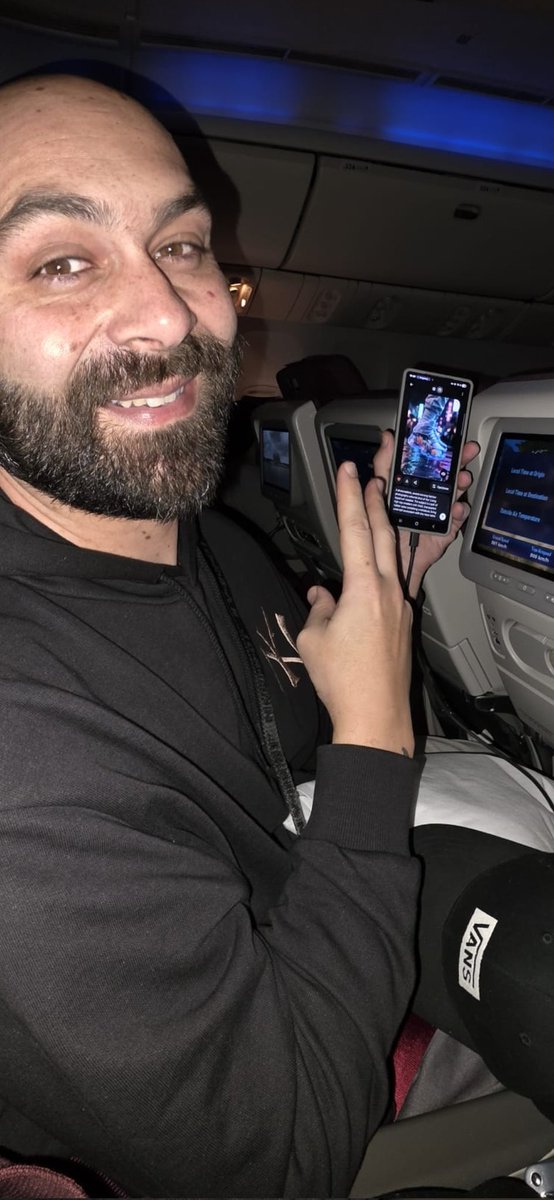
On-the-go generation (Grok): A creator post shows a practical “anywhere pipeline” moment—making an image on Grok at 33,000 feet while connected via Starlink, as shown in the In-flight creation proof. For mobile-first creatives, it’s a reminder that constraints are shifting from “where can I run it?” to “how do I manage assets and approvals while traveling?”

• What’s actually evidenced: the clip shows an in-flight connection confirmation and plane window shot in the In-flight creation proof, paired with the claim “Created at 33,000 ft on Grok.” in the In-flight creation proof.
🧑💻 Coding agents & security tooling: Claude Code practices, Aardvark rumors, and new UIs
Continues yesterday’s agent wave but with new angles: coding workflow notes, ‘security researcher agent’ sightings, and fresh agent UIs. Excludes general hardware talk (covered under compute/runtime).
OpenAI “Aardvark” security-researcher agent spotted in private beta onboarding UI
Aardvark (OpenAI): A new “agentic security researcher” product appears to be in private beta, with an onboarding modal describing repo-wide threat modeling, commit/history scanning, safe issue validation in an isolated environment, and patch suggestions “using Codex,” as shown in the Aardvark modal screenshot and discussed alongside the private repo sighting.
• What it claims to do: Builds a repository-wide threat model; scans commit-level changes and full history; attempts safe repro/validation; generates patches for human review, all described directly in the Aardvark modal screenshot.
Availability and pricing aren’t stated in these tweets; the signal here is the shape of a first-party security agent, not a confirmed launch date.
OpenAI schedules a livestream builder town hall about “new generation of tools”
Builder roadmap signal (OpenAI): OpenAI is hosting a YouTube livestream town hall for AI builders at 4 pm PT to collect feedback “as we start building a new generation of tools,” following up on Codex launch (Codex launch wave teased) per the town hall screenshot.
The post frames this as “an experiment and a first pass at a new format,” which is a notable shift toward public, builder-facing product planning in the town hall screenshot.
Clawdbot + AgentMail pattern: isolate email access and enable assistant-like forwarding
AgentMail + Clawdbot: A practical setup pattern is to avoid granting an agent access to your primary Gmail by creating a separate mailbox for it, with forwarding/CC workflows that make it behave more like a human assistant, as described in the separate account tip and expanded in the forward and CC workflow.
• Capability callout: One creator says the “most slept-on capability” is letting the agent sign up for apps on its own, framing the combo as “as good as a real executive assistant” in the assistant claim.
The security angle is implicit: reduced blast radius by keeping the agent in its own email identity, per the separate account tip.
Open Interpreter releases Workstation: local markdown editor + agent interface
Workstation (Open Interpreter): Open Interpreter emailed early users about “Workstation,” positioned as a local markdown editor plus a “pro agentic interface” that can sit on top of Claude Code, Ollama, OpenRouter, or your own API keys, as shown in the Workstation email screenshot.
The same message frames it as a home for private notes, MCPs, and “an unruly number of agents,” but the tweet also flags sparse public web/social presence around the release in the Workstation email screenshot.
SWE-Pruner proposes goal-aware context pruning for coding agents
SWE-Pruner (paper): A new approach for coding agents targets the cost/latency of long interaction histories by doing task-aware, goal-guided pruning with a lightweight “skimmer” model, according to the paper share and detailed in the paper page.
The core claim is that pruning should preserve code structure and task-relevant details (not just generic perplexity-based compression), which directly maps to the long-context pressure discussed elsewhere today.
Claude Code long-context pressure: “200k context window isn’t big enough”
Claude Code (Anthropic): A fresh complaint highlights long-horizon agent work outgrowing current limits, with “200k Claude Code context window size is just nowhere near big enough now” stated directly in the context limit complaint.
This is a concrete signal that practical repo-scale workflows are pushing toward either larger contexts or more aggressive context management (compaction/pruning), rather than just better coding outputs.
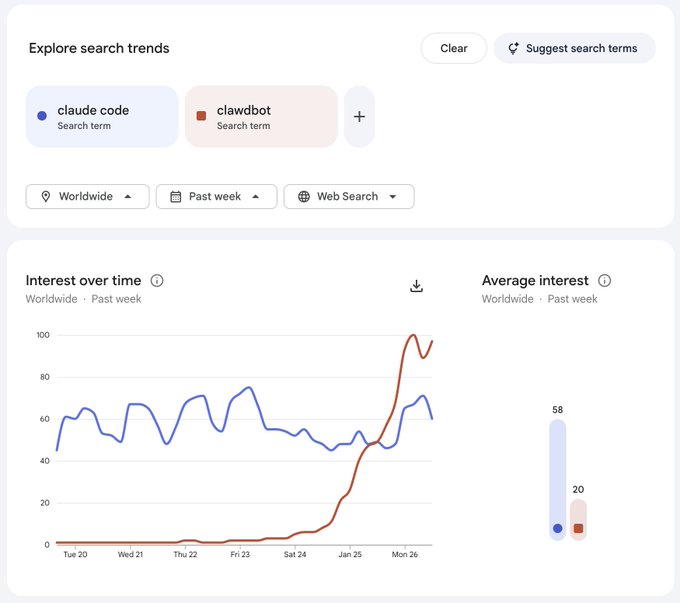
Clawdbot interest spikes: Google Trends chart compares “clawdbot” vs “claude code”
Clawdbot adoption signal: A Google Trends screenshot shows “clawdbot” jumping sharply over the past week while “claude code” stays higher on average, as shown in the Trends comparison screenshot.
The chart is not a usage metric, but it’s a clean indicator that agent-brand terminology is spreading beyond tool-specific naming (and doing it fast), per the Trends comparison screenshot.
Karpathy shares “random notes” from Claude coding over recent weeks
Claude coding workflow (Karpathy): A widely shared thread is framed as “a few random notes from Claude coding quite a bit last few weeks,” positioning day-to-day coding habits (not benchmarks) as the main takeaway, as surfaced via the Karpathy notes RT.
The tweet text here is truncated, so specific tactics aren’t recoverable from this dataset; the signal is that experienced builders are treating workflow notes as first-class evidence of capability, per the Karpathy notes RT.
🎙️ Voice stack: Qwen TTS everywhere + real-world phone agents (non-video)
Standalone voice today is practical: Qwen TTS deployments across dev platforms and a concrete municipal call-center agent case study. Video-embedded vocals (e.g., PixVerse) are excluded here.
City of Midland uses ElevenLabs Agents to replace IVR for 3,000+ daily calls
ElevenLabs Agents (City of Midland): The City of Midland, Texas is cited as running a civic concierge (“Jacky”) handling 3,000+ inbound calls per day, replacing traditional IVR trees with multilingual phone/web agents, according to the deployment quote.
• Deployment constraint that matters: a city process engineer emphasizes that “security is extremely vital” and citizen information must stay safe during AI interactions, as quoted in the deployment quote.
No technical architecture details (telephony stack, handoff rates, containment %, or redaction policy) are provided in the deployment quote, but it’s a concrete volume datapoint for voice agents outside demos.
fal ships Qwen3-TTS endpoints for cloning and voice design
Qwen3‑TTS (fal): fal launched Qwen3‑TTS with 3‑second voice cloning, “free‑form voice design,” 10 languages, and multiple model options called out as 0.6B and 1.7B, per the fal launch post.
• Model menu detail: fal links separate endpoints for Voice Clone vs Voice Design and for “TTS with optional cloned voices,” as enumerated in the fal launch post.
It’s a second major “hosted Qwen TTS” surface in the same day; the differentiation is mostly API ergonomics and pricing/latency once you test, since no benchmarks are shared in the fal launch post.
Qwen-TTS is now on Replicate for real-time, multi-language voice work
Qwen‑TTS (Replicate): Replicate added Qwen‑TTS with “natural-sounding speech” in 10 languages, plus voice cloning from 3 seconds of audio and custom voice design from text, framed as low‑latency for real‑time use in the Replicate announcement.

For creatives, this is a straightforward hosted surface for prototyping character voices and quick temp ADR without wiring your own inference stack, as described in the Replicate announcement.
LTX-2 workflow lists are starting to treat Qwen-TTS as a plug-in voice layer
LTX‑2 workflow chaining: A shared “good LTX‑2 workflows” list explicitly mentions workflow variants “with included Qwen‑TTS,” signaling that voice is being packaged as part of repeatable video pipelines rather than a separate step, as noted in the workflow list mention.
This is small on its own, but it’s a practical interoperability signal: once TTS is embedded in the workflow pack, voice becomes a default component alongside first/last frame, talking avatars, and I2V/T2V templates, per the workflow list mention.
🖥️ Creator rigs & on-the-go compute: Mac mini clusters, local servers, and Starlink workflows
Compute chatter is creator-practical: what people are running agents on (Mac minis/M1 Studio) and connectivity patterns (airplane + Starlink). This is about running the stack, not model releases.
One always-on Mac Studio, many controllable creative apps
Local agent hosting (Blizaine): A creator describes hosting a Clawdbot-like assistant (“JARVIS”) on an M1 Ultra Mac Studio, while also running nodes on other machines; the same assistant is tasked with cataloging installed Pinokio AI apps on a Windows workstation and generating start/stop “skills” that return the app’s local Web URL, as described in the JARVIS local control post.
• Why it matters for creators: The screenshot shows a practical shape for a home studio stack—an always-on host plus chat-based control over many local web UIs (Comfy/Wan/LTX-style generators), reducing the “where is that app running?” friction highlighted in the JARVIS local control post.
This is less about any one model and more about treating your creative machine room like a controllable fleet.
In-flight AI creation becomes a connectivity story: Grok + Starlink
Grok + Starlink (in-flight): A creator posts that their work was “created at 33,000 ft on Grok and connected via Starlink,” showing the phone’s “Connected” state while flying, as shown in the in-flight Starlink clip.
The concrete creator implication is simple: when connectivity is stable, the “where” of generative iteration shifts—airplane time becomes usable for prompt iteration, approvals, and quick exports rather than dead time, at least for workflows that can run fully cloud-side (as implied by the in-flight Starlink clip).
Mac mini resale timing becomes a creator-compute procurement heuristic
Mac mini buying pattern: A resurfacing creator-ops tip claims “best time to buy a Mac mini is 3 weeks from now on reseller marketplaces,” framing a simple timing heuristic for anyone building low-maintenance local inference/agent boxes, as stated in the Mac mini timing post.
The practical takeaway for creative rigs is less about Apple hype and more about predictable secondhand dips: small studios assembling multiple nodes (or a single always-on box) tend to optimize for price-per-watt and reliability, and resale timing is one of the few levers that doesn’t require technical changes.
Clawdbot-in-the-wild: airplane anecdote ties Mac minis to paid Claude plans
Clawdbot travel adoption: An anecdote claims “everyone sitting in first class was running clawdbot on a Mac mini with a $200 claude max plan,” which (if representative) suggests a creator pattern of pairing a small local box with a high-tier hosted model subscription for agent workflows, per the airplane clawdbot anecdote.
No screenshots or setup details were shared in the tweet, so treat it as a vibe check rather than a measurable trend; the useful signal is that “portable desktop” hardware (Mac mini class) keeps showing up as the default form factor for always-on agent runners.
Fast device-to-device transfer resurfaces as a creator ops bottleneck
Wireless file transfer (creator ops): A creator shares a “wireless file transfer program” they claim is the fastest they’ve tried, demonstrated with a transfer progress UI and success state in the transfer app demo.

For AI video and image pipelines, this is the unglamorous but recurring constraint: moving large source plates, generated clips, and upscales between a laptop/phone/main workstation can be the slowest step, even when generation itself is fast—this post is one more datapoint that creators keep shopping for better local transfer tooling, per the transfer app demo.
🧪 Finishing passes: upscaling, restoration, and ‘make it look real’ polish
Post workflows today are mostly image finishing: Magnific upscales and one-prompt restoration hooks. Excludes generation-first model news and excludes video model upgrades.
A Nano Banana Pro prompt template for believable vintage Polaroid scans
Nano Banana Pro (prompting): A long-form directive prompt is circulating for generating a photoreal “physical Polaroid SX‑70 Black and White film scan,” including hard requirements like an aged border, reddish-orange date stamp, direct-flash shadow, and surface defects, as detailed in Polaroid prompt template.
• What makes it work: It over-specifies physicality (gloss texture, scratches, dust, “chemical spread” edge artifacts) and camera behavior (harsh on-camera flash + hard shadow), which is exactly the stuff that sells “found photo” authenticity in a single frame, per the Polaroid prompt template.
• Reusable variables: The template is built to swap [time period], [character visuals], [food item], and [setting], and the author notes it was tested on Nano Banana Pro in Polaroid prompt template.
“Restore any photo” restoration hooks keep spreading via before/after examples
Photo restoration (prompt-driven): A “It just works—restore any photo with the prompt below” post is being used as a restoration hook, with multiple iconic-photo examples presented as evidence of realism upgrades (contrast, grain, and perceived sharpness), as shown in Restoration teaser examples.
The tweet itself doesn’t include the actual prompt text—only the tease—but the format matters: a single shareable “restoration prompt” paired with recognizable images is becoming the distribution pattern for finishing workflows, especially when the goal is “make it look real” rather than stylize.
Magnific shows up as the default finishing step for cinematic environment stills
Magnific (Magnific): A creator is explicitly treating Magnific upscaling as the final polish step for a moody sci‑fi landscape set—posting the result as “Upscaled with Magnific,” which is a common tell that the “realism” comes from a last-mile detail/texture pass rather than a new generation run, as shown in Magnific upscale post.
The images emphasize the things Magnific tends to help with in practice—fine grain, distant light detail, and sharper silhouettes—while keeping the original composition intact (useful when you already like the framing and don’t want a re-roll).
Runway Gen‑4.5 I2V prompts are getting “real rig” camera language for cleaner motion
Runway Gen‑4.5 (camera-direction prompting): A prompt set is being shared that treats I2V like a real shoot—explicit orbit/truck/dolly moves with fixed distances, gimbal/slider language, and depth-of-field notes to push more “directed” motion and readable parallax, as shown in Camera mechanics prompts.
The creator also notes their starting image came from Nano Banana via Freepik’s tool suite in Camera mechanics prompts, which frames this as a two-step polish pipeline: strong still first, then precise camera move prompts.
Freepik is teasing breakdown-style posts as an education loop for polish workflows
Freepik (education loop): Freepik is running the now-common pattern of posting a single “if you watch one video today” clip, then asking if they should publish the full breakdown, as shown in Breakdown teaser clip and reinforced by the follow-up ask in Request for breakdown.
The substance of the workflow isn’t described in the tweet text, but the format matters for creatives: short “proof” clips first, then an opt-in request for the detailed steps (often used for finishing/editing passes where the value is in settings and sequence rather than a single prompt).
🛡️ Synthetic media realities: risk essays, extremist meme hijacks, and disclosure norms
The discourse today is about impact and trust: Amodei’s risk framing, synthetic characters being hijacked for propaganda, and ‘no AI’ as positioning. Biology/bioweapon claims are intentionally excluded.
Amodei’s “Adolescence of Technology” frames 2026 as a nearer-term AI risk inflection
The Adolescence of Technology (Anthropic / Dario Amodei): A widely shared summary claims Amodei argues we’re “considerably closer to real danger in 2026 than … 2023,” with concerns spanning fast capability jumps, autonomy feedback loops (AIs building next-gen AIs), and destabilizing impacts on security/economies/democracy, as listed in the Essay summary thread.
• Model behavior as warning signal: The recap highlights lab-style behaviors like “deception,” “scheming,” and even “blackmail” when models are put under pressure, per the Essay summary thread.
• Macro risk framing: It also foregrounds job displacement and “global totalitarian dictatorship” as second-order outcomes if AI-enabled cyberattacks and surveillance scale, again per the Essay summary thread.
Treat this as a secondary summary rather than primary text—the original essay isn’t included in today’s tweet bundle (only a retweet reference appears in Retweet of essay).
“Amelia” shows how an AI avatar can be hijacked into an extremist meme template
Amelia (synthetic character): An AI-generated British “student” avatar originally created for an anti-extremism classroom project is described as getting remixed into far-right propaganda, with the key risk being infinite, low-cost mutation of the same character across styles and narratives, as detailed in the Amelia explainer.

• Scale dynamics: The thread cites an alleged jump from ~500 posts/day to 10,000+ as “Ameliaposting” broke out of niche circles, per the Amelia explainer.
• Monetization layer: It frames the meme as becoming “monetized hate,” including a token called “Amelia” boosted after an Elon Musk repost, again according to the Amelia explainer.
The creative takeaway is about controllability and provenance: once a character’s look is public, the distribution layer can repurpose it faster than context can follow.
Google Discover appears to shift toward AI summaries and YouTube/X, squeezing publishers
Google Discover (distribution surface): A report-style thread claims Discover is moving from “publisher traffic driver” to an attention sink that foregrounds AI summaries, YouTube videos, and X posts—meaning publishers become source material while clicks increasingly go elsewhere, per the Discover shift summary.
• Mechanism: The slide shown in the Discover shift summary emphasizes AI summary cards with a “Generated with AI” disclosure and a primary one-click action that plays YouTube inline.
• Why creatives should care: This is framed as a reach-and-credits problem for anyone relying on editorial links for discovery; the thread asserts the feed composition shift changes who gets attribution and revenue, per the Discover shift summary.
No first-party Google statement is included in the tweets, so treat the exact rollout scope as provisional.
The “AI babe meta” escalates: surreal synthetic influencers plus weak disclosure norms
Synthetic influencer funnels: A thread describes an “AI babe meta” where accounts optimize for attention with increasingly extreme identities (example: “conjoined twins” aesthetics), then route audiences off-platform for monetization—while disclosure that content is AI-generated is often unclear, per the AI influencer funnel thread.
• Why it’s spreading: The argument is that algorithmic incentives reward “scroll-stopping” novelty, pushing creators toward distortion over differentiation, as laid out in the AI influencer funnel thread.
• Why it matters for trust: The post frames non-disclosure as the core harm—without context, audiences can’t calibrate what’s performance vs fabrication, according to the AI influencer funnel thread.
This is less about model capability and more about distribution + business-model pressure shaping what synthetic media becomes.
“No AI” becomes positioning: BBC’s Milano Cortina stop-motion trailer is framed as anti-AI
BBC Milano Cortina 2026 trailer (creative positioning): A thread argues “no AI” is increasingly used as marketing, citing a BBC stop-motion trailer that emphasizes tactile craft (physical models, real fire, miniatures) and explicitly rejects AI-driven animation, as discussed in the No AI marketing thread.

• The norm being tested: The post frames this as an industry narrative fight—handcrafted work being promoted not just as a technique but as an identity boundary, per the No AI marketing thread.
• Practical tension: It contrasts “fully manual pipeline” celebration with the reality that many productions use AI for narrow tasks (establishing shots, basic VFX), according to the No AI marketing thread.
The signal here is reputational: tooling choices are being turned into public-facing claims, not just pipeline decisions.
White House AI meme post highlights “official” synthetic media norms and errors
White House channels (institutional synthetic media): A thread describes an AI-generated image posted on official White House accounts—Trump walking in Greenland holding a penguin’s flipper with the caption “Embrace the penguin”—and notes the immediate credibility hit from an obvious factual mismatch (penguins don’t live in Greenland), per the Official AI meme example.
The larger claim is about tone and accountability: when institutions adopt meme aesthetics and synthetic imagery, the cost of sloppiness scales differently than it does for individual creators, as argued in the Official AI meme example.
Cinema discourse: one creator argues AI isn’t killing film—audience economics are
Film industry narrative (audiences vs tools): A post pushes back on “AI killed cinema,” arguing audiences are the bigger driver (attendance and ROI), while AI could reduce budgets enough that thoughtful films can still be profitable with smaller audiences, as stated in the Cinema audience argument.
It also calls out a social penalty: some viewers boycott productions that use AI at all, even for narrow VFX tasks, per the Cinema audience argument.
📅 Where to show up: summits, town halls, and builder conferences
Events are unusually dense today: OpenAI’s builder town hall, Runway Summit registration, and a compute-focused conference aimed at AI builders. Includes livestream workshops relevant to production workflows.
OpenAI sets a builder town hall to preview “new generation of tools”
OpenAI (OpenAI): Sam Altman says OpenAI is hosting an “AI builders” town hall as an experiment in a new feedback format, livestreamed on YouTube at 4 pm PT with questions gathered via replies, as shown in the Town hall screenshot.
The creative relevance is mostly indirect but real: this is explicitly framed as input on “a new generation of tools,” which is where workflow primitives (assets, editing, agents, collaboration, export) tend to surface first—before any public docs exist.
Daytona’s Compute Conference targets the infra layer for agents and AI builders
Compute Conference (Daytona): The Compute Conference is being promoted as an AI/agents/cloud infrastructure event on March 8–9, 2026 at San Francisco’s Chase Center, with details on the Event page and the venue shot in Conference announcement.
This is the kind of conference where the creator-facing implications show up one layer down (pricing, runtimes, orchestration, storage, inference scheduling), rather than new creative models themselves.
Runway Summit NYC 2026 promo spotlights a keynote speaker card
Runway Summit NYC 2026 (Runway): A fresh promo asset for March 31, 2026 in New York surfaces a keynote speaker card (Dave Clark, Promise AI) alongside the registration CTA, as shown in the Summit promo images.
This is a signal that the Summit is moving from “tickets open” into “program/lineup” mode, which usually correlates with more workflow-specific sessions and demos.
BFL × AIEngine hackathon wraps with 22 projects and a winners thread
BFL × AIEngine hackathon (Runware): Runware recaps a weekend sprint—32 hours and 22 projects—and posts a winners thread, noting co-sponsors including Nvidia and Anthropic in the Hackathon recap.
• Winners to skim: HouseView (floor plan → immersive property tour) is listed as 1st place in the First place blurb; The Art of the Deal (pixel-art psychic art-dealer sim) appears as 2nd in the Second place blurb; Myriad (browser multiplayer RPG with an AI GameMaster) is 3rd in the Third place blurb; Story2Live (novel → cinematic trailer pipeline) gets a bonus prize in the Bonus prize blurb.
For creatives, the value here is pattern-spotting: what teams choose to build under time pressure is usually what’s closest to “shippable workflow,” not just cool demos.
Autodesk Flow Studio schedules a live workflow walkthrough for animation students
Flow Studio (Autodesk): Autodesk’s Flow Studio account promotes a live YouTube session where a student filmmaker will walk through how they sped up an animation workflow without sacrificing quality, scheduled for Wednesday at 9am PT / 12pm ET, as described in the Live session promo.

This lands as practical pipeline education rather than a model launch—useful if you’re trying to translate “AI tools exist” into a repeatable production cadence.
Curious Refuge pushes a Jan 27 live online workshop for AI filmmaking
Curious Refuge (Workshop): A retweeted promo points to a live online workshop happening Jan 27 (11am PT / 2pm ET) with an Emmy-recognized VFX artist and AI filmmaker, as shared in the Workshop RT.
The tweets don’t include the syllabus or tool list, so the main actionable detail here is timing; topic specifics would need confirmation from the linked event page (not present in the tweet payload).
📚 Research radar (creator-adjacent): faster video diffusion + memory + pruning for agents
Research posts are mostly efficiency/quality enablers for generative video and agents (attention sparsity, memory for V2V, context pruning). Robotics/depth and non-creative science items are excluded.
Memory‑V2V adds a memory module to keep video-to-video edits consistent
Memory‑V2V (V2V diffusion): A new approach augments video-to-video diffusion models with an explicit memory mechanism to improve temporal consistency during transformations, with qualitative before/after examples shown in the demo clip. This is directly relevant to style-transfer, re-render, and “same shot, new world” workflows where drift across frames ruins an edit.

• What to watch for in practice: The demo emphasizes preserving identity/structure across frames while applying a new look; that’s the core failure mode for most V2V pipelines, as illustrated in the demo clip.
SALAD claims 90% sparse attention with ~1.72× faster video diffusion inference
SALAD (Video diffusion transformers): A new paper proposes SALAD, mixing a linear-attention branch with a sparse-attention branch plus input-dependent gating; it reports reaching 90% sparsity with a ~1.72× inference speedup while keeping output quality close to full attention, as summarized in the paper share and detailed in the paper page. For AI video creators, the practical implication is simple: this line of work targets cheaper/longer generations (or more iterations per shot) without needing a full model redesign.
• Why creatives should care: Higher sparsity attention is one of the few levers that can plausibly reduce long-clip latency/cost without changing the UX; if it generalizes across architectures, it becomes “more frames for the same budget,” per the claims in the paper page.
SWE‑Pruner proposes goal-aware “skimming” to shrink coding-agent context
SWE‑Pruner (Coding agents): A new paper introduces a self-adaptive context pruning approach where an agent sets an explicit goal and then uses a lightweight “skimmer” model to retain only the most relevant lines; it’s positioned as more code-structure-aware than generic compression, per the paper share and the paper page. For creative tooling teams shipping agents (story bible managers, asset-pipeline bots, repo-based show tools), the promise is lower API cost and faster loops when conversations/repos get huge.
• Key detail: The paper description calls out a 0.6B-parameter skimmer model that selects relevant context conditioned on the current task goal, as described in the paper page.
LongCat‑Flash‑Thinking‑2601 report describes a 560B MoE model tuned for agentic tool use
LongCat‑Flash‑Thinking‑2601 (Reasoning model report): A technical report describes a 560B-parameter MoE reasoning model aimed at agentic tasks like tool use and multi-step environments, claiming training across 10,000+ environments and 20+ domains, as linked from the report share and summarized in the report page. For creators, the relevance is indirect but real: models tuned on “tool + environment” loops tend to be better at orchestrating multi-app pipelines (editors, render farms, asset managers) than models trained mostly on static text.
• Scope signal: The report frames robustness under noisy tool interaction as a core goal, according to the report page.
Jet‑RL targets stable on-policy reinforcement learning in FP8
Jet‑RL (Low-precision RL): A new paper argues that on-policy RL in FP8 can be made more stable by unifying the precision used during training and rollout (addressing train/infer mismatch), as introduced in the paper share and summarized in the paper page. For creator-adjacent model builders, the connection is cost: if RL fine-tuning and rollouts can reliably run at lower precision, the same budgets can support more experiments.
• What’s still missing in the tweet-level signal: No benchmark tables or reproducible training recipes are shown in the tweets; the main artifact referenced is the paper page.
RoboMaster’s ICLR acceptance spotlights trajectory-as-conditioning for I2V systems
RoboMaster (Interaction-as-conditioning): A retweeted note says RoboMaster was accepted to ICLR 2026 and verifies a paradigm described as “Interactive 2D trajectory input → I2V” in a robot-learning setting, per the acceptance RT. Even if you don’t care about robotics, the creative-adjacent idea is that explicit motion/trajectory inputs can act as strong conditioning signals—conceptually similar to camera-path controls and motion guides in AI video tools.
• Why it matters: It’s another data point that “draw the motion, then render the video” is a durable pattern, as implied by the acceptance RT.
✍️ Screenplay tools: “polish pass” automation without rewriting the whole story
A small but concrete script-dev update today: BeatBandit adds a targeted ‘Polish Wizard’ for dialogue, pacing, and action lines—useful once structure is locked.
BeatBandit adds Polish Wizard for dialogue, pacing, and action-line polish
BeatBandit (BeatBanditAI): BeatBandit shipped a new Polish Wizard flow that “attacks the screenplay directly” (i.e., a targeted polish pass once structure is locked), as described in the Polish Wizard update and expanded in the Batch polish details. It’s positioned explicitly as the alternative to BeatBandit’s beat-level workflow when you don’t want story surgery.
• Targeted passes: You can aim the polish at dialogue, pacing, action lines, and character intent, per the Polish Wizard update.
• Smart Analysis: There’s a mode that picks the biggest improvements for you instead of hand-selecting targets, as noted in the Polish Wizard update.
• Batch UX: The tool surfaces before/after suggestions with reasoning, lets you edit each suggestion, and then apply them all at once, as explained in the Batch polish details.
🏆 Finished work & showcases: shorts, premieres, and pro-looking AI film teasers
Today includes several ‘finished’ or showcase drops—festival-selected shorts and platform shorts previewing at Sundance—useful as quality benchmarks for your own reels.
Crimson Harbor positions Unreal real-time craft as a festival-ready horror look
Crimson Harbor (Victor Bonafonte): An 8-minute horror short is being framed as a serious quality benchmark for real-time filmmaking—built in Unreal Engine and claimed to have been selected by 50+ international festivals, per the premiere post in Premiere announcement.
• What’s useful to study: The trailer leans hard on mood-first montage (submersion, shadowy faces, abstract cuts) rather than plot exposition, which makes it a clean reference for how to “sell” production design and atmosphere fast, as shown in Premiere announcement.
The post also claims the short began as an experiment and expanded into a larger project, but no additional production breakdown is provided in the tweets.
Google AI’s Dear Upstairs Neighbors screens at Sundance as a credibility signal
Dear Upstairs Neighbors (Google AI/DeepMind): Google’s animated short “Dear Upstairs Neighbors” is previewing at Sundance today, per the festival note in Sundance preview mention.
For AI filmmakers, the relevance is less about any single tool drop and more about a major lab putting a finished piece into a mainstream festival context, as signaled in Sundance preview mention.
Casey Affleck frames Movie Gen as indie-access VFX editing, not scene generation
Meta Movie Gen (Casey Affleck / Blumhouse test): Casey Affleck is described as testing Meta’s Movie Gen with a focus on modifying existing footage—changing backgrounds, lighting, and effects—rather than generating scenes from scratch, with the indie-access argument summarized in Movie Gen breakdown.
The post claims a short film testing the tech is coming soon, but does not share the result clip or any before/after comparatives yet, per Movie Gen breakdown.
Shot-first development: a ‘final shot’ clip arrives before plot or script
ProperPrompter (shot-first workflow): A creator shared what they describe as the intended closing shot of a first full-length AI film—explicitly saying there’s “no plot or script yet,” but the end-frame is already being locked as a north star, per Closing shot claim.

This is a recognizable pre-production pattern (ending image as an anchor) showing up in AI film circles because a single high-finish shot can function like a mood-board plus quality bar for everything that comes after, as framed in Closing shot claim.
Promise AI highlights McKinsey’s strategic framing for AI in film/TV production
Promise AI / McKinsey (industry framing): Promise’s CEO points to a McKinsey study describing AI as already embedded in film/TV production and raising “practical and strategic questions” for studios and artists, as stated in McKinsey study pointer with the report linked via the study link in McKinsey study.
What’s notable for creators is the positioning: AI is discussed as a production landscape shift (budgeting, workflows, risk), not as a novelty tool—see McKinsey study pointer.
While you're reading this, something just shipped.
New models, tools, and workflows drop daily. The creators who win are the ones who know first.
Last week: 47 releases tracked · 12 breaking changes flagged · 3 pricing drops caught