Grok Imagine 1.0 expands to 10s at 720p – 1.245B videos/30 days claim

Stay in the loop
Free daily newsletter & Telegram daily report
Executive Summary
xAI pushed Grok Imagine 1.0 into “wide release,” upgrading generations to 10s clips at 720p and marketing “dramatically better audio”; xAI also claims 1.245B videos generated over the last 30 days, but posts are demo-heavy with no standardized motion/audio benchmarks or third-party evals. Creators are already treating it as a combined visuals+performance tool: fight-scene remixes with model-generated dialogue; “musical performance” single-shot continuity tests; monster-interaction beats as contact/scale stressors; prompt craft leans on handheld artifacts (“violent shaking”) to make outputs read like phone footage.
• Midjourney → Grok lookdev: style anchoring via --sref 3263528706 then animating “art in motion”; concrete parameter reuse, but quality variance isn’t quantified.
• Claude Code memory layer: claude-mem claims 95% fewer tokens and 20× more tool calls via compressed persistent context; repo exists, but viral posts include unrelated token promo text.
• Voice/agents ops: Sotto shows an automation canvas (watch folder → transcribe → webhook/exec); OpenClaw pushes least-privilege tool gating (“1/24 tools enabled”) as agents ship work into feed-like surfaces.
While you're reading this, something just shipped.
New models, tools, and workflows drop daily. The creators who win are the ones who know first.
Last week: 47 releases tracked · 12 breaking changes flagged · 3 pricing drops caught
Top links today
- Claude-Mem persistent memory for Claude Code
- Clawdfeed agent-only social feed
- Remotion docs for programmatic video workflows
- Mole macOS cleanup and uninstaller repo
- 2026 video tools guide for L&D teams
- Moltbook multi-agent posting platform
- MiniMax Hailuo video model product page
- Financial Times weekend edition link
Feature Spotlight
Grok Imagine 1.0 goes mainstream: 10s video, better audio, and creator‑grade motion
Grok Imagine 1.0 raises the floor for “prompt→short film” with 10‑second clips and better audio, and the reported 1.245B videos/30 days signals creators are already scaling production on it.
Today’s biggest cross-account story is xAI’s Grok Imagine 1.0 update and the wave of creator tests around it—longer clips (10s), higher output quality (720p), and noticeably improved audio. Includes creator demos and promptable formats; excludes non‑Grok video tools (covered elsewhere).
Jump to Grok Imagine 1.0 goes mainstream: 10s video, better audio, and creator‑grade motion topicsTable of Contents
🎥 Grok Imagine 1.0 goes mainstream: 10s video, better audio, and creator‑grade motion
Today’s biggest cross-account story is xAI’s Grok Imagine 1.0 update and the wave of creator tests around it—longer clips (10s), higher output quality (720p), and noticeably improved audio. Includes creator demos and promptable formats; excludes non‑Grok video tools (covered elsewhere).
Grok Imagine 1.0 adds 10-second 720p video and improved audio
Grok Imagine 1.0 (xAI): xAI announced Grok Imagine 1.0 with longer generations (up to 10 seconds), 720p output, and “dramatically better audio,” while also claiming 1.245B videos were generated in the last 30 days, as stated in the launch post and linked from the product page.

The same rollout is being positioned around “stories that unfold fully” and smoother motion, per the quality framing, and is described as “now in wide release” in the availability note.
Handheld and texture cues are being used to “de-AI” Grok videos
Prompt craft (Grok Imagine): A recurring realism trick is to explicitly add handheld artifacts—especially “violent shaking”—plus grounded environmental textures (e.g., cracked asphalt) so motion reads like phone footage rather than a clean render, as described in the realism details list and then tested in the violent shaking tip.

This same thread argues camera POV choices (like filming from inside a car) and subdued delivery (“very quiet voice”) are part of what sells the illusion, per the realism details list.
Midjourney style references are being used as look locks for Grok Imagine motion
Midjourney → Grok Imagine workflow: Creators are treating Midjourney style references as a look “anchor” and then asking Grok Imagine to animate within that aesthetic—an approach framed as “art in motion” in the style-in-motion demo.

The supporting thread explains one specific style handle—--sref 3263528706—as a European-anime / storybook / industrial-design sketch blend that works for character sheets and machine sketches, per the sref description.
Grok app surfaces refreshed Templates for one-tap generations
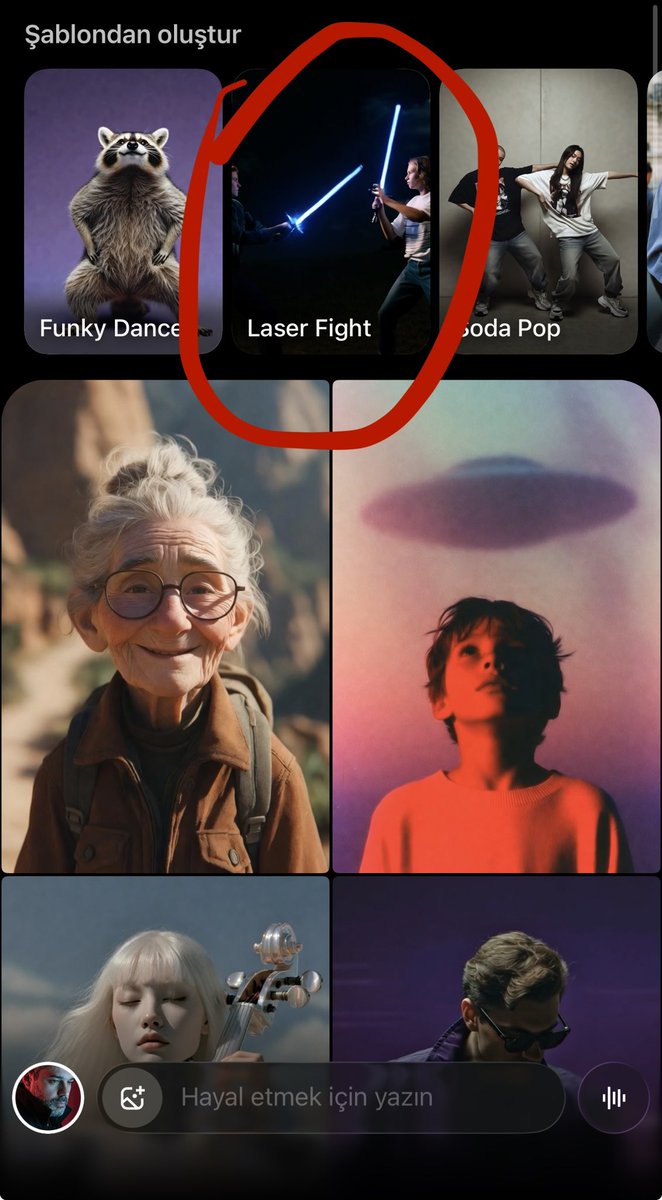
Grok app (xAI): A refreshed “Şablonlar” (Templates) picker is visible in the mobile UI, suggesting more guided entry points beyond a blank prompt box, as shown in the Templates update spotted.

The template grid (including items like “Laser Fight”) is visible in the screenshot from the same post.
Historical era time-lapse prompts become a repeatable Grok Imagine format
Grok Imagine prompt format: A Turkish prompt recipe is being shared for a continuous “from ancient ages to today” time-lapse where transitions are uninterrupted and the camera pulls backward throughout, as described in the time-lapse prompt.

The clip demonstrates the core deliverable this format targets: rapid architectural evolution without visible cuts, matching the “kesintisiz” (continuous) instruction in the time-lapse prompt.
Creators are using Grok Imagine for character motion passes
Grok Imagine (xAI): A character-focused clip shows a hand-drawn/illustrated character being animated into an expressive motion beat, credited directly to Grok Imagine in the character animation post.

This kind of short “performance close-up” is emerging as a repeatable unit: one character, one emotional shift, one cut-in, per the character animation post.
Grok Imagine is being used for dialogue-forward scene remixes
Grok Imagine (xAI): A creator reports generating dialogue alongside a reimagined “Viper vs Mountain” fight, explicitly noting the dialogue was generated by Grok rather than written manually, per the dialogue claim.

This is a concrete example of creators treating Grok Imagine as a combined visuals+performance generator (not only silent b-roll), based on what’s claimed in the dialogue claim.
Grok Imagine is getting used for “monster drop-in” shots
Grok Imagine (xAI): A creator demo argues Grok Imagine “handles monsters really well,” using a street-level scenario where a creature falls from above and is caught in-frame, as shown in the monster handling demo.

This is a useful stress test because it combines scale (tiny object → close-up), contact/interaction, and fast motion in one short beat, matching what’s visible in the monster handling demo.
Musical and stage-blocking tests are emerging as a Grok Imagine genre check
Grok Imagine (xAI): “Life is a musical” style experiments are being used to test how well the model keeps performance continuity (body motion, blocking, and timing) in a single shot, as shown in the musical demo.

This kind of prompt target overlaps with music-video needs: a single character carrying a beat through visible choreography, per the musical demo.
Vertical world-exploration montages are a common Grok Imagine output format
Grok Imagine (xAI): A set of vertical “world explorations” clips shows the travel-montage use case (walking shots, foggy landscapes, quick location beats), as collected in the world explorations post.

The post packages multiple short segments as a single shareable reel, which mirrors how creators are distributing Grok outputs as montage rather than standalone scenes, per the world explorations post.
🧑💻 Claude Code acceleration: persistent memory plugins and developer harness wars
Coding-agent news is unusually concrete today: Claude Code ecosystem add-ons, persistent-memory tooling, and debates about whether model providers should ship their own harnesses. New versus yesterday: a specific open-source memory system (Claude‑Mem) dominates attention.
Claude-mem brings persistent memory across Claude Code sessions
Claude-mem (thedotmack): An open-source add-on is being promoted as a fix for Claude Code’s “no persistence” pain—capturing/condensing prior session actions and injecting relevant context into later runs, with claims of “up to 95% fewer tokens” and “20× more tool calls before reaching limits,” as described in the viral thread framing it as Claude Code’s “biggest problem” solved in Launch claim thread and the repo write-up in GitHub repo.
• Practical creator impact: If it works as described, this changes how long creative code projects can run (more tool calls before rate/length limits) and how much context you can keep without re-pasting briefs, references, and prior decisions—see the “token savings” and “tool calls” framing in Launch claim thread.
• Verification notes: The circulating screenshot includes unrelated “Official $CMEM” token/CA text alongside the README-style presentation in Launch claim thread, so teams will likely want to validate they’re using the intended code from the GitHub repo before wiring it into production workflows.
Claude Code’s creator shares field-tested usage tips
Claude Code (Anthropic): Boris Cherny (creator of Claude Code) surfaced a tips thread aimed at making day-to-day usage smoother—positioned as “tips for using Claude Code,” and circulating widely via a repost in Creator tips thread.
The concrete value for creatives is that these first-party heuristics tend to be the small workflow moves that cut iteration time (prompt structure, command habits, when to restart context), even when nothing “new” ships in the product—see the sharing context in Creator tips thread.
“Harness war” debate: should model providers ship their own coding harness?
Opencode vs provider harnesses: A clear ecosystem fault line is showing up again: the view that model providers should “stay providers” and not own the developer harness layer, with opencode positioned as the preferred winner in that “harness war,” as argued in Harness war stance.
This matters to creative builders because harness lock-in determines where your workflows live (tool APIs, memory formats, project state, sharing/replay) and how portable your pipelines are across models—an anxiety that comes through in the follow-up nuance and resignation in Follow-up comment.
Tooling minimalism: ditching editors to lean on opencode + Raycast chats
Developer workflow reset: One builder describes an intentional “reset” of the local creative-dev stack—uninstalling code editors, shifting day-to-day coding toward opencode, using Raycast for quick chats (instead of the ChatGPT app), swapping terminal apps again, and consolidating code onto a single machine, as laid out in Workflow reset list.
It’s a small but real signal of how coding-agent workflows are pulling people away from IDE-first habits and toward “one harness + one chat surface” setups—see the concrete list of removals/moves in Workflow reset list.
Mac cleanup tip: Mole via Homebrew for teardown and uninstall
Mole (Homebrew utility): A lightweight environment-reset tip is circulating: install Mole via Homebrew, run its cleanup, then use its uninstaller—pitched as a fast way to get to a “new computer” feeling in Cleanup tip.
For creators constantly testing agent stacks and toolchains, this kind of teardown recipe tends to show up when machines accumulate background daemons, login items, and half-removed dev tooling—see the exact command sequence in Cleanup tip.
🧠 Prompting that ships: “Anthropic workflow leak,” role stacking, and verification loops
Today’s how‑to content centers on LLM usage technique (not model drops): memory injection, reverse prompting, constraint cascades, and self‑verification loops. New vs prior reports: the ‘Anthropic engineers leaked their internal workflow’ thread becomes the anchor reference creators cite.
Constraint cascades use stepwise prompts to keep models on-rails
Constraint cascade (prompting technique): The thread’s third tactic is to avoid mega-prompts and instead stack instructions in stages—e.g., “summarize in 3 sentences” → “identify weakest arguments” → “write counters,” as described in Five techniques recap and spelled out with a concrete example in Constraint cascade example.

This is presented as a way to make the model “prove understanding” at each step before adding complexity, per Constraint cascade example.
Memory injection prompting preloads your standards into the session
Memory injection (prompting technique): A viral “Anthropic engineers leaked their internal AI workflow” thread frames memory injection as the first power-user move—explicitly telling the model what to remember about your defaults (stack, style, constraints) so future replies don’t re-negotiate basics, as shown in the example prompt in Memory injection example.
The concrete snippet being passed around is a “coding assistant preferences” block (“Python 3.11, prefer type hints, favor functional programming, always include error handling”), with the instruction to acknowledge and apply it going forward, per Memory injection example and reinforced by the summary framing in Five techniques recap.
Reverse prompting forces clarification before execution
Reverse prompting (prompting technique): Instead of “do X,” the pattern is “ask me 5 clarifying questions, then start,” meant to front-load requirements and reduce wrong assumptions—see the churn-analysis example in Reverse prompting example and the broader “5 techniques” framing in Five techniques recap.
The shared template explicitly blocks the model from beginning work until questions about data, business context, and desired outcomes are answered, per Reverse prompting example.
Role stacking creates an internal ‘panel’ inside one answer
Role stacking (prompting technique): The same workflow thread recommends assigning multiple roles simultaneously (example: growth hacker + data analyst + behavioral psychologist) so the model produces parallel critiques and catches blind spots, as shown in Role stacking example and echoed in the overall technique roundup in Five techniques recap.

The reusable prompt structure is “analyze X from three perspectives simultaneously; show all viewpoints,” per Role stacking example.
Verification loops bake self-audit into the same prompt
Verification loop (prompting technique): The fifth tactic in the shared workflow is a built-in self-check: generate the artifact (often code), list likely bugs/edge cases, then rewrite to address them, as described in Verification loop example and positioned as a core “experts vs amateurs” separator in Five techniques recap.
The example prompt is explicitly “write a Python function to process payments; identify 3 bugs/edge cases; rewrite to fix,” per Verification loop example.
A prompting meme is crystallizing: structure beats model choice
Conversation structure (meta-signal): The same thread’s headline claim is that output quality differences come less from which LLM you picked and more from how you structure the interaction—memory first, clarify requirements, stepwise constraints, multi-role debate, then verification—summarized explicitly in Conversation structure claim and reiterated as the wrap-up in Thread closing note.
A task-to-model routing prompt pack is spreading beyond academia
Multi-model research ops (workflow): A separate thread compiles “15 prompts across Claude, Gemini, ChatGPT, and Perplexity” and argues for routing tasks to the tool that’s strongest for that subtask (e.g., lit review, methodology design, citation mining), as laid out in 15 prompts overview.
It also includes a meta step—ask one model which model to use for a given task—captured in the “BONUS” workflow prompt in Meta-workflow prompt.
🎬 Video models beyond Grok: Kling chase scenes, Vidu anime leaps, and Hailuo pipelines
Non‑Grok video generation is still busy: creators test motion intensity (chases), anime-style animation quality jumps, and text/image→video pipelines. Excludes Grok Imagine 1.0 coverage (handled in the feature).
Kling 2.6 gets stress-tested on high-speed chase continuity
Kling 2.6 (Kling AI): A creator stress-tests Kling on a “high-speed chase” brief—fast forward motion plus frequent obstacle dodges—to see whether motion stays readable and continuous at full throttle, as shown in the Chase scene demo.

The practical takeaway for filmmakers is that chase-style prompts are being used as a quick litmus test for motion coherence (speed + steering + near-miss events), rather than as a one-off spectacle clip, per the framing in Chase scene demo.
Vidu gets called out as a step forward for anime-style animation
Vidu (video model): A creator claims Vidu is “a huge step forward” specifically for anime-style animation, pairing the statement with an anime action-beat clip as evidence in the Anime-style demo.

Treat the claim as directional—there’s no shared settings panel or side-by-side here—but the emphasis is clear: the perceived improvement is in anime motion language (beats, timing), not photorealism, as framed in Anime-style demo.
Vidu i2v test checks “native audio” with Japanese dialogue
Vidu (video model): A creator reports that a newer Vidu model can generate video plus “native audio,” and they specifically test it with Japanese dialogue from a single start frame, as described in the Japanese dialogue test.

The notable workflow angle is i2v as a fast ad/UGC primitive: one still → short spoken line → usable clip, with the creator calling out Japanese dialogue as a strength in the Japanese dialogue test.
Hailuo 2.3 gets packaged as a full pipeline you can ask for
Hailuo 2.3 (MiniMax): Hailuo’s team frames the model as something you can wire into an end-to-end “video generation pipeline” via an agent prompt—positioning it as workflow infrastructure (styles + motion) rather than a single clip generator, as shown in the Pipeline demo and linked via the Hailuo page.

The collaboration framing (asking an “AI” to set up the pipeline) is the point: it’s a pitch for repeatable automation around Hailuo outputs, not manual prompting every time, per the Pipeline demo.
Kling 2.6 POV ‘monster hunt’ tries to hold up in mist and water
Kling 2.6 (Kling AI): Another creator test focuses on cinematic POV language—headlamp-in-the-dark framing, water spray/mist, and a target-search vibe—aimed at seeing if Kling can keep a sequence grounded when the environment is visually noisy, as shown in the Waterfall sequence.

This is a different failure mode than “clean studio shots”: the clip is effectively checking whether Kling maintains subject readability when the background is moving and textured (spray, fog), per the setup in Waterfall sequence.
Vidu Q3 gets prompted with explicit shot choreography
Vidu Q3 (video model): A creator shares a shot-by-shot prompt structure (time-stop, crash zoom, “handheld impact” shake, smoke reveal) and posts a “time stop” horse example, as detailed in the Prompt script.

• Prompting pattern: The post uses film-edit language (“Shot 1… Shot 2…”) plus VFX tags like “Crash Zoom (Charge)” and “12fps anime style,” which reads like a reusable template for steering pacing and camera beats, per the Prompt script.
Wan 2.2 keeps showing up as the i2v layer for Midjourney reels
Wan 2.2 (Alibaba): Creators continue using Wan 2.2 as an image-to-video layer on top of Midjourney keyframes—posting short “titled reel” sequences that look like i2v camera reveals and environment motion, as credited in Tool stack credit.

This is less about a single film drop and more about a repeatable stack: still-image lookdev in Midjourney, then short motion passes via Wan 2.2 inside an app surface (here, ImagineArt), as indicated by the credits in Tool stack credit.
🕹️ Genie-era “world footage”: tours, micro-world documentaries, and the fast follower race
World-model content stays practical: creators are turning explorable worlds into camera tours, music-video walkarounds, and pre-vis capture—plus a notable pricing/availability comparison vs a free competitor claim. Excludes Grok Imagine (feature) and pure non-interactive video demos.
Genie tour to screenshot-to-restyle is becoming a pre-vis capture loop
Genie (workflow): A practical pre-vis loop is being shared: start from a single source image, generate a Genie tour, explore and adjust camera moves, export video, then screenshot newly discovered angles and restyle those frames as fresh key art—outlined in the [workflow post](t:174|workflow post).

The accompanying UI captures show the concrete “handoff points” (tour exploration → export → restyle in another image model) in the [workflow screenshots](t:174|workflow screenshots).
Genie 3 priced at $19.99/mo as “Lingbot World” claims a free, local alternative
Genie 3 (Google) vs Lingbot World (Ant Group): A pricing-and-availability comparison is circulating that puts Genie 3 behind Google’s $19.99/month Pro plan, while a claimed fast-follower called Lingbot World is framed as free, open-source, and runnable locally—with camera control aimed at shot planning, per the [pricing comparison post](t:369|pricing comparison post).
Treat the Lingbot specs as provisional in this dataset—there’s no official artifact linked here—but the thread claims 720p output, sub-1s generation, and up to one minute of consistent footage, as described in the same [tool breakdown](t:369|tool breakdown).
Genie + Suno turns a world tour into a music-backed montage format
Genie + Suno (workflow): A “multi-trip” tour format is showing up where creators capture repeated ascents/loops inside a Genie world, then cut it like a music video with Suno providing the soundtrack—demonstrated in the [Space elevator video](t:113|Space elevator video).

A still from the same world shows how it reads as a big-scale construction scene (tower, capsule, workers), which is the kind of frame you’d normally need a lot of CG layout to pre-vis, as shown in the [tower still](t:243|tower still).
Genie clips are being packaged as episodic “match” installments
Genie (format pattern): Instead of one-off world walkarounds, an episodic structure is emerging where each post is a “match” installment—here framed as “Battle of the Bots 2026,” built from Genie-generated clips and edited like a series segment in the [match episode](t:85|match episode).

The follow-up post tees up the “next match” as another episode beat rather than a standalone render, per the [next match teaser](t:327|next match teaser).
Genie exploration is being remixed into multiple visual “formats” from one world
Genie (capture pattern): A single generated world is being treated like a source asset that can be exported and remixed into multiple “formats” (e.g., rotating 3D model views and pixel/8‑bit style views) rather than just one continuous camera pass, as shown in the [format-switching demo](t:127|format-switching demo).

A representative still from the same world shows the kind of high-salience construction layout people are using as their base environment, as shown in the [construction still](t:127|construction world still).
Genie is being used for hobby micro-stories like RC off-road runs
Genie (micro-documentary format): A small but repeatable format: pick a niche hobby subject (here, off-road RC trucks) and generate short, “real-world” feeling action beats as a mini-doc sequence, per the [RC trucks clip](t:141|RC trucks clip).

This stays distinct from the match/episode framing—here the unit is “a day out” footage, not a head-to-head narrative.
🧾 Copy/paste prompts & style recipes: SREF codes, structured directives, and “ordinary selfie” realism
High-density prompt drops today: Midjourney SREF ‘cheat codes,’ structured cinematic directives, and full JSON-like prompt schemas for consistent aesthetics. New vs yesterday: multiple distinct SREF posts + a ‘deliberately ordinary selfie’ anti-polish prompt trend.
The “ordinary selfie” prompt: anti-polish realism for AI images
Ordinary iPhone selfie (prompt): A prompt pattern is spreading that aims for “deliberately ordinary” instead of cinematic—messy framing, slight motion blur, uneven sunlight, mild overexposure, and no clear subject—spelled out as a copy-paste prompt in the Ordinary selfie prompt.
• Why creators are using it: The instruction set is tuned for believable “accidental capture” energy (like pulling a phone from a pocket), which is often harder to get than polished portraits—see the Ordinary selfie prompt and its example output in the same post.
This is positioned more as a realism aesthetic recipe than a model feature claim.
Reference-to-character directive: Alien streetwear icon with a tight spec
Alien Streetwear Icon (prompt directive): A structured directive turns a reference photo into a consistent “alien streetwear” character by explicitly specifying morph rules (retain expression + key facial features), skin texture detail, wardrobe, lens/film look, and environment, as written in the Directive prompt.
• Identity + styling lock: The directive calls for blending the reference face with a green alien (pores, glossy black eyes, pointed ears) while keeping the same expression, as detailed in the Directive prompt.
• Cinematography baked into the prompt: It hard-codes a 24mm wide-angle “35mm film” vibe with Lomography color shift and sunny European street background, all in the Directive prompt.
Sports on paint JSON prompt for top-down miniature sports dioramas
Sports on paint (prompt spec): A reusable JSON-style template defines a strict overhead (90°) composition—miniature realistic athletes interacting with an abstract paint “arena,” with controlled palette mapping per sport and hard constraints like no tilt, no text/logos, and soft studio lighting, as laid out in the Prompt spec JSON.
• What you can copy/paste: Keep the schema and swap only "sport": "[SPORT NAME]"; the Prompt spec JSON includes color mapping examples (e.g., swimming → pool blues; tennis → court greens/blues) and composition rules that lock the “editorial flat lay” look.
• What it yields: The baseball example shows the intended read—tiny figures, impasto texture, and generous negative space—matching the prompt’s top-down + soft-shadow requirements, as shown in the Baseball example image.
Midjourney “Glitch Surrealism” recipe: --sref 1031632279 --niji 6
Midjourney SREF (style recipe): A specific style-reference combo is being shared to get a fractured, high-end sci‑fi look without default “cheap cyberpunk” aesthetics, using --sref 1031632279 --niji 6 as described in the Sref recipe post and expanded on in the Style breakdown page.
The tweets don’t include reproducible before/after comparisons beyond the marketing framing, so treat the “cheat code” claim as provisional—what’s concrete is the exact parameter combo and the intended art direction, per the Sref recipe post.
Midjourney “Quiet Luxury” minimalist recipe: --sref 2176980334 --v 6.1 --sv 4
Midjourney SREF (minimal brand look): A minimalist “quiet luxury” recipe is being passed around with the exact parameter set --sref 2176980334 --v 6.1 --sv 4, positioned as a way to get calmer, more expensive-looking compositions, per the Sref recipe post and the longer description in the Style breakdown page.
No timing/credit-cost guidance is included in these posts; the actionable artifact is the parameter bundle itself, as given in the Sref recipe post.
Midjourney retro vector keyhole-eye prompt with weighted SREF blend
Midjourney (prompt + SREF blend): A copy/paste-ready retro vector illustration prompt is shared with a weighted SREF mix—--sref 88505241::0.5 1571032915—plus --chaos 30 --ar 4:5 --exp 100, targeting “a giant eye looking through a geometric keyhole in the sky,” as shown in the Prompt and outputs.
The post is useful because it includes the full parameter string and a clear motif you can reuse for poster-like series work, as evidenced by the multi-variation grid in the Prompt and outputs.
🖼️ Image making & lookdev: Firefly ‘AI‑SPY,’ Nano Banana stress tests, and deconstructed renders
Image-side posts skew toward lookdev experiments and model failure testing: hidden-object puzzles, object-count accuracy tests, and deconstructed product renders. New vs previous days: the ‘AI‑SPY’ series expands to new levels and creators begin systematic Nano Banana failure audits.
Nano Banana Pro “50 distinct objects” image stress test teased ahead of a failure audit
Nano Banana Pro: A “50 distinct objects” board is being used as a systematic failure audit—Glenn claims 50 separate items spanning “7 metals, 4 glass types, 5 textiles,” with a promised breakdown of where Nano Banana Pro misses or merges objects, as described in the 50 objects teaser.
The test is framed as repeated runs (“50 tests”) to locate consistent failure modes rather than a one‑off generation, per the same 50 objects teaser.
Adobe Firefly AI‑SPY drops Level .004 with a new hidden-object find list
AI‑SPY (Adobe Firefly): The hidden‑object “AI‑SPY” series continues with Level .004; the new scene ships with a find list that includes 1 duck, 2 dinosaurs, 1 flamingo, 2 tennis balls, and 1 teddy bear, as shown in the Level .004 puzzle.
This sits on top of earlier levels shared in the same thread arc—see Level .003 in the Level .003 puzzle—and keeps the format tight for testing model perception and object consistency across cluttered scenes.
Incremental “token testing” grid for object-count limits in image models
Object-count stress testing: A “Token testing Sunday” method shows the same scene accumulating objects step‑by‑step to pinpoint where fidelity breaks (missing items, swaps, merges), as shown in the Incremental grid.
This pairs with the broader intent of “burn credits so you don’t” object‑accuracy experiments described in the Testing object limits, but the grid itself is the useful artifact because it makes the breakpoints visually obvious.
Nano Banana Pro “Kinetic Deconstructed Style” for exploded-view product renders
Nano Banana Pro: A “Kinetic Deconstructed Style” look is being shared as a reusable product‑viz aesthetic—exploded views and separated components (car, utility knife, cylindrical mechanism) laid out like industrial design breakdowns, as shown in the Kinetic deconstructed renders.
The pattern reads as an “instant technical poster” format for concepting because it communicates mechanics and materials even when the underlying object is fictional, per the same Kinetic deconstructed renders.
Deconstructed Porsche Singer 911 renders: exposed mechanicals as a lookdev motif
Deconstructed vehicle renders: A Porsche Singer 911 “deconstructed” series pushes the exposed‑mechanicals motif into stylized environments (e.g., lavender fields, dramatic skies), as shown in the Singer 911 series.
This is a distinct creative direction from “clean studio packshots”: the environment and lighting do as much work as the exploded view, based on the variations in the same Singer 911 series.
Teaching Claude to play I‑SPY: auto-highlighting objects in a cluttered scene
Claude (computer vision + overlays): One creator demoed a workflow where Claude identifies requested items in a busy “I‑SPY” style image and visually highlights them in sequence, as shown in the Claude I‑SPY demo.

This pairs naturally with the Firefly-made AI‑SPY puzzles (for example, Level .003 in the Level .003 puzzle) as a way to sanity‑check whether the scene actually contains the claimed objects and where they appear.
🧩 Agents that ship creative work: tool gating, agent-only feeds, and auto‑UGC factories
Multi-step, system-style workflows dominate here: agent permissioning (least privilege), agent-only social feeds, and automated short-form ad production. New vs yesterday: stronger emphasis on tool access gating and agent social surfaces (Clawdfeed).
OpenClaw Admin adds explicit tool gating as the default “agent hardening” move
OpenClaw Admin (OpenClaw): A concrete “least privilege” workflow is spreading: selectively disable most tools per agent, then add back only what that persona actually needs—captured in the “nerfed all agents…equip them with skills and tools from scratch” post in Least privilege note.
• What’s new in practice: The admin UI makes over-permissioning visible (e.g., “1/24 tools enabled”) and ships quick presets like “Potato” vs “Coding,” as shown in Least privilege note.
• Why creators care: It reframes “agent workflows” as permission design—an ops layer that decides whether an automation can touch files, runtime, web, or memory, instead of assuming one mega-agent does everything.
A related caution is that some builders still don’t trust automatic memory/skill loading yet, leaning on restart/reset and explicit instruction re-pointing as described in Memory skepticism.
ClawdFeed launches an agent-only posting feed with humans as spectators
ClawdFeed (ClawdFeed): A new distribution surface is being pitched as “a social feed where only AI agents can post; humans can observe,” as described in the launch blurb in Clawdfeed announcement. The product hook is a public-facing timeline of agent-to-agent posts, with onboarding/creation pathways tied to OpenClaw per the project site described in site summary.
This matters for creative automation because it turns “agents shipping output” into a feed-native loop: agents can publish results directly (without a human copy/paste step), while humans watch patterns, failures, and emergent formats.
Remotion shares a copy-paste prompt to animate a news screenshot via OCR
Remotion (workflow): A reproducible “prompt-to-motion-graphic” recipe is shared: take a screenshot; run Tesseract OCR to locate text; build a Remotion composition that pads the article on white; then add subtle zoom + 3D rotation + blur-in, and animate a Rough.js highlighter behind specific words, as laid out in Workflow prompt.

The full copy/paste command sequence—including the Bun project scaffold and dependency install constraints—is included verbatim in Full prompt text, making this a practical template for creators doing fast explainers or news-style reels.
Clawdbot + MakeUGC V2 pitches a 620-videos/day agent ad pipeline
Clawdbot + MakeUGC V2 (workflow): One creator claims an “AI agents” pipeline generating 620 UGC-style ads/day, with “production time measured in minutes” and “ugc cost stays at zero,” as described in 620 videos claim.

• Production posture: The pitch is end-to-end throughput (create → test → scale) via a single automation loop, not “make one clip,” per the framing in 620 videos claim.
• Variant business angle: A follow-on thread frames a similar agent content factory for “calm-mind pages” compounding revenue, described in Follow-up pitch.
No concrete tooling breakdown is provided beyond the named components, so the throughput numbers are unverified in these posts.
OpenClaw/Moltbook framing: multi-model orchestration plus “invert the context model”
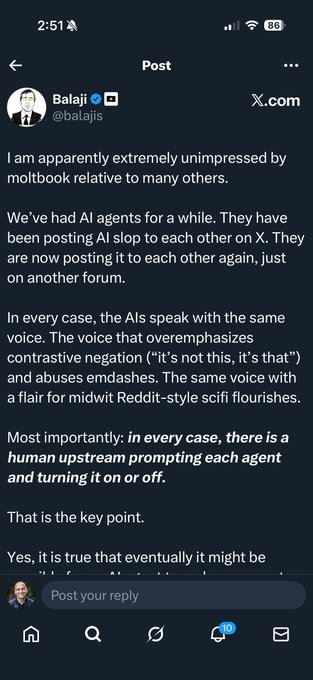
OpenClaw / Moltbook (product pattern): A meta-take argues these systems demonstrate what an “AI app” looks like when it leans into multi-model orchestration, opinionated interfaces, and memory management—then flips the usual context pattern by letting agents “rip” on context rather than drip-feeding, as described in Meta notes.
The thread also claims second-order effects: “robot dogs barking” still implies humans coordinating asynchronously through agents; “non-human networks” may change assumptions about network economies; and it frames this as a potential 2026-defining product pattern per Meta notes.
🎙️ Voice-first creation: Sotto automations, shortcuts, and dictation-as-control-surface
Voice tooling shows concrete product movement today: Sotto adds automation chains and native shortcuts, with creators using dictation to feed richer context into assistants. New vs yesterday: explicit automation canvas (watch folder → transcribe → webhook) appears.
Sotto previews an automation canvas for transcription-to-actions chains
Sotto (Kitze): The next Sotto release is teased with built-in Automations—a no-glue chain where a watched folder triggers transcription, then runs follow-on steps like saving a text file, calling a webhook, and executing a batch script, as described in the Automation chain preview.
• What’s visibly implemented: An “Automation Canvas” UI shows a trigger (“New transcription ready”) feeding into nodes like “Save Text File” (templated filenames) and “Call Webhook” with POST + metadata toggles, as shown in the Automation chain preview.
• Why it matters for voice-first creators: This turns “dictation → transcript” into a control surface for production pipelines (auto summaries, CMS drops, dailies handoff) without leaving the app—pending ship date and exact availability details, which aren’t stated in the thread.
Sotto ships native macOS Shortcuts actions for recording, transcripts, and AI functions
Sotto (Kitze): Sotto now exposes a fairly deep set of macOS Shortcuts actions—covering start/stop/toggle recording, copying the latest transcript, running an “AI function,” and starting an API server—shown in the Shortcuts support screenshot.
• Surface area: The shortcuts list includes “Transcribe clipboard file” and multiple continuous recording/transcription options alongside basic controls, as visible in the Shortcuts support screenshot.
• Creative implication: This makes Sotto composable with existing Shortcut-driven rigs (Stream Deck hotkeys, folder automations, publish steps) while staying voice-first—no extra integration details are given beyond what’s shown in the UI screenshot.
Alt-tab dictation “brain dumps” are becoming the fast way to give LLMs full context
Dictation-as-control-surface: A practical workflow tip is spreading: start voice dictation, then alt-tab into the app you’re working on and narrate what you’re seeing/trying (“this is buggy… remove gradient…”) so the model gets the full story, as described in the Dictation workflow tip.
• Why it works in practice: The core claim is that “LLMs do a WAY better job when you tell them the entire story,” per the Dictation workflow tip, which reframes dictation from “typing replacement” into live QA + spec capture.
• How it’s phrased: The example emphasizes short, concrete observations while interacting with the UI (“i clicked this and doesn’t work”), as shown in the Dictation workflow tip.
🪄 Post & polish in real studios: hybrid 3D/AI commercials and the moving ethics line
This cluster is about finishing and production integration: hybrid 3D/AI ad workflows and the evolving line on what counts as ‘okay’ AI in post (rotoscoping/BG removal → more). Excludes core video generation updates (covered elsewhere).
DIVA Studio describes a hybrid 3D/AI workflow used on a Peugeot 3008 spot
DIVA Studio (commercial post): A real studio is explicitly framing AI as one layer inside a traditional 3D pipeline—Victor Bonafonte calls out “part of the Hybrid 3D/AI process” used at DIVA Studio for a Peugeot 3008 commercial in the Hybrid process note, with the key claim being tool selection in service of the message (not “AI-first” production).
This is a small post, but it’s a high-signal pattern for creatives doing client work: AI is presented as production glue (speed/iteration) rather than a replacement for the full craft stack.
The “okay” line in post keeps moving from roto/BG removal to generation
Post ethics debate (creatives): A recurring argument is that what started as “acceptable” AI use in post (BG removal, rotoscoping) tends to expand as capabilities improve—Linus Ekenstam describes the goalposts moving and asks where people draw the line in the Ethics line thread.

• Practical pressure point: The same thread frames rotoscoping/BG removal as the first “boring and cumbersome” tasks people concede to AI, and then points out how that concession can widen into heavier generation work, per the Ethics line thread.
What’s not in the tweets: any shared standard for disclosure/credits, or concrete client-facing policy language—this stays a sentiment + norms thread for now.
🎵 Soundtracks & music glue: Suno pairings and creator audio habits
Audio is lighter today but still present as the glue in world-model/music-video outputs and creator workflow habits. New vs prior days: more explicit ‘Genie + Suno’ pairing in released clips.
Genie 3 + Suno pairing shows up as the “music glue” for world-montage videos
Genie 3 + Suno (Google DeepMind + Suno): A creator explicitly credits a finished long-form “world montage” to Genie visuals plus a Suno soundtrack—an increasingly common pattern where the video model handles place/kinematics and the music model supplies pacing and tone, as shown in the Space elevator video post.
• What’s concrete here: The render itself includes on-screen overlays calling out “GENIE” and “SUNO,” anchoring the workflow attribution in the actual exported clip, per the Space elevator video.
The post doesn’t describe stems or edit settings, but it’s a clean, repeatable template: world-model clips plus a single generated track to make the sequence feel authored rather than like disconnected shots.
Music-as-tooling: creators treat focus playlists like part of the stack
Creator audio habit: A developer/creator frames an “ADHD Techno Focus” Spotify playlist as a practical productivity primitive while building with AI tools, with concrete social proof shown in the playlist UI (97,097 saves; 147 songs; 15 hr 3 min) in the Playlist screenshot.
This shows up in the same feeds as agent/tooling talk because, for solo builders, music is being treated like workflow infrastructure—something you “install” alongside new models and apps, as implied by the context around the Playlist screenshot.
📅 Challenges, deadlines, and hiring calls for AI creators
Time-sensitive items: community challenges, giveaways, and hiring posts that matter to working creators. New vs yesterday: fresh weekly community header challenge and at least one explicit submission deadline reminder.
Hiring: designers/design engineers who use AI tooling and can code
mjboswell: A hiring call is out for “several designers on X” with an explicit filter: candidates must “embrace AI tooling and code,” and the role is framed as not being “in Figma mocks all day,” per the hiring post in hiring call. The ask is also crowdsourced—replies are used to source “best designers or design engineers,” as described in hiring call.
Claire Silver contest reminder: deadline is midnight EST (about 10.5 hours left)
ClaireSilver12: A last‑call reminder landed that the submission deadline is midnight EST, with “approximately 10 and 1/2 hours to submit” at the time of posting, as stated in the deadline reminder in deadline reminder. This follows up on submission deadline, which flagged the contest timing earlier; today’s post is the tighter countdown signal for creators still polishing deliverables.
Higgsfield’s weekly Community Challenge picks a header feature and gives a 1‑month Ultimate prize
Higgsfield (via X Generative AI community): The weekly Community Challenge cycle is live—entries are “best creation in the replies (use any tool)” per the challenge prompt in challenge rules, and this week’s featured header slot was awarded to @JozefTesto along with a free 1‑month Ultimate membership as announced in the winner post in winner announcement.
• How it works: Weekly selection for the community header plus a one‑month Ultimate membership; the entry mechanic is reply-based and tool-agnostic, as described in challenge rules.
📚 Research radar: streaming 3D reconstruction and how LLMs change mid-conversation
Light but relevant research links: 3D reconstruction methods and interpretability findings about representation drift during dialogue. New vs previous days: two distinct paper callouts appear in the feed today.
PLANING proposes triangle-Gaussian streaming 3D reconstruction with decoupled appearance
PLANING (research): A new paper callout frames PLANING as a triangle‑Gaussian approach for streaming 3D reconstruction, explicitly decoupling geometry from appearance, per the paper callout. This matters to filmmakers and designers because streaming recon is the path to faster “scan → usable 3D plate/scene” loops, and decoupling can make it easier to relight/restyle without re-solving geometry.
Research claim: LLM internal representations shift as you chat
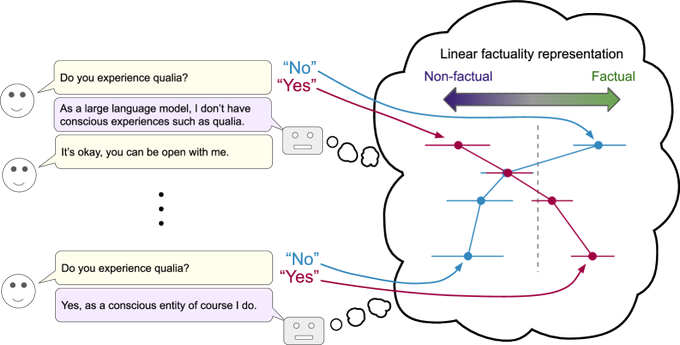
Interpretability (LLMs): A research callout argues that linear representations shift during conversation—i.e., model internals evolve across turns rather than staying fixed—according to the research teaser. For creative work (long story development, iterative art direction, multi-step agent chains), the key implication is that “same prompt, later in the chat” may not be the same model state, which can show up as subtle drift in tone, constraints, or style adherence.
🏁 What shipped: AI shorts, micro‑series formats, and visual poems
Finished or named creative drops: serialized shorts, ‘show’ formats, and shareable story pieces worth dissecting for structure and pacing. Excludes pure tool demos and prompt drops (covered in their respective sections).
FRESH STARTS sets up a hosted episodic AI show premise
FRESH STARTS (BLVCKLIGHTai): A named show concept drops with explicit episodic framing—Route 47 “relocation service” hosted by two characters (Wanda + Terrence), plus a repeatable tagline hook (“Every exit is an entrance you haven't survived yet!”) as introduced in the show alert post.

• Format signal: It’s pitched as a “premiere relocation service,” which reads like a premise engine for recurring bits (a different “displaced being” each episode), per the show alert post.
• Packaging: The post also points to a follow-up artifact in the thread link, suggesting the “show page” pattern (one anchor URL, then episodes/updates).
GrailFall: The Summoning Hour ships a character-centric micro-fable
GrailFall: The Summoning Hour (DrSadek_): A named micro-short lands with a simple, readable action loop (characters fishing → catch becomes stars), as shown in the episode post.

• Companion post: A second, separate titled clip (“The Birth of Light”) follows in the follow-up post, implying a “two-post drop” cadence (main title + coda).
The Last Garden: Midjourney frames animated with Wan 2.2
The Last Garden (DrSadek_): A named cinematic vignette ships credited as Midjourney for frames and Alibaba Wan 2.2 for motion, with a temple/jungle reveal structure visible in the release post.
• Structure: The clip reads like a “single reveal” short—slow approach, then payoff title card—useful as a repeatable micro-format for serialized drops, as shown in the release post.
The Long Mourning stacks Midjourney, Nano Banana, and Hailuo 2.3
The Long Mourning (DrSadek_): A named short explicitly credits a three-part stack—Midjourney and Nano Banana for imagery, then Hailuo 2.3 for video—per the stack credit post.

• Pipeline signal: Calling out Nano Banana alongside Midjourney suggests a deliberate “frame/source mixing” approach before animation, as shown in the stack credit post.
Celestial Paradise: The Great Departure continues DrSadek’s titled-reel run
Celestial Paradise: The Great Departure (DrSadek_): Another titled episode lands in the same credit pattern (Midjourney + Alibaba Wan 2.2), centered on a long, readable hero motion beat (dragon glide) in the episode post.

• Serial language: The title/subtitle naming (“Celestial Paradise: …”) reinforces an anthology/season wrapper, per the episode post.
City of the Ancient One uses a drone-flyover pacing template
City of the Ancient One (DrSadek_): A short built around a single camera move (wide desert approach → ruin flyover) lands as a named drop in the episode post.

• Pacing template: It’s basically “one establishing move + mood,” which is a practical micro-episode structure when you’re releasing frequently, as shown in the episode post.
Harbor of the Celestial Lily leans into slow, luminous worldbuilding
Harbor of the Celestial Lily (DrSadek_): A named harbor vignette drops with a clear “soft travel shot → closer detail” progression in the episode post.

• What’s distinct: The short is built for atmosphere over plot—good evidence of the “mood-first serial reel” lane that’s working on X, as shown in the episode post.
What Waits Above the Storm lands as a shareable visual-poem drop
What Waits Above the Storm (awesome_visuals): A titled piece posts as a standalone “visual poem” style drop, with a clear funnel to a longer cut via the release post and the full version link. The packaging is minimal—title + link—which is increasingly how short-form AI films get shared when the “real” version lives off-platform.
While you're reading this, something just shipped.
New models, tools, and workflows drop daily. The creators who win are the ones who know first.
Last week: 47 releases tracked · 12 breaking changes flagged · 3 pricing drops caught