Google Always‑On Memory Agent cites 7k waitlist – 3‑role Gemini stack

Stay in the loop
Free daily newsletter & Telegram daily report
Executive Summary
Google published an open-source Always‑On Memory Agent reference implementation built on ADK + Gemini; it runs as a background “memory layer” with 3 roles (ingest files → periodic consolidation → query answering); the pitch is always-on/cheap via Gemini 3.1 Flash‑Lite, and it explicitly claims “no vector database, no embeddings” because the LLM writes and updates structured memory artifacts. One account cites 7k+ waitlist signups pre-launch, but public threads don’t show long-horizon failure modes (memory drift, conflicting facts) or how it behaves once the corpus grows for months.
• LTX‑2.3: creator threads frame open-source local video gen as “no API bills/queues”; adds start+end-frame control plus audio→video conditioning; Pro vs Fast becomes the workflow knob; one user reports @fal audio→video errors “all day.”
• Perplexica: “local Perplexity alternative” rhetoric continues; posts cite 29K GitHub stars and an MIT license, but mode quality isn’t independently audited in the chatter.
• Calico AI pipeline: Firecrawl→Calico→n8n batch loop claims replacing $30K shoots and driving ~20% conversion lift; impressive wiring, but the lift is self-reported.
While you're reading this, something just shipped.
New models, tools, and workflows drop daily. The creators who win are the ones who know first.
Last week: 47 releases tracked · 12 breaking changes flagged · 3 pricing drops caught
Top links today
- Perplexica local AI search engine repo
- Founders Kit open source startup resources
- SkillNet paper on composing AI skills
- DARE paper for R-aware agent retrieval
- Adobe Firefly Ambassador program application
- Calico AI fashion video generator
- LTX Studio 2.3 local video generation
- Higgsfield Soul Cinema model page
- Luma Dream Brief $1M competition details
- Meshy tutorial for seamless PBR textures
- Pictory 2.0 feature webinar registration
Feature Spotlight
Open video goes local: LTX‑2.3 workflows, modes, and audio→video control
LTX‑2.3 is getting treated like a practical “local video generator” upgrade: open + runnable on your own machine with better quality/modes and audio→video options—tightening the loop for filmmakers who iterate a lot.
Today’s biggest maker-thread cluster is LTX‑2.3: creators emphasizing local runs (no API bills), Pro vs Fast tradeoffs, and new controls like start/end frames and audio-driven generation. Excludes other video tools (Kling/Luma/Seedance) which are covered in separate categories.
Jump to Open video goes local: LTX‑2.3 workflows, modes, and audio→video control topicsTable of Contents
🎬 Open video goes local: LTX‑2.3 workflows, modes, and audio→video control
Today’s biggest maker-thread cluster is LTX‑2.3: creators emphasizing local runs (no API bills), Pro vs Fast tradeoffs, and new controls like start/end frames and audio-driven generation. Excludes other video tools (Kling/Luma/Seedance) which are covered in separate categories.
A step-by-step LTX-2.3 workflow lands with a feature checklist
LTX-2.3 (LTX): A creator walkthrough frames LTX-2.3 as an open-source model you can run locally, then tees up a practical “make this clip step by step” flow in the Walkthrough intro; the thread context calls out upgrades around initial/final frame handling, audio improvements, a fast mode, and better overall quality, as summarized in the Walkthrough intro.

• What’s concrete in the thread: The same post that claims the drop also enumerates the specific areas the author noticed improving (initial/final frames, audio, fast mode), which helps creators decide what to re-test first when upgrading from earlier runs, as described in the Walkthrough intro.
Creators push LTX-2.3 as a local-first alternative to API queues
LTX-2.3 (LTX): Creators are explicitly positioning LTX-2.3 as “run it on your own computer” video generation—no API bills, credits, or overloaded queues, per the Local-first pitch; the broader “open-source + local” headline also shows up in the Open-source drop note, with deeper system positioning collected on the Model page.

This framing matters because it shifts the usual trade space from “which hosted model is best today” to “how much GPU do I have and what can I run without waiting,” which changes iteration loops for short-form and previs work.
LTX-2.3 highlights start/end-frame control plus audio-to-video conditioning
LTX-2.3 (LTX): The same creator thread highlights three control modes—use both a starting and ending frame, use a starting frame only, or condition generation on voices via audio-to-video, as outlined in the Control options recap.
The point is tighter shot locking: start/end frames aim at more predictable entrances/exits, while audio conditioning targets performance timing (at least as pitched in the Control options recap).
A creator runs a 2.0 vs 2.3 visual regression check for LTX
LTX-2.0 vs LTX-2.3 (LTX): One creator reports running a “test suite” and posts side-by-side stills comparing 2.0 and 2.3 outputs in the Stills comparison, giving a concrete way to sanity-check upgrades without relying on promo clips.
The sample shown is a courtyard/fountain scene where lighting and surface detail appear different between versions, as visible in the Stills comparison.
LTX Desktop is pitched as the high-throughput local route with Nvidia GPUs
LTX Desktop (LTX): The thread explicitly calls out a Desktop option for people with a “solid Nvidia GPU,” framing it as the setup that lets you generate at high volume compared to credit/queue-bound web flows, per the Desktop mention.
It’s a practical deployment split: web for convenience, Desktop for sustained iteration, as implied by the Desktop mention.
LTX-2.3 “Pro vs Fast” becomes the default quality/speed toggle
LTX-2.3 (LTX): The walkthrough thread describes a simple operating pattern—pick LTX 2.3 Pro when you want the best result, or switch to the Fast model when throughput matters, per the Mode choice notes; it’s presented as a deliberate workflow choice rather than a hidden setting.
This is one of the more actionable “day one” knobs because it lets teams separate exploration (Fast) from keepers (Pro) without changing tools, as implied by the Mode choice notes.
Stills-first: generate frames with Nano Banana 2, then animate in LTX
LTX-2.3 (LTX): A concrete recipe in the walkthrough is to generate your still frames first using Nano Banana 2 inside LTX, then pick an LTX model and animate those stills, as described in the Stills-first workflow note.
This is effectively treating image generation as “keyframe design,” then using LTX as the motion pass—useful when you want art direction control before spending time on video iterations, per the Stills-first workflow note.
Audio-to-video for LTX-2.3 hits tooling errors for at least some users
LTX-2.3 audio-to-video (LTX): At least one user reports being unable to run LTX 2.3 audio-to-video, saying @fal returned errors “all day long” in the Error report, which is a useful reality check against the audio-to-video capability being promoted elsewhere in the Control options recap.
It’s not clear from the tweets whether the failure is model-side, account/config, or the hosting layer; the only concrete signal is repeated errors as stated in the Error report.
Free LTX credits get shared as a quick on-ramp to testing
LTX credits (LTX): A free-credits on-ramp is being circulated to reduce the initial friction of trying LTX runs, per the Free credits mention.

No specifics on amount or expiry are stated in the tweet itself, but it’s clearly being used as a “try it now” wedge in the Free credits mention.
🧠 Agents & automation for creators: persistent memory, “AI Self” operators, and studio OS thinking
More creators are sharing agent-like setups that run in the background (memory layers, AI ‘selves’, and creative OS metaphors). New today vs prior reports: Google’s open-source always-on memory agent spikes across accounts, plus more “AI Self” task examples and agentic filmmaking UI demos.
Google open-sources an Always-On Memory Agent built on ADK + Gemini
Always-On Memory Agent (Google ADK + Gemini): Google’s agent-memory reference implementation is being shared as an always-running “memory layer” with three background roles (ingest files → periodic consolidation → query answering), positioned as cheaper/always-on via Gemini 3.1 Flash-Lite in the Launch explainer and published in the GitHub repo. It explicitly claims “no vector database, no embeddings”—instead the LLM writes and updates structured memory artifacts, as shown in the Launch explainer.
• Adoption signal: one account cites “7k+ people on the waitlist before launch” and says the demo is now public in the Waitlist signal.
What’s still unclear from the tweets: how well it scales past a personal folder, and what the failure modes look like when memory grows for months.
Pika AI Selves: operator-style task examples expand beyond chat into real errands
AI Selves (Pika): Following up on iMessage examples (AI doubles inside texting flows), a new examples thread surfaces at least 8 concrete “operator” tasks—starting with eBay listing and custom visuals in the Examples thread opener and reaching “outsourcing family IT help” in the Family IT example. A separate comment shows the behavior creators want: “take photos of all the stuff… and let it decide how to price it,” per the eBay pricing comment.
What’s not evidenced here: any guardrails for mistakes (wrong prices, wrong descriptions) or how much identity training is required to sound like the user.
DreamLabLA shares a 3D-to-Luma Agents workflow for consistent fashion characters
Luma Agents (Luma/DreamLabLA): Following up on public launch (reference-driven creative production), a concrete 4-step pipeline is shared: polypaint a pattern on a 3D model → screenshot into Luma Board → instruct the agent to render (including hair) while preserving a specific region as a “vitiligo effect” → generate a character sheet and reuse it for candid shots, per the Workflow steps and shown in the Behind-the-scenes walkthrough.

The steps matter because they treat “character sheet” as the reusable consistency asset (not the 3D render itself), as described in the Workflow steps.
STAGES demo: one-click shot analyzer turns video into storyboards
Shot analyzer to storyboard (STAGES): A demo shows an automated “shot analyzation → storyboard” conversion in one action—turning an input clip into storyboard panels for previz/reference, as shown in the Shot analyzer demo.

The key creative implication is speed: the storyboard becomes a fast planning artifact for multi-shot generation loops, with the conversion UI visible in the Shot analyzer demo.
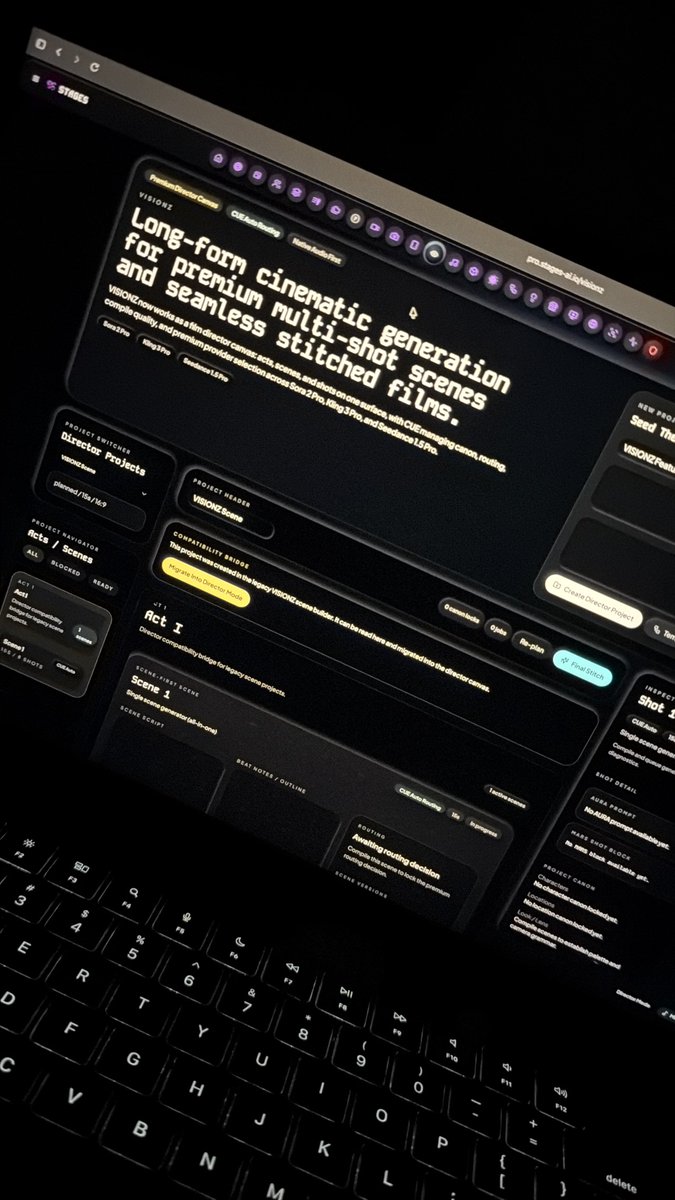
STAGES teases VISIONZ: a director canvas for long-form multi-shot continuity
VISIONZ (STAGES): A first-look screen shows VISIONZ framed as “long-form cinematic generation” where acts, scenes, and shots live on one surface, while CUE handles canon/continuity, routing, and “final stitch,” with provider selection name-checking “Sora 2 Pro, King 3 Pro, and Seedance 1.5 Pro” in the VISIONZ UI photo.

The tweet is a product tease, but it’s specific about the UI metaphor (director canvas) and the backend job (continuity + stitching) in the VISIONZ UI photo.
Consumer AI memory raises context-switching risks between work and personal modes
AI memory in consumer apps: A creator-focused take argues “memory” can be a step-function UX upgrade, but mixing work + personal context creates landmines—especially when you speak differently across contexts—per the Memory landmines thread. The same thread points to account/context switching as one possible mitigation, also noted in the Memory landmines thread.
STAGES shows a 151-shot continuity grid as an agentic “creative OS” pitch
Continuity orchestration (STAGES/CUE): One creator claims STAGES can analyze a project “151 shots deep” with continuity handled by CUE “inherently,” with the grid of shots shown in the 151-shot continuity demo.

This is presented as an “only costs inference” workflow (no bespoke training), but the tweets don’t include details on constraints, accepted formats, or how continuity edits are controlled beyond prompting in the 151-shot continuity demo.
Luma Agents blend workflow: latent-blend two images, then merge into an existing asset
Luma Agents (blend workflow): A second recipe describes using Luma’s blend tool as an iteration engine: pick two source images → run a latent blend → select 2–3 outputs → instruct the agent to incorporate elements into a previously generated asset (example: a robotic arm) and regenerate variations, per the Blend tool steps.
This reads like a practical way to “splice” aesthetics into an established design without restarting from scratch, but there’s no clip showing blend inputs/outputs in the tweets cited.
🧍 Consistency & performance transfer: Motion Control, ID lock, and cinematic still→scene pipelines
Continuity remains the core creative bottleneck, and today’s tweets focus on motion/ID consistency (Kling Motion Control), plus the emerging pattern of “make a cinematic still first, then animate it” using character/color controls. Excludes LTX‑2.3 (covered as the feature).
Kling Motion Control 3.0 highlights improved facial ID consistency
Kling Motion Control 3.0 (Kling): Kling is positioning Motion Control 3.0 as a step forward for facial ID consistency during motion transfer—explicitly calling out “our best facial ID consistency yet” in the Motion Control 3.0 note. This matters for performance-transfer workflows (actor/reference → generated character) where identity drift is usually what breaks multi-clip continuity.
Soul Cinema preview leans into cinematic stills, then Kling for scenes
Soul Cinema (Higgsfield): Following up on Soul Cinema preview (cinematic photo model + Soul ID/HEX), a creator thread says people are already using Soul Cinema outputs as the first frame for video generation and explicitly pairing it with Kling to turn “movie-frame” stills into scenes, as described in the Soul Cinema to Kling claim.

• Consistency stack recap: The positioning remains “cinematic frames” plus Soul ID for character consistency and Soul HEX for palette control, as outlined in the Soul Cinema announcement.
• Release timing update: The same thread says this is “only the preview version” and that the full Soul Cinema model is coming next week, per the Full model timing. Availability is pointed to via the Product page shared in the Try Soul Cinema post.
Promptsref integrates Kling Motion Control plus a reusable motion library
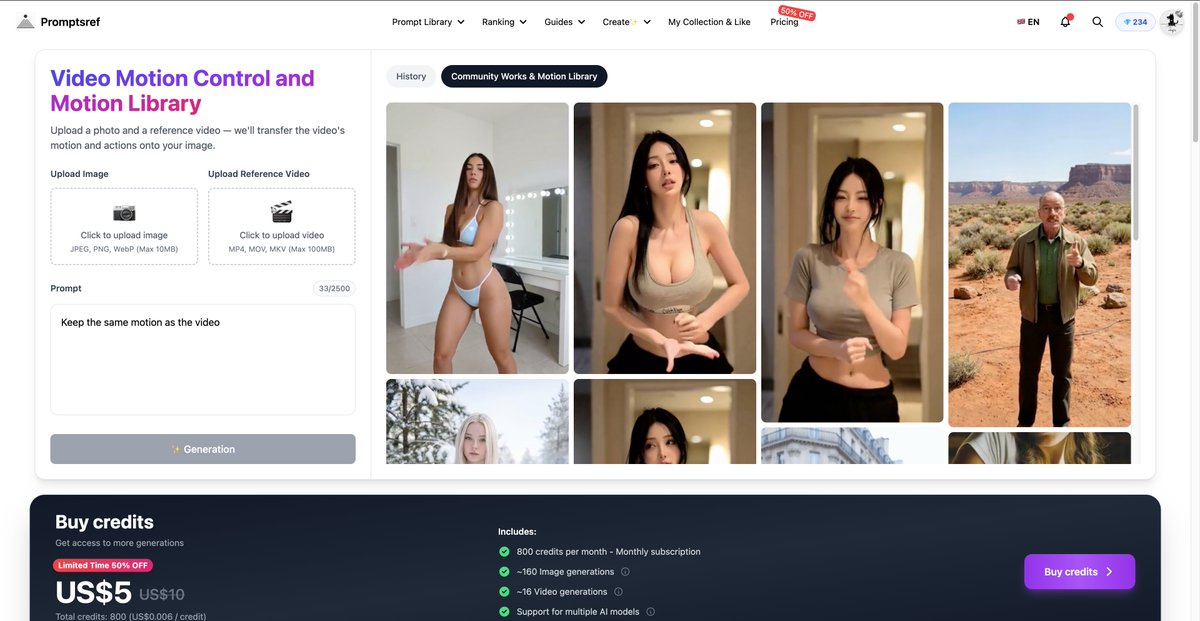
Promptsref + Kling Motion Control (Promptsref/Kling): Promptsref says it now supports Kling Motion Control end-to-end, pitching a fast “AI influencer” loop: generate a realistic still (they cite Nano Banana Pro), then apply motion from a reference clip or a preset library, as described in the Motion Control integration post.

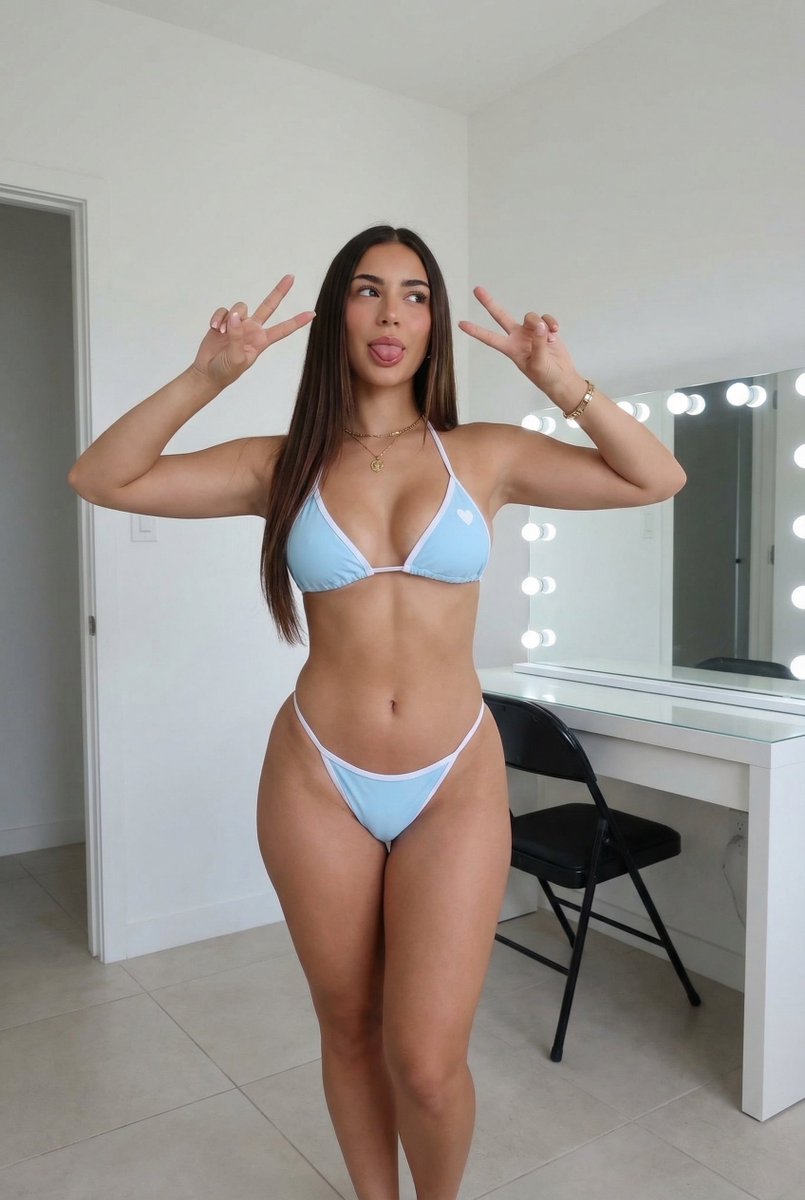
• Two-input recipe: The UI shown in the Motion Control integration post centers on uploading an image + a reference video, with a minimal instruction like “Keep the same motion as the video.”
• Preset motion library: Promptsref also claims it hosts “popular online dance motions” as controllable presets, so you can start from a known-good motion template instead of hunting reference clips, per the Motion Control integration post.
• Pricing signal: The same UI capture includes a “Limited time 50% off” credits panel, implying Motion Control is being packaged as a repeatable, paid production primitive rather than a one-off experiment, as shown in the Motion Control integration post.
Kling 3.0 creative short spotlights emotion and expression control
Kling 3.0 (Kling): A Kling Creative Partner case study frames Motion Control as less about big movements and more about directing subtle acting beats—“nuances such as emotions and expressions” across people and even animals—via the short-film process shared in the Creative partner short film. The signal here is that “performance transfer” is being sold as micro-expression fidelity, not only body motion matching.
🧩 Prompts & style codes you can paste: SREFs, layouts, and product-photo recipes
A heavy prompt day: multiple Midjourney SREF aesthetics, reusable layout templates (campaign grids), and photography prompt structures. New today: several fresh SREF callouts (neo‑noir, watercolor, toy‑3D) plus packaged prompt “systems” for brand work.
A copy-paste template for “collectible action figure in blister pack” shots
Product-photo prompt (packaging): GlennHasABeard shared a clean template prompt for turning any subject into a collectible action figure in a clear blister pack with a branded backer card and accessory compartments, shown with multiple examples in the Action figure prompt share.
The share is already copy/paste:
The examples in the Action figure prompt share make it clear the accessory list (“includes [items]”) is the control knob that pushes variety without changing the core look.
A JSON-shaped packaging prompt for stacked boxes and editorial sunlight
Packaging photography prompt (JSON spec): Egeberkina posted a structured JSON prompt for an editorial packaging shot—three stacked boxes, tight crop, 50mm lens feel, natural sunlight, and specific box-face copy (“CITRINA”, “Mediterranean Harvest”)—with the intended output shown in the CITRINA packaging prompt.
The interesting part is how “layout” gets pinned as data: camera (angle/lens), composition (tilt/stack/crop), and typography (brand text/subtitles) all become explicit fields, per the CITRINA packaging prompt.
A reusable photo prompt formula: environment + action + emotion + lens + light
Prompt structure (photo realism): A compact “fill-in-the-blanks” photography prompt formula is being shared as a repeatable scaffold: environment + action/movement + emotion + visual metaphor + camera/lens/angle + depth of field + shutter feel + key/fill/rim + rule-of-thirds, as written in the Prompt structure template.
The same author pairs it with a Midjourney SREF-blend workflow in the Sref blend workflow, but the portable part is the structure itself:
Midjourney SREF 12399233 pushes synthwave cyberpunk neon with motion blur
Midjourney (SREF 12399233): A synthwave × cyberpunk neon style code is being promoted as a consistent way to get aggressive magenta/cyan contrast plus a “high-speed” motion blur feel for esports posters and electronic music covers, as shown in the Cyberpunk SREF examples.
Promptsref also links to a deeper write-up of the style and usage knobs via the Style detail page. The copy-paste part is straightforward:
Midjourney SREF 1277607542 targets watercolor picture-book storytelling beats
Midjourney (SREF 1277607542): A narrative watercolor picture-book illustration style reference is being circulated as a “modern European children’s book” look that prioritizes emotion over technical detail, as described in the Picture-book SREF drop with multiple sample scenes.
The code is the whole point—drop it into any scene prompt to pull the linework + wash texture:
The examples in the Picture-book SREF drop lean on simple staging (doorways, rooms, street scenes) where the style’s softness reads as “story moment” rather than concept art polish.
Midjourney SREF 2958118019 dials in neo-noir anime lighting and mood
Midjourney (SREF 2958118019): A new style reference is being shared for a neo-noir anime illustration look—hard key light, deep shadows, night interiors, and “crime/noir” atmosphere—described directly in the Neo-noir style ref with example frames.
The practical takeaway is that you can keep your subject prompt minimal and let the style code do the heavy lifting:
It’s positioned as a fast way to get classic film-noir contrast without manually stacking lots of lighting adjectives, per the Neo-noir style ref.
A board-game miniatures product-photo recipe built like a real collector shoot
Nano Banana 2 (prompt recipe): A premium board-game “collector product shot” prompt is being shared with concrete camera/lens cues (Sony A7III, 85mm, f/2.8), luxury study background bokeh, and tight focus on miniatures posed on a map, as posted in the Daily prompt text and repeated verbatim in the Prompt paste.
Key copy-paste core (theme bracket is the swap):
Midjourney SREF 1923246294 aims for premium 3D toy-product renders
Midjourney (SREF 1923246294): Promptsref is calling out --sref 1923246294 as a reusable “high-end 3D toy / miniature model” aesthetic—soft pastel materials, clean plastic texture, and studio-like product lighting—positioned for UI icons, mobile game assets, and playful product mockups in the 3D toy SREF pitch.
They attach the full parameter/keyword breakdown on a dedicated page, referenced in the Sref detail page.
Today’s signal is primarily the code + use-case framing (no embedded examples in the tweet itself), per the 3D toy SREF pitch.
Promptsref highlights Midjourney SREF 781386691 for airy watercolor minimalism
Midjourney (SREF 781386691): Promptsref is pitching --sref 781386691 as a “dreamy watercolor” shortcut—pastel palette, lots of white space, translucent brush feel—framed as especially useful for lifestyle brands and fashion packaging in the Dreamy watercolor SREF pitch.
If you want the parameter breakdown and keywords Promptsref associates with the style, they point to a dedicated page in the Sref detail page.
This one is mostly positioning + a reference code today; there aren’t example images embedded in the tweet itself, per the Dreamy watercolor SREF pitch.
Promptsref’s “most popular SREF” spotlights Retro Hand-Drawn Pop (1047829894)
Midjourney (SREF 1047829894): Promptsref posted a “most popular SREF” recap describing a Retro Hand-Drawn Pop look—thick imperfect marker outlines, high-saturation primaries, risograph-ish grain—along with suggested usage scenarios like streetwear merch, packaging, and editorial posters in the Top Sref analysis.
The post also points to the broader index/tracker site in the Sref tracker page. The code they’re tracking here is:
This one reads like a meta-template too: it’s explicitly framed as a way to push back against Midjourney’s default “refined realism,” per the Top Sref analysis.
🖼️ Image models in practice: editing, aspect ratios, artboards, and realism tests
Image talk centers on practical control knobs: editing an existing image with Grok, Nano Banana 2 aspect-ratio extremes, and Firefly Boards as a reference-collage workflow. New today: more “image edit” usage and multiple examples of ultra-wide/ultra-tall aspect ratios as a creative constraint.
Firefly Boards turns a whole reference artboard into one “super reference”
Adobe Firefly Boards (Adobe): A practical control trick is to drop many reference images onto a Firefly Board artboard, then treat the entire artboard as the reference for generation—useful for locking a “kit” (palette, shapes, subject details) in one place, as described in the Artboard reference tip. Short version: it’s collage-to-generation.
• Model surface signal: The same screenshot shows a model picker labeled “Gemini 3.1 (w/ Nano Banana 2)” and a “Uses 0 credits” indicator, as visible in the Artboard reference tip. That suggests a low-friction iteration path when you’re exploring compositions fast.
It’s a UI-level hint, not a spec sheet. But it’s concrete.
Promptsref adds Grok image editing from an uploaded source image
Grok image editing (xAI, via Promptsref): Promptsref says its site now lets you upload an image and edit it directly with Grok, then shows a practical “2D illustration → realistic portrait” conversion using a single reusable prompt in the Website update. This matters if you do character lookdev or style transfers and want a fast edit loop instead of regenerating from scratch.
• What the early A/B looks like: In the same test, the author reports Nano Banana Pro reads as more photorealistic, while Grok skews more “3D-rendered” in texture/lighting, as described in the Website update.
• Edit permissiveness: They also claim Grok allows “bolder” edits than Nano Banana Pro in practice, per the Website update.
Nano Banana 2 expands into ultra-wide and ultra-tall aspect ratios
Nano Banana 2 (ImagineArt/Freepik ecosystem): Creators report new extreme aspect ratios—1:4, 4:1, 1:8, and 8:1—which open up thin panoramas and poster-strip compositions, according to the Aspect ratio options post. This is directly useful for banner ads, book spines, UI hero strips, skyline shots, and “wide establishing shot” prompts.
The shared example is a highly vertical architectural render that reads like a stress test for continuity across a long frame, as shown in the Aspect ratio options post.
An 8:1 parchment prompt becomes a practical text-and-layout stress test
Nano Banana 2 prompting: A clean way to test text rendering + spacing control in extreme panoramas is circulating via an 8:1 prompt that asks for “the longest Turkish word” handwritten on aged paper, as shown in the 8:1 parchment example. It’s a quick diagnostic for whether a model can keep letterforms consistent across a long canvas.
The example output includes a single long word on a narrow parchment strip with a pen prop, per the 8:1 parchment example.
Hidden Objects puzzles keep shipping daily (levels .051–.053)
Hidden Objects format (Adobe Firefly + Nano Banana 2): Following up on Hidden objects (daily “find 5 items” engagement images), new levels .051, .052, and .053 were posted today in the Level .051, Level .052 , and Level .053. The format stays consistent: a dense scene plus a row of target object icons.
This keeps functioning as a repeatable “daily drop” template: one image, five targets, lots of replies.
A simple 2D vs 3D A/B helps decide a character look direction
Character lookdev A/B testing: A clean comparison format is resurfacing: generate the same character both as a 3D render and as a 2D illustration, then pick which one you want to standardize for downstream shots, as posted in the 2D or 3D comparison. It’s a quick decision tool before you sink time into consistency.
The post is minimal, but the side-by-side is the point.
Recraft V4 + Nano Banana 2 shows up as an editorial look pipeline
Recraft V4 + Nano Banana 2: A creator posts an editorial-style mini-set explicitly labeled “Recraft V4 + Nano Banana 2,” implying a two-model stack for fashion/portrait aesthetics and finishing, as shown in the Four-image set. This matters if you’re mixing a design-forward generator with a realism-forward one.
No step-by-step settings are shared in the post. The deliverable is the signal.
🛠️ Single-tool craft: getting better results without changing your whole stack
A smaller but useful set of single-tool tips: prompt craftsmanship guidance, and UI/feature notes that change day-to-day productivity. New today: more creator emphasis on “less brute-force iteration, more intent” plus concrete Firefly Boards reference handling.
Firefly Boards turns a multi-image artboard into a single reference input
Adobe Firefly Boards: A practical reference hack is circulating where you drop many reference images onto a Firefly Boards artboard, then use the entire board as the one reference source for new generations, as described in Boards reference tip.
The same screenshot also shows Firefly Boards exposing a model picker (e.g., “Gemini 3.1 (w/ Nano Banana 2)”) and a “Uses 0 credits” indicator in the UI, as shown in Boards reference tip.
Map screenshot to generated panorama is emerging as a Nano Banana 2 workflow
Nano Banana 2: Creators are calling out a workflow where you screenshot a map and prompt the model to generate a wide panoramic scene from it, positioning it as a useful setup step for animation/worldbuilding, as referenced in the Map panorama idea.
One prompt to convert 2D art into a live-action editorial portrait
Grok image editing (xAI): A site update claims you can now upload an image and use Grok to edit it directly, and one creator tested a “2D illustration → realistic portrait” conversion using the same prompt across tools, as described in Site update and comparison.
They report Nano Banana Pro looks “more photorealistic,” while Grok reads more “3D” in texture/rendering and allows “bolder and more suggestive image edits,” per Site update and comparison. The copy-paste conversion prompt they used is included verbatim in Site update and comparison.
Ambient light and texture language is being used to break “samey” realism
Prompt craftsmanship: A repeatable micro-technique being shared is to explicitly describe ambient light and image texture in the prompt to make realistic outputs feel less generic, per the Ambient light tip retweet.
Creators push back on brute-force generation as a cost trap
Iteration discipline: A blunt thread argues that massive iteration is often a prompt/intent problem (“If you need this much iteration you need to get better at knowing what you want”), framing over-generation as wasted spend and misaligned incentives for subscription businesses, as stated in Over-generation critique.
🧱 3D & motion assets: textures, materials, and hybrid 3D→AI fashion pipelines
3D-adjacent creator workflow posts focus on generating production-friendly assets (PBR textures) and using 3D as a scaffold for AI fashion/character work. New today: a clear text→seamless PBR texture walkthrough and more 3D-to-agent rendering notes.
3D-to-Luma Agents fashion workflow: polypaint first, then render + character sheets
Luma Agents (DreamLabLA): A concrete 3D→AI fashion pipeline is circulating: polypaint a pattern on a 3D model, screenshot into Luma Board, then have an agent render the look (including hair) and expand it into a character sheet plus candid shots, as outlined in the Behind-the-scenes workflow and the Step list.

• Why 3D matters here: the 3D model acts as the composition/material scaffold (pattern placement, silhouettes), while Luma Agents handles the “camera + render” exploration loop—then the character sheet becomes the reusable anchor for continuity, per the Step list.
Meshy shows a text-to-seamless PBR texture workflow (4 map outputs)
Meshy (MeshyAI): Meshy shared a hands-on workflow for generating seamless PBR textures from a single text prompt—exporting four production-ready maps (base/albedo, normal, roughness, height) as shown in the Seamless PBR tutorial.

• What this unlocks: faster material lookdev for 3D scenes (tiling surfaces you can drop into Blender/Unreal) without manually painting or fixing texture seams, per the Seamless PBR tutorial.
The post is framed as a “stop manually fixing textures” move, with the key value being map completeness (not only a beauty pass).
Latent blend as an asset-iteration loop inside Luma Agents
Luma Agents (DreamLabLA): DreamLabLA also documented a repeatable “asset iteration” pattern using latent blend: blend two source images, pick 2–3 promising results, then instruct the agent to incorporate elements of the blend into an existing asset (example: a previously generated robotic arm) and regenerate, as described in the Blend workflow and echoed in the Blend steps recap.
This reads like a practical bridge between moodboard mashups and production-ish iteration: you keep a stable base asset while importing controlled fragments from blend outputs.
🧰 Studios, hubs, and “everything-in-one” creator platforms
Today includes multiple hub-style products bundling models or turning documents into media: local search engines, slide generators, and model aggregators. New today: more aggressive “one subscription / many models” positioning plus practical deck automation demos.
Chatly demos an idea-to-deck workflow from prompts, files, or URLs
Chatly (deck automation): Chatly is being pitched as a presentation “autopilot”—type an idea for instant slides; upload a doc/PDF/spreadsheet so it can read and build a deck; or paste a link for a polished presentation in seconds, as shown in the deck automation claim demo.

• Why it matters for creators: This kind of ingest→structure→design pipeline is exactly the boring step between “script/brief” and “client-ready artifact,” especially when you’re iterating concepts daily for ads, story pitches, or brand systems.
GlobalGPT markets a one-subscription bundle spanning text, image, and video models
GlobalGPT (model aggregator hub): A “100+ premium models under one roof” bundle is being promoted as a single subscription covering text models (GPT, Claude, Gemini, Grok, DeepSeek) plus multiple video and image generators, with the core promise being fewer separate subscriptions and no waitlists, per the bundle overview and the feature walkthrough in image tooling pitch.

• Creative angle: The pitch is an all-in-one surface that collapses model switching into one workspace—useful when a project hops between scripting, image comps, and short video iterations without wanting to juggle accounts.
Google Search “AI Mode” is rolling out, with early user claims it changes how they search
Google Search (AI Mode): A Turkish-language post says Google’s “AI Mode” is now open to everyone and has already changed their default “googling” habit—claiming they largely stopped doing normal searches during the trial period, as shown in the AI Mode rollout note screenshot.
This is an early signal that the primary creative workflow shift may be “search results as a conversation surface,” not a separate research app.
Founders Kit open-sources an “idea to IPO” founder resource hub
Founders Kit (open-source repo): A GitHub repo is circulating as a single index of founder resources—Paul Graham essays, YC courses, pitch deck examples, fundraising guides, and “200+ tools” across design/analytics/automation/marketing—positioned as no-paywall and no-email-gate, per the Founders Kit roundup and the linked GitHub repo.
The value to creatives is less “startup theory” and more having a ready-made shortlist of go-to tooling + references when you’re spinning up a studio site, a client pitch, or a productized creative service.
Noah AI leans into a texting-first interface for executive assistance
Noah AI (text-first assistant): Noah is framed as an “executive assistant” that uses texting—rather than another dashboard app—as the main UI, with a waitlist entry point on its site, per the texting interface note and the linked waitlist page.
For creators running a small studio, it’s a notable product bet: meeting you where you already coordinate work (messages), instead of asking you to adopt another workspace.
OpenArt promotes an AI-made teaser trailer as a platform release moment
OpenArt (AI film promo): OpenArt is distributing and promoting a teaser trailer for Embryom Chronicles: The Last Doctrine as a platform-branded release, per the teaser trailer RT.
Even without production details in the tweet text, it’s another example of tool/platform accounts acting like mini-distributors—amplifying specific creators and works rather than only shipping features.
🧑💻 Vibe coding & creative dev: Claude/Codex chatter, prototypes, and self-hosted maker stacks
Coding-with-LLMs is a distinct creator beat today: people shipping tiny prototypes, debating code agents/editors, and sharing ‘LLM says no’ moments. New today: more concrete prototype prompts (GitHub-commit RPG) and practical self-hosting screenshots tied to creator workflows.
A packed Umbrel dashboard argues 16GB RAM is fine for maker stacks
Umbrel Pro (self-hosting): A screenshot-backed claim says “16gb … is enough,” showing ~5.09 GB used out of 16.5 GB while running a crowded grid of apps (Home Assistant, Immich, Jellyfin, n8n, Frigate, Vaultwarden, etc.), as shown in the Umbrel dashboard.
• Why it matters for creative dev: This is evidence that local-first “creator ops” stacks (automation + media servers + agent glue like n8n/ntfy) can coexist on modest RAM, per the Umbrel dashboard.
Claude Code saying “No” becomes a vibe-coding UX pattern
Claude Code (Anthropic): A viral terminal screenshot shows Claude Code answering “No” to a product-polish request (“make sakura petals fall…”), then immediately reframing it as a business decision (“should I?”) and offering to proceed anyway, as shown in the Claude Code screenshot.
• Practical read: The post treats pushback as useful product sense during “vibe coding,” not as an alignment failure, per the Claude Code screenshot.
A “GitHub RPG” prototype turns commits into quests and loot rolls
GitHub RPG (prototype): A quick prototype maps developer activity into a game loop—“1 commit = 1 quest (with a chance of loot)”—and floats async PVP as a next step, as described in the Prototype pitch.

• Why creators care: It’s a concrete example of using LLM-assisted building to ship playful, identity-driven tooling that sits adjacent to creative practice (daily output becomes story/game content), per the Prototype pitch.
A two-model workflow pairs ChatGPT 5.4 planning with Claude Code building
ChatGPT 5.4 × Claude Code (workflow): One builder reports that “ChatGPT 5.4 made an insanely comprehensive implementation plan” which they then handed to Claude Code, calling the combination “a dream team,” as described in the Two-model relay. The concrete pattern is role-splitting: one model produces a structured build plan; another runs the coding loop.
Developer chatter frames Claude vs Codex as the only fight that matters
Claude vs Codex (creator chatter): A builder take argues that “the only war is happening between claude and codex,” with a side-claim that “most people don’t care about editors” right now, as captured in the Claude vs Codex take. The subtext for creative dev is where mindshare is going: agentic coding models and CLI workflows are getting compared directly, while IDE/editor polish is treated as secondary.
A crypto-themed Arkanoid clone ships from a game GFX boilerplate
Rektanoid (game prototype): A creator says an Arkanoid clone with a “crypto twist theme” was “ONE SHOTTED” using their game graphics boilerplate, with a working gameplay clip in the Rektanoid demo and the underlying engine/tooling linked via the Display engine repo.

• Reusable pattern: Boilerplate-first + LLM iteration is being used to jump straight to shippable aesthetics (CRT/vector look, effects pipeline) and then theme-swap, per the Rektanoid demo.
📣 AI for ads & commerce: catalog video, metaphor cartoons, and campaign systems
Marketing-oriented creators focus on repeatable ad production: automating SKU-level video, using animated metaphors for performance ads, and generating brand campaign kits. New today: a detailed e-commerce batch pipeline with quantified cost/conversion claims.
Batch-generate loopable product videos for every SKU with Firecrawl + Calico AI + n8n
Calico AI + Firecrawl + n8n: A creator shared a fully-automated pipeline that takes any e-commerce collection URL, scrapes product images, and turns each SKU into a short, loopable “model video” asset—positioned as replacing ~$30K collection shoots and claiming ~20% on-site conversion lift in the pipeline breakdown and follow-up Calico tool link.

• How the batch flow is wired: Firecrawl pulls product shots from a collection URL; Calico AI generates realistic motion showing fit/texture/movement; each clip starts and ends on the original product shot for clean looping; outputs are auto-labeled, sorted, and pushed to Google Drive “zero manual intervention,” as laid out in the pipeline breakdown.
• Where to replicate: The workflow is built around Calico’s fashion photo-to-video generator, which is linked from the Calico tool link and described on the Product video generator page.
A single prompt that generates a full multi-panel brand campaign layout
Brand campaign system prompt: A long-form “creative director” prompt is being shared as a way to turn any brand name into an editorial campaign board—explicitly forcing brand analysis (tone, audience energy, color psychology, typography mood) and a fixed layout: left hero portrait + center typographic poster + right 2×2 grid, as shown in the full prompt and output and reiterated via the Pringles example.
• Output structure that stays consistent: The prompt specifies slogan logic (left slogan differs from center slogan but matches the same concept), icon panels that “interpret” the center slogan, and micro-branding details (mini symbols, border text, repeated marks), as detailed in the full prompt and output.
The tweets are heavy on art direction constraints, but light on model/tool specifics—so treat it as a transferable prompt scaffold rather than a tool-specific feature drop.
Animated-metaphor cartoon ads as a scalable performance creative pattern
Animated metaphor ads: A performance-ad playbook is getting spelled out as “$72k+/month creatives” using short animated metaphors instead of experts-on-camera—e.g., “a drink smashing through clogged arteries” or a character freezing in a fridge—to make abstract health claims instantly legible, per the pattern explanation.

• Why it scales: The pattern is framed as a repeatable engine—“AI builds the scenes,” scripts create tension, and testing finds winners—rather than a one-off animation project, as described in the pattern explanation.
Structured JSON prompts for consistent editorial packaging shots
Packaging prompt as JSON: A structured scene spec is shared in JSON form for generating consistent packaging photography—defining camera (50mm, slightly low angle), composition (three stacked boxes, tight crop, hands visible), brand typography, and “natural sunlight” lighting, per the Citrina JSON example.
This format reads like a reusable template for product mockups (swap brand text/colors/components while keeping shot grammar stable), rather than a one-off prompt.
💻 Local-first creator stack: private search, self-hosting, and on-device workflows
Creators continue shifting toward local/private tools and self-hosted stacks to avoid API costs and tracking. New today: Perplexica gets framed as a serious local Perplexity alternative, plus practical self-hosting capacity checks.
Perplexica spreads as the “run Perplexity locally” option, now cited at 29K stars
Perplexica: Momentum is still building on the “private, local Perplexity alternative” storyline—following up on Local clone, the same pitch now includes a concrete adoption datapoint of 29K GitHub stars and an explicit MIT license claim in the 29K stars claim. The core creative value remains: web search with citations, but routed through your choice of models (including local via Ollama), as listed in the Feature rundown and anchored by the codebase in the GitHub repo.
• Workflow fit for creators: The posts emphasize multiple “search modes” (general, academic, YouTube, Reddit, writing) and “real-time” web lookup, which maps cleanly to story research and reference gathering without sending queries to a hosted Perplexity-style service, per the 29K stars claim and Feature rundown.
Some details are hype-y (no independent verification of the star count or mode quality appears in the tweets), but the repo link provides the concrete place to validate claims via the GitHub repo.
Umbrel Pro: 16GB RAM shown supporting a crowded self-hosted creator stack
Umbrel Pro (self-hosting): A practical “what can I actually run?” datapoint shows 16.5GB RAM handling a surprisingly full home-lab stack—Home Assistant, Immich, Jellyfin, n8n, Pi-hole, Vaultwarden, Zigbee2MQTT, and more—while reporting ~5.09GB in use in the Dashboard screenshot. This matters for creatives because the same box can cover media library, automation, and notification plumbing alongside local AI services.
The screenshot is a useful baseline for capacity planning (and a reminder that RAM fear can be over-indexed vs. disk/network constraints), with the “live usage” app grid acting as a de facto checklist of what people are actually self-hosting today, as shown in the Dashboard screenshot.
Modular Diffusers ships with a Mellon node UI for composing diffusion pipelines
Modular Diffusers + Mellon: A release callout frames “Modular Diffusers” as a way to compose diffusion workflows more easily—both as code and in a visual node editor called Mellon, according to the Release blurb. For local-first creators, the point is: more pipeline control without depending on hosted black-box generators.
Details are thin in the tweet (no examples or docs attached), but the packaging—“novel pipes” assembled as modular components—signals a push toward reusable, shareable graph-style image systems similar to what ComfyUI normalized, as described in the Release blurb.
🏁 What shipped: shorts, cinematics, ARG clips, and AI commercials
Lots of finished work and “proof by output”: short films, AI commercials, and format experiments (ARG recovered footage, animation tests). New today: multiple creator demos across Kling, Seedance, Luma Agents, and horror/analog aesthetics.
Seedance 2 enables a 10-minute animated short made in <48 hours for <$100
Seedance 2 (Dreamina): A creator case study claims a single person produced a ~10-minute animated short (“Punch the Monkey”) in under 48 hours for under $100, with reactions framed as “hard to believe it’s not a real animated series,” per the Short film claim.

This matters less as a one-off flex and more as a new “proof by output” bar: long-enough runtime to test pacing, scene transitions, and comedic timing (not just 10–15s loops), while staying within a solo-creator budget and turnaround as described in the Short film claim.
Luma Virelli runway: 3D models turned into a fashion show with Luma Agents
Luma Agents (Luma) + 3D lookdev: DreamLabLA shares “Luma Virelli — Luxury Cybernetics,” positioning it as a runway experience that starts from 3D models and then expands into characters, environment, and camera shots via agents, per the Runway experience post.
• Workflow clues: the behind-the-scenes breakdown outlines a concrete bridge—polypaint pattern on the 3D model, screenshot into a Luma Board, agent render pass (including notes like hair and a vitiligo color region), then a character sheet that becomes the seed for candid shots, as detailed in the Workflow notes and Step list.
The useful takeaway is that the “3D screenshot → agent worldbuilding” handoff is being shown as a viable way to lock design intent before generating coverage, as implied by the Workflow notes.
A “glamour” beauty commercial test made with Luma Agents
Luma Agents (Luma): A beauty-ad exercise lands as a compact “commercial grammar” test—close-ups, slow pacing, and controlled lighting—shared as an experiment rather than a polished brand deliverable in the Glamour commercial attempt.

Credits are unusually specific for an AI clip (starring talent + cinematography attribution), which makes it easier to parse what’s coming from direction/editing versus generation, as described in the Glamour commercial attempt.
Anima_Labs’ “everyday moment” gag short using Midjourney + Nano Banana + Seedance 2
Everyday micro-shorts: Anima_Labs shows a simple, highly relatable gag (“fly: 1, grandpa: 0”) built as a short, loopable cartoon scene, with the tool stack called out explicitly in the Tool stack breakdown.

• Pipeline snapshot: character design in Midjourney plus Nano Banana on Freepik, then animation in Seedance 2 on Dreamina, as listed in the Tool stack breakdown.
The output is a good example of how “short runtime + clear joke + consistent characters” can be a repeatable format rather than a one-time cinematic demo, as shown in the Tool stack breakdown.
Route 47 “recovered VHS” horror format continues with NOVA_REMEMBERS_TC3.VHS
BLVCKLIGHTai recovered-footage micro-format: Following up on ARG wrapper, recovered-footage styling gets another entry with an “AUTOMATED TRANSMISSION” framing and a file-name title card (“NOVA_REMEMBERS_TC3.VHS”), as shown in the Recovered VHS scene.

The strength of the format is that the lore and UI-text become part of the storytelling surface (file status, “source dimension,” “recovery rate”), with the in-world narration extended in the Transmission text and the earlier “found this file” setup echoed in the Found file preface.
Hidden Objects levels .051–.053: Firefly + Nano Banana 2 as daily puzzle posts
Hidden Objects (Adobe Firefly + Nano Banana 2): Following up on Daily puzzle format, Glenn posts new “find 5 items” levels (.051–.053) as engagement-native images—each combines a detailed scene plus an object key at the bottom, as shown across the Level 051, Level 052 , and Level 053 drops.
The notable pattern is consistency in packaging (level numbering, five-item checklist, dense illustrative scenes), which keeps the series recognizable while the scene genre rotates (celestial map, messy baking, observatory), per the Level 051 and Level 052 examples.
Kling used for a Pink Panther-style character animation beat
Kling (Kuaishou): A short character beat (“the pink panther”) is posted as a motion/style demo—simple staging, readable silhouette, and a clean end-pose, per the Pink Panther clip.

The clip is useful as a reference for “single gag + one continuous move” animation prompts and as a quick benchmark for how well your current video model holds character proportions through a full-body move, as shown in the Pink Panther clip.
awesome_visuals posts Douyin-sourced “AI cinematics” as reference clips
Short-form cinematics as a moodboard: A cluster of reposted clips (credited to Douyin creators) functions as a fast reference feed for pacing, framing, and “micro-gag” structure—one anchor example is the compilation labeled “amazing cinematics made with AI,” per the Cinematics montage.

Other posts in the same stream include discrete beats like “kitchen cute” in the Kitchen clip and quick character-business moments in the Douyin repost, which makes the account read more like a shot-library than a single-project thread.
DrSadek’s surreal illustration drops: Winter’s Warm Door and The Whale Pages
Surreal poster-art cadence: DrSadek continues the “single-image, high-concept” drop format—one piece frames a winter landscape portal to warm light in the Winter’s Warm Door, and another turns an open book into an ocean waterfall (with whales) in the Whale Pages scene.
The two images share a consistent poster logic (one dominant metaphor, minimal narrative text), with a separate “good night” piece reinforcing the same cadence in the Desert light opening.
📅 Deadlines & stages: film festivals, creator competitions, and webinars
Event posts today are unusually actionable: a $1M ad-idea competition, an AI film festival presence in Kyoto, and tool webinars/programs. New today: clear dates/locations for WAIFF Kyoto + Luma Dream Brief submission window reminders.
Luma Dream Brief offers up to $1M for AI-made ads; submissions due March 22
Luma Dream Brief (Luma Labs): Luma is running a global competition with prizes “up to $1M” for bringing an unmade advertising idea to life using Luma AI, with the submission deadline called out as March 22 in the Deadline post and reinforced by the Submissions reminder.

• What’s being rewarded: The framing is “no client, no approvals,” centered on the single idea you’ve been sitting on, as stated in the Deadline post and detailed on the Competition site.
• Why it matters operationally: It’s a concrete calendar driver for anyone already using Luma for spec ads, since the prize pool and hard cutoff date are explicit in the Deadline post.
Hailuo (MiniMax) brings a Best AI Film Award and workshops to WAIFF Kyoto (Mar 12–13)
Hailuo AI (MiniMax) × WAIFF Kyoto: Hailuo is plugging into the World A.I. Film Festival in Kyoto with a “Minimax Best AI Film Award,” a keynote, and two creator workshops; the on-site dates are March 12–13, with the main speaking/workshop block listed for March 13 in the Kyoto schedule.
• On-stage schedule: The keynote “The Studio in Your Pocket: All-in-Hand AI Animation for Everyone” is slated for March 13, 13:00–13:20, followed by two hour-long workshops (13:30–14:30 and 14:30–15:30) per the Kyoto schedule.
• Why filmmakers care: This is one of the few posts today that pins AI-film community activity to a specific venue (Rohm Theatre, Kyoto) and time window, as laid out in the Kyoto schedule.
Pictory schedules a March 11 webinar for 8 new features in Pictory 2.0
Pictory 2.0 (Pictory): Pictory is hosting a live webinar on March 11 at 11 AM PST to walk through “8 new features” in Pictory 2.0, with signup linked in the Webinar announcement.
• Registration + agenda: The event is positioned as a “what’s new in AI video” breakdown, with the RSVP flow via Webinar registration as referenced in the Webinar announcement.
• One concrete feature being promoted: Pictory is also pushing AI Color Palettes as a “make every video look on-brand” control (including Brand Kit matching), with specifics documented in the Color palettes guide and teased in the Palette feature post.
🚧 Friction log: regressions, extension failures, and creative paralysis signals
A few reliability/predictability complaints surface: video extension issues and “models got worse” sentiment, plus creator productivity strain. New today: multiple posts explicitly calling out regressions and feature breakage rather than new capabilities.
Grok Imagine users report video extension trouble after a day of reliability
Grok Imagine (xAI): A creator who’s been using Grok Imagine for “romantic anime” reports they’ve had trouble extending video “since yesterday,” which reads like a service-side regression rather than a prompting issue, following up on Video extension where the same extension flow was being used for short children’s story beats.

The post doesn’t include an error message or workaround yet, but it’s a clean signal that extension (not base generation) can become the brittle step in a storytelling pipeline, per the Extension failure note.
Creators complain models feel worse week-to-week, without clear attribution
Model quality drift (Unspecified providers): A creator claim that “AI models have gotten stupider in the last week” frames a common frustration in day-to-day creative work: reliability feels variable even when you keep prompts constant, per the Regression complaint.
There’s no accompanying benchmark, model/version, or reproduction steps in the tweets, so treat it as sentiment rather than a confirmed regression—but it maps to a real production risk when teams depend on consistent outputs across days.
Inbox pressure shows up as a creative bottleneck even with AI tools around
Creative throughput (Human factors): A creator describes feeling “paralyzed” when starting work—“what … should i do now”—and follows with the concrete symptom: “red dots everywhere, everyone wants something,” per the Paralysis confession and Red dots follow-up.
It’s not a tool launch, but it’s a useful friction log datapoint: even as AI lowers execution cost, attention triage and request overload can become the limiting constraint for creatives shipping work.
🧭 Synthetic media trust & ethics: deepfakes, disclosure fights, and ‘AI slop’ culture war
Policy/culture threads today cluster around what counts as ‘AI’ (deepfake vs genAI), how people react to AI use in studios, and ethical discomfort around recreating real people. New today: renewed debate over face-swap labeling and emotionally charged “recreate the dead” examples.
Viral “recreate the dead” clip triggers grief-tech ethics questions for creators
AI memorialization ethics: A widely shared clip shows someone using AI to recreate a grandparent’s deceased spouse, framed as “something amazing happened,” and it’s resonating because it looks like a near-term, consumer-accessible version of “grief avatars,” as shown in Deceased spouse recreated.

For filmmakers and storytellers, this is less about model capability than about consent, emotional manipulation risk, and what counts as respectful use when the subject can’t opt in—especially once these reconstructions get posted as shareable content rather than kept private.
Deepfake vs genAI confusion resurfaces around face-swap labeling and “AI” claims
Face-swap disclosure (X community notes): A fresh round of confusion hit when a community-note screenshot argues that “AI” in a studio context can mean older face-swap deepfake tech rather than diffusion-style generative video—while creators push back that diffusion models may still be involved in modern face swaps, and that “every studio is using generative AI or will be shortly,” per the debate captured in Face-swap labeling argument.
The practical tension for creatives is that one label (“AI”) is now doing double duty: it can mean everything from classic VFX face replacement to diffusion-based generation, and that ambiguity is becoming part of the reputational fight—not just the tech stack.
“AI slop” backlash rhetoric escalates, with creators responding more combatively
AI art backlash discourse: Posts dunking on “AI haters” are getting sharper—one thread mocks the “AI art is microwave food” analogy and attacks critics’ credibility rather than debating outputs, as seen in Microwave comparison rebuttal. A follow-on post frames angry replies as wasted effort and claims not to read them, which is part of the escalating tone captured in Backlash reply bait.
This kind of rhetoric matters operationally because it shifts the fight from “what was made” to “who gets to speak,” and that tends to bleed into disclosure norms, platform moderation, and client comfort—especially for anyone selling AI-assisted creative services.
“Pencilslop” and #BreakThePencil show up as a highly memetic anti-AI ragebait format
Anti-AI meme format: The “pencilslop” / #BreakThePencil trend is being called out as unusually effective ragebait, built around symbolic rejection of “slop” via quick, repeatable visuals (broken pencil, denied stamps), as described in Pencilslop movement.

For creators, it’s a reminder that culture-war formats can spread faster than any single tool demo; they also create pressure to declare process (“handmade” vs “AI”) even when the work is hybrid.
💸 Credits & access nudges (only the meaningful ones)
A couple of creator-access levers show up: free credits to try local video workflows and a notable 50% credit promo inside a motion-control site UI. Kept narrow to avoid ad-noise.
LTX shares a free-credits link as the quickest way to trial the stack
LTX (LTX Model): A “get free LTX credits” promo is being shared as a low-friction way to try the LTX generation stack without committing money up front, per the Free credits mention follow-up and the Credits callout.
The practical creative relevance is simple: credits-based promos tend to be how people validate whether a model fits their shot loop (timing, motion quality, reruns) before investing in GPU time or subscriptions—especially for video tools where a single test clip is often the whole decision.
Promptsref’s Motion Control page surfaces a limited-time 50% off credits deal
Promptsref (Motion control workflow): The site’s Motion Control interface includes a “Limited Time 50% OFF” credits offer (shown as “US$5 US$10”) alongside a rough usage conversion (~160 image gens and ~16 video gens per month), as visible in the Credits panel screenshot.
This is less about the tooling feature itself and more about access economics: it’s a clear nudge toward running image-to-motion tests (including preset dance motions) by making first-month experimentation cheaper, as implied by the same UI flow in the Credits panel screenshot.
📄 Research radar (creator-relevant): skill networks, retrieval for tools, and dataset instrumentation
Light but high-signal research items: agent skill composition and tool-aware retrieval for real ecosystems. New today: two fresh paper shares oriented around ‘skills’ and ‘retrieval alignment’ rather than pure model scaling.
SkillNet proposes a create–evaluate–connect framework for agent skill libraries
SkillNet (paper): A new framework argues that “skills” should be treated as modular artifacts that can be created, evaluated, then connected into a growing network for lifelong-learning agents, as previewed in the SkillNet share and detailed on the ArXiv paper. This lands right on a practical creator pain: once you have more than a few agent capabilities (story beats, shot lists, color scripts, naming conventions), the hard part becomes reuse and composition, not one-off prompting.

• Why it matters for creative agents: The core claim is that you can systematize “skill acquisition” and “skill reuse” instead of re-prompting from scratch each project, per the ArXiv paper.
• Evaluation is first-class: SkillNet explicitly calls out evaluation as a required step before skills get connected into a larger repertoire, as described in the SkillNet share.
The tweets don’t include a public repo or benchmark harness, so treat it as a conceptual scaffolding until implementations show up.
DARE targets tool-aware retrieval for the R package ecosystem
DARE (paper): DARE introduces a retrieval/embedding approach meant to help LLM agents more reliably find and use the right R packages—a concrete “agents + real tool ecosystems” alignment problem—per the DARE paper and the accompanying ArXiv paper. For creators who do data storytelling, generative design experiments, or audience/marketing analysis in R, this is the unglamorous bottleneck: the agent can write code, but it often reaches for the wrong library.
• Distribution-aware retrieval: The paper frames this as retrieval aligned to the ecosystem’s real package distribution (not just generic semantic similarity), as described in the ArXiv paper.
No implementation details are shown in the tweets beyond the paper page, so the immediate takeaway is the direction: “tool-indexed retrieval” is becoming its own research track.
DataClaw datasets emphasize tool-call and reasoning traces as first-class data
DataClaw (datasets): A DataClaw dataset drop is being positioned as “first class” on Hugging Face Datasets, emphasizing visibility into reasoning traces and tool calls, according to the DataClaw datasets note. For anyone building creative agents (research assistants, storyboarders, asset organizers), this kind of instrumentation-focused dataset is what you’d use to debug agent behavior and evaluate tool-use—not just output quality.
The retweet is truncated and doesn’t link to a specific dataset card in the provided tweets, so what’s still unclear is scope (tasks, licenses, and whether the traces are standardized enough to plug into eval tooling).
While you're reading this, something just shipped.
New models, tools, and workflows drop daily. The creators who win are the ones who know first.
Last week: 47 releases tracked · 12 breaking changes flagged · 3 pricing drops caught