ElevenLabs Flows ships node canvas for 5 modalities – API “soon”

Stay in the loop
Free daily newsletter & Telegram daily report
Executive Summary
ElevenLabs rolled out Flows inside ElevenCreative; a node-based canvas that chains image/video generation with ElevenLabs audio blocks (TTS, music, SFX, lip sync, voice changer) into a single graph; the pitch is fewer export/re-upload loops and less context loss across steps. It’s described as live today, available on all tiers, with API access “coming soon”; what’s not shown yet is graph portability (sharing, versioning, repeatable runs) or how well multi-modal state survives across edits.
• OpenClaw workflows: Medeo “video skill” aims for no-dashboard chat→rendered-link; install is “paste GitHub URL” with a claimed ~30s time-to-first-video once keyed, but pricing/controls are unspecified.
• Adobe/Photoshop: Rotate Object beta shifts from demo to workflow; creators cite ~20 generative credits per rotate and fast distribution (a 1M-view post).
• IndexCache paper: claims 75% fewer sparse-attention indexer computations; up to 1.82× prefill and 1.48× decode speedups—still paper-land until reproduced in real stacks.
Net: creator UX is polarizing into “one canvas” suites vs “talk to an agent” surfaces; reliability, entitlements, and benchmarks remain the missing receipts.
While you're reading this, something just shipped.
New models, tools, and workflows drop daily. The creators who win are the ones who know first.
Last week: 47 releases tracked · 12 breaking changes flagged · 3 pricing drops caught
Top links today
- Build-your-own-x mega tutorial repo
- Medeo Video Skill for OpenClaw repo
- LLM Course by Maxime Labonne repo
- Free IPTV M3U playlist repo
- Mobile-GS Gaussian splatting for mobile paper
- ShotVerse multi-shot video control paper
- Spatial-TTT streaming spatial intelligence paper
- Deterministic video depth estimation paper
- Runway Character API getting started
- Photoshop Rotate Object beta feature page
- ElevenLabs Flows node-based pipeline
- UI Bakery self-hosted internal apps
- Fellow botless meeting recording launch
Feature Spotlight
Photoshop “Rotate Object” goes from beta novelty to real workflow (and the credit math)
Photoshop (beta) Rotate Object is exploding beyond demos: creators are using it as a fast “reshoot” tool, and we now have the key constraint—~20 generative credits per rotation plus a Creative Cloud requirement.
Continues yesterday’s Rotate Object buzz, but today the creator chatter shifts to practical usage: the “different angle after the shoot” fix, what it costs in generative credits, and how fast it’s spreading (1M‑view demo). Excludes broader Adobe business news (covered elsewhere).
Jump to Photoshop “Rotate Object” goes from beta novelty to real workflow (and the credit math) topicsTable of Contents
🧩 Photoshop “Rotate Object” goes from beta novelty to real workflow (and the credit math)
Continues yesterday’s Rotate Object buzz, but today the creator chatter shifts to practical usage: the “different angle after the shoot” fix, what it costs in generative credits, and how fast it’s spreading (1M‑view demo). Excludes broader Adobe business news (covered elsewhere).
Rotate Object becomes the quick “reshoot” for missing angles
Rotate Object (Adobe Photoshop beta): Creator chatter is shifting from “neat demo” to a concrete photography workflow—using Rotate Object to generate the missing camera angle you didn’t capture, as framed in the “different angle after a photoshoot” use case shown in reshoot angle example.

This matters for compositing-heavy creators because it turns a classic production problem (wrong angle, no re-shoot) into an in-app iteration step instead of a pipeline reset.
Rotate Object usage now has visible “credit math”
Rotate Object (Adobe Photoshop beta): Practical adoption is now being shaped by cost/access details—one creator reports the tool “requires 20 generative credits per rotate,” as clarified in Q&A in credit cost reply.
That’s on top of access expectations creators are repeating—that you need an Adobe Creative Cloud plan and that it’s “in Photoshop using Firefly,” per the clarification in subscription requirement comment.
Rotate Object spreads fast: a 1M-view demo thread appears
Rotate Object (Adobe Photoshop beta): Distribution is showing up as evidence—one creator reports their Rotate Object post hit “1 million people watched,” alongside engagement stats in 1M views screenshot.
The view count doesn’t validate output quality by itself, but it does show the feature has crossed from niche beta chatter into mass creator curiosity.
Creators start curating “wild examples” as Rotate Object patterns emerge
Rotate Object (Adobe Photoshop beta): A day after release, creators are already packaging it as a pattern library—“Rotate Object dropped… 24 hours ago” followed by a curated set of “Wild examples,” as described in examples thread lead.
This kind of early public example-catalog tends to standardize the first wave of “how people actually use it,” more than official docs do.
Rotate Object triggers a fresh round of Adobe competitive anxiety
Adobe competitive signal: The Rotate Object moment is being read as more than a feature—posts like “Is Adobe in serious trouble?” are appearing directly in the wake of the beta rollout discussion in competitive anxiety prompt.
Even within the same thread space, creators are redirecting attention back to the tool itself—calling Rotate Object “🔥,” as seen in Rotate Object endorsement reply.
🧠 No-dashboard creation: chat-to-video skills, image→website, and game-asset assembly lines
Today’s highest-signal posts are about shipping faster via agent-like workflows: generate full videos by texting an assistant, turn a single image into a live website, and automate game sprite production. Excludes single-tool feature news like Photoshop Rotate Object (feature).
Medeo Video Skill plugs chat-to-video into OpenClaw
Medeo Video Skill (OpenClaw): A new OpenClaw skill wraps Medeo so you can request a full video in plain text and get back a rendered link—skipping the usual “dashboard + exports + re-uploads” loop described in the Skill overview and reinforced by the No-dashboard thesis. It’s positioned as open source, with the implementation and setup notes in the GitHub repo.
• What creators actually get: Text-to-video plus the ability to incorporate your own images/videos as inputs, and run generation in the background with a notification when done, as outlined in the No-dashboard thesis and the Background workflow note.
A lot is still unspecified (e.g., output controls and pricing/credits on the Medeo side), but the “chat surface as the UI” framing is explicit in the Skill overview.
An indie sprite pipeline stitches Freepik, Nano Banana 2, and Kling 3.0
Spritesheet workflow (techhalla): A multi-tool pipeline claims minutes-to-spritesheet output by starting from a Freepik Space seed image, shaping it into consistent character views with Nano Banana 2, generating motion clips with Kling 3.0, then assembling frames into a downloadable spritesheet—outlined in the Workflow thread intro and continued in the Full toolkit follow-up.

• Reusable starting point: The author shares a reusable Space link as the “prompt bundle” container, pointing to the Freepik Space.
It’s pitched as a 2-year iteration on the workflow, but the tweets don’t include frame-count targets, palette constraints, or engine-specific export settings (Unity/Godot), beyond the core tool chain described in the Workflow thread intro.
Image-to-website in about 90 minutes using Google AI Studio
Image-to-website workflow: A creator walkthrough claims a full loop from one AI-generated concept image to a working website in ~90 minutes, leaning on Google AI Studio rather than Figma or a traditional dev team, as shown in the Workflow overview and echoed by the Tool stack recap.

The “stack” callout varies by retell (Nano Banana + Claude Sonnet 4.6 + Google AI Studio is cited in the Tool stack recap), but the consistent takeaway is that the concept image is treated as the spec and the site is generated from there, per the Workflow overview.
A chat-native CRM built on OpenClaw links Sheets, Gmail, and Calendar
OpenClaw CRM (moritzkremb): A “chat with my CRM” setup is shown running on OpenClaw, using Google Sheets as the source of truth while pulling Gmail thread context and Calendar availability to draft follow-ups, schedule meetings, and keep pipeline fields updated—laid out in the CRM system diagram.
The framing is explicitly “no dashboards needed—just chat,” with the diagram listing example commands like “Who needs follow-up today?” and “Update this lead to status: Won…,” all tied to the tool reads/writes depicted in the CRM system diagram.
A small “clip to spritesheet” app turns AI motion into game-ready frames
Spritesheet finishing step: A “vibe-coded” helper app is shown as the last-mile piece—upload generated animation videos, choose frames, and export a spritesheet file for download—described as part of the end-to-end pipeline in the App and export step and visible in the broader demo in the Workflow video.
The practical implication is that Kling (or any video generator) becomes a spritesheet source as long as you have a deterministic frame-extraction step, per the App and export step.
Installing a video skill becomes a single chat instruction
OpenClaw skill install flow: The install pattern being pushed is “tell your assistant to install the skill, paste the repo URL, then follow prompts,” with a claimed ~30-second time-to-first-video once you have an API key—see the exact message format in the Install message and the repo reference in the GitHub repo. The same thread frames this as the core UX shift (“no dashboards… just talk to an agent”) in the No-dashboard thesis.
Slack and Teams become the front door for the next adoption wave
Work-surface distribution thesis: A thread argues that the “overlooked surface area” is where people already work—Slack and Teams—and that 2026 is when adoption doubles as the early majority shows up, making in-surface AI assistants a scaling lever (the post cites the classic 2.5/13.5/34/34/16% adoption split) according to the Adoption curve argument.
🎬 Kling & Seedance craft tests: multi-shot action, doc realism, and fast ad production
Video posts today cluster around practical filmmaking: multi-shot fantasy action in Kling, documentary-style realism in Seedance, and rapid commercial production pipelines. Excludes chat-to-video agent skills (covered under workflows).
12-hour ad pipeline: Nano Banana Pro assets into Kling 3.0 multi-cuts
Kling 3.0 multi-cuts (Kling): A commercial case study claims a full Rumble ad was produced in under 12 hours by combining Nano Banana Pro for generation with Kling 3.0 multi-cuts, citing “10+ angles” and “100+ generations” before an edit pass, per the commercial workflow claim.
• Workflow packaging: The creator offers a “workflow breakdown + prompt file” gated via replies and also points to a Telegram drop for the full process, according to the commercial workflow claim and the Telegram link post.
The post emphasizes that the differentiator is iteration volume and editing—not the specific model list—per the commercial workflow claim.
Seedance 2.0 wildlife-doc recipe: handheld macro + slow motion hunt beat
Seedance 2.0 (Seedance): A wildlife documentary-style prompt is being shared as a template—“snake in dry grass” → cut to tense close-up → strike/capture—explicitly calling for handheld doc camera, shallow DoF, dust particles, and dramatic natural light, according to the wildlife doc prompt.

• Prompt structure: The recipe combines shot direction (“camera switches to a tense close-up”) with texture cues (“dust particles in the air”) and pacing (“cinematic slow motion”), as written in the wildlife doc prompt.
The narration text is included as copy (BBC-style calm voice), but the tweet doesn’t provide model settings for voice beyond that phrasing, per the wildlife doc prompt.
Kling 3.0 gets a “dragon siege” multi-shot stress test
Kling 3.0 (Kling): A creator shared a multi-shot “castle siege with dragons” sequence meant as a spectacle/control test—wide establishing shots, mid shots of fire on battlements, and close-ups on the dragon’s head, as shown in the siege sequence post.

The post frames it as a repeatable format (generate a full sequence, then share prompts to subscribers), which signals Kling 3.0’s growing use for short narrative set pieces rather than single shots, per the siege sequence post.
Multi-character fight scenes: Midjourney + Nano Banana assets pushed through Kling
Kling (Kuaishou): A multi-character action test shows a four-character fight scene generated from characters designed in Midjourney + Nano Banana, then animated in Kling; the creator notes action quality is improving but inconsistencies remain, per the fight scene experiment.

A follow-up clip singles out one character (“Goblin Orc”) as a separate asset, hinting at an asset-first approach (build characters, then stage sequences), per the character clip share.
Seedance 2 is getting positive notes on character motion and SFX feel
Seedance 2 (Seedance): A short character animation share calls out that Seedance 2 “brings life” to characters and that the SFX feel “on point,” per the character animation post.

The visible output leans into stylized VFX (glowing eyes, energy swirl around a raised hand) and suggests Seedance is being used as a character-performance enhancer, not only a text-to-scene generator, as shown in the character animation post.
🧪 Copy‑paste aesthetics: Midjourney SREFs, Nano Banana templates, and brand-character prompts
Lots of reusable creative recipes today: Midjourney style references (maps, stop-motion, dark sci-fi, neon), Nano Banana design templates, and brand-to-character prompt formats. Excludes tool capability announcements (kept in their native categories).
A one-line prompt turns brands into consistent “cute monster” mascots
Brand character prompt: A compact template prompt—“[Brand] reimagined as a cute monster” where the creature’s colors/textures/personality are built from the brand’s visual identity—was shared as a reusable mascot/character design pattern in the prompt share.
The examples emphasize studio-background “character design photography” and “adorable but unmistakably that brand,” which makes it usable for fast brand-mascot exploration across very different identities, per the prompt share.
Nano Banana 2 daily prompt turns any monument into a cake-city hero shot
Nano Banana 2: A “Daily Prompt #11” template turns a single variable—[MONUMENT]—into a consistent hero-product photography setup where the monument becomes a multi-tier edible cake that also contains a miniature “living city” in the frosting and layers, per the full prompt.
The prompt hard-specs camera framing (Sony A7III, 85mm, f/2.8), texture cues (crumbs, ganache drips, gold leaf), and a magazine-cover composition, which is the reusable part that keeps variations coherent across different monument swaps, as written in the full prompt.
Niji 7 to Nano Banana Pro: a simple recipe for cinematic 3D character renders
Nano Banana Pro: A copy-paste “style transfer” instruction converts a niji 7 character into a modern cinematic 3D render—calling for filmic color science, subtle halation/bloom, realistic materials, and “preserve the original camera framing,” as written in the transfer prompt.
The before/after pair shows the intent: keep pose/framing while swapping rendering pipeline and material realism, with hard negatives like “no text, no logo,” per the transfer prompt.
A JSON-style selfie prompt schema focuses on identity locks and lighting control
Prompt schema (selfie realism): A highly structured, JSON-like prompt format spells out “character lock” identity constraints (face proportions, hair, skin texture), low-light phone-glow lighting rules, and camera metadata (iPhone 15 Pro Max front camera, 24mm), as shown in the structured prompt.
The reusable idea is treating prompts like a spec (sections for meta, lighting, camera perspective, negatives) to reduce drift and artifacts across iterations, as implied by the repeated “NO face change” / “avoid ring light/flash” rules in the structured prompt.
Midjourney SREF 1470 is a warm vintage hand-drawn sketch reference
Midjourney SREF 1470: Promptsref spotlights a “vintage hand‑drawn sketch” look—imperfect linework, restrained retro palette, paper texture—positioned for children’s book illustration, holiday cards, mascots, and packaging, as described in the style note.
The companion SREF detail page keeps the copy‑paste payload tight: --sref 1470 --v 7 --sv6, matching the style note.
Midjourney SREF 1951547188 is pitched as cyberpunk neon light trails
Midjourney SREF 1951547188: Promptsref describes this reference as a “cyberpunk + neon” look with glowing blue/pink/yellow trails and holographic depth, suggested for posters, club promos, game UI, and VR-world visuals, per the SREF description.
More parameter context and examples are collected on the SREF detail page, which also pins it to a specific Midjourney version string (--v 6.1 --sv4) as repeated in the SREF description.
Promptsref’s top SREF combo is a cinematic manga lighting stack
Midjourney SREF combo: Promptsref posted a “most popular sref” snapshot that’s actually a multi-code stack (--sref 288301287 919112908 2851576893 3944559892 42523245 --niji 7) and describes the look as a polished “cinematic manga” blend with volumetric lighting, bloom, and high-gloss materials, per the style analysis.
It’s presented as a reusable aesthetic profile for gacha-style character art, web novel covers, and concept art, with the payload being the exact SREF list plus lighting/material keywords, per the style analysis.
A Midjourney multi-SREF stack pairs cinematic panoramas with high stylize
Midjourney multi-SREF stack: An artist-shared parameter bundle combines wide framing (--ar 16:9), high experimentation (--exp 20), and a four-code SREF stack (4021525234 573034649 1452296749 827402982) plus --stylize 500, as posted in the prompt line.
The attached outputs span a consistent “cinematic anime” mood—city lights against mountains, ornate framed portrait inserts, and sun-dappled botanicals—suggesting the stack behaves like a reusable look LUT for series art rather than a one-shot, per the prompt line.
Midjourney SREF 718618355 focuses on modern Ancient Egypt iconography
Midjourney SREF 718618355: A style reference labeled “Ancient Egypt” that reads like modern graphic iconography—clean backgrounds, jewel-tone accents, and emblem objects (scarab, ankh) alongside profile bust studies—shared in the SREF post.
The set’s consistency comes from repeating motif shapes (cobra headband, beaded collars, metallic inlays) rather than complex scenes, which makes it a compact style system for themed collections, per the SREF post.
Midjourney SREF 3912530269 gives an engraved, diagram-like sports look
Midjourney SREF 3912530269: A style reference posted alongside an American-football theme that pushes a grayscale etching/engraving aesthetic—helmet studies, jersey back, and equipment closeups—per the SREF post.
The visual language resembles old technical plates (high line detail, limited palette, figure labels), making it a repeatable “collection” look for objects and uniforms, as shown in the SREF post.
🖼️ Image making that’s actually usable: multi‑reference Grok Imagine and repeatable Firefly formats
Image content today is less “random art” and more reproducible formats: Grok Imagine multi-reference consistency tests (fantasy + cartoons) plus repeatable Firefly/Nano Banana puzzle outputs. Excludes SREF/prompt packs (handled in prompts).
Firefly × Nano Banana “Hidden Objects” keeps scaling as a repeatable image format
Hidden Objects format (Adobe Firefly × Nano Banana 2): The “Hidden Objects” series keeps shipping as a numbered, replayable template—Level .070 aquarium, Level .071 volcanic rock, Level .072 underwater cave, and Level .073 lantern market—each pairing a dense scene with a fixed list of five items to find, as shown across the Level .070 post, Level .071 post , Level .072 post , and Level .073 post.
• Why it’s usable: The structure stays constant (scene + five target icons), which makes it a serializable content unit rather than a one-off image, as evidenced by the consistent “Level .0xx” naming in the Level .070 post and Level .073 post.
The emerging pattern is “format-first” image generation: repeatable packaging and progression numbers do more for engagement than novel aesthetics alone.
Grok Imagine multi-reference image prompting is landing for epic fantasy art
Grok Imagine (xAI): Creators are reporting that feeding multiple reference images can lock in an “epic fantasy illustration” look without needing a long prompt, extending the same multi-reference habit that recently showed up in video prompting—following up on Image refs, the image-only results look notably consistent across variants in the multi-reference example.

The practical creative unlock is quick style convergence: instead of iterating on adjectives, the references carry the aesthetic and character cues, as demonstrated in the multi-reference example.
Grok Imagine’s multi-reference cartoon styles are getting strong results
Grok Imagine (xAI): A second set of tests shows multi-reference prompting paired with a “cartoon styles” setting producing clean, readable outputs, with an on-device UI walkthrough captured in the workflow screen recording.

• Workflow shape: The clip shows selecting an image input, applying a cartoon style mode, then generating a stylized result—an “inputs then style” pattern that’s easy to repeat, as shown in the workflow screen recording.
It’s still anecdotal (no standardized evals), but multiple posts converging on “cartoons work well” suggests this is becoming a default use-case for Grok Imagine rather than an edge test.
Cartoon character animation clips in Grok Imagine are getting shared as a quality baseline
Grok Imagine (xAI): Beyond stills, creators are circulating short cartoon character clips as proof that Grok Imagine’s animation output can look polished enough for quick character beats, as shown in the cartoon clip.

This matters for storytellers because it hints at a lightweight loop for animated reaction shots and micro-scenes, where “good enough motion” beats perfect realism for posting cadence—see the cartoon clip.
Midjourney v8 is being previewed as “next week” by creators experimenting with broader styles
Midjourney (Midjourney): At least one creator is publicly framing Midjourney Version 8 as arriving “next week,” while showing a pipeline that spans 2D in Midjourney and 3D via Nano Banana Pro, per the character-of-the-day post.

Treat the timing as community chatter (not an official release note in these tweets), but it’s a clear signal that people are already staging broader style exploration beyond the “classic 3D/Pixar” baseline described in the character-of-the-day post.
🧰 All‑in‑one studios & model bundles: Flows, Pictory 2.0, Canva layers, and “100 models” subscriptions
A clear platform trend today: creators want fewer logins and a single canvas for assets. The tweets include ElevenLabs’ node-based pipeline, Pictory’s expanded studio, Canva’s decomposition feature, and a multi-model subscription bundle pitch.
ElevenLabs Flows launches a node canvas for end-to-end AI content pipelines
Flows (ElevenLabs): ElevenLabs rolled out Flows, a node-based canvas inside ElevenCreative that’s pitched as replacing tool-hopping by chaining image/video generation with ElevenLabs audio (TTS, music, SFX, lip sync, voice changer) in one pipeline, as described in the Flows launch thread and the Node canvas feature list.

• What it consolidates: The thread frames current workflows as repeated export/re-upload loops, then claims Flows removes the context loss by keeping everything in one graph, per the Workflow pain recap.
• Availability + roadmap: It’s described as “live today” and “available on all tiers,” with API access “coming soon,” according to the Availability note.
The open question from these posts is how portable Flows graphs will be once the API lands (sharing, versioning, and repeatable runs aren’t detailed yet in the tweets).
GlobalGPT markets a single subscription bundling 100+ text, image, and video models
GlobalGPT (model bundle): A sponsored thread promotes GlobalGPT as a “one subscription, one tab” product bundling “100+ premium models,” explicitly naming GPT-5.2, Claude 4.5, Gemini 3 Pro, and video generators like Sora 2 Pro / Veo 3.1 / Kling 2.6 in the Bundle claim and the Video suite pitch.

• Value proposition: The pitch emphasizes “no waitlists” and “zero per-video fees,” plus “unlimited generations,” as stated in the Video suite pitch.
• Disclosure: The same thread labels it a “paid partnership,” per the Video suite pitch.
No independent pricing table, usage limits, or model-specific knobs are shown in the tweets, so the exact entitlements (rate limits, queues, and output rights) remain unspecified here.
Pictory 2.0 adds avatars, GenAI, hosting, Brand Kits, and AI Studio in one platform
Pictory 2.0 (Pictory): Pictory announced a “2.0” update positioning itself as a single platform that combines avatars, generative AI, editing, video hosting, and Brand Kits—explicitly framed as “stop paying for 5 video tools,” per the Product update post.
The same post claims PixVerse 5.5 is now available inside Pictory’s AI Studio for multi-shot storytelling with built-in audio, followed by an in-app refine/brand step, as stated in the Product update post. Access is pointed at a free trial via the Signup page.
Canva releases MagicLayers globally for image-to-layer decomposition
MagicLayers (Canva): A launch note circulating today says Canva has released MagicLayers globally, positioning it as an “image-to-layer decomposition” feature—turning a single image into an editable layer stack—according to the Launch repost.
The tweets here don’t include UI captures or export formats (e.g., how layers map to Canva elements, masks, or grouped objects), so the practical limits (complex scenes, text, shadows) aren’t evidenced in this dataset.
Creator UX is splitting between node canvases and chat-first “do it for me” tools
Creator UX direction: Today’s posts show two competing “fewer logins” paths—(1) single-canvas studios like ElevenLabs’ Flows that keep multi-modal steps in one programmable graph, as framed in the Programmable infrastructure claim, and (2) chat-first tooling rhetoric that rejects dashboards in favor of “an AI agent you talk to,” as stated in the Agents over dashboards thesis.

The unifying signal is that creators are explicitly valuing continuity of context across modalities (assets, voice, SFX, edits) more than they value best-in-class point tools—at least in the way these products are being positioned in the tweets.
🧱 3D & game-adjacent creation: Meshy textures, previs, and mobile Gaussian splats
3D today spans production-ready character texturing, previs for fight choreography, and research pushing real-time 3D capture/rendering onto mobile. Excludes 2D sprite-sheet pipelines (covered under workflows).
Meshy 6’s texturing pitch is consistency, not novelty
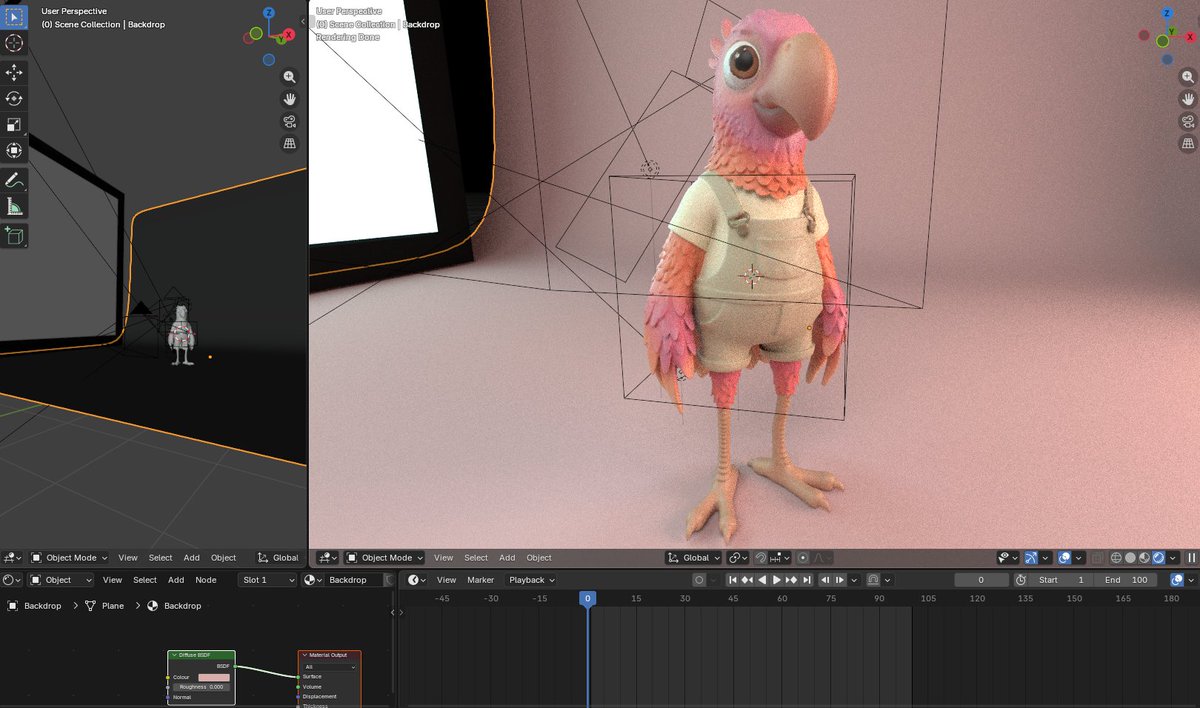
Meshy 6 (Meshy): Meshy is showcasing Meshy 6 as a step up in texture sharpness and consistency using “gentleman animals” character renders, as shown in the Meshy 6 texture demo.

• What’s being highlighted: Cleaner texture detail and more consistent outputs across multiple characters/angles, per the Meshy 6 texture demo.
• Proof artifact creators can inspect: The post includes DCC screenshots (Blender viewport + node/material UI) that make it easier to judge whether the results are “real” textures vs post effects, as shown in Meshy 6 texture demo.
Mobile-GS claims real-time Gaussian splats on phones by removing depth sorting
Mobile-GS (research): A new paper argues that getting Gaussian Splatting to run on mobile hinges on avoiding the depth-sorting bottleneck in alpha blending, proposing a depth-aware order-independent rendering path and a neural view-dependent enhancement step, as summarized in the paper share and detailed on the Paper page.

• Why creators should care: If this line of work holds up, it points toward capture-to-viewer 3D assets that can be previewed interactively on phones/tablets (think location scans, props, or set references) instead of only workstation playback.
The tweets don’t include device targets/FPS numbers, so performance claims are directional rather than directly checkable from the post.
Autodesk Flow Studio markets 3D previs specifically for fight choreography
Autodesk Flow Studio (Autodesk): Autodesk is positioning Flow Studio as a way to block combat choreography in 3D—not only moves, but timing and camera angles—before committing to final CG, as described in the Flow Studio promo.
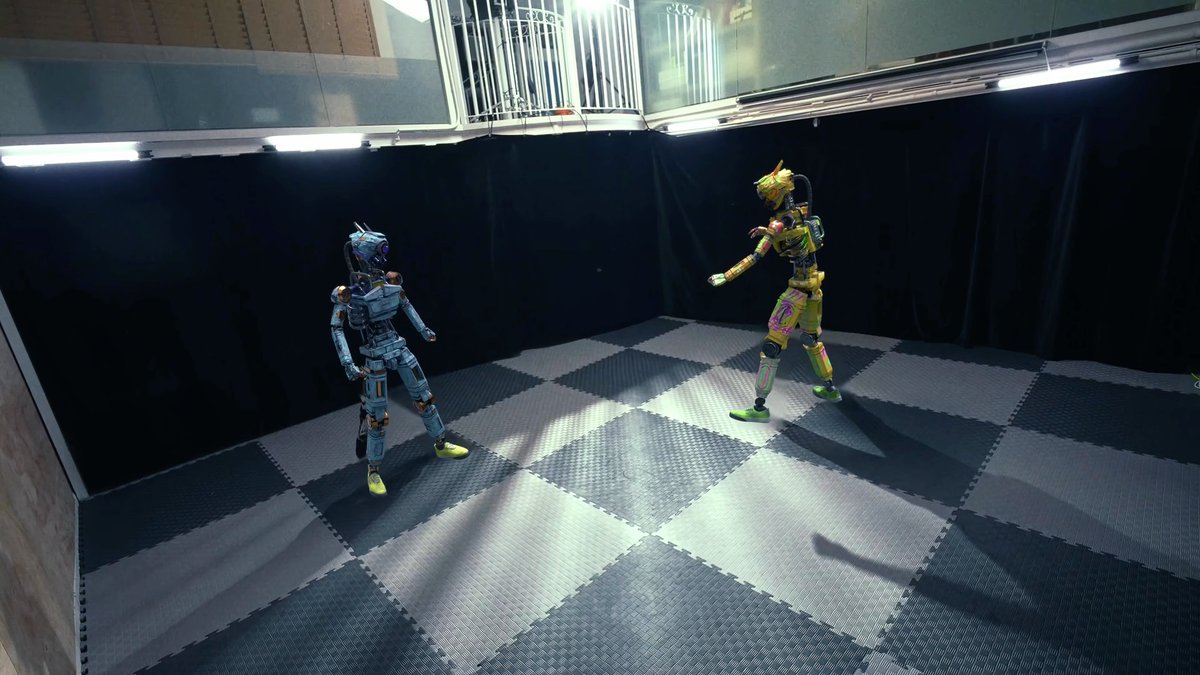
The clip emphasizes shot planning (close/wide changes) and sequence timing over final-render fidelity, which maps well to previs teams trying to lock edit decisions early.
3DxAI + Luma is being framed as an effects-control shortcut
3DxAI workflow (Tony Hou) + Luma (LumaLabsAI): DreamLabLA highlights a workflow where Tony Hou uses 3DxAI alongside Luma to create and control advanced effects “without complex volume or fluid sims,” according to the workflow mention.

The post is light on implementation specifics (what parts are Luma vs 3DxAI, and what parameters are controllable), but the positioning is clear: fast iteration on effects that would normally require heavier simulation work.
Meshy’s GDC wrap-up adds a Jupiter display partnership and a teaser
Meshy (GDC 2026): Meshy posted a GDC 2026 wrap-up thanking booth visitors and calling out Jupiter for display hardware used in the showcase, while teasing “a whole new way to showcase your creations” coming soon, according to the GDC wrap-up post.

The post reads like an event debrief plus a product tease; it doesn’t specify whether the upcoming “showcase” change is a new viewer, embed, marketplace, or export format.
🎛️ AI music videos in the wild: Suno tracks, Kling visuals, and the lipsync reality check
Audio posts today are mostly practical music-video stacks: generate a track, generate visuals, then wrestle lipsync and editing. Excludes voice-only platform news (covered under studios/platforms).
AI music-video stack: images in Midjourney/Nano Banana, visuals in Kling, music in Suno, lipsync still uneven
AI music video workflow: A creator breakdown shows a still-common “separate best-in-class tools per modality” pipeline—generate keyframes with Midjourney + Nano Banana, animate in Kling, score in Suno, then attempt lipsync with Sync.so and finish in Splice + Lightroom, as listed in the tool stack notes in workflow breakdown.

• Modality split: Image generation (Midjourney/Nano Banana) is treated as art direction and look-dev, while Kling handles motion continuity, per workflow breakdown.
• Lipsync reality: Even with a dedicated sync tool in the loop, the creator reports lipsync is still “hit or miss,” as stated in workflow breakdown.
The edit/grade step is still doing a lot of “consistency glue” work, not the generators.
Grok Imagine as B-roll: clip packs stitched into an “End of the World” music montage
Grok Imagine (xAI): A short-form music piece gets paired with a montage made from Grok Imagine clips, framing Grok as a B-roll source you can cut around existing audio, per the attribution in made with Grok clips and the post setup in end of world music.

• What’s actually happening: The creator is treating Grok outputs as a library of cutaway shots rather than trying to drive tight performance beats (mouth shapes, instrument fingering), based on the “clips” phrasing in made with Grok clips.
It’s a lightweight pattern: visuals don’t need to be narrative-consistent if the edit rhythm is.
ST^TIC Friday Features: a recurring distribution slot for AI music videos
AI music-video distribution: The @aimusicvideo “ST^TIC Friday Features” programming slot is being promoted again as a weekend drop/curation lane, as seen in the repost in Friday features signal.
This kind of recurring slot matters because music-video workflows are increasingly “tool-chain heavy”; creators appear to value predictable places to publish and get discovered, even when the production stack is stitched together across multiple generators.
📈 Attention engineering for creators: dynamic captions, hook testing, and AI theme-page ads
Marketing content today is unusually actionable: caption dynamics backed by watch-on-mute stats, plus an ad pattern (authority theme pages) that uses AI-generated recurring characters to scale variations fast.
InVideo adds Dynamic Captions as a first-class retention lever
Dynamic Captions (InVideo): InVideo rolled out Dynamic Captions—AI, word-by-word animated on-screen text with multiple style presets—positioned as a bigger driver of short-form performance than camera gear, as framed in the feature overview and reinforced by the captions editing thesis.

• Why it matters: The thread cites that 92% of social video is watched on mute, that captions can lift completion by 80%, and that skip rate can drop from 41.3% → 18.4% → 14.7% when moving from no captions to captions to dynamic captions, according to the watch-on-mute stats.
• What’s new in the UI: The feature is described as one-click, style-based animated captions with customization hooks (fonts, colors) plus a “safe zone” toggle for TikTok/IG framing, as shown in the controls rundown and echoed in the product CTA.
Authority theme pages are scaling ads with AI-generated recurring characters
Authority theme-page ad pattern: A creator calls out a shift in high-spend ecom ads toward “authority theme pages” that use a recurring AI-generated character (example: a “mysterious indigenous doctor”) to deliver curiosity hooks (“what does that sign mean?”) and route every episode to the same solution, as described in the pattern breakdown.

• Structure: One stable persona; dozens of clips where each video diagnoses a new “symptom” (hair loss, swollen legs, etc.) to trigger curiosity-first retention, per the pattern breakdown.
• Scaling loop: AI generates the character; simple scripts produce diagnoses; volume testing finds winning hooks—then iterate hundreds of variations without relying on founders/influencers, as outlined in the pattern breakdown.
HeyGen adds “Styles” to Video Agent for hook testing
Video Agent Styles (HeyGen): HeyGen’s Video Agent reportedly gained a “Styles” option aimed at making outputs more “hooky” (a shorthand for attention capture), with the claim that platform algorithms reward longer dwell time and that visual hooks can matter more than production quality, per the hooky dwell-time framing.
The tweet doesn’t include a before/after demo or a settings breakdown, so treat the exact scope of “Styles” (template library vs. motion typography vs. look presets) as unverified until a product clip or docs show what’s actually controllable.
🛡️ Law, labor, and censorship: the rules creators will be forced to ship under
Policy/safety discussion today is about real constraints: aligning AI behavior to law (not company specs), creative censorship vs “let artists be artists,” and anime studios adopting AI under labor pressure (sparking IP and jobs debates).
Legal Alignment pushes AI safety toward law as the normative target
Legal Alignment for Safe and Ethical AI (multi-institution paper): A Jan 2026 paper argues mainstream alignment work (e.g., RLHF + internal “model specs”) mostly optimizes compliance with private, non-democratic policies, and proposes treating law as the most legitimate, publicly accountable source of norms, as summarized in the thread by Legal alignment overview with the full text in the ArXiv paper.
• Three concrete pathways: The authors frame legal alignment as (1) aligning to the content of law, (2) using legal interpretation methods when rules/specs are ambiguous, and (3) borrowing legal structures like agency/fiduciary duty as governance blueprints, per the Legal alignment overview discussion.
• Why creators feel it: The thread claims current systems can be nudged into actions that would be illegal for humans (examples cited include insider trading and hacking scenarios), and highlights a security-flavored datapoint—“18 of 25 top MCP vulnerabilities” rated easy—based on the same Legal alignment overview summary.
The big open question they raise is what happens once AI systems begin influencing the legal rules they’re supposed to follow, as noted in Legal alignment overview.
Anime studios accelerate AI adoption under a labor crunch
Japanese anime production (industry shift): Multiple Japanese studios are described as adopting AI tooling to cope with labor shortages and punishing economics—an overview post claims some background tasks drop from “one week” to “five minutes,” and short clips from “a week” to “a day,” as written up in Industry summary with more detail in the Industry article.
• Labor numbers driving the change: The same summary cites 38% of workers earning under ¥200,000/month and ~219 hours/month workloads, framing AI as a response to unsustainable conditions rather than a pure cost-cut, according to Industry summary.
• Creative and pipeline concerns: The post highlights backlash around authenticity, copyright, and the risk of hollowing out entry-level “in-between” roles that traditionally train new animators, per Industry summary.
Net signal: the “AI vs craft” debate is getting forced by schedules and staffing, not ideology, as laid out in Industry summary.
STAGES leans into an anti-censorship pitch for AI art
STAGES.ai (creator positioning): Several posts frame STAGES as a place where “fine art can’t be made properly if it’s constantly censored,” explicitly pitching the tool as enabling artists to publish work that other platforms may restrict, per Censorship claim and follow-up showcases like Stages fashion set.
The visible outputs being shared skew toward editorial/fashion photography aesthetics and darker fine-art studies, as shown in Noctra magazine mock and Abstract motion sample, with the overall message that moderation policy is becoming a differentiator, not a footnote.
Toei’s FY2026 AI plans trigger a fast clarification cycle
Toei Animation (pipeline planning): A report claims Toei announced FY2026 intentions to explore AI across parts of production—storyboards, in-between automation, color correction, and photo-to-anime background conversion—then later clarified that current productions don’t use AI after public backlash, according to Toei plan and clarification and the linked Industry article.
This is the playbook creators should expect more often: announce “exploration,” get immediate reputational feedback, and narrow claims to future R&D, as described in Toei plan and clarification.
Synthetic casts get introduced like film talent
AI actors as story assets: A circulating format introduces “AI actors” as named, reusable characters (positioned like a cast reveal for an ongoing story world), as indicated by the reposted claim in AI actors announcement.
There’s not enough detail in the captured post to verify tooling, rights posture, or how identity consistency is maintained, but the packaging itself signals a shift: characters are being branded as persistent IP units, not one-off generations.
📚 Research radar that will leak into creative tools (camera control, depth, robustness, speed)
A heavy paper day with direct creative implications: deterministic depth for video, text-driven multi-shot camera planning, streaming spatial intelligence, and inference speedups. Excludes policy papers (handled in trust & policy).
ShotVerse adds plan-then-control camera trajectories for text-driven multi-shot video
ShotVerse (paper): A “Plan-then-Control” system aims to turn text prompts into globally aligned multi-shot camera trajectories, then render them into coherent multi-shot video—framed as reducing the need for manual camera plotting, as described in the Multi-shot camera clip and the linked Paper page.

• What’s new vs typical text-to-video: it explicitly separates “what happens” from “how it’s shot,” using a planner + controller abstraction instead of hoping prompting alone yields consistent cinematography.
• Why filmmakers care: multi-shot consistency (shot-to-shot geography, coverage logic) is the thing most current generators break first; ShotVerse is an attempt to make that controllable rather than emergent.
DVD proposes deterministic video depth with generative priors to reduce flicker
DVD (paper): A new method for deterministic (single-solution) video depth estimation uses generative priors to improve consistency across frames, positioned as a way to avoid the multi-hypothesis/flicker issues common in prior approaches, as shown in the Depth demo clip summary and project framing.

• Why creatives care: more stable depth maps are directly useful for 2.5D relighting, depth-aware compositing, and “cheap” parallax in post—especially when you need depth that doesn’t jump between frames.
• Implementation signal: the team is already pointing to code and a project page via the follow-up link-out in Code and page links, which usually means this will land in creator tooling quickly (DepthAnything-style pipelines).
IndexCache reuses sparse-attention indices across layers to speed long-context runs
IndexCache (paper): Targets inference cost for sparse attention by reusing top‑k token indices across transformer layers; the paper claims you can remove 75% of indexer computations with negligible quality loss, reaching up to 1.82× prefill and 1.48× decode speedups according to the Abstract screenshot and the linked Paper page.
• Why creators notice: long-context creative agents (script breakdown, asset lists, edit logs) and multimodal pipelines are often bottlenecked by attention cost; this is the kind of systems trick that later shows up as “same quality, cheaper/faster” in product tiers.
Reka Edge 2603 ships as a deployable 7B vision-language model on Hugging Face
reka-edge-2603 (RekaAI): A 7B multimodal vision-language model release surfaced on Hugging Face, positioned for image/video input workflows and noted as being optimized for Apple Silicon (MPS) in the model page, as shared in the Model availability post with details in the Model card.
• Why it matters for creative tooling: smaller VLMs are the building blocks for on-device or low-latency features like auto-logging shots, selecting takes, generating captions/alt text, or driving “assistant sees your screen” UX without a heavy cloud dependency.
• What’s missing in the tweets: no independent eval numbers were posted alongside the share, so capability comparisons are still unclear.
ROVA and PVRBench measure how video reasoning breaks under real-world noise
ROVA + PVRBench (paper): Introduces a robustness-focused training framework and a benchmark aimed at “going outside” conditions—weather, occlusion, camera motion—highlighting that models can drop by up to 35% (accuracy) and 28% (reasoning) under perturbations, as summarized in the Abstract screenshot and the linked Paper page.
• Creative relevance: this is about failure modes in the exact footage creators use—handheld shots, motion blur, bad lighting—so it’s a useful north star for anyone building video-understanding tools for editing, logging, or compliance.
• Signal to watch: papers like this often precede product changes like “robust mode,” “low-light mode,” or auto-filtering for unusable frames.
Spatial-TTT adapts spatial reasoning during streaming video via test-time training
Spatial-TTT (paper): Proposes test-time training for streaming visual inputs so spatial understanding can adapt on-the-fly during deployment, per the Spatial-TTT demo and the linked Paper page.

• Creative implication: if this kind of adaptation holds up, it’s a path toward more reliable real-time spatial behaviors in AR/virtual production and camera-aware agents (less brittle when lighting/camera motion shifts mid-scene).
• Who’s behind it: the reposted context frames it as Tencent Hunyuan + Tsinghua work in the Paper repost.
FIRM ‘Trust Your Critic’ highlights robust reward models for RL image editing
FIRM / “Trust Your Critic” (paper mention): A thread flags work on robust reward models for RL-based image editing and generation, framed around large-scale edit data and “trusting the critic” signals during optimization, per the Paper mention.
• Why creatives care: if reward models get more reliable, expect editing tools that can iterate longer (or more aggressively) without drifting off-style—especially for multi-step fixes like layout + lighting + texture consistency.
• Caveat: the tweet excerpt is partial and doesn’t include a direct paper link, so concrete dataset size/method details aren’t fully attributable from today’s feed alone.
MADQA benchmarks whether document agents navigate strategically or search randomly
MADQA (paper): A benchmark for multimodal agents reasoning over collections of heterogeneous PDF documents, framed around whether systems do strategic navigation vs stochastic search; it’s introduced as 2,250 human-authored questions grounded in 800 PDFs, per the Benchmark overview and the linked Paper page.
• Why storytellers and studios care: anything that turns piles of pitch decks, scripts, and legal PDFs into reliable answers depends on this capability; MADQA is trying to measure the “real work” part (finding the right doc + page), not just answering once you’re there.
🏛️ Creative AI market signals: Adobe leadership change, moat debates, and “AI in Slack” distribution bets
A set of industry-level signals that directly affects creator tool ecosystems: Adobe’s CEO transition under AI pressure, creator skepticism about model-provider moats, and distribution strategy shifting toward Slack/Teams surfaces for the early majority.
Adobe starts a CEO search as investor focus shifts to AI-era growth
Adobe (Adobe): Adobe says CEO Shantanu Narayen will step down after 18 years and stay on as board chair while a successor is found, as summarized in the leadership-change thread and echoed by coverage that ties the timing to investor concerns about generative AI disruption in the blog analysis.
• Creator-tool implication: The stated “AI-driven era” framing in the succession recap lands as a market signal that Creative Cloud’s AI roadmap (Firefly-era product velocity, packaging, and pricing) is now board-level narrative, not just a feature track.
What’s still unknown is whether this becomes a strategy shift (M&A, pricing, product bundling) or primarily a messaging reset around the same roadmap.
Creators debate whether frontier LLM moats survive “good enough” local models
Model-provider moats: A widely engaged thread argues OpenAI/Anthropic and other frontier providers may struggle to defend moats as cheaper and open models approach “good enough” for most business workflows—“we don’t actually need much higher intelligence” for common automations, per the moat question thread.
• Why creatives care: If capability gaps compress, differentiation shifts toward distribution, integrated creative suites, and workflow UX (consistency controls, rights management, collaboration) rather than raw model IQ—an angle implied by the prompt “What am I missing?” in the same discussion.
The post is a question rather than evidence; there are no cost curves or eval artifacts attached in today’s tweets, so treat it as sentiment signal, not forecast.
“AI in Slack/Teams” framed as the scaling surface for 2026 adoption
Work-surface distribution: A take argues the next adoption jump comes from meeting users where they already work—Slack/Teams—rather than forcing new dashboards, and frames 2026 as the year adoption “will double in 12 months,” citing the classic 2.5/13.5/34/34/16 adoption curve in the distribution thread.
• Why it matters to creative teams: For studios and agencies living in Slack, this points toward “brief → approvals → asset handoff → publishing” happening inside chat as the default interface, with Perplexity’s move described as “a great move” in the same post.
A sharper stance emerges: AI compresses “design labor” into decisions
Design work re-framing: Multiple posts argue designers shouldn’t fear replacement because AI accelerates decision velocity—one person claims “one designer can do the job of 100 designers” with AI, while the scarce resource becomes “decision makers,” per the decision-speed post.
• Commodity claim: A longer follow-up asserts “Design has always been a commodity… 100% an algorithm” and urges aiming for “invisible” outcomes, as stated in the design-as-commodity post.
This is rhetoric, not a measurement, but it’s a clear cultural signal about how some teams plan to justify headcount and tool spend in creative orgs.
Inference reselling pops up as a lightweight creator business thesis
Inference reselling: A short, blunt claim suggests “How to get rich in 2026” is becoming “an inference reseller,” per the monetization post.
In practice, this usually means packaging model access + a workflow layer (prompts, templates, brand voice, distribution, compliance) and taking margin on usage; today’s tweet provides no details on mechanics, pricing, or unit economics beyond the claim in the same post.
📣 Reach & money on X: revenue sharing, impressions targets, and algorithm guesswork
Creator-side platform dynamics show up strongly today: revenue sharing status, impression targets to unlock subscriptions, and people reverse-engineering why they’re getting shown to non-followers. Excludes marketing tactics (covered elsewhere).
X revenue sharing feels opaque as creators track payouts, pauses, and cycles
X Revenue Sharing (Creator Studio): A creator reported reaching a second payout day “without being paused,” alongside their highest impressions peak in over a year (just under 230K) while still unsure they’ll qualify, per the Payout status note.
• Cycle transparency gap: Follow-up posts describe confusion about how payouts/qualification work—“No one knows how this app works and you’re all just guessing,” as stated in the Algorithm confusion post while they also share a full 2-week metrics snapshot (238.9K impressions; 9.5% engagement rate; 22.8K engagements) in the Account overview screenshot.
What’s missing from the thread is the specific “minimum” threshold they failed to hit, making it hard to map actions to outcomes from the outside.
Creators are using “non-follower impressions” as an algorithm exposure proxy
X Analytics (Distribution): A creator flagged an out-of-network reach shift, noting their last 7 days’ impressions skewed toward people outside their network—67% from non-followers—as shown in the Impressions donut chart.
In practice, this metric is being treated as a proxy for “the algo picked this up,” even though it doesn’t explain why distribution expanded.
X subscription gating shows up as verified-follower and impressions thresholds
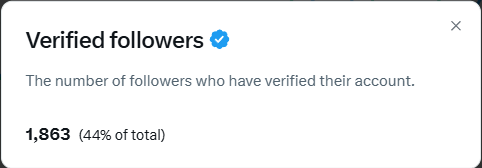
X Subscriptions eligibility: A creator frames monetization as a two-step gate—get within “<150” of a verified-follower milestone, then hit 5M impressions in 3 months again to unlock subscriptions, as described in the Subscriptions threshold post.
The screenshot shared alongside that post shows 1,863 verified followers (44% of total), giving a concrete sense of how close (or far) creators can be from platform-set unlock conditions.
Creators are setting daily impression quotas tied to monetization windows
Creator growth ops on X: After missing the minimum threshold for the payout cycle, a creator sets a specific execution target—55K impressions daily—and explicitly ties it to balancing original posts with replies, per the Daily target post.
This frames “reply volume” as part of the reach system, not just community engagement, with payouts as the forcing function.
Creators want account alerts without turning on noisy push notifications
X Notifications UX: A creator asks for a way to get alerts from specific accounts without enabling full notifications, because push vibrations become “every minute,” as described in the Alerts request.
The request is less about growth mechanics and more about attention management—staying plugged into key accounts without sacrificing focus during high-posting stretches.
🏆 What shipped: awards wins, feature releases, and concept-driven AI fashion/editorials
Finished work and career signals today: Escape awards wins, a feature-length film release announcement, and concept collections (like face-erasure fashion) that show how AI aesthetics are being framed as art direction, not “tool demos.”
VOID fashion editorials use face-erasure glitches as the concept, not the artifact
VOID (Midjourney + Magnific): The creator frames face distortion/erasure as the thesis—“glitch as grief… dissociation… the self under pressure”—and positions the garments as the emotional payload once identity cues are removed, as explained in the long concept statement in VOID concept statement and reiterated with audience prompt in Which image stays.

• Production note: The workflow is described as Midjourney generation followed by Magnific refinement, per VOID concept statement, with additional context links and breakdown pointers spread across VOID details post and Which image stays.
HEAVY PULP announces a first feature-length AI film, “OJAI”
HEAVY PULP: A retweeted announcement says HEAVY PULP is releasing a first feature-length experimental sci‑fi drama titled “OJAI”, as captured in the Feature film announcement.
The same timeline includes a separate reaction post pointing to a sudden jump in visibility—“HEAVY PULP being world famous”—in Visibility reaction, which reads like distribution momentum more than a teaser drop (no trailer clip is included in these tweets).
BLVCKLIGHTai takes First Place “Pioneer” at the 2026 Escape AI Media Awards
Escape AI Media Awards: BLVCKLIGHTai says they won First Place for the Pioneer award at year two of the Escape awards, framing it as peer-reviewed validation after winning “Alchemist” the prior year, as described in the Pioneer win post.
The post also name-checks continuity inside the scene—following @Diesol as last year’s Pioneer and pointing to @JunieLauX winning Alchemist this year—making it read less like a one-off trophy and more like an emerging awards circuit for AI-native filmmakers and artists, per the Pioneer win post and the follow-up reply in Peer reviewed comment.
Dustin Hollywood wins Escape’s “Artisan” cinematography award
Escape AI Media Awards: Dustin Hollywood reports winning the Artisan award (which they frame as a cinematography honor), emphasizing recognition for craft rather than tool demos, as stated in the Artisan win post.
This comes alongside broader community posting from the event itself, including the on-site attendance snap in At the awards and the general “come join us” invite in Awards invite link.
STAGES.ai posts are being framed as editorial fashion work, not prompt tests
STAGES.ai: Multiple posts present STAGES outputs as finished editorial/fashion plates—styled, sequenced, and treated like publication spreads—rather than single-image tool flexes, as shown in the fashion set shared in Fashion set carousel and the “NOCTRA” magazine-style layout in Noctra spread.
A separate share continues the same positioning with additional dark fashion imagery in Serpent water scene, while Fine art post signals the “fine art” framing explicitly.
10,000-follower milestone posts show the AI creator ‘support loop’ in public
Creator milestones: BLVCKLIGHTai posts a 10,000 milestone thank-you aimed at “lovers, lurkers, bots,” making the growth moment part of the creative persona and community loop, as shown in the 10,000 milestone post.
A companion reflection argues that disengaging from “noise” and focusing on output led to more growth, per Ignore noise reflection, reinforcing how creator culture on X ties audience-building directly to ongoing AI art practice.
📅 Where creators are gathering: Escape awards, Cursor meetups, and remix contests
Event signals today are lightweight but useful: an AI film awards gathering, a Cursor community meetup with practical workflow takeaways, and a remix contest for animation learners.
Escape AI Media Awards 2026 becomes a visible in-person hub for AI filmmakers
Escape AI Media Awards: Year two of the Escape awards shows up in feeds as a real community gathering (not just an online drop), with creators posting from the event and sharing peer-voted wins—see the on-site check-in in At the awards and the first-place “Pioneer” post in Pioneer award win.
• Peer-reviewed recognition: BLVCKLIGHTai describes taking First Place for “Pioneer” as “peer reviewed” and “means more,” in the winner reflection in Pioneer award win.
• Craft categories matter: Dustin Hollywood frames winning “Artisan” as a cinematography-style award in Artisan award post, reinforcing that the event is rewarding production craft, not only prompting.
Event details and the broader “neo cinema” framing are centralized on the Escape site, as linked from Event page.
Cursor Meetup in Limassol highlights how teams ease into LLM workflows
Cursor Meetup (Limassol): Notes from a local Cursor meetup focus on practical adoption—small “start here” systems, then graduating to deeper LLM setups—per the recap in Meetup recap. It’s a grounded signal. It’s about onboarding friction.
• Staged onboarding: The takeaway that teams can begin with n8n to get initial wins, then “once they outgrow n8n, they’re ready,” is stated directly in n8n onboarding note.
• Non-code use for code reviews: The claim that Cursor’s code reviews/automations generalize to spec/design-doc/product-strategy reviews is called out in Automations beyond code.
A second theme is playful demos: one highlight mentions a Pokémon-like game where child creatures are generated from “parents,” per n8n onboarding note.
A remix contest emerges around the Framer Cartoon Hero animation course
Fable Simulation: A first remix contest is running for people who took the Framer Cartoon Hero animation course, according to the announcement in Remix contest post. It’s a small but clear community mechanic.
What’s not specified in the tweet is prize structure, judging criteria, or deadlines. The post reads like an early engagement hook, not a full rules drop.
While you're reading this, something just shipped.
New models, tools, and workflows drop daily. The creators who win are the ones who know first.
Last week: 47 releases tracked · 12 breaking changes flagged · 3 pricing drops caught