Seedance 2.0 rollout paused after 2-studio pressure – China-only via Volcano Engine

Stay in the loop
Free daily newsletter & Telegram daily report
Executive Summary
ByteDance has paused the planned global rollout of Seedance 2.0 after coordinated Hollywood copyright pressure; threads cite cease-and-desist letters from Disney and Warner Bros. Discovery plus an MPA line that “infringement is a feature, not a bug.” ByteDance says it’s “strengthening safeguards,” but the practical outcome is a split launch: Seedance 2.0 remains available in China via Volcano Engine, while “outside China” access and commercial-use expectations get muddy; no court filing or technical mitigation details are shown in the posts.
• STAGES/NAKIDpictures: previews “Bridge Editing,” a timeline primitive that auto-generates continuity between clips (motion/color/screen direction); labeled proprietary and “patent pending,” with UI screenshots but no method disclosure.
• Anthropic/Claude: temporarily doubles usage outside peak hours for 2 weeks; exact windows and whether API limits change aren’t specified.
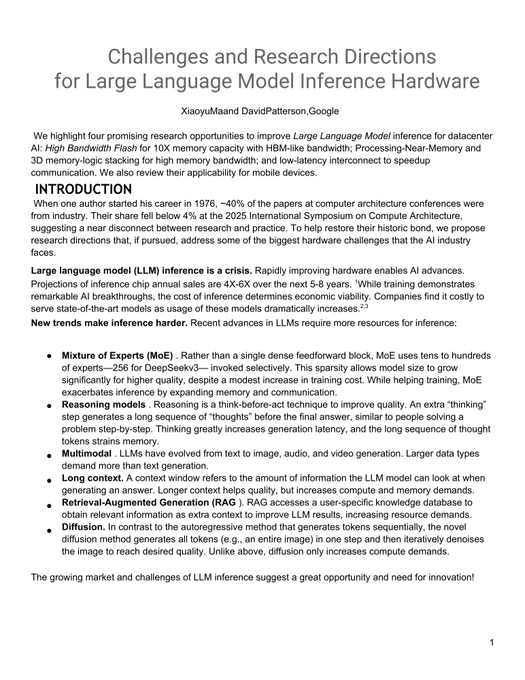
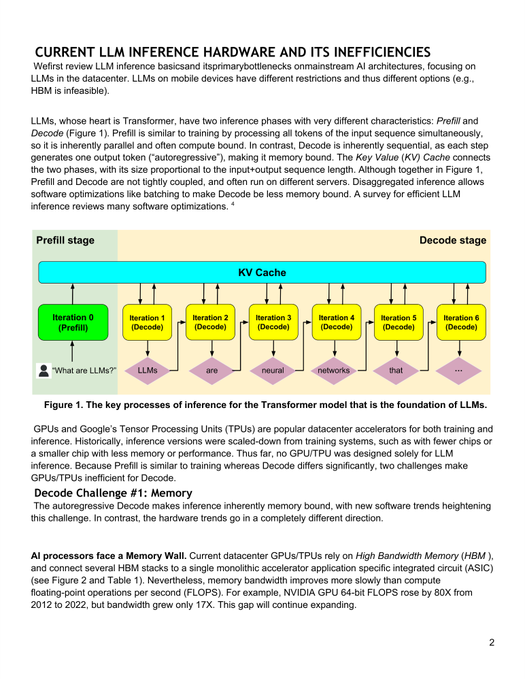
• Google/David Patterson: argues inference is memory-bound; cites ~80× compute vs ~17× memory-bandwidth gains since 2012, and HBM ~35% pricier since 2023—thread claims, paper linked.
Net: video generation is being squeezed from both ends—rights enforcement on distribution; continuity and memory economics on production; the missing receipts are independent benchmarks and enforceable policy clarity.
While you're reading this, something just shipped.
New models, tools, and workflows drop daily. The creators who win are the ones who know first.
Last week: 47 releases tracked · 12 breaking changes flagged · 3 pricing drops caught
Top links today
- WebVM repo for running Linux in browser
- Build-your-own-x tutorial index
- AgentCash pay-per-use APIs for agents
- FLUX.2 klein model page on Hugging Face
- BTK Akademi free AI courses in Turkish
- Turkcell Geleceği Yazanlar AI courses
- Google Skillshop Prompting Essentials catalog
- ODTÜ Bilgeİş AI training portal
- Microsoft Learn Azure AI training path
- ShotDeck searchable frames from real films
- Adobe Firefly Ambassador Program waitlist
- Pictory text-to-video product page
Feature Spotlight
Seedance 2.0’s global rollout pauses as Hollywood copyright enforcement hits video models
ByteDance paused Seedance 2.0’s global launch after major studios’ cease‑and‑desist letters. For creators, this is a real-time warning that video capability ≠ usable distribution without IP safeguards.
Today’s biggest cross-account story is ByteDance suspending Seedance 2.0’s global launch after coordinated studio legal action—an immediate, practical constraint on what characters/styles creators can ship commercially.
Jump to Seedance 2.0’s global rollout pauses as Hollywood copyright enforcement hits video models topicsTable of Contents
⚖️ Seedance 2.0’s global rollout pauses as Hollywood copyright enforcement hits video models
Today’s biggest cross-account story is ByteDance suspending Seedance 2.0’s global launch after coordinated studio legal action—an immediate, practical constraint on what characters/styles creators can ship commercially.
ByteDance pauses Seedance 2.0 global launch after Hollywood copyright disputes
Seedance 2.0 (ByteDance): ByteDance has suspended the planned global rollout of its video-generation model Seedance 2.0, following copyright disputes/pressure from major Hollywood studios, as reported in the Launch pause report and reiterated in the Launch on hold post. For creators, the practical impact is immediate: the model’s “outside China” availability and commercial usage expectations get murky fast, and any workflows depending on Seedance access now have launch-timing risk.
According to a longer write-up circulating in-thread, the escalation included cease-and-desist letters from Disney and Warner Bros. Discovery plus an MPA framing that “infringement is a feature, not a bug,” with ByteDance saying it’s “strengthening safeguards” while Seedance 2.0 remains available in China via Volcano Engine Letter claims and availability split. More detail is collected in a separate article linked from the discussion, as summarized in the Report on legal claims.
🎬 Kling-first cinematic tricks + STAGES’ new editing primitives (continuity as software)
Video talk is dominated by Kling 3.0 promptable live-action/CG moments and STAGES.ai experimentation—less about new model drops, more about directing, editing, and continuity control.
STAGES.ai demos “Bridge Editing” to auto-generate continuity between clips
STAGES (NAKIDpictures): STAGES.ai is previewing a new NLE concept it calls Bridge Editing—instead of hand-built transitions, clips get linked by an “intelligent bridge” that tries to preserve motion, color, subject continuity, and screen direction, with the system described as proprietary and “patent pending” in the Bridge Editing prototype.
The screenshots in the Bridge Editing prototype show a “Storyboard Director” panel feeding a timeline where “Shot 01” and “Shot 02” are connected by a visible Bridge Mode link, implying continuity becomes a first-class object you can manipulate, not just an edit decision.
Kling 3.0 “handshake through monitor” liquid-glass portal prompt (photo → cinematic clip)
Kling 3.0 (Kling AI): A detailed still-to-video recipe is circulating for a practical “virtual meets real” beat—animate a static photo so the on-screen character looks at a real hand, the display ripples like liquid glass, and both hands meet in a slow-motion handshake, while explicitly forcing composition lock (“do not change the original image composition”) as written in the Full prompt.

Copy-paste prompt from the Full prompt (kept intact):
Kling 3.0 variant: character climbs out of the monitor and fights a real desk toy
Kling 3.0 (Kling AI): A second prompt variant pushes the same “liquid glass monitor” setup further—have the on-screen character break out, shrink to desk scale, then interact with (and fight) a real physical prop in-frame, while still enforcing strict composition lock and an 8–10s cinematic spec as laid out in the Out-of-screen fight prompt.

Kling v3 vs Seedance chatter shifts to “ideas first, generating second”
Kling v3 (Kling AI): A creator comparison take frames Kling v3 as close to Seedance on “quality/adherence/elements inclusion,” then pivots into a craft workflow stance—access matters less than having written concepts ready, captured in the Quality comparison note.

Grok Animation creature-morph clips used as a style-variation sandbox
Grok Animation (xAI): Anima_Labs shared a rapid creature/character morph montage as a way to “vary the styles” and restock a library of characters/creatures, explicitly listing a tool split of Midjourney (2D), Leonardo/Nano Banana Pro (3D), and Grok (animation + sound) in the Style variation clip.

Kling 3.0 speed/adherence demo: “make a cute cat” → instant kitten clip
Kling 3.0 (Kling AI): A short capture shows the “type prompt → get a clean result” loop using the minimal instruction “make a cute cat,” with the output presented as a fast, coherent kitten generation in the Cute cat demo.

🧩 Copy‑paste aesthetics: Midjourney SREFs, Nano Banana prompt kits, and structured prompt schemas
A high volume of the feed is reusable prompt material: Midjourney SREF/style analysis posts plus Nano Banana “template prompts” (cloud logos, product renders, posters, selfie schemas).
A massive Midjourney SREF blend string is being used to lock a blue-orange motion aesthetic
Midjourney SREF blend string (lloydcreates): A copy-paste mega-stack of SREF codes (with weights like ::8, ::2, ::3) is shared as an “afterparty from V8 rating,” targeting a coherent blue/orange speed-and-light-trails look in the blend string.
The image grid shows the style holding across cars, portraits, sneakers, and energy streak compositions—useful when you need one palette + motion language across a whole campaign, as shown in the blend string.
A strict “Doodle-style” vector portrait prompt bakes in likeness locks and palette logic
Vector portrait prompt (underwoodxie96): A detailed, production-oriented prompt defines a “Doodle-style” flat 2D vector portrait with strict likeness constraints (facial structure, head tilt, ears), simplified facial features (dot eyes, simple mouth), and a two-tone gradient background whose palette is inferred from “personality,” as laid out in the full prompt text.
The post includes an explicit negative list (no halo, no wings, no 3D, no messy sketch lines) and concrete wardrobe guidance (oversized streetwear with thick monoline outlines), which makes it easier to standardize a whole avatar set, as shown in the full prompt text.
Midjourney SREF 851985277 blends ukiyo-e ink-wash with modern anime linework
Midjourney SREF 851985277 (Promptsref): A reusable style recipe that mixes traditional Japanese ukiyo-e composition with modern anime energy—soft beige tones, ink-wash texture, and clean expressive lines—shared with the exact parameter string --sref 851985277 --niji 6 in the style write-up.
• Where it lands well: The post frames it as strong for game character art, book covers, brand visuals, and poster design, with prompt directions like “ukiyo-e style” and “ink wash painting” highlighted in the style write-up.
• Copy path: The detailed prompt breakdown is linked from the prompt breakdown link, which routes to the Sref detail page for replication details.
Nano Banana Pro “Phantom Protocol” prompt JSON standardizes product hero renders in a void
Nano Banana Pro prompt JSON (lloydcreates): A reusable control schema for product renders specifies “strictly centered,” “floating in a void,” black background, prismatic/caustic lighting, and aggressive clutter bans (no text, no stands, no horizon) in the prompt JSON.
• Lighting and material recipe: The template explicitly calls for brushed matte metallic + frosted translucent glass layers with amber/cyan highlights, as enumerated in the prompt JSON.
• Error prevention baked in: It includes guardrails against crop errors and multi-instance duplication (a common “catalog render” failure mode), as specified in the prompt JSON.
Midjourney SREF 1311228238 aims at European fantasy-comic character illustration
Midjourney SREF 1311228238 (Artedeingenio): A character-illustration look pitched for tabletop/RPG publishing—European fantasy comics (bande dessinée), video-game concept art influences, and bold linework—shared as --sref 1311228238 in the style description.
The post explicitly frames it as useful for illustrating D&D manuals and similar RPG guides, as described in the style description.
Midjourney SREF 2309808913 yields an architectural-sketch × concept-art watercolor hybrid
Midjourney SREF 2309808913 (Artedeingenio): A style reference described as “a hybrid illustration between architectural sketching and concept art,” leaning on ink outlines plus digital-watercolor washes, shared with the exact flag --sref 2309808913 in the sref callout.
The attached examples show the look across characters, vehicles, and building facades, which makes it practical for visual development sets rather than single hero images, as seen in the sref callout.
Midjourney SREF 2671261553 pushes a gothic woodcut-comic look for dark fantasy art
Midjourney SREF 2671261553 (Promptsref): A high-contrast, ink-heavy style reference described as “lost dark fantasy comic” energy—heavy shadows, blood-red highlights, gritty woodcut texture—shared as --sref 2671261553 --niji 6 in the style note.
• Best-fit outputs: The post explicitly calls out fantasy game key art, comic covers, dark novel illustration, and gothic posters, as listed in the style note.
• Prompt pack access: The “exact prompts” link is provided in the prompt breakdown link and resolves to the Sref guide page.
Midjourney SREF 3179391764 targets a purple-orange cyberpunk vaporwave look
Midjourney SREF 3179391764 (Promptsref): A palette-first SREF pitched for retro-future sci-fi visuals—deep purple shadows with orange-red highlights and neon glow—shared as --sref 3179391764 --niji 6 in the style description.
• Use cases called out: The thread positions it for sci-fi posters, cyberpunk illustration, music cover art, game UI concepts, and “futuristic ad visuals,” per the style description.
• Full prompt formula: Promptsref points to a replicable prompt set via the full breakdown link, which lands on the Sref guide page with examples and parameter tips.
Midjourney SREF 929505068 + 2200230567 is being documented as “vintage dark cinematic”
Midjourney SREF combo 929505068 + 2200230567 (Promptsref): A new SREF pairing is linked as a “vintage dark cinematic” look—low-key lighting, noir-ish contrast, textured highlights—shared alongside example frames and a dedicated write-up link in the sref code share.
The supporting breakdown page is referenced via the sref code share, which points to the Sref detail page describing the lighting and texture cues to reproduce the look reliably.
Prompt share: turn any historical event into a blockbuster one-sheet poster
Nano Banana 2 prompt (GlennHasABeard): A compact, highly reusable poster spec—[Historical event] as a blockbuster movie poster, dramatic tagline, cast credits, bold title typography, key figures posed heroically, theatrical one-sheet, 8K—is shared as a copy/paste format in the prompt share.
The attached examples show the format can reliably produce full credit blocks, taglines, and genre-consistent composition (including IMAX-style footer clutter) rather than “pretty art with random text,” as evidenced in the prompt share.
🧑🎤 Keeping the same character across shots: refs, locked identities, and repeatable pipelines
Today’s consistency talk is very practical: creators share reference-image workflows (Grok Imagine, Leonardo/Nano Banana) and “locked reference” positioning (especially for long sequences).
Leonardo’s “tiger balm” workflow shows a repeatable identity lock from real video
Leonardo + Nano Banana 2: A creator pitches a repeatable way to stop character drift by starting from real footage, grabbing the last frame, and using Nano Banana 2 inside Leonardo to generate a stylized hero character—then reusing that identity for downstream shots, as described in Workflow walkthrough with a “try it yourself” follow-up in Workflow recap.

The thread’s consistency claim is operational: once you’ve minted the character from a real frame, the rest of the pipeline becomes “rinse and repeat” while the identity stays stable, per Workflow walkthrough.
Grok Imagine reference-image slots show a clean way to keep video elements coherent
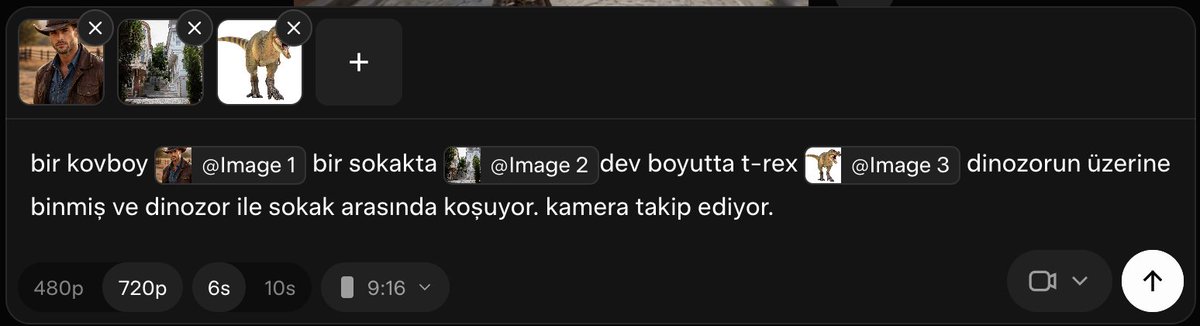
Grok Imagine (xAI): A concrete “reference images → video” recipe is circulating in Turkish, using multiple images + @Image slot tags inside the prompt to keep the same cowboy/street/T‑rex elements bound while the camera follows, as shown in the Prompt screenshot.

Prompt screenshot shows the interface with three refs loaded and a prompt that explicitly stitches them together (cowboy + street + giant T‑rex), alongside basic output controls (e.g., 480p/720p and 6s/10s).
The key pattern is that the prompt names each ref (“[@Image 1] … [@Image 2] … [@Image 3]”) rather than hoping the model “remembers” what each uploaded image is supposed to represent, per Prompt screenshot.
Grok Imagine’s multi-reference UI is becoming the go-to for stable cartoon characters
Grok Imagine (xAI): Creators are leaning on Grok Imagine’s multiple “Reference Images” UI to keep cartoon characters consistent across generations, following up on Image refs (image references in video prompts) with a clearer “add several refs, then prompt” workflow shown in the Multi-reference demo.

• What’s concretely new in the workflow: Instead of a single style/character anchor, users stack several refs (the demo shows a base plus additional images) to reduce drift in shape language and face style, as shown in Multi-reference demo.
• Where it seems to shine: The tweet calls out cartoons specifically—useful when you need one coherent character model sheet feel across iterations, per Multi-reference demo.
Nano Banana Pro’s pitch is locked references for 300+ shot character continuity
Nano Banana Pro: In a film-oriented tool stack post, Nano Banana Pro is positioned as an edit-first model where “locked references” and “same face across 300+ shots” are the headline value—less about one-off hero images and more about long-run continuity, as shown in Production pipeline post.
The pipeline framing matters: it places Nano Banana Pro after prompt development and before video generation (e.g., “Reve → NB Pro → Kling”), treating character consistency as the central gating step, per Production pipeline post.
Seven reference images is the new baseline for keeping pet characters stable in Grok Imagine
Grok Imagine (xAI): One creator reports that with 7 reference images of their animals loaded, they can prompt “them to do anything,” which is a strong signal that people are treating Grok Imagine like a lightweight character bible for recurring casts, as shown in Seven-image pets workflow and enabled by the broader multi-ref capability noted in Multi-reference cartoons.

The tweet frames this less as a style trick and more as character binding (same pets, new situations), which is the exact consistency problem most short-form series and character channels run into, per Seven-image pets workflow.
Nano Banana 2 vs Nano Banana Pro comparisons are shifting into “when to use which”
Nano Banana 2 vs Nano Banana Pro (Leonardo): A comparison thread frames NB2 vs NB Pro across 10 photography-style prompts (cinematic, street, food, architecture, portrait, etc.), explicitly asking “who wins” and “in which cases,” per Comparison setup and the full prompt set listed in 10-genre prompt list.
The most relevant angle for character consistency is the implicit trade-off: “better realism/style adherence” vs “better identity hold” is what these head-to-heads are trying to surface, with Leonardo positioned as the testbed in the 10-genre prompt list plus the product link shared via Leonardo site.
🛠️ Agents & automation for creators: paid data, Claude Code kits, and ‘vibe-coded’ production tools
The workflow layer is busy: agent capabilities, ready-made Claude Code configs, and creator pipelines that turn prompts into apps, websites, or game tooling fast.
AgentCash introduces pay-per-call premium APIs directly inside coding agents
AgentCash: A new agent payment layer is being pitched as “premium data on tap”—agents can spend a few cents per request to reach 250+ paid APIs without the usual key/subscription setup, and the thread claims 74M payments processed already, as described in the [product walkthrough](t:41|product walkthrough) and [capabilities list](t:202|capabilities list). This matters for creators building research-heavy automations (lead lists, social scraping, trend mining) because it reframes “data access” as a tool-call, not a procurement task.

• Setup flow: The onboarding is framed as ~2 minutes—connect accounts, then paste an install prompt into your agent, as laid out in the [setup steps](t:192|setup steps) and the linked [setup page](link:192:0|Setup page).
• Where it runs: It’s positioned as working in Claude Code, OpenClaw, and Codex, per the [compatibility claim](t:41|compatibility claim), which hints at “one balance, many tools” rather than a single-platform wallet.
The tweets are promotional and don’t include a public price sheet or API catalog details, so cost predictability and provider coverage remain unclear from today’s sources.
“Everything Claude Code” packages a full production Claude Code setup
Everything Claude Code (affaan-m): A widely shared GitHub repo compiles an end-to-end Claude Code configuration—agents, skills, hooks, commands, rules, and MCP configs—and the screenshot claims roughly 52k stars and 6.4k forks, as shown in the [repo screenshot](t:26|repo screenshot) and linked via the [GitHub repo](link:115:0|GitHub repo). For creative teams, the value is less “another prompt pack” and more a reusable operating baseline for repeatable tasks (research → generate → validate → ship) across projects.
• What’s concrete today: The README positioning emphasizes “production-ready” patterns evolved over “10+ months,” and highlights multi-language docs and multi-language support in the badge row, as visible in the [repo screenshot](t:26|repo screenshot).
No independent evals are provided in the tweets; this is best read as a community-maintained workflow skeleton, not a verified performance claim.
Image-to-website workflow: from one AI image to deployment in 2–3 hours
Image-to-website pipeline: Following up on Image-to-website (prior: fast site generation claims), Amir Mushich shows a new proof run—one AI image → a working deployed site in ~2–3 hours, with the result shown in the [workflow clip](t:87|workflow clip) and a clickable [live demo site](link:87:0|Live demo site). For designers and filmmakers building pitches, this is a concrete “turn a key visual into a landing page” loop that fits how creative projects actually start.

The tweet doesn’t spell out the exact build toolchain steps (framework/hosting), so reproducibility depends on the unseen parts of the workflow.
Vibe-coding loop: prototype a game, accidentally scaffold an engine
Vibe-coded game dev: A short demo shows the “vibe code” loop escalating from “quick game” into an AI-assisted mini engine—code fills rapidly while a playable 2D shooter runs alongside, as shown in the [split-screen demo](t:20|split-screen demo). For interactive storytellers, this is the practical pattern: keep the game running while the model iterates on systems (input, entities, collisions, weapons), tightening the build-test loop.

The clip doesn’t reveal the exact model/tooling stack, so treat it as workflow signal (tight iteration) rather than a reproducible recipe.
Claude gets used for a WebGPU-to-Godot port to hit Android performance
Claude for project migration: AIandDesign describes pushing Claude “to its limits” to port a browser WebGPU game into Godot for Android, motivated by handheld performance constraints, as stated in the [porting note](t:205|porting note) and expanded context in the [Godot migration plan](t:286|Godot migration plan) with the target game linked as the [WebGPU build](link:286:0|WebGPU build). This is the creative-useful form of “LLM coding”: not snippets, but translation across engines and runtime assumptions.
No before/after FPS or device profiling numbers are given today, so the performance gain is a goal rather than an evidenced result.
Recordly positions itself as an open-source ScreenStudio alternative
Recordly: An open-source screen recording app is being promoted as a replacement for ScreenStudio, emphasizing “cinematic” capture features (auto-zoom, cursor animation, quick timeline edits) and export options, as summarized in the [tool announcement](t:13|tool announcement) and detailed on the linked [project site](link:13:0|Project site). For AI creators shipping tools, tutorials, or prompt workflows, screen recording quality is part of distribution—this is aimed at reducing post-edit time.
The tweet doesn’t include a demo clip, so feature quality (especially auto-zoom) can’t be validated from today’s timeline.
build-your-own-x resurfaces as a “from scratch” idea bank for builders
build-your-own-x: The “compile every build-it-from-scratch tutorial” repo is resurfacing as a shortcut for creators who want to understand or recreate tool primitives (CLI tools, editors, engines) rather than only prompting them, as described in the [repo callout](t:17|repo callout). In an agent-heavy workflow world, it’s often the fastest way to turn a vague automation idea into a concrete spec (what modules exist, what interfaces you’ll need, what can be swapped for AI).
The tweet doesn’t link the repo directly, so the exact scope/version isn’t verifiable from today’s data.
Mini server racks are becoming the “local automation” creator prop
Local creator infra: A compact home rack build—Mac Studio plus Umbrel, UniFi switch, Aqara hub, Raspberry Pi 4, and ODROID N2+—signals creators organizing a small “always-on” stack for self-hosted services and automations, as shown in the [rack photo](t:48|rack photo). For agent workflows, this is often where the unglamorous parts live: schedulers, storage, local dashboards, and internal tools.
The post is a parts list and intent, not a measured benchmark; it doesn’t specify which workloads (LLMs vs orchestration vs media servers) are actually running.
✍️ Prompting that actually improves writing: Socratic prompting + Claude-built curriculums
A large chunk of text-only AI craft today is about upgrading thinking, not outputs—Socratic prompting templates for strategy, analysis, and content planning, plus “Claude replaces courses” curriculum prompts.
Socratic prompting: turn “do X” into questions that force better thinking
Socratic prompting: A widely shared template reframes prompts from “produce an output” into a short sequence of questions (what makes this good; what frameworks apply; now apply), with the claim that it reliably increases depth for strategy/copy/planning tasks, as laid out in the Socratic prompting thread and expanded in the Three-part structure.

• Copy/paste base template: “What makes [output type] effective? What principles/frameworks apply? Now apply those insights to [my task],” per the Three-part structure—and the thread notes it’s most useful for multi-step work (analysis, strategy, creative problem-solving) rather than formatting/rewrite requests, as described in the When to use it.
• Concrete swaps (useful for creators): The thread gives direct rewrites for value props (“what triggers should it hit, then apply”), LinkedIn calendars (“what content earns engagement + what cadence avoids fatigue, then design 30 days”), and customer feedback (“what signals indicate PMF issues, now analyze this data”), as shown in the Value prop example, LinkedIn calendar example , and Customer feedback lens.
The core move is programming the model’s analysis phase before it writes, as framed in the Questions activate reasoning and Instructions skip steps posts.
“Claude as teacher” prompt: generate a goal-based curriculum with milestones and practice
Claude curriculum prompt: A circulating “replace online courses” prompt asks Claude to act as a private instructor and output a personalized learning plan (roadmap, what to ignore, weekly milestones, practice tasks, and progress checks), as posted in the Replace courses prompt and reiterated with the full scaffold in the Curriculum template.
It’s framed as a way to turn “I want to learn X” into an execution plan tailored to time per day and learning style (practical/examples/theory/project-based), with the deliverable being a step-by-step sequence and built-in practice loops rather than a static reading list, per the Replace courses prompt.
🖼️ Image models in practice: FLUX.2 klein speed, Firefly formats, and Nano Banana look-tests
Image chatter is a mix of model availability (FLUX.2 klein), tool positioning (Firefly ambassador content), and practical look-tests/comparisons (NB2 vs NB Pro, multi-model aesthetics).
FLUX.2 klein hits Hugging Face, pitched for sub-second image gen + editing
FLUX.2 klein (Black Forest Labs): A Hugging Face release is being circulated as FLUX.2 klein arriving with “sub-second image generation and editing” positioning, per the HF release callout; for creatives this maps to tighter iterate→pick loops (especially when you’re doing lots of small edits rather than one big hero render). Availability details beyond “on Hugging Face” aren’t in the tweets, so treat performance claims as marketing until you see a reproducible demo or benchmark artifact.
Nano Banana 2 vs Nano Banana Pro: a 10-genre prompt pack for side-by-side look tests
Nano Banana (Leonardo): A side-by-side comparison thread tests Nano Banana 2 vs Nano Banana Pro across 10 photography genres, explicitly framed as “which one wins—and in which cases,” with all images generated in Leonardo per the comparison setup and the thread index.
• Copy-paste prompt baselines: The thread includes full “house style” prompts for specific looks—e.g., a cinematic freeze-frame brief in the cinematic prompt and a subway street-photography setup in the street prompt—so you can rerun identical text across both models and compare drift/adherence.
• Repro path: The author points readers to try both models directly in Leonardo via the Leonardo app.
No single “winner” is claimed in the tweets; the value here is the standardized prompt suite for consistent A/B testing.
Firefly Ambassador visibility grows via “everything made in Firefly” creator ads
Adobe Firefly (Adobe): Creator program visibility is getting a boost via a self-referential format—an announcement video that’s also an ad—where the creator says every scene was made in Adobe Firefly, as described in the ambassador announcement and backed by the finished reel.

The follow-up thread pushes the Firefly Ambassador Program waitlist, as linked in the waitlist post via the waitlist form.
Grok Imagine’s multi-reference input gets pitched as a cartoon consistency lever
Grok Imagine (xAI): Multi-reference image input is being highlighted as especially useful for cartoons—explicitly calling out that you can add multiple reference images to steer a single output—per the multi-ref demo.
The clip shows the practical interaction model (add several refs under “Reference Images,” then generate), which is the core workflow difference versus single-reference prompting.
World Building Codex V3.0 ships as a packaged Midjourney worldbuilding framework
World Building Codex V3.0 (VVSVS): VVSVS released World Building Codex V3.0, positioning it as a packaged framework for worldbuilding plus a documented process for curating and using Midjourney SREFs, per the release post and the linked Codex page.

This is less about a new model feature and more about packaging “how to get consistent worlds” into a reusable system (references, process, and examples).
Firefly “Hidden Objects” keeps scaling as a repeatable, level-based image format
Adobe Firefly (Adobe): The “Hidden Objects” image format continues with new drops at Level .074 and Level .075, keeping the same repeatable mechanic—one detailed scene plus a bottom strip of target-object silhouettes—per the level .074 post and the level .075 post.
This is a format creatives can serialize (new “level” numbers, consistent UI strip) without needing viewers to understand the underlying toolchain.
Midjourney “Romanticism” set shows how multi-SREF stacks push painterly moodboards
Midjourney (Romanticism look): A “Romanticism” mini-set demonstrates a painterly, soft-focus moodboard aesthetic using a multi---sref stack plus higher exploration/quality settings, as shown in the Romanticism prompt line with outputs attached.
The practical takeaway is that stacked SREFs plus aggressive stylize can be used to keep a collection coherent (faces, lamb, cloaked figure, rose landscape) without needing a character-lock workflow.
Nano Banana 2 “TV mirror selfie” collage becomes a repeatable style-remix template
Nano Banana 2 (Hailuo): A “TV mirror selfie” concept collage shows a repeatable remix format—recognizable ensemble casts staged as bathroom mirror selfies, with show-title scribbles on the mirror—shared as a Nano Banana 2 result in the collage post.
The creative utility is fast variant generation for pop-culture pastiche (same framing, different IP-coded wardrobe/props), which also makes it easy to build a consistent multi-panel carousel.
Grok Imagine “Pi Day” micro-visual: π dissolves into a nebula loop
Grok Imagine (xAI): A short Pi Day clip shows a clean, social-ready beat—“π” dissolving into a colorful cosmic/nebula animation—shared in the Pi Day visual.

It’s lightweight, but it’s the kind of repeatable micro-format that can be reskinned for calendar moments (holidays, launches) without needing a full narrative pipeline.
🧱 All-in-one studios & access shifts: Hailuo Workspace, STAGES as a creative OS, and Claude capacity windows
Platform-level moves today are about consolidation: unified workspaces (Hailuo), ‘creative operating system’ positioning (STAGES), and temporary usage boosts (Claude off-peak) that change when you schedule heavy work.
STAGES previews “Bridge Editing” that links clips via continuity-aware transitions
STAGES (STAGES.ai / NAKIDpictures): Dustin Hollywood shared an early STAGES prototype for “Bridge Editing,” where adjacent clips are connected by an “intelligent bridge” meant to preserve motion, color, subject continuity, and screen direction—positioned as a replacement for manual transition work, according to the Bridge Editing prototype post. The tangible artifact here is the UI concept: a timeline that links shots into continuity chains rather than treating cuts as isolated joins.
• Interface signal: screenshots show “BRIDGE MODE” connecting “Shot 01” to “Shot 02” directly in the timeline and a “Storyboard Director” panel feeding shots, as visible in the Bridge Editing prototype post.
• IP posture: the post claims the system is “patent pending” and proprietary to STAGES/NAKID, which implies the team expects this interaction model to become a defensible differentiator if it works at scale, per the Bridge Editing prototype post.
Claude doubles usage outside peak hours for the next two weeks
Claude (Anthropic): Anthropic is temporarily doubling Claude usage outside peak hours for two weeks, framed as a thank-you to users in the off-peak boost notice. For creators doing heavy ideation passes, long-script breakdowns, or batch prompt iteration, this is a straightforward scheduling lever: the “when” of generation becomes part of the workflow, not just the “what.”
The post doesn’t specify exact off-peak windows, which products/tier plans are included, or whether API rate limits change as well; only “usage outside our peak hours” is explicitly promised in the off-peak boost notice.
Hailuo Workspace adds a unified project hub for image, video, and audio assets
Hailuo Workspace (Hailuo): Hailuo rolled out a redesigned “Workspace” that pulls image, video, and audio creation into one consolidated flow, with new project/asset organization pitched as the core upgrade—see the feature rundown in the Workspace leveled up post and the product entry point on the Workspace page. This matters for small teams doing mixed-media outputs because it’s explicitly trying to remove the “tool hopping + lost assets” tax by making generation and organization one surface.

• What’s actually new in the pitch: a unified workspace (“One Flow”), explicit asset organization (“Project Mastery”), and a near-term roadmap tease (“bolder ideas, smarter tools & models”), as described in the Workspace leveled up post.
• Access dynamic: the launch post is coupled to an ULTRA membership giveaway mechanic (comment + repost), which signals the Workspace push is also a retention/acquisition play, per the Workspace leveled up post.
STAGES leans harder into “creative operating system” positioning for cinema workflows
STAGES (STAGES.ai / NAKIDpictures): Alongside the Bridge Editing preview, STAGES is being framed less as a single tool and more as “the foundation of a new creative operating system” with a multi-year roadmap claim, as stated in the creative OS positioning. A separate post also teases a completed “Venice film format” software concept that’s “coming to the U.S.” with “major partners,” according to the format expansion tease.

The through-line is platform consolidation: editing primitives (Bridge), a storyboard-driven UI surface, and a broader “OS” narrative that aims to keep ideation → generation → edit inside one environment, as described in the creative OS positioning and format expansion tease.
Hailuo teases an upcoming “3.0 model” release
Hailuo (Hailuo): A separate post is pointing to a “Creative Tools Hailuo 3.0 Model” timing cue, which reads like a platform-level model refresh tease rather than a shipped upgrade, as shown in the 3.0 tease post. For creators, this kind of pre-announce often correlates with changing model defaults, pricing tiers, or capability jumps inside the same workspace surface.
The tease doesn’t include specs, availability regions, or pricing changes yet; it’s strictly a roadmap signal in the 3.0 tease post.
Pictory’s blog-to-learning-video flow spotlights text-to-video repurposing
Pictory (Pictory.ai): Following up on All-in-one studio (Pictory 2.0 consolidation pitch), Pictory is pushing a concrete repurposing workflow: paste a blog post and generate a “learning video” via text-to-video with minimal editing, as described in the blog-to-video prompt. The example UI highlights options like voiceover/music choices and “Generate from PowerPoint,” which frames Pictory as a repurposing layer across content formats.
Access is routed through a free-trial funnel, as linked in the Free trial signup.
🧰 Single-tool updates worth using: Photoshop Rotate Object walkthroughs + ‘AI Effects’ one-click prompts
Compared to yesterday, the Photoshop Rotate Object chatter is calmer but more applied: creators share explainers, while prompt platforms add “click-to-use” effect presets to reduce prompt-library digging.
Promptsref adds “AI Effects” to turn proven prompts into one-click edits
Promptsref image editor: A new AI Effects feature packages “prompts that already work” into clickable presets, positioning it as an alternative to browsing a long prompt library—underwoodxie96 describes the intent and includes an example effect in the AI Effects announcement, with the broader multi-model editor context described on the Image editor page.
This is a workflow change for creative teams: instead of prompt-writing from scratch per task, you pick an effect that encodes constraints (continuity, truthfulness, no-new-elements) and run it repeatedly across references and iterations.
The “one image → 9-frame storyboard grid” prompt gets productized as an effect
Storyboard planning prompt: One specific AI Effect is essentially a pre-vis generator—turn one reference image into a 10–20s cinematic progression (Setup → Build → Turn → Payoff), then output a labeled 3×3 Master Contact Sheet of 9 keyframes, as laid out in the full prompt block inside the Storyboard effect prompt.
The notable detail is provenance: the same storyboard prompt format is described as having reached 1M views in December in the Storyboard effect prompt, and now it’s being treated as a reusable “button” rather than a one-off thread.
For filmmakers using image-to-video tools, this kind of grid is the missing middle step between “cool still” and shot-by-shot prompting (lens/DoF continuity rules, axis consistency, and explicit keyframe beats are all embedded in the template).
A practical Rotate Object walkthrough (Photoshop beta) starts replacing “wow” demos
Photoshop (Adobe): A more applied wave of Rotate Object content is showing up as creators move from hype to explainers—ozansihay published a Turkish “detaylı anlatım” video covering the new 2D layer rotation / 3D rotate workflow, as indicated in the Walkthrough video post.
For designers, this matters because it’s the difference between seeing a single flashy before/after and actually understanding where Rotate Object fits in day-to-day comp work (angle fixes, perspective tweaks, and iterative concepting), building on the original “rotate 2D images” pitch shared in the Feature announcement.
📣 AI marketing formats that scale: ‘authority theme pages’ and repeatable character ads
Marketing talk is very pattern-driven: recurring AI characters (doctor/dentist archetypes), standardized hooks, and volume testing—optimized for short-form feeds, not polished brand ads.
Old “Japanese dentist” authority page: repeatable lesson hook that drives scale
Authority theme-page ad format: A recurring “old Japanese dentist” character page is described as pulling ~30M monthly views, using a rigid loop—start the same way, call out a visible problem (yellow stains), give a short calm fix, then let the product appear naturally at the end, as outlined in the Format breakdown.

The creative takeaway is that this isn’t “one great ad”; it’s a repeatable episode template that supports volume (dozens of posts/month) while keeping trust anchored in a consistent on-screen authority persona, per the Format breakdown.
Ecommerce ads shifting into “authority theme pages” with recurring doctor characters
Authority theme pages (short-form ads): Following up on Theme pages (recurring “mysterious doctor” character ads), the thread claims $60k+/month ecommerce budgets are moving into these formats because the hook is framed as “hidden knowledge” (a symptom callout) rather than a direct pitch, as described in the Shift to authority pages context.
Instead of founders/influencers, the ads run as a character series: point at hair loss/underarms/swollen legs → “what does that sign mean?” → same solution; the post attributes scaling to volume testing across many variations while holding identity constant, per the Shift to authority pages framing.
🖥️ Compute reality for creators: memory bottlenecks, battery drain, and local stacks
Compute/infra posts today focus on the practical limiter for next-gen creative AI—memory bandwidth/cost—plus what local agent work actually does to batteries and home setups.
Google/Patterson argue LLM inference is memory-bound, and HBM is the choke point
LLM inference hardware (Google / David Patterson): A widely shared thread frames the next bottleneck for creator-facing AI as memory bandwidth/capacity and networking, not raw FLOPs, using the “GPU is a race car, HBM is the fuel pipe” analogy in the memory bottleneck thread; it cites an ~80× compute gain since 2012 vs ~17× memory-bandwidth gain, plus a claim that HBM chips are ~35% more expensive since 2023, as summarized in the same memory bottleneck thread. The underlying argument is backed by the linked paper in the ArXiv paper, which breaks inference into compute-heavy prefill and memory-heavy decode phases (KV cache as the scaling headache).
• Proposed “fix directions”: The thread lists four routes—higher-capacity flash stacks (example: 512GB vs 48GB), compute-near-memory, vertical stacking, and faster interconnects—calling out inference/serving as the economic center of gravity in the memory bottleneck thread.
Treat the cost and multiplier figures as “thread-level” claims until you read the ArXiv paper directly; the practical takeaway for creatives is that long-context, MoE-style routing, and reasoning-token-heavy workflows increasingly price out on memory and comms before they price out on compute.
Local agents can drain laptop batteries fast under sustained load
On-device agents (power draw reality): A creator note reports that running local agent workloads can be punishing on mobile hardware—“If I take my M4 Max off power, I lose 30% battery in ~10 minutes” as stated in the battery drain note. That’s a concrete constraint for anyone trying to storyboard, iterate, or run automation away from a desk.
The post doesn’t specify the exact model/runtime (local LLM vs tool-using agent loop vs video pipeline), so treat it as an empirical warning signal rather than a benchmark; the value is that it anchors “local-first” creative stacks to a very real battery/thermal budget.
Mini home server rack builds are showing up as creator infra for local workloads
Local creator infra (home rack pattern): A developer shared a compact “mini server rack” parts list—Mac Studio, Umbrel, UniFi switch, Aqara hub, Raspberry Pi 4, and Odroid N2+—as a way to consolidate always-on services in one place, as listed in the mini rack parts list.
This shows how “local AI” often becomes a broader home-lab setup (networking, storage, automation hubs) rather than a single box; it pairs naturally with agent workflows that need persistence, background jobs, and predictable connectivity.
🧯 Reality check: agents still time out, reauth loops hurt, and ‘Jarvis’ isn’t here yet
Reliability pain shows up in creator ops: session timeouts, re-auth churn, and skepticism that “self-improving agents” work end-to-end without babysitting.
OpenClaw chat logs show the two things that still break “agent ops”: timeouts and reauth
OpenClaw (agent ops reality check): A real chat log shows an agent failing mid-task with “LLM request timed out,” then restarting a fresh session because “no memory files” were present—right as the user is complaining about having to repeat a 7‑day email reauth loop, as captured in the Timeout and reauth log.
The point for creators isn’t the model choice. It’s that day‑to‑day automation still collapses on basic plumbing: long-running requests timing out, and auth expiring on a cadence that forces manual babysitting, as shown in the same Timeout and reauth log.
Hermes-Agent promises a self-improving loop, but creators doubt agents work end-to-end yet
Hermes-Agent (Nous Research): A creator callout highlights the gap between ambitious “self-improving agent” positioning (learning loop, multi-platform gateways, cron automations, subagents, multiple terminal backends) and current lived experience—“I highly doubt that any agent works properly at this point,” as written in the Skeptical take.
What’s notable is the framing: the skepticism isn’t about one missing feature, but about whether the whole stack (auth, persistence, tool reliability, retries) holds together under real workloads, per the Skeptical take.
“It’s 14.03.2026 and no one has a Jarvis yet” becomes the reliability punchline
Assistant reliability (consumer-grade gap): The “no Jarvis yet” post lands because it’s not about capability demos—it’s about dependable autonomy still feeling out of reach in normal life, as summed up in the No Jarvis meme.
The same feed shows the compensating behavior: people start building mini home racks to run always-on tools locally (Mac Studio + SBCs + network gear), as shown in the DIY mini server rack. That’s a signal that reliability/persistence is still being solved with DIY infrastructure, not product polish.
OpenClaw users are switching the chat surface from iMessage to Telegram
OpenClaw (workflow workaround): One user reports moving from iMessage to Telegram specifically to run OpenClaw—“telegram is so much better,” according to the Telegram switch note.
This reads less like preference and more like a reliability/ergonomics workaround: creators will change the agent’s chat surface if it reduces friction during ongoing automation, per the Telegram switch note.
📅 Access & participation: creator waitlists, gated tools, and community prompts-to-share calls
Events today are mostly access funnels: creator waitlists (Firefly Ambassadors), limited-access tool signups, and community calls to submit work for featuring.
Adobe Firefly Ambassador Program waitlist recirculates with new ambassador announcements
Adobe Firefly (Adobe): The Firefly Ambassador Program is getting a fresh visibility bump as creators publicly announce they’ve been accepted and point others to the waitlist—see the ambassador reveal in Ambassador announcement and the application entry point in Waitlist breakdown intro via the Waitlist form. This matters because it’s an explicit access funnel for creators who want early looks, sponsorship-style collaborations, or distribution via Adobe’s ambassador network.
The posts are promotional by design (sponsored disclosure appears in the announcement), but the practical takeaway is simple: Adobe is actively recruiting AI-native creators, and the waitlist is the current gate.
ARQ opens a limited-access creator signup (Airtable form)
ARQ (starks_arq): ARQ is running a scarcity-gated access push—creators are asked to “sign up to get a chance” at access, with the intake handled through an Airtable form linked in Signup link post and teased in Access pitch. For working creatives, the immediate relevance is that ARQ appears to be in a small cohort / invite-limited phase rather than an open launch.
There’s no product spec in the tweets beyond the access mechanic, so treat it as an early signal: distribution is starting before full public availability.
MayorKingAI runs an open call to feature community AI art in a Sunday roundup
Community distribution slot: MayorKingAI is collecting submissions for a near-term feature post—“drop your best work below” with a promise to spotlight top creations on Sunday, as stated in Share your AI art call. For creators, this is a straightforward participation loop: submit work → potential amplification tied to a specific time window.

The post is medium-agnostic (“Images, videos, anything goes”), which makes it useful for multi-tool stacks (image → video → audio) even if the call itself is just a comment-thread submission.
📉 Creator money & reach on X: remonetization appeals and revenue suspensions
Only a small slice today, but it’s high-stakes: creators posting publicly about monetization suspension/remonetization and the emotional/operational fallout.
Creator revenue suspensions show up as “prompt-as-post” status updates
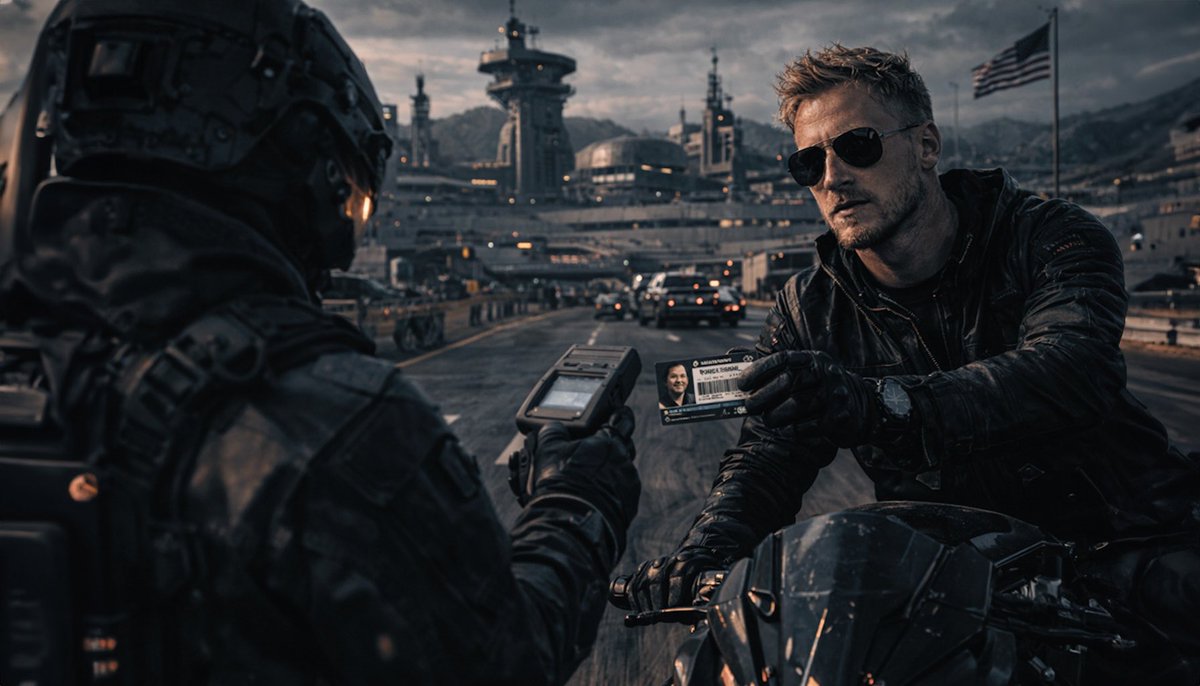
X creator monetization (Underwoodxie96): A creator reports their X creator revenue has been suspended and frames the update in the same language they use to make work—posting a full cinematic prompt (“mysterious… man… gritty espionage thriller… --ar 2:3 --sref …”) in the suspension note, as shown in the Revenue suspended post.
For AI creatives, this is a visible pattern: monetization enforcement becomes an operational risk, and the “public artifact” of the event is increasingly an AI-generated visual + prompt, not a plain-text complaint.
Public remonetization appeals become a repeatable tactic on X
X remonetization process: A creator says they’re going to make their appeals for getting remonetized public (and do it regularly), explicitly tagging platform leadership, per the Public remonetization appeal.
The practical change here isn’t a feature—it's the escalation channel: turning a private support outcome into a recurring, public-thread format designed for visibility and pressure.
🏁 What shipped (or is about to): micro‑dramas, spec ads, and creator-made film formats
This bucket is about finished or imminent creative work: episodic micro-drama rollouts, concept ad spots/prints, and creator-built production formats moving toward partnerships.
HOUSE of HEAT micro-drama sets trailer Monday and Episode 1 Friday cadence
HOUSE of HEAT (NAKIDpictures): NAKIDpictures announced its first micro-drama with a fixed near-term release cadence—“Trailer drop Monday, Episode 1 Friday,” with weekly distribution planned across Escape AI Media and the project’s socials, as stated in the Release cadence note. It’s a concrete “ship like a series” move (trailer → episode → weekly drops) rather than a one-off AI clip.
The post also introduces LILY as the star, framing it like a character-forward rollout rather than a tool demo, per the Release cadence note.
DARKSTAR gets a first sequence preview with a full sci‑fi synopsis
DARKSTAR (Dustin Hollywood): A “first sequence” preview dropped alongside a full synopsis (classified gravity-drive test flight goes wrong; pilot returns to a ruined future), with Dustin noting prior attempts “two years ago” didn’t work because the models were weaker, as written in the Sequence preview and synopsis. The post also flags a practical production problem—character likeness drift (“made him look like Hemsworth”)—which is exactly the kind of continuity issue that shows up once you try to cut a scene, not just generate shots.

Treat this as an early signal of where his bar is: realism + VFX density + multi-shot continuity, per the Sequence preview and synopsis.
STAGES teases “Bridge Editing” that links clips with continuity-aware transitions
STAGES (Dustin Hollywood / NAKIDpictures): Dustin shared an early prototype of what he calls “Bridge Editing”—a patent-pending NLE concept where clips are connected by an “intelligent bridge” that accounts for motion, color, subject continuity, and screen direction, as described in the Bridge editing explainer. The claim is that the timeline becomes a system that generates continuity between shots rather than forcing manual cuts.
• What’s concrete today: UI screenshots show “BRIDGE MODE” linking “Shot 01” to “Shot 02” on a timeline and a “Storyboard Director” panel in the same interface, as visible in the Bridge editing explainer.
Details on how the bridge is computed (optical flow vs model-driven interpolation vs constraint solving) aren’t provided yet; the post is positioning + early UI proof.
Dustin Hollywood says his “Venice film format” is coming to the U.S.
Venice film format (Dustin Hollywood): Dustin says he “finished the software last week” and is “bringing it to the U.S.” with “major partners involved,” while explicitly holding back details for now, per the Partners tease. For creators, this is framed as a distribution/format play (a packaged way to present work) rather than another model or prompt drop.
The post is light on specifics—no format specs, partners named, or release window beyond the U.S. move mentioned in the Partners tease.
Coach concept print ads posted as portfolio work
Coach concept ads (Dustin Hollywood): Dustin shared a set of “concept print ads” for his portfolio and an agency in the UK—explicitly calling out the Coach brand in the Concept print note. The attached images include a clean product-style bag shot and a more narrative concept scene (shown as a second image in the same post), indicating a mix of classic key visual and campaign concepting.
The post doesn’t specify which AI tools were used (if any); what’s new here is the “spec/portfolio output” cadence rather than process detail, per the Concept print note.
Kentucky Derby × Ralph Lauren spec ad lands as a portfolio-style spot
Kentucky Derby × Ralph Lauren (Dustin Hollywood / NAKIDpictures): A long-form spec ad cut was posted as “Kentucky Dirby x Ralph Lauren spec ad,” presented as agency/portfolio-style work under the NAKIDpictures banner in the Spec ad post. The NAKIDpictures site frames the studio as operating at the intersection of cinema and AI, including its STAGES system, as outlined in the Studio overview.

The post itself doesn’t list the toolchain, but the deliverable is clear: a finished spot with brand-coded wardrobe, riding imagery, and logo patch close-ups, as shown in the Spec ad post.
While you're reading this, something just shipped.
New models, tools, and workflows drop daily. The creators who win are the ones who know first.
Last week: 47 releases tracked · 12 breaking changes flagged · 3 pricing drops caught