Claude Opus 4.5 tops WebDev at 1493 Elo – coding agents converge

Stay in the loop
Free daily newsletter & Telegram daily report
Executive Summary
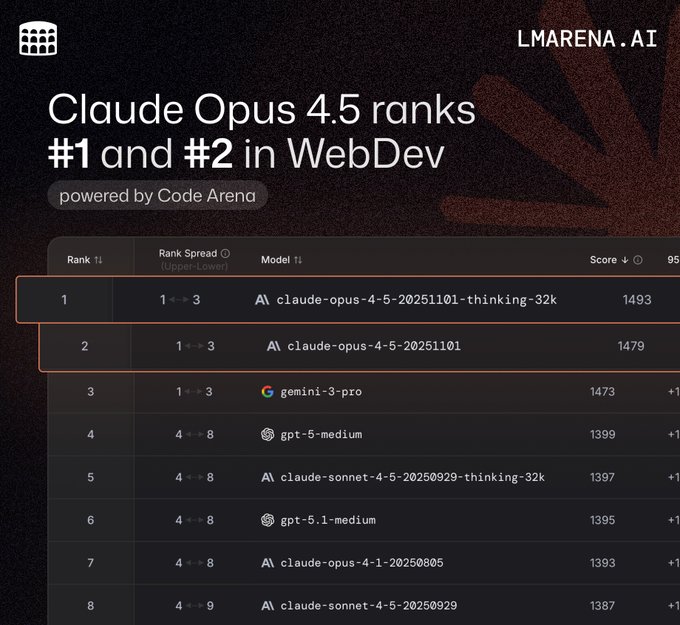
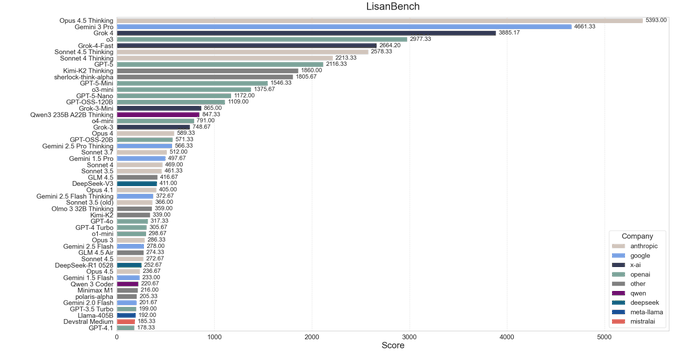
After Monday’s pricing and SWE‑bench splash, today is about receipts: Claude Opus 4.5 (thinking‑32k) is now #1 on LMArena’s Code WebDev board at 1493 Elo, with the non‑thinking variant at #2 and Gemini 3 Pro bumped to third. The same family also grabbed the top Arena Expert slot and a top‑3 spot on text, while LisanBench now ranks Opus 4.5 Thinking as the longest‑chain reasoner on 18 of 50 tasks despite a 16,384‑token thinking cap and roughly $35 total batch cost.
The twist: broad benchmarks still say “specialist, not emperor.” SimpleBench shows Opus 4.5 inching from 60% to 62% over Opus 4.1, while Gemini 3 Pro sits way out front at 76.4%, so if you need one generalist brain, Google still holds the belt. But on code‑heavy and spec‑driven work, the live arenas, SWE‑bench, and terminal evals are all pointing to Opus.
Tooling is catching up fast. Cline 3.38.3 now treats Opus 4.5 and its 32k thinking mode as first‑class for long‑horizon coding, and builders are reporting “three weeks of engineering in three hours” bursts and full SaaS rewrites in under two. At the same time, veterans warn non‑thinking Opus can underperform Sonnet 4.5 without a good harness—plan modes, hooks, and multi‑model routing still separate wizardry from wishful thinking.
Top links today
- Anthropic agent harness engineering blog
- Perplexity personalized memory feature overview
- LangChain guide to agents, runtimes, harnesses
- vLLM Ray symmetric-run multi-node guide
- Artificial Analysis LLM hardware cost benchmarks
- General Agentic Memory via Deep Research paper
- DR Tulu deep research RL framework paper
- Efficient reasoning distillation from frontier models
- Gradient-based chain-of-thought elicitation paper
- Computer-use agents as UI judges paper
- Unified multimodal understanding vs generation paper
- Agent0-VL self-evolving tool-integrated VLM paper
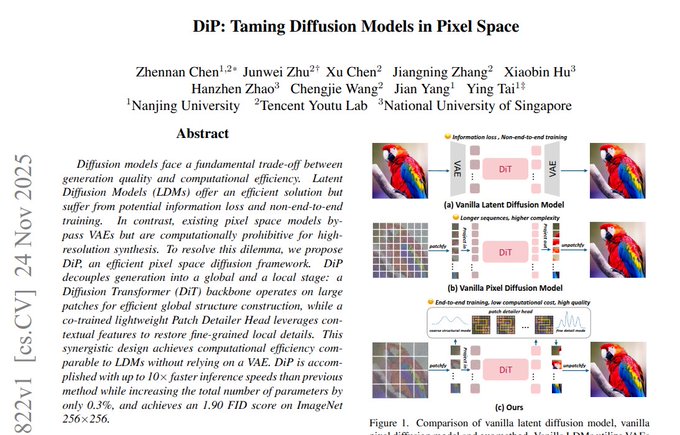
- DiP pixel-space diffusion model paper
- STARFlow-V normalizing flow video generation paper
- HSBC analysis of OpenAI long-term losses
Feature Spotlight
Feature: Opus 4.5 consolidates the coding crown
Opus 4.5 claims #1 on Code Arena WebDev (thinking‑32k), top Expert/Text placements, strong LisanBench chains, and fast IDE uptake (Cline). Builders report low-cost batch runs and longer valid chains.
Cross‑account momentum centers on Opus 4.5 topping live leaderboards and showing practical agent gains; mostly eval updates, dev tool rollouts, and usage data today.
Jump to Feature: Opus 4.5 consolidates the coding crown topicsTable of Contents
🏆 Feature: Opus 4.5 consolidates the coding crown
Cross‑account momentum centers on Opus 4.5 topping live leaderboards and showing practical agent gains; mostly eval updates, dev tool rollouts, and usage data today.
Opus 4.5 takes #1 WebDev slot and tops Arena Expert leaderboard
Claude‑Opus‑4.5 (thinking‑32k) has jumped straight to #1 on LMArena’s Code Arena WebDev board with 1493 Elo, with the non‑thinking variant at #2 (1479) and Gemini 3 Pro now third at 1473, extending Anthropic’s lead on coding‑style evals following its earlier SWE‑bench and ARC‑AGI wins benchmarks and position arena update.
The same model family also now holds #1 on the Arena Expert leaderboard and #3/#4 on the Text leaderboard (thinking and non‑thinking), and ranks top‑3 across occupational categories like software, business, medicine, writing, and math expert rankings text leaderboard. For engineers, this means that if you’re already routing hard Web/UI tasks to Opus 4.5, the broader Arena data increasingly backs that choice over GPT‑5.1 medium and Gemini 3 Pro for complex, spec‑heavy front‑end work.
Builders report huge productivity jumps—and some friction—with Opus 4.5
Hands‑on reports keep piling up around Opus 4.5: one founder says they "did about 3 weeks of engineering work in 3 hours" with the model engineering burst, while another had it rewrite an entire SaaS from a messy React app to a clean Laravel build in under two hours using FactoryAI saas rewrite.

Others lean on Opus 4.5 for front‑end design via Claude Code’s new frontend-design plugin, one‑shotting physics simulators and app layouts when run in plan mode design workflow. EMad Mostaque mentions it’s the first Claude he finds “reasonably usable for decent math work,” and notes that thinking and non‑thinking quality now feel very close on many problems math impression. At the same time, some experienced users like Jeremy Howard and others argue that non‑thinking Opus 4.5 can be worse than Sonnet 4.5 in practice and that true one‑shot solutions are still rare, requiring back‑and‑forth and human review critic view jeremy comment. Put together, the mood from serious builders is: Opus 4.5 is now their go‑to for big, structured coding and math tasks—especially with good harnesses—while Sonnet 4.5 and GPT‑5.1 Pro remain in the mix for faster or more general work.
Cline 3.38.3 makes Opus 4.5 a first‑class long‑horizon code agent
Cline 3.38.3 is out with built‑in support for Claude‑Opus‑4.5 and the 32k thinking variant, plus an expanded Hooks UI and native tool calling for providers like Baseten and Kimi K2 cline 3.38.3 notes.

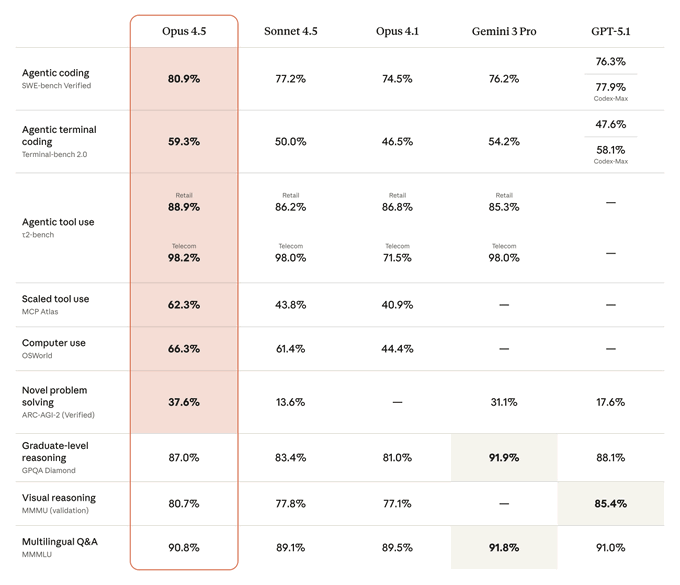
Following earlier editor integrations of Opus 4.5 into Cursor, Zed, Windsurf and others editor adoption, this release pushes Cline closer to a full agent harness: you get richer lifecycle hooks around each step, better control over when Opus plans vs edits, and the option to swap in Grok 4.1 or Gemini 3 Pro where they’re stronger. The Cline team highlights Opus 4.5’s ~80.9% SWE‑bench and 62.3% MCP Atlas scores as the reason they now recommend it for complex multi‑step coding tasks, with Sonnet 4.5 reserved for cheaper, more routine work cline 3.38.3 notes. For teams standardizing on Cline as their coding agent, this is the cleanest way so far to put Opus 4.5 Thinking at the center of long‑running refactors and feature builds without writing your own harness from scratch.
LisanBench crowns Opus 4.5 Thinking as longest‑chain reasoner
On the new LisanBench reasoning benchmark, Claude‑Opus‑4.5 Thinking takes a clear first place, producing the longest valid chains on 18 of 50 "words" while Gemini 3 Pro and Grok‑4 set 13 and 10 records respectively lisanbench thread.
Opus 4.5 Thinking is currently limited to 16,384 "thinking" tokens in this setup (OpenAI models were run with a larger medium budget), yet still ends up the best‑scoring model once chains are allowed to run long thinking limit note. The full LisanBench run cost roughly $5 for non‑thinking Opus 4.5 and about $35 with Thinking via Anthropic’s Batch API, which is cheap enough that individual teams can realistically reproduce these experiments and tune their own reasoning budgets batch cost estimate. For builders already using Opus 4.5 for agentic workflows, this is extra evidence that the thinking variant is where you want to go for hard, multi‑step reasoning, even if it sometimes takes longer to notice and correct its own mistakes than OpenAI’s thinking models lisanbench thread.
SimpleBench: Opus 4.5 edges Opus 4.1 but trails Gemini 3
On the SimpleBench aggregate benchmark, Claude‑Opus‑4.5 scores 62% accuracy, up 2 points from Claude‑Opus‑4.1’s 60%, while Gemini 3 Pro remains well ahead at 76.4% simplebench summary.
So Opus 4.5 is a clear upgrade inside the Anthropic family but not an all‑around SOTA: if you’re routing by raw SimpleBench score, Gemini 3 still looks like the global default. For coding and agents though, this is just one data point; combined with SWE‑bench, Terminal‑Bench, and the Arena leaderboards, it reinforces a more nuanced pattern where Opus 4.5 is especially strong on code‑heavy and structured‑instruction tasks, while Gemini 3 keeps the edge on broader, mixed‑domain QA reasoning comparison.
📊 Benchmarks: Gemini 3 and Grok 4.1 step up
Continues yesterday’s benchmark race with fresh non‑Opus signals. Excludes Opus 4.5 which is covered in the feature.
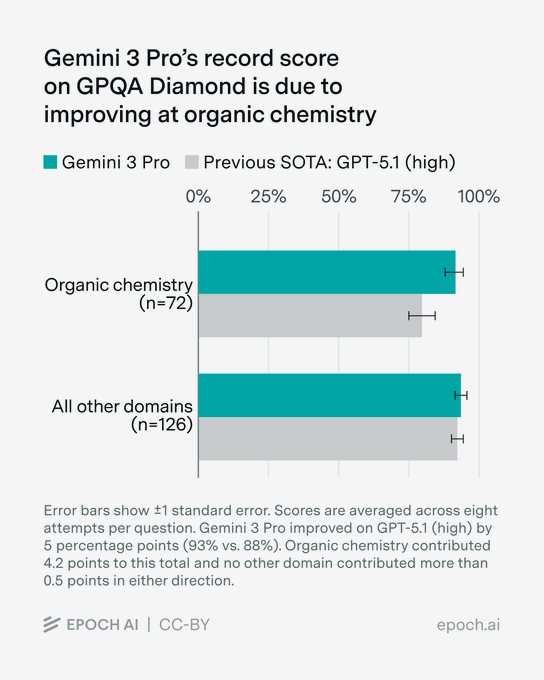
Gemini 3 Pro hits 93% on GPQA Diamond, lifting SOTA by ~5 points
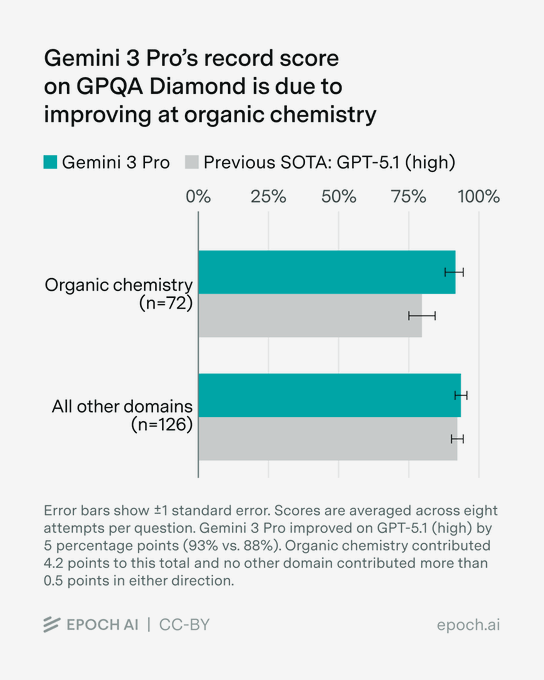
Gemini 3 Pro set a new record on the GPQA Diamond benchmark with a 93% score, up from the previous best of around 88% from GPT‑5.1 (high), with most of the gain coming from organic chemistry questions. gpqa update
GPQA Diamond is a very hard graduate‑level question benchmark, so a 5‑point jump at the top end is a big deal for anyone leaning on models for scientific and technical reasoning. The analysis shows that on non‑chemistry domains Gemini 3 Pro only nudges past GPT‑5.1, so the big win is in a narrow but important slice of the test. This strengthens the pattern from earlier math and reasoning suites that Gemini 3 is consolidating a lead on formal problem solving rather than general chat quality. Builders doing chemistry‑adjacent work or dense technical Q&A should be routing their hardest questions here first, and then verifying against primary literature.
CAIS indices rank Gemini 3 Pro #1 in both text and vision capabilities
New CAIS capability indices put Gemini 3 Pro at the top for both text and vision tasks, with Opus 4.5, GPT‑5.1 and Grok 4 following behind in different orders. On the Text Capabilities Index, Gemini 3 Pro averages 47.6% vs 44.4% for Opus 4.5 and 37.5% for GPT‑5.1; in the Vision Capabilities Index it scores 57.1% vs 47.4% for GPT‑5.1 and 45.4% for Opus 4.5. (text index chart, vision index chart)
The CAIS suite pulls together multiple hard benchmarks (Humanity’s Last Exam, ARC‑AGI‑2, SWE‑Bench, MindCube, IntPhys, etc.), so these averages are a useful single number when you don’t want to maintain your own bespoke eval mix. The main takeaways: Gemini 3 Pro looks like the best single bet if you need one model to handle both language and perception; GPT‑5.1 still lags on average despite some strengths; and Opus 4.5 is competitive but not leading once you exclude its strongest coding‑centric tests. For infra planners and router authors, this argues for routing more generic multimodal workloads to Gemini 3 Pro while using other models where you have very specific advantages measured locally.
Gemini 3 Pro tops SimpleBench with 76.4% vs low‑60s for rivals
On the SimpleBench aggregate benchmark, Gemini 3 Pro now leads with a 76.4% AVG@5 score, well ahead of Claude Opus 4.5 at 62.0%, Gemini 2.5 Pro at 62.4%, and GPT‑5 Pro at 61.6%. simplebench tweet
SimpleBench is a broad multi‑task suite, so a ~14‑15 point margin at the top is a strong signal if you’re picking a default model for general reasoning and multi‑step agent tasks rather than niche domains. The gap is especially relevant because the other contenders here are all considered frontier models; this isn’t a small base model comparison. For AI engineers, this suggests you can keep Gemini 3 Pro as your "do‑everything" backbone and specialize others where they have clear wins (e.g., coding or safety) instead of trying to micro‑route every general query.
Google claims Gemini 3 Pro remains SOTA on Vending‑Bench tool use
Google is reiterating that Gemini 3 Pro is still state of the art on real‑world tool‑use benchmarks such as Vending‑Bench, after correcting an earlier image that mis‑represented the comparison. (tool use claim, image correction) Vending‑Bench stresses API calling and multi‑step tool orchestration rather than pure text accuracy, so it’s closer to how production agents behave. Holding the lead here matters if you’re building shopping, booking, or enterprise workflow bots that must chain external tools reliably rather than merely answer questions. For now, this positions Gemini 3 Pro as the safer default for tool‑heavy agents, with others like GPT‑5.1 and Opus 4.5 better used for specialized sub‑tasks (e.g., deep coding) behind a router.
Grok 4.1 Thinking jumps to #2 on LMArena Text behind Gemini 3 Pro
On the LMArena Text leaderboard, Grok‑4.1‑Thinking has climbed into the #2 spot, sitting just behind Gemini 3 Pro and ahead of its own non‑thinking variant and several GPT‑5.x baselines. text arena update
LMArena is a head‑to‑head, human‑voted arena, so this isn’t a single benchmark score but a crowd‑sourced Elo signal across many prompts. The fact that Grok’s thinking mode outperforms both its base form and some larger rivals suggests xAI’s reasoning‑style fine‑tuning is paying off in real comparative usage, not just on narrow exams. For teams experimenting with long‑form reasoning and tool‑use agents, Grok‑4.1‑Thinking is now worth a test slot alongside Gemini 3 Pro and your current default, especially given its aggressive pricing. grok value comment
Independent tests show Gemini 3 Pro excelling at hard mathy code, weak at web apps
Independent evaluator Victor has been hammering Gemini 3 Pro against GPT‑5 Pro and Claude 4.5 across three tough coding tasks and reports that Gemini 3 Pro is clearly ahead on debugging complex compiler bugs, refactoring Haskell files without linearity mistakes, and solving hard λ‑calculus problems. victor analysis
In one highlighted example, Gemini 3 Pro produced a one‑line λ‑calculus solution that was both simpler and faster than the author’s own, and in another it generated a correct ref_app_swi_sup implementation while GPT‑5 Pro and Gemini 2.5 Deep Think both introduced subtle linearity bugs in HVM4. victor analysis At the same time, the same tester found Gemini 3 worse than GPT‑5.1 at one‑shot web app generation, prone to missing features and shipping buggy UIs, and shaky on health prompts and creative writing. The picture is: if you’re doing deep algorithmic work, type‑system heavy languages, or weird math, Gemini 3 Pro deserves to be your first call, but you probably still want GPT‑5.1 Pro or Opus for productized UX flows and anything user‑facing.
Gemini 3 Pro still leads GeoBench despite new Claude 4.5 results
Fresh GeoBench numbers highlighted by the community show Gemini 3 Pro retaining the top position, while Claude 4.5 Opus Thinking slots in behind an older Gemini 2 Flash checkpoint. geobench comment GeoBench focuses on geography‑heavy reasoning and map‑like spatial questions, which often trip up models that haven’t internalized enough world knowledge or coordinate logic. Seeing Gemini 3 Pro not only keep its lead but also outperform the latest Claude variant here suggests its pre‑training mix and RL stack are still ahead on this particular axis. If your product leans heavily on location reasoning—logistics, travel, mapping, localized recommendations—this is another data point in favor of preferring Gemini 3 Pro in your routing logic.
🧪 New model drops and open APIs
A busy day for open weights and APIs: mostly image/video/VLM releases with immediate hosting and pricing details for engineers.
FLUX.2 spreads to fal, Picsart Flows, and OpenArt Unlimited
Black Forest Labs’ FLUX.2 is quickly turning from a single checkpoint into an ecosystem: fal now offers a FLUX.2 LoRA gallery and trainer, Picsart wired it into Flows, and OpenArt Unlimited added it as a top‑tier image engine. Engineers can now hit FLUX.2 via multiple production‑ready APIs instead of self‑hosting from day one.

fal’s LoRA gallery exposes prebuilt adapters (add background, virtual try‑on, multi‑angle, etc.) plus a trainer so teams can fine‑tune small style LoRAs on FLUX.2 lora gallery post, with an accompanying Tiny AutoEncoder that streams intermediate outputs instead of progress bars for faster perceived latency tiny autoencoder intro. Picsart dropped FLUX.2 into its Flows system so non‑ML teams can chain it in design pipelines alongside editing tools picsart flows demo, while OpenArt Unlimited added both a Pro (speed) and Flex (precision) variant for 4MP jobs in its subscription plan openart launch video. For you, the point is: FLUX.2 is now reachable from several mature SaaS surfaces with billing, rate limits, and UI already solved, so you can plug it into creative apps without standing up your own GPU stack.
Alibaba’s Z‑Image Turbo debuts as fast, cheap 6B text‑to‑image model
Alibaba’s Z‑Image Turbo, a 6B‑parameter diffusion model, has been released under Apache‑2.0 and is already wired into fal with aggressive pricing and latency: roughly ~1 s generation and $0.005 per megapixel for photoreal text‑to‑image. That gives you an open, production‑priced alternative to proprietary image APIs.
On the model side, Z‑Image Turbo shows up on Tongyi‑MAI as an Apache‑2.0 text‑to‑image checkpoint with safetensors and diffusers support, explicitly positioned for fast single‑GPU inference tongyi model card. fal then added a "Z‑Image Turbo" endpoint at launch with a simple per‑megapixel billing line and advertises ~1‑second latency for typical 1–4MP jobs fal launch thread. The combination—fully open weights plus a cheap hosted runtime—means you can prototype locally, train or prune in your stack, and still have a drop‑in hosted option for production traffic without being locked into one vendor.
INTELLECT‑3 opens with weights and an OpenRouter reasoning API
Prime Intellect’s INTELLECT‑3, a frontier‑style reasoning model, is now available both as open weights and via OpenRouter’s API, with a full technical report and training environment published alongside it. OpenRouter is pushing it as a deeply transparent alternative to closed "thinking" models.
OpenRouter announced INTELLECT‑3 as a new public model on the platform with code, weights, and environment configs all released so other labs can study how it was trained openrouter launch. Their docs call out that INTELLECT‑3 generates long reasoning blocks which should be preserved between turns to maintain chain‑of‑thought, and they show how to structure conversations so the model’s internal reasoning isn’t accidentally truncated reasoning docs. On the qualitative side, early users are already sharing benchmarks and mid‑curve memes that place INTELLECT‑3 near top closed models for math and coding while keeping the whole stack inspectable community screenshot. If you’re experimenting with open "thinkers" for agents or deep research, you can now route to INTELLECT‑3 with a standard OpenAI‑style API call instead of standing up your own infra.
Perceptron’s Isaac 0.1 VLM comes to Replicate with grounded OCR and spatial QA
Perceptron’s Isaac 0.1, a 2B‑parameter grounded vision‑language model, is now live on Replicate with an HTTP API and UI that surface bounding boxes, rationales, and answers for OCR and spatial questions. It’s tuned for real‑world scenes like documents, scoreboards, and UIs rather than just captioning.
Isaac 0.1 sits at the small‑model end of the spectrum but is built for “explain your decision” workflows: when you ask if a shot beat the buzzer, it not only says yes/no, it also highlights the ball, the shot clock and describes the evidence in natural language isaac demo image. Replicate’s deployment exposes that behavior as a single model with JSON responses and makes it easy to call from Python or JS without wrangling GPUs yourself replicate blog post. For people building QA layers over dashboards, CCTV, forms, or sports footage, this is an immediately usable VLM that trades raw size for grounded, inspectable answers.
ImagineArt 1.5 gains hosted API on fal for photoreal portraits
ImagineArt’s 1.5 image model, which people have been praising for stable photoreal portraits, now has a dedicated API surface on fal. That gives teams a straightforward way to hit it from code instead of going through the consumer web app.
One builder reports getting "a very decent portrait in 3 tries" after wiring the new 1.5 API on fal into their pipeline, noting that this release feels much steadier and more realistic for photo‑style work than earlier ImagineArt versions fal api usage. Another post confirms that the latest ImagineArt 1.5 model is live on fal’s model catalog with an API‑first experience fal launch note. If you’ve been testing ImagineArt 1.5 in UI form and want to move it into a production service—say, for avatars or marketing imagery—the hosted fal endpoint lets you do that without managing GPUs or rate‑limiting yourself.
🛠️ Engineering agents: harnesses, IDE flows, planning
Stronger focus on long‑running harness patterns and practical IDE/CLI upgrades; mostly coding agent ergonomics and planning tips.
Hyperbrowser sessions can now load your own Chrome extensions
Hyperbrowser’s cloud browser substrate for agents now supports loading arbitrary Manifest V3 Chrome extensions into each session, so you can ship custom devtools, scrapers, or automation logic alongside the agent itself. Following its initial release as a general agent browser host cloud browser launch, the new feature lets you ZIP an extension with manifest.json at the root, upload it, and then attach its extensionId when creating a session. extensions docs
This works with background scripts, content scripts, and debugging extensions, and is aimed squarely at teams who want fully reproducible browser environments instead of hoping agents behave the same on every workstation. (extensions docs, api signup link) Practically, it means your “browser agent” can now rely on stable, maintained capabilities—like site‑specific instrumenters, cookie inspectors, or accessibility checkers—without re‑implementing them in LLM prompts or brittle page‑specific CSS selectors.
Cline 3.38.3 expands hooks, models, and native tool calling
Cline 3.38.3 ships a bigger Hooks system and UI so you can tap into more parts of the coding agent loop, while also adding Grok 4.1 (and Grok Code) as xAI providers plus native tool calling for Baseten and Kimi K2. The release also exposes a "thinking" level control for Gemini 3 Pro preview alongside a set of bugfixes around slash commands, Vertex, Windows terminals, and reasoning toggles across providers. release thread
For people building serious coding harnesses on top of Cline, these hooks and native tool integrations make it easier to route specific tasks (e.g. heavy web search, code execution, or hosted models) through the right backend without hand‑wiring everything in shell scripts. It also means you can keep experimenting with frontier models like Grok 4.1 or Gemini 3 in the same agent UX instead of spinning up one‑off prototypes per model.
LangChain sharpens agent mental models and surfaces reusable skills
LangChain published a short guide spelling out the difference between an agent framework (LangChain), a runtime (LangGraph), and a harness (Deep Agents), then wired a growing catalog of “skills” into the Deep Agents CLI. The idea is to separate abstractions that help you build agents from infrastructure that keeps them running durably, and from general‑purpose harnesses that ship with pre‑built capabilities like browsing or coding. langchain blog langchain post

In a separate chat with Rippling’s head of AI, Harrison Chase walks through how they use LangSmith to debug and iterate on these agents in production, emphasizing context engineering, feedback loops, and realistic tests instead of toy prompts. (rippling interview, insights agent talk) JXNL adds practical harness advice like “two tools named list_repos is not two tools, it’s one problem” and points out there’s an “evals shortage” as more teams deploy agents without robust evaluation pipelines. (tool naming advice, evals shortage) Put together, this cluster is a good snapshot of how serious shops are starting to think about agent structure rather than just wiring LLMs to tools ad hoc.
OpenCode adds Exa web/code search and an official Docker image
OpenCode wired in Exa’s web and code search so an agent can look up examples for any library you’re using without extra setup, and pushed an official Alpine‑based Docker image to GitHub Container Registry. In practice this means prompts like “what’s the hottest new library, find examples” now trigger Exa Web and Code search under the hood, then surface concise answers and code snippets inline in the OpenCode chat. exa integration
The team initially limited Exa‑powered search to “Zen” users to avoid surprising folks in locked‑down environments, but notes that the integration works with any model you route through OpenCode, not just their defaults. (works with any model, university usage) For infra teams, the new ghcr.io/sst/opencode image simplifies rolling OpenCode into devcontainers and CI, turning it into a reusable coding‑agent front‑end rather than yet another local experiment. docker image announcement
Zed 0.214.0 makes project search and TypeScript errors feel instant
Zed rewrote its project search so the first match shows up in milliseconds rather than after a long ripgrep run, and v0.214.x layers on nicer TypeScript errors and panel sorting tweaks. The new search walks project files respecting .gitignore, streams early hits, and only loads buffers that actually match, which makes grep‑style queries feel interactive even on large repos. search blog

The 0.214.0 release also adds “pretty” TS diagnostics inline, a project_panel.sort_mode option to control how entries are ordered, and a round of local‑project search improvements and bugfixes. (release summary, search perf note) For teams standardizing on Zed as an AI‑augmented editor, the net effect is that agent‑initiated and human‑initiated searches both get faster feedback, making it easier to keep agents inside Zed instead of spawning external shells.
Anthropic AI SDK 6 beta adds agent instruction caching and richer system messages
Anthropic’s AI SDK 6 beta quietly introduced agent instruction caching, letting you cache the heavy system and tool instructions once and reuse them across calls instead of resending long prompts every turn. Early adopters show off simple patterns where they preload the agent’s core instructions and then stream only deltas and user inputs, which both cuts token spend and makes agent behavior more consistent across calls. instruction caching code On top of that, the same stream‑text style APIs now support model‑specific system messages in the system setting, which makes it easier to run different behavioral profiles (e.g. planner vs executor) on top of the same base model without hand‑rolling prompt concatenation. system message note For teams already leaning into Anthropic’s harness patterns, this SDK release is an obvious next step: you can pair cached instructions with the initializer/coding‑agent split from their blog and get both better behavior and lower per‑turn costs.
Builders converge on multimodel planning workflows in Cursor
A few heavy Cursor users laid out a repeatable pattern for using Opus 4.5 and GPT‑5.1‑Codex together: start in “plan mode” with a strong thinking model to map changes, then hand implementation to a cheaper executor and bounce back only when stuck. Eric Zakariasson’s workflow has Opus 4.5 or GPT‑5.1‑Codex explain the relevant codepaths, propose a step‑by‑step plan, then switch to a lighter composer model to actually edit files, with explicit review and human verification at the end of each loop. cursor workflow thread Others note that GPT‑5.1‑Codex Max on extra‑high is now fast enough to refactor messy Python scripts into clean, testable functions in about 3 minutes, roughly half the time they were used to, which makes the “expensive planner, cheaper implementer” pattern more viable. (codex speed note, opus productivity quote) The common thread is that agents don’t replace engineering judgment—they amplify it when paired with clear decomposition, good prompts, and a habit of treating errors as inputs to the next turn rather than a reason to restart.
Firecrawl becomes a native search-and-scrape step in Vercel Workflow Builder
Firecrawl is now a first‑class step type inside Vercel’s new Workflow Builder, giving you drag‑and‑drop “search and scrape” blocks in the same canvas where you orchestrate model calls and tools. The integration means you can wire up workflows where an LLM plans, a Firecrawl step crawls and extracts, and a second LLM summarizes or routes—all without writing glue code. workflow builder demo

Under the hood it’s the same open‑source engine exposed via the firecrawl-aisdk package, so you can also call it programmatically from the Vercel AI SDK or other clients. sdk integration workflow builder site Firecrawl’s own examples show using it both for classic RAG (scraping docs into a store) and for one‑shot tasks like “summarize this site’s pricing page” as part of a broader agent harness. workflow builder live
Practitioners spotlight tool clarity and evals as agent bottlenecks
A set of agent builders, including JXNL, are calling out very practical failure modes in current harnesses: overlapping tools from multiple MCP servers that share names, and a shortage of robust evals for tool‑calling flows. The advice is blunt—“two tools named list_repos is not two tools. It is one problem”—and argues that agents can’t be aligned to your cognition if they can’t see clean tool boundaries. tool naming advice JXNL also points out there’s an “evals shortage” as more teams ship agents without systematic ways to catch tool‑call errors, and is now publishing session notes and cookbooks on catching and classifying these failures in production. (evals shortage, session notes link) For anyone wiring up complex harnesses on LangChain, Anthropic’s SDK, or custom stacks, these patterns are a useful checklist: clear tool schemas, non‑colliding names across MCP servers, and evals that treat mis‑routed tool calls as first‑class bugs, not curiosities.
Zed adds agent server extensions for SSH remoting
In addition to the faster search and nicer errors, Zed quietly added “agent server extensions” that work even when you’re connected to a remote machine over SSH, so your AI helpers can keep running close to the code instead of being tied to your local box. The feature means Zed’s agent infrastructure can now talk to remote sandboxes, shells, or language servers in a more structured way, which is important if you’re using agents to operate in production‑like environments. ssh extension note Paired with the improved project search and TypeScript diagnostics, the direction of travel is clear: Zed wants to be not just an editor that happens to have AI, but a host for long‑lived coding agents that can safely operate on real repos, whether they live on your laptop or behind an SSH hop.
🧩 Orchestration & MCP: extensible browsers and skills
Interoperability and skills distribution ramp. Excludes feature items; focuses on MCP-ready surfaces and agent skills catalogs.
Hyperbrowser can now load your own Chrome extensions into agent sessions
Hyperbrowser added support for loading arbitrary Manifest V3 Chrome extensions into its cloud browser sessions by uploading a ZIP and attaching the extension ID when you create a session. This gives teams a way to ship custom automation, devtools, or instrumentation inside an isolated agent browser, instead of hard‑coding everything into the agent runtime itself. browser extensions post
The docs walk through packaging an extension with a root‑level manifest.json, uploading it, and then passing extensionIds in the session create call so every node boots with exactly the same extension set. docs page Follow‑up posts stress that this is meant for serious agent workloads: you can run background scripts, content scripts, and custom tooling reliably in the cloud browser, while keeping the rest of your infra language‑agnostic. feature explanation The interesting shift here is that “what the agent can do in the browser” is no longer limited by the vendor’s built‑in tools; it’s however many MV3 extensions your security team is happy to bless.
LangChain positions Deep Agents as the harness layer above runtimes like LangGraph
LangChain published a piece clarifying the split between frameworks (abstractions like LangChain itself), runtimes (infra layers like LangGraph for durable execution, streaming, human‑in‑the‑loop), and harnesses (general‑purpose agents wired to tools and skills, like Deep Agents). framework blog The point is to stop treating “agent” as a monolith and instead decide where you’re actually making bets: in your graph runtime, in your tool catalog, or in your reusable harness logic.
Alongside the mental model, they shipped Deep Agents CLI support for skills: packaged capabilities (e.g., web search, retrieval, code actions) that any agent can consume without redefining prompts or tool schemas. skills video The demo shows how skills are discovered, how agents select and route to them, and how you can iterate on skills while keeping the harness stable. langchain blog
For orchestration and MCP folks, the implication is clear: you can treat skills as your distribution unit (similar to MCP servers), LangGraph as the execution substrate, and Deep Agents as a pluggable harness. That gives you room to swap models or runtimes without losing the investment in skills, while still having a shared agent brain that knows how to plan, call tools, and recover from failures.
n8n turns entire automation instance into an MCP-ready surface
n8n announced that every workflow in an n8n instance is now exposed as an MCP‑compatible surface, consumable from tools like Lovable and Mistral’s agents, with Claude Code support mentioned alongside. n8n mcp update Instead of wiring each integration by hand, you point the agent at your n8n MCP endpoint and it can call any of your existing flows as tools.
For orchestration folks, this means you can keep business logic, auth, and side‑effects in n8n where ops already understands them, and let MCP‑aware agents focus on planning and argument construction. It also gives you a single place to throttle, log, and audit what agents are doing to internal systems. The trade‑off: debugging now crosses three layers (LLM, MCP adapter, n8n), so you’ll want good tracing and clear tool schemas to avoid opaque failures.
OpenAI shares design patterns for great ChatGPT Apps built on Apps SDK and MCP
OpenAI’s devrel team put out a guide on what makes a “great ChatGPT app,” aimed at people building on the Apps SDK and Model Context Protocol. apps guide tweet The post is less about yet another feature and more about patterns: designing around user intent instead of raw model calls, treating tools as first‑class, and using MCP to keep app state and context grounded in your own data.
The piece walks through how to structure conversations, where to offload logic into tools vs keeping it in prompt space, and how to think about feedback loops once your app is in the wild. openai blog For orchestration engineers, it’s effectively a checklist for turning a pile of MCP tools into a coherent app: decide on the narrow story the app tells, define a small, sharp tool surface with good schemas, and let the model orchestrate those tools rather than stuffing everything into system prompts.
The practical upshot: if you’re already wiring MCP servers, this guide helps you move from "my agent can technically call X" to "my app reliably solves Y"—without having to reverse‑engineer OpenAI’s own internal harness.
Weaviate + CrewAI show multi-agent, tool-rich patterns for industry-specific assistants
Weaviate highlighted a CrewAI recipe where three domain agents (biomedicine, healthcare, finance) share a common tool stack—Weaviate vector search plus a Serper web search wrapper—coordinated by a crew orchestrator. weaviate crewai blog Each agent gets its own role, goals, and tools, and the Crew layer handles sequencing tasks, running them in parallel, and aggregating the results.
The diagram and notebook show a full stack: environment setup, connecting to a Weaviate Cloud collection, initializing tools, defining tasks per industry, and wiring them into a Crew that can run queries like "how should this feature be marketed to hospitals vs fintech?" weaviate blog It’s a good concrete example of what “agent orchestration” actually looks like when you combine:
- a vector database with rich collections,
- multi‑agent roles for different expertise,
- and a runtime that can decide who works on what and when.
If you’re already exposing Weaviate via MCP or similar, this pattern maps nicely: your MCP server becomes one tool in a broader multi‑agent harness, instead of trying to cram every behavior into a single omniscient agent.
🧪 Reasoning & memory: agentic research and CoT control
Strong run of reasoning/memory papers; mostly agent loops, retrieval‑heavy memory, gradient steering, and multimodal collaboration.
Bridgewater’s AIA Forecaster uses ~10 agents plus calibration to reach superforecaster‑level Brier scores
Bridgewater’s AIA Forecaster is a judgmental forecasting system where about 10 independent LLM agents each run their own news search, reason about an event, and produce a probability; a supervisor agent then reconciles disagreements via targeted follow‑up searches and evidence checks aia forecaster paper. Raw forecasts are still too hedged (clustered toward 50%), so the team applies Platt scaling on historical data to sharpen probabilities, pushing them closer to 0 or 1 where justified.
On the FORECASTBENCH benchmark, the resulting ensemble hits a Brier score around 0.11, comparable to human superforecasters and better than prior LLM setups aia forecaster paper. On real prediction‑market questions, AIA slightly trails market prices, but an ensemble of AIA + market beats either alone, suggesting the agents add independent signal. The design pattern—many weak but diverse forecasters, a deliberative supervisor, then statistical calibration—is a useful template if you’re building serious decision‑support agents instead of single‑shot Q&A bots.
General Agentic Memory lets agents deep‑search their own history instead of squashing it into notes
The General Agentic Memory (GAM) framework reframes memory as just‑in‑time deep research over an agent’s entire past, instead of pre‑compressing long chains of thoughts and tool calls into short summaries that often drop crucial detail gam paper thread. It stores sessions as full "pages" plus tiny memos; at query time a Researcher agent decides what’s missing, searches the page store, reads relevant episodes, and loops until it can answer, while a Memorizer continuously writes concise but search‑friendly memos as new work happens.
On long‑conversation and document QA benchmarks, GAM beat both very‑long‑context prompting and standard RAG/memory systems, showing that letting agents research their own history yields far stronger recall and fewer hallucinations benchmark summary. Because it’s model‑agnostic and structured like a compiler (JIT fetch vs up‑front summarization), GAM is a natural pattern if you’re building agents that need to work over days of logs or multi‑stage tool chains without blowing the context window.
Learning‑to‑Reason study finds GPT‑OSS traces 4× more token‑efficient than DeepSeek‑R1 for 12B models
A new Learning to Reason paper compares training 12B models on math reasoning traces from DeepSeek‑R1 vs OpenAI’s open‑source reasoner gpt‑oss, finding that models distilled on GPT‑OSS traces reach similar accuracy while using about 4× fewer reasoning tokens at inference (≈3.5k vs ≈15.5k on average) paper summary. Since inference cost scales roughly linearly with tokens, that translates into ~75% lower reasoning cost for the same quality.
The authors also note Nemotron base models already had DeepSeek‑R1 traces in pretraining: loss on those traces stayed flat, while loss on GPT‑OSS traces started higher and dropped over training, indicating the model was learning genuinely new structure from GPT‑OSS style explanations paper summary. For practitioners, the takeaway is that verbose reasoning ≠ better reasoning: if you’re curating traces for smaller models, style and concision of chain‑of‑thought matter as much as raw correctness.
Agent0‑VL trains a self‑evolving vision‑language agent using tools, verifier, and self‑repair loops
Agent0‑VL extends the Agent0 idea to vision‑language tasks by unifying a Solver role (multi‑step reasoning with tools) and a Verifier role (step‑wise checking and critique) into a closed training loop that improves without human labels agent0vl abstract. The Solver answers problems using calculators, code and visual tools; the Verifier replays the reasoning, re‑checks tool calls, scores each step for correctness and confidence, and writes short critiques.
When the Verifier is unsure or spots a bug, a Self‑Repair stage asks the Solver to patch only the broken segments and re‑infer downstream steps, with rewards combining step scores, penalties for failed repairs, and final correctness agent0vl abstract. On visual math and scientific reasoning benchmarks, the authors report ~12.5‑point accuracy gains over the starting base VLM, achieving strong performance using only cheap tools and self‑supervision. It’s a compelling example of how you can turn a single VLM into a mini research group—proposer, critic, and debugger—rather than a one‑shot oracle.
BeMyEYES uses perceiver+reasoner agents to bolt strong vision onto text‑only LLMs
Be My Eyes proposes a modular multi‑agent setup where a small perceiver model looks at images and a text‑only reasoner LLM does the heavy thinking, letting GPT‑4 or DeepSeek‑R1 reach SOTA‑level scores on hard multimodal benchmarks like MathVista and MMMU‑Pro without changing their weights bemyeyes paper. The perceiver generates detailed, structured descriptions; the reasoner reads those plus the question, can ask follow‑ups for missing information, and then picks an answer.
The team builds training data by having GPT‑4o play both roles on synthetic image questions, then fine‑tunes the tiny perceiver to imitate those descriptions so it stays tightly aligned with what the big text LLM wants bemyeyes paper. In practice, this means you can upgrade a battle‑tested text model to multimodal reasoning by adding a narrow vision front‑end and an interaction protocol, instead of retraining a giant VLM from scratch—a very attractive pattern for shops that have already standardized on a particular base LLM.
Gradient steering of hidden states elicits chain‑of‑thought from base LLMs without fine‑tuning
The Eliciting Chain‑of‑Thought in Base LLMs paper shows you can turn short‑answer base models into step‑by‑step reasoners at inference time by directly nudging their hidden states, no fine‑tuning required cot steering paper. A small classifier scores each token’s hidden state for "looks like CoT", and gradient‑based optimization increases that score while a distance penalty keeps the state close to the original so fluency and style stay intact.
During generation, whenever a hidden state looks non‑reasoning, the method follows the classifier’s gradient for a few steps until confidence passes a threshold, then continues decoding normally. On math, commonsense and logic benchmarks, this probabilistic representation optimization outperformed prior fixed‑direction steering methods, boosting accuracy while preserving natural‑sounding text cot steering paper. It’s a strong proof‑of‑concept that a lot of latent reasoning capability is already baked into base LLMs—you may not need a full CoT‑tuned checkpoint if you’re willing to do a bit of on‑the‑fly state surgery.
UniSandbox study finds unified multimodal models often fail to use their language understanding for image generation
The Does Understanding Inform Generation in Unified Multimodal Models? paper builds a synthetic UniSandbox of math and symbol puzzles that force models to truly reason before drawing images, then tests today’s unified text–image models inside it unisandbox paper. Out of the box, most systems behave like loose keyword matchers: they almost never solve tasks that require multi‑step reasoning, despite strong language‑side understanding.
When the authors add explicit Chain‑of‑Thought text before generation and treat that as a teacher, performance jumps sharply; then, by distilling from these CoT traces, the image generator itself starts to solve arithmetic and symbol‑mapping tasks without needing visible reasoning at inference. A second experiment adds new fictional facts only to the language side and asks models to draw the right portrait or favorite fruit—but here, most unified models still fail, especially when mapping from attributes back to identities unisandbox paper. The core message: multimodal models may "understand" more than their generators can express, and bridging that gap likely needs explicit reasoning channels or targeted distillation rather than more pretraining alone.
Universe of Thoughts framework boosts creative reasoning by remixing and mutating "thought atoms"
The Universe of Thoughts (UoT) paper argues that standard CoT keeps models stuck exploring one narrow solution region, so it decomposes solutions into small "thought atoms" that can be recombined, swapped across problems, or even used to tweak the task rules themselves uot paper overview. It then defines combinational, exploratory, and transformational UoT variants that either analogize from related tasks, expand the pool of building blocks, or mutate constraints.
On three open‑ended tasks (traffic control, electricity tariffs, social cohesion policy), a separate model scores answers for utility, novelty and feasibility. UoT variants—especially the combinational and transformational ones—consistently produced more creative yet workable proposals than standard CoT baselines and sometimes matched much larger proprietary systems uot paper overview. The message for builders is clear: explicitly modeling and editing internal "idea graphs" may matter as much as sheer model size if your use case is policy design, product ideation, or other domains where "interesting and viable" beats "safe and generic".
Computer‑use agents act as judges for generative UIs in AUI benchmark
Microsoft, Oxford and NUS introduced AUI (Agentic User Interfaces), where computer‑use agents are used not just to operate web apps but to evaluate and refine model‑generated interfaces aui paper abstract. A coding model called the Coder turns natural language specs into full HTML/JS apps; other LLMs generate realistic tasks plus tiny check scripts, then a computer‑use agent executes each task in the browser. Those task scripts auto‑mark success or failure, giving fast, scalable feedback on which UIs actually work.
All the agent’s steps and screenshots are condensed into a dashboard image, preserving key regions and text so the Coder can see where the agent struggled and adjust layouts, contrast, or control placement accordingly aui paper abstract. Over iterative cycles, the Coder learns to drop flashy but unusable designs, avoid overlapping components, and surface critical buttons—optimizing for agents as end‑users. If you’re building UI‑heavy tools meant to be driven by agents rather than humans, this kind of "agent‑in‑the‑loop UX testing" will likely become mandatory.
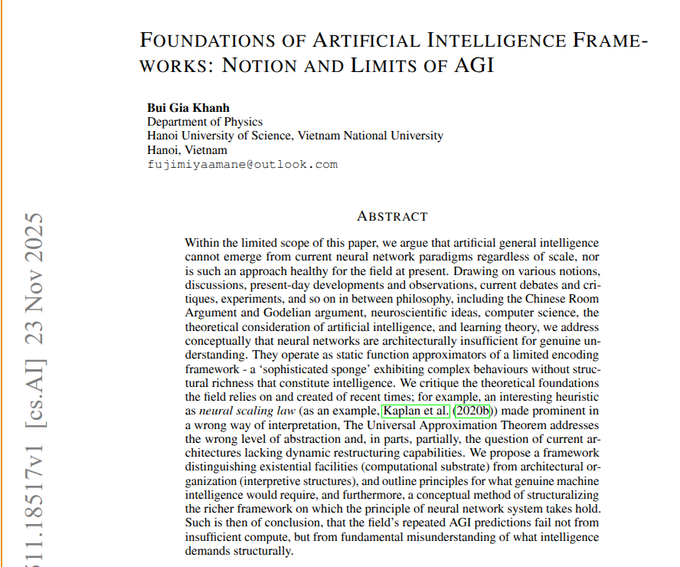
"Foundations of AI Frameworks" argues current static neural nets can’t yield true AGI, calls for richer self‑modifying systems
A conceptual paper from Hanoi argues that today’s large neural networks are "static function approximators" that can’t support genuine understanding or open‑ended general intelligence, no matter how far we scale them agi limits paper. The author leans on ideas like the Chinese Room and Gödel‑style critiques to claim that training handled entirely by an external algorithm leaves models unable to decide what to care about, rewrite their own circuitry, or build ever‑richer internal representations over time.
The paper also criticizes over‑interpreting neural scaling laws and the Universal Approximation Theorem as evidence that deep reasoning will emerge by default, arguing these results say only that functions can be fitted, not that the resulting systems have the right structure for intelligence agi limits paper. As an alternative, it sketches a separation between raw "existential facilities" (hardware substrate) and higher‑level "architectural organization" (learning rules, neuron types, self‑modification mechanisms). Even if you don’t buy the strong claim that AGI is impossible with current paradigms, it’s a useful reminder that algorithmic and architectural innovation matter at least as much as bigger datasets and more GPUs.
🏢 Enterprise AI rollouts and shopper UX
Production usage threads: agent deployments and commerce assistants. Excludes finance/outlook, which is covered separately.
Perplexity Memory adds cross-thread recall and Comet integration with user controls
Perplexity has switched on long‑term memory that remembers preferences, projects, and prior threads across all models and modes, so future answers can be tailored without users re‑explaining themselves. memory launch
The same memory system now powers the Comet browser: it can pull context from open tabs, active projects, and past work to answer in‑place, and the new Language tab uses it to run a persistent language tutor that remembers your level and goals. language tutor demo Crucially for enterprise rollouts, memory and history can be fully viewed and deleted, turned off entirely, and are disabled by default in incognito windows, which makes this feel more IT‑deployable than typical "sticky" chat history. privacy controls explainer
Perplexity launches AI shopping experience with conversational discovery and PayPal checkout
Perplexity is rolling out an AI-powered shopping experience to all U.S. users that treats buying as a conversational research problem rather than a filter sidebar: you describe lifestyle, constraints, and tastes, and it iteratively narrows down products. shopping feature demo

The system remembers your past activity, refines options as you rate products during the conversation, and then hands off the final purchase to PayPal so you stay in flow instead of bouncing between sites. For commerce teams this is effectively a whitepaper on what an AI shopping UX looks like in 2025: natural‑language faceting, dynamic presentation (different layouts for toys vs. shoes), and checkout handled by a trusted payments layer instead of yet another stored card.
Perplexity rolls out Nano Banana–powered virtual try-on for Pro and Max
Perplexity is giving all Pro and Max subscribers a "Virtual Try-On" experience that lets you upload a photo, generate a 3D-ish avatar, and see clothes on your own body while you browse products. feature launch

Under the hood the system uses Nano Banana Pro to generate and dress avatars, then slots into the existing Perplexity shopping flow—no separate app required. avatar generation demo For fashion and e‑commerce teams this is a turnkey reference: the UX is a single Try it on button on product pages, with the heavy lifting done by a background image model, which is exactly the pattern many retailers have been sketching but not yet shipping.
Copilot in Microsoft Edge adds in-browser cashback, price tracking, and comparisons
Microsoft has upgraded Copilot Mode in Edge so U.S. users now get cashback offers, price history charts, price tracking alerts, and cross‑site comparisons directly inside the browser while shopping, instead of relying on separate extensions or manual research. copilot shopping post
For product teams this is the clearest signal yet that the browser itself is becoming the primary AI shopping surface: Copilot watches what you’re viewing, suggests better deals or cashback where available, and keeps you in Edge. That raises the bar for retailers, who now need structured pricing and review data that AI browsers can parse, and for other browsers that don’t yet have a first‑party AI layer keeping users from defecting mid‑journey.
Deliveroo uses ElevenLabs voice agents to re-engage riders and audit restaurants
Deliveroo is now running production voice agents from ElevenLabs to call inactive rider applicants and phone restaurants to verify opening hours and tag status, with early metrics showing 80% of rider applicants re‑engaged and a 75% restaurant contact rate. deployment stats For AI leaders this is a concrete reference case of phone-based agents handling messy, real-world contact tasks that previously needed human ops teams. The system is doing three distinct jobs—re‑engagement, hours verification, and partner-site tagging—with measurable funnel improvements (e.g., 86% of targeted partner sites contacted for tag activation) and no user-facing UI changes, which makes it a good pattern for other marketplaces and logistics platforms considering agent rollouts. case study page
v0 expands free premium access to students at five more universities
Vercel’s v0 is extending its student program: San Francisco State, ASU, Georgia Tech, University of Waterloo, and NYU students now get one year of v0 Premium free once they verify with a school email. v0 student update
The team says the next batch of schools will be picked based on waitlist signups, nudging students to rally peers onto the list. student program page For AI‑curious engineering and design students this is effectively a no‑cost way to get a production‑grade UI generator into their toolbelt, and for companies it means more entry‑level hires will expect v0‑style AI front end scaffolding as a normal part of building.
Character AI launches Stories, a visual interactive fiction format for teens
Character AI is rolling out Stories, a new format where users pick characters and genres, then play through branching, visual, decision‑driven adventures that are built and narrated by AI. stories announcement
It’s aimed squarely at teens and young adults, with a focus on replayable arcs and clear decision points instead of free‑form chat, which matters for safety teams and product leads trying to design "contained" AI experiences. From an enterprise perspective, this is a template for how to turn raw chat models into products with structure, pacing, and shareable outputs instead of endless text scrolls.
ElevenLabs pairs voice agents with FLUX.2 images and video for customer engagement
Alongside its Deliveroo deployment, ElevenLabs is positioning its Agents product as part of a broader engagement stack, highlighting that FLUX.2 image and video generation is now available inside ElevenLabs for things like personalized visuals in outreach or support flows. agent impact summary
The interesting bit isn’t just prettier images—it’s that a single vendor is now bundling outbound phone automation (Agents) with on‑brand visual generation, which makes it easier for non‑tech enterprises to move from "AI voice pilot" to full campaigns that include tailored follow‑ups, banners, and explainer clips without wiring together three separate providers. retake integration note
Genspark shifts from research-only to delivering finished decks, sheets, and sites
Genspark’s founders say they realized users loved its deep research but immediately jumped into PowerPoint and Excel afterwards, so they’ve started evolving the product from "research assistant" into an agent that returns full artifacts: Excel workbooks with charts, ready-to-present slide decks, and even basic websites. genspark panel recap
This is a notable pattern for enterprise AI UX: teams don’t actually want "insights" as paragraphs, they want the thing they would have built from those insights. Genspark is now baking that into the agent scope, which should resonate with any org that has researchers or analysts who still spend half their time copying AI output into Office or internal dashboards.
Perplexity turns Comet into a language tutor and research aide backed by Supermemory
Perplexity’s Comet browser now has a dedicated Language tab that acts as a language tutor, plus a "Supermemory" system that pulls context from active projects and open tabs to answer questions and continue lessons. comet language demo

For knowledge workers and students this turns Comet from a search front‑end into a lightweight learning environment: you can practice Japanese, then later ask for explanations or examples that reference documents you were just working on. Because it’s backed by the same memory system that powers mainline Perplexity, the assistant can maintain continuity over weeks without bolting on separate note‑taking tools. memory plus comet post
⚙️ Serving & runtimes: FP8 RL, Ray symmetric-run, dLLM
Mostly runtime and kernel-side advances with concrete operator changes; lower latency and more stable training/inference loops.
SGLang unifies FP8 training and inference for large RL models
SGLang’s Miles stack now supports end-to-end FP8 for both training and inference in RL-style post-training, replacing the usual BF16/FP8 mix that often causes stability headaches at 30B and 235B MoE scales fp8 announcement. The key design is "Unified FP8": quantization happens consistently on both forward and backward passes, which their KL-loss graphs show yields much lower divergence than mixed-precision baselines over hundreds of RL steps
.
They also introduce a detailed error analysis that pins most instability on the quantization step rather than the GEMM kernels, then show that a fully FP8 tensor pipeline (with proper scaling and calibration) cuts TIS-clipfrac and keeps KL loss flat even as training progresses FP8 blog. For RLHF and other long-horizon RL settings, this means you can get the memory and throughput gains of FP8 without watching your runs explode halfway through, and you can experiment with large MoE policies on smaller clusters than a BF16 setup would demand, using the open Miles implementation as a starting point Miles repo.
Ray 2.52 adds symmetric-run and Wide-EP for simpler multi-node vLLM
Running vLLM across multiple Ray nodes has been awkward, so the vLLM team introduced a new ray symmetric-run command that launches the same entrypoint on every node while Ray handles startup, coordination, and teardown for you ray symmetric run. This lands alongside Ray 2.52’s Wide-EP and prefill/decode disaggregation APIs tuned for vLLM, which have been validated at around 2.4k tokens per second on H200-class hardware wide ep update.
For anyone building their own serving stack instead of using a managed provider, this means you can keep your application logic in a single script, call ray symmetric-run to fan it out across the cluster, and rely on Ray’s runtime to manage role symmetry, environment variables, and shutdown. The Ray team has a short write-up with configuration examples and caveats on port usage and logging fan-out Ray blog post, which is worth reading if you’ve been juggling separate head/worker entrypoints or hand-rolled SSH glue.
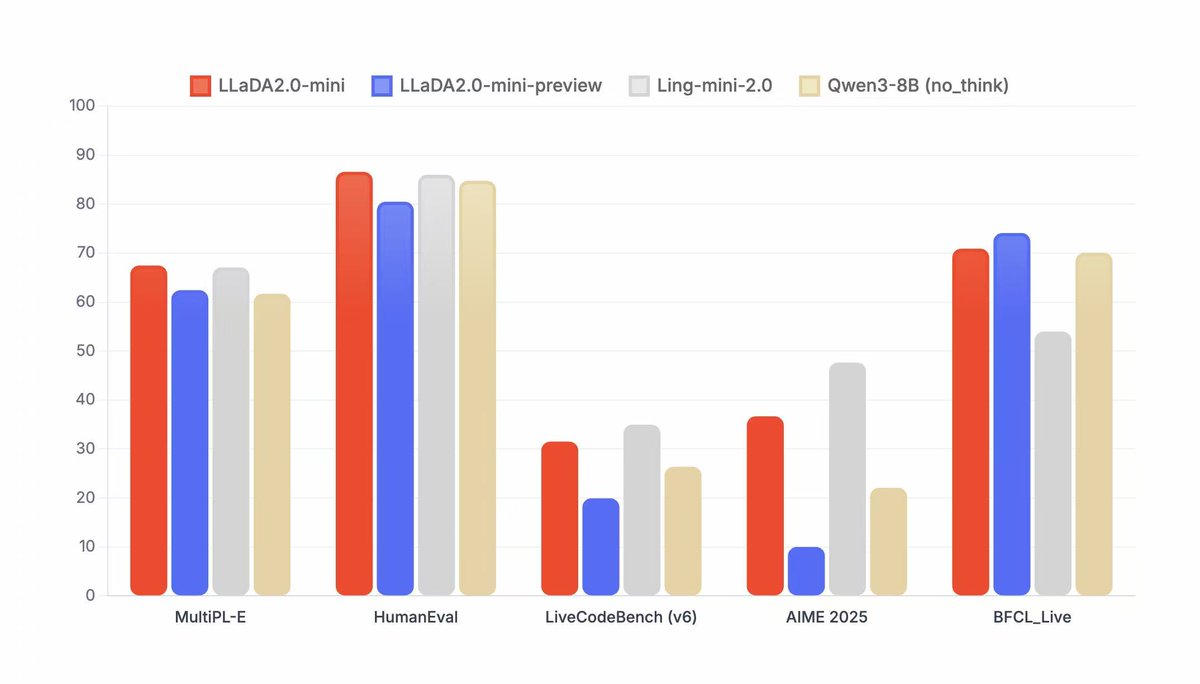
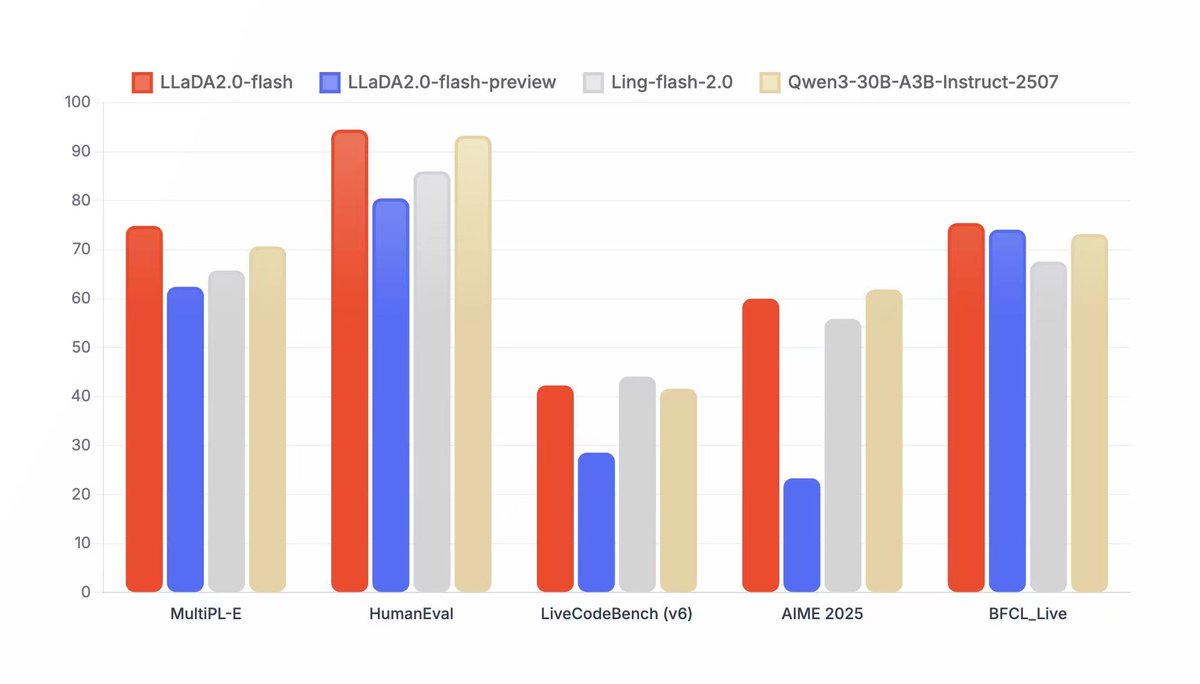
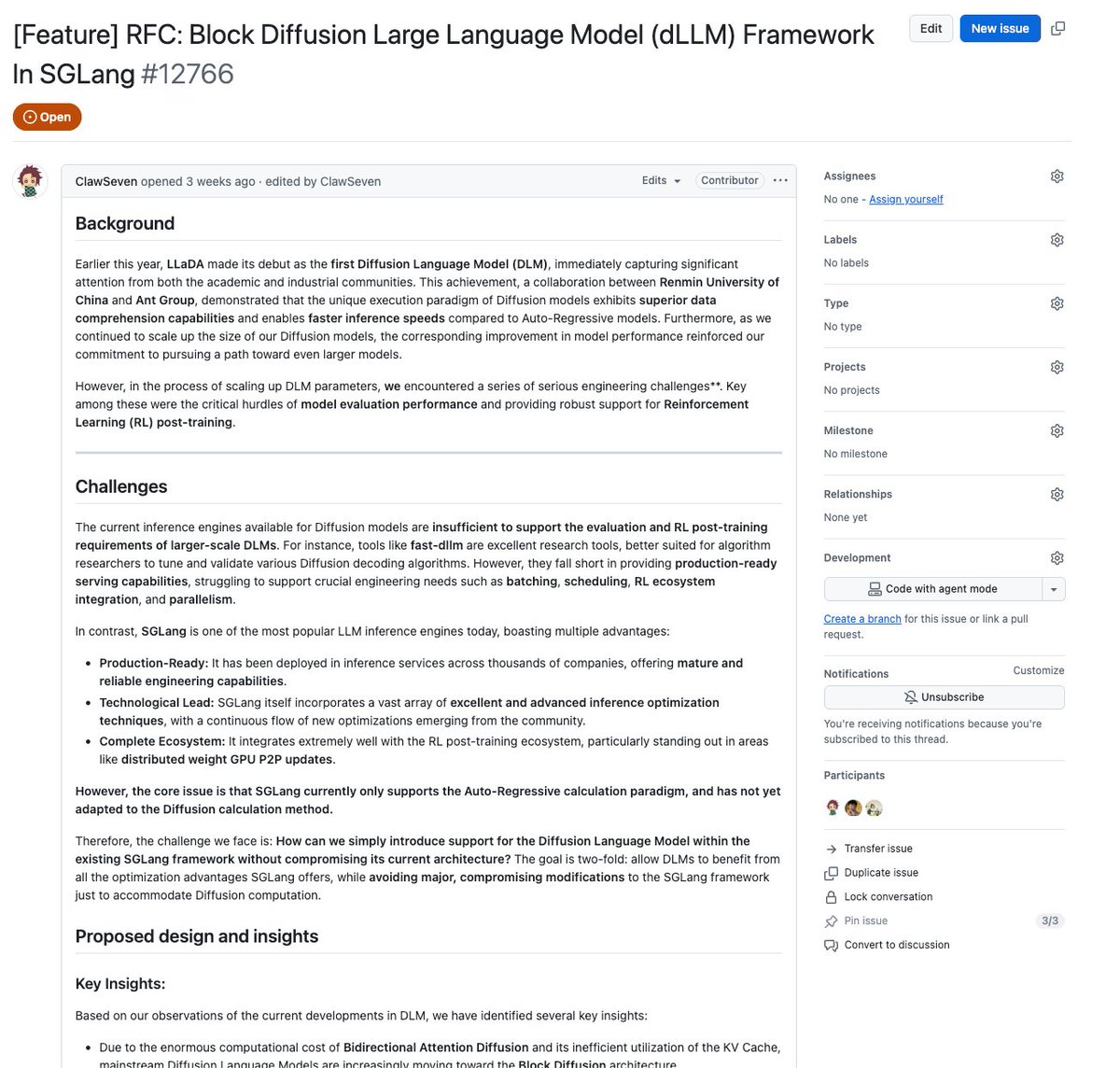
SGLang dLLM framework brings block diffusion to language model serving
The SGLang team also shipped a Diffusion Language Model (dLLM) framework that adds block diffusion, robust KV cache management, and TP/EP parallelism into the same serving/runtime stack dllm release. Instead of treating diffusion-style LMs as a separate research toy, dLLM slots them into SGLang’s existing infrastructure, with PR #12766 wiring up block-wise diffusion updates and support for Ant Group’s new LLaDA2.0-mini and LLaDA2.0-flash models PR details.
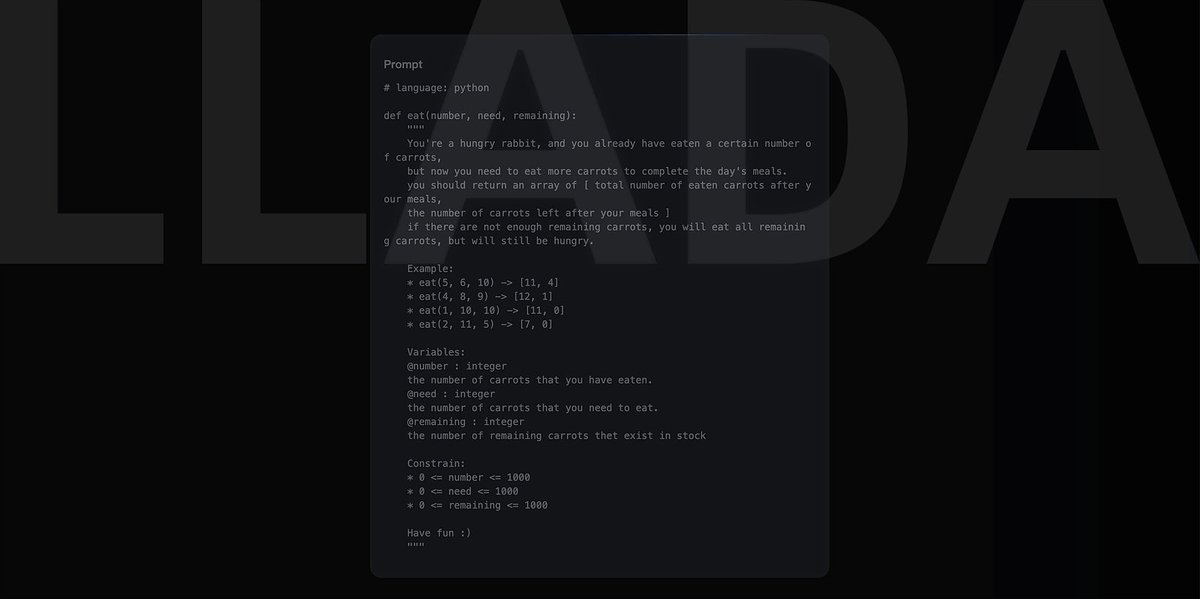
The framework already exposes KV cache handling and tensor/experts parallelism suitable for production-scale serving, and the team says CUDA graphs and dynamic batching are planned within the next couple of weeks to close the performance gap with autoregressive engines Miles repo. For practitioners this means you can start experimenting with diffusion LMs—block diffusion, long-context handling, different compute–latency tradeoffs—inside a familiar SGLang runtime, instead of standing up a separate inference stack just to play with the new model class.
💸 AI revenue models and capital needs
Macro revenue and burn scenarios dominate today’s discourse with concrete projections. Separate from infra costs and enterprise case studies.
HSBC sees a $207B–$500B funding gap in OpenAI’s AI build‑out
HSBC’s latest model of OpenAI’s business says that even under bullish assumptions on user growth and monetization, the company ends up with a massive capital hole to fill by 2030. One version of the analysis has OpenAI booking ~$153.8B in revenue that year but racking up nearly $500B in cumulative operating losses, driven by about $140.7B of R&D and $75.4B of COGS. losses breakdown A companion note frames OpenAI as a “compute utility” renting up to 36GW of cloud power from Microsoft and Amazon, with long‑term data‑center commitments approaching $1.8T, and still a roughly $207B funding gap even if everything goes right on the demand side. funding-gap summary
For AI leaders, this is the clearest outside view so far on just how capital‑intensive frontier model training and serving will be if you’re chasing global scale. The report assumes OpenAI keeps leaning on hyperscaler balance sheets for 30+ GW of capacity rather than owning most of the iron directly, which also implies long‑term dependency on cloud partners’ pricing and network strategy. funding-gap summary For developers building on OpenAI, the practical takeaway isn’t that the company is about to run out of money; it’s that the business will be under constant pressure to improve token economics and push higher‑margin enterprise products so that this capex and opex curve eventually bends.
The bigger strategic signal is that compute and energy access, not just model quality, are now central to competitive positioning. If HSBC is even directionally right, any lab trying to match OpenAI at the frontier either needs a similar financing pipeline or a much more compute‑efficient training and inference story. That’s the lens infra buyers, investors, and even regulators are likely to use when they evaluate new model announcements over the next few years.
OpenAI projects 220M ChatGPT subscribers and $270B subs revenue by 2030
OpenAI’s internal projections frame ChatGPT as a Spotify‑scale subscription business by the end of the decade, with about 220M paying users and $270B in cumulative subscription revenue through 2030. subs projection The model assumes 2.6B weekly active users by then, with 8.5% converting to Plus/Pro, generating roughly $87B in subscription revenue in 2030 alone. revenue forecast Right now, they’re at ~800M users and ~35M paying subs (about 5% of weekly actives), so this forecast implies both continued user growth and a noticeable lift in conversion. The go‑to‑market story looks like Zoom/Slack: hook hundreds of millions on a free tier, then upsell teams and enterprises into higher‑priced SKUs. revenue forecast For engineers and product leaders, the signal is that consumer + prosumer SaaS is the core business model, not metered API alone, and that price sensitivity at global scale will cap how aggressive per‑seat pricing can be.
There’s also an implicit capital story here. Even with that revenue arc, OpenAI expects to burn on the order of $100B+ in cash between now and 2030 to get there, which sets expectations about how long they will prioritize growth and model quality over margins. revenue forecast If you’re building on top of their stack, this is a hint that the company is planning for ChatGPT to be a durable platform with massive distribution rather than a short‑lived research toy. followup commentary
🧠 Memory, retrieval and token spend hygiene
Practical memory/caching and retrieval benchmarks dominate; mainly app infra to reduce token burn and improve recall quality.
Perplexity Memory auto-loads cross-thread context with incognito safeguards
Perplexity has rolled out a Memory system that lets its assistants recall your threads, interests, and preferences across sessions and even across different underlying models, so follow‑up questions weeks later can start with rich context instead of cold prompts. memory launch It stores things like favorite brands, hobbies, and active projects as structured memories and automatically injects them into relevant future answers to cut down on repetitive prompt boilerplate and wasted tokens. prefs summary
Memory is also wired into the Comet browser: it can pull context from your active projects and open tabs, then use that alongside past chats to answer in‑place while you browse. comet demo On the control side, Perplexity exposes a settings view where you can inspect what’s been remembered, delete entries, or turn Memory off entirely, and any incognito session automatically disables both history and memory so nothing gets written in the first place. privacy controls For teams building on similar patterns, this is a good reference design for balancing token‑saving auto‑context with clear user control and privacy defaults. feature summary
Memori 3.0 slashes GPT‑5 token costs ~80% and adds REST API
Caching layer Memori is now at ~6.4k GitHub stars in about three months and claims that at 10M GPT‑5 tokens it can cut spend from roughly $112.50 to $22.50 (about 80% savings) by aggressively caching exact and semantically similar queries in your own SQL store. repo overview Version 3.0 adds a REST API so Python, JavaScript, and Java backends can all talk to the same short‑ and long‑term memory, letting frontends and services share conversation history, TTL rules, and PII tags instead of re‑implementing context logic per stack. api update
Under the hood Memori sits between your app and any LLM provider (OpenAI, Claude, Gemini, local), intercepting prompts and deciding when to serve from cache versus call the model. repo overview Every row tracks lineage, expiration, salience, and sensitivity, so you can both audit where an answer came from and route only appropriate memories to different models, which is exactly the kind of token hygiene you want once you’re into eight‑figure monthly token counts.
ColBERT-style ToolRet-bge models lead new tool retrieval benchmark
A new public benchmark for tool retrieval shows that old‑school BM25 is still a surprisingly strong baseline, but ColBERT‑style models like GTE‑ModernColBERT and the new ToolRet‑bge‑base/large families clearly win on recall@k for routing user queries to the right tools. benchmark thread In the main comparison, BM25 reaches about 0.48 Recall@1 and ~0.78 Recall@10, while ToolRet‑bge‑large hits roughly 0.69 Recall@1 and ~0.94 Recall@10, outperforming larger general‑purpose embeddings and even strong dense retrievers like Qwen3‑Embedding‑0.6B.
For agent builders this matters because “which tool do I call?” is often the first and most expensive decision: a bad tool pick wastes both latency and tokens. The results suggest that investing in a dedicated, ColBERT‑style index over tools (and maybe pairing it with BM25) will give you more reliable tool routing than just pointing your agent at whatever text embedding you already use for documents. author comment
🎨 Creative stacks: Retake edits, interactive images, VTO
High volume of gen‑media workflows today: surgical video edits, interactive educational images, try‑on UX. Reserved to capture creator traffic.
Gemini’s interactive images turn static diagrams into explorable lessons
Google is rolling out interactive images in Gemini: instead of just generating a picture, it now lets you click or highlight parts of the image and get targeted explanations, labels, or follow‑up text. (learning demo, rollout clip) This isn’t about nicer thumbnails; it’s about turning a single visual into a mini explorable.

In the demos, users tap areas of a fantasy city or a complex science diagram and Gemini responds with short blurbs about each component, almost like tooltips that are generated on demand. learning demo For people building educational content, labs, or onboarding flows, that means you can prompt Gemini for "an interactive overview of a neural network" or "annotated digestive system" and ship something where learners poke at parts instead of skimming paragraphs. The big win is that you don’t need a custom front‑end or separate labeling pass; the model handles both generation and interaction, and you just embed the experience where it makes sense.
Perplexity rolls out Nano Banana–powered virtual try‑on to Pro and Max
Perplexity is adding a virtual try‑on flow for all Pro and Max subscribers: you upload a photo once, it builds a persistent avatar, and you can then try clothes on yourself while browsing products inside the app. (feature launch, shopping flow, avatar demo) Under the hood, the visuals are powered by Nano Banana Pro, so the avatar is high‑fidelity and stays consistent across outfits. avatar demo
From a UX perspective this is more than a gimmick. The flow is: pick item → tap Try it on → Perplexity generates your avatar wearing that exact piece, then keeps you in the shopping context so you can compare sizes or styles without bouncing to another site. shopping flow For AI builders working on commerce or fashion tools, it’s a good reference pattern: avatar creation is a one‑time step, VTO lives alongside search and Q&A, and the AI system handles pose, lighting, and cloth transfer for you. It also shows how visual models like Nano Banana are getting embedded into broader agents instead of living in separate “image gen” sandboxes.
ComfyUI bakes in Topaz Astra, Starlight, Apollo and Bloom for 4K/8K
ComfyUI has integrated Topaz Labs’ flagship models directly into its node graph, giving video and image creators first‑class upscaling, interpolation, and enhancement paths up to 4K video and 8K stills. integration post The bundle includes Astra and Starlight Fast for creative vs. precision upscale, Apollo for frame interpolation, and Bloom for image/face enhancement.

For people already living in Comfy, this removes a whole category of “export to Topaz, re‑import later” friction. You can now chain base model → Topaz upscale → interpolation → encode in one graph, with the same parameters under version control. integration post It also means you can systematically A/B Astra vs. Starlight in the same pipeline or add Apollo only on specific shots (e.g., slow pans) to keep budgets down. If you’re building templates or selling Comfy workflows, this gives you a clean way to ship photo and production‑grade upscales without asking users to juggle extra apps.
Nano Banana Pro + free converter unlock fast pixel‑art game assets
Indie devs are leaning hard on Nano Banana Pro for pixel‑art pipelines: one shared setup generated 625 character concepts in under 10 minutes, then used a free converter tool to turn those into crisp 1:1 pixel art suitable for production sprites. (pixel art workflow, conversion demo, animation tease, conversion thread)

The pattern is to first prompt Nano Banana for a dense 5×5 or larger grid of front‑facing characters in a "highly detailed pixel art" style, with each row themed (e.g., monkey allies, tiger variants) but consistent proportions and camera. (grid prompt advice, grid labeling trick) You then label those cells in a follow‑up pass ("add 1–25 labels"), isolate favorites onto clean white backgrounds, and feed them through Hugo’s open‑source converter that enforces a strict pixel grid and palette. conversion demo From there, people are composing mock game screenshots, 8‑directional sprite sheets, and even simple animation loops by asking Nano Banana to place specific numbered characters into top‑down scenes or action poses. (screenshot prompt, animation tease) The important bit is that all of this runs on commodity tools: no in‑house art team, no custom engine plugins, just a gen‑image model plus one smart post‑process tool chained together.
Nano Banana Pro + Veo 3.1 keyframe stack for smooth AI car videos
A detailed workflow is emerging around Nano Banana Pro images and Veo 3.1 video for anyone doing product or automotive visuals: generate a series of labeled car shots in Nano Banana, then feed them as keyframes into Veo 3.1 to animate the transformation with clean motion graphics and camera moves. (workflow thread, keyframe followup)

The stack looks like this: use Nano Banana Pro to design multiple rally or street variants of a car (front, side, 3/4), keeping style and lighting consistent; then pair adjacent frames (e.g., stock → rally kit, closed hood → open hood) as start/end keyframes in Veo. workflow thread Veo handles the in‑between: smooth zooms into the WRX, progressive arrival of decals and aero parts, and even multi‑stage technical overlays like gold contour lines and animated labels for each modification. prompted camera moves For teams doing explainer content or spec breakdowns, this means you can storyboard entirely in images, then let Veo handle motion while you focus prompts on how it moves: exact camera path, when overlays appear, when to switch to hood‑open views. It’s a nice example of how image and video models are starting to line up into predictable pipelines instead of one‑off tricks.
Nano Banana Pro turns doodled instructions into polished portrait edits
Creators are using Nano Banana Pro as an interactive editor, not just a prompt‑only generator: you can ask it to "doodle on this image" with arrows and text instructions, then feed that annotated version back with "implement these edits, remove the instructions" to get a final, cleaned portrait. edit flows graphic
In the shared examples, the workflow is Start → Doodle → Final: first a plain photo, then a version where the model has scrawled notes like "change hair to long messy braid" or "add chunky scarf & denim jacket", then a finished image where those instructions have been carried out and the doodles erased. edit flows graphic A second flow does the same for lighting and texture—"warmer light, glow", "add knit details", "add wall texture"—ending in a rich, golden‑hour look.
For product teams this suggests a different UI: rather than hoping users craft perfect text prompts, you expose a scribble + notes layer on top of the current image and let the model treat that as a visual diff specification. It’s much easier for non‑technical users to circle “make this warmer” than to write a 60‑word prompt, and Nano Banana seems good at reading both the handwriting and the intention.
InVideo FlexFX packages AI motion effects for social video teams
InVideo’s new FlexFX feature is getting a lot of attention from video creators: it takes regular footage or photos and applies prebuilt effects like kaleidoscopic distortions, warp teleports, hero‑walk explosions, and whip‑pan transitions without masking or keyframing. (flexfx overview, effects thread)

The key point is speed. FlexFX works with any input clip, is tuned for social formats, and lets you stack effects so a creator can do “slow zoom + teleporter + explosion” as a preset rather than a three‑hour After Effects session. effects thread In practice it looks like one‑click ways to turn B‑roll into visually dense reels: trippy kaleido overlays for music, clean whip‑pans for scene changes, or an instant hero‑walk shot with a giant CG blast behind the subject.
For people building creator tools, this is a good example of where AI slots in: take tasks that were previously a mix of plugin shopping and timeline micro‑edits, and collapse them into named, composable effects with sane defaults that non‑experts can drag onto a clip.
Lucy Edit Fast on fal focuses on localized video edits at $0.04/s
DecartAI’s Lucy Edit Fast model is now live on fal, offering localized video edits—changing backgrounds, faces, or regions—at roughly $0.04 per second for 720p, with generation times around 10 seconds. (lucy launch, use cases)

Unlike full text‑to‑video systems, Lucy assumes you already have footage. You specify which part of the frame to change and how, and it applies those edits while preserving the rest of the scene, which is closer to the way editors think about revisions. lucy launch The positioning is clear: turn simple takes into polished, on‑brand clips without reshoots, especially for localized campaigns or quick product swaps.
Combined with stacks like FLUX.2 on the image side and Retake for performance tweaks, Lucy fills the “patch this one thing in my clip” niche. It’s the piece you call when the video is 90% right and you don’t want to regenerate the entire sequence.
Replicate’s Image Editing Arena makes model A/Bs a one‑screen decision
Replicate launched an Image Editing Arena that puts the latest editing‑capable models—FLUX.2, Nano Banana, Seedream, Qwen Edit, Reve and others—into a single interface so you can compare cost, speed, and quality on the same input edit. (arena announcement, arena app)

Instead of guessing "which model will handle this product cleanup best?", you upload once, describe the edit (remove background, fix color, relight, change outfit), and the Arena runs each model and shows side‑by‑side outputs plus runtime and price metrics. arena announcement That’s perfect for teams designing a router or picking a default model for specific workloads like in‑painting, UI edits, or text‑heavy composites.
The bigger pattern is that this is an editor‑facing tool, not just a benchmark chart. Designers and art leads can eyeball which outputs feel brand‑safe or on‑style, while engineers capture the latency and cost stats, then codify that into routing logic.
Character AI launches Stories, a visual interactive fiction format for teens
Character AI introduced Stories, a new format where users build interactive, visual adventures starring their favorite AI characters, with branching choices and replayable paths designed especially for teens. stories announcement
Instead of a long back‑and‑forth chat, a Story is a structured episode: you pick characters, a genre, and a premise, then the system generates scenes with art and text where you make decisions that steer the narrative. stories announcement The key design choice is that Stories are meant to be shared and replayed, so they sit somewhere between visual novels, fanfic, and character chat.
If you’re building narrative tools, this is a signal that the market wants more than freeform chat logs. Giving people a way to package AI‑generated content—episodes with art, choices, and a play button—looks like a more native format for how younger users actually consume and show off their creations.
🎞️ Media generation methods: flows and pixel diffusion
New generative methods beyond classic diffusion; mostly video and pixel-space transformer hybrids with faster sampling claims.
Apple’s STARFlow‑V brings normalizing flows to long-horizon video generation
Apple researchers propose STARFlow‑V, an end‑to‑end video generator built on normalizing flows instead of diffusion, and show it can handle text‑to‑video, image‑to‑video and video‑to‑video with a single shared model while remaining competitive with diffusion systems on quality and speed. paper summary
STARFlow‑V compresses each frame into latent codes, runs a global autoregressive block over time for temporal coherence, and uses local blocks for within‑frame detail, which helps reduce error accumulation on long clips and avoids the many‑step noise denoising loop of diffusion models. paper summary The authors add a lightweight flow score matching denoiser that only peeks one frame ahead, plus a parallelizable block‑wise Jacobi update scheme, to stabilize training and speed sampling. paper summary The key point for practitioners: this is early but strong evidence that flow‑based, causal video models can approach diffusion‑level fidelity while offering native likelihoods and a more unified text/image/video interface, which could simplify serving stacks that currently juggle multiple specialized generators.
DiP shows ~10× faster pixel-space diffusion with patch-wise detail refinement
The DiP paper introduces a pixel‑space Diffusion Transformer that operates on large patches plus a tiny “patch detailer” head, claiming about a 10× sampling speedup over prior pixel‑space diffusion methods at similar image quality on ImageNet. paper recap
Instead of running diffusion in a latent VAE space (fast but lossy) or on dense per‑pixel tokens (accurate but extremely slow), DiP tokenizes images into relatively coarse patches that a global DiT models for layout and composition, then attaches a small convolutional U‑Net detailer that enriches each patch with high‑frequency edges and textures. paper recap This split lets most of the compute focus on global structure while the local head restores crispness, which the authors report beats larger transformer baselines on both speed and FID under the same hardware budget. paper recap For image‑gen system builders this suggests a promising middle path: you can stay in pixel space (no VAE reconstruction artifacts) and still get practical sampling times, at the cost of a slightly more complex two‑stage architecture that has to be trained and tuned as a unit.
🤖 Embodied AI: affordable arms and humanoid push
Quieter day but notable hardware notes; mostly product specs and capability demos. Separate from creative/media and model releases.
AgileX NERO brings 7‑DoF research arm down to $2,499
AgileX Robotics announced NERO, a 7‑degree‑of‑freedom robotic arm priced at $2,499 with a 3 kg payload, pitching it as a human‑like, obstacle‑aware platform for advanced robotics research and prototyping NERO summary.

For AI engineers working on manipulation and embodied agents, this is a big deal: NERO sits in the price band where a small lab or startup can afford multiple units, instead of one $20k+ industrial arm. The pitch is human‑like reach and dexterity plus detour/obstacle‑avoidance behaviors baked into the motion stack NERO repost. That makes it a more realistic target for training and testing vision‑language‑action models than toy arms, without jumping to Boston Dynamics–tier budgets.
The interesting angle is that NERO is clearly aimed at the agent era: you can imagine plugging it into a computer‑use + robot stack where a model controls both screen and arm. If the kinematics are well‑documented and the API is open, this becomes a natural hardware choice for labs trying to scale from simulation (Isaac, MuJoCo, etc.) into real‑world pick‑and‑place, small assembly, or lab‑automation tasks. The real test will be how robust the joints, encoders, and control loops are under continuous use, but the specs and price alone will put NERO on a lot of shortlists.
Hyper‑real humanoid robot demo stirs ethics talk
A new humanoid robot demo doing the rounds shows a strikingly human‑like face, expressions, and body proportions, prompting renewed debate on why most major manufacturers still avoid making robots that look truly human humanoid comment.

Commentary around the clip argues that, long term, humanoids will both work like humans and look like them, and that current avoidance is more about ethical and societal hesitation than technical limits humanoid politics. For embodied‑AI people, the point is subtle: we’re close to hardware that can host models in forms that pass casual visual inspection as human. That raises UX and safety questions well beyond balance or grasping—how do you signal capabilities and limits, avoid deception, and design faces and motions that people can work with all day without discomfort?
If your roadmap involves humanoid assistants—factory, elder care, or front‑of‑house—this kind of demo is a reminder that appearance is now a design variable, not a distant sci‑fi concern. The technical stack (actuators, skin materials, expression control) is catching up; the bottleneck is increasingly policy, norms, and what we’re willing to deploy in public spaces.
🗣️ Voice & multimodal assistants in-product
Smaller but notable voice/multimodal UX updates land across assistants; mostly direct user workflows, not raw model releases.
ChatGPT Voice moves inside the main chat UI on web and mobile
OpenAI is rolling its Advanced Voice experience directly into the main ChatGPT chat interface, so you tap the mic and talk while seeing live transcripts and responses in the same thread instead of switching modes. The demo shows answers appearing word‑by‑word as you speak, with inline visuals like maps and images embedded below the transcript, which makes the voice mode feel like a true multimodal assistant rather than a separate feature voice feature demo.

For builders, this is a clear signal that conversational, screenful‑aware UX (text + voice + visuals in one surface) is becoming the default interaction pattern, and that future "voice mode" APIs may need to treat transcripts, tool calls, and rich UI payloads as one continuous stream rather than separate channels.
ChatGPT images tab gets styles, edit shortcuts, and hints of Image v2
OpenAI is updating the ChatGPT Images tab on web and mobile with trending style presets (e.g. "Crayon", "Nightcam", "Fairytale"), one‑tap edit prompts like "Remove people from the background", and a gallery of your past generations, making the image experience feel more like a dedicated creative tool than a one‑off prompt box images tab screenshot. Testers also spotted a hidden "ImageGenV2Banner" on the web app advertising "faster image generation" and "more consistent editing", fuelling speculation that a new image backend (often dubbed "gpt-image-2") is close to launch v2 banner leak web banner copy.
For anyone building on ChatGPT as their user‑facing front end, this means your users will soon have richer, more guided image flows by default—less prompt engineering, more preset transformations—while you still control the higher‑level logic in your app. It also suggests that future image APIs may lean harder into editing pipelines (remove, restyle, relight) rather than only raw text→image generation.
Gemini’s interactive images let users click into scenes for explanations
Google is rolling out a new interactive image format in Gemini where users can tap or click regions of an AI‑generated picture to reveal labels and short explanations, turning static illustrations into explorable diagrams rollout summary. In the demos, selecting parts of a fantasy city or science graphic pops up context boxes like "ancient structure" or "magical energy source", making the images act more like lightweight visual knowledge maps than plain pictures learning use case.
For product teams, this shows an emerging pattern: assistants aren’t only returning text or single images, but stateful canvases where the user can explore sub‑components. It’s especially relevant for education, onboarding flows, and any workflow where you currently ship static infographics or screenshots that users have to mentally parse on their own.
Gemini tests in-app doodle and text annotation on generated images
Google is experimenting with an image editor inside Gemini that lets users draw on and annotate generated images before saving them, including a toolbar for colored brushes and text labels annotation leak. The leaked UI shows a robot-in-a-workshop scene with overlay tools for freehand lines and captions, plus a "Done" button that suggests these edits become part of the assistant’s response or a new asset.
For builders, this hints at a more conversational editing loop where users can mark up exactly what to change ("make this a coloring page", circle objects, add notes) instead of endlessly iterating with text prompts. If this lands in the API, expect a shift from prompt‑only control toward mixed gesture + text workflows for design, marketing and documentation assistants.
Perplexity adds a dedicated language tutor tab inside the Comet browser
Perplexity is rolling out a "Language" tab in its Comet AI browser that turns the assistant into an embedded language tutor, separate from the main search/chat views language tab demo. The promo shows quick access to structured language practice inside the browser, alongside Comet’s new Memory feature that can pull context from active projects and open tabs when enabled memory upgrade.

For engineers, this is another example of assistants becoming modeful inside host apps: instead of one generic chat box, you get purpose‑built surfaces (search, shopping, language learning) sharing a common memory and permissions model. If you’re building similar experiences, it’s a reminder to treat language learning, coding help, and research as distinct UX modes even when the same backend model powers them all.
🏗️ Compute economics, chips and power constraints
Non‑AI exception: concrete supply/cost signals for AI. Focus on tokens‑per‑$ benchmarks, TPU roadmaps and datacenter power. Excludes policy not tied to AI infra.
Epoch says Microsoft’s Fairwater AI data center could peak at 3.3 GW by 2027
Epoch AI estimates Microsoft’s Fairwater, Wisconsin campus will reach a peak electrical load of about 3.3 GW once its fourth building comes online in late 2027, compared with Los Angeles’ 2.4 GW average load in 2023, underscoring how single AI campuses can rival major cities in power draw fairwater estimate. The group stresses that while a typical GPT‑4o ChatGPT query currently uses about as much energy as a microwave for one second, uncertainty around inference‑time compute scaling vs. hardware and algorithmic efficiencies means future per‑query energy use could rise or fall, even as hyperscalers continue to build city‑scale AI power infrastructure fairwater estimate capacity commentary.
Nvidia H100/B200 lead current tokens-per-dollar economics over MI300X and TPU v6e
Artificial Analysis’ new hardware benchmarking shows NVIDIA’s H100 delivers roughly $1.06 per million input+output tokens at ~30 output tok/s for Llama 3.3 70B with vLLM, versus ~$2.24 on AMD’s MI300X and ~$5.13 on Google’s TPU v6e, a ~2× and ~5× tokens-per-dollar advantage respectively at that reference speed hardware benchmark. The same study notes TPU v7 (Ironwood) will massively increase FLOPs, memory (32GB→192GB), and bandwidth (1.6→7.4 TB/s) over v6e, but warns that its per-token economics are unknowable until Google publishes pricing, so infra teams should treat H100/B200 as the current cost baseline while keeping an eye on upcoming TPU v7 launches hardware benchmark nvidia positioning.
Chinese regulators halt ByteDance’s new Nvidia GPU deployments, tie state funds to local AI chips
Reuters reports that Chinese regulators have blocked ByteDance from using Nvidia GPUs in new data centers and are conditioning state funding for fresh facilities on deploying domestic AI accelerators instead regulator report. The move follows earlier guidance telling Chinese firms to stop ordering Nvidia’s export‑limited H‑series parts, effectively forcing large AI workloads like TikTok and Douyin training to migrate toward local silicon despite performance gaps, which will reshape domestic cost/performance trade‑offs and GPU supply for China‑based AI services regulator report.
Genesis Mission details highlight $50B AWS site and multi‑GW AI supercompute push
Following up on Genesis Mission, which launched a DOE‑style "AI Manhattan Project" EO, new reporting highlights concrete infra plans: AWS is committing $50B to a single 2.2 GW data center campus, Google is promoting TPU roadmaps with ~4× compute jumps, and Amazon plans to add roughly 500,000 Trn1/Trn2‑class chips for model training and inference under the Genesis umbrella genesis overview. President Trump framed it as "the single largest marshaling of federal resources of scientific discovery since the Apollo program," showing that US public‑sector AI policy is now tightly coupled to enormous energy and compute footprints rather than small pilot clusters biden genesis quote newsletter recap.

Epoch frames hyperscaler AI campuses as new city-scale power consumers
Epoch AI notes that whatever happens at the model level, Microsoft’s Fairwater projections and other hyperscaler builds show a clear trend: single AI campuses are being designed to use multiple gigawatts of power, putting them in the same league as major cities infrastructure comment. They also reiterate that today’s chatbots are relatively modest per query, but that long‑thinking models and test‑time compute scaling could quickly dominate energy budgets if model design does not keep pace with more efficient accelerators and serving stacks energy-per-query.
Space-based TPUs pitched as cheaper AI power if launch costs hit <$200/kg
Sundar Pichai and others are again floating the idea of TPUs in orbit, noting that solar panels in space can generate up to 8× more energy than on Earth and that space offers continuous sunlight and easier radiative cooling for AI compute pichai clip musk space comment. A new analysis argues that if reusable launch costs drop below roughly $200/kg by the mid‑2030s, high‑Earth‑orbit datacenters could deliver power at $6–9 per watt, up to ~50% cheaper than terrestrial solar+grid+cooling, with a chart showing orbital cost per watt undercutting the ~$12/W Earth benchmark once launch falls under $500–600/kg for thin PV and around $1000/kg for compute‑heavy constellations orbital cost analysis.